Key Takeaways
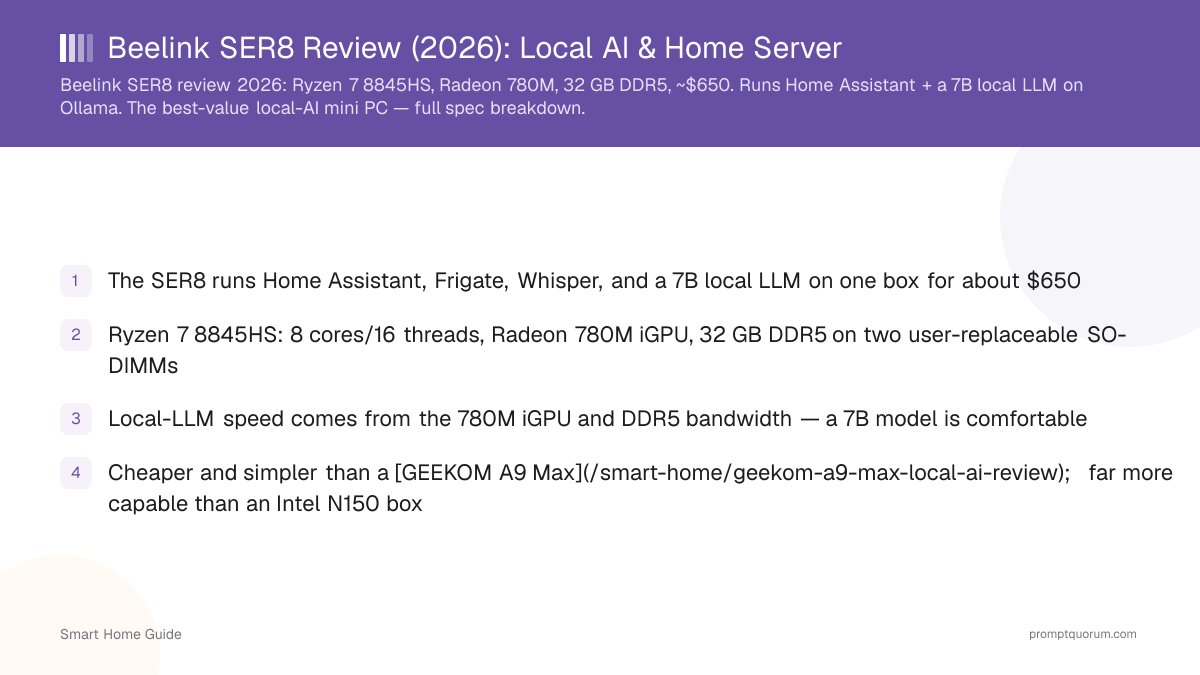
- Buy the 32 GB/1 TB SER8 (Ryzen 7 8845HS) — it runs Home Assistant, Frigate, Whisper, and a 7B local LLM on one box for about $799–849 (August 2026, volatile)
- Confirm the listing says 8845HS, not the cheaper 8745HS variant Beelink also sells under the same SER8 name
- 32 GB is the hero config for most buyers; go 64 GB (~$1,239) only if you want 14B models to feel comfortable
- Beelink has released newer SER9 and SER10 Pro/Max lines since this review's original publish — the SER8 is not the current flagship, but it is still the better value for HA + Frigate + a 7B model
- Cheaper and simpler than a GEEKOM A9 Max (now $1,099–1,799); far more capable than an Intel N150 box
- Skip it entirely for 32B+ models — see the GPU-server comparison for that job
Verdict & Best Config
YES — buy the Beelink SER8 32 GB/1 TB (Ryzen 7 8845HS, Radeon 780M) if you want Home Assistant, Frigate, and a small local LLM running quietly on one machine. Recommended configuration: Ryzen 7 8845HS · 32 GB DDR5 · 1 TB NVMe. Best for: a home-server all-in-one — Home Assistant, Ollama, Whisper, and Frigate together, with a 7B assistant comfortable and 13B–14B usable but slower.
Current price: check live price — prices vary by RAM/storage configuration and retailer; researched range for 32 GB/1 TB is roughly $799–849 (August 2026). Not for: anyone planning to run 30B-plus models routinely — the RAM ceiling and shared-memory iGPU make that a poor fit even at 64 GB. See the GPU-server alternative instead.
Should You Buy the SER8?
Match your actual workload to a config before reading further — most buyers overpay for headroom they never use, or underbuy and hit a wall at 14B.
Your need | Recommendation |
|---|---|
| Home Assistant only, no AI | Overkill — get the cheaper EQ14 |
| HA + Frigate (no LLM) | Yes — 24GB/1TB is enough |
| HA + a 7B local assistant | Best fit — 32GB/1TB (hero config) |
| 14B models | Yes, but choose 64GB/1TB |
| 32B-class models | Consider 64GB, or a discrete GPU |
| 70B-class models | No — see the GPU-server guide |
Disclosure
This page contains product links, not affiliate links — PromptQuorum has no current affiliate relationship with Beelink, Amazon, or any vendor named on this page, and earns no commission from clicks or purchases. Links carry rel="nofollow". We link to the manufacturer store and to major retailers because they are the actual purchase channels for this product, not because of any paid arrangement.
32GB vs 64GB: Which Should You Buy?
Buy 32 GB unless you specifically need 14B models to feel comfortable rather than merely usable. The two configs share the same CPU and iGPU — the only difference is RAM headroom, and for most Home Assistant + 7B-model buyers that headroom goes unused.
- Buy 32GB/1TB if: your target is a 7B–8B model, you run Home Assistant + Frigate + Whisper alongside it, and you want the lowest price that still does the job comfortably.
- Buy 64GB/1TB if: you plan to run 13B–14B models regularly and want them to feel as responsive as the 7B tier feels on 32 GB, or you want extra RAM headroom for running multiple services (HA, Frigate, a vector database, Ollama) without swapping.
- Both configs share the same Radeon 780M iGPU and DDR5-5600 memory bandwidth — 64 GB does not make inference faster, it only lets larger models fit.
- The 64 GB SKU currently costs roughly $400–450 more than the 32 GB SKU — worth it only if the larger model tier is the actual goal, not "just in case."
Specifications
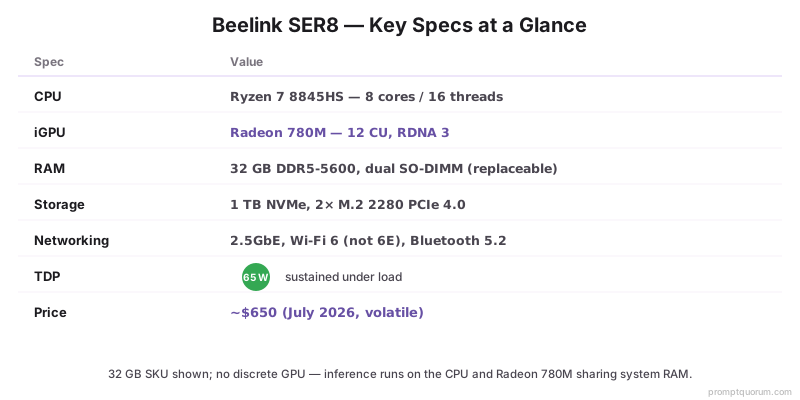
All specs below were re-verified against Beelink's own listing and independent retailer/review sources in August 2026. Beelink sells the SER8 name under two different CPUs — confirm the listing says "8845HS" (this review's subject, 5.1 GHz boost) and not the cheaper "8745HS" variant (4.9 GHz boost, otherwise similar) before buying. RAM as sold varies by SKU (16, 24, 32, or 64 GB); this table reflects the 32 GB / 1 TB unit as the reference config.
- No discrete GPU: all AI inference runs on the CPU and Radeon 780M iGPU sharing system RAM.
- Dual SO-DIMM slots are user-replaceable. Beelink's own spec sheet lists a 256 GB maximum; in practice most buyers reach 64–96 GB with commonly available kits, and higher-density kits are not independently verified here — treat the manufacturer figure as a ceiling, not a tested number.
- Idle power draw: roughly 8–12 W by most independent reviews (not independently re-measured for this update) — cheap to leave on continuously as a home server.
Spec | Beelink SER8 (8845HS) |
|---|---|
| CPU | AMD Ryzen 7 8845HS (Zen 4, 4 nm) |
| Cores / threads | 8 cores / 16 threads, up to 5.1 GHz |
| iGPU | AMD Radeon 780M — 12 CU, RDNA 3, ~2700 MHz |
| NPU | Ryzen AI Engine, 16 TOPS (XDNA gen 1) |
| RAM | DDR5-5600 dual SO-DIMM, user-replaceable (16/24/32/64 GB SKUs) |
| Storage | 2× M.2 2280 PCIe 4.0; 500GB–1TB shipped, up to 8TB |
| Ports | 1× USB4 (40 Gbps), 3× USB-A 10 Gbps, 2× USB-A 2.0, 1× USB-C 10 Gbps, HDMI 2.1, DP 1.4, 3.5 mm |
| Networking | 1× 2.5GbE, Wi-Fi 6 (not 6E), Bluetooth 5.2 |
| TDP | 54–65 W (runs at 65 W sustained) |
| Dimensions | 135 × 135 × 44.7 mm, ~0.75 kg |
| OS | Windows 11 Pro (Linux/Proxmox install supported) |
| Price (32GB/1TB) | ~$799–849 (Aug 2026 — volatile, check current price) |
What Can the SER8 Actually Run?
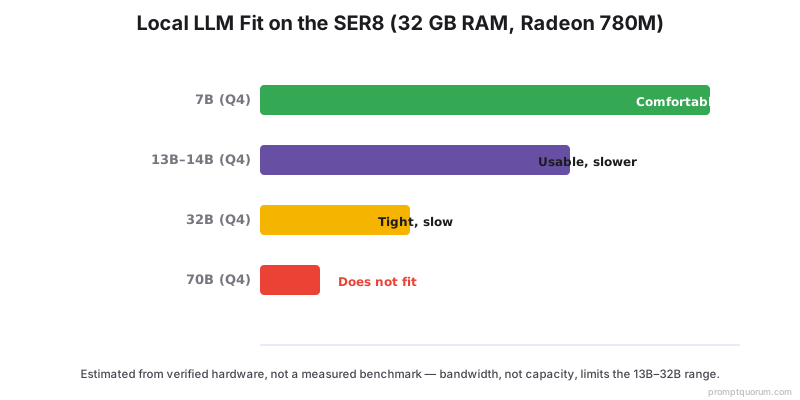
These are estimates based on the verified hardware and typical 2026 quantization practice — not measured benchmarks, and not a PromptQuorum-tested result. Actual speed depends on the model, quantization format, and inference backend (Vulkan or ROCm for the 780M).
- Ollama, LM Studio, and llama.cpp all run on the SER8; the 780M is used through Vulkan or ROCm backends depending on the tool.
- A 7B–8B model at Q4 is the comfortable sweet spot on either RAM config — this is the workload the SER8 is genuinely good at.
- For 14B models: use 64 GB if you want the model to feel as responsive as the 7B tier does on 32 GB; it works on 32 GB but competes with Home Assistant and Frigate for memory.
- 32B-class models fit only tightly even at 64 GB and run slowly — if 32B is your actual target, buy a discrete-GPU system instead (see the GPU-server comparison).
- The 16-TOPS NPU is not used by mainstream LLM runtimes (Ollama, llama.cpp) in 2026 — see the NPU note below.
- See Ollama on Home Assistant to connect the model, and the local LLM hardware guide for VRAM depth on other platforms.
Model size | 32GB SER8 | 64GB SER8 |
|---|---|---|
| 7B–8B (Q4) | Comfortable | Comfortable |
| 14B (Q4) | Usable, slower | Comfortable |
| 32B (Q4) | Tight, slow | Usable, slower |
| 70B (Q4) | Does not fit | Tight, very slow |
Does the 16-TOPS NPU Speed Up Local AI?
No — the NPU is not what makes local LLMs fast on the SER8, and mainstream runtimes do not use it for LLM inference in 2026. The Ryzen AI Engine's 16 TOPS figure is real, but Ollama, llama.cpp, and LM Studio run LLM inference on the CPU and Radeon 780M iGPU, not the NPU — the NPU accelerates specific vision/audio workloads in supported frameworks, not general-purpose token generation.
- What actually determines local-LLM speed on this hardware: the Radeon 780M's compute throughput and DDR5-5600 memory bandwidth, since the iGPU and CPU share system RAM.
- Don't buy the SER8 (or any Ryzen AI mini PC) expecting NPU-accelerated chat — buy it for the CPU/iGPU/RAM combination, which is the part that actually runs your model.
- This also means the newer SER9/SER10's higher NPU TOPS ratings do not translate into meaningfully faster local-LLM inference for this exact use case — a genuine reason the older SER8 remains a fair value pick.
Home Assistant, Frigate & a Local Voice Assistant
The SER8's strongest single use case is a one-box smart-home server: Home Assistant, Frigate for camera AI, Whisper for voice, and Ollama for a local LLM assistant, all on one machine. This combination is realistic on 32 GB, and it is the reason this review recommends the SER8 over a cheaper N150 box in the first place.
- Home Assistant OS or Home Assistant Container runs comfortably alongside the other services — CPU and RAM headroom are the bottleneck, not raw compute.
- Frigate (camera object detection) benefits from a hardware accelerator — the SER8's iGPU can decode video, but a dedicated accelerator like the Hailo-8L (see the bundle below) is the better fit if you run more than 2–3 cameras.
- Whisper (speech-to-text) for voice commands runs fine on the CPU for a single-household setup; it does not need the iGPU.
- Ollama serves the local LLM (7B recommended) that Home Assistant's Assist pipeline can call for natural-language automations and Q&A.
- Build this exact setup: see Connect Ollama to Home Assistant and Running Your Smart Home on a Local LLM.
Complete SER8 Smart-Home Bundle
Beyond the mini PC itself, a real all-in-one smart-home build needs a Zigbee coordinator for devices, PoE cameras for Frigate, and — if you run more than a couple of cameras — a dedicated AI accelerator. Every product below is one already used elsewhere on this site for the same category, not a new pick invented for this page.
- Mini PC: SER8 32GB/1TB — the hub for Home Assistant, Ollama, Whisper, and Frigate.
- Zigbee coordinator: a USB dongle for Zigbee devices (locks, sensors, bulbs) — the SONOFF ZBDongle-E below is the one already recommended on this site's smart-home hub roundup.
- PoE cameras: Reolink RLC-810A is a straightforward starting point for Frigate — PoE means one cable per camera for power and network.
- Frigate accelerator: if you run more than 2–3 cameras, add a Hailo-8L M.2 module — it offloads object detection so the SER8's CPU stays free for Home Assistant and the LLM.
- Additional storage: either M.2 2280 PCIe NVMe SSD fits the SER8's second slot (up to 8 TB per Beelink's spec) — pick capacity based on how many days of Frigate footage you want to retain.
- Software: Home Assistant and Ollama are both free and open-source — no subscription cost beyond the hardware.
Why Buy the SER8
Four specs do the real work: 32 GB of upgradeable RAM, dual M.2 storage, 2.5GbE networking, and the Radeon 780M iGPU — together they cover Home Assistant, Frigate, and a 7B model without a discrete GPU.
- 32 GB DDR5 (upgradeable to 64 GB): enough to run Home Assistant, Frigate, Whisper, and a 7B model together without constant memory pressure.
- User-replaceable RAM: unlike soldered-RAM competitors, you can start at 32 GB and move to 64 GB later without buying a new machine.
- 2.5GbE networking: matters for a home server pulling camera streams and serving Home Assistant's dashboard to multiple devices — a 1GbE port would be the bottleneck first.
- Two M.2 slots: run the OS on one drive and dedicate the second entirely to Frigate footage, so recordings don't compete with the OS drive for I/O.
- Radeon 780M iGPU: strong enough for 7B-model inference and Frigate's video decode without a discrete GPU's power draw or noise.
Pros & Cons
Why I like it, and why I wouldn't buy it for every job.
Why I like it
- Best value for a capable local-AI box — $799–849 for a machine that comfortably runs a 7B model plus a full smart-home stack
- User-replaceable RAM and two M.2 slots mean the machine grows with you instead of forcing a replacement
- 2.5GbE and USB4 cover the actual bottlenecks of a home server (network throughput, external storage) that cheaper boxes skip
- Runs at 65 W under load and roughly 8–12 W at idle — inexpensive to leave on 24/7
Why I wouldn't buy it for every job
- Wi-Fi is 6, not 6E — use the 2.5GbE port for anything that matters; don't rely on Wi-Fi for this machine
- Only one 2.5GbE port — rivals like the Minisforum UM890 Pro offer two
- 32 GB is not enough for 30B-plus models without an upgrade, and even 64 GB is tight for that tier
- The 16-TOPS NPU does not accelerate local LLM inference — don't buy it expecting NPU speedups
- Beelink now sells newer SER9 and SER10 lines — if 10GbE networking or the latest NPU generation matters to you, the SER8 is not that machine
SER8 vs Alternatives
If the SER8 is not the right fit, four boxes bracket it on price and capability — each is covered in its own review with its own product card below.
- GEEKOM A9 Max — the headroom pick: 128 GB RAM ceiling and Wi-Fi 7, but now $1,099–1,799 (2026 Edition, Ryzen AI 9 HX 370/HX 470) — more than double, often triple the SER8's price.
- Minisforum UM890 Pro — similar Radeon 780M performance, but adds dual 2.5GbE, Wi-Fi 6E, and an OCuLink eGPU port for a modest premium.
- Beelink EQ14 — budget Intel N150 box for Home Assistant plus a tiny model only; skip if you want a 7B assistant.
- GMKtec G3 Plus — another budget N150 option with upgradeable RAM.
- Beelink's own SER9 and SER10 Pro/Max (launched CES 2026, Ryzen AI 9 HX 470, 10GbE on some SKUs) are the current flagship line — worth it only if 10GbE or the newer NPU generation matters to you specifically; for HA + Frigate + a 7B model, they do not change the recommendation.
- Still comparing? Start from the best mini PCs for Home Assistant + local AI roundup.
Mini PC | Price (approx.) | RAM ceiling (tested) | Best for |
|---|---|---|---|
| Beelink SER8 | $799–849 (32GB/1TB) | ~64–96GB | Best value: HA + 7B model |
| Beelink EQ14 | $180–230 | 16GB | HA only, tiny model |
| Minisforum UM890 Pro | $700–850 | ~64–96GB | Dual 2.5GbE, eGPU port |
| GEEKOM A9 Max (2026) | $1,099–1,799 | 128GB | Max headroom, Wi-Fi 7 |
| GMKtec G3 Plus | $200–260 | 32GB | Budget, upgradeable |
Where to Buy
Two channels are the real, verifiable options: Beelink's official store (direct warranty support) and Amazon (fast delivery, easy returns). Prices move week to week and by RAM/storage SKU — check the live price rather than trusting a fixed figure.
- Beelink official store: direct manufacturer warranty and support; occasionally the highest price of the two channels.
- Amazon: usually the more competitive price, plus Amazon's standard return policy — the practical default for most buyers.
- Confirm the RAM SKU (16, 24, 32, or 64 GB) and the CPU (8845HS, not 8745HS) on the listing before buying — Beelink sells multiple variants under the same "SER8" name.
Upgrade Basket
If you start on the 32 GB config and later need more, these are the genuine upgrade paths — all using the SER8's existing slots, no new machine required.
- RAM upgrade to 64 GB: a DDR5 SO-DIMM kit sized for the SER8's two slots — check the current kit price and confirm DDR5-5600 compatibility before buying.
- Additional NVMe SSD: any M.2 2280 PCIe 4.0 drive fits the second slot — useful for dedicating storage to Frigate footage separately from the OS drive.
- Zigbee coordinator: needed if you add Zigbee devices (locks, sensors, bulbs) beyond what Wi-Fi/Matter devices already cover.
- Hailo-8L accelerator: add this once you have more than 2–3 Frigate cameras and object-detection starts competing with the LLM for CPU time.
Total Setup Cost
A realistic full build — SER8 plus the bundle above — lands around $930–1,070 (USD, August 2026), not just the mini PC's sticker price.
- This total excludes PoE switch/injector and cabling, which vary by home and are usually a one-time cost shared across other network devices.
- Skip the Hailo-8L if you run 1–2 cameras only — the SER8's iGPU handles light Frigate loads without it.
Item | Approx. price |
|---|---|
| Beelink SER8 32GB/1TB | $799–849 |
| SONOFF ZBDongle-E (Zigbee) | $20–25 |
| Reolink RLC-810A × 2 (PoE cameras) | $120–180 |
| Hailo-8L M.2 (Frigate accelerator) | ~$70 |
| Total (approx.) | $1,009–1,124+ |
SER8 vs a GPU Server
If 32B or 70B models are the actual goal, don't buy the SER8 just because it's cheaper — a discrete-GPU system is the honest answer for that workload. The comparison below is deliberately unfavorable to the SER8 outside its real strengths, because a reader planning a 70B setup should not end up here disappointed.
- Build a GPU workstation instead if 32B+ is a hard requirement: see the local-AI workstation build guide for a discrete-GPU system spec'd for that tier.
- For everything else on this page — Home Assistant, Frigate, a 7B–14B assistant — the SER8 is the better value and the quieter, cheaper machine to run continuously.
Factor | SER8 (iGPU) | GPU server (24GB+ VRAM) |
|---|---|---|
| Price | $799–849 | $1,500+ |
| Power draw | 65 W load / ~10 W idle | 300–600 W load |
| 7B model | Comfortable | Fast, overkill |
| 14B model | Usable | Fast |
| 32B model | Tight, slow | Comfortable |
| 70B model | Does not fit | Usable (quantized) |
| Home Assistant | Yes, primary strength | Yes, but overkill |
| Noise, 24/7 use | Silent, cheap to run | Louder, costlier |
Buyer Context: Tariffs & Availability (2026)
The SER8 is manufactured in China, so its landed price reflects 2026 trade measures — a reason to treat any price on this page as a moving target. The facts below are buyer context, not editorial opinion.
- US: Section 301 tariffs on Chinese electronics remain in force in 2026; the separate 2025 "IEEPA" tariffs were struck down by the Supreme Court in February 2026 and replaced by a temporary, capped Section 122 tariff. The sub-$800 duty-free "de minimis" exemption for direct imports has also ended.
- EU (affects DE/FR): there is no broad EU tariff on finished mini PCs, but from July 2026 the €150 duty-free threshold on low-value direct-from-China parcels was removed and a small per-parcel handling fee added.
- Assumption (macro trend, not a per-product fact): redirected Chinese export capacity has kept availability of these brands high in the EU and US, which broadly supports competitive pricing.
- Net effect: verify the current price at the retailer before buying — the ranges on this page are indicative and date-stamped August 2026.
Price Sanity Check
Before buying, compare the current SER8 price against the GEEKOM A9 Max and Beelink's own SER9/SER10 — if a sale temporarily prices the SER8 close to either, the newer or higher-spec machine may be the better buy at that price. This is not a hypothetical: mini-PC pricing swings 15–20% around sales events, and a $150 gap can flip the right recommendation.
- If the SER8 32GB/1TB is priced within ~$100 of a GEEKOM A9 Max sale price, the A9 Max's 128 GB ceiling and Wi-Fi 7 likely justify the difference for anyone who might grow into larger models.
- If the SER8 and SER9 are priced close together, check whether the SER9's spec improvements (verify current SER9 pricing and specs at purchase time) matter enough to you — otherwise the SER8 remains the value pick.
- Don't buy on brand momentum alone — the recommendation on this page is tied to the 32GB/1TB config at roughly $799–849; re-check before purchase.
Frequently Asked Questions
What is the current price of the Beelink SER8?
Researched range for the 32 GB/1 TB configuration (Ryzen 7 8845HS) is roughly $799–849, with the 16 GB/500 GB base config typically lower (check current price) and the 64 GB/1 TB config higher (~$1,239). Prices vary by retailer and change weekly — check the live price before buying rather than relying on this figure.
What are the official Beelink SER8 specs?
AMD Ryzen 7 8845HS (8 cores/16 threads, up to 5.1 GHz), Radeon 780M iGPU (12 CU, RDNA 3), 16 TOPS NPU, DDR5-5600 dual SO-DIMM RAM (16/24/32/64 GB SKUs), 2× M.2 2280 PCIe 4.0 storage, 2.5GbE, Wi-Fi 6, USB4, 54–65 W TDP. Beelink also sells a cheaper SER8 variant with the 8745HS chip (4.9 GHz boost) — confirm the CPU on the listing.
What are the Beelink SER8 dimensions?
135 × 135 × 44.7 mm, approximately 0.75 kg — small enough to sit behind a monitor or mount out of sight.
Can the Beelink SER8 run local LLMs?
Yes. With 32 GB of RAM and the Radeon 780M iGPU it comfortably runs a 7B–8B model on Ollama and can load a 13B–14B model at 4-bit, though slower. These are estimates from its verified hardware, not a PromptQuorum-measured benchmark, because actual speed depends on the model, quantization, and backend.
Beelink SER8: 32GB or 64GB?
Buy 32 GB if your target is a 7B–8B model alongside Home Assistant and Frigate — that is the comfortable sweet spot. Buy 64 GB only if you specifically want 13B–14B models to feel responsive rather than merely usable; the extra RAM does not speed up inference, it only raises the model-size ceiling.
What is the SER8's idle power consumption?
Roughly 8–12 W by independent measurements — inexpensive to run continuously as a home server. Under sustained load it draws up to 65 W. Exact figures depend on the workload and power profile.
Does the 16-TOPS NPU speed up local AI on the SER8?
No. Mainstream LLM runtimes (Ollama, llama.cpp, LM Studio) do not use the NPU for inference in 2026 — they run on the CPU and Radeon 780M iGPU instead. The NPU accelerates specific vision/audio workloads in supported frameworks, not general chat inference.
Is there a newer Beelink model than the SER8?
Yes. Beelink released the SER9 and, at CES 2026, the SER10 Pro and SER10 Max (Ryzen AI 9 HX 470, up to 10GbE networking). These are the current flagship line. For the specific job this review covers — Home Assistant, Frigate, and a 7B–14B local model — the SER8 remains the better value; the newer NPU generation does not meaningfully help this workload (see the NPU note above).
SER8 or GEEKOM A9 Max?
The SER8 is the value choice at $799–849 and covers most local-AI smart-home needs. Choose the A9 Max only if you need its 128 GB RAM ceiling or Wi-Fi 7 — it costs $1,099–1,799, roughly 1.3x–2.2x the SER8's price depending on config, so it should be a deliberate choice, not a default upgrade.
Is the RAM upgradeable?
Yes. The SER8 uses two standard DDR5 SO-DIMM slots that are user-replaceable, so you can start at 32 GB and move to 64 GB later. It also has two M.2 slots for storage expansion.
Where is the Beelink SER8 made, and does that affect price?
It is manufactured in China. In 2026, US import measures (Section 301 tariffs, the end of the sub-$800 de minimis exemption) and the EU removal of the €150 low-value parcel exemption can affect landed cost, so check the current retailer price rather than relying on a fixed number.
Final Buying Decision
Three paths, one clear default.
- YES, buy the 32 GB/1 TB SER8 if: you want Home Assistant, Frigate, and a 7B–8B local assistant on one quiet, inexpensive box — this is the default recommendation for most readers of this page.
- YES, but choose 64 GB/1 TB if: 13B–14B models are your actual target and you want them to feel responsive, not just technically loaded.
- NO if: 32B or 70B models are your primary use case — buy a discrete-GPU system instead; see the local-AI workstation build guide.
My pick: SER8 32GB/1TB — check today's price and buy that configuration.