Key Takeaways
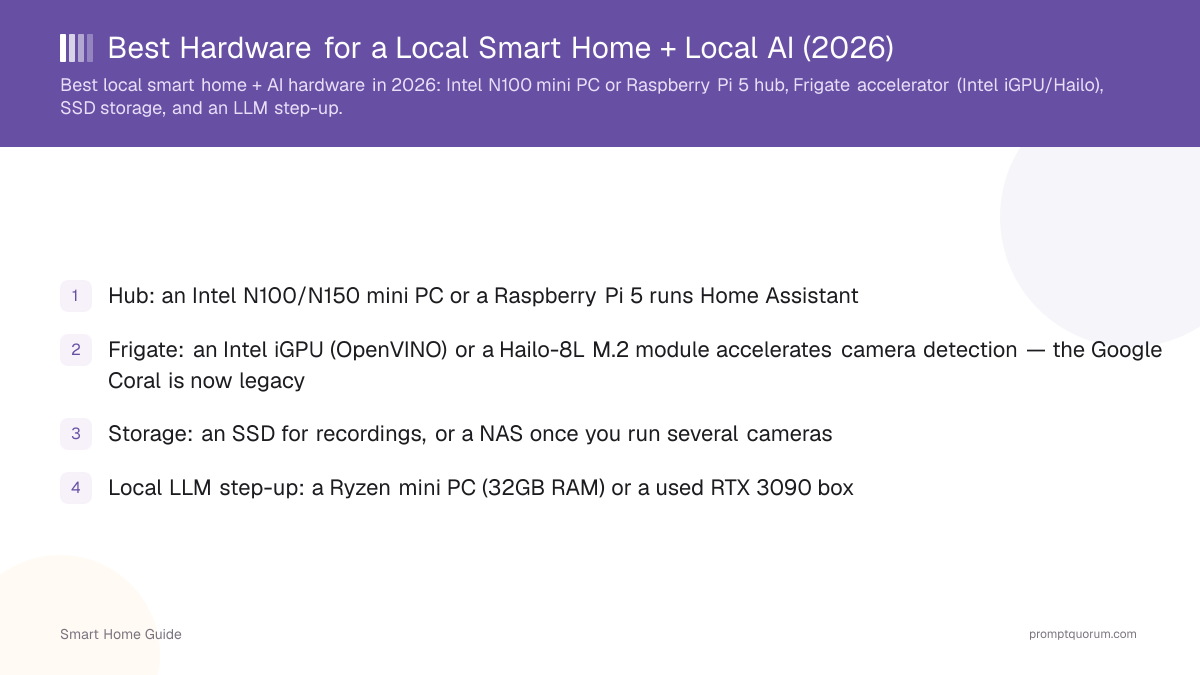
- Hub: an Intel N100/N150 mini PC (~$190–220) or a Raspberry Pi 5 (~$180–305, up sharply on a DRAM shortage) runs Home Assistant
- Frigate: an Intel iGPU (OpenVINO, built into most mini PCs), a Hailo-8L M.2 module (~$70), or a Hailo-8 M.2 (~$170–200) accelerates camera detection — the Google Coral is now legacy and no longer Frigate's recommendation for new builds
- Storage: an SSD for recordings, or a NAS (Synology DS225+ ~$340, DS925+ ~$640, UGREEN NASync ~$650–730) once you run several cameras
- Local LLM step-up: a Ryzen mini PC (32GB RAM, ~$649) or a used RTX 3090 box (~$850–1,050 — prices have risen well above 2024–2025 levels)
- Decide HA-only vs HA + cameras + local AI before buying — it changes the right box, and buying the mini PC now beats replacing a Pi later
Which Hardware Should You Buy?
Match your goal to a box, not the other way around. The table below maps each smart-home goal to the hardware that covers it — every row links to the fuller pick further down the page.
Your goal | Buy this | Est. price (Aug 2026) |
|---|---|---|
| Home Assistant only | Home Assistant Green or Raspberry Pi 5 | $199 (Green) / $180–305 (Pi 5) |
| HA + Frigate cameras | Intel N100/N150 mini PC | ~$190–220 |
| HA + a local LLM | Ryzen mini PC, 32GB RAM | ~$649 |
| HA + a larger local LLM | Used RTX 3090 server | ~$850–1,050 (GPU only) |
Prices are current and move — GPU and DRAM pricing especially has been volatile this year. Check the linked listing before buying.
💡Tip: Not sure yet whether you will want local AI? See Don't Overspend before you buy the expensive box.
What the Hub Needs
Home Assistant itself is lightweight and runs on modest hardware; the heavy demands come from Frigate camera detection and a local LLM. Size the box for what you will add, not just the hub.
- The hub needs little compute for device control and automations.
- Frigate object detection needs an accelerator: an Intel iGPU via OpenVINO handles most setups, and a Hailo-8L or Hailo-8 M.2 module adds capacity. The Google Coral USB/M.2 TPU still works but is now legacy — Frigate no longer recommends it for new builds.
- Larger Whisper models and local LLM inference are the most demanding workloads — plan RAM and a GPU/NPU around those.
- Store camera recordings on an SSD; move to a NAS once you run several cameras continuously.
Raspberry Pi
A Raspberry Pi 5 is the lowest-power way to run Home Assistant for typical smart home use, but a 2026 DRAM shortage has pushed board prices up sharply — the 8GB board now runs roughly $180–220 and the 16GB board $280–305, both well above their original ~$80/$120 launch prices, with analysts not expecting normalisation before late 2027. It struggles with LLM inference and large Whisper models.
- Great for device control, automations, and a small local voice setup.
- LLM inference on a Pi is limited to very small, slow models — pair it with a Hailo-8L M.2 HAT if you want Frigate detection.
- Choose a Pi 5 if you want basics at low power and are confident you will not add a local LLM. If you think you will want local AI within the next year, skip the Pi and buy the mini PC now — it costs little more and saves you buying twice.
- For a plug-and-play appliance, the Home Assistant Green ships ready to run (about $199 in 2026, up from a $99 launch price). Home Assistant Yellow was discontinued in October 2025 — Green is now the only official first-party hub.
Mini PC (and Room for an LLM)
A mini PC is the best single-box choice for Home Assistant plus local AI, with enough RAM and a capable iGPU or NPU to run a small LLM and accelerate Frigate. It balances power, size, and cost, and this is the section to spend more on if you are buying one box for both jobs.
- Best budget pick: a low-power Intel N100/N150 mini PC runs Home Assistant and accelerates Frigate via the Intel iGPU (OpenVINO) — the practical default for a hub-plus-cameras box. The Beelink EQ14 (Intel N150, 16GB RAM) is priced around $190–220 — good for 24/7 operation and low electricity use, but underpowered for a local LLM.
- Best pick for local AI: for a local LLM on the same box, step up to a Ryzen mini PC with 32GB RAM. The Beelink SER8 (Ryzen 7 8845HS) is priced around $649 and runs a Qwen3 8B or Llama 3.1 8B model via Ollama at usable speed, alongside Home Assistant and Frigate. Prioritise RAM and a capable integrated GPU or NPU for lower latency.
- If you are buying one box for Home Assistant and local AI together, the Ryzen mini PC is worth the extra cost over the N150 — it is the only one of the two that actually runs an LLM at usable speed.
- For specific picks, see best mini PCs for Home Assistant + local AI and the cross-cluster best mini PCs for local LLMs.
Running Security Cameras? Choose Your Frigate Accelerator
How many cameras and how much detection headroom you need decides the accelerator, separately from which box runs the hub. Frigate no longer recommends the Google Coral for new builds — it now steers new users toward Hailo, alongside a host's built-in Intel iGPU.
- 1–4 cameras: the Intel iGPU built into an N100/N150 mini PC, run via OpenVINO, covers most home setups at no extra hardware cost.
- 4–10 cameras or if you want more detection headroom on non-Intel hardware: a Hailo-8L M.2 module (~$70) is Frigate's current low-power recommendation — it behaves like the Coral used to, as a first-class-supported add-in card.
- 10+ cameras or heavier enrichments (face/license-plate recognition on top of detection): a Hailo-8 M.2 module (~$170–200) adds meaningfully more throughput.
- Already own a Coral? It still works — this is only about what to buy for a new build, not a reason to replace a working Coral setup.
NAS
A NAS can host Home Assistant in a container alongside storage and Frigate recordings, if it has enough CPU and RAM — a good option if you already own one, but not the right reason to buy your first NAS. Don't buy a NAS specifically to run a local LLM: a dedicated mini PC or GPU box is a better AI platform for the money.
- 2–4 cameras / lighter storage: the Synology DS225+ (~$340) covers Home Assistant-in-a-container plus Frigate recordings for a small camera count.
- 4–10 cameras / more headroom: the Synology DS925+ (~$640) adds CPU/RAM headroom for more add-ons and cameras.
- Storage plus local AI in one box: UGREEN NASync models (DXP4800 Plus-class, ~$650–730) ship with a built-in local-LLM option and newer hardware (DDR5, 10GbE without add-on cards) at a similar price to the DS925+.
- LLM inference on a NAS still depends heavily on its hardware — most NAS units lack a capable discrete GPU, so treat the built-in LLM option as a convenience feature, not a substitute for the RTX 3090 tier below if you actually want a large model.
Dedicated Server (LLM Step-Up)
A dedicated server with a discrete GPU is the step-up for running a larger local LLM alongside many cameras. It offers the most headroom at higher cost and power — and GPU prices moved a lot in 2026, so treat the figures below as a snapshot, not a fixed number.
- A used RTX 3090 (24GB VRAM) is one of the strongest VRAM-per-dollar options for local LLMs, but its used price has risen sharply through 2026 to roughly $850–1,050 — well above the $600–800 it traded at in 2024–2025. Q4-quantized models up to roughly 70B may be possible depending on quantization, context size, and offloading; treat this as a capability range, not a guarantee for every 70B model.
- A used RTX 3060 (12GB) is the budget alternative for a discrete-GPU box, now running roughly $220–290 used — it handles 7B–13B models comfortably without the RTX 3090's VRAM headroom or price.
- Best for many cameras, a larger LLM, and multiple users. Higher power draw and cost than a mini PC — see the power-consumption section below before committing to this tier.
- Overkill for a basic smart home — reserve for heavy local-AI use, and keep the Home Assistant hub on a separate low-power box for reliability (see One Box or Two? below).
Don't Overspend on Your Home Assistant Server
More hardware than your use case needs is the single most common wasted purchase in this category — match the box to what you actually plan to run.
- Home Assistant only? You don't need an RTX GPU, and you probably don't need a mini PC — a Raspberry Pi 5 or Home Assistant Green covers it.
- Home Assistant plus Frigate cameras? You don't need an expensive workstation — an Intel N100/N150 mini PC with its built-in iGPU is enough for most home camera counts.
- Home Assistant plus a small local LLM? A 32GB Ryzen mini PC is enough for an 8B-class model — you don't need a discrete GPU yet.
- Want a large local LLM (32B and up)? That is the point where a discrete GPU, such as a used RTX 3090, actually earns its cost.
Power Consumption Matters for a 24/7 Box
This hardware runs continuously, so for a box that never turns off, electricity cost over a year can matter as much as the purchase price. Roughly, in order of typical draw:
Hardware | Typical role | Power draw | Best for |
|---|---|---|---|
| Raspberry Pi 5 | Hub only | Very low (a few watts) | Home Assistant |
| Intel N100/N150 mini PC | Hub + Frigate | Low (~10–15W typical) | 24/7 hub + cameras |
| Ryzen mini PC (32GB) | Hub + Frigate + small LLM | Moderate (~15–35W typical, higher under LLM load) | One-box local AI |
| RTX 3090 server | Heavy local AI | High (GPU alone can draw 250W+ under load) | Large models, not 24/7 idle |
For a server that runs 24/7, power consumption can matter more than the initial purchase price — a 250W GPU running continuously adds meaningfully to a power bill in a way a 10W mini PC does not. This is one reason to keep a heavy GPU server as a separate, deliberately-run box rather than an always-on one (see One Box or Two? below).
One Box or Two?
One box is simpler and cheaper; two boxes protect Home Assistant's reliability from a heavier AI workload. Which one is right depends on how much you value uptime versus simplicity.
- One box (a single mini PC): simplest and cheapest — a Ryzen mini PC runs Home Assistant, Frigate, and a small local LLM together. The right choice for most home setups.
- Two boxes (a low-power hub plus a separate AI machine): keeps Home Assistant ultra-reliable on a low-power box that rarely needs a reboot, while heavier AI work — a used RTX 3090 server, for example — runs and can be restarted independently without taking your automations down with it.
- Choose two boxes if you run Home Assistant for anything safety-relevant (locks, alarms, heating) and want that layer isolated from a GPU box that you might reboot, update, or experiment on.
Picking for HA-only vs HA + AI
Choose a Pi for HA-only, and a mini PC for HA plus local AI — that single decision drives the right hardware. Match the box to the workload, not the other way around.
Hardware | Relative price | HA-only | Can run a local LLM | Frigate acceleration |
|---|---|---|---|---|
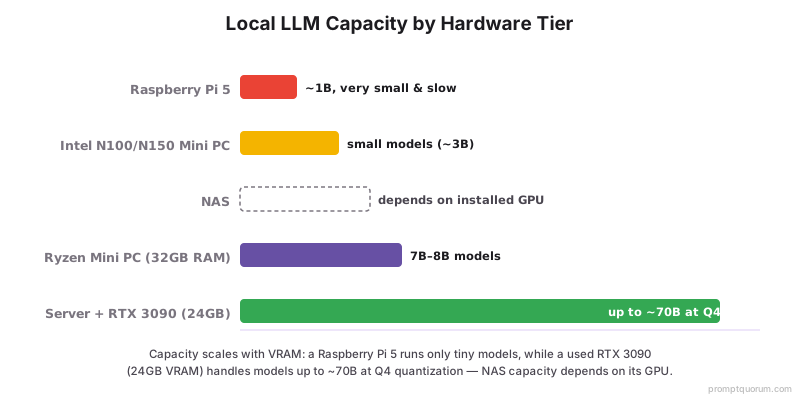
| Raspberry Pi 5 | Low | Yes | Very small only, slow | Hailo-8L M.2 HAT |
| Intel N100/N150 mini PC | Medium | Yes | Small models | Intel iGPU (OpenVINO) |
| Ryzen mini PC | Medium | Yes | Yes (7B–8B) | iGPU or Hailo M.2 |
| NAS | Medium–High | Yes (container) | Depends on hardware | Depends on model |
| Server + used RTX 3090 | High | Yes | Yes (up to ~70B, quantization-dependent) | Discrete GPU |
For power draw per tier, see Power Consumption above; for whether to run everything on one box, see One Box or Two?.
A General Buying Recommendation for 2026
If you are choosing one box today and are not sure which tier fits, this is a reasonable default based on the trade-offs above — your actual needs may point elsewhere, and none of the picks below have been tested or reviewed by PromptQuorum.
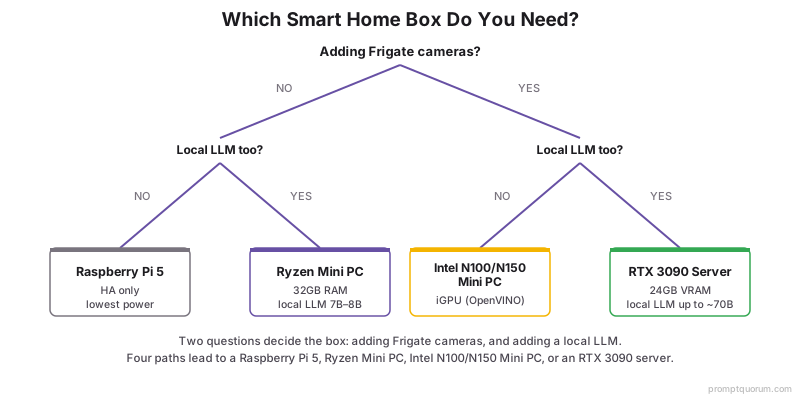
- For a normal local smart home (Home Assistant plus a handful of Zigbee/Matter devices): an Intel N150 mini PC is a sensible default — it covers Frigate too if you add cameras later.
- For Home Assistant plus cameras plus a small local AI assistant: a Ryzen mini PC with 32GB RAM is a reasonable one-box choice — it is the cheapest box that actually runs an 8B-class LLM at usable speed.
- For serious local AI (32B-class models or larger): a separate RTX 3090 server, kept apart from the Home Assistant hub, is the reasonable step-up given current used-GPU pricing.
- A new AI-first installation is generally a weaker fit for a Raspberry Pi given 2026 Pi pricing and its LLM limitations — a mini PC is usually a closer price and a much better AI platform.
Complete Local Smart-Home Stacks
Most buyers need more than one product — a hub, a Frigate accelerator, and storage at minimum, plus an AI box if you want local LLM inference. These three stacks combine the picks above by scenario; every product links back to its full recommendation earlier on this page.
Stack | Hub | Frigate accelerator | AI | Est. total (Aug 2026) |
|---|---|---|---|---|
| Starter (HA only) | Home Assistant Green or Pi 5 | — | — | ~$199–305 |
| HA + cameras | N150 mini PC | Intel iGPU, or Hailo-8L if you want more headroom | — | ~$190–290 |
| HA + cameras + local AI | Ryzen mini PC, 32GB | Built-in iGPU, or Hailo-8L for more cameras | Runs on the same box (8B-class model) | ~$649–720 |
| HA + cameras + large local AI | N150 mini PC (kept separate for reliability) | Hailo-8 | Used RTX 3090 server, run separately | ~$1,400–1,700 |
The last stack keeps the Home Assistant hub on its own low-power box and runs the RTX 3090 as a separate machine — see One Box or Two? for why.
Frequently Asked Questions
What hardware does Frigate recommend?
For new builds Frigate recommends an Intel iGPU via OpenVINO, or a Hailo-8L (~$70, budget) or Hailo-8 (~$170–200, faster) M.2 module for more detection capacity. The Google Coral USB/M.2 TPU still works but is now legacy — Frigate no longer recommends it for new installations except on very low-power hardware.
Can a Raspberry Pi run a local LLM too?
A Pi can run only very small models, and slowly, so it is not ideal for a responsive local-LLM assistant. It handles Home Assistant and basic voice well, but for local AI a mini PC with a capable iGPU or NPU — or a used RTX 3090 box — is the better choice.
How much RAM do I need?
Home Assistant alone runs in a couple of gigabytes. To run a small local LLM and other AI services on the same box, more RAM helps; a mini PC with 32GB RAM and a capable iGPU/NPU keeps a Qwen3 8B or Llama 3.1 8B model responsive. Match RAM to the model size you plan to run.
What mini PC should I get?
For HA plus cameras, an Intel N100/N150 mini PC accelerates Frigate via OpenVINO. For HA plus a local LLM, step up to a Ryzen mini PC with 32GB RAM. See the best mini PCs for Home Assistant + local AI guide for picks.
One box or two?
One box (a mini PC) is simplest and runs Home Assistant plus a small local LLM together. Split into two if you want to keep the hub ultra-reliable on a low-power box and offload heavy AI to a separate machine such as a used RTX 3090 server.
What about power consumption for a 24/7 box?
It matters more than the purchase price for hardware that never turns off. A Raspberry Pi draws a few watts, an N100/N150 mini PC around 10–15W, a Ryzen mini PC 15–35W depending on load, and a discrete GPU like an RTX 3090 can draw 250W+ under load — one reason to run a heavy GPU server as a separate box rather than always-on.
Is a Raspberry Pi still worth it given 2026 pricing?
For Home Assistant only, yes — it is still the lowest-power option. But a 2026 DRAM shortage has pushed Pi 5 prices up sharply (roughly $180–305 depending on RAM, versus an original $80–120), narrowing the price gap to an N100/N150 mini PC. If you might add cameras or a local LLM within a year, the mini PC is usually the better buy now.