Key Takeaways
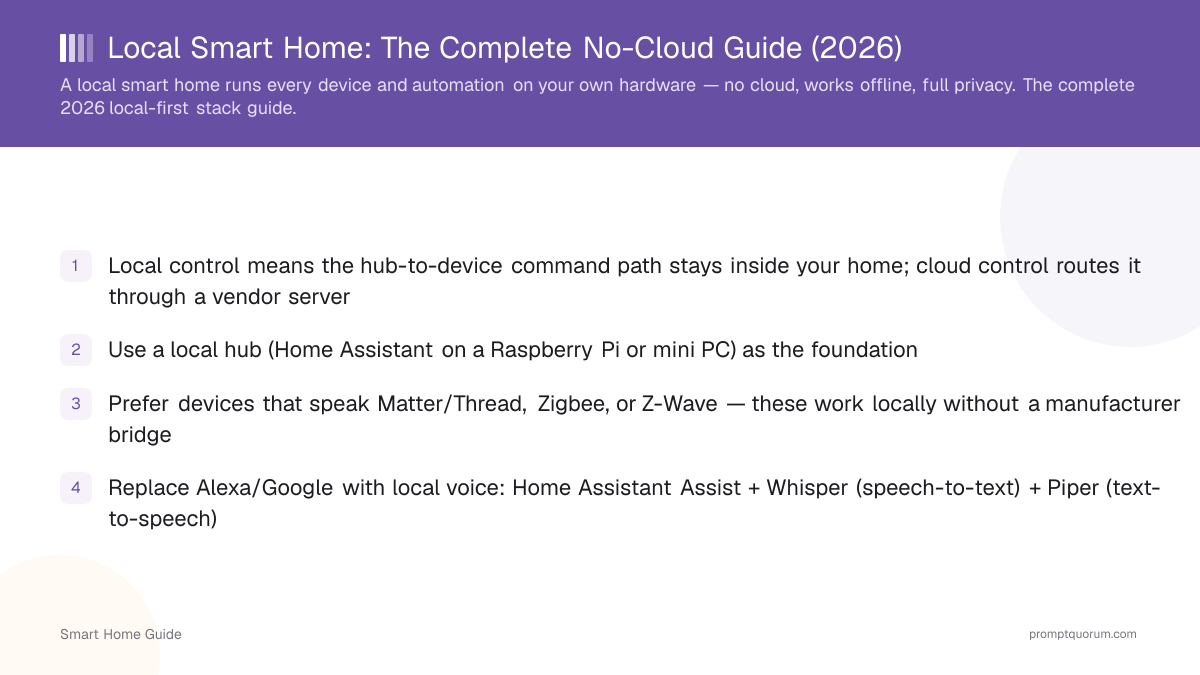
- Local control means the hub-to-device command path stays inside your home; cloud control routes it through a vendor server
- Use a local hub (Home Assistant on a Raspberry Pi or mini PC) as the foundation
- Prefer devices that speak Matter/Thread, Zigbee, or Z-Wave — these work locally without a manufacturer bridge
- Replace Alexa/Google with local voice: Home Assistant Assist + Whisper (speech-to-text) + Piper (text-to-speech)
- New in 2026: a local LLM via Ollama can run natural-language control and context-aware automations on the same box
- Trade-off: more upfront setup effort in exchange for privacy, offline reliability, and no subscriptions
- Local data processing: device state, automation logic, voice, and camera analysis are handled on your own hub by default
What a Local Smart Home Actually Means
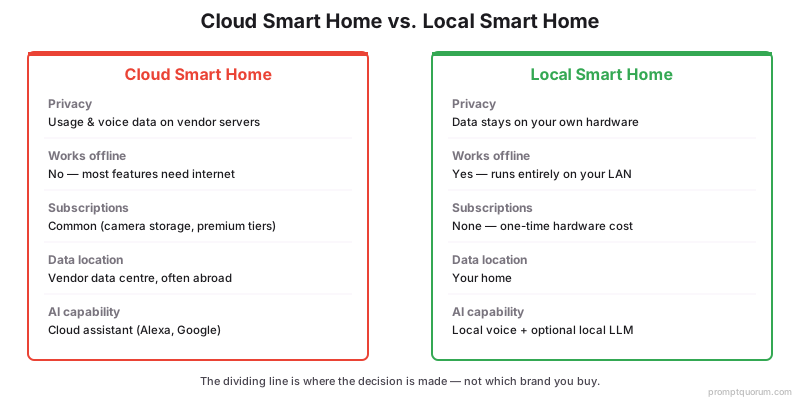
A local smart home keeps the control path — the link between "I want the light on" and the light turning on — entirely inside your home. Cloud smart homes send that command to a manufacturer server first; local smart homes do not. The dividing line is where the decision is made, not which brand you buy.
- Cloud control: Your app or voice assistant sends the command to a vendor cloud, which relays it to the device. If the cloud or your internet is down, the device stops responding.
- Local control: A hub in your home (Home Assistant) sends the command directly to the device over a local protocol. No internet round-trip, no third-party server.
- Why the distinction matters: Local control determines privacy (no usage logs leave the house), reliability (works offline), and longevity (a vendor cloud shutdown cannot brick the device).
Dimension | Cloud smart home | Local smart home |
|---|---|---|
| Privacy | Usage, voice, and camera data on vendor servers | Data stays on your hardware |
| Works offline | No — most features need the cloud | Yes — runs on your LAN |
| Subscriptions | Common (camera storage, premium features) | None — one-time hardware cost |
| Data location | Vendor data centre (often another country) | Your home |
| Setup effort | Low — app-guided | Higher — you run the hub |
| AI capability | Cloud assistant (Alexa, Google) | Local voice + optional local LLM |
Local Data Processing: What Stays on Your Hardware
Local data processing means sensor readings, automation logic, voice audio, and camera video are handled on a device in your home instead of a vendor server. In a local setup the processing step stays in the house by default. The table shows where each data type is handled in each model.
- What local processing does not guarantee: zero network traffic. Firmware updates, cloud-only devices, weather and other online integrations, and optional remote access can still contact external servers. Check each integration individually — see smart home privacy risks.
- How to verify it: block internet access for a device at your router and test it. If lights, sensors, and automations still respond, the control path is local.
- Compliance angle: for EU households, local processing reduces the number of third-party processors involved — see GDPR-friendly private smart home.
Data type | Cloud processing | Local processing |
|---|---|---|
| Device state and sensors | Sent to the vendor cloud and back | Handled by the hub on your LAN |
| Automation rules | Evaluated on vendor servers | Evaluated by Home Assistant on your hub |
| Voice commands | Audio streamed to a vendor cloud | Whisper + Piper on your hardware |
| Camera video | Uploaded for cloud analysis and storage | Analysed locally (e.g. Frigate) |
| AI inference | Cloud LLM or cloud assistant | Local LLM via Ollama |
| History and logs | Retained by the vendor | Stored on your hub's disk |
Why Local-First Is Growing in 2026
Local-first adoption is rising because the cloud trade-offs became concrete: shutdowns bricking hardware, recurring fees, outages, and privacy exposure — while local AI is now runnable at home. Each of these is a specific, verifiable reason rather than a general preference.
- Cloud shutdowns brick devices: When a vendor discontinues a product cloud, dependent devices can lose core functions overnight. Local devices keep working because nothing external is required.
- Reliability: A local smart home responds during internet outages and vendor-cloud incidents. Lights, locks, and automations do not depend on a remote server being up.
- Privacy: Cloud devices collect usage patterns, voice recordings, and camera feeds. Local control removes the third-party processor entirely — see smart home privacy risks.
- No subscriptions: Local camera recording and local automations avoid the monthly fees that cloud ecosystems attach to storage and premium features.
- Local AI is now practical: Small, capable models run on a mini PC, so a local LLM can act as the automation brain — a capability that did not exist for home users a few years ago. See running your smart home on a local LLM.
The Local-First Stack, Layer by Layer
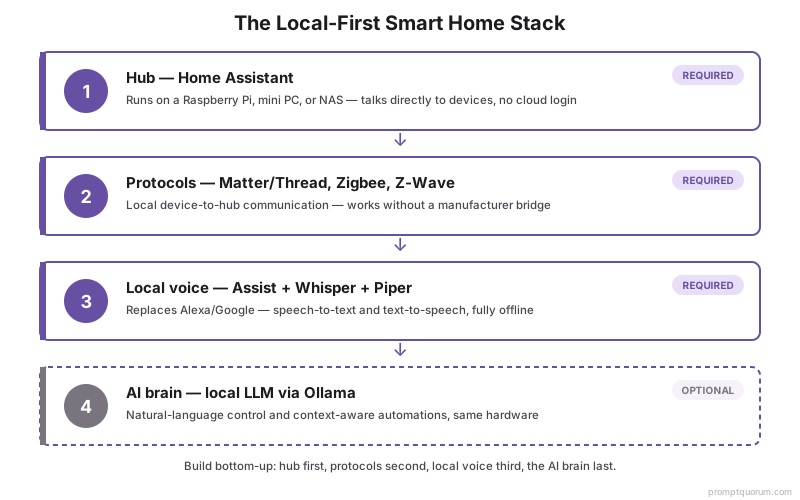
A local smart home is four layers: a hub, local device protocols, local voice, and an optional local AI brain. Build them in that order — the hub first, AI last.
- 1Hub — Home Assistant
Why it matters: The control plane. Home Assistant is open-source software that runs on a Raspberry Pi, mini PC, or NAS and talks directly to your devices. Start here — see [Home Assistant getting started](/smart-home/home-assistant-getting-started). - 2Protocols — Matter/Thread, Zigbee, Z-Wave
Why it matters: How devices communicate locally. Zigbee and Z-Wave are mature low-power mesh standards; Thread is the modern mesh; Matter is the unifying layer. These work without a manufacturer cloud — see [Matter local control](/smart-home/matter-local-control-guide). - 3Local voice — Assist + Whisper + Piper
Why it matters: Replaces Alexa and Google. Home Assistant Assist handles intent, Whisper does speech-to-text, and Piper does text-to-speech, all offline — see [build a fully local voice assistant](/smart-home/local-voice-assistant-smart-home). - 4AI brain — a local LLM via Ollama
Why it matters: Optional top layer. A local model turns rigid rules into natural-language control and context-aware automations, running on the same hardware with no cloud.
What You Can Run Locally Today
Lighting, climate, security, sensors, voice, and AI automations all run locally in 2026 — the cloud is optional, not required. The table below maps each category to its local option.
- For private AI cameras specifically, Frigate runs object and person detection locally with no subscription.
- For the hardware to run all of this — including a local LLM — see best hardware for a local smart home.
Category | Local option | Notes |
|---|---|---|
| Lighting | Zigbee/Matter bulbs + Home Assistant | Instant local response; no app cloud login needed |
| Climate | Local thermostats / TRVs over Zigbee or Z-Wave | Schedules and automations run on the hub |
| Security | Local cameras + Frigate | On-device AI detection; see local AI cameras below |
| Sensors | Zigbee/Z-Wave motion, door, temperature | Trigger automations with no internet |
| Voice | Assist + Whisper + Piper | Fully offline wake-word and commands |
| AI automations | Local LLM via Ollama | Natural-language control and context-aware rules |
What It Costs and the Effort It Takes
A local smart home trades higher upfront setup effort for zero subscriptions and long-term control. The honest summary: you spend a weekend and one-time hardware money instead of monthly fees and vendor lock-in.
- Hardware: A Raspberry Pi runs a basic local hub; a mini PC is the better pick if you also want to run a local LLM. Plan one-time hardware cost, not recurring fees.
- Effort: Expect a learning curve setting up Home Assistant, pairing devices, and writing your first automations. The payoff is a system no vendor can change or discontinue.
- Use a local-first path if: privacy, offline reliability, or avoiding subscriptions matter to you.
- Stay with cloud if: you want zero maintenance and never touch configuration — but accept the data, outage, and subscription trade-offs in why local beats cloud.
How to Start a Local Smart Home
Start with the hub and one room, then expand — do not buy a houseful of devices first. The fastest reliable path is Home Assistant on a Raspberry Pi or mini PC, a Zigbee coordinator, and a few local devices.
- 1Install Home Assistant on a Raspberry Pi or mini PC — getting-started guide.
- 2Pick hardware with room to grow if you want local AI — hardware guide.
- 3Add local-by-default devices over Matter/Thread, Zigbee, or Z-Wave — Matter local control.
- 4Add local voice once devices work — local voice assistant.
- 5Add a local LLM brain last — running your smart home on a local LLM.
- 6For EU readers, confirm the privacy posture — GDPR-friendly private smart home.
Frequently Asked Questions
Is a local smart home hard to set up?
It takes more effort than a plug-and-play cloud setup, mainly installing Home Assistant and pairing devices. Most people get a working hub and first automation running in a weekend, then expand gradually. No coding is required for common setups, though YAML configuration is available for advanced automations.
Does a local smart home work without internet?
Yes. Because the hub and devices communicate over your local network, lights, locks, sensors, and automations keep working during an internet or vendor-cloud outage. You only lose internet-dependent extras like remote access away from home and cloud notifications.
Do I need a subscription for a local smart home?
No. Home Assistant is free and open-source, and local devices have no recurring fees. You pay one-time hardware costs. Optional paid extras exist (for example, a cloud relay for easy remote access), but core local control needs no subscription.
Can I run AI locally for my smart home?
Yes. A local LLM via Ollama can act as the conversation agent and automation brain inside Home Assistant, running natural-language device control on your own hardware with no cloud. A mini PC handles small models comfortably; see the local LLM smart home guide.
Is a local smart home GDPR-compliant?
Local processing keeps device, voice, and camera data on hardware in your home, which supports GDPR data-minimization and residency by design because no third-party processor is involved. See the GDPR-friendly private smart home guide for the EU buyer checklist.
What is the difference between local and cloud processing in a smart home?
With cloud processing, commands, sensor data, and voice audio travel to a vendor server that decides what to do and sends the result back. With local processing, a hub in your home makes that decision on your own network. Local processing typically responds faster because there is no internet round trip, keeps working offline, and avoids sending usage data to a third-party processor; cloud processing needs less setup.
Which smart home systems keep automations and data on-device?
Home Assistant is the most widely used local-first hub; openHAB and Hubitat Elevation are alternatives built around local processing. Local protocols — Zigbee, Z-Wave, and Matter over Thread — let devices work without a manufacturer cloud, but individual devices and integrations vary, so check each one before buying.