Key Takeaways
- Home Assistant Assist is the local voice pipeline that ties everything together
- Whisper handles speech-to-text locally; pick a model size for your accuracy/speed/hardware trade-off
- Piper handles text-to-speech locally with natural-sounding voices
- The Wyoming protocol connects Assist to the Whisper and Piper services
- Add a wake-word engine (such as openWakeWord) for hands-free triggering
- Optional: set a local LLM as the conversation agent for natural-language understanding
The Fully-Local Voice Stack
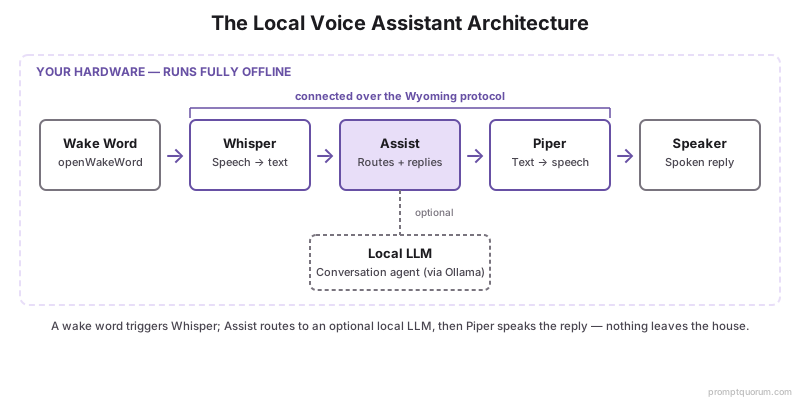
A local voice assistant is four roles on your own hardware: capture and transcribe (Whisper), understand (Assist intents or a local LLM), respond (Piper), and trigger (wake word). Each runs offline; the Wyoming protocol wires them together.
Component | Role | Local? | Notes |
|---|---|---|---|
| Assist | Pipeline + intent | Yes | Built into Home Assistant |
| Whisper | Speech-to-text | Yes | Model size sets accuracy/speed |
| Piper | Text-to-speech | Yes | Natural local voices |
| Wake word | Hands-free trigger | Yes | e.g. openWakeWord |
| Local LLM | Understanding (optional) | Yes | Via Ollama as conversation agent |
Home Assistant Assist
Assist is the built-in voice pipeline that routes audio through speech-to-text, an agent, and text-to-speech. It is configured under Settings → Voice assistants.
- Assist works with built-in intents out of the box (no LLM required) for common commands.
- You select the STT engine (Whisper), the TTS engine (Piper), and the conversation agent.
- Use multiple pipelines if you want a fast intent-only assistant and a separate LLM-powered one.
Whisper for Local Speech-to-Text
Whisper transcribes your speech locally; larger Whisper models are more accurate but need more compute. Add it as the Whisper (faster-whisper) add-on and connect via Wyoming.
- Whisper ships in sizes from tiny to large — smaller is faster, larger is more accurate.
- For a focused STT setup (models, hardware, accuracy), see local Whisper + Home Assistant.
- Whisper is multilingual, so non-English commands transcribe without a cloud service.
Piper for Local Text-to-Speech
Piper generates spoken responses locally with natural-sounding voices, fast enough for real-time replies on modest hardware. Add it as the Piper add-on and select a voice.
- Piper offers multiple languages and voices; pick one per pipeline.
- It runs well on a Raspberry Pi for typical response lengths.
- No audio is sent anywhere — the speech is synthesised on your device.
- Piper's own GitHub repository moved to maintenance-only status in late 2025, but the packaged Home Assistant Wyoming add-on is unaffected and keeps working as described above; for future projects, Kokoro TTS is an actively developed local alternative worth evaluating.
The Wyoming Protocol
Wyoming is the protocol Home Assistant uses to connect Assist to local voice services like Whisper and Piper. It lets the speech services run as separate add-ons or on separate machines.
- Each service (Whisper, Piper, wake word) runs as a Wyoming endpoint.
- Assist discovers and uses them through the Wyoming integration.
- This modularity means you can offload Whisper to a more powerful box if needed.
Adding the LLM Brain
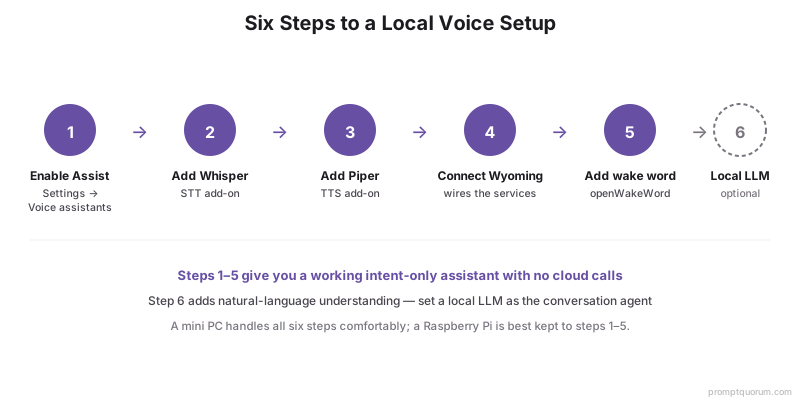
Set a local LLM as the conversation agent to understand natural language instead of only fixed intents. This is optional but unlocks flexible phrasing.
- Wire Ollama into Home Assistant first — see the Ollama integration guide.
- Use a small function-calling model so voice responses stay snappy.
- For the end-to-end picture, see running your smart home on a local LLM.
Hardware Needs
A mini PC comfortably runs Assist, Whisper, Piper, and a small LLM; a Raspberry Pi handles intent-only voice but struggles with large Whisper models and LLM inference. Microphone hardware (voice satellites) captures audio around the house.
- Use a mini PC if you want the LLM brain and larger Whisper models — see best hardware for a local smart home.
- Use a Pi for a lightweight, intent-only assistant.
- Add voice-satellite hardware (microphone + speaker endpoints) for room coverage.
- Compare local vs cloud voice trade-offs in local vs cloud voice assistants.
Frequently Asked Questions
Can a local voice assistant fully replace Alexa?
For smart-home control and many routines, yes — Assist with Whisper, Piper, and a local LLM covers natural-language device control and responses. It does not replicate every third-party Alexa skill or cloud shopping feature, but it covers the core home-control use case privately.
Does a local voice assistant work offline?
Yes. Speech-to-text (Whisper), text-to-speech (Piper), intent handling, and an optional local LLM all run on your hardware, so the assistant works with no internet. Only remote access from outside the home needs connectivity.
How accurate is local speech recognition?
Accuracy depends on the Whisper model size and your microphone. Larger Whisper models are more accurate but slower; a mid-size model on a mini PC gives a good balance for home commands. See the local Whisper guide for sizing.
What hardware do I need for a local voice assistant?
A mini PC for the full stack (LLM + larger Whisper), or a Raspberry Pi for an intent-only assistant, plus microphone/speaker voice-satellite hardware for room coverage. A GPU or NPU lowers LLM and large-Whisper latency.
Can I use a custom wake word?
Yes. A local wake-word engine such as openWakeWord supports custom wake words and runs on your hardware, so hands-free triggering needs no cloud.