Key Takeaways
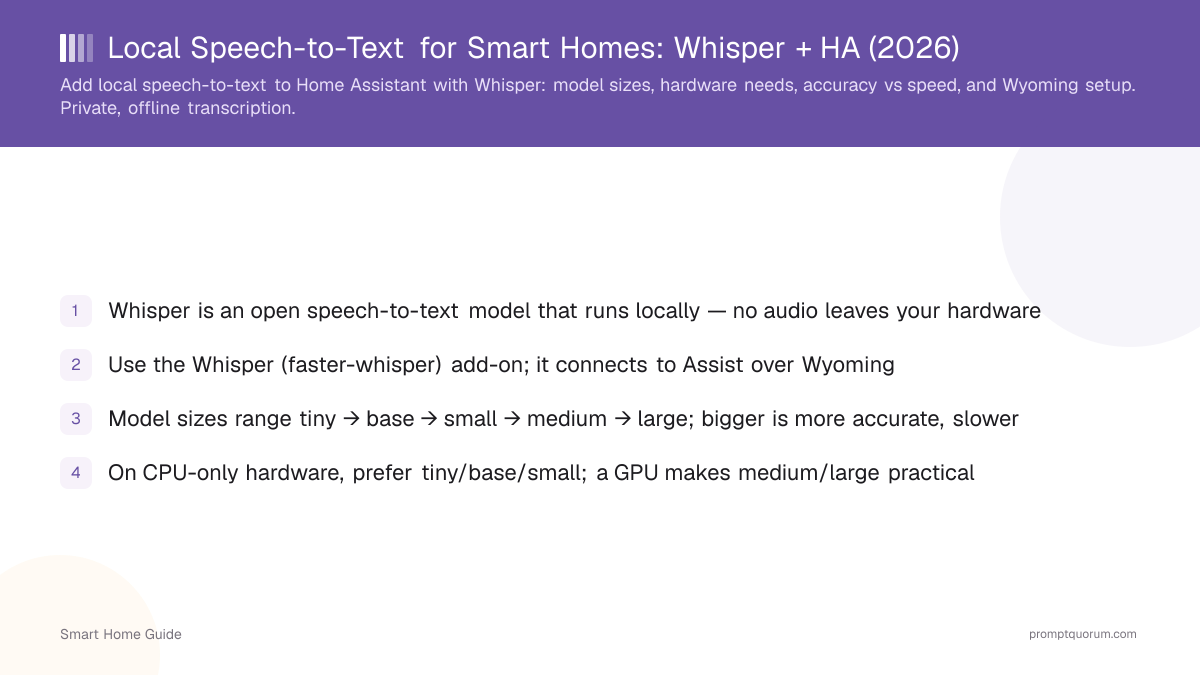
- Whisper is an open speech-to-text model that runs locally — no audio leaves your hardware
- Use the Whisper (faster-whisper) add-on; it connects to Assist over Wyoming
- Model sizes range tiny → base → small → medium → large; bigger is more accurate, slower
- On CPU-only hardware, prefer tiny/base/small; a GPU makes medium/large practical
- Whisper is multilingual, so non-English commands transcribe without a cloud service
- Tune accuracy with a better microphone and the right model before going larger
- Home Assistant's official Whisper app is built on faster-whisper (wyoming-faster-whisper); whisper.cpp has no official Home Assistant app
- No like-for-like speed comparison exists for Home Assistant hardware: the published numbers use different setups
- Piper handles text-to-speech over Wyoming; MacWhisper is a Mac desktop app, not a Home Assistant component
Why Use Local Speech-to-Text?
Local speech-to-text keeps your voice recordings on your own hardware, so no audio is uploaded to a third party. It also works offline and has no per-request cost.
- Privacy: cloud assistants transmit and may retain recordings; local Whisper does not — see smart home privacy risks.
- Offline: transcription works during internet outages.
- No fees: there is no usage charge for local transcription.
Which Whisper Model Size Should You Use?
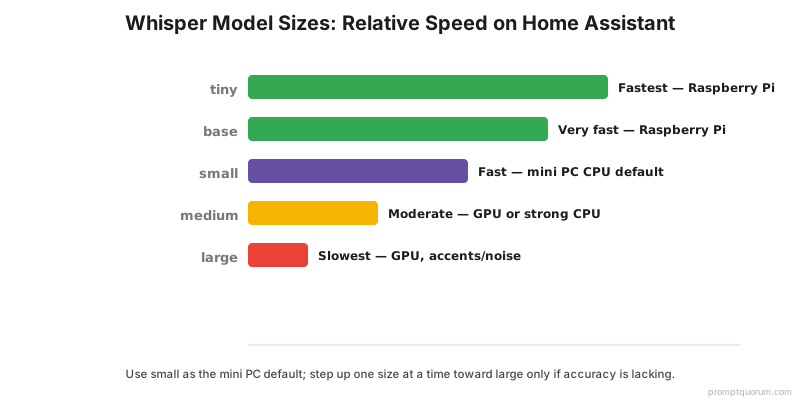
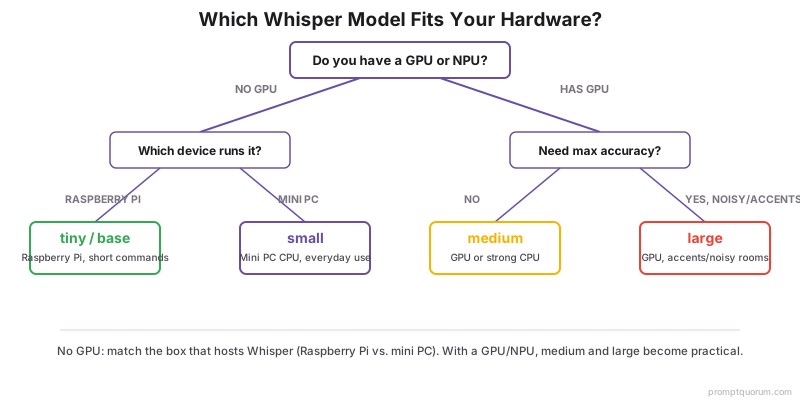
Pick the smallest Whisper model that gives acceptable accuracy on your hardware — tiny/base/small for CPU-only, medium/large when you have a GPU. Larger models improve accuracy on accents and noisy audio at the cost of speed.
- Use small as the default on a mini PC CPU; move to medium/large only if accuracy is lacking.
- Use tiny/base on a Raspberry Pi to keep latency usable.
Model | Relative accuracy | Relative speed | Best for |
|---|---|---|---|
| tiny | Lowest | Fastest | Low-power CPU, short commands |
| base | Low | Very fast | Raspberry Pi, simple phrases |
| small | Good | Fast | Mini PC CPU, everyday use |
| medium | High | Moderate | GPU or strong CPU |
| large | Highest | Slowest | GPU, accents/noisy rooms |
Wyoming Setup
The Whisper add-on exposes a Wyoming endpoint that Assist uses for speech-to-text. Setup is install → pick model → select in pipeline.
- 1Install the Whisper (faster-whisper) add-on from the add-on store.
- 2Set the model size in the add-on configuration and start it.
- 3The add-on registers as a Wyoming speech-to-text service automatically.
- 4In Settings → Voice assistants, set Whisper as the STT engine for your Assist pipeline.
- 5Test transcription from the Assist debug tools before adding voice hardware.
Hardware Needs
Whisper runs on CPU for small models and benefits from a GPU for medium/large models. Match model size to the box that hosts it.
- Raspberry Pi: stick to tiny/base for acceptable latency.
- Mini PC (CPU): small works well; medium is possible but slower — see best hardware for a local smart home.
- With a GPU/NPU: medium and large become practical for high accuracy.
- You can run Whisper on a separate, more powerful machine via Wyoming if your hub is a Pi.
Tuning Accuracy
Improve a good microphone and the right model before reaching for the largest Whisper. Audio quality often matters more than model size for home commands.
- Use a quality microphone or voice-satellite hardware close to the speaker.
- Reduce background noise where the microphone sits.
- Set the correct language in the add-on to avoid mis-transcription.
- Step up one model size at a time and re-test rather than jumping to large.
faster-whisper vs whisper.cpp for Home Assistant
Home Assistant's official Whisper app is built on faster-whisper; whisper.cpp has no official Home Assistant app, so using it means running a separate Wyoming-compatible server. Both engines run OpenAI's Whisper models locally; they differ in how they plug into Assist.
- Home Assistant OS: install the Whisper app from Settings > Apps; the Wyoming integration discovers it automatically (Whisper app docs). Apps were formerly called add-ons.
- Default model:
autoselectstiny-int8on ARM devices such as the Raspberry Pi 4 andbase-int8otherwise; the-int8variants are slightly less accurate but smaller and faster (Whisper app docs). - Backends: with
stt_libraryset toauto, English uses a Parakeet model via sherpa, Chinese, Cantonese, Japanese and Korean use SenseVoice via funasr, Russian uses GigaAM, and everything else uses faster-whisper (Whisper app docs). - Container or separate host: run the
rhasspy/wyoming-whisperimage (port 10300 in the example), then add the Wyoming Protocol integration with that host and port (wyoming-faster-whisper, Wyoming integration docs). Wyoming services can run on another device on your local network, which suits resource-heavy Whisper. - GPU: the project's NVIDIA GPU image is not published; you build it yourself (about 10.7 GB against about 1.6 GB for the CPU image), and Home Assistant OS has no GPU passthrough (wyoming-faster-whisper).
- whisper.cpp: its
whisper-serverexample is an HTTP server with an OpenAI-like API, not a Wyoming server (whisper.cpp). The rhasspy/wyoming-whisper-cpp bridge is archived; community bridges exist, but we have not tested any.
Aspect | faster-whisper | whisper.cpp |
|---|---|---|
| Home Assistant app | Official Whisper app | No official app |
| Wyoming server | wyoming-faster-whisper | wyoming-whisper-cpp (archived) |
| Install on HA OS | Settings > Apps > Whisper | Run separately, add via Wyoming |
| Install in Docker | rhasspy/wyoming-whisper image | whisper-server (HTTP, not Wyoming) |
| GPU support | NVIDIA CUDA 12 + cuDNN 9 | CUDA, Vulkan, Metal, OpenVINO |
| CPU path | CTranslate2, int8 or fp32 | Plain C/C++, quantized models |
| Models | tiny to large-v3, turbo, distil | ggml tiny to large |
| Languages | Whisper's 100 via Wyoming | Multilingual and .en models |
Speed: What the Published Benchmarks Show
We found no like-for-like faster-whisper vs whisper.cpp measurement on Home Assistant hardware, so a direct comparison for a Raspberry Pi or mini PC is not possible. The only side-by-side numbers come from the faster-whisper README: 13 minutes of audio transcribed on a desktop PC with faster-whisper v1.1.0 and whisper.cpp v1.7.2. We did not run these tests ourselves.
- These are 13-minute file transcriptions on a desktop GPU (CUDA 12.4) and an Intel Core i7-12700K, not 3-second voice commands, so they do not predict command latency on a Raspberry Pi or mini PC. Versions are older than the current releases.
- Home Assistant's own docs say Whisper takes "around 8 seconds" to process a voice command on a Raspberry Pi 4 and is done "in under a second" on an Intel NUC; the page does not name the model (local Assist docs).
- The same page lists Speech-to-Phrase, a different engine, at "under one second" on a Raspberry Pi 4 or Home Assistant Green (local Assist docs).
- The whisper.cpp README has no timing table; it links a community benchmark thread (issue 89) and ships a
whisper-benchexample so you can measure your own machine.
Hardware and model | Engine and settings | Time, 13 min audio |
|---|---|---|
| RTX 3070 Ti 8GB, large-v2 | faster-whisper, fp16, beam 5 | 1m03s |
| RTX 3070 Ti 8GB, large-v2 | whisper.cpp + Flash Attention, fp16, beam 5 | 1m05s |
| i7-12700K (8 threads), small | whisper.cpp, fp32, beam 5 | 2m05s |
| i7-12700K (8 threads), small | faster-whisper, fp32, beam 5 | 2m37s |
| i7-12700K (8 threads), small | faster-whisper, int8, beam 5 | 1m42s |
Model Sizes and Memory Use
Model size drives memory more than anything else: whisper.cpp's README lists about 273 MB of memory for tiny and about 3.9 GB for large. Figures below are from the whisper.cpp README.
- faster-whisper's README lists large-v2 on the RTX 3070 Ti at 4525MB VRAM (fp16) and 2926MB (int8) (faster-whisper README).
- For the small model on CPU the same README lists 1477MB RAM (faster-whisper int8) and 2257MB (fp32); whisper.cpp is listed at 1049MB (fp32).
- The Whisper app also offers
turbo(faster thanlarge-v3) and English-only distilled models such asdistil-small.en(Whisper app docs).
Model | Disk (whisper.cpp) | Memory (whisper.cpp) |
|---|---|---|
| tiny | 75 MiB | ~273 MB |
| base | 142 MiB | ~388 MB |
| small | 466 MiB | ~852 MB |
| medium | 1.5 GiB | ~2.1 GB |
| large | 2.9 GiB | ~3.9 GB |
Piper TTS: The Speech Half of the Voice Pipeline
Piper is the local text-to-speech engine in Home Assistant's voice setup: the Piper app exposes it over Wyoming, the same way the Whisper app does for speech-to-text. Whisper hears the command; Piper speaks the reply.
- Install: Settings > Apps > Piper; the Wyoming integration discovers it (Piper app docs). Outside Home Assistant OS, wyoming-piper runs as a Wyoming server (port 10200 in its example).
- Voices: named
<language>_<REGION>-<name>-<quality>, defaulten_US-lessac-medium, downloaded automatically from Hugging Face. Qualityx_lowandloware 16 kHz,mediumandhighare 22.05 kHz. - Resource use: the app docs say that on a Raspberry Pi 4 voices up to
mediumrun with usable speed; Home Assistant's docs say a Pi with medium-quality models "can generate 1.6s of voice in a second" (local Assist docs). - Languages: Piper's voice list has 44 language and region entries, including German, French, Spanish, Portuguese (Brazil and Portugal), Chinese and Arabic (Jordan). We found no Japanese or Korean entry there; the Piper app documents optional Japanese and Thai voices that need an extra phonemizer download (about 350 MB and 390 MB).
- Maintenance: the original rhasspy/piper repository is archived and points to OHF-Voice/piper1-gpl (GPL-3.0), where development continues; its README says the Open Home Foundation is looking for maintainers. The app's experimental
omnivoicebackend is higher quality but "much slower" and "really needs a desktop or server CPU" (Piper app docs). - Deep dive: Piper TTS review.
MacWhisper Is Not a Home Assistant Component
MacWhisper is a Mac desktop app, not a Home Assistant component: for Assist, use the Whisper app or another Wyoming speech-to-text server. MacWhisper transcribes audio, video, meetings and system audio locally on your Mac, and its website does not mention Home Assistant or the Wyoming protocol.
- Use MacWhisper for files, meetings and dictation on a Mac: MacWhisper review.
- Compare the engines side by side: Local Whisper STT comparison.
Project Activity
The tools above are actively updated, except the whisper.cpp Wyoming bridge, which is archived. Dates are read from each project's GitHub repository.
Project | Latest release | Last commit |
|---|---|---|
| faster-whisper | v1.2.1 (2025-10-31) | 2026-10-16 |
| whisper.cpp | v1.9.5 (2026-10-06) | 2026-10-12 |
| wyoming-faster-whisper | v3.8.1 (2026-09-14) | 2026-10-14 |
| wyoming-piper | v2.5.2 (2026-09-11) | 2026-09-11 |
| Piper (piper1-gpl) | v1.8.0 (2026-09-04) | 2026-10-17 |
| wyoming-whisper-cpp (archived) | No release | 2024-02-29 |
⚠️Warning: rhasspy/wyoming-whisper-cpp is archived and has had no update since 2024-02-29, so it may be unmaintained: check a bridge's current state before relying on it. The original rhasspy/piper repository is also archived (last update 2025-08-26).
Frequently Asked Questions
What is the Wyoming protocol?
Wyoming is the lightweight network protocol Home Assistant's Assist pipeline uses to talk to voice add-ons — speech-to-text (like the Whisper add-on), text-to-speech, and wake-word detection. It lets the add-on run as its own service, even on a separate, more powerful machine, and register itself with Assist automatically instead of requiring manual API wiring. You don't configure Wyoming directly — installing the Whisper add-on exposes a Wyoming endpoint that Assist detects and lets you select in your pipeline.
Which Whisper model should I use for Home Assistant?
Use small as the default on a mini PC CPU, tiny or base on a Raspberry Pi, and medium or large only if you have a GPU and need higher accuracy on accents or noisy rooms. Step up one size at a time and re-test.
Do I need a GPU for local Whisper?
No for small and below — those run on CPU. A GPU mainly makes medium and large models fast enough for real-time use. You can also offload Whisper to a more powerful machine over the Wyoming protocol.
How accurate is local Whisper offline?
Accuracy is strong with the right model and a good microphone; larger models handle accents and noise better. For clear home commands, the small model on a mini PC is usually accurate enough, and it runs fully offline.
Is local Whisper multilingual?
Yes. Whisper supports many languages, so non-English commands transcribe locally without any cloud service. Set the language in the add-on configuration for best results.
Is faster-whisper or whisper.cpp better for Home Assistant?
faster-whisper is the simpler path because Home Assistant's official Whisper app is built on it: it installs from Settings > Apps and is discovered through the Wyoming integration. whisper.cpp has no official app and needs a separate Wyoming-compatible server. The projects publish benchmarks on different hardware and settings, so no direct speed comparison for Home Assistant hardware exists.
Can I use whisper.cpp with Home Assistant?
Yes, but not through an official app. Home Assistant talks to speech-to-text engines over the Wyoming protocol, and whisper.cpp's own whisper-server speaks HTTP instead. The rhasspy/wyoming-whisper-cpp bridge is archived (last update 2024-02-29), and community bridges exist that we have not tested. Add any Wyoming server under Settings > Devices & services with its host and port.
What is Piper in Home Assistant?
Piper is a local neural text-to-speech engine. Home Assistant's Piper app exposes it over Wyoming for spoken replies, with voices named like en_US-lessac-medium. Development continues at OHF-Voice/piper1-gpl; the original rhasspy/piper repository is archived.
Is MacWhisper a Home Assistant add-on?
No. MacWhisper is a Mac desktop app for transcribing audio, video and meetings; its website does not mention Home Assistant or Wyoming. For Assist, use the Whisper app or another Wyoming speech-to-text server.