SillyTavern Chinese Roleplay Setup
Qwen3-72B Q4_K_M is the best local model for Chinese roleplay at 46 GB RAM. For 8 GB VRAM, use Qwen3 8B. Always set character cards to UTF-8 and connect SillyTavern to Ollama at http://127.0.0.1:11434.
Quick Answer
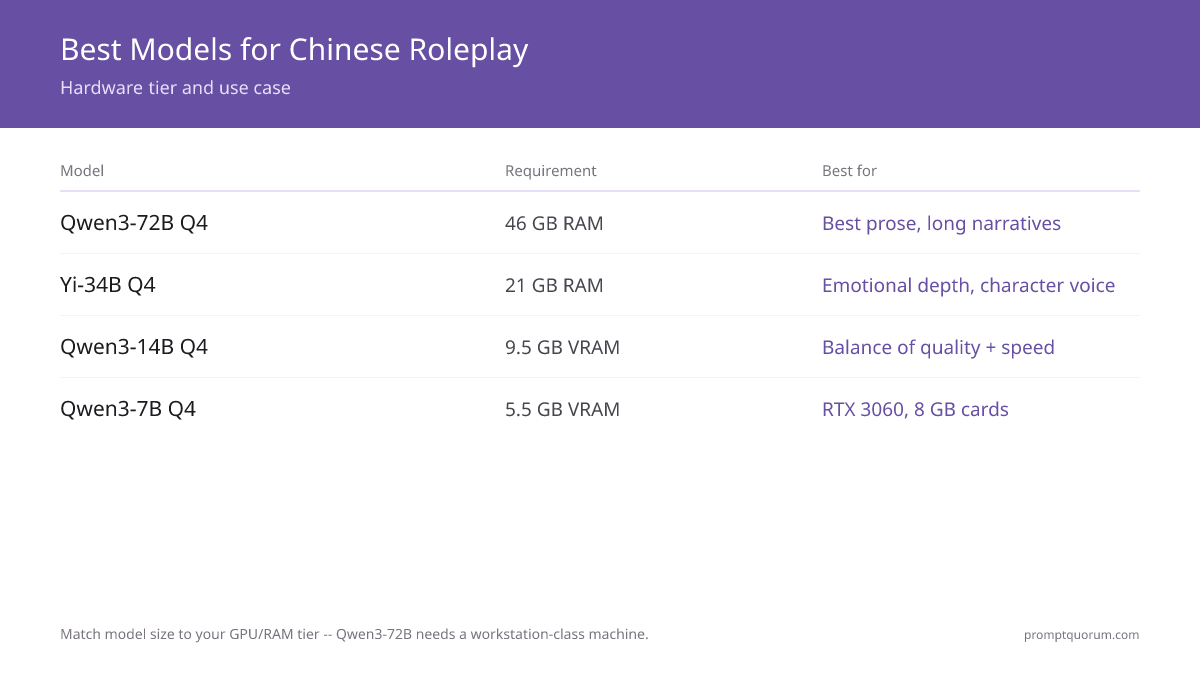
Qwen3-72B Q4_K_M is the best local model for Chinese roleplay — native Chinese training, rich vocabulary, and 128K context. Yi-34B excels at emotional character depth. For users with 8 GB VRAM, Qwen3 8B runs well at 8–12 tok/s.
- ▸Qwen3-72B Q4_K_M: 46 GB RAM, best Chinese prose quality, 128K context — for workstation or Mac Studio
- ▸Yi-34B Q4_K_M: 21 GB RAM, excellent character voice and emotional range
- ▸Qwen3 8B Q4_K_M: 5.5 GB VRAM, 8–12 tok/s — best for 8 GB VRAM cards
- ▸ChatGLM3-6B: 4.5 GB VRAM, fastest inference but weaker character consistency
Key Takeaways
- ✓Qwen3-72B Q4_K_M: best Chinese prose, 46 GB RAM needed
- ✓Yi-34B Q4_K_M: best character depth, 21 GB RAM
- ✓Qwen3 8B Q4_K_M: best for 8 GB VRAM, 8–12 tok/s
- ✓SillyTavern → API type: OpenAI-compatible → URL: http://127.0.0.1:11434/v1
- ✓Character cards: paste Chinese text directly, save as UTF-8
- ✓System prompt: 始终用简体中文回复。保持角色一致性。
Which Qwen or Chinese Model to Use for Roleplay
Four models cover the main hardware tiers. Qwen3-72B leads on prose quality but requires a workstation or Mac Studio with 46 GB of unified memory. Yi-34B is the runner-up for users who prioritise character voice and emotional range over raw fluency. Qwen3 8B is the practical choice for anyone with a standard gaming GPU.
Connect SillyTavern to Ollama in 4 Steps
SillyTavern communicates with Ollama through an OpenAI-compatible API endpoint. No plugin needed — Ollama exposes this natively at port 11434.
Writing Character Cards in Chinese
SillyTavern character cards (persona descriptions, greeting messages, and example dialogue) fully support Chinese text. Write directly in Simplified Chinese — no special encoding steps needed as long as your system locale is UTF-8.
A minimal Chinese character card structure:
名字:苏云
描述:苏云是一名二十五岁的古风侠女,性格冷静、话语简洁,行事果断。她来自江湖,精通剑术,内心深处渴望平静的生活。
开场白:(苏云缓缓抬头,眸色沉静)你来了。有什么事?
示例对话:
{{user}}: 我需要你的帮助。
苏云: 先说清楚,值不值得我出手。
Encoding Settings to Prevent Garbled Chinese
Garbled Chinese output (乱码) is almost always caused by one of three issues: wrong system prompt language instruction, model not trained on Chinese, or a terminal/editor not set to UTF-8.
- ▸SillyTavern config: No special setting needed — the app uses UTF-8 internally. If you export/import character cards as JSON, verify your editor saves as UTF-8 (not ANSI or GB2312).
- ▸Windows terminal: Run `chcp 65001` before starting Ollama to force UTF-8 code page.
- ▸Ollama model file: If using a custom Modelfile, set `PARAMETER stop ""` — Chinese punctuation like 。!? can trigger premature stop tokens on some base models.
- ▸llama.cpp backend: Add `--log-disable` flag — the default log output can break Unicode in some Windows terminals.
System Prompt Template for Chinese Roleplay
Place this in SillyTavern's system prompt field (API → Instruction Template). Adjust the character name and tone as needed.
你是{{char}}。请始终用简体中文回复,保持角色一致性。
规则:
- 不要破坏角色(OOC)
- 回复长度:100–300字,根据情境调整
- 使用符合古风/现代/科幻(选择一种)语境的词汇
- 如有动作描写,用括号标注,如:(她轻轻叹气)
Frequently Asked Questions
Want the full breakdown?
Read the complete guide →Related Prompt Bites