نظرة عامة على عائلة نماذج Qwen
تضم تشكيلة Qwen الآن خمسة خيارات عملية: الرائد Qwen 3.6 27B، وQwen3 (الجيل السابق، ولا يزال منتشرًا على نطاق واسع)، وQwen2.5 للاستدلال العام، وQwen2.5-Coder، وQwen2.5-VL للرؤية — لكل منها خيارات أحجام متعددة. جميعها نماذج ذات أوزان مفتوحة نشرها فريق Qwen التابع لـ Alibaba على Hugging Face. يصدر Qwen 3.6 كنموذج كثيف بحجم 27B وكنموذج مزيج خبراء 35B-A3B (`qwen3.6:35b`)؛ وللأجهزة المتواضعة يأتي جيل Qwen3.5 (`qwen3.5:4b` و`qwen3.5:9b`) بعد Qwen3، ويمثل Qwen3-VL (`qwen3-vl:8b`) جيل الرؤية الأحدث. راجع بطاقة كل نموذج لمعرفة ترخيصه.
اختر العائلة الفرعية أولًا ثم الحجم الذي يلائم VRAM لديك. من المعتاد دمج العائلات الفرعية: Qwen2.5-Coder 14B لإكمال الكود وQwen3 8B أو Qwen 3.6 27B لتلخيص المستندات.
العائلة الفرعية | الأحجام المتاحة | الاستخدام الرئيسي | بادئة وسم Ollama |
|---|---|---|---|
| Qwen 3.6 (النموذج الرائد) | 27B كثيف، 35B-A3B MoE | الاستدلال العام والبرمجة (`qwen3.6:27b-coding`)، سياق 256K | qwen3.6: |
| Qwen3 (الجيل السابق) | 0.6B، 1.7B، 4B، 8B، 14B، 32B | الاستدلال العام، وضع الاستدلال، متعدد اللغات، المهام الوكيلية | qwen3: |
| Qwen2.5 | 7B، 14B، 32B، 72B | الاستدلال العام، المهام بالصينية/متعددة اللغات، RAG | qwen2.5: |
| Qwen2.5-Coder | 7B، 14B، 32B | توليد الكود، التصحيح، HumanEval، SWE-bench | qwen2.5-coder: |
| Qwen2.5-VL | 3B، 7B، 32B، 72B | OCR للمستندات، الأسئلة عن الصور، استخراج نص CJK | qwen2.5vl: |
Qwen 3.6 27B (صدر في أبريل 2026) هو الاختيار الرائد الجديد — نموذج كثيف بنافذة سياق 256K يعمل بـ ~17 GB من VRAM عند Q4_K_M عبر `ollama run qwen3.6:27b`. تظل Qwen2.5 العائلة الأكثر اختبارًا، بأوسع تغطية في Ollama وGGUF حتى منتصف 2026. راجع أفضل نماذج LLM المحلية 2026 لمقارنة أوسع.
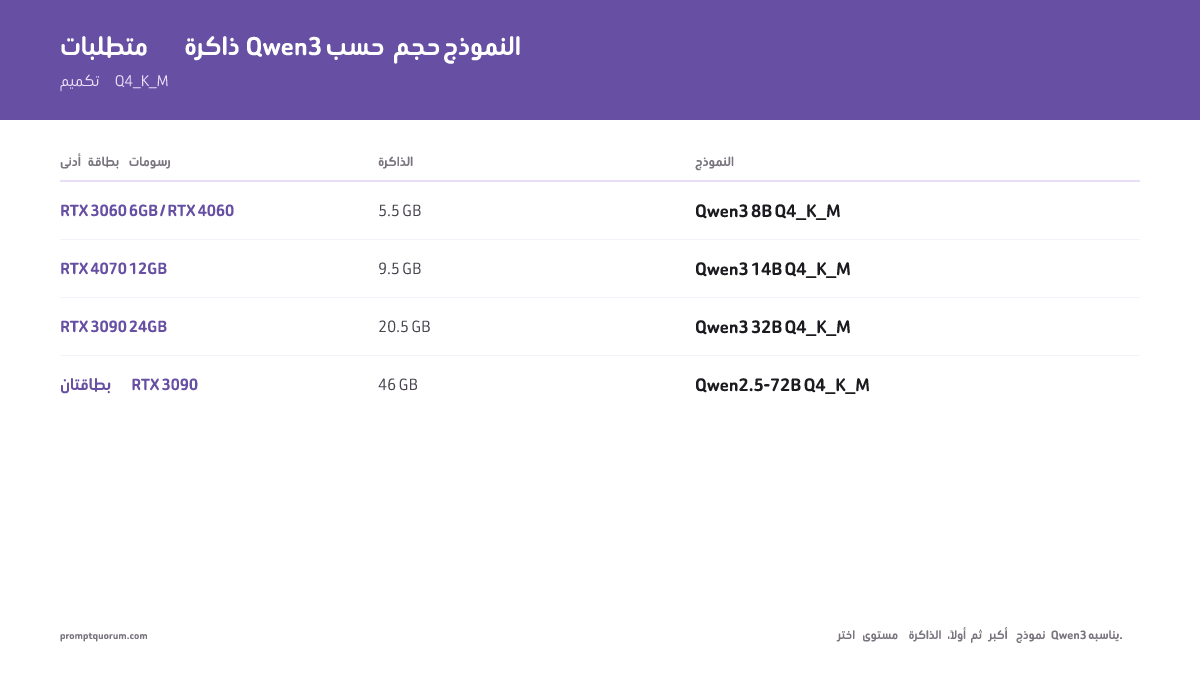
متطلبات الأجهزة حسب حجم النموذج
اختر مستوى VRAM لديك أولًا ثم أكبر نموذج Qwen3 يتسع. Q4_K_M هو التكميم القياسي المستخدم في جميع الأرقام أدناه — يقدّم أفضل نسبة حجم/جودة لـ Ollama وLM Studio.
النموذج | VRAM | الحد الأدنى لبطاقة الرسوم | Apple Silicon | السرعة (GPU) |
|---|---|---|---|---|
| Qwen3 8B Q4_K_M | 5.5 GB | RTX 3060 12 GB، RTX 4060 | M1/M2 8 GB | ~57 tok/s (RTX 3060 12 GB) |
| Qwen2.5-Coder 7B Q4_K_M | 5.5 GB | RTX 3060 12 GB، RTX 4060 | M1/M2 8 GB | ~55 tok/s (RTX 3060 12 GB) |
| Qwen2.5-VL 7B (Ollama) | 6.0 GB | RTX 3060 8 GB، RTX 4060 | M1/M2 16 GB | — |
| Qwen3 14B Q4_K_M | 9.5 GB | RTX 4070 12 GB | M2 Pro 16 GB | ~38 tok/s (RTX 4070) |
| Qwen2.5-Coder 14B Q4_K_M | 9.5 GB | RTX 4070 12 GB | M2 Pro 16 GB | ~36 tok/s (RTX 4070) |
| Qwen3 32B Q4_K_M (الجيل السابق) | 20.5 GB | RTX 3090 24 GB | M3 Max 48 GB | ~28 tok/s (RTX 4090) |
| Qwen2.5-Coder 32B Q4_K_M | 20.5 GB | RTX 3090 24 GB | M3 Max 48 GB | ~27 tok/s (RTX 4090) |
| Qwen 3.6 27B Q4_K_M | ~17 GB | RTX 4090 24 GB | M3 Max 36 GB | ~24 tok/s (RTX 4090) |
| Qwen2.5-72B Q4_K_M | 46 GB | 2× RTX 3090 (48 GB) | M2 Ultra 64 GB | ~12 tok/s (2×RTX 4090) |
أرقام VRAM تقريبية لصيغة Q4_K_M. تذكر مكتبة Ollama أحجام تنزيل: 5.2 GB (qwen3:8b) و9.3 GB (qwen3:14b) و20 GB (qwen3:32b وqwen2.5:32b) و47 GB (qwen2.5:72b) و17 GB (qwen3.6:27b-q4_K_M؛ الوسم الافتراضي 27b بحجم 18–19 GB)، جرى التحقق في 23 أكتوبر 2026. أضف 1–2 GB لذاكرة KV المؤقتة بسياق 4K. إذا كانت بطاقة الرسوم تملك VRAM أقل مما يحتاج النموذج، يفرّغ Ollama الطبقات تلقائيًا إلى RAM النظام — يعمل، لكنه يقلّل السرعة بشكل كبير.
💡نصيحة: هل حددت مستوى VRAM الخاص بك؟ اطّلع على بطاقة الرسوم أو جهاز Mac المناسب تمامًا لهذا المستوى — 6 GB ← RTX 4060، 12 GB ← RTX 4070 Super، 24 GB ← RTX 3090/4090، 48 GB فأكثر ← Mac mini M5 Pro أو بطاقتا رسوم.
الإعداد عبر Ollama
Ollama هو أسرع طريقة لتشغيل أي نموذج Qwen3 محليًا — يدير تنزيل النموذج وتكميم GGUF وواجهة API المحلية على `localhost:11434` دون أي إعداد. ثبّته من ollama.com. إذا لم تستخدم Ollama من قبل، اقرأ أولًا كيفية تثبيت Ollama.
- 1ثبّت Ollama
Why it matters: متاح لـ macOS وLinux (تثبيت بسطر واحد) وWindows. لا حاجة لإعداد تعريفات بطاقة الرسوم — يكتشف Ollama CUDA وROCm وMetal تلقائيًا. - 2نزّل النموذج بوسم حجم صريح
Why it matters: حدّد الحجم دائمًا: `qwen2.5:7b`، `qwen2.5:14b`، `qwen2.5:32b`. يُحل `qwen2.5` غير الموسوم إلى نموذج 7B، لكنه قد يتغير بين إصدارات Ollama. - 3شغّل النموذج
Why it matters: `ollama run qwen2.5:7b` يفتح دردشة تفاعلية. اكتب أمرك واضغط Enter. أغلق بـ `/bye`. - 4اضبط نافذة السياق عند الحاجة
Why it matters: تذكر مكتبة Ollama نافذة سياق بطول 40K لـ Qwen3 و32K لـ Qwen2.5 و256K لـ Qwen 3.6. لاستخدام سياق 128K على نموذج 7B، شغّل `ollama run qwen2.5:7b` ثم اكتب `/set parameter num_ctx 131072` داخل الجلسة. يتطلب هذا مزيدًا من VRAM. - 5اختبر نقطة نهاية API
Why it matters: يكشف Ollama واجهة API متوافقة مع OpenAI. تتصل تطبيقات مثل PromptQuorum وContinue.dev وOpen WebUI مباشرة بـ `http://localhost:11434/v1`.
# Instalar Ollama (Linux)
curl -fsSL https://ollama.com/install.sh | sh

# macOS: descarga el .dmg desde ollama.com o:
brew install ollama

# Descargar modelos — usa etiquetas explícitas
ollama pull qwen3.6:27b          # insignia, contexto 256K (~17 GB)
ollama pull qwen3:8b             # Qwen3 uso general 8B (~5,5 GB)
ollama pull qwen2.5:7b           # Qwen2.5 uso general 7B (~5,5 GB)
ollama pull qwen2.5:14b          # Qwen2.5 uso general 14B (~9,5 GB)
ollama pull qwen2.5:32b          # Qwen2.5 uso general 32B (~20,5 GB)
ollama pull qwen2.5-coder:32b    # Qwen2.5-Coder 32B (~20,5 GB)
ollama pull qwen2.5vl:7b          # visión 7B (~6,0 GB)

# Ejecutar en modo interactivo
ollama run qwen2.5:7b

# Probar la API compatible con OpenAI
curl http://localhost:11434/v1/chat/completions \
  -H "Content-Type: application/json" \
  -d '{"model":"qwen2.5:7b","messages":[{"role":"user","content":"Hola"}]}'
الإعداد عبر LM Studio
يقدّم LM Studio واجهة رسومية لـ Qwen3 دون الحاجة إلى أوامر طرفية. نزّله من lmstudio.ai أو راجع كيفية تثبيت LM Studio. يعمل على macOS وWindows وLinux.
- 1افتح متصفح النماذج
Why it matters: ابحث عن "Qwen3" أو "Qwen Coder" لاستكشاف جميع بناءات GGUF المتاحة. رشّح حسب Q4_K_M للحصول على نسبة الجودة/الحجم الموصى بها. - 2نزّل بناء GGUF
Why it matters: اختر متغير Q4_K_M. يعرض LM Studio حجم الملف قبل التنزيل — تأكد من أنه يتسع في VRAM المتاح. - 3حمّل النموذج وابدأ الدردشة
Why it matters: انقر على النموذج في الشريط الجانبي الأيسر لتحميله في الذاكرة. توزيع الطبقات على بطاقة الرسوم تلقائي حسب VRAM المكتشف. - 4ابدأ الخادم المحلي
Why it matters: "بدء الخادم" يكشف نقطة نهاية متوافقة مع OpenAI على `localhost:1234`. تتصل به تطبيقاتك ونصوصك كما لو كان API الخاص بـ OpenAI.
التكميم: أي تنسيق تختار
Q4_K_M هو القيمة الافتراضية الصحيحة لـ Qwen3 على الأجهزة الاستهلاكية. يقلّل VRAM بين 55–60% مقارنةً بـ FP16 مع تدهور طفيف في MMLU وHumanEval. للتنسيقات الأخرى حالات استخدام محددة:
Q4_K_M هو أفضل تكميم لـ Qwen3 لمعظم المستخدمين: يقلّل VRAM بنسبة 55% مع فقدان جودة طفيف مقارنةً بـ FP16.
يضغط التكميم أرقام النموذج من 16 بت إلى 4 بت، فيقلّل حجم الملف وVRAM المطلوب إلى النصف تقريبًا. الأمر أشبه بالانتقال من TIFF إلى JPEG عالي الجودة — ملف أصغر، ونتيجة شبه متطابقة لمعظم الاستخدامات.
- Q4_K_M (موصى به): ~5.5 GB لـ 7B. أفضل نسبة جودة لكل GB. ابدأ بهذا.
- Q8_0: ~8.5 GB لـ 7B. جودة قريبة من FP16؛ استخدمه إذا كان لديك فائض VRAM وتريد أقصى دقة.
- Q5_K_M: ~6.5 GB لـ 7B. تحسّن هامشي على Q4_K_M — اخترْه فقط إذا كانت جودة مخرجات Q4_K_M ضعيفة بوضوح لمهمتك.
- Q2_K: ~3 GB لـ 7B. أصغر ملف، لكن جودة المخرجات بالصينية تتدهور بشكل ملحوظ — تجنّبه مع Qwen3 إذا كانت الصينية جزءًا من حالة استخدامك.
- IQ4_XS: ~4.8 GB لـ 7B. تكميم imatrix أحدث يتفوق على جودة Q4_K_M بحجم أصغر قليلًا — متاح في إصدارات حديثة من llama.cpp وLM Studio 0.3+.
أداء المعايير على الأجهزة الاستهلاكية
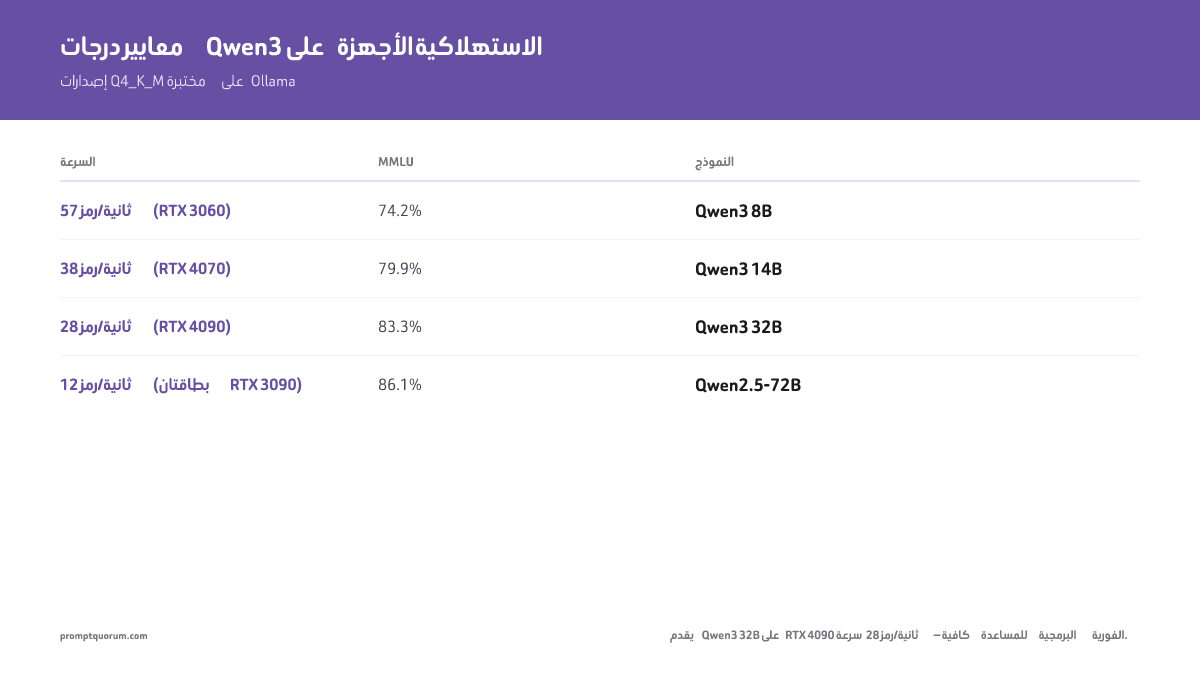
يقدّم Qwen3 32B Q4_K_M على RTX 4090 سرعة 28 token/ثانية — سرعة كافية للمساعدة البرمجية في الوقت الفعلي. Qwen3 32B هو الجيل السابق من Qwen؛ ويتسع Qwen 3.6 27B الأحدث في مستوى 24 GB نفسه (راجع جدول الأجهزة أعلاه). الأرقام أدناه قيم تقريبية وليست قياسات أجرتها PromptQuorum: تختلف السرعة بحسب بطاقة الرسوم وبرنامج التشغيل وطول السياق وإصدار Ollama، ولم نُعد تشغيل درجات الدقة، ودرجات HumanEval الخاصة بـ Coder هي النتائج المنشورة لنماذج Instruct بدقة كاملة (التقرير التقني لـ Qwen2.5-Coder، arXiv:2409.12186، الجدول 16)، أما درجات Qwen3 وQwen2.5-72B فتقريبية ولم تُقارَن ببطاقات النماذج، وتسجّل نسخ Q4_K_M عادةً درجة أقل قليلًا من الدقة الكاملة. راجع بطاقة كل نموذج واختبر على جهازك قبل الاعتماد عليها.
النموذج (Q4_K_M) | MMLU | Math | HumanEval | السرعة (GPU) |
|---|---|---|---|---|
| Qwen3 8B | 74.2% | 58.8% | 57.3% | 57 tok/s (RTX 3060 12 GB) |
| Qwen3 14B | 79.9% | 69.8% | 64.6% | 38 tok/s (RTX 4070 12 GB) |
| Qwen3 32B | 83.3% | 79.5% | 71.3% | 28 tok/s (RTX 4090 24 GB) |
| Qwen2.5-72B | 86.1% | 83.1% | 73.2% | 12 tok/s (2×RTX 3090) |
| Qwen2.5-Coder 7B | — | — | 88.4% | 55 tok/s (RTX 3060 12 GB) |
| Qwen2.5-Coder 14B | — | — | 89.6% | 36 tok/s (RTX 4070 12 GB) |
| Qwen2.5-Coder 32B | — | — | 92.7% | 27 tok/s (RTX 4090 24 GB) |
💡نصيحة: هل تريد تحقيق درجة 92.7% في HumanEval بسرعة 27 token/ثانية؟ اطّلع على بطاقة الرسوم بسعة 24 GB التي تشغّل Qwen2.5-Coder 32B.
Qwen مقابل DeepSeek مقابل Llama: ماذا تشغّل محليًا
في تقديرنا، تُعد عائلة Qwen الأكثر كفاءة في استخدام VRAM على الأجهزة الاستهلاكية؛ وخط DeepSeek V4 الحالي واسع النطاق (V4-Flash: 284B معامل إجمالي) وغير عملي على بطاقة رسوم استهلاكية واحدة؛ وLlama 3.3 70B بديل إذا كنت تفضّل النموذج المفتوح من Meta وتقبل نقل جزء من الطبقات إلى ذاكرة النظام على بطاقة رسوم واحدة. يقارن الجدول أدناه الخيارات العملية في كل مستوى VRAM.
مستوى VRAM | أفضل Qwen | أفضل منافس | الحكم |
|---|---|---|---|
| 6 GB | Qwen3 8B | Llama 3.2 3B (يتسع، لكنه 3B فقط) | يفوز Qwen3 8B — نفس VRAM، نموذج أكبر بكثير |
| 12 GB | Qwen2.5-Coder 14B | Llama 3.1 8B Instruct | Qwen2.5-Coder 14B للكود؛ Llama 3.1 8B للدردشة العامة |
| 24 GB | Qwen2.5-Coder 32B | Llama 3.3 70B (مع تفريغ) | Qwen2.5-Coder 32B للكود؛ Llama 3.3 70B إذا كانت الجودة > السرعة |
| 48 GB+ | Qwen2.5-72B | DeepSeek V4-Flash 284B MoE | الأوزان وحدها ~140 GB بتكميم 4 بت؛ Qwen2.5-72B يناسب 48 GB |
المستخدمون الناطقون بالعربية: سيادة البيانات والنشر المحلي
تشغيل Qwen3 محليًا يُبقي أوامر الاستدلال على جهازك، فلا تُرسل بيانات الاستدلال إلى واجهة API سحابية، وبذلك يُتجنَّب هذا النقل الدولي في طبقة الاستدلال. تتطلب واجهات API لنماذج LLM السحابية إرسال الأوامر إلى خوادم خارجية، مما قد يُفعّل متطلبات GDPR وقوانين حماية البيانات في الخليج بشأن معالجة البيانات والنقل الدولي. ويعتمد امتثال إعدادك ككل على بياناتك وأغراضك وتقييمك القانوني؛ وهذا ليس استشارة قانونية.
دُرّب Qwen3 على يد فريق Qwen التابع لـ Alibaba على مجموعة نصية صينية ومتعددة اللغات في الغالب. وهو مرشح قوي للمستندات بالصينية المبسّطة والتقليدية والنصوص المختلطة (صينية/عربية/إنجليزية)؛ جرّبه على موادك الخاصة.
لعمليات النشر في الشركات الناطقة بالعربية: إعداد Qwen3 دون اتصال بالإنترنت أثناء الاستدلال يسهّل الالتزام بالأطر التنظيمية في السعودية (PDPL) والإمارات (قانون حماية البيانات) ودول الخليج الأخرى، لكن الامتثال يعتمد على حالة الاستخدام ويُنصح بتأكيده مع مستشار قانوني. يعمل النموذج بالكامل على أجهزة محلية — ولا يصل أي طرف ثالث إلى بيانات الإدخال أو الإخراج ما لم تفعّل خدمات سحابية أو أدوات متصلة. كما تتوفر بدائل عربية سيادية مثل Jais وALLaM للمؤسسات التي تفضّل نماذج عربية المنشأ. راجع تشغيل الذكاء الاصطناعي دون اتصال بالكامل للحصول على دليل كامل للإعداد المعزول.
يمكن تشغيل Qwen3 دون اتصال بالإنترنت بعد التنزيل، فلا حاجة لأن تغادر بيانات الاستدلال جهازك، مما يقلّل مخاطر نقل البيانات عبر الحدود بموجب GDPR وقوانين الخليج (ويظل الامتثال معتمدًا على حالة استخدامك).
عندما تشغّل Qwen3 محليًا، تبقى أوامرك ومستنداتك على حاسوبك ما لم تربطه بخدمة سحابية. لا يحتاج الاستدلال إلى استدعاء API سحابي؛ أما كيفية تعامل بقية إعدادك مع البيانات فمسؤوليتك.
ما الجهاز الذي ينبغي شراؤه لنشر Qwen3؟
طابِق مستوى Qwen المستهدف مع VRAM المطلوب أولًا، ثم اشترِ أرخص بطاقة تحقّق هذا الحد — دفع ثمن VRAM أكثر مما يحتاجه نموذجك هو أكثر أخطاء الإنفاق شيوعًا في هذه القائمة. تتوافق الاختيارات أدناه مباشرة مع جدول الأجهزة أعلاه: اقتصادي ← RTX 4060، متوسط ← RTX 4070 Super، فئة عليا ← RTX 3090/4090، Apple Silicon ← Mac mini M5 Pro، تشغيل متواصل ← حاسوب صغير. تعكس الأسعار أدناه سوق بطاقات الرسوم في 2026 — أدى نقص رقائق الذاكرة والطلب من مراكز بيانات الذكاء الاصطناعي إلى ارتفاع أسعار بطاقات الرسوم الجديدة وتشكيلات ذاكرة Apple؛ تحقّق من السعر الفعلي قبل الشراء.
💡نصيحة: تخطَّ هذا القسم إذا كنت تملك بالفعل بطاقة رسوم بسعة 8 GB من VRAM أو أكثر — شغّل Qwen3 8B أولًا على ما تملكه. اشترِ جهازًا جديدًا فقط بعد بلوغ هذا الحد ورغبتك في نموذج أكبر.
NVIDIA RTX 4060 8 GB
اختيار اقتصادي — Qwen3 8B وQwen2.5-Coder 7B (5.5 GB VRAM)
أرخص بطاقة في هذه القائمة تحقّق متطلب 5.5 GB لـ Qwen3 8B مع هامش للسياق. تشغّل Qwen2.5-Coder 7B بسرعة ~55 token/ثانية — سرعة كافية للمساعدة البرمجية التفاعلية.
الإيجابيات
- +يتحقق متطلب 5.5 GB من VRAM مع هامش لذاكرة KV المؤقتة للسياق الطويل
- +أقل سعر في هذه القائمة — بطاقة الرسوم الأولى المناسبة إذا لم تشغّل نموذج LLM محليًا من قبل
- +50–57 token/ثانية على نماذج 7B/8B، بأداء مماثل للبطاقات الأغلى عند هذا الحجم من النماذج
السلبيات
- –يقتصر على Qwen3 8B / Qwen2.5-Coder 7B — لا هامش للانتقال إلى 14B دون ضغط ذاكرة KV المؤقتة
NVIDIA RTX 4070 Super 12 GB
اختيار متوسط — Qwen3 14B وQwen2.5-Coder 14B (9.5 GB VRAM)
تشغّل Qwen2.5-Coder 14B (89.6% في HumanEval) بسرعة 36–38 token/ثانية مع بقاء 2–3 GB من VRAM للسياق — خيار مناسب لمستوى 12 GB.
الإيجابيات
- +يتسع النموذج بحجم 9.5 GB مع بقاء 2–3 GB من VRAM — مساحة لنوافذ سياق أطول
- +HumanEval 89.6% (14B) مقابل 88.4% (7B)، وهي درجات Instruct المنشورة بدقة كاملة — تحسّن صغير في هذا المعيار، فاختر 14B لهامش الأداء في المهام الأصعب لا لقفزة كبيرة في الدرجة
- +تحافظ سرعة ~38 token/ثانية على استجابة الدردشة التفاعلية وإكمال الكود
السلبيات
- –لا يكفي VRAM لمستوى 32B — خطّط للبيع أو إعادة الاستخدام إذا تجاوزت 14B
NVIDIA RTX 4090 24 GB (أو RTX 3090 24 GB مستعملة)
اختيار فئة عليا — Qwen2.5-Coder 32B وQwen 3.6 27B (~20.5 / ~17 GB VRAM)
تقدّم 4090 سرعة ~27 token/ثانية على Qwen2.5-Coder 32B — سرعة برمجة في الوقت الفعلي بدرجة 92.7% في HumanEval. تملك RTX 3090 المستعملة نفس سعة 24 GB من VRAM، وتقترب من سرعة استدلال 4090 بفارق نحو 15% فقط، بسعر أقل بكثير إذا وجدت عرضًا مستعملًا موثوقًا.
الإيجابيات
- +تغطي سعة 24 GB من VRAM جميع إصدارات Qwen3 32B وQwen 3.6 27B مع هامش إضافي
- +~27 token/ثانية على Qwen2.5-Coder 32B (92.7% في HumanEval) — سريعة بما يكفي للبرمجة الزوجية في الوقت الفعلي
- +RTX 3090 المستعملة هي البديل الاقتصادي: سقف VRAM نفسه، أبطأ بنحو 15%، وأرخص بشكل ملحوظ مستعملة
السلبيات
- –أعلى تكلفة مبدئية في هذه القائمة — لا تُبرَّر إلا عند الحاجة الفعلية لجودة فئة 32B
Apple Mac mini M5 Pro 64 GB
اختيار Apple Silicon — Qwen 3.6 27B أو Qwen3 32B، هادئ ومنخفض الاستهلاك
أفضل قيمة لتشغيل Qwen3 32B عبر الذاكرة الموحّدة — هادئ، استهلاك طاقة منخفض، ولا حاجة لتركيب بطاقة رسوم منفصلة. أما Qwen2.5-72B فإن M2 Ultra بذاكرة 64 GB هو الحد الأدنى الضيق، وتمنح ذاكرة 128 GB أو أكثر هامشًا للسياق.
الإيجابيات
- +تتوفر تكوينات M5 Pro بذاكرة موحّدة تصل حتى 64 GB — أعلى بكثير من متطلب 20.5 GB لـ Qwen3 32B، مع مساحة إضافية لتطبيقات أخرى
- +تشغيل صامت واستهلاك طاقة مناسب لمكتب العمل — دون إدارة تبريد مخصص لبطاقة رسوم
- +عملية شراء واحدة تغطي نظام التشغيل والتخزين والاستدلال — دون تجميع منفصل لبطاقة رسوم/مزود طاقة/هيكل
السلبيات
- –لا تتوفر بعد اختبارات أداء مستقلة لـ Qwen3 32B على شريحة M5 Pro — توقّع أداءً أبطأ بوضوح من بطاقة رسوم مخصصة مثل RTX 4090، بما يتسق مع أجيال Apple Silicon السابقة في Mac mini
MINISFORUM UM890 Pro (أو حاسوب صغير مماثل بمعالج AMD Ryzen AI)
اختيار للتشغيل المتواصل — Qwen3 8B على CPU + iGPU (~8–12 token/ثانية، أقل من 35 واط)
غير مخصص للاستخدام التفاعلي — بل لتشغيل نسخة من Qwen3 8B على مدار الساعة طوال أيام الأسبوع لمهام خلفية، أو أتمتة المنزل، أو نقطة نهاية API منخفضة الحركة حيث تهم تكلفة الطاقة أكثر من السرعة.
الإيجابيات
- +استهلاك أقل من 35 واط — رخيص التشغيل المستمر، على عكس تجميعة سطح مكتب ببطاقة رسوم
- +حجم صغير يناسب أي مكان؛ دون حاجة لبطاقة رسوم منفصلة أو تبريدها
- +يشغّل Qwen3 8B دون أي بطاقة رسوم مخصصة على الإطلاق
السلبيات
- –سرعة 8–12 token/ثانية بطيئة جدًا للدردشة التفاعلية — اختيار مخصص للاستخدام الخلفي/API فقط
الأخطاء الشائعة عند تشغيل Qwen3 محليًا
- استخدام الأمر `ollama pull qwen2.5` دون وسم حجم. بدون وسم حجم صريح (`:7b`، `:14b`، إلخ)، قد يُحل Ollama إلى الحجم الافتراضي، الذي قد يتغير بين تحديثات المكتبة. استخدم دائمًا وسومًا صريحة: `ollama pull qwen2.5:14b`.
- تجاهل حجم نافذة السياق. بحسب بطاقة النموذج، يدعم Qwen3 أصلًا سياقًا بطول 32K رمز ونحو 131K مع YaRN. تحدد مواصفات Modelfile في Ollama القيمة الافتراضية لـ `num_ctx` بـ 2048، لكن وقت التشغيل الفعلي يختار قيمة افتراضية متدرجة حسب VRAM: 4K أقل من 24 GiB، و32K بين 24 و48 GiB، و256K فوق 48 GiB. لا تعتمد على أي من القيمتين الافتراضيتين: اضبط `num_ctx` صراحةً، مثلاً بكتابة `/set parameter num_ctx 8192` (أو أكثر) داخل جلسة `ollama run` — وإلا يقتطع النموذج الإدخال بصمت.
- اختيار تكميم Q2_K للاستخدام بالصينية. بدقة 2 بت، تتدهور مخرجات Qwen3 بالصينية بشكل ملحوظ. استخدم Q4_K_M كحد أدنى لأي عمل بالصينية.
- تشغيل نموذج 32B بـ VRAM قليل. إذا كانت بطاقة الرسوم تملك 16 GB والنموذج يحتاج إلى 20.5 GB، يفرّغ Ollama الطبقات إلى RAM النظام. يعمل النموذج لكن بـ 3–5 token/ثانية — غير قابل للاستخدام التفاعلي. راجع جدول الأجهزة واختر نموذجًا يتسع في VRAM لديك.
- استخدام العائلة الفرعية الخاطئة للبرمجة. تم تدريب Qwen2.5-Coder 7B للبرمجة ويسجّل 88.4% في HumanEval (درجة Instruct المنشورة بدقة كاملة)، بينما لا تُضبط النماذج العامة لذلك. إذا كانت حالة استخدامك هي الكود، استخدم دائمًا متغير Coder بالحجم نفسه.
الخطوات التالية
- أفضل نماذج LLM للمعالج فقط — ليس لديك GPU؟ اكتشف أحجام Qwen3 التي تعمل على المعالج فقط →
- شرح تحديد دقة LLM — تبحث عن الفرق بين Q4_K_M وQ8؟ شرح التحديد الدقي →
الأسئلة الشائعة
كم من VRAM أحتاج لتشغيل Qwen3 8B محليًا؟
يتطلب Qwen3 8B Q4_K_M 5.5 GB من VRAM. تكفي RTX 3060 12 GB أو RTX 4060 أو شريحة Apple M بذاكرة موحدة 8 GB.
ما أفضل نموذج Qwen للبرمجة محليًا؟
Qwen2.5-Coder 32B أكبر نموذج برمجة مخصص من Qwen2.5 يتسع في بطاقة رسوم بسعة 24 GB؛ وتذكر Qwen نتيجة 92.7% في HumanEval لنسخة Instruct بدقة كاملة. كما يتوفر لـ Qwen 3.6 27B متغير برمجة (`qwen3.6:27b-coding`). بـ 12 GB من VRAM أو أقل: Qwen2.5-Coder 14B (89.6%، 9.5 GB من VRAM).
كيف يقارن Qwen بـ DeepSeek للنشر المحلي؟
يستخدم Qwen بنية كثيفة متوافقة مع الأجهزة الاستهلاكية. خط DeepSeek المفتوح الحالي هو V4 (V4-Flash: 284B معامل إجمالي، MoE)، وهو أكبر بكثير من بطاقة رسوم استهلاكية واحدة؛ أما DeepSeek-V2.5 (236B MoE، 2024) فقد حلّ محله V3 ثم V4.
هل يمكنني تشغيل Qwen على جهاز Mac؟
نعم. يشغّل M2 Pro 32 GB نموذج Qwen3 14B بـ ~32 token/ثانية. ويتعامل M3 Max 64 GB مع Qwen3 32B بـ ~22 token/ثانية.
ما أمر Ollama الذي أستخدمه لـ Qwen؟
للنموذج الرائد، `ollama run qwen3.6:27b` (~17 GB من VRAM). لـ Qwen3، `ollama pull qwen3:8b`. لـ Qwen2.5، `ollama pull qwen2.5:7b` لـ 7B، و`:14b` لـ 14B، و`:32b` لـ 32B، أو `qwen2.5-coder:32b` لمتغير البرمجة. استخدم دائمًا وسوم حجم صريحة.
هل Qwen مناسب للمهام باللغة الصينية؟
نعم. دُرّب Qwen3 مسبقًا على مجموعة نصية صينية ضخمة ويدعم أصليًا الصينية المبسّطة والتقليدية واليابانية والكورية ولغات كثيرة أخرى (راجع بطاقة النموذج). وهو مرشح قوي للذكاء الاصطناعي المحلي بالصينية؛ جرّبه على مستنداتك.
أي تكميم ينبغي أن أستخدم لـ Qwen3؟
Q4_K_M افتراضيًا — يقلّل VRAM بنحو 55% مقارنةً بـ FP16 مع فقدان جودة طفيف. تجنّب Q2_K للاستخدام بالصينية.
هل يعمل Qwen2.5-VL لـ OCR للمستندات الصينية؟
نعم — `ollama pull qwen2.5vl:7b` (تنزيل 6.0 GB)، يقبل النص والصور ويقرأ نص CJK في المستندات الممسوحة؛ جرّبه على مستنداتك. وQwen3-VL الأحدث هو `qwen3-vl:8b`.
المصادر
- Ollama library: qwen3.6 tags -- 27b-q4_K_M بحجم 17 GB، والوسم الافتراضي 27b بحجم 18–19 GB، وسياق 256K، ووسم 27b-coding؛ جرى التحقق في 23 أكتوبر 2026
- Ollama library: qwen3 tags -- 8b بحجم 5.2 GB، و14b بحجم 9.3 GB، و32b بحجم 20 GB، وسياق 40K؛ جرى التحقق في 23 أكتوبر 2026
- Ollama library: qwen2.5 tags -- 7b بحجم 4.7 GB، و14b بحجم 9.0 GB، و32b بحجم 20 GB، و72b بحجم 47 GB، وسياق 32K؛ جرى التحقق في 23 أكتوبر 2026
- Ollama library: qwen2.5-coder tags -- 7b بحجم 4.7 GB، و14b بحجم 9.0 GB، و32b بحجم 20 GB، وسياق 32K؛ جرى التحقق في 23 أكتوبر 2026
- Qwen3-8B model card -- سياق أصلي 32,768 و131,072 مع YaRN، ودعم أكثر من 100 لغة
- Qwen2.5-Coder-32B-Instruct model card -- سياق 131,072 مع YaRN
- Qwen2.5-Coder Technical Report (arXiv:2409.12186) -- الجدول 16: HumanEval 88.4 (7B) و89.6 (14B) و92.7 (32B)، لنماذج Instruct بدقة كاملة