Key Takeaways
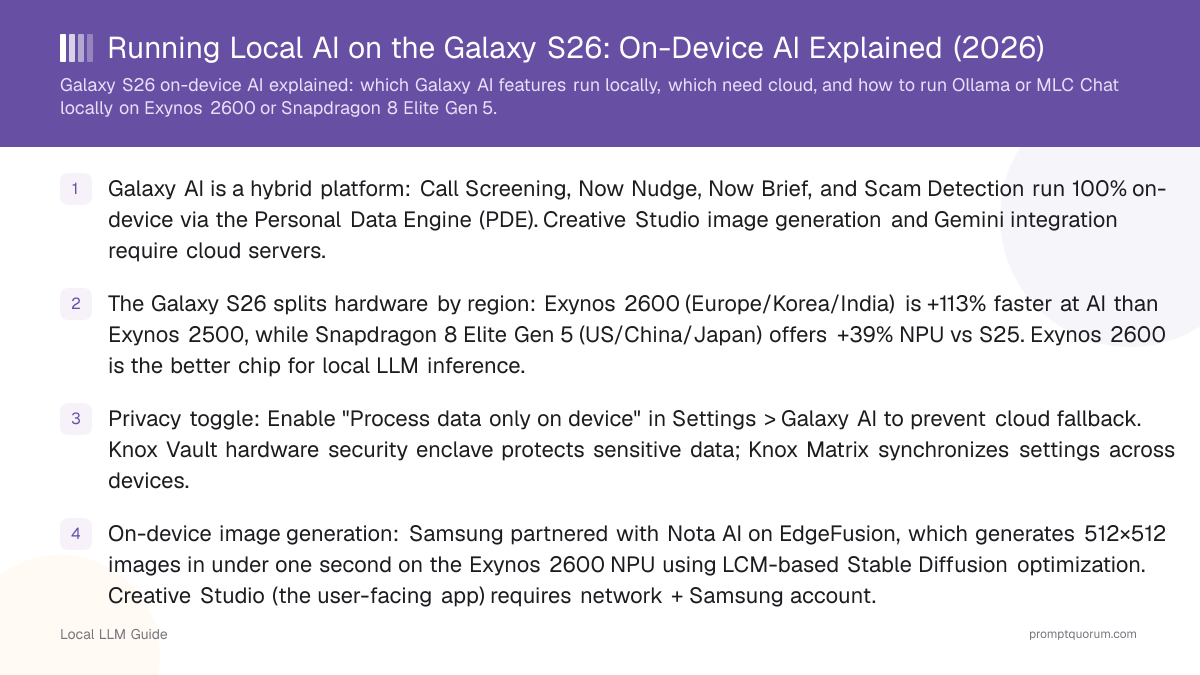
- Galaxy AI is a hybrid platform: Call Screening, Now Nudge, Now Brief, and Scam Detection run 100% on-device via the Personal Data Engine (PDE). Creative Studio image generation and Gemini integration require cloud servers.
- The Galaxy S26 splits hardware by region: Exynos 2600 (Europe/Korea/India) is +113% faster at AI than Exynos 2500, while Snapdragon 8 Elite Gen 5 (US/China/Japan) offers +39% NPU vs S25. Exynos 2600 is the better chip for local LLM inference.
- Privacy toggle: Enable "Process data only on device" in Settings > Galaxy AI to prevent cloud fallback. Knox Vault hardware security enclave protects sensitive data; Knox Matrix synchronizes settings across devices.
- On-device image generation: Samsung partnered with Nota AI on EdgeFusion, which generates 512×512 images in under one second on the Exynos 2600 NPU using LCM-based Stable Diffusion optimization. Creative Studio (the user-facing app) requires network + Samsung account.
- Running your own LLMs: LPDDR5X memory (85.6 GB/s) limits decode throughput. A quantized 7B model at Q4 (4-bit, ~3.5 GB) reaches ~24 tokens/sec theoretical max. Use MLC Chat or Ollama for Android to test.
- Snapdragon memory: S26 and S26 Ultra variants in US/China/Japan use Snapdragon 8 Elite Gen 5 (84.8 GB/s LPDDR5X), slightly slower for LLM inference than Exynos 2600 due to lower NPU performance, not memory.
What Is Galaxy AI on the Galaxy S26?
Galaxy AI is Samsung's on-device intelligence platform, built on Samsung's own Gauss large language model family plus Gemini integration. Launched with Galaxy S24, refined on S25, and expanded on S26 (Feb 25, 2026 launch), it balances local processing for privacy with cloud features for power.
The Personal Data Engine (PDE) is the core: it learns from your on-device data—messages, calendar, photos, location history—without sending anything to Samsung's servers unless you explicitly opt into cloud features. Knox Vault, a hardware security enclave, isolates sensitive data (credentials, health records, payment info) from even Samsung's own software.
Galaxy AI features split into three categories: pure on-device (Call Screening), hybrid with local-first default (Now Nudge, Now Brief, Scam Detection), and cloud-dependent (Creative Studio, Gemini agents, Circle to Search).
User control is central: a single toggle in Galaxy AI settings—"Process data only on device"—blocks all cloud fallback for compatible features. This is not a privacy afterthought; it's the default behavior unless you ask for more power.
📍 In One Sentence
Galaxy AI runs on-device features via Personal Data Engine (PDE) and cloud features on demand, with a single toggle to force device-only processing.
💬 In Plain Terms
Knox Vault = hardware lock for secrets; PDE = learns from your phone without uploading data; toggle = your choice whether cloud features are on.
On-Device vs. Cloud: Which Features Stay Local?
Feature | Processing | User Data Sent? | Requires Network? |
|---|---|---|---|
| Call Screening | On-Device (NPU) | No — caller audio transcribed locally | No |
| Now Nudge | On-Device (PDE) | No — reads screen + calendar locally | No |
| Now Brief | On-Device (PDE) | No — digests local reservations + events | No |
| Scam Detection | On-Device (NPU + Gemini model) | No — call audio + intent flagged locally | No |
| Creative Studio (image gen) | Cloud (Samsung servers) | Yes — text prompt + reference images | Yes — account + internet required |
| Gemini agents (multi-step tasks) | Cloud (Google Gemini) | Yes — task intent to Google servers | Yes |
| Circle to Search | Cloud (Google) | Yes — screenshot area to Google | Yes |
| Photo Assist (complex edits) | Hybrid (local segmentation, cloud generation) | Partial — image sent for generative models | Yes for object removal / background change |
On-Device Image Generation on the S26
Samsung partnered with Nota AI (South Korea) to optimize Stable Diffusion for mobile NPU inference. The result: text-to-image generation in under one second, producing 512×512 pixel photorealistic images entirely on-device, no network required.
The technique is called EdgeFusion (from Nota AI's research): it uses a Latent Consistency Model (LCM) scheduler with 2-step denoising instead of the standard 50 steps, reducing computation by ~96%. Model-level tiling reduces cross-attention latency by ~73%. Mixed-precision quantization (W8A16 in the U-Net) keeps quality intact while halving VRAM footprint.
Performance: validated on Exynos 2600 NPU, where it generates 512×512 images in under 1 second. Exynos 2600 is 2.4x faster at Stable Diffusion than Exynos 2500, so this is realistic. Snapdragon 8 Elite Gen 5 in US/China/Japan variants will likely achieve similar or slightly longer times due to lower NPU performance.
Reality check: Samsung's shipping app, Creative Studio, requires network + Samsung account login. It's unclear whether EdgeFusion shipped as a user-facing feature at launch or whether it powers a future update. Samsung never mentioned "EdgeFusion" by name in official Unpacked materials; the feature originates from Nota AI's research partnership. Use this knowledge to manage expectations: on-device image gen is coming, but may not ship fully on day one.
📍 In One Sentence
EdgeFusion generates 512×512 images in <1 second on-device by reducing Stable Diffusion from 50 denoising steps to just 2, using quantized weights and model-level tiling.
💬 In Plain Terms
Fewer denoising steps = less computation = faster inference. Quantization shrinks the model. Tiling splits the attention layers to fit in phone VRAM. Together: instant images offline.
- LCM scheduler: 2-step denoising replaces 50-step standard diffusion, 96% fewer compute steps
- Model-level tiling: reduces cross-attention memory access, ~73% latency improvement
- W8A16 quantization: 8-bit weights, 16-bit activations, no perceptible quality loss
- Target resolution: 512×512 pixels, photorealistic output
- NPU-optimized: Exynos 2600 tensor cores handle most compute; minimal CPU overhead
- Offline capable: zero network dependency if EdgeFusion is active
Exynos 2600 vs. Snapdragon 8 Elite Gen 5 NPU
Metric | Exynos 2600 | Snapdragon 8 Elite Gen 5 | Winner for Local AI? |
|---|---|---|---|
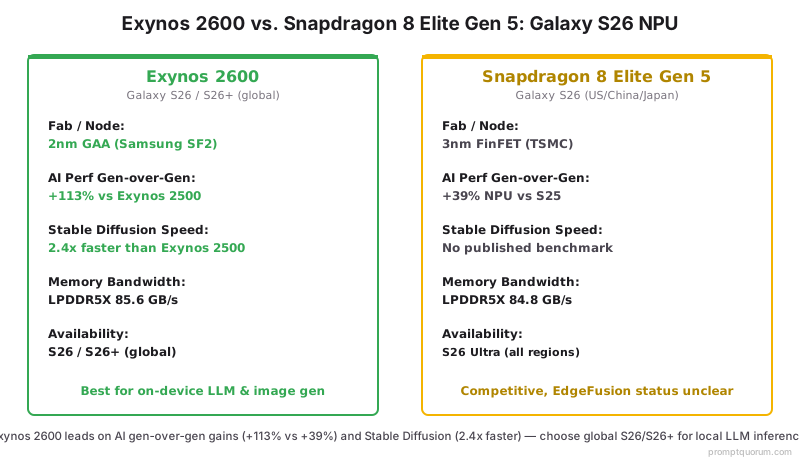
| Node / Fab | 2nm GAA (Samsung SF2) | 3nm FinFET (TSMC) | Exynos (smaller, more efficient) |
| AI Performance Gen-over-gen | +113% vs Exynos 2500 | +39% NPU vs S25 | Exynos (3x larger leap) |
| Stable Diffusion Speed | 2.4x faster than Exynos 2500 | No published Stable Diffusion benchmark | Exynos (verified; Snapdragon spec TBD) |
| Available regions/variants | S26 (global), S26+ (global) | S26 (US/China/Japan), S26 Ultra (all regions) | Exynos (global availability) |
| Memory bandwidth | LPDDR5X 85.6 GB/s (typical) | LPDDR5X 84.8 GB/s (typical) | Exynos (marginally higher) |
| Verdict | Best for on-device LLM & image gen | Competitive; EdgeFusion unclear if available | Exynos (choose S26/S26+ over S26 Ultra) |
Running Your Own LLM on the Galaxy S26
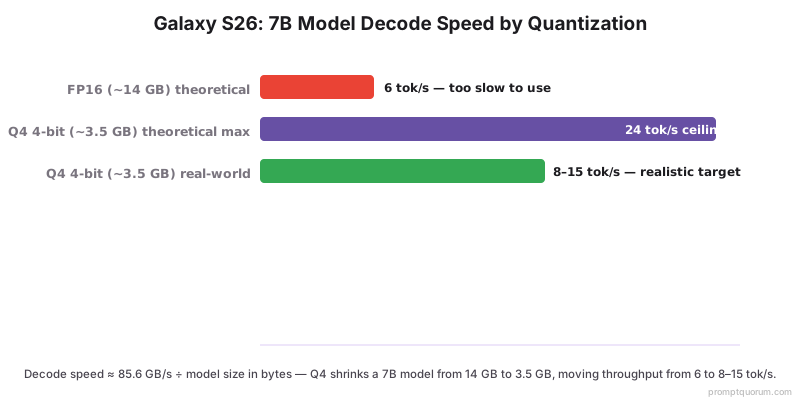
The Galaxy S26's memory bandwidth is the limiting factor. LPDDR5X at 85.6 GB/s means token generation (the "decode phase" of LLM inference) maxes out at roughly memory_bandwidth / model_size_in_bytes tokens per second.
Math: A 7B parameter model in FP16 (16-bit floats) weighs ~14 GB. At 85.6 GB/s ÷ 14 GB ≈ 6 tokens/sec theoretical maximum. But quantization changes this dramatically.
Quantized at Q4 (4-bit, storing 2 parameters per byte), the same 7B model shrinks to ~3.5 GB. Throughput scales: 85.6 GB/s ÷ 3.5 GB ≈ 24 tokens/sec theoretical max. Real-world is lower due to compute overhead, but realistic targets are 8–15 tokens/sec on Galaxy S26 for a quantized 7B model.
Best tools: MLC Chat (cross-platform, community models) and Ollama for Android (if available at your launch date). Both support quantized models. Start with a 7B model (Mistral 7B, Llama 2 7B, Phi 2.7B) at Q4 or Q5 quantization.
- Use Q4 (4-bit) quantization for 7B models; Q3 (3-bit) fits larger models but loses quality
- Avoid FP16 full-precision models; they're too large for practical throughput
- Best open-weight models for mobile: Mistral 7B, Phi 2.7B, TinyLlama 1.1B
- Expected speed: 8–15 tokens/sec for 7B Q4; 3–5 tokens/sec for unquantized 7B
- Use MLC Chat or Ollama; both auto-optimize for Exynos/Snapdragon
- Test offline: if Ollama caches the model, inference works entirely without internet
Galaxy S26 Privacy: What Leaves Your Device?
Knox Vault is Samsung's hardware security module: a separate processor isolated from the main CPU and Android OS. Sensitive data—payment methods, fingerprints, health records, passwords—lives in Knox Vault and is never exposed to apps or Samsung's servers without explicit user action.
Personal Data Engine (PDE) learns locally: on-device machine learning models train on your usage patterns, calendar, messages, photos, and contacts. By default, this data never touches Samsung's cloud. You control the boundary with the "Process data only on device" toggle in Galaxy AI settings.
Cloud features are opt-in: Creative Studio, Gemini agents, and Circle to Search require your permission and send data to Samsung and Google servers respectively. Each feature has its own privacy policy. Disabling these features prevents any cloud transmission.
Cross-device privacy: Knox Matrix synchronizes security settings and encrypted data across your Galaxy devices using end-to-end encryption. Samsung acts as a relay, not a decryption layer.
Default assumption: if you haven't explicitly enabled a cloud feature, your data stays local. This is the opposite of Apple Intelligence (always-on cloud PCC for advanced features) and the opposite of Google Gemini (tighter cloud integration by default).
- Knox Vault = hardware-isolated enclave for secrets; separate processor, separate OS, never synced to cloud
- PDE = local learning engine; trains on your data without uploading
- "Process data only on device" toggle = blocks all cloud fallback for supported features
- Creative Studio = cloud-dependent; disabling it prevents image gen data transmission
- Gemini agents = Google-powered; uses your Google account for multi-step tasks
- Knox Matrix = cross-device sync using end-to-end encryption; Samsung sees encrypted blobs, not plaintext
Frequently Asked Questions
Is Galaxy AI fully on-device or does it use cloud?
Hybrid. Call Screening, Now Nudge, Now Brief, and Scam Detection run entirely on-device using the Personal Data Engine. Image generation (Creative Studio), Gemini agents, and Circle to Search require cloud servers. Enable "Process data only on device" in settings to force local-only processing for supported features.
What's the difference between Exynos 2600 and Snapdragon 8 Elite Gen 5?
Exynos 2600 (2nm, Samsung Foundry) is +113% faster at AI than the previous-gen Exynos 2500. Snapdragon 8 Elite Gen 5 (3nm, TSMC) is +39% faster at NPU than Snapdragon 8 Gen 1 (S25). Exynos 2600 is the clear winner for on-device LLM inference; it's 2.4x faster at Stable Diffusion.
Can I run a large language model on Galaxy S26?
Yes, but with limits. LPDDR5X bandwidth (85.6 GB/s) caps decode throughput. A quantized 7B model at Q4 reaches ~24 tokens/sec theoretical max (~8–15 realistic). Use MLC Chat or Ollama for Android. Larger models (13B, 70B) are impractical due to memory and bandwidth constraints.
Does Galaxy AI work offline?
Partially. Call Screening, Now Nudge, Now Brief, Scam Detection, and on-device LLMs (if running via Ollama) work completely offline. Creative Studio, Gemini agents, and Circle to Search require internet. Enable "Process data only on device" to ensure supported features don't attempt cloud fallback.
What is EdgeFusion and does it ship on Galaxy S26?
EdgeFusion is Nota AI's optimized Stable Diffusion for mobile NPUs, generating 512×512 images in <1 second on Exynos 2600. Samsung officially partnered with Nota AI, but "EdgeFusion" was never named in official Galaxy Unpacked materials. Creative Studio (the shipping image gen app) requires network + Samsung account, so EdgeFusion's exact status at launch is unclear.
What data does Samsung collect via Galaxy AI?
By default, none. Personal Data Engine stays local. When you enable cloud features—Creative Studio, Gemini agents—data is sent to Samsung (for Galaxy AI) or Google (for Gemini). Disable these features to prevent transmission. Check Settings > Privacy > Galaxy AI for a breakdown of what's enabled.
Does Knox Vault protect my data from Samsung?
Yes. Knox Vault is a separate hardware processor isolated from the main OS. Sensitive data (biometrics, payment info, health) stored in Knox Vault cannot be accessed by Android apps or Samsung software without explicit unlock. Even Samsung engineers cannot extract Knox Vault data without physical device access and privilege escalation.
Can I disable Galaxy AI cloud features entirely?
Yes. Disable individual features in Settings > Galaxy AI. You can toggle off Creative Studio, Gemini agents, and Circle to Search independently. Enable "Process data only on device" to block cloud fallback for supported features. On-device features (Call Screening, Now Nudge) continue working.
Is Galaxy S26 better than iPhone for running local AI?
For running your own quantized LLMs, yes. Exynos 2600 is faster at Stable Diffusion than Apple's A18 Pro NPU, and Android supports more open-weight model tools (Ollama, MLC Chat). But Apple's on-device-first philosophy and cryptographically auditable PCC make it stronger for privacy if you trust Apple's infrastructure over Samsung's.
How often will Galaxy AI features be updated?
Galaxy AI features roll out via One UI updates (usually monthly security patches + quarterly feature updates). Samsung committed to 7 years of OS updates and 7 years of security patches for Galaxy S26, so expect new Galaxy AI features and performance improvements through 2033.