Who Built LangGraph, and How Did It Become Its Own Product?
LangChain Inc. built LangGraph as an extension of LangChain for agents that needed more reliability than a simple loop could provide, then spun it out into its own installable package. Early LangChain agent abstractions (the pre-2024 "agent executor" pattern) ran as a fixed loop with limited control over intermediate steps, which made it hard to add retries, pause for a human decision, or recover cleanly after a crash. LangGraph addressed that by modeling an agent explicitly as a graph, borrowing ideas from Google's Pregel and Apache Beam for how state moves between computation steps.
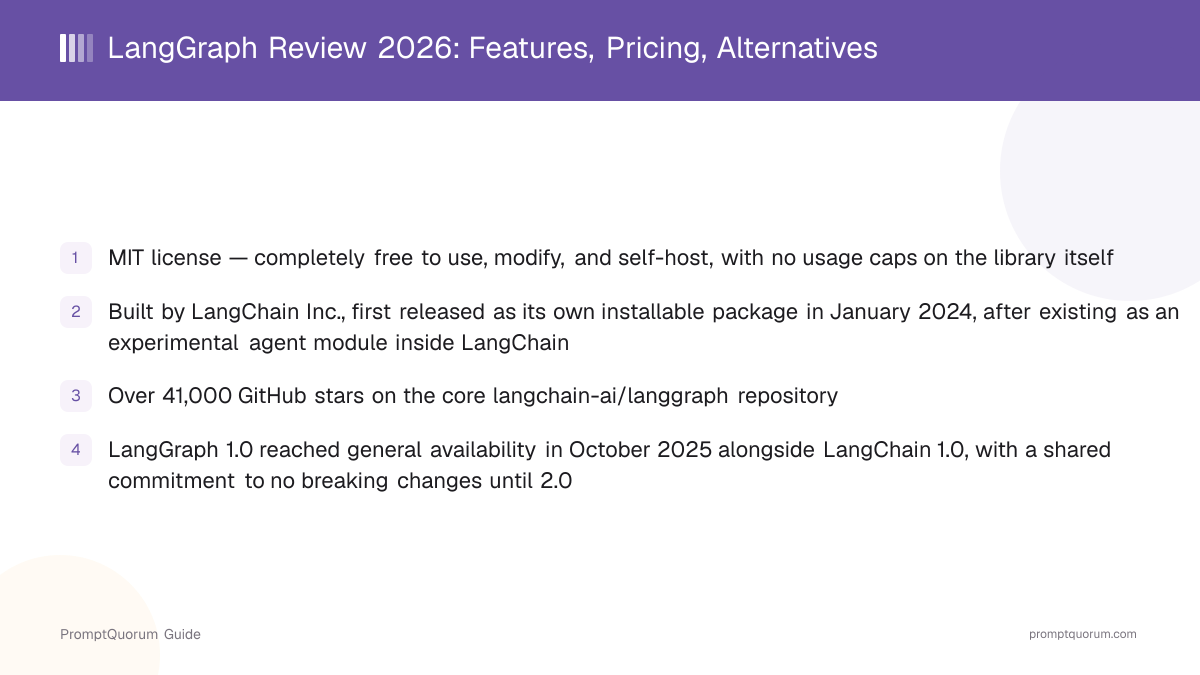
LangGraph shipped as its own standalone Python package in January 2024, separate from the core langchain package, so teams could adopt the graph-based runtime without depending on the rest of the LangChain framework. LangChain Inc. then built a hosted deployment product around it: a beta called LangGraph Cloud in mid-2024, which reached general availability in May 2025 under the name LangGraph Platform. In October 2025, alongside the LangChain 1.0 and LangGraph 1.0 general-availability releases, that hosting product was folded into the LangSmith product family and is now sold as LangSmith Deployment rather than as a separately branded platform.
Experimental module inside LangChain
- Date:
- 2023
- What it means:
- Early graph-based agent ideas exist inside the LangChain codebase, addressing limits of the fixed agent-executor loop
LangGraph standalone package
- Date:
- 2024-01
- What it means:
- LangGraph ships as its own installable Python package, independent of the core langchain package
LangGraph Cloud (beta)
- Date:
- 2024-06
- What it means:
- First hosted deployment offering for LangGraph agents, in beta
LangGraph Platform (GA)
- Date:
- 2025-05
- What it means:
- Hosted deployment product reaches general availability under the LangGraph Platform name
LangGraph 1.0
- Date:
- 2025-10
- What it means:
- General availability alongside LangChain 1.0; public commitment to no breaking changes until 2.0
Folded into LangSmith Deployment
- Date:
- 2025-10
- What it means:
- Hosted deployment is re-sold as a metered LangSmith feature rather than a separately branded platform
📌Note: The MIT license on the open-source LangGraph library is unaffected by any of this repositioning — only the name and pricing structure of the hosted deployment product changed, not the free status of the library you pip install.
What Is LangGraph?
LangGraph is an open-source library (MIT license, github.com/langchain-ai/langgraph) for building agents as stateful graphs, available for Python and JavaScript/TypeScript (as LangGraph.js). Instead of a linear chain of calls, an agent built with LangGraph is a directed graph: nodes are units of work (a model call, a tool call, a piece of business logic), and edges define which node runs next — including conditional edges that branch based on the current state, and cycles that let the agent loop back to retry or re-plan.
- State: a single, typed object (commonly a Python
TypedDict) that every node reads from and writes to, so the entire graph shares one source of truth about what has happened so far - Nodes and edges: nodes are plain functions that take the current state and return updates to it; edges (including conditional edges) decide which node executes next based on that state
- Checkpointing and persistence: a pluggable checkpointer (an in-memory saver for development, or a database-backed one such as Postgres for production) saves the graph's state after each step, keyed to a thread ID, so a run can pause and resume exactly where it left off
- Human-in-the-loop: the
interrupt()function pauses execution inside a node and returns control to the calling code; resuming with aCommand(resume=...)continues the same graph run from that exact point, which is how LangGraph implements approval steps without losing state - Multi-agent and hierarchical graphs: because a node can itself invoke a compiled subgraph, LangGraph supports single-agent, multi-agent, and hierarchical (supervisor-plus-workers) architectures with the same primitives
- LangGraph Studio: an optional visual tool for inspecting and stepping through a running graph, separate from the core library
Pausing for a human decision with interrupt()
Calling interrupt("Approve this draft?") inside a node halts the graph at that point and returns the interrupt payload to the caller instead of an error — the state up to that node is already checkpointed. Resuming with graph.invoke(Command(resume=True), config=...) on the same thread ID continues execution from exactly where it paused, which is the pattern LangGraph uses for approval gates instead of a separate workflow engine.
from typing_extensions import TypedDict
from langgraph.graph import StateGraph, START, END
from langgraph.checkpoint.memory import MemorySaver

class State(TypedDict):
    topic: str
    draft: str

def write_draft(state: State) -> dict:
    return {"draft": f"Draft about {state['topic']}"}

def review_draft(state: State) -> dict:
    return {"draft": state["draft"] + " (reviewed)"}

builder = StateGraph(State)
builder.add_node("write", write_draft)
builder.add_node("review", review_draft)
builder.add_edge(START, "write")
builder.add_edge("write", "review")
builder.add_edge("review", END)

graph = builder.compile(checkpointer=MemorySaver())
result = graph.invoke(
    {"topic": "local LLMs"},
    config={"configurable": {"thread_id": "1"}},
)
print(result["draft"])
How Much Does LangGraph Cost?
The LangGraph library itself is completely free under the MIT license — production hosting for LangGraph agents is the paid, metered add-on. LangChain Inc. does not charge for the open-source library, whether self-hosted, used commercially, or modified; its deployment revenue comes from LangSmith plans, the same company product that also sells the separate LangSmith observability/tracing tier discussed in PromptQuorum's LangChain review.
- LangGraph (the library): free forever under the MIT license, for Python and JavaScript/TypeScript, self-hosted or embedded in any application
- Self-hosting your own agents: you can run compiled LangGraph graphs on your own servers with your own checkpointer (for example Postgres) at zero cost to LangChain Inc. — no license fee for self-managed production use
- LangSmith Developer tier: $0 per seat per month, one seat, up to 5,000 base traces per month, then pay-as-you-go — does not include managed deployment
- LangSmith Plus tier: $39 per seat per month, unlimited seats, up to 10,000 base traces per month, and includes one free small serverless LangGraph deployment plus access to metered Deployment, Engine, and related infrastructure
- LangSmith Enterprise: custom pricing, adds self-hosted/hybrid deployment options and custom SLAs
- Deployment usage beyond the included allowance is metered separately from trace usage: compute is billed in LCUs (1 LCU = $1.50) and database usage in LSUs (1 LSU = $1.00), by vCPU-hour and GiB-hour
- What was marketed as "LangGraph Platform" through 2025 is billed today as LangSmith Deployment — there is no separate LangGraph Platform price list to budget against; it is a line item inside a LangSmith plan
Tier | Price | Best For |
|---|---|---|
| LangGraph library | Free (MIT license) | Everyone — self-hosted, no cost |
| LangSmith Developer | $0/seat/mo, 5K traces | Solo devs, prototyping, no hosting |
| LangSmith Plus | $39/seat/mo, +metering | Teams needing managed hosting |
| LangSmith Enterprise | Custom pricing | Self-hosted/hybrid, compliance |
Prices verified against LangChain's official pricing page as of September 2026 and billed in USD worldwide — the page does not show region-specific pricing, so check the live page before budgeting, since SaaS tiers and metering rates change without much notice.
How Do You Install and Get Started With LangGraph?
Installing LangGraph takes one pip or npm command — no account, license key, or server required for the open-source library. Managed deployment through LangSmith is opt-in and only needed once you want to host an agent for others to call.
- 1Install the package:
pip install -U langgraph(Python) ornpm install @langchain/langgraph(JavaScript/TypeScript). - 2Set your model provider's API key as an environment variable (for example
OPENAI_API_KEY) — LangGraph does not provide or proxy model access itself; you call your chosen model from inside a node. - 3Define a state schema (a
TypedDictor similar), build aStateGraphfrom it, register nodes withadd_node, and connect them withadd_edgeor a conditional edge. - 4Compile the graph with
.compile(), passing acheckpointer(an in-memoryMemorySaverfor development, or a database-backed one for production) so state persists across steps and process restarts. - 5Use
interrupt()inside any node where you need a human decision before continuing, and resume the paused run with aCommand(resume=...)on the same thread ID. - 6Read the official LangGraph documentation and browse the GitHub repository for the current API reference and the JavaScript/TypeScript quickstart.
- 7Optionally, deploy to LangSmith Deployment or self-host the compiled graph behind your own API server once you need production hosting rather than a local run.
Do I need a LangChain Inc. account to use LangGraph?
No. The LangGraph library installs and runs without any account, and you supply your own model provider API keys. An account is only needed if you choose to use LangSmith for tracing or managed deployment.
Does installing LangGraph require LangChain?
No. LangGraph ships as its own package and can be installed and used without the core langchain package, though many teams use LangChain's create_agent abstraction (which itself runs on LangGraph) as a higher-level starting point.
Who Should Use LangGraph?
LangGraph fits teams building production agents that need explicit control over state, retries, or human approval — not every agent needs a graph. It is a weaker fit for a simple, linear tool-calling agent with no branching or persistence requirements.
Use LangGraph if
- Your agent needs to pause for a human approval step and resume later without losing its place — LangGraph's
interrupt()and checkpointing handle this natively - You need the agent to survive a server restart or crash mid-task — a database-backed checkpointer resumes exactly where the process left off
- Your workflow has cycles or conditional branching — an agent that re-plans, retries a failed step, or routes between multiple specialized nodes based on state
- You are building a multi-agent or hierarchical system (a supervisor node routing to worker subgraphs) and want one consistent set of primitives for all of it
- You want an explicit, inspectable state object rather than an opaque agent loop, for debugging or compliance reasons
Avoid LangGraph if
- Your workflow is a simple, linear sequence with no retries, branching, or need to pause — plain LangChain's
create_agent, or even a short Python script calling a model directly, is less overhead - Your team wants a role-based multi-agent abstraction (named agents with roles, goals, and delegated tasks) rather than an explicit state graph — CrewAI is built specifically around that mental model
- You are not already using the LangChain ecosystem and do not want that dependency footprint, even though LangGraph can be installed standalone
- You need a conversation-pattern multi-agent framework (agents talking to each other in a chat loop) rather than a directed graph — AutoGen specializes in that pattern
When Should You NOT Use LangGraph?
Skip LangGraph for a simple linear workflow with no retries, branching, or need to persist state across a pause — the graph abstraction adds overhead a straight-line script does not need. A few concrete situations where a different tool wins.
- A workflow that always runs the same fixed sequence of steps once and returns a result — a plain function call chain, or LangChain's
create_agent, covers this with less code - A team that wants a role-based mental model — named agents with personas, goals, and delegated subtasks — instead of thinking in explicit nodes and edges; CrewAI is designed around that abstraction
- A team not already invested in the LangChain ecosystem that wants the smallest possible dependency footprint and is comfortable managing state and retries by hand
- A project whose primary need is multi-agent conversation patterns (agents debating or reviewing each other's output in a chat loop) rather than an explicit control-flow graph — AutoGen is built around that pattern
- Use LangGraph instead when the workflow genuinely has cycles, conditional branches, a need to pause for human input, or must survive a restart mid-task
LangGraph vs. Alternatives
LangGraph competes with other agent orchestration frameworks, each built around a different mental model for how an agent should be structured.
Tool | Mental Model | License | Backing | Best For |
|---|---|---|---|---|
| LangGraph | Explicit state graph | MIT | LangChain Inc. (VC-backed) | Stateful production agents |
| LangChain | Chains + create_agent | MIT | LangChain Inc. (VC-backed) | General-purpose LLM apps |
| CrewAI | Role-based agent crews | MIT | CrewAI Inc. (VC-backed) | Named-role multi-agent teams |
| AutoGen | Multi-agent conversation | MIT / CC-BY | Microsoft Research | Chat-loop agent patterns |
| Semantic Kernel | Plugins + planners | MIT | Microsoft | .NET-first enterprise apps |
Common Mistakes When Evaluating LangGraph
These mistakes come from conflating LangGraph with LangChain or LangGraph Platform, or reaching for a graph when a simpler tool would do.
Mistake 1: Assuming LangGraph and LangChain are the same product
LangGraph is a distinct, lower-level library for graph-based agent orchestration, built by the same company as LangChain but installable and usable entirely on its own. LangChain's create_agent abstraction runs on top of LangGraph, but plenty of production LangGraph deployments never import the core langchain package at all.
Mistake 2: Looking for a "LangGraph Platform" price list that no longer exists
What was branded LangGraph Platform through 2025 was folded into LangSmith Deployment in October 2025. Budget against LangSmith's Plus/Enterprise pricing and its per-vCPU-hour and per-GiB-hour metering, not a separate LangGraph Platform price sheet — searching for one will surface outdated blog posts and pricing calculators.
Mistake 3: Reaching for a full state graph when a linear chain would do
Not every agent needs explicit nodes, edges, and a checkpointer. A single tool-calling loop with no retries, branching, or pause requirement is well served by LangChain's create_agent or a plain script. Reach for LangGraph's lower-level graph API when you specifically need cycles, conditional routing, or human-in-the-loop interrupts that a simpler abstraction does not expose.
Frequently Asked Questions
Is LangGraph free to use?
Yes. The LangGraph library is open-source under the MIT license and free for any use, including commercial products, with no usage limits and no license fee for self-hosting your own agents in production.
Who built LangGraph?
LangGraph was built by LangChain Inc., the venture-backed company behind LangChain, founded by Harrison Chase. It began as an experimental agent module inside LangChain and shipped as its own standalone package in January 2024.
What is the difference between LangGraph and LangChain?
LangChain provides a general framework for chains, prompts, and the higher-level create_agent abstraction. LangGraph is the lower-level, graph-based runtime that create_agent itself runs on — use LangGraph directly when you need explicit state, cycles, or human-in-the-loop control that create_agent does not expose.
What happened to LangGraph Platform?
LangGraph Platform was the name for LangChain Inc.'s hosted agent-deployment product from its May 2025 general-availability release through October 2025. It was then folded into the LangSmith product family and is now sold as LangSmith Deployment, a metered feature of paid LangSmith plans, rather than as a separately branded platform with its own price list.
How much does hosting a LangGraph agent in production cost?
The LangSmith Plus tier ($39 per seat per month) includes one free small serverless deployment; usage beyond that is metered separately in LCUs for compute (1 LCU = $1.50) and LSUs for database usage (1 LSU = $1.00), billed by vCPU-hour and GiB-hour. Enterprise pricing is custom.
Can I self-host LangGraph agents instead of paying for managed deployment?
Yes. Because LangGraph is MIT-licensed, you can compile a graph, choose your own checkpointer (such as a self-managed Postgres database), and run it behind your own API server or infrastructure at no licensing cost — managed deployment through LangSmith is an optional convenience, not a requirement.
What is a checkpointer in LangGraph?
A checkpointer is a pluggable component that saves a graph's state after each step, keyed to a thread ID. An in-memory MemorySaver is common for development and testing; production deployments typically use a database-backed checkpointer so a run can resume after a process restart.
How does human-in-the-loop work in LangGraph?
Calling interrupt() inside a node pauses graph execution at that point and returns control to the calling code, with state already checkpointed. Resuming with a Command(resume=...) call on the same thread ID continues the run from exactly where it paused.
How many GitHub stars does LangGraph have?
The core langchain-ai/langgraph repository has passed 41,000 GitHub stars — fewer than the core LangChain repository (over 140,000), reflecting that LangGraph is a more specialized, lower-level library rather than a general-purpose framework.
Is LangGraph better than CrewAI for multi-agent systems?
Neither is strictly better — they model multi-agent systems differently. LangGraph exposes an explicit state graph you control node by node, which suits teams that need fine-grained control or human approval steps. CrewAI offers a role-based abstraction (named agents with goals and delegated tasks) that is faster to set up for teams comfortable with less low-level control.