Key Takeaways
- Most smart home subscriptions come from cloud camera storage and AI detection
- A local hub (Home Assistant) runs control and automations with no fee
- Frigate records cameras and runs AI detection locally, no subscription
- Choose local-capable devices that do not require a cloud account
- You trade one-time hardware cost for zero recurring fees
- Over time, the local approach is cheaper and keeps data private
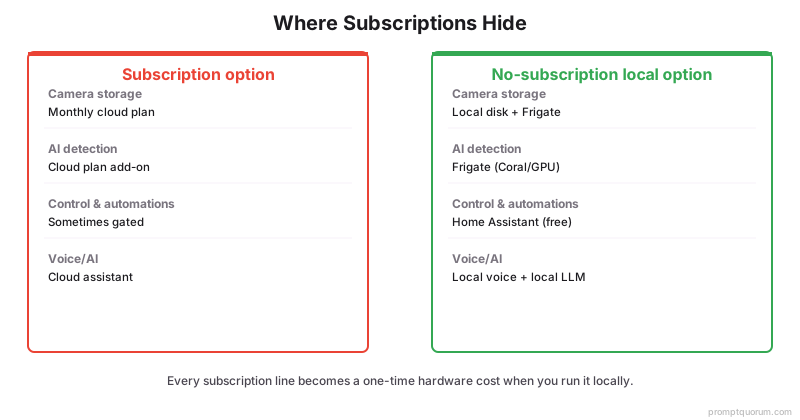
Where Subscriptions Hide
Smart home subscriptions hide mostly in cloud cameras: footage storage, AI detection, and premium features behind a monthly plan. Knowing where they hide lets you design them out.
- Camera storage: cloud video history is the most common recurring fee.
- AI detection: person/object alerts are often gated behind a plan.
- Premium features: some ecosystems lock automations or extras behind subscriptions.
The No-Subscription Stack
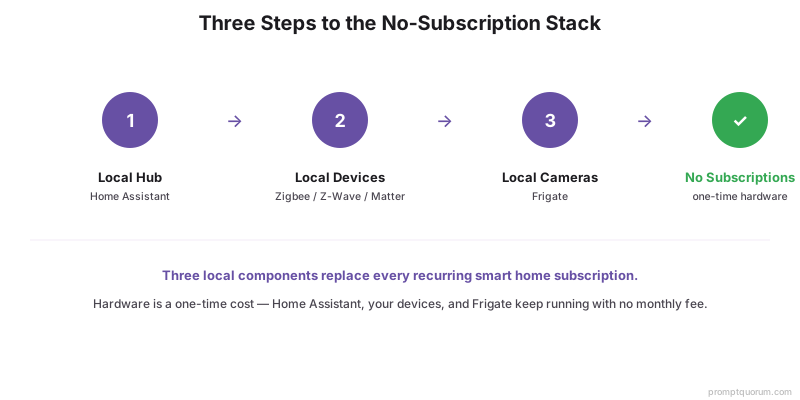
The no-subscription stack is a local hub plus local-capable devices and local camera recording — everything runs on hardware you own. No core feature requires a monthly fee.
- Local hub: Home Assistant runs control and automations free — see getting started.
- Local devices: Zigbee, Z-Wave, Matter, or local Wi-Fi with no cloud account.
- Local cameras: Frigate for recording and AI detection — see local AI security cameras.
Devices With No Fees
Devices that use local protocols and do not require a cloud account charge no recurring fees. Check the protocol and whether a cloud login is mandatory.
- Zigbee and Z-Wave bulbs, plugs, and sensors have no fees.
- Matter devices commissioned to a local controller have no fees.
- Avoid devices that require a vendor subscription for basic control.
Local Camera Storage
Record cameras to local storage with Frigate instead of paying for cloud video history. This removes the biggest recurring smart home fee.
- Use RTSP/PoE cameras and record locally — footage stays in your home.
- Frigate provides AI detection with no subscription — see local AI security cameras.
- Plan local disk for the retention you want; no monthly fee applies.
The One-Time-Cost Math
Local replaces recurring monthly fees with one-time hardware, so it is cheaper over time. The longer you run it, the larger the saving versus a subscription.
Function | Subscription option | No-subscription local option |
|---|---|---|
| Camera storage | Monthly cloud plan | Local disk + Frigate |
| AI detection | Cloud plan add-on | Frigate (Coral/GPU) |
| Control & automations | Sometimes gated | Home Assistant (free) |
| Voice/AI | Cloud assistant | Local voice + local LLM |
Frequently Asked Questions
Which smart home devices have no fees?
Devices using Zigbee, Z-Wave, or Matter, or local-Wi-Fi devices with a local API, charge no recurring fees because they work through a local hub with no cloud account. The recurring fees almost always come from cloud cameras and premium ecosystem features.
Can I store camera footage without a subscription?
Yes. Record RTSP or PoE cameras locally with Frigate to your own storage, which provides recording and AI detection with no subscription. Footage stays in your home, and you control retention by the disk space you provide.
How much do I save long-term?
Savings grow over time because you replace recurring monthly fees with a one-time hardware cost. The exact amount depends on how many cloud subscriptions you avoid, but a local setup is typically cheaper the longer you run it.
Are there hidden costs to a no-subscription smart home?
The main cost is upfront hardware (a local hub, a detection accelerator, and storage) plus your setup time. After that, core control, automations, and local camera recording run with no recurring fees.