قاعدة عامة لـ VRAM — مرجع سريع
لا وقت للصيغة؟ استخدم هذه القواعد البسيطة:
بمجرد معرفة ميزانية VRAM لديك، راجع أي GPU تناسب كل مستوى ←
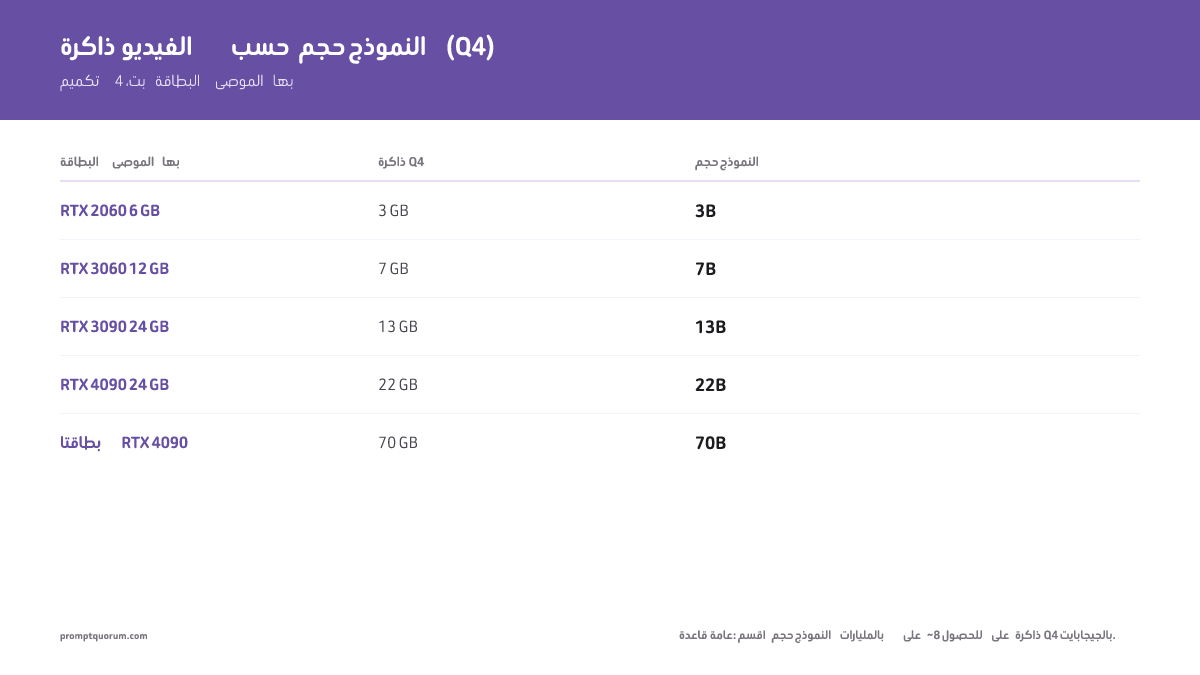
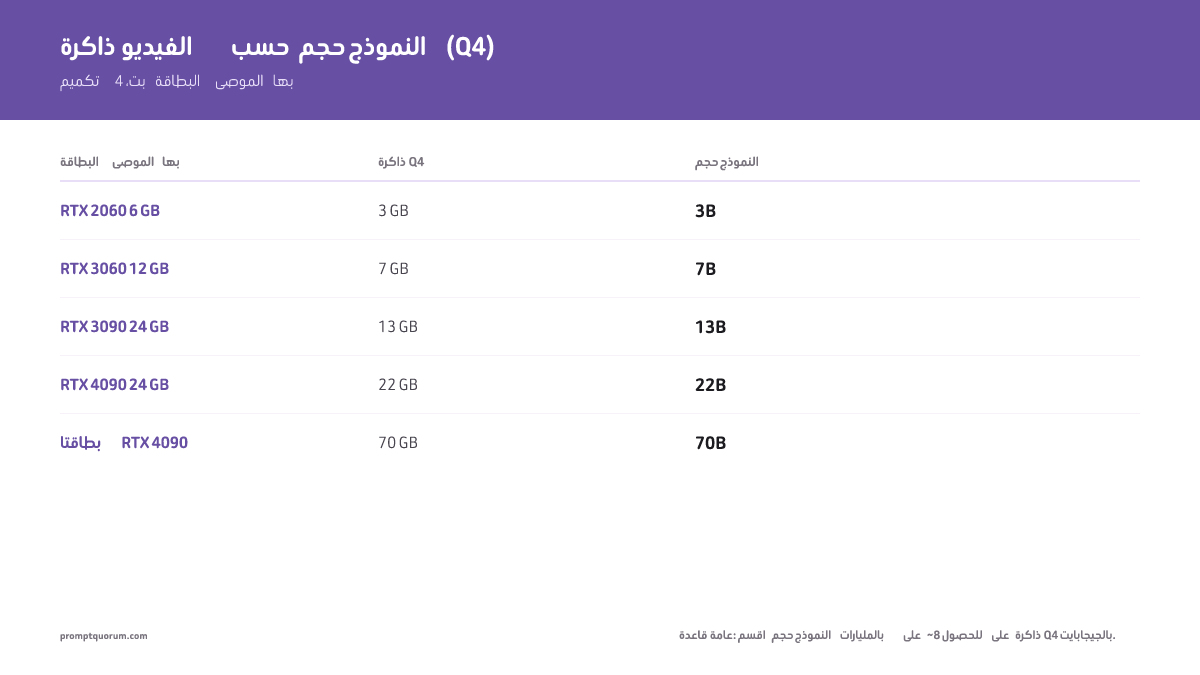
- نماذج 3B (Phi, StableLM): نحو 2 GB أوزان بتكميم Q4، 4 GB VRAM موصى بها مع هامش
- نماذج 7B (Llama, Mistral, Qwen): نحو 4 GB أوزان بتكميم Q4، 6-8 GB VRAM موصى بها
- نماذج 13B (Llama 3.3, Mistral): نحو 8 GB أوزان بتكميم Q4، 10-12 GB VRAM موصى بها
- نماذج 22B (Qwen3, Gemma): نحو 13 GB أوزان بتكميم Q4، 16 GB VRAM موصى بها
- نماذج 70B (Llama 3.3, Qwen 3.6): نحو 42 GB أوزان بتكميم Q4، 48 GB VRAM موصى بها، 50+ GB بـQ5
- نماذج MoE: تتوسّع VRAM مع الأوزان التي يجب إبقاؤها في الذاكرة. مثال: Qwen 3.6 35B-A3B (3B نشطة) يتسع في بصمة ضئيلة ~2 GB، بينما لا يزال Llama 4 Scout (17B نشطة / 109B إجمالي) يحتاج ~55 GB بـ Q4 لأن كل الخبراء يبقون مقيمين
# Quick VRAM formula (memorize this)
VRAM (GB) ≈ Model Size (B) × 0.6  # at Q4 quantization

# Examples:
7B × 0.6 = 4.2 GB
70B × 0.6 = 42 GB

# For other quantizations (bytes per parameter):
Q8 (8-bit): Model Size × 1.05
Q5 (5-bit): Model Size × 0.7
FP32 (full): Model Size × 4

# Verified against real GGUF file sizes (Hugging Face):
# Llama-2-7B Q4_K_M = 4.08 GB, Mistral-Small-24B Q4_K_M = 14.33 GB,
# Llama-3.3-70B Q4_K_M = 42.52 GB
ما صيغة VRAM لنماذج LLM؟
VRAM (GB) = حجم النموذج بالمليار × بايت لكل معامل
- حجم النموذج: عدد المعاملات (7B, 13B, 70B, إلخ)
- بايت لكل معامل: 4.0 (FP32، دقة كاملة)، ~1.05 (Q8، 8 بت)، ~0.7 (Q5، 5 بت)، ~0.6 (Q4، 4 بت)
- هذه الأرقام تم التحقق منها مقابل أحجام ملفات GGUF الحقيقية على Hugging Face، وليس فقط عرض البت النظري — صيغ حقيقية مثل Q4_K_M تحمل هامشًا إضافيًا فوق الحد الأدنى النظري لـ4 بت (0.5 بايت/معامل).
مثال: Llama 3.3 70B، FP32، دون تكميم:
70 مليار × 4.0 بايت = 280 GB. غير عملي على أجهزة استهلاكية.
Llama 3.3 70B، تكميم Q4 (4 بت):
70 مليار × 0.6 بايت = 42 GB. (ملف GGUF الحقيقي لـLlama-3.3-70B-Instruct بتكميم Q4_K_M يزن 42.52 GB.)
نماذج MoE (المتفرقة): تحدد المعاملات النشطة الحوسبة، لكن يجب أن يبقى كل الخبراء محمّلين في VRAM. مثال: Llama 4 Scout لديه 109B معامل إجمالي مع 17B نشطة لكل token. بـ Q4 لا يزال يحتاج ~55 GB من VRAM لإبقاء كل الخبراء — يتسع في GPU بسعة 24 GB فقط بتكميم عدواني 1.78 بت (~20 tok/s). الحوسبة رخيصة؛ الذاكرة هي القيد.
كم تحتاج كل حجم نموذج من VRAM؟
حجم النموذج | FP32 (دون تكميم) | Q8 (8 بت) | Q5 (5 بت) | Q4 (4 بت) | GPU الموصى بها |
|---|---|---|---|---|---|
| 3B (Phi, StableLM) | 12 GB | 3 GB | 2 GB | 2 GB | RTX 3050 4 GB أو RTX 2060 6 GB |
| 7B (Llama 3.3, Mistral) | 28 GB | 7 GB | 5 GB | 4 GB | RTX 4060 8 GB أو RTX 3060 12 GB |
| 13B (Llama 3.3, Mistral) | 52 GB | 14 GB | 9 GB | 8 GB | RTX 3060 12 GB أو RTX 4070 12 GB |
| 22B (Qwen, Gemma) | 88 GB | 23 GB | 15 GB | 13 GB | RTX 4080 16 GB أو RTX 4090 24 GB |
| 70B (Llama 3, Qwen) | 280 GB | 74 GB | 50 GB | 42 GB | 2× RTX 4090 (24 GB لكل منها)، أو 1× H100 80 GB |
| Qwen 3.6 35B-A3B (3B نشطة، MoE)* | 12 GB | 3 GB | 2 GB | 2 GB | RTX 2060 6 GB أو RTX 5070 12 GB |
| DeepSeek V4-Flash (13B نشطة / 284B إجمالي، MoE)* | 52 GB | 14 GB | 9 GB | 8 GB | RTX 3060 12 GB أو RTX 5070 12 GB |
| Llama 4 Scout (17B نشطة / 109B إجمالي، MoE)† | 436 GB | 114 GB | 76 GB | 55 GB | 2× RTX 4090 (48 GB) — يتسع في 24 GB فقط بـ 1.78 بت (~20 tok/s) |
| gpt-oss:20b (3.6B نشطة / 21B إجمالي، MoE)* | 84 GB | 22 GB | 15 GB | 12 GB | RTX 5070 12 GB أو أي GPU بسعة 16 GB |
| Kimi K2.6 (32B نشطة / 1T إجمالي، MoE)* | 128 GB | 34 GB | 22 GB | 19 GB | 2× RTX 4090 أو RTX 5090 32 GB (Q4 فقط) |
الأرقام هي أحجام أوزان خام، تم التحقق منها مقابل أحجام ملفات GGUF الحقيقية على Hugging Face (مثل Llama-2-7B Q4_K_M = 4.08 GB، Mistral-Small-24B Q4_K_M = 14.33 GB، Llama-3.3-70B Q4_K_M = 42.52 GB) — أضف 1-2 GB هامشًا للسياق/ذاكرة KV. * نماذج MoE: تُحسب VRAM من المعاملات النشطة فقط، لا من حجم النموذج الإجمالي. † يُبقي Llama 4 Scout كل الـ 109B معامل مقيمة، لذا يحتاج ~55 GB بـ Q4 رغم وجود 17B نشطة فقط لكل token.
أفضل LLM محلي حسب فئة VRAM
يعرف معظم الأشخاص بالفعل سعة VRAM في GPU لديهم ويريدون البحث العكسي: "لدي 12 GB — ما أفضل نموذج؟" استخدم هذا الجدول بدلاً من الصيغة.
طابق VRAM في GPU لديك مع أكبر فئة نموذج تناسبها بتكميم Q4، ثم راجع جدول الحجم أعلاه للنموذج الدقيق.
إذا كنت تعرف بالفعل سعة VRAM في GPU لديك، تخطَّ حسابات حجم النموذج — ابحث عن سعة بطاقتك في الجدول أدناه واستخدم فئة النموذج المقابلة لها.
فئة VRAM | أفضل نموذج (Q4) | أمثلة GPU | ما يناسبها |
|---|---|---|---|
| 4 GB | Llama 3.2 3B أو Phi-3.5-mini (~1.5-2 GB) | RTX 3050 4 GB, GTX 1650 | فئة 3B فقط — نماذج 7B ستفشل بـ OOM |
| 6 GB | Qwen3 4B، أو Llama 3.1 8B بتكميم Q4 عدواني (~3-4 GB) | RTX 2060 6 GB, RTX 3050 Ti | 4B براحة؛ 8B ضيّق |
| 8 GB | Llama 3.1 8B أو Qwen3 8B (~3.5-5 GB) بهامش حقيقي | RTX 4060 Ti 8 GB, RTX 3070 | النقطة المثالية الأكثر شيوعًا لنماذج 7-8B |
| 12 GB | Qwen3 14B (~6.5 GB)، أو 7-8B بـ Q5/Q8 لجودة أعلى | RTX 3060 12 GB, RTX 4070 | 14B براحة، مع هامش لسياق أكبر |
| 16 GB | Qwen3 14B بـ Q5/Q8، أو فئة 22B (Gemma, Qwen) بـ Q4 (~11 GB) | RTX 4060 Ti 16 GB, RTX 4080 | 22B هو السقف العملي عند هذه الفئة |
| 24 GB | 22-32B براحة بـ Q8 كامل؛ 70B فقط دون 4 بت مع فقدان جودة | RTX 4090, RTX 3090 | 70B يحتاج فعليًا ~42 GB — هذه الفئة غير كافية |
| 32 GB | 22-32B بدقة كاملة، أو كبطاقة واحدة في إعداد ثنائي GPU لـ 70B | RTX 5090 | لا يزال أقل من 70B Q4 وحده (~42 GB مطلوبة) |
| 48 GB | 70B براحة بـ Q4 (~42 GB)، وبضيق بـ Q5 (~50 GB) | 2× RTX 4090, RTX 6000 Ada | أول فئة تلائم 70B دون حيل تكميم تفقد الجودة |
| 64 GB+ (ذاكرة موحدة) | 70B براحة بـ Q4/Q5، دون الحاجة لإعداد ثنائي GPU | Mac Studio M5 Max/Ultra (128-256 GB) | الخيار الاستهلاكي الوحيد الذي يلائم 70B دون GPU منفصلة |
هذه أرقام هدف شراء بتكميم Q4 مع عبء واقعي مضمّن — راجع جدول الحجم أعلاه للحد الأدنى الحسابي المجرد لكل مستوى تكميم. الذاكرة الموحدة في Apple Silicon (Mac Studio M5 Max/Ultra) بديل عن GPU منفصلة لفئات 48 GB فأعلى — راجع تشغيل نماذج 70B على Apple Silicon M5 Max لمعرفة سرعات tok/s الدقيقة عند كل مستوى تكميم.
تحتاج نماذج MoE إلى VRAM أقل بكثير مما يوحي به حجمها
توزّع نماذج Mixture-of-Experts (MoE) معاملاتها بين شبكات فرعية "خبيرة" عديدة وتفعّل جزءًا منها فقط لكل token. تقلّل المعاملات النشطة الحوسبة وتسرّع الاستدلال، لكن في معظم نماذج MoE يجب أن يبقى كل الخبراء محمّلين في VRAM — لذا يتبع استخدام الذاكرة إجمالي المعاملات لا النشطة.
القاعدة للنماذج الكثيفة: VRAM = المعاملات_الإجمالية × بايت_لكل_معامل
القاعدة لنماذج MoE (الحوسبة): تحدد المعاملات_النشطة الـ tokens/ثانية — لكن VRAM لا تزال تتوسّع مع الأوزان الإجمالية المقيمة.
مثال: Llama 4 Scout لديه 109B معامل إجمالي مع 17B نشطة فقط لكل token. سريع لحجمه، لكنه بـ Q4 لا يزال يحتاج ~55 GB من VRAM لإبقاء كل الخبراء — خارج متناول GPU واحدة بسعة 24 GB إلا بتكميم عدواني 1.78 بت (~20 tok/s على RTX 4090).
تستطيع بعض بيئات التشغيل بثّ الخبراء غير النشطين أو إنزالهم إلى RAM النظام، مضحّيةً بالسرعة مقابل بصمة VRAM أقل. الخلاصة الأساسية: لا تفترض أن نموذج MoE يتسع في VRAM بحجم معاملاته النشطة — تحقّق من الحجم الفعلي على القرص لمستوى التكميم لديك.
كيف يقلّل التكميم متطلبات VRAM؟
يقلّل التكميم عدد البتات اللازمة لتمثيل كل معامل في النموذج.
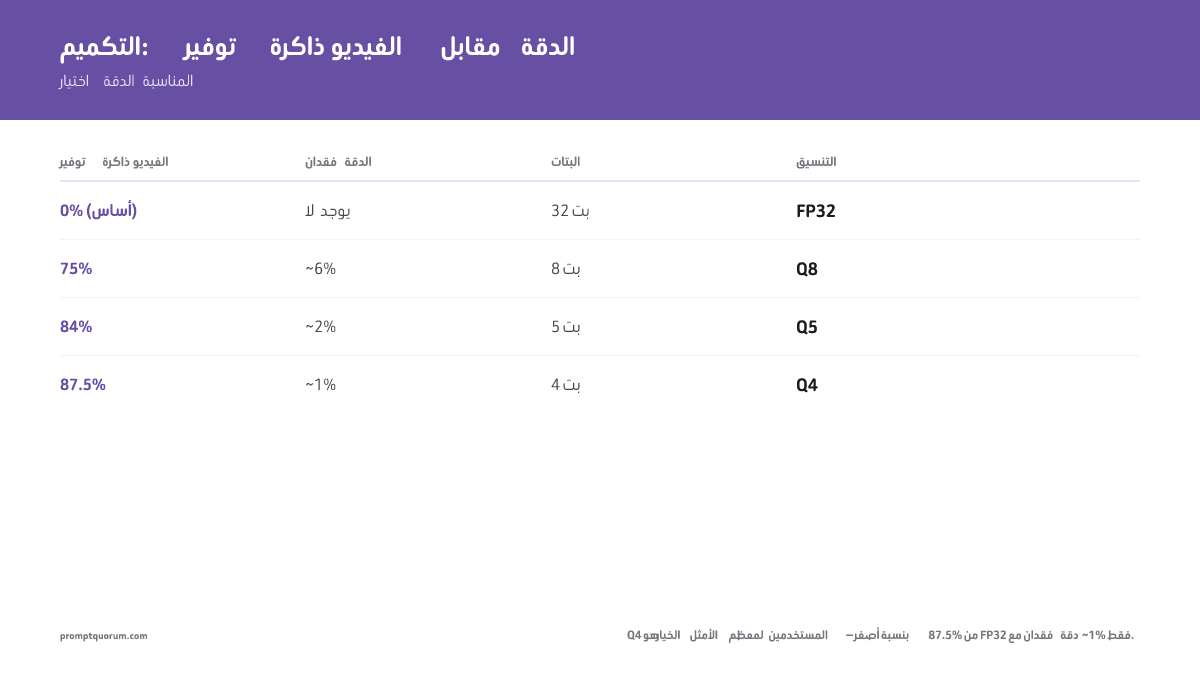
- FP32 (عدد عشري 32 بت): دقة كاملة. 1 معامل = 4 بايت. دون فقدان. الأبطأ.
- Q8 (8 بت): 1 معامل = 1 بايت. ~6% فقدان دقة. 75% توفير في VRAM.
- Q5 (5 بت): 1 معامل = 0.625 بايت. ~2% فقدان دقة. 84% توفير في VRAM.
- Q4 (4 بت): 1 معامل = 0.5 بايت. ~1% فقدان دقة. 87.5% توفير في VRAM.
لمعظم المستخدمين، Q4 هي النقطة المثالية: فقدان دقة غير محسوس، وبصمة VRAM أقل بنسبة 87%.
اعتبارًا من أبريل 2026، Q4 هي المعيار. وتتوفر Q5 و Q8 إذا كان لديك VRAM فائضة وتريد مكاسب جودة هامشية.
تحدد VRAM حجم النموذج، لكن تصميم الـ prompt يحدد جودة المخرجات. تستطيع تقنيات مثل chain-of-thought و few-shot prompting سد فجوة الجودة بين النماذج الأصغر والأكبر. استكشف مجموعة أدوات هندسة الـ prompt الكاملة للاستفادة أكثر من النماذج التي يدعمها جهازك. وإذا كان لديك 12–16 GB من VRAM وتريد حمل برمجة محددًا لتجربة تلك المجموعة، فإن استبدال GitHub Copilot بنموذج LLM محلي يربط حزمة Continue.dev + Ollama + Qwen3-Coder بدقة بمستويات VRAM تلك.
ماذا عن batch size والاستدلال متعدد المستخدمين؟
يؤثر batch size في الإنتاجية (tokens في الثانية)، لا في زمن استجابة استدلال فردي.
مستخدم واحد يسأل "كم 2+2؟" يستخدم VRAM نفسها بغض النظر عمّا إذا كان batch size 1 أو 32.
batch size = 32 يعني معالجة 32 prompt على التوازي. يستخدم هذا ~32× أكثر من VRAM، لكنه يولّد 32 إجابة أسرع.
لمستخدم واحد (الاستخدام النموذجي لـ LLM محلي): batch size = 1. تكون VRAM هي حجم النموذج + 1-2 GB عبء.
لخادم متعدد المستخدمين: خصّص batch size × VRAM النموذج. يحتاج نموذج 70B بـ batch=4 إلى ~160-192 GB (40-48 GB × 4).
هل تحتاج VRAM أكثر من حجم النموذج؟
نعم. إضافةً إلى أوزان النموذج، أضف:
- ذاكرة KV (ذاكرة المفتاح-القيمة للسياق): ~5-10% VRAM إضافية.
- حالة المُحسّن (عند الـ fine-tuning): 2-4× حجم النموذج (متعلقة بالتدريب فقط، لا بالاستدلال).
- عبء النظام (نظام التشغيل، التعريفات، بيئة تشغيل Ollama/LM Studio): ~1-2 GB.
القاعدة: نموذج 70B Q4 (40-48 GB) + ذاكرة KV (4 GB) + نظام (2 GB) = ~46-54 GB مخصصة.
اشترِ دائمًا GPU بهامش 1-2 GB على الأقل فوق الحد الأدنى النظري.
أخطاء شائعة حول VRAM
- مزيد من VRAM = استدلال أسرع. خطأ. لا يؤثر حجم VRAM في السرعة. أما عرض نطاق الذاكرة (GB/ثانية) فيؤثر، وهو ثابت لكل GPU.
- batch size = حد tokens تسلسلي. خطأ. batch size = طلبات على التوازي. يستخدم الاستدلال الفردي batch=1 بغض النظر عن حجم VRAM.
- تحتاج 24 GB فقط لأي نموذج 70B. خطأ. Q4 يحتاج 40-48 GB. Q8 يحتاج 70 GB+. يعتمد على التكميم.
حاسبة VRAM
اختر حجم نموذجك والتكميم لتقدير متطلبات VRAM.
Popular Models
Base Model
6.50 GB
Context OH
1.50 GB
Batch OH
0.00 GB
System OH
1.00 GB
Total Minimum
9.00 GB
Recommended (with 25% safety margin)
11.25 GB
👉 Look for a GPU with at least 11.25 GB VRAM
Compatible GPUs
RTX 3060 (12 GB)
0.8 GB headroom
RTX 4060 Ti (16 GB)
4.8 GB headroom
RTX 4070 Ti Super (16 GB)
4.8 GB headroom
RTX 4080 Super (16 GB)
4.8 GB headroom
RTX 4090 (24 GB)
12.8 GB headroom
RTX 5090 (32 GB)
20.8 GB headroom
Mac Mini M6 (32 GB) (32 GB)
20.8 GB headroom
Mac Mini M5 Pro (64 GB) (64 GB)
52.8 GB headroom
Mac Studio M5 Max (128 GB) (128 GB)
116.8 GB headroom
Mac Studio M5 Ultra (96 GB+) (96 GB)
84.8 GB headroom
💡 Pro Tips:
- Always use the "with safety margin" figure when buying a GPU
- Q4 gives 90-95% quality with 25% size reduction. Q5 is better if you have room
- Context overhead grows with conversation length. Budget 1-3 GB for typical usage
- Batch size matters for multi-user APIs. Single-user chat can ignore batch overhead
📋 Share this configuration:
الأسئلة الشائعة
هل يمكنني تشغيل Mistral Small على GPU بسعة 6 GB؟
لا. Mistral Small نموذج بحجم 22-24B — حتى بتكميم Q4 يحتاج نحو 13-14 GB من VRAM لأوزانه فقط. بطاقة 6 GB أو 8 GB ستواجه خطأ OOM. خصص 16 GB لهامش مريح، أو انزل إلى نموذج 7B-8B لبطاقة 6-8 GB.
كم أحتاج من VRAM لعمل fine-tuning لنموذج 7B؟
لـ LoRA: 12-16 GB. fine-tuning كامل: 28 GB+. يتطلب الـ fine-tuning حالة المُحسّن (2-4× VRAM النموذج)، لا مجرد الاستدلال.
هل 12 GB كافية لـ Llama 3 13B؟
نعم، بارتياح. نموذج 13B يحتاج نحو 8 GB بتكميم Q4، لذا 12 GB تترك هامشًا حقيقيًا. بـ Q5 (~9 GB) لا تزال مريحة؛ بـ Q8 (~14 GB) تصبح ضيّقة.
هل أحتاج 24 GB لنموذج 70B؟
لا. يحتاج نموذج 70B إلى 40-48 GB بتكميم Q4. بـ Q5+، تحتاج 50 GB+. 24 GB غير كافية لأي نموذج 70B عند أي مستوى تكميم.
هل تقليل batch size يقلّل VRAM للاستدلال الفردي؟
لا. يستخدم الاستدلال الفردي دائمًا VRAM لـ batch=1. يساعد batch size في الإنتاجية فقط (سيناريوهات متعددة المستخدمين).
ما أفضل تكميم للدقة؟
Q8 فقدانه غير محسوس تقريبًا. Q5 فقدانه ~2%. Q4 فقدانه ~1%. للأغلب، Q4 هي النقطة المثالية.
هل يمكنني إنزال جزء من VRAM إلى RAM الخاصة بـ CPU؟
نعم، عبر تقسيم الطبقات (NVLink). يدعمه Llama.cpp و Ollama. تنخفض الإنتاجية بنسبة 30-50% لكنه يعمل. أقل من 8 GB من VRAM؟ راجع أي النماذج تعمل أسرع على مستوى جهازك الدقيق — معايير بأرقام tok/ثانية حقيقية لـ CPU فقط و4 GB و6 GB و8 GB من VRAM.
أي مستوى تكميم له أفضل دقة؟
Q8 فقدان جودته غير محسوس تقريبًا. Q5 تدهوره ~2%. Q4 تدهوره ~1%. لمعظم المهام، Q4 هي النقطة المثالية بين توفير VRAM والجودة.
ما صيغة VRAM لنماذج LLM؟
VRAM (GB) = معاملات النموذج (مليار) × بايت لكل معامل + عبء. بـ Q4 (4 بت): 7B × 0.5 بايت + 1 GB عبء ≈ 4.5 GB أوزان + 2 GB ذاكرة KV = ~7 GB إجمالي.
كم تحتاج Q8 من VRAM أكثر من Q4؟
تستخدم Q8 ضعف VRAM مقارنة بـ Q4. يحتاج نموذج 7B بـ Q4 إلى ~4-5 GB؛ وبـ Q8 ~8-9 GB. تحقّق دائمًا من مستوى التكميم قبل شراء GPU.
هل يمكنني تشغيل نموذج 70B على وحدتي GPU؟
نعم. وحدتا RTX 5090 (24 GB لكل منهما) تجمعان 48 GB من VRAM — كافية لنموذج 70B بـ Q4. يدعم llama.cpp و Ollama وحدات GPU متعددة عبر التوازي التنسوري و --n-gpu-layers.
المصادر
- توثيق بنية ذاكرة CUDA ونموذج الذاكرة المشتركة من NVIDIA
- التوثيق الرسمي لـ Ollama و LM Studio: متطلبات VRAM للنماذج ومواصفات التكميم
- مشروع llama.cpp على GitHub: مستويات التكميم (Q4, Q5, Q8) وحسابات الذاكرة