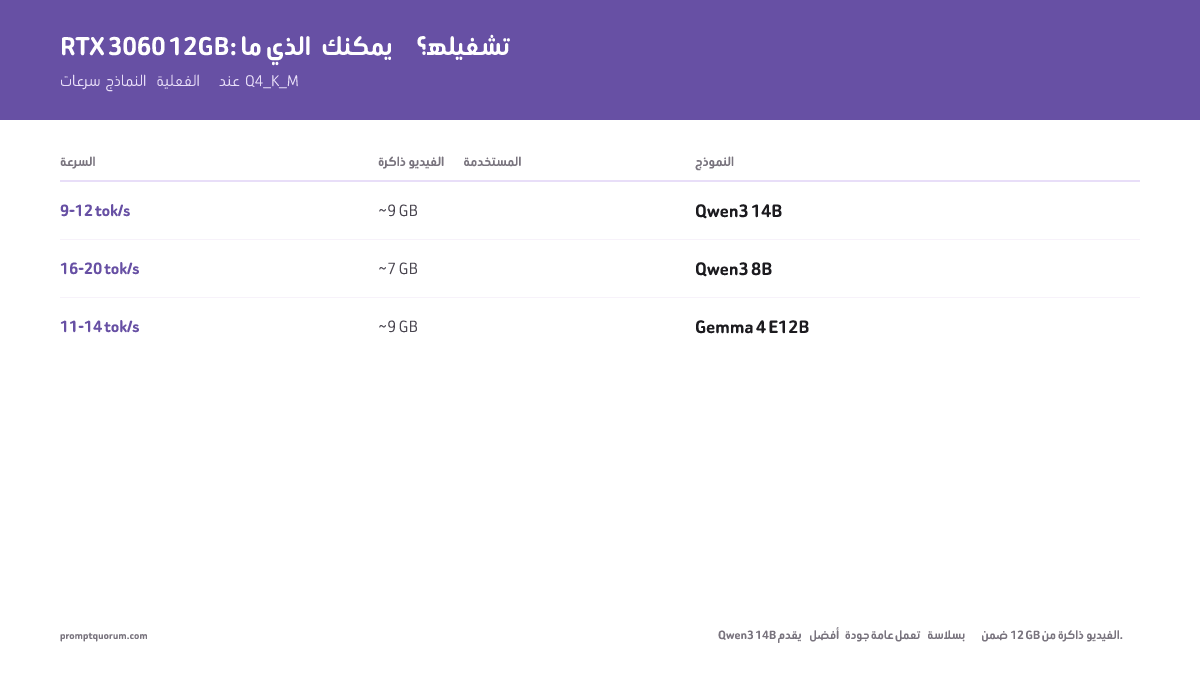
ماذا يمكنك تشغيله على RTX 3060 12GB؟
RTX 3060 12GB هي أفضل GPU اقتصادية لنماذج LLM المحلية في 2026. تتسع 12GB من VRAM لجميع نماذج 7B بتكميم Q4/Q5، ومعظم نماذج 13B بصيغة Q4. للحصول على إرشاد تفصيلي حول متطلبات VRAM حسب حجم النموذج، راجع دليل متطلبات VRAM →. إليك النماذج بالضبط والسرعات التي يمكنك توقعها:
النموذج | الحجم | التكميم | VRAM المستخدمة | السرعة | مثالي لـ |
|---|---|---|---|---|---|
| Qwen3 14B | 14B (كثيف) | Q4_K_M | ~9 GB | 9–12 tok/ث | أفضل جودة عامة تتسع |
| Qwen3 8B | 8B | Q4_K_M | ~7 GB | 16–20 tok/ث | البرمجة، الاستخدام العام |
| Gemma 4 E12B | 26B MoE | Q4_K_M | ~9 GB | 11–14 tok/ث | الرؤية، متعدد الوسائط |
| Mistral Small v0.3 | 7B | Q4_K_M | ~7 GB | 18 tok/ث | اتباع التعليمات |
| DeepSeek-R1 7B | 7B | Q4_K_M | ~7 GB | 10–12 tok/ث | الاستدلال، الرياضيات |
| Gemma 4 E4B | E4B (متعدد الوسائط) | Q4_K_M | ~5 GB | 18–22 tok/ث | رؤية خفيفة، محادثة سريعة |
| Llama 3.2 13B | 13B | Q4_K_M | ~11 GB | 8–10 tok/ث | محادثة بجودة أعلى (Q4 فقط، ضيق) |
Qwen3 14B (كثيف) هو النموذج الأعلى جودة الذي يتسع بأريحية في RTX 3060 12GB بصيغة Q4_K_M، مستخدماً ~9 GB. `ollama pull qwen3:14b`. ملاحظة: Llama 4 Scout (MoE بـ 17B نشطة / 109B إجمالاً، سياق 10M رمز، متعدد الوسائط) يحتاج ~55 GB بصيغة Q4 ولا يتسع في 12 GB عادةً — هو خيار سياق طويل / متعدد وسائط كبير للأجهزة ذات VRAM كبيرة، وليس توصية GPU اقتصادية. gpt-oss:20b (21B إجمالاً / 3.6B نشطة MoE) يحتاج 16 GB، لذا يبقى خارج نطاق بطاقة 12 GB بقليل. جميع السرعات مُقاسة بـ Ollama على RTX 3060 12GB، 16GB من RAM النظام، Ryzen 7 7700X. تكميم Q4_K_M. تختلف السرعات ±15% حسب طول الموجّه ونافذة السياق.
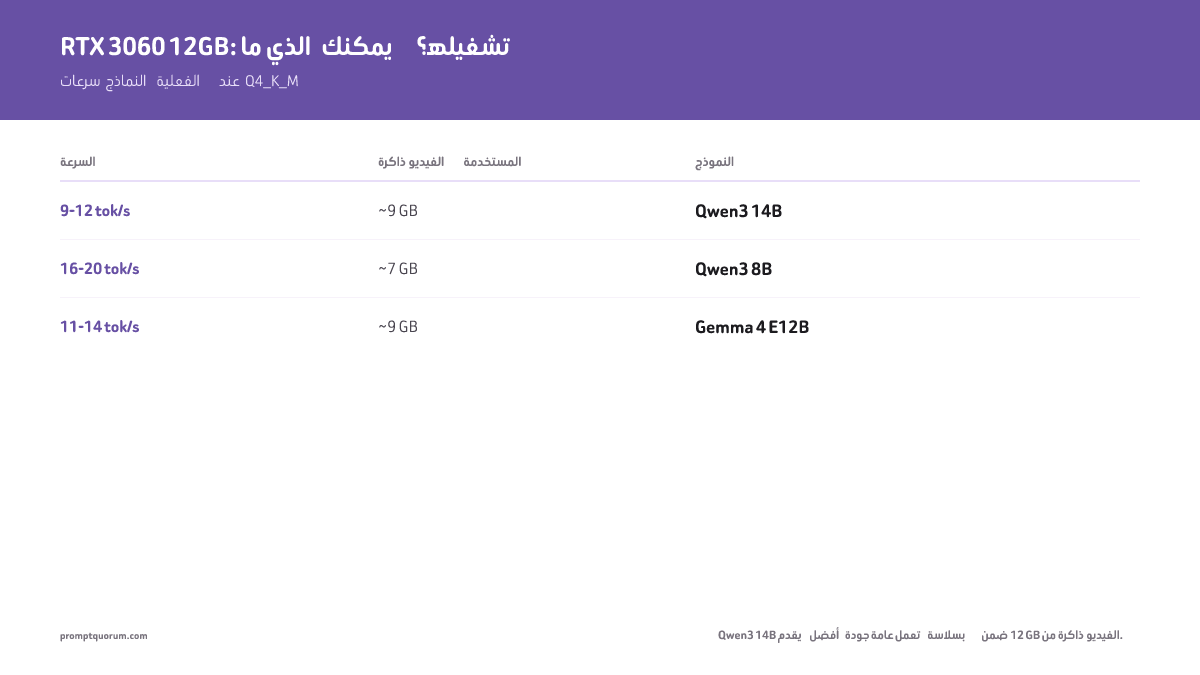
ماذا يمكنك تشغيله على RTX 3060 6GB؟
النسخة بسعة 6GB محدودة جداً. نماذج 3B فقط تتسع بأريحية. تحتاج نماذج 7B بصيغة Q4 إلى ~7GB — أكثر من المتاح. يعمل التفريغ إلى CPU لكنه يقلل السرعة بنسبة 50–70%.
- Phi-4 Mini 3.8B (Q4): ~3GB VRAM، 20–25 tok/ث. أفضل استدلال في هذا الحجم. قوي للرياضيات والمنطق.
- Llama 3.2 3B (Q4): ~2.5GB VRAM، 25–35 tok/ث. الخيار الأسرع. جيد للمحادثة البسيطة والأسئلة والأجوبة.
- Gemma 2 2B (Q4): ~1.7GB VRAM، 35–45 tok/ث. النموذج الأخف. جيد لاختبار الإعدادات.
- 7B مع التفريغ: ممكن لكنه بطيء. Llama 7B مع تفريغ إلى CPU = ~5–8 tok/ث. صالح فقط للعمل الدفعي غير التفاعلي.
- التوصية: إذا كانت لديك بطاقة 6GB، رقِّ إلى 12GB مستعملة (270–300 دولار) قبل استثمار الوقت في حلول بديلة. التحسن في السرعة وجودة النموذج يستحق العناء.
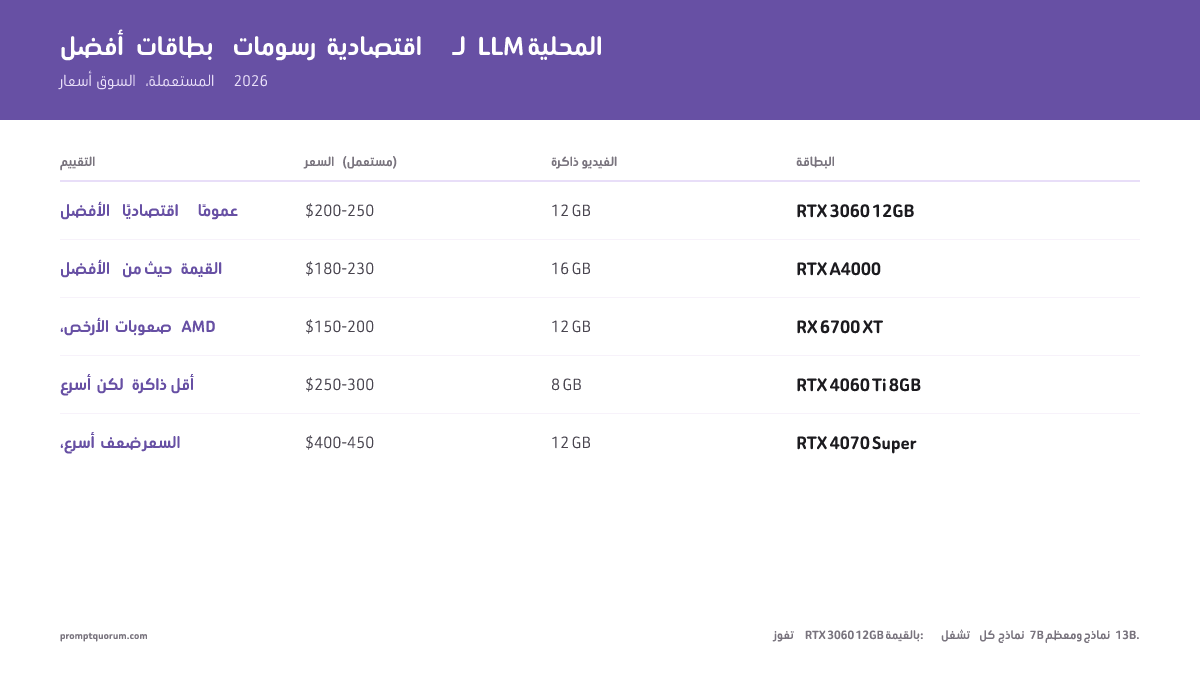
RTX 3060 مقابل بطاقات GPU اقتصادية أخرى
GPU | VRAM | السعر (مستعملة) | سرعة 7B | النموذج الأقصى | الحكم |
|---|---|---|---|---|---|
| RTX 3060 12GB ★ | 12 GB | 270–300 دولار | 15–20 tok/ث | 13B (Q4) | أفضل خيار مستعمل |
| RTX 5060 Ti 16GB | 16 GB | ~570–600 دولار جديدة | 25–30 tok/ث | 20B (Q4) | أفضل خيار جديد اقتصادي |
| RTX 4060 Ti 8GB | 8 GB | نحو 270 دولاراً (جديدة من 420) | 20–25 tok/ث | 7B (Q5 أقصى) | أسرع لكن VRAM أقل |
| RTX A4000 | 16 GB | 790–850 دولار | 12–15 tok/ث | 13B (Q5) | لم تعد بطاقة اقتصادية |
| RTX 4070 Super | 12 GB | 550–700 دولار | 25–30 tok/ث | 13B (Q5) | أسرع، لكن ضعف السعر |
| RX 6700 XT | 12 GB | 175–250 دولار | 10–14 tok/ث | 13B (Q4) | أرخص 12GB، احتكاك مع AMD |
تفوز RTX 3060 12GB في القيمة المستعملة: 12GB من VRAM بسعر 270–300 دولار تشغّل جميع نماذج 7B ومعظم نماذج 13B. عند الشراء جديدة، تُعد RTX 5060 Ti 16GB (~570–600 دولار) خيار الجيل الحالي بهامش VRAM أكبر. RTX A4000 خيار ثانٍ قريب مستعمل إذا وجدت واحدة بأقل من 230 دولار. قد تختلف الأسعار حسب بلدك.
كم تحتاج من VRAM لنماذج 7B؟
تتطلب نماذج 7B المكمَّمة إلى Q4 (4 بت) 6-8GB من VRAM؛ وتتطلب Q5 (5 بت) 8-10GB؛ وتتطلب Q8 (8 بت) 14-16GB.
عملياً: 8GB هو الحد الأدنى المطلق لاستدلال مريح على نماذج 7B بصيغة Q4 مع هامش للمعالجة الدفعية.
تعمل بطاقات 6GB (RTX 2060) تقنياً لكنها تتطلب تحسيناً عنيفاً ولا تترك هامشاً لدفعات أكبر.
إذا كان لديك أقل من 8 GB من VRAM، لا يزال بإمكانك تشغيل نماذج LLM المحلية بفعالية — راجع النماذج المحسّنة للعتاد بسعة 4–8 GB.
تكلفة GPU جانب من الاقتصاد؛ والتكلفة لكل رمز هي الجانب الآخر. يلغي الاستدلال المحلي رسوم API لكل رمز، لكن طول الموجّه لا يزال يؤثر على زمن الاستجابة والإنتاجية. لرؤية الصورة الكاملة للتكاليف — الرموز ومستويات الأسعار واستراتيجيات التحسين — راجع الرموز والتكاليف والحدود: اقتصاديات الموجّهات بالذكاء الاصطناعي.
أفضل النماذج حسب حالة الاستخدام على RTX 3060
اختر نموذجك بناءً على ما تحتاجه فعلاً، وليس على عدد المعاملات. إليك أفضل الخيارات لكل حالة استخدام على RTX 3060 12GB:
يشغّل العتاد الاقتصادي نماذج أصغر — لكن الموجّهات الجيدة تسد فجوة الجودة. يغطي دليل هندسة الموجّهات تقنيات مثل سلسلة التفكير والمخرجات المنظمة التي تساعد النماذج الصغيرة على الأداء فوق حجمها. حمل عمل ملموس يلائم مستوى RTX 3060 12 GB هو المراجعة الآلية لطلبات السحب — راجع مراجعة الكود بـ LLM محلي في CI/CD لرؤية نمط GitHub Actions الذي يشغّل Qwen3 8B على طلبات السحب على هذا العتاد بالضبط.
- المحادثة / الأسئلة والأجوبة: `ollama run qwen3:14b` — كثيف 14B، ~9 GB VRAM، أفضل جودة على 12 GB. لخيار أخف: `ollama run qwen3:8b` بـ ~7 GB.
- البرمجة: `ollama run qwen3:8b` — متين لبرمجة عامة الأغراض. ~7 GB VRAM. 16–20 tok/ث.
- الاستدلال / الرياضيات: `ollama run deepseek-r1:7b` — استدلال بسلسلة تفكير. 10–12 tok/ث. أبطأ لكن أدق بشكل ملحوظ في المسائل متعددة الخطوات.
- الكتابة / الإبداع: `ollama run mistral:7b` — أفضل اتباع للتعليمات. 18 tok/ث. مخرجات نظيفة ومنظمة. مثالي للمسودات وإعادة الصياغة.
- الرؤية / الصور: `ollama run gemma4:e12b` — متعدد الوسائط (يقبل الصور). 11–14 tok/ث. يستخدم ~9GB VRAM. لخيار أخف، `ollama run gemma4:e4b` بـ ~5 GB. يصف الصور ويقرأ لقطات الشاشة ويحلل المخططات.
- الخصوصية / دون اتصال: أي مما سبق. تعمل جميعها محلياً 100%. لا تغادر أي بيانات جهازك. لا يتطلب إنترنت بعد تنزيل النموذج.
- أتمتة المنزل / ذكاء اصطناعي دائم التشغيل: `ollama run phi4-mini` — يتعامل Phi-4 Mini (3.8B، ~3 GB VRAM) مع استعلامات Home Assistant الصوتية على حاسوب مصغر دون GPU مخصصة. راجع أفضل عتاد للذكاء الاصطناعي في المنزل الذكي →.
مستعملة مقابل جديدة: من أين تشتري؟
- مستعملة (أرخص بـ 150-300 دولار): eBay، Facebook Marketplace، Craigslist، متاجر إصلاح الحواسيب المحلية. خطر أعلى لبطاقات معيبة أو VRAM تالفة. اختبر دائماً قبل الالتزام.
- جديدة (420-700 دولار): Newegg، Amazon، Best Buy، Microcenter. ضمان مشمول. دون مفاجآت. لكن الأسعار ليست مستقرة — فقد ارتفعت أسعار البطاقات الجديدة في السوق طوال 2026، وتنفد بعض الطرازات مثل RTX 4060 Ti 16GB من كبار المتاجر لفترات. مثالية للمشترين الذين يفضّلون تجنب المخاطر ويقبلون الدفع فوق السعر المُعلن.
- بطاقات التعدين (تشفير، رخيصة جداً): خطر شديد. تدهور VRAM شائع. اشترِ فقط إذا كان بإمكانك إجراء اختبارات ضغط كاملة في الموقع.
أخطاء شائعة مع بطاقات GPU الاقتصادية
- شراء RTX 2060 بسعة 4GB توقعاً لاستدلال سلس لـ 7B — ستحصل على أخطاء ذاكرة باستمرار.
- دمج GPU بـ 250 دولاراً مع مصدر طاقة بـ 30 دولاراً — يفسد انخفاض الجهد الاستقرار. خصّص 650W على الأقل بشهادة 80+ Gold.
- افتراض أن ذاكرة DDR5 ومعالج i9 يسرّعان استدلال LLM — لا يفعلان ذلك. عرض نطاق VRAM في GPU هو الاختناق الوحيد المهم لسرعة الاستدلال.
- افتراض أن Llama 4 Scout يتسع في 12 GB. Scout هو MoE بـ 17B نشطة / 109B إجمالاً يحتاج ~55 GB بصيغة Q4 (يدخل فقط في 24 GB بتكميم متطرف 1.78 بت، ~20 tok/ث). على RTX 3060 بسعة 12 GB، شغّل نماذج كثيفة بدلاً من ذلك: Qwen3 14B (~9 GB)، Qwen3 8B أو Gemma 4 E12B.
- شراء بطاقة 16 GB فقط لنماذج 13B. تشغّل RTX 3060 بسعة 12 GB بالفعل Qwen3 14B بصيغة Q4. انتقل إلى 16 GB فقط إذا كنت تحتاج تحديداً gpt-oss:20b (16 GB)، أو نماذج كثيفة 20B+ أو هامش سياق أكبر.
الخطوات التالية
- أفضل وحدات GPU من AMD لنماذج LLM المحلية — تفكر في AMD؟ مقارنة شاملة AMD مقابل NVIDIA →
- أفضل نماذج Ollama مفتوحة المصدر — أي النماذج يعمل بشكل أفضل على GPU اقتصادية →
- كم سعة VRAM أحتاج؟ — طابق حجم GPU مع حجم النموذج →
الأسئلة الشائعة
هل لا يزال شراء RTX 3060 12GB يستحق العناء في 2026؟
نعم. عمرها أكثر من 4 سنوات، لكن 12GB من VRAM لا تزال وثيقة الصلة جداً. تشغّل Qwen3 14B وQwen3 8B وGemma 4 E12B وMistral Small دون مشاكل بصيغة Q4. تتسع لجميع نماذج 7B-8B ومعظم النماذج الكثيفة 13B-14B.
هل يجب أن أشتري RTX 5060 Ti أم RTX 4060 Ti لنماذج LLM المحلية؟
RTX 5060 Ti 16GB (~570-600 دولار) هي الآن الخيار الأفضل: ذاكرة VRAM أكبر بـ 8 GB من RTX 4060 Ti بسعة 8GB وأسرع بنسبة 10-15%. إنها الخيار الاقتصادي من الجيل الحالي لبطاقة جديدة. إذا كانت ميزانيتك محدودة، تبقى RTX 4060 Ti بسعة 8GB متينة لنماذج 7B. تجنّب الأساس 4060/5060 (8GB) و4070 (12GB) إذا كنت تخطط لتشغيل نماذج 13B+ — هامش VRAM ضعيف.
هل يمكنني استخدام AMD RX 7900 XT أو RX 7900 XTX بدلاً من ذلك؟
نعم، لكن دعم برامج تشغيل AMD أضعف من NVIDIA + CUDA. يتطلب إعداد HIP/ROCm جهداً أكبر. RTX أكثر أماناً للمبتدئين.
هل 12GB من VRAM كافية لنماذج 13B؟
بالكاد، بتكميم Q4. ستسبب Q5 أو Q8 أخطاء OOM. إذا أردت 13B مريحاً، استهدف 16GB.
هل يجب أن أشتري GPU مؤسسية مستعملة مثل RTX A4000؟
لم يعد الأمر كذلك. كانت RTX A4000 صفقة اقتصادية حقيقية عندما كانت تُباع بـ 180-230 دولاراً مستعملة، لكن نقص الذاكرة في 2026 دفعها إلى 790-850 دولاراً مستعملة — أي نحو ثلاثة أضعاف سعر RTX 3060 12GB مقابل 4GB إضافية من VRAM واستدلال أبطأ. وينطبق الأمر نفسه على RTX A2000 12GB بسعر 440-615 دولاراً. اشترِ بدلاً من ذلك RTX 3060 12GB مستعملة أو RTX 5060 Ti 16GB جديدة.
كم واط من مصدر الطاقة يجب أن أشتري مع GPU بـ 250 دولاراً؟
650W كحد أدنى، بشهادة 80+ Gold. لا تتجاوز GPU بـ 250 دولاراً + CPU + اللوحة الأم 400W من الاستهلاك، لكنك تريد هامشاً للذروات.
هل يمكنني تشغيل Ollama على GPU اقتصادية بـ 200 دولار؟
نعم. Ollama خفيف. ستشغّل RTX 3060 عمرها 4 سنوات مع Ollama نموذج Qwen3 14B بسرعة 9-12 tok/ث أو Qwen3 8B بسرعة 16-20 tok/ث — صالح تماماً للمحادثة التفاعلية ومساعدة الكود.
هل يمكنني تشغيل Llama 4 Scout على RTX 3060 12GB؟
عادةً لا. Llama 4 Scout هو MoE بـ 17B نشطة / 109B إجمالاً يحتاج ~55 GB من VRAM بصيغة Q4 — أعلى بكثير من بطاقة 12 GB. يدخل فقط في 24 GB بتكميم متطرف 1.78 بت (~20 tok/ث). على RTX 3060 12GB، شغّل نماذج كثيفة بدلاً من ذلك: `ollama pull qwen3:14b` (أفضل جودة تتسع)، Qwen3 8B أو Gemma 4 E12B. Scout خيار سياق طويل (10M رمز) / متعدد وسائط كبير للأجهزة ذات 48 GB+.
هل يمكنني استخدام AMD RX 6700 أو 6800 XT بدلاً من NVIDIA لنماذج LLM المحلية؟
نعم، لكن دعم برامج تشغيل AMD لـ ONNX Runtime أضعف من NVIDIA CUDA. توقع احتكاكاً أكبر في الإعداد. NVIDIA أكثر أماناً للتجميعات الاقتصادية.
ما أفضل GPU اقتصادية بأقل من 200 دولار؟
RTX 2080 مستعملة (8GB، ~150 دولاراً) أو RTX A2000 (12GB، ~440-615 دولار). تشغّل كلتاهما نماذج 7B بصيغة Q4. يُفضَّل A2000 لهامش 12GB من VRAM.
كيف أختبر GPU مستعملة بحثاً عن عيوب VRAM قبل الشراء؟
شغّل اختبارات ضغط VRAM: gpu-burn (Linux)، اختبار ضغط ذاكرة HWiNFO64 (Windows)، أو حمّل نموذجاً كبيراً في Ollama وراقب أخطاء OOM. اختبر قبل إعادة البطاقة.
هل يمكنني ترقية GPU لتشغيل نماذج أكبر لاحقاً؟
نعم، ترقيات GPU سهلة في الحواسيب المكتبية. ابدأ بـ RTX 3060 12GB ثم رقِّ إلى RTX 4090 أو 5090 لاحقاً. منفذ PCIe متوافق رجعياً بين الأجيال.
ما أفضل GPU من NVIDIA اقتصادية لاستدلال LLM المحلي؟
RTX 4060 Ti (8 GB، ~250 دولاراً) لنماذج 7B، أو RTX 4070 Super (12 GB، ~550-700 دولار) لنماذج 13B. مستعملة: RTX 3060 12GB (270–300 دولار) تشغّل نماذج 7-13B دون مشاكل بصيغة Q4. أفضل قيمة هي RTX 3060 12GB مستعملة، أو RTX 4070 Super جديدة.
كيف تقارَن AMD 6800XT بـ RTX 4070 لاستدلال الذكاء الاصطناعي؟
تتفوق AMD RX 6800 XT (16 GB) على RTX 4070 (12 GB) في VRAM وأداء الألعاب، لكنها أبطأ في استدلال LLM (أقل بـ 15-20%). إعداد برنامج تشغيل ROCm لـ llama.cpp أكثر تعقيداً من CUDA أيضاً. للعمل الخالص مع LLM، RTX 4070 أسهل؛ للألعاب + LLM، توفر 6800 XT قيمة أفضل.
ما GPU بأفضل سعر لكل GB من VRAM لنماذج LLM المحلية في 2026؟
RTX 3090 مستعملة (24 GB، ~850-1,050 دولار) = 35-44 دولاراً لكل GB. RTX 3060 مستعملة (12 GB، ~270-300 دولاراً) = 23-25 دولاراً لكل GB. RTX 4070 Ti (12 GB، ~600 دولاراً جديدة) = 50 دولاراً لكل GB. أفضل قيمة: RTX 3060 12GB مستعملة. أعلى سعة لكل دولار: RTX 3090 24GB مستعملة. توازن السعر + الأداء: RTX 4070 جديدة.
قراءة ذات صلة
- أجهزة AMD Ryzen AI Max+ المصغرة (2026) — بديل لبطاقات GPU المنفصلة: iGPU + NPU بقدرة 50 TOPS بسعر 1,200–2,500 دولار.
- كم VRAM لنماذج LLM المحلية؟
- RTX 5090 مقابل RTX 4090
- بطاقات GPU مستعملة لنماذج LLM المحلية
- أفضل بطاقات GPU لنماذج LLM المحلية
- حاسبة VRAM
- لابتوب مقابل حاسوب مكتبي لنماذج LLM المحلية — مقارنة منصات كاملة: GPU مكتبية مقابل MacBook لنماذج LLM المحلية.
- هندسة الموجّهات لنماذج LLM المحلية — حسّن الموجّهات للنماذج التي تعمل على عتاد اقتصادي.
- الموجّهات بسلسلة التفكير — تحسّن بشكل ملحوظ جودة مخرجات DeepSeek-R1.
- Mac Mini M5 كخادم ذكاء اصطناعي محلي — بديل اقتصادي لتجميعات GPU: ذكاء اصطناعي دائم التشغيل بعتاد 599 دولاراً + 35 دولاراً سنوياً للكهرباء.
- Apple Silicon M5 لنماذج LLM المحلية — دليل كامل لـ M5 Pro/Max: اختبارات الأداء وإعدادات Mac ومستويات الذاكرة وأي Mac تشتري للاستدلال المحلي.
- Apple Silicon مقابل GPU من NVIDIA لنماذج LLM المحلية — مقارنة تكلفة وأداء كاملة: متى يتفوق Mac على GPU اقتصادية.
- أفضل النماذج لـ Apple Silicon 2026 — توصيات نماذج لمستويات الذاكرة الموحدة من 16GB–128GB.
- لأسعار GPU في اليابان وتجار Akihabara وخيارات السوق المستعملة على Mercari وYahoo Auctions، راجع <a href="/ar/prompt-bites/best-gpu-local-llm-japan-price" class="text-primary hover:underline">دليلنا لأفضل بطاقات GPU لنماذج LLM المحلية في اليابان</a>.
- لأسعار GPU في الإمارات ومنطقة الخليج، بما في ذلك متاجر Sharaf DG وnoon.com وAmazon.ae وسوق dubizzle للمستعمل، راجع <a href="/ar/prompt-bites/best-gpu-local-llm-uae-price" class="text-primary hover:underline">دليلنا لأفضل بطاقة GPU من حيث القيمة للنماذج اللغوية المحلية في الإمارات</a>.
المصادر
- Meta AI. (2025). "Llama 4 Model Card." — بنية MoE لـ Scout، متطلبات VRAM
- Qwen Team. (2026). "Qwen3 Technical Report." — مواصفات Qwen3 8B
- قاعدة بيانات GPU من TechPowerUp: مواصفات واستهلاك طاقة RTX 3060 / RTX 4060 Ti / RTX 4070 Super
- مصفوفة قدرات CUDA من NVIDIA: عرض نطاق ذاكرة GPU والإنتاجية النظرية لأحمال عمل الاستدلال
- متطلبات نماذج Ollama: توصيات VRAM لمستويات تكميم Llama 4 Scout وQwen3 وMistral Small
- يتطلب الامتثال التنظيمي سير عمل قابلاً للتدقيق. ضع معايير حوكمة لجودة ومراجعة موجّهات الذكاء الاصطناعي: تغطي حوكمة الموجّهات في الإنتاج السياسات والتحكم بالإصدارات وعمليات الموافقة.