Key Takeaways
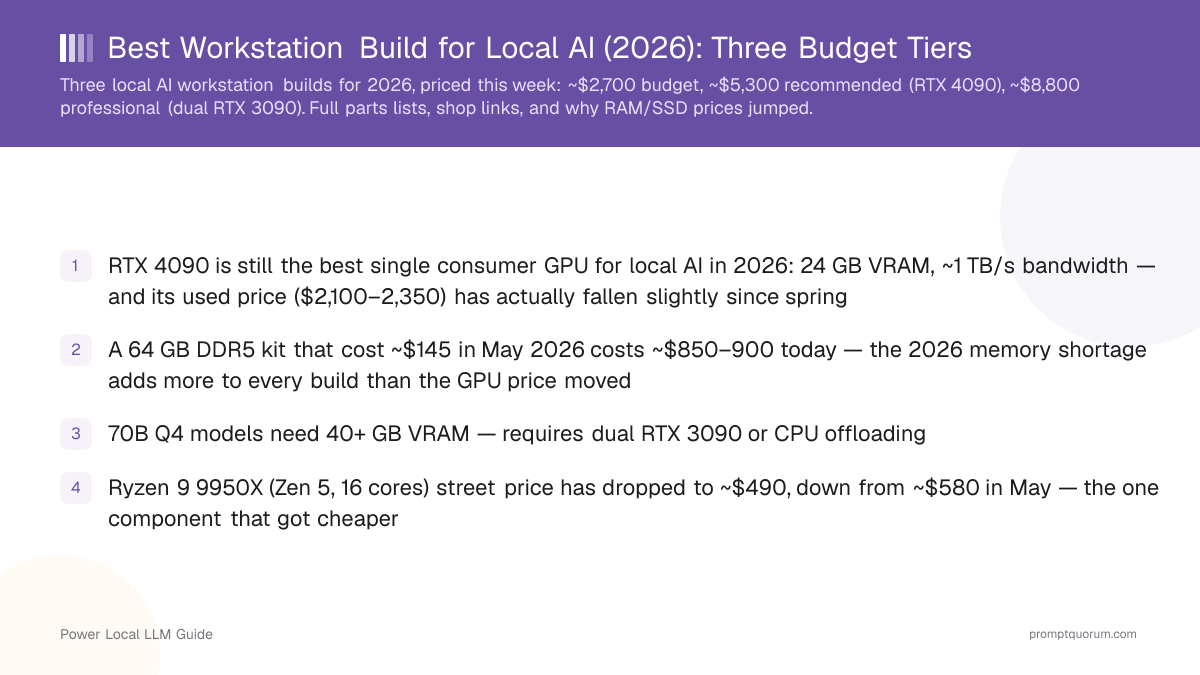
- RTX 4090 is still the best single consumer GPU for local AI in 2026: 24 GB VRAM, ~1 TB/s bandwidth — and its used price ($2,100–2,350) has actually fallen slightly since spring
- A 64 GB DDR5 kit that cost ~$145 in May 2026 costs ~$850–900 today — the 2026 memory shortage adds more to every build than the GPU price moved
- 70B Q4 models need 40+ GB VRAM — requires dual RTX 3090 or CPU offloading
- Ryzen 9 9950X (Zen 5, 16 cores) street price has dropped to ~$490, down from ~$580 in May — the one component that got cheaper
- PCIe Gen 4/5 NVMe loads a 7B model in under 2 seconds vs 10+ seconds on SATA, but a 4 TB Gen 5 drive now runs ~$700–900, up from ~$200
- Tier 1 and Tier 2 share the AM5 socket — upgrade GPU/RAM later without a new motherboard; Tier 3 requires TRX50
Which Workstation Should You Build?
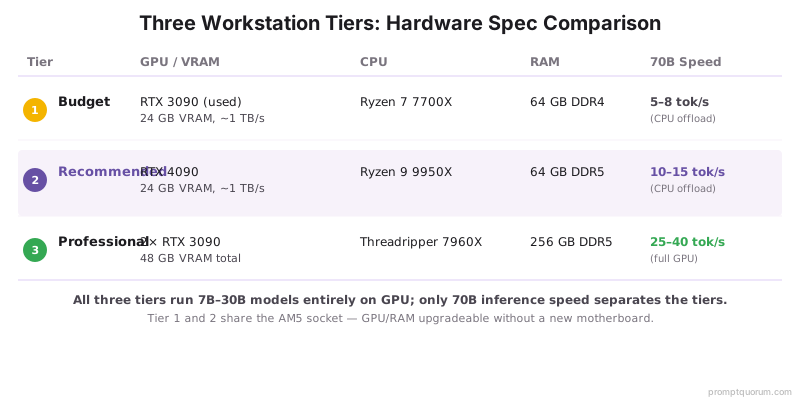
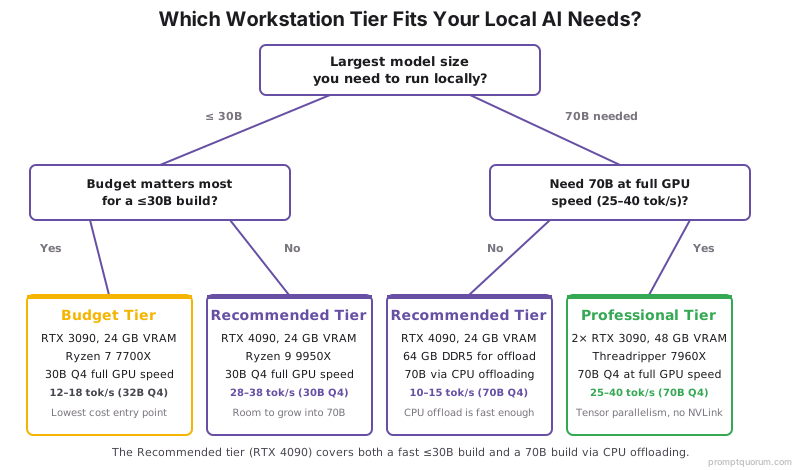
Choose your build based on the largest model you need to run: 7B–14B → Budget. 14B–32B → Recommended. 70B → Professional. Prices below are complete-system totals checked August 25, 2026.
Budget | Recommended | Professional | |
|---|---|---|---|
| Price | ~$2,700 | ~$5,300 | ~$8,800 |
| GPU | RTX 3090 24GB (used) | RTX 4090 24GB | 2× RTX 3090 (48GB) |
| CPU | Ryzen 7 7700X | Ryzen 9 9950X | Threadripper 7960X |
| RAM | 64GB DDR5 | 64GB DDR5-6000 | 256GB DDR5 ECC |
| Largest model | 32B Q4 on GPU | 30B Q4 GPU / 70B offload | 70B Q4 at GPU speed |
| Best for | Budget buyers, 7B–14B daily use | Most users, 14B–32B | 70B workloads, multi-user |
Every total below is higher than what you may have seen quoted elsewhere in 2026 — that is the DDR5/NAND shortage (see the callout after the tier tables), not a mistake. GPU prices, by contrast, are flat or slightly down since spring.
Sponsored
Editor's Choice: RTX 4090 Recommended Workstation
Best overall local-AI workstation for 2026 — the balance point between VRAM, upgrade headroom, and price for the widest range of models.
- 24 GB VRAM — runs every model up to 32B Q4 fully on GPU
- 64 GB DDR5-6000 — enough for 70B via CPU offload at 10–15 tok/s
- Qwen3 32B Q4 fully on GPU at 28–38 tok/s; 70B with offloading
- ~$5,300 complete system, checked August 25, 2026
- Skip this if: you only ever run 7B–14B models — the Budget build saves ~$2,600 and does that job just as well
VRAM Determines Your Build — Match Model Size to Hardware
Not sure which tier you need? Start from the largest model you actually plan to run, not the one you might run someday.
Model size | Recommended VRAM | Best build |
|---|---|---|
| 7B | 8–12 GB | Budget (RTX 3090 has headroom to spare) |
| 14B | 16–24 GB | Budget or Recommended |
| 32B Q4 | ~20–24 GB | Recommended (RTX 4090) |
| 70B Q4 | ~40 GB+ | Professional (dual RTX 3090) or offload on Recommended |
| 70B Q8 | ~70 GB+ | Multi-GPU only — see our GPU guide |
Not sure which GPU you need on its own (not as part of a full build)? See our GPU buying guide for single-card picks below Budget-tier pricing.
Tier 1: ~$2,700 Budget AI Workstation
The budget build uses a used RTX 3090 (24 GB VRAM) as the core. It runs Llama 3.1 8B Q8 at 45–60 tok/s, Qwen3 14B Q8 at 20–28 tok/s, and Qwen3 32B Q4 at 12–18 tok/s entirely on GPU. The RTX 3090 draws 350 W — pair with a quality 850 W PSU. Buy this build if: your budget is under $3,000, you mainly run 7B–32B models, and you are comfortable buying a used GPU. Skip it if: 70B is your primary workload — CPU-offloaded 70B on this tier runs 5–8 tok/s, which is functional but slow.
- Models supported at full GPU speed: 7B (any quant), 13B (Q4/Q8), 14B (Q4/Q8), 30B (Q4)
- 70B support: CPU offloading required — ~5–8 tok/s, functional but not ideal
- Power draw: ~450 W peak (GPU 350 W + CPU 65 W + rest)
- Recommended PSU: Corsair RM850x or equivalent 80+ Gold
Component | Model | Price (Aug 2026) |
|---|---|---|
| GPU | NVIDIA RTX 3090 (used, 24 GB) | ~$850 |
| CPU | AMD Ryzen 7 7700X | ~$220 |
| Motherboard | MSI MAG X670E Tomahawk WiFi | ~$190 |
| RAM | 64 GB DDR5-5600 (2×32 GB) | ~$850 (was ~$110 in May) |
| Storage | 2 TB PCIe Gen 4 NVMe | ~$350 (was ~$90 in May) |
| PSU | 850 W Gold rated | ~$110 |
| Case | Mid-tower ATX, 3+ fan slots | ~$80 |
| CPU Cooler | 240mm AIO or Tower | ~$70 |
| Total | ~$2,720 |
💡Tip: Used vs. new RTX 3090: used cards ($850–1,050 on eBay) save 30–50% over the few new-old-stock units still around, at the cost of an unknown warranty. Buy from a seller with return acceptance and check for mining wear (fan noise, thermal paste residue) before committing.
Tier 2: ~$5,300 Recommended AI Workstation
The recommended build centers on the RTX 4090 (24 GB, ~1 TB/s memory bandwidth) paired with the AMD Ryzen 9 9950X (Zen 5, 16 cores). The 4090 is 30–40% faster than the 3090 per GB of VRAM and draws less power per token. This build handles 30B Q4 models fully on GPU and 70B models via CPU offloading at 10–15 tok/s with 64 GB RAM. Buy this build if: you want the best single-GPU workstation, run 14B–32B models regularly, and occasionally offload a 70B. Skip it if: 70B is your primary daily workload — go Professional instead for GPU-speed 70B.
- Models supported at full GPU speed: 7B–30B (any quant), 32B (Q4 fits in 24 GB)
- 70B support: CPU offloading at 10–15 tok/s with 64 GB RAM; upgrade to 128 GB for 15–20 tok/s
- 7B Q4 speed: ~105–125 tok/s on Ollama
- 14B Q8 speed: ~48–60 tok/s
- 30B Q4 speed: ~28–38 tok/s
- Power draw: ~550 W peak (GPU 450 W + CPU 65 W + rest)
Component | Model | Price (Aug 2026) |
|---|---|---|
| GPU | NVIDIA GeForce RTX 4090 24 GB | ~$2,200 |
| CPU | AMD Ryzen 9 9950X (16C/32T, Zen 5) | ~$490 (down from ~$580 in May) |
| Motherboard | ASUS ProArt X870E-Creator WiFi | ~$520 |
| RAM | 64 GB DDR5-6000 CL30 (2×32 GB) | ~$900 (was ~$145 in May) |
| Storage | 4 TB PCIe Gen 5 NVMe | ~$800 (was ~$200 in May) |
| PSU | 1000 W Platinum rated | ~$180 |
| Case | Full-tower ATX with strong airflow | ~$140 |
| CPU Cooler | 360mm AIO | ~$110 |
| Total | ~$5,340 |
Tier 3: ~$8,800 Professional 70B Workstation
The professional build targets 70B model inference at GPU speed (25–40 tok/s) using dual RTX 3090 GPUs for 48 GB total VRAM. The Ryzen Threadripper 7960X (24 cores, high memory bandwidth) accelerates CPU offloading for models that spill over 48 GB. With 256 GB DDR5 ECC, even 140B quantized models load entirely in RAM. Buy this build if: 70B is your primary workload, you need 48 GB+ GPU VRAM, or you support multiple concurrent users. Skip it if: you have never run a model larger than 32B — this tier is significant overspend for that use case.
- Models supported at full GPU speed (48 GB total VRAM): 7B–70B Q4, 30B Q8
- 70B Q4 speed: 25–40 tok/s (both RTX 3090s active via tensor parallelism in Ollama)
- CPU offloading with 256 GB RAM: runs 140B+ models at 4–6 tok/s
- Dual GPU configuration: Ollama detects both GPUs automatically; no NVLink needed
- Power draw: ~900 W peak (2× GPU 700 W + CPU 350 W + rest)
- Recommended PSU: Seasonic PRIME TX-1600W or equivalent
Component | Model | Price (Aug 2026) |
|---|---|---|
| GPU ×2 | 2× NVIDIA RTX 3090 24 GB (used) | ~$1,700 |
| CPU | AMD Ryzen Threadripper 7960X (24C) | ~$1,400 (volatile — seen $1,000–$2,500) |
| Motherboard | ASUS Pro WS TRX50-SAGE WiFi | ~$800 |
| RAM | 256 GB DDR5-5200 ECC (8×32 GB) | ~$2,800 (was ~$650 in May — verify before buying) |
| Storage | 8 TB PCIe Gen 4 NVMe (2×4 TB) | ~$1,400 (was ~$360 in May) |
| PSU | 1600 W Platinum modular | ~$350 |
| Case | Full-tower HEDT ATX | ~$220 |
| CPU Cooler | 360mm AIO + extra case fans | ~$150 |
| GPU Bridges/Cables | NVLink not required (Ollama uses both) | ~$0 |
| Total | ~$8,820 |
⚠️Warning: The 2026 DRAM shortage hit ECC/RDIMM server memory hardest — 256 GB DDR5 ECC kits are both scarce and volatile in price. Get a live quote from your motherboard vendor's QVL-listed RAM before ordering; the figure above is a checked estimate, not a guaranteed price.
Hardware We Would Not Buy for This Use Case
- An 8 GB GPU if your goal is 32B models — you will hit a VRAM wall immediately; no CPU offloading trick fixes an undersized card the way it can stretch RAM
- An expensive CPU paired with an undersized GPU — the GPU and its VRAM decide inference speed far more than CPU clock speed; a $600 CPU with a 12 GB GPU is money misallocated
- A SATA SSD for a new AI workstation — model loading is 5x slower than PCIe Gen 4 NVMe for a difference of $20–40 on a multi-thousand-dollar build
- An undersized PSU — the Professional tier peaks near 900 W; a cheap 750 W unit will brownout under sustained dual-GPU load
- 32 GB RAM for serious 70B CPU offloading — the model itself needs ~40 GB just to sit in memory before the OS and Ollama overhead
Should You Build a Workstation or Rent Cloud GPUs?
Local Workstation vs. Cloud GPU Rental
Use a local LLM if:
- •You use local models 2+ hours/day
- •Privacy or data residency matters for your workload
- •You want a fixed, predictable long-term cost
- •You are already committed to a specific tier above
Use a cloud model if:
- •You use local models under 1 hour/day
- •Your workload is occasional or bursty (batch jobs, testing)
- •You do not want to handle hardware maintenance
- •You need to try a 70B+ model before committing to hardware
Quick decision:
- →Heavy daily use → build the workstation (see the tier tables above)
- →Occasional / evaluation use → rent cloud GPUs
- →Not sure? See the payback-time table just below
- →Compare cloud GPU providers →
Software Stack for Any Build
Once hardware is assembled, getting Ollama running takes under 10 minutes:
- 1Install Ubuntu 22.04 LTS or Windows 11 (Ubuntu preferred for CUDA stability)
- 2Install NVIDIA drivers 550+ from nvidia.com or
ubuntu-drivers autoinstall - 3Install Ollama:
curl -fsSL https://ollama.com/install.sh | sh - 4Pull a model:
ollama pull qwen2.5:14b-instruct-q8_0 - 5Run as network server:
OLLAMA_HOST=0.0.0.0 ollama serve - 6Install Open WebUI for browser UI:
docker run -d -p 3000:8080 --gpus all ghcr.io/open-webui/open-webui:cuda - 7Expose via Tailscale for secure remote access from any device
Performance Comparison Across All Three Builds
Hardware performance is unchanged from earlier 2026 measurements — only the prices moved. Use this table to see what each tier actually does, independent of the cost table above.
Model + Quant | Budget (~$2,700) | Recommended (~$5,300) | Professional (~$8,800) |
|---|---|---|---|
| Llama 3.1 8B Q4 | 55–70 tok/s | 105–125 tok/s | 120–140 tok/s |
| Qwen3 14B Q8 | 20–28 tok/s | 48–60 tok/s | 55–70 tok/s |
| Qwen3 32B Q4 | 12–18 tok/s | 28–38 tok/s | 40–55 tok/s |
| Llama 3.3 70B Q4 | 5–8 tok/s (CPU) | 10–15 tok/s (CPU) | 25–40 tok/s (GPU) |
| Mixtral 8x22B Q4 | 15–22 tok/s | 32–45 tok/s | 45–60 tok/s |
Total Cost of Ownership: Workstation vs. Cloud GPU
The Recommended build's hardware cost rose ~29% since May 2026 (RAM and storage, not the GPU) — so the payback math against cloud rental changed too. Below: hardware + estimated electricity vs. RunPod A40 rental ($0.44/hr) at three usage levels, using the Recommended (~$5,300) build.
Usage level | Cloud cost/year (A40 @ $0.44/hr) | Workstation power cost/year | Payback vs. cloud |
|---|---|---|---|
| 2 hrs/day | ~$321 | ~$44 (@$0.15/kWh) | ~19 years — cloud wins |
| 4 hrs/day | ~$642 | ~$88 | ~9.6 years |
| 8 hrs/day | ~$1,285 | ~$176 | ~4.8 years |
At 2026's inflated hardware prices, the workstation only clearly wins the pure cost math above ~4 hrs/day of use — below that, cloud rental is the better financial choice even though the A40 (Ampere-generation) is slower than an RTX 4090. Privacy, data residency, and not depending on cloud availability are separate reasons to go local regardless of the payback period. Electricity assumed at $0.15/kWh (US average); European users at ~€0.30/kWh should roughly double the power-cost column.
Should I build a workstation or rent cloud GPUs for running 70B models?
For regular use (4+ hours/day), build the workstation. A dedicated A40 48 GB on RunPod costs $0.44/hr — at 4 hours/day, that's ~$642/year. At 2026's inflated hardware prices, the ~$5,300 Recommended build now pays for itself in roughly 9–10 years at 4 hrs/day, or under 5 years at 8 hrs/day. For occasional use (under 2 hours/day), cloud is cheaper. See the payback table above for the full breakdown.
Why did this build cost so much more than other 2026 guides quote?
RAM and NVMe storage, not the GPU. A 2026 DRAM/NAND supply shortage — memory makers shifted factory capacity to AI-datacenter HBM chips — pushed 64 GB DDR5 kit prices from ~$145 in May 2026 to ~$850–900 by August, and 4 TB NVMe drives from ~$200 to ~$700–900. GPU prices, by contrast, are flat to slightly down over the same period. Any build guide still quoting May 2026 component prices is understating your real cost by $1,000+ per tier.
Should I buy a used or new RTX 3090 for the Budget or Professional build?
Used is the standard choice for the RTX 3090 in 2026 — production ended in 2022, so "new" units are old retailer stock at a premium, not fresher hardware. Used cards run $850–1,050 depending on condition; check for excessive fan noise or a burning smell under load (signs of mining wear), and prefer a seller who accepts returns. If you want factory warranty coverage instead, the RTX 4090 (still in production-adjacent supply) is the safer new-hardware pick, just at Recommended-tier pricing.
Do I need NVLink to run Ollama across two GPUs?
No. Ollama uses CUDA tensor parallelism to split model layers across multiple GPUs via PCIe — no NVLink required. NVLink would increase inter-GPU bandwidth from ~32 GB/s (PCIe 4.0 x16) to ~600 GB/s, which matters for training but minimally for inference. The dual RTX 3090 setup works fully without NVLink.
Why not an RTX 4090 over dual RTX 3090 for the professional build?
VRAM is the deciding factor. Two RTX 3090s at 24 GB each = 48 GB total, enough for Llama 3.3 70B Q4 (~40 GB). A single RTX 4090 has only 24 GB — 70B Q4 does not fit without CPU offloading. For 70B inference at GPU speed, dual 3090s win on VRAM/dollar. For 30B and below, the RTX 4090 is faster per dollar.
Can I start with the budget build and upgrade to the recommended tier?
Yes — Tier 1 and Tier 2 both use the AM5 socket. You can replace the RTX 3090 with an RTX 4090 later, or add a second GPU. RAM modules are compatible, though you will likely be buying at whatever the DDR5 market price is at upgrade time. The only incompatibility is Tier 1/2 (AM5) vs Tier 3 (TRX50) — moving to Threadripper requires a new motherboard and CPU.
What power outlet do I need for the professional build?
The professional build (dual RTX 3090 + Threadripper) peaks at ~900 W from the wall. A standard 15A/120V US outlet supports ~1800 W — you are fine. European 16A/230V outlets support ~3680 W. Use a quality PSU (Seasonic, Corsair, be quiet!) with 80+ Platinum efficiency to minimize heat and power draw.
Worthwhile Upgrades If You Expect to Grow
Three upgrades are worth paying for if you think you will outgrow your tier within a year:
- RAM: 64 GB → 128 GB — useful for CPU-offloaded 70B models on the Recommended tier, pushing offload speed from ~10–15 tok/s toward ~15–20 tok/s
- Storage: 2 TB → 4 TB — useful if you keep more than 3–4 large models installed at once; re-downloading a 40 GB model repeatedly costs more time than the storage upgrade costs money
- Cooling: 240mm → 360mm AIO — matters most on the Recommended and Professional tiers, where sustained multi-hour inference keeps the GPU and CPU at high load far longer than gaming workloads do
Which Workstation Should You Buy?
Still unsure? Start with the Recommended RTX 4090 build — it offers the best balance of performance, VRAM, power consumption, and upgradeability for most local-AI users. You can always add a second GPU or more RAM later; the socket and case have room for it.
💰 Under $3,000 — Budget Build
~$2,700 · RTX 3090 24GB
Runs every model up to 32B Q4 fully on GPU. Best if your budget is capped and you can source a used GPU.
⭐ Best overall — Recommended Build
~$5,300 · RTX 4090 24GB
The best balance of performance, VRAM, power draw, and upgrade headroom for most local-AI users. Start here if unsure.
🚀 70B / professional — Professional Build
~$8,800 · Dual RTX 3090 (48GB)
GPU-speed 70B inference (25–40 tok/s). Buy this only if 70B is your primary, daily workload.