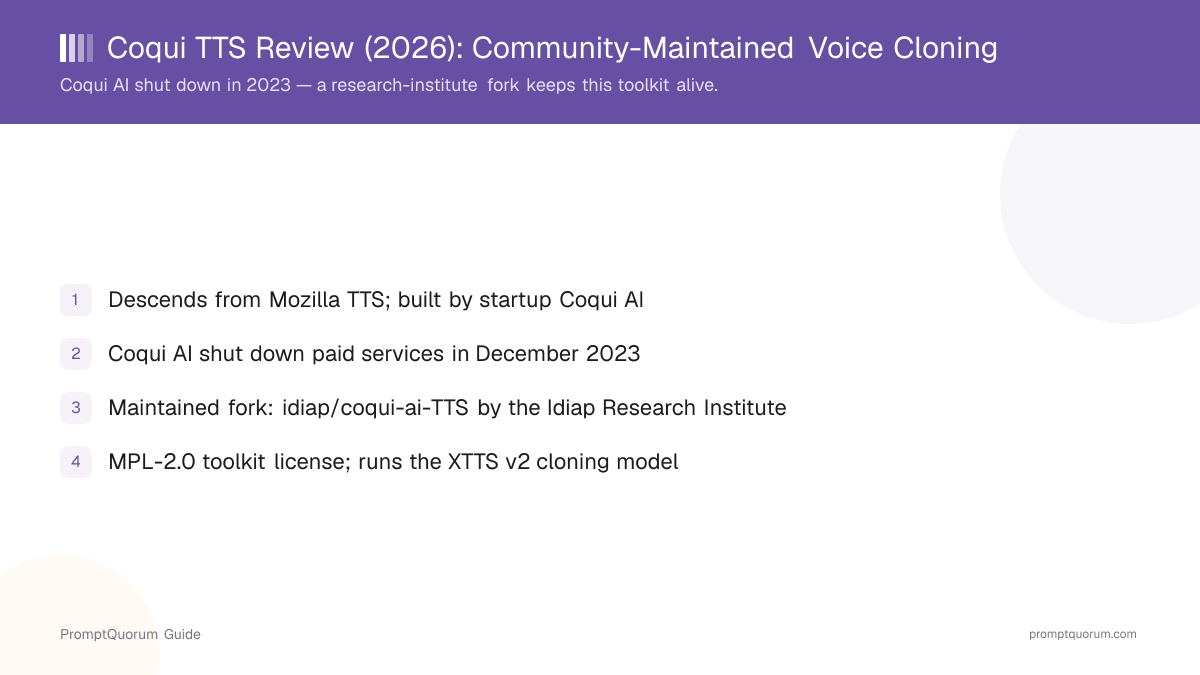
History: From Mozilla TTS to a Community Fork
Coqui TTS traces back to Mozilla's TTS project, an internal Mozilla research effort into open-source speech technology. When Mozilla disbanded that research group in 2021, several of its engineers — including Eren Gölge, Kelly Davis, Josh Meyer, and Reuben Morais — founded a startup, Coqui AI, to continue the work as an independent company, releasing both a text-to-speech toolkit (Coqui TTS) and a speech-to-text toolkit (Coqui STT).
Coqui AI raised a $3.3 million seed round in March 2023 and offered both an open-source toolkit and paid cloud services, including hosted access to its voice-cloning model, XTTS. The company struggled to reach a sustainable business model on top of open-source software, and announced it was shutting down its paid services in December 2023, with its servers going offline on December 11, 2023.
The original repository, coqui-ai/TTS, remains publicly available on GitHub under its MPL-2.0 license, but has had no new commits since August 2024, and GitHub does not show it as formally archived — in practice, it receives no active development or bug fixes.
A community fork, idiap/coqui-ai-TTS, continues development. It is maintained under the Idiap Research Institute, a Swiss research institute, and is published to PyPI under the package name coqui-tts (distinct from the original TTS package name). Its README explicitly states it is a "fork of the original, unmaintained repository," and its release history shows ongoing updates, including a v0.27.0 release adding a voice-cloning cache and a v0.27.5 release on January 26, 2026.
Who created Coqui TTS?
Coqui TTS was created by the startup Coqui AI, founded in 2021 by former engineers of Mozilla's TTS research project, including Eren Gölge, Kelly Davis, Josh Meyer, and Reuben Morais. After Coqui AI shut down its paid services in December 2023, development continued on a community fork maintained by the Idiap Research Institute.
What Coqui TTS Actually Does
Coqui TTS is a toolkit, not a single model — it provides a unified Python interface, CLI, and training pipeline for running (and, historically, training) several different text-to-speech model architectures.
- Multi-model interface. A single
TTS()Python class loads and runs different model architectures, including VITS-based single-speaker and multi-speaker models, Tacotron2-based models, and the XTTS v2 voice-cloning model, without changing the surrounding application code. - Command-line synthesis. The
ttsCLI command synthesizes speech directly from the terminal, listing all available pretrained models withtts --list_models. - Voice cloning via XTTS v2. Passing a
speaker_wavargument to a loaded XTTS v2 model clones a voice from a short reference audio clip, generating speech in that cloned voice across the languages XTTS v2 supports. - Broad pretrained model library. The toolkit ships with access to pretrained models described as covering over 1,100 languages via the underlying Fairseq-based massively multilingual models, alongside higher-quality curated models for specific languages.
- Model training and fine-tuning. Beyond running pretrained models, the toolkit includes training scripts and dataset-analysis utilities for building or fine-tuning a custom voice model, historically one of its most-used features before the shutdown of Coqui AI's hosted training service.
- Streaming inference for XTTS v2. The toolkit documents low-latency streaming synthesis with XTTS v2 (cited by the maintained fork's documentation as sub-200ms latency to first audio), useful for interactive voice applications.
Coqui TTS and XTTS v2: How They Relate
Coqui TTS (the toolkit) and XTTS v2 (the model) are two different things with two different licenses, and confusing them is a common licensing mistake. The Coqui TTS toolkit — the Python package, CLI, and training code — is licensed under MPL-2.0, a permissive license that allows commercial use with source-disclosure conditions on toolkit modifications. XTTS v2 is a specific pretrained model whose weights are distributed under the Coqui Public Model License (CPML), a non-commercial license, separate from the toolkit's MPL-2.0 license.
In practice, this means you can use the Coqui TTS toolkit commercially with permissively licensed models (VITS or Tacotron2 models trained under compatible licenses) while the specific combination of "Coqui TTS toolkit running the XTTS v2 model" inherits XTTS v2's non-commercial restriction for that model's weights and outputs. Running a different, permissively licensed model through the same toolkit does not carry that restriction.
The coqui-tts package documents XTTS v2 usage directly, with the model loaded as TTS("tts_models/multilingual/multi-dataset/xtts_v2"), since the toolkit is the primary supported way to run XTTS v2 outside of directly using the model weights through another inference stack. See PromptQuorum's dedicated XTTS v2 review for a full breakdown of that model's license and capabilities.
Install and Run Coqui TTS: Step by Step
This walkthrough installs the actively maintained coqui-tts package and runs a first synthesis, using the syntax documented in the maintained fork's own README.
- 1Install the maintained package.
Why it matters: Run `pip install coqui-tts` (or `uv pip install coqui-tts` if using uv) in a Python environment. Install the `coqui-tts` package specifically — not the older `TTS` package name, which points to the now-unmaintained original repository. - 2List available pretrained models.
Why it matters: Run `tts --list_models` to see the full catalog of pretrained models available to download, organized by language and architecture (VITS, Tacotron2, XTTS, and others). - 3Synthesize speech from the command line.
Why it matters: Run `tts --text "Hello world" --out_path output.wav` to synthesize with the default model, or add `--model_name <model>` to pick a specific one from the list. - 4(Optional) Use the Python API for XTTS v2 voice cloning.
Why it matters: Load the model with `TTS("tts_models/multilingual/multi-dataset/xtts_v2").to(device)`, then call `.tts_to_file()` with a `speaker_wav` argument pointing to a short reference audio clip and a `language` argument to clone a voice. - 5(Optional) Enable GPU acceleration.
Why it matters: Pass `gpu=True` to the `TTS()` constructor, or call `.to("cuda")` on the loaded model object, to run inference on an NVIDIA GPU — recommended for XTTS v2, which is significantly slower on CPU alone. - 6(Optional) Accept the CPML license non-interactively for XTTS v2.
Why it matters: Loading XTTS v2 for the first time prompts an interactive license-acceptance step for the CPML. Set the `COQUI_TOS_AGREED=1` environment variable to accept it non-interactively, which is required for unattended use in Docker containers or CI pipelines.
Real Usage Examples
Beyond the basic install walkthrough above, these are common real-world usage patterns from the maintained fork's own documentation.
- Non-interactive CPML acceptance for automated environments: set
COQUI_TOS_AGREED=1before the first XTTS v2 load, so Docker builds and CI pipelines do not hang on an interactive prompt. - Speaker and language introspection: after loading a multi-speaker or multilingual model,
tts.speakersandtts.languageslist what the loaded model actually supports, useful for validating input before synthesis.
# Command line: list available pretrained models
tts --list_models

# Command line: synthesize with the default model
tts --text "Hello world" --out_path output.wav

# Command line: synthesize with a specific model
tts --model_name "tts_models/en/ljspeech/tacotron2-DDC" \
    --text "This is a test." --out_path output.wav

# Python API: basic synthesis
from TTS.api import TTS

tts = TTS("tts_models/en/ljspeech/tacotron2-DDC")
tts.tts_to_file(text="Hello world", file_path="output.wav")

# Python API: XTTS v2 voice cloning (accept CPML non-interactively first)
# export COQUI_TOS_AGREED=1
import torch
from TTS.api import TTS

device = "cuda" if torch.cuda.is_available() else "cpu"
tts = TTS("tts_models/multilingual/multi-dataset/xtts_v2").to(device)

tts.tts_to_file(
    text="Hola, esto es una prueba.",
    speaker_wav="reference_voice.wav",
    language="es",
    file_path="cloned_output.wav",
)

# Python API: list speakers and languages available on a loaded model
print(tts.speakers)
print(tts.languages)
License and Cost
The Coqui TTS toolkit is licensed under MPL-2.0 (Mozilla Public License 2.0), confirmed via the coqui-tts package's published metadata on PyPI and the license file in the idiap/coqui-ai-TTS repository. MPL-2.0 is a permissive-with-conditions license: you can use the toolkit commercially, but if you modify and distribute the toolkit's own source files, you must release those specific modified files under MPL-2.0 as well. Using the toolkit as an unmodified dependency does not place your own application code under MPL-2.0.
The XTTS v2 model is licensed separately, under the Coqui Public Model License (CPML), which is non-commercial — this applies to the model weights and their generated audio outputs, not to the Coqui TTS toolkit code that runs them. See PromptQuorum's XTTS v2 review for the full breakdown of that license.
There is no paid tier, subscription, or license fee for the Coqui TTS toolkit itself. Coqui AI's paid hosted services shut down in December 2023 and are not available at any price; the only way to use Coqui TTS today is self-hosted, using either the unmaintained original package or the actively maintained coqui-tts fork.
What license does Coqui TTS use?
The Coqui TTS toolkit itself is licensed under MPL-2.0, which allows commercial use with the condition that modifications to the toolkit's own source files are released under the same license. This is separate from the license of any specific model it runs — the XTTS v2 model, for example, is under the non-commercial Coqui Public Model License (CPML), which applies to the model weights and outputs, not the toolkit code.
What Coqui TTS Is Not Good For
Coqui TTS is a flexible, multi-model toolkit, not the fastest or simplest option for every use case. It is the wrong tool for the following situations:
- Building on the original, unmaintained repository. If you
pip install TTS(the original package name) rather thanpip install coqui-tts(the maintained fork), you are building on code that has received no updates since August 2024 — check which package a tutorial or dependency actually references before relying on it. - Fastest possible CPU-only synthesis. If your priority is real-time speech on modest hardware like a Raspberry Pi with no GPU, Piper is purpose-built for that and simpler to deploy; Coqui TTS's larger models, especially XTTS v2, are noticeably slower on CPU alone.
- Commercial voice cloning without a separate license check. Running XTTS v2 through the Coqui TTS toolkit still carries XTTS v2's own non-commercial CPML restriction on the model weights and outputs — the toolkit's MPL-2.0 license does not override that. See the License and Cost section above.
- Guaranteed long-term corporate support. Coqui AI, the company, no longer exists as of December 2023. The current fork is maintained by a research institute on a community basis, which is a different maintenance model than a funded company with a support contract — factor that into decisions for critical production infrastructure.
- A single, stable API across versions. Because development moved between an unmaintained original and an actively developed fork, some tutorials, Stack Overflow answers, and blog posts online reference an older API surface or the original package name — verify against the current
coqui-ttsdocumentation rather than an older search result.
Alternatives to Coqui TTS
Piper
- Best fit:
- Fastest CPU-only synthesis, no voice cloning, real-time on a Raspberry Pi
- License:
- GPL-3.0-or-later
XTTS v2
- Best fit:
- The voice-cloning model itself, if you only need XTTS v2 and not the broader toolkit
- License:
- CPML (non-commercial)
Articles about XTTS v2 (9)
- XTTS v2 Review: Multilingual Voice Cloning from 6 Seconds of AudioUpdated September 5, 2026
- Best Local TTS Engine for Mac (2026): What Actually Uses Apple SiliconUpdated September 11, 2026
- Best Local TTS Engine for an NVIDIA GPU Setup (2026)Updated September 11, 2026
- Best Local TTS Engine for Raspberry Pi (2026)Updated September 11, 2026
- Best TTS for Ollama (2026): Adding Voice Output to a Local LLM SetupUpdated September 11, 2026
- Piper vs Chatterbox TTS (2026): Fast Local Speech or Voice Cloning?Updated September 11, 2026
- Piper vs Kokoro TTS (2026): Which Local Voice Engine Should You Use?Updated September 11, 2026
- Bark TTS Review: Suno's MIT-Licensed Model for Laughter, Sighs, and SpeechUpdated September 6, 2026
- StyleTTS 2 Review: Columbia's MIT-Licensed Research Model for Natural SpeechUpdated September 6, 2026
+5 more not shown
Bark
- Best fit:
- Expressive, non-speech audio — laughter, sighs, ambient sound
- License:
- MIT
Articles about Bark (7)
- Bark TTS Review: Suno's MIT-Licensed Model for Laughter, Sighs, and SpeechUpdated September 6, 2026
- Local Voice & Speech Tools Compared (2026): Text-to-Speech, Speech-to-Text and Voice AgentsUpdated September 20, 2026
- Best Local TTS Engine for Mac (2026): What Actually Uses Apple SiliconUpdated September 11, 2026
- Best Local TTS Engine for an NVIDIA GPU Setup (2026)Updated September 11, 2026
- Best TTS for Ollama (2026): Adding Voice Output to a Local LLM SetupUpdated September 11, 2026
- StyleTTS 2 Review: Columbia's MIT-Licensed Research Model for Natural SpeechUpdated September 6, 2026
- Local TTS & Voice Cloning Licenses 2026: Which Engines Allow Commercial Use (Piper, XTTS v2, F5-TTS, Coqui)Updated July 15, 2026
Also mentioned in:
- Willow Inference Server Review: Self-Hosted Whisper ASR and TTSUpdated September 19, 2026
- Piper vs Kokoro TTS (2026): Which Local Voice Engine Should You Use?Updated September 11, 2026
- MLC Chat Review: The Mobile App Built on MLC LLM, Assessed HonestlyUpdated September 7, 2026
+2 more not shown
StyleTTS 2
- Best fit:
- Highest natural-sounding English narration quality (no voice cloning)
- License:
- MIT
Articles about StyleTTS 2 (5)
- StyleTTS 2 Review: Columbia's MIT-Licensed Research Model for Natural SpeechUpdated September 6, 2026
- Local Voice & Speech Tools Compared (2026): Text-to-Speech, Speech-to-Text and Voice AgentsUpdated September 20, 2026
- Kokoro vs ElevenLabs: Local TTS vs Cloud Voice AI (2026)Updated September 11, 2026
- Piper vs Kokoro TTS (2026): Which Local Voice Engine Should You Use?Updated September 11, 2026
- Local TTS & Voice Cloning Licenses 2026: Which Engines Allow Commercial Use (Piper, XTTS v2, F5-TTS, Coqui)Updated July 15, 2026
Also mentioned in:
- MLC Chat Review: The Mobile App Built on MLC LLM, Assessed HonestlyUpdated September 7, 2026
ElevenLabs
- Best fit:
- Managed cloud API for teams that prefer not to self-host, with commercial voice cloning
- License:
- Proprietary (paid cloud API)
Frequently Asked Questions
What is Coqui TTS?
Coqui TTS is an open-source, local text-to-speech and voice-cloning toolkit descended from Mozilla's TTS research project, originally built by the startup Coqui AI. It supports multiple model architectures, including the XTTS v2 voice-cloning model, through a single Python interface and CLI.
Is Coqui TTS still maintained?
The original coqui-ai/TTS repository is not actively maintained — it has had no new commits since August 2024, after the company Coqui AI shut down its paid services in December 2023. An actively maintained community fork, idiap/coqui-ai-TTS, continues development under the Idiap Research Institute and is published to PyPI as the coqui-tts package, with releases as recent as January 2026.
Is Coqui TTS free?
Yes, the toolkit itself has no paid tier or license fee. Coqui AI's previous paid hosted services shut down in December 2023 and are not available at any price. Some specific models that run on the toolkit, like XTTS v2, have their own separate license (CPML) that restricts commercial use of that model's weights and outputs.
What is the difference between the coqui-tts and TTS packages?
TTS is the original PyPI package name, tied to the unmaintained coqui-ai/TTS repository with no updates since August 2024. coqui-tts is the actively maintained fork's package name, published from the idiap/coqui-ai-TTS repository under the Idiap Research Institute, with regular releases including v0.27.5 in January 2026. Install coqui-tts for a version that receives updates.
Does Coqui TTS support voice cloning?
Yes, via the XTTS v2 model, which the toolkit can load and run. XTTS v2 clones a voice from a short reference audio clip passed as the speaker_wav argument. Note that XTTS v2's own license, the Coqui Public Model License (CPML), is non-commercial, separate from the toolkit's MPL-2.0 license.
Why did Coqui AI shut down?
Coqui AI, the company behind Coqui TTS, announced it was shutting down its paid hosted services in December 2023, with its servers going offline on December 11, 2023, after struggling to build a sustainable business model on top of open-source speech technology. The open-source toolkit itself remained available, and development later continued on a community fork.
What is the latest Coqui TTS release?
The latest release of the actively maintained coqui-tts package is v0.27.5, published January 26, 2026, per its PyPI listing.
Verdict
Coqui TTS is a genuinely useful case study in what happens to open-source infrastructure after the company behind it shuts down: the original repository went quiet in August 2024, but the software did not disappear — a research institute picked up maintenance, renamed the package, and kept shipping releases into 2026. For anyone evaluating it today, the practical takeaway is simple: install coqui-tts, not the original TTS package, and understand that the toolkit's MPL-2.0 license is separate from the non-commercial CPML license on the XTTS v2 model it can run. As a toolkit, its strength is flexibility across model architectures rather than being the fastest or simplest option for any single use case — for that, pair this review with PromptQuorum's coverage of Piper for speed, XTTS v2 for the cloning model specifically, or the local TTS licensing guide for the full picture across engines.
Sources
- idiap/coqui-ai-TTS on GitHub — the actively maintained fork: README, docs, license, and release history.
- coqui-tts on PyPI — published package metadata, including the current MPL-2.0 license and version history.
- coqui-ai/TTS on GitHub — the original, now-unmaintained repository (MPL-2.0 license).
- XTTS v2 on Hugging Face — the voice-cloning model's model card and CPML license text.
- Idiap Research Institute — the Swiss research institute maintaining the community fork.