Does Ollama Have Built-In Text-to-Speech?
No — Ollama has no built-in text-to-speech or audio-output capability. Ollama is a local runtime for large language models: it loads a model, exposes it over a local REST API and CLI, and returns text. It does not synthesize speech, and it does not ship a TTS model.
A GitHub issue requesting native TTS support, #11021, proposed loading audio-generation models directly and adding an OpenAI-compatible POST /v1/audio/speech endpoint. It was closed as a duplicate of an earlier, still-open request (issue #5424) — as of this writing, Ollama has not shipped native TTS, and there is no committed timeline for it.
This is why every local voice setup built on Ollama — a voice assistant, an audiobook narrator for LLM output, or an accessibility read-aloud tool — chains Ollama to a separate TTS engine rather than relying on any single "Ollama TTS mode." Community glue projects already exist for this: maudoin/ollama-voice, with 378 GitHub stars at the time of writing, chains Whisper for transcription, Ollama for the reply, and pyttsx3 — a wrapper around your operating system's own built-in voices, not a neural TTS model — for output. That project demonstrates the pattern; it is not itself a recommendation for pyttsx3's audio quality, which trails every neural engine compared in this guide.
Is there an official Ollama text-to-speech feature?
No. Ollama generates text only. A community feature request to add native TTS support (GitHub issue #11021) is unresolved as of this writing, closed as a duplicate of an earlier, still-open request. Voice output requires piping Ollama's text response to a separate TTS engine.
How to Pipe Ollama Output to a Local TTS Engine
Every Ollama-plus-TTS pipeline follows the same four steps: ask Ollama for text, extract that text from the JSON response, pass it to a TTS engine, and play or save the resulting audio. There is no official integration between Ollama and any TTS engine — this is glue code you write yourself, typically under 20 lines.
- Ollama's API does not know or care what happens to its text output. There is no callback, webhook, or plugin system connecting Ollama to any TTS engine — your code is the only thing joining them.
- Streaming mode (
"stream": true) lowers perceived latency by returning tokens as they generate, letting you start synthesizing audio for the first sentence before the model finishes the full reply — useful for interactive voice assistants, more complex to implement than the non-streaming example above.
- 1Start Ollama and pull a model
Why it matters: Ollama must already be running (`ollama serve`, or the desktop app) with at least one model pulled (`ollama pull llama3.1`) before it can answer requests over its REST API. - 2Send a prompt to Ollama's REST API
Why it matters: A POST request to `http://localhost:11434/api/generate` with `"stream": false` returns a single JSON object containing the full reply in its `response` field — simplest to parse for a TTS pipeline, though streaming mode is available for lower time-to-first-audio. - 3Extract the text and pass it to your TTS engine
Why it matters: The `response` string is plain text — pass it directly to a TTS engine's CLI over stdin (Piper) or its Python API (Kokoro, XTTS v2, Chatterbox, Bark, or the Coqui TTS toolkit). - 4Play or save the resulting audio
Why it matters: Most TTS CLIs and APIs write a `.wav` file directly; for live playback, pipe raw audio to a player like `aplay` (Linux) or use a Python audio library.
# 1. Ask Ollama for a text response (non-streaming, for simplicity)
RESPONSE=$(curl -s http://localhost:11434/api/generate -d '{
  "model": "llama3.1",
  "prompt": "Explain quantum entanglement in two sentences.",
  "stream": false
}' | python3 -c "import sys, json; print(json.load(sys.stdin)['response'])")

# 2. Pipe that text into Piper's CLI to synthesize audio (lowest-resource option)
echo "$RESPONSE" | piper --model en_US-lessac-medium --output_file response.wav

# --- Equivalent Python version, swapping in Kokoro instead of Piper ---
import json
import requests
import soundfile as sf
from kokoro_onnx import Kokoro

reply = requests.post(
    "http://localhost:11434/api/generate",
    json={"model": "llama3.1", "prompt": "Explain quantum entanglement in two sentences.", "stream": False},
).json()["response"]

kokoro = Kokoro("kokoro-v1.0.onnx", "voices-v1.0.bin")
samples, sample_rate = kokoro.create(reply, voice="af_heart")
sf.write("response.wav", samples, sample_rate)
Which TTS Engine Pairs Best with Ollama?
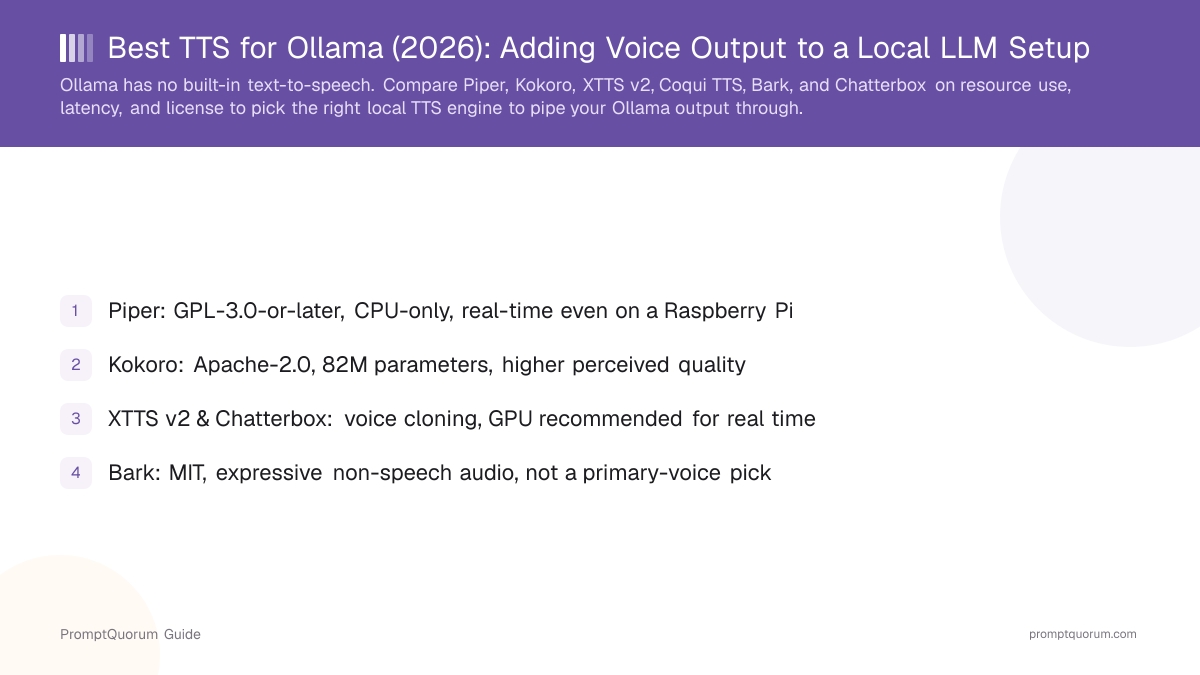
Piper is the best fit for most Ollama pairings because it adds the least resource competition alongside an LLM that is already using CPU or GPU memory. The table below scores each candidate specifically on how well it shares a machine with Ollama — resource use, latency, how much code it takes to pipe into, and license — not on raw audio quality alone.
Piper
- License:
- GPL-3.0-or-later
- Resource use:
- CPU-only, very light
- Latency:
- Real-time, even on a Raspberry Pi
- Ease of piping:
- Single CLI call, text over stdin
Kokoro
- License:
- Apache-2.0
- Resource use:
- CPU-capable, light (82M params)
- Latency:
- Fast; no public real-time spec vs. GPU engines
- Ease of piping:
- Python API (kokoro-onnx), a few lines
XTTS v2
- License:
- CPML (non-commercial)
- Resource use:
- Heavy; GPU recommended
- Latency:
- Sub-200ms streaming, on GPU, per Coqui docs
- Ease of piping:
- Python API, more setup (license prompt)
Articles about XTTS v2 (9)
- XTTS v2 Review: Multilingual Voice Cloning from 6 Seconds of AudioUpdated September 5, 2026
- Best Local TTS Engine for Mac (2026): What Actually Uses Apple SiliconUpdated September 11, 2026
- Best Local TTS Engine for an NVIDIA GPU Setup (2026)Updated September 11, 2026
- Best Local TTS Engine for Raspberry Pi (2026)Updated September 11, 2026
- Piper vs Chatterbox TTS (2026): Fast Local Speech or Voice Cloning?Updated September 11, 2026
- Piper vs Kokoro TTS (2026): Which Local Voice Engine Should You Use?Updated September 11, 2026
- Bark TTS Review: Suno's MIT-Licensed Model for Laughter, Sighs, and SpeechUpdated September 6, 2026
- StyleTTS 2 Review: Columbia's MIT-Licensed Research Model for Natural SpeechUpdated September 6, 2026
- Coqui TTS Review: The Community-Maintained Voice-Cloning ToolkitUpdated September 5, 2026
+5 more not shown
Coqui TTS toolkit
- License:
- MPL-2.0 (toolkit only)
- Resource use:
- Varies by the model it loads
- Latency:
- Varies by the model it loads
- Ease of piping:
- One Python API for several models
Bark
- License:
- MIT
- Resource use:
- Heavy; GPU recommended, slow on CPU
- Latency:
- Not built for real-time streaming
- Ease of piping:
- Python API, simple but slower
Articles about Bark (6)
- Bark TTS Review: Suno's MIT-Licensed Model for Laughter, Sighs, and SpeechUpdated September 6, 2026
- Local Voice & Speech Tools Compared (2026): Text-to-Speech, Speech-to-Text and Voice AgentsUpdated September 20, 2026
- Best Local TTS Engine for Mac (2026): What Actually Uses Apple SiliconUpdated September 11, 2026
- Best Local TTS Engine for an NVIDIA GPU Setup (2026)Updated September 11, 2026
- StyleTTS 2 Review: Columbia's MIT-Licensed Research Model for Natural SpeechUpdated September 6, 2026
- Local TTS & Voice Cloning Licenses 2026: Which Engines Allow Commercial Use (Piper, XTTS v2, F5-TTS, Coqui)Updated July 15, 2026
Also mentioned in:
- Open-LLM-VTuber Review: Self-Hosted Voice Chat with a Live2D AvatarUpdated October 24, 2026
- Willow Inference Server Review: Self-Hosted Whisper ASR and TTSUpdated September 19, 2026
- Piper vs Kokoro TTS (2026): Which Local Voice Engine Should You Use?Updated September 11, 2026
+3 more not shown
Chatterbox
- License:
- MIT
- Resource use:
- Moderate; GPU recommended for real-time
- Latency:
- No public real-time spec confirmed
- Ease of piping:
- Python API (chatterbox-tts pip package)
Which TTS engine uses the fewest resources alongside Ollama?
Piper. It is CPU-only, runs in real time even on a Raspberry Pi, and does not need to share GPU memory with an Ollama model — the lowest-resource-cost option in this comparison.
Who Should Use Which Engine?
Match the engine to your hardware and voice requirements, not to whichever one has the highest raw audio quality on its own.
- 🏆 Best overall for an Ollama pairing: Piper — lowest resource cost, real-time on CPU, simplest to pipe into a shell script or a Python subprocess call.
- Best for higher audio quality at a similar footprint: Kokoro — still small enough to run without a GPU, with noticeably better perceived speech quality than Piper per its own release benchmarks.
- Best for voice cloning, commercial use allowed: Chatterbox — MIT-licensed, clones a voice from about 5 seconds of reference audio, needs a GPU alongside Ollama for real-time use.
- Best for voice cloning, non-commercial or research use: XTTS v2 — clones a voice from 6 seconds of audio across 17 languages, but its CPML license blocks commercial use without a separate agreement — see PromptQuorum's XTTS v2 license breakdown.
- Best for expressive non-speech audio, not as a primary voice: Bark — laughter, sighs, and simple ambient sound from text prompts alone, but its repository has had no commits since April 5, 2024, so do not depend on it for a maintained production pipeline.
- 🧭 Raspberry Pi or other CPU-only hardware, running Ollama with a small model → Piper. Nothing else in this guide is confirmed to run in real time without a GPU.
- 🧭 Desktop or server with a spare GPU alongside Ollama, want a cloned voice, and need commercial rights → Chatterbox.
- 🧭 Desktop or server with a spare GPU, research or personal project, want the highest cloning quality → XTTS v2.
- 🧭 Want a single toolkit that can load several different models over time (including XTTS v2) → Coqui TTS toolkit instead of installing each model's dependencies separately.
When Not to Use Any of These
Local TTS paired with Ollama is not the right approach for every voice-output need — some situations call for a cloud API or a different tool entirely.
- ❌ If you need dozens of highly polished, emotionally expressive voices out of the box — a managed cloud API such as ElevenLabs offers a larger curated voice library and more expressive controls than any of the models here; see PromptQuorum's ElevenLabs vs. local TTS comparison for the trade-offs.
- ❌ If your hardware cannot spare RAM or VRAM beyond what Ollama already uses — running Ollama and a GPU-hungry TTS engine like XTTS v2 or Bark on the same modest GPU can starve both; drop to Piper or Kokoro, or move TTS to a second machine.
- ❌ If you need a shipped commercial product and have not independently confirmed a license — XTTS v2's CPML is explicitly non-commercial, and Coqui AI, the company behind it, shut down its paid licensing services in December 2023; verify licensing terms yourself before shipping any of these engines in a paid product.
- ❌ If you are cloning a real person's voice without their consent — this raises consent and impersonation concerns independent of any engine's license, in personal and commercial use alike.
Frequently Asked Questions
Does Ollama have built-in text-to-speech?
No. Ollama generates text only and has no native audio output. A GitHub feature request for native TTS support (issue #11021) is unresolved as of this writing. Voice output requires piping Ollama's text response to a separate local TTS engine.
What is the best TTS engine to pair with Ollama?
Piper, for most setups — it is CPU-only, GPL-3.0-or-later licensed, and runs in real time even on a Raspberry Pi, so it does not compete with Ollama for GPU memory. Choose Kokoro for higher perceived audio quality at a similar resource footprint, or XTTS v2 / Chatterbox if you specifically need voice cloning.
How do I pipe Ollama's output to a TTS engine?
Send a POST request to Ollama's REST API at http://localhost:11434/api/generate with "stream": false, extract the response field from the returned JSON, and pass that text to your chosen TTS engine's CLI (Piper accepts text over stdin) or Python API (Kokoro, XTTS v2, Chatterbox, Bark, and the Coqui TTS toolkit all expose one). See the pipeline walkthrough above for working commands.
Do I need a GPU to run a TTS engine alongside Ollama?
Not necessarily. Piper and Kokoro are both CPU-capable and do not require a GPU. XTTS v2, Bark, and Chatterbox all benefit from or require a GPU for real-time performance, which means they compete with Ollama for GPU memory on a single-GPU machine.
Can I use XTTS v2 commercially in an Ollama-based product?
Not without a separate agreement. XTTS v2 is licensed under the Coqui Public Model License (CPML), which is non-commercial. Coqui AI, the company that released it, shut down its paid services in December 2023, so PromptQuorum could not confirm an active commercial licensing pathway exists today. See the full XTTS v2 license breakdown before shipping a paid product.
Which TTS engine should I use for a Raspberry Pi voice assistant running Ollama?
Piper. It is the only engine in this comparison confirmed to run in real time on CPU-only hardware such as a Raspberry Pi, which is exactly the constraint a Pi imposes when it is also running (or talking to) an Ollama instance.
Is there an official integration between Ollama and any TTS engine?
No. There is no official plugin, callback, or built-in bridge connecting Ollama to any TTS engine. Every pairing described in this guide is glue code you write yourself — typically under 20 lines calling Ollama's REST API and then a TTS engine's own CLI or Python API.
What is the difference between Kokoro and Piper for an Ollama pipeline?
Both are CPU-capable and free to use commercially (Kokoro under Apache-2.0, Piper under GPL-3.0-or-later). Kokoro is a larger model (82 million parameters) that delivers noticeably higher perceived speech quality per its own release benchmarks, while Piper is lighter and has a longer track record running in real time on very modest hardware such as a Raspberry Pi.
Can I clone my own voice to narrate Ollama's output?
Yes, with XTTS v2 (6 seconds of reference audio, non-commercial CPML license) or Chatterbox (about 5 seconds of reference audio, MIT license, commercial use allowed). Neither Piper nor Kokoro supports voice cloning — both use fixed, pre-trained voices.
Verdict
Ollama's lack of native text-to-speech is not a gap you work around with a plugin — it is a design choice that keeps Ollama scoped to language-model inference, and every voice pipeline built on it chains in a separate engine. For most readers, that engine should be Piper: it costs almost nothing in resources alongside an already-running LLM, it pipes into a shell script or Python subprocess in one line, and it runs in real time on hardware as modest as a Raspberry Pi. If Piper's audio quality is not enough, Kokoro is the next step up at a similar resource footprint. Reach for XTTS v2 or Chatterbox only when voice cloning is a genuine requirement, budget a GPU for it, and — for XTTS v2 specifically — confirm the non-commercial CPML license fits your use case before you build on it. If unsure where to start, install Piper first: it is the fastest way to hear an Ollama model speak, and switching to a heavier engine later is a smaller change than starting with one.
Sources
- Ollama GitHub Issue #11021 — the feature request for native TTS support, closed as a duplicate of an earlier, still-open issue.
- Ollama REST API documentation — the
/api/generateendpoint used in this guide's pipeline examples. - maudoin/ollama-voice on GitHub — a community project chaining Whisper, Ollama, and pyttsx3; 378 stars at the time of writing.
- Kokoro-82M model card on Hugging Face — parameter count, license, and architecture.
- XTTS v2 on Hugging Face — cloning requirements and license reference.
- Chatterbox on GitHub — Resemble AI's open-source voice-cloning model, license, and usage examples.
- Bark on GitHub — Suno's generative audio model, license, and commit history.