Which Local LLM Models Support Japanese Best?
Quick Answer
The best Japanese local LLM depends on your task. For conversation: Rinna 3.6B (runs on 4 GB RAM). For instruction following: ELYZA-7B. For coding with Japanese: Qwen3-Coder. All run via Ollama.
- ▸Rinna 3.6B — Japanese-native, 4 GB RAM minimum, daily conversation
- ▸ELYZA-7B — instruction following and Q&A, 6 GB RAM
- ▸Qwen3 8B — multilingual JA/ZH/EN and coding, 6 GB RAM
Key Takeaways
- ✓Rinna 3.6B is the lightest Japanese-native model — runs on 4 GB RAM via Ollama (dedicated inference only; close all background apps) with no fine-tuning needed
- ✓ELYZA-7B (fine-tuned Llama) leads on instruction following in Japanese; use for Q&A and task automation
- ✓Qwen3 8B is the best multilingual choice: strong Japanese alongside Chinese and English, plus coding support
- ✓Japanese tokenization runs ~20–30% fewer effective tokens/second than English due to kanji/kana overhead — factor this into latency expectations
- ✓Q4_K_M is the minimum recommended quantization for Japanese; Q3 and below show measurable quality degradation
Japanese Model Comparison Table
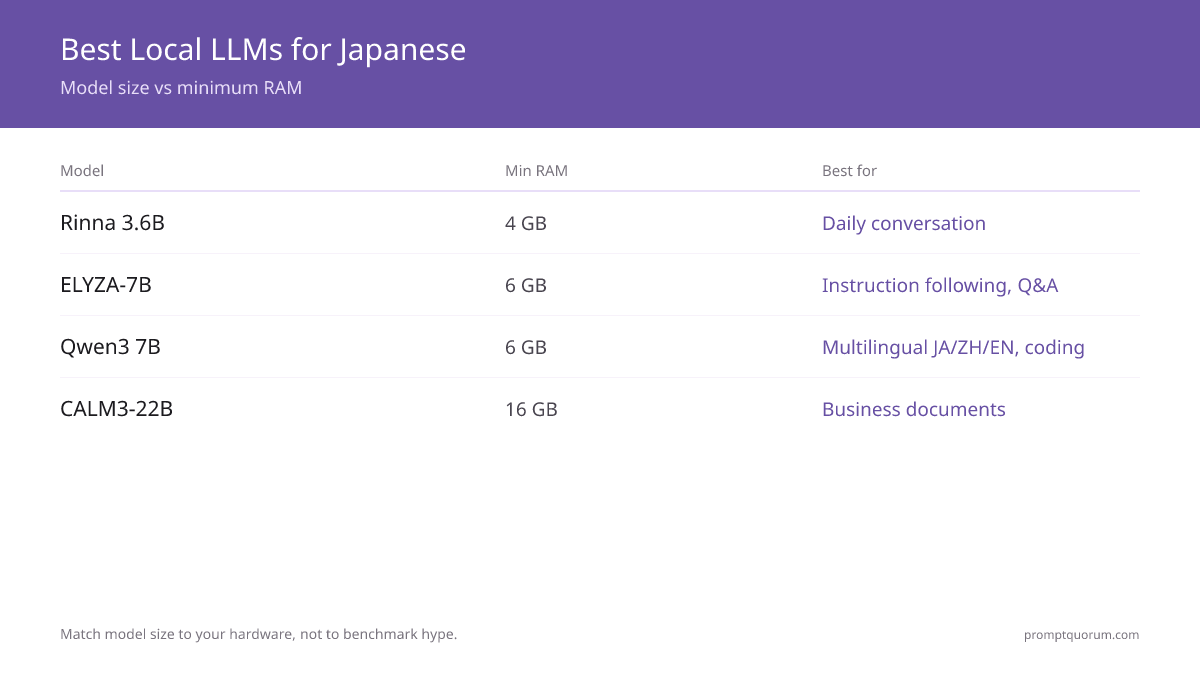
Five local LLMs stand out for Japanese-language tasks: Rinna 3.6B, ELYZA-7B, CyberAgent CALM3-22B, Qwen3 8B, and Phi-4. Each fills a different hardware and use-case niche. The table below gives you the decision anchor points.
Decision shortcut: Use Rinna 3.6B if you have only 4 GB RAM and need Japanese-native conversation. Use ELYZA-7B for structured instruction following on 6 GB hardware. Use Qwen3 8B when you need multilingual output across Japanese, Chinese, and English in a single model.
| Model | Size / Min RAM | Best for |
|---|---|---|
| Rinna 3.6B | 3.6B / 4 GB RAM | Daily conversation in Japanese |
| ELYZA-7B | 7B / 6 GB RAM | Instruction following, Q&A |
| CyberAgent CALM3-22B | 22B / 16 GB RAM | Business documents in Japanese |
| Qwen3 8B | 7B / 6 GB RAM | Multilingual JA/ZH/EN, coding |
| Phi-4 | 14B / 10–12 GB RAM | Reasoning + Japanese (via fine-tune) |
Recommendations by Task
Match the model to your task rather than defaulting to the largest available. Japanese tokenization produces ~20–30% fewer effective tokens per second compared to English text — kanji, hiragana, and katakana each require separate token slots, which means a model rated at 20 tok/s on English delivers roughly 14–16 effective tok/s on Japanese. Plan latency accordingly.
Task-to-model mapping: Daily chat → Rinna 3.6B (lightest, Japanese-native, no fine-tuning required). Business documents and formal writing → ELYZA-7B or CyberAgent CALM3-22B (CALM3 is the stronger option when RAM allows 16 GB). Coding assistance in Japanese → Qwen3-Coder (multilingual code model with strong Japanese comment and documentation support). Translation between Japanese, English, and Chinese → Qwen3 8B (single model handles all three languages without swapping).
Quantization matters more for Japanese than English. Q4_K_M is the recommended minimum — testing shows minimal quality degradation. Q3_K_M produces a ~5–10% reduction in Japanese output quality. Q2 quantization is not recommended for Japanese use. All models in this comparison are available at Q4_K_M via Ollama or LM Studio.
For apps to run these models on Android in Japan, see the Android LLM apps for Japan guide. For GPU recommendations to run 7B+ Japanese models locally in Japan, see the Japan GPU price guide. For a broader local model selection guide, see best local LLMs for coding and LLM quantization explained.
Quick Answers About Japanese Local LLMs
What is the best local LLM for Japanese translation?▾
Do Llama and Mistral support Japanese?▾
Does quantization hurt Japanese quality?▾
Does a Japanese model run on an 8 GB MacBook?▾
How do I start a Japanese model in Ollama?▾
ollama run rinna or ollama run elyza in a terminal. Ollama downloads the model automatically on first run. Check the Ollama model library at ollama.com/library for the latest available variants and quantization options for each Japanese model.Want the full breakdown?
Read the complete guide →Related Prompt Bites