Sponsored
Quick Picks — One Product Per Category
Skip the reading — here is the specific product PromptQuorum would buy in each category, checked August 25, 2026.
Category | Our pick | Best for |
|---|---|---|
| 🧠 Hub | Home Assistant Green | Easiest local setup, no server to build |
| 💻 Hub + local AI | Beelink EQ14 or Minisforum UM890 Pro | HA plus a local model / Frigate |
| 📡 Zigbee | SONOFF ZBDongle-E | Best value coordinator |
| 🧵 Thread/Matter | Home Assistant Connect ZBT-2 | Official HA Thread/Matter support |
| 💡 Lighting | Philips Hue / IKEA TRÅDFRI | Reliable local lighting |
| 🚪 Sensors | Aqara P1 / SONOFF SNZB-04P | Motion and door/window automation |
| 🔌 Plugs | SONOFF / ThirdReality Zigbee | Local energy monitoring and control |
| 📷 Camera | Reolink RLC-810A | Local video + Frigate, no subscription |
| 🔐 Lock | Yale Assure Lock 2 (Z-Wave) | Local, reliable, safety-critical |
Key Takeaways
- Choose your architecture first: local-first (Home Assistant + Zigbee/Z-Wave/Matter), cloud-first (Alexa/Google/vendor hubs), or hybrid
- Hub: Home Assistant Green ($199/€179) for the easiest local setup; a mini PC if you also want local AI
- Zigbee/Thread: Home Assistant Connect ZBT-2 ($49/€45) or SONOFF ZBDongle-E (~$20–27, budget)
- Cameras: local RTSP cameras + Frigate avoid subscriptions and keep footage home
- Locks: prioritize local reliability (Z-Wave/Matter) over AI features — never let an LLM be the sole authority on your door lock
- A slightly more expensive local device is often cheaper than a cloud one over 3–5 years once subscriptions are counted
Before You Buy: Choose Your Architecture
There are three ways to build a smart home in 2026 — pick one before buying anything, because it determines which products below actually make sense for you.
- 🟢 Local-first — Home Assistant + Zigbee/Z-Wave/Matter. Best for: privacy, reliability, no subscriptions, deep automation, long-term flexibility. This is what the rest of this guide is built around.
- 🔵 Cloud-first — Alexa / Google Home / vendor hubs. Best for: simplicity, voice control, minimal setup. A real, honest choice if ease-of-setup matters more to you than long-term cost or privacy — PromptQuorum just isn't optimized to recommend specific cloud ecosystems here.
- 🟣 Hybrid — Home Assistant + Alexa/Google/Apple. Best for: local automation with the voice assistants you already use. Home Assistant can bridge Matter, Zigbee, and Z-Wave devices to HomeKit, Google Home, or Alexa while keeping local control underneath.
- PromptQuorum's recommendation: for a new, serious smart home build, choose local-first or hybrid — it gives every product recommendation below a reason to exist beyond "it's a gadget."
How We Pick: Local-Capable First
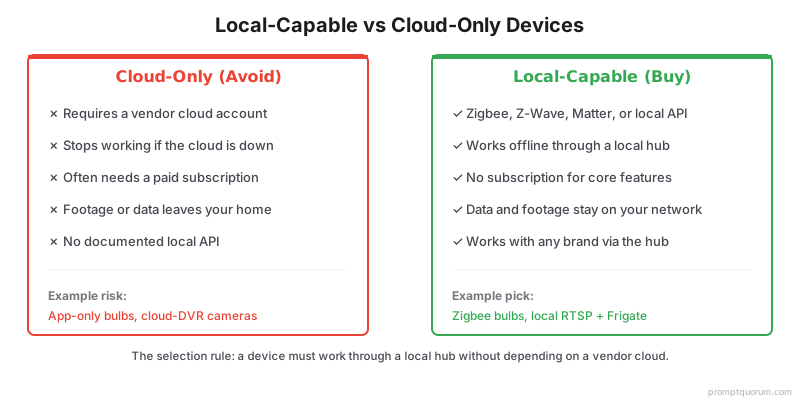
The selection rule is local capability first: a device must work through a local hub without depending on a vendor cloud. Local-capable devices protect privacy, keep working offline, and avoid subscriptions. This page has not been built from PromptQuorum physically testing every product — picks are based on current specifications, documented local-API/protocol support, and independent reviews, checked August 25, 2026.
- Local protocol or API: Zigbee, Z-Wave, Matter, or a documented local Wi-Fi API.
- No mandatory cloud account: the device must function through a local hub.
- No subscription for core features: recording or automation should not require a fee.
- Current pricing: every price below was checked against manufacturer or major-retailer listings on August 25, 2026 — always verify the live price before buying.
Best Smart Home Hub
🏆 Our pick: Home Assistant Green ($199/€179). If you want a genuinely local-first smart home without building a server yourself, Green is the easiest starting point — it speaks Zigbee (with a coordinator), Z-Wave, Matter, and Thread, and runs automations, dashboards, and energy monitoring entirely offline.
- Note on price: Home Assistant Green's price rose from its original $99 launch price to $199/€179 in April 2026, driven by rising RAM/component costs — worth knowing before you budget, since older reviews still cite the outdated $99 figure.
- Best for: beginners who want local control without building or maintaining a server themselves.
- Upgrade path: if you later want local LLMs, Frigate camera AI, many cameras, Docker containers, or a database, move Home Assistant to a mini PC instead — see the Best Mini PC section below.
- Add a Zigbee coordinator and, separately, a Z-Wave controller (USB sticks) for those protocols — see Best Zigbee & Thread Coordinator.
- A Thread border router enables Matter-over-Thread devices specifically; it is not required for Zigbee or Z-Wave.
Best Mini PC for Hub + Local AI
There are really three different mini PC buyers here — pick the one that matches your plan, not the cheapest option by default.
- Home Assistant only: an Intel N100/N150 mini PC is enough — cheap, quiet, and low power. If you don't plan to add local AI or heavy Frigate workloads, Home Assistant Green (above) is simpler and sufficient.
- Home Assistant + light local AI: step up to a networking-focused N150 box like the Beelink EQ14 (~$189–199) — dual 2.5GbE networking, runs Home Assistant plus a small 1B–3B local model. If you want more RAM headroom instead, the GMKtec G3 Plus (~$180–200, upgradeable to 32 GB) is the alternative pick.
- Home Assistant + Frigate + serious local AI: the workload gets substantially heavier here — go with a Ryzen mini PC like the Minisforum UM890 Pro for real 7B+ model speed and multiple concurrent services (dual 2.5GbE, eGPU port, much higher RAM ceiling).
- 🏆 Best budget: Beelink EQ14 — best if you want Home Assistant, Docker, networking, low electricity consumption, and light local AI in one cheap box.
- 🏆 Best upgrade: Minisforum UM890 Pro — best if you want Home Assistant, real local AI, 32 GB+ RAM, multiple services, and RAG or larger models.
Best Zigbee & Thread Coordinator
Matter is the application standard devices speak; Thread is the wireless network some of them run on; a Thread Border Router is the hardware that connects Thread devices to your network — they are distinct, complementary parts of the same architecture, not interchangeable terms. A Matter-over-Thread device needs the right infrastructure, not just "Matter support," to actually run locally.
- 🥇 Best value: SONOFF ZBDongle-E (~$20–27). Inexpensive, Home Assistant compatible, works with both Zigbee2MQTT and ZHA, and has a large supported-device ecosystem. Zigbee-only.
- 🥈 Best for Home Assistant-native Thread/Matter: Home Assistant Connect ZBT-2 ($49/€45). Official first-party hardware with tighter Home Assistant integration and Thread/Matter capability — runs Zigbee or Thread, not simultaneously.
- Which should you buy? The ZBDongle-E is the cheapest Zigbee-first option. The ZBT-2 is the better choice if you're building specifically around Home Assistant and want Thread/Matter capability from day one. Need both protocols running at once on a single dongle? Neither of these does that — see the full Zigbee & Thread dongle comparison for the SONOFF Dongle Plus MG24, which does.
- Full comparison, including Ethernet/PoE coordinators for large or multi-floor homes: Best Zigbee & Thread USB Dongles for Home Assistant.
Best Smart Lighting
Choose Zigbee or Matter bulbs and switches so lighting controls locally and instantly. Avoid bulbs that only work through a manufacturer app and cloud.
- 🥇 Best premium: Philips Hue (~$54+ per color bulb). Buy if reliability matters, you want a mature ecosystem, a large product range, and don't mind paying more.
- 🥇 Best budget: IKEA TRÅDFRI. Buy if price matters, plain Zigbee control is sufficient, and you're integrating with Home Assistant — significantly cheaper per bulb than Hue.
- Wall switches that control existing fixtures are often more reliable than smart bulbs alone, and avoid the "someone turned the physical switch off" failure mode.
- What we don't recommend: bulbs that require cloud access for basic operation, become useless when the vendor shuts down its servers, or need a subscription for basic automation.
Best Smart Home Sensors
Don't buy "one sensor" — a realistic starter pack is 2 motion sensors, 4 door/window sensors, and 1 temperature/humidity sensor, all Zigbee so they trigger automations with no internet dependency.
- Motion ≠ presence. A PIR motion sensor detects movement; an mmWave presence sensor like the Aqara FP2 can detect a stationary person — use mmWave for offices, bedrooms, bathrooms, and living-room lighting automation where "did they leave the room" matters.
- Keep lock and alarm automations deterministic rather than routing them through an LLM — see AI automations with a local LLM.
Sensor | Pick | Use |
|---|---|---|
| Motion | Aqara P1 (~$25–30) | Lights and occupancy triggers |
| Door/window | SONOFF SNZB-04P (~$15–25) | Entry alerts, security automations |
| Temperature/humidity | Zigbee temp sensor | Climate automation |
| Presence (advanced) | Aqara FP2 (~$85) | Stationary-person detection for lighting |
Best Smart Locks
A lock is not an ordinary smart-home purchase — local reliability matters more than AI features, because a failure here is a safety and security problem, not an inconvenience.
- Prefer Z-Wave or Matter locks with local control, a physical key override, low-battery warnings, and offline operation. Z-Wave locks are the long-standing, proven local choice; Matter locks are newer and still maturing.
- PromptQuorum's position: use AI to suggest actions, never let an LLM become the sole authority controlling your door lock. Keep lock automations deterministic (a specific sensor state triggers a specific action), not routed through a model's judgment call.
- Example: Yale Assure Lock 2 with Z-Wave (~$190–210) — reliable local control, no cloud dependency for core locking/unlocking.
Best Smart Home Security Cameras
🥇 Best local-first: Reolink RLC-810A (~$80–130), a 4K PoE camera with RTSP output, no mandatory cloud recording subscription for basic local use, and direct Frigate compatibility.
- Why we prefer local cameras: a cloud camera creates a recurring monthly cost for something your own hardware can do once, paid for. The local architecture is: camera → local network → Frigate → local AI detection → Home Assistant, with no cloud AI subscription required for the basic setup.
- RTSP and PoE support matter more than brand — any camera with documented RTSP output and no forced cloud gate works with Frigate.
- Full setup guide: Local AI Security Cameras with Frigate.
Best Smart Plugs
Don't just buy one — smart plugs are one of the cheapest, highest-value local automation entry points.
- Best budget: SONOFF Zigbee smart plug (~$15–20) — local control through your hub, no cloud account required.
- Best simple option: ThirdReality Zigbee smart plug — similar positioning, wide Home Assistant device-database support.
- Best local Wi-Fi (no coordinator needed): Shelly — controls over local Wi-Fi with a documented local API, useful if you don't want to add another Zigbee device to your mesh.
- Choose a plug with energy monitoring if you want to build energy-usage automations later — that data point is easy to skip at purchase time and annoying to add afterward.
The Local Smart Home Starter Kit
Budget: roughly $290–360 total (checked August 25, 2026). Start with a local hub, a Zigbee coordinator, and a few local devices in one room, then expand.
- This gives a private, reliable base you can grow room by room — every device here works offline once paired, and none require a subscription.
Category | Device | Approx. price |
|---|---|---|
| Hub | Home Assistant Green | $199/€179 |
| Zigbee | SONOFF ZBDongle-E | ~$20–27 |
| Lighting | 2–4 Zigbee bulbs (IKEA TRÅDFRI) | ~$30–50 |
| Sensors | 2 motion + 2 door/window sensors | ~$40–65 |
| Plugs | 2 Zigbee smart plugs | ~$30–40 |
The Serious Local Smart Home
This is the architecture PromptQuorum recommends for a serious local-first home in 2026 — hub upgraded to a mini PC, cameras, presence sensing, and room for local AI.
Role | Device |
|---|---|
| Hub/server | Beelink EQ14 (or Minisforum UM890 Pro for more AI headroom) |
| Zigbee | SONOFF ZBDongle-E |
| Thread | Home Assistant Connect ZBT-2 |
| Cameras | 2× Reolink RLC-810A (PoE) |
| Sensors | Aqara / SONOFF motion + door/window |
| Presence | Aqara FP2 |
| Storage | 1 TB+ NVMe for Frigate recordings |
| Optional: local AI | A small local LLM via Ollama |
| Optional: camera AI | Frigate object detection |
What Not to Buy
Avoid products with any of these traits, regardless of brand or review score.
- Cloud access is mandatory for basic operation.
- A subscription is required for core functionality (not just advanced features).
- The local API is undocumented or unsupported by Home Assistant.
- The device becomes useless if the vendor's servers ever shut down.
- Firmware updates are unreliable or have a history of breaking local functionality.
- The ecosystem lock-in is severe — proprietary hub required, no export path for your data or automations.
- Important nuance: Matter certification alone does not automatically mean every feature is local or equally supported across ecosystems — Matter improves interoperability but doesn't eliminate ecosystem-specific limitations. Check the specific feature you need, not just the "Matter" logo on the box.
The Hidden Cost of Cloud Smart Homes
A slightly more expensive local device can be cheaper over 3–5 years once you count subscriptions — this is a genuine buying argument, not just a privacy one.
- The local-first purchase price is often higher up front — the payoff shows up in year 2 and beyond, once cloud subscriptions would have kept billing.
Product | Purchase cost | Subscription |
|---|---|---|
| Local camera + Frigate | $$$ | $0 |
| Cloud camera | $$ | $–$$/month |
| Local hub (Home Assistant) | $$$ | $0 |
| Cloud security platform | $$ | $/month |
| Zigbee sensors | $ | $0 |
| Cloud-only sensors | $ | Potentially recurring |
What Should You Buy?
Match your actual goal to a specific purchase — this is the fastest way through this guide if you already know what you want.
- I want the easiest setup → Home Assistant Green.
- I want the cheapest local system → an N150 mini PC (or Home Assistant Green) + a Zigbee dongle.
- I want Home Assistant + local AI → a Ryzen mini PC like the Minisforum UM890 Pro.
- I want cameras + AI → an Intel or Ryzen mini PC with more RAM/CPU headroom + Frigate.
- I want Matter → a Matter controller (Home Assistant) + a Thread Border Router (ZBT-2).
- I want the cheapest sensors → Zigbee (Aqara/SONOFF).
- I want premium lighting → Philips Hue.
- I want maximum privacy → Home Assistant + local protocols throughout, no cloud-only devices.
- I don't want to configure anything → a cloud ecosystem or vendor hub — a legitimate choice, just outside what this guide optimizes for.
Frequently Asked Questions
What's the best smart home device to start with?
A local hub running Home Assistant, plus a Zigbee coordinator and a couple of Zigbee bulbs or sensors. The hub is the foundation that makes every other local-capable device work together offline and privately.
Which smart home devices are worth buying this year?
The ones that work locally: Home Assistant Green as the hub, a Zigbee/Thread coordinator (ZBDongle-E or Connect ZBT-2), Zigbee lighting and sensors, and a local RTSP camera paired with Frigate instead of a cloud subscription — see the quick-picks table above for a specific product per category.
Which brands work locally?
Look for devices using Zigbee, Z-Wave, or Matter, or local-Wi-Fi devices with a documented local API. These work through a local hub without a vendor cloud, regardless of brand. Avoid devices that require a cloud account for basic control.
Do I need the manufacturer's hub?
Usually not. A local hub like Home Assistant can talk to Zigbee, Z-Wave, and Matter devices directly with a coordinator, so you can often skip the manufacturer's cloud-tied hub. Check that the specific device supports local pairing.
What are good budget picks?
Zigbee bulbs, plugs, and sensors are inexpensive and local-capable, making them strong budget choices. Starting with a few Zigbee devices and a local hub keeps initial cost low while staying private and expandable — see the starter kit above.
What is the best provider if I want to outfit my whole house with smart home devices?
There is no single "provider" for a local-first setup — that's the point. Home Assistant is the hub, and you mix and match Zigbee/Z-Wave/Matter devices from any brand (Aqara, SONOFF, Philips Hue, IKEA, Reolink, etc.) rather than being locked to one vendor's ecosystem and price list.
Which networked household devices are best controlled via an app?
Devices with a documented local API — Zigbee, Z-Wave, and Matter devices paired through Home Assistant all get app control (the Home Assistant app) without routing your data through a vendor cloud. Cloud-only devices also offer app control, but through the vendor's own app and servers.
How much do local-capable devices cost compared to cloud-only devices?
Local-capable devices (Zigbee, Z-Wave, Matter) typically cost the same or less than cloud-only equivalents at purchase, since the difference is protocol support, not hardware quality. The real savings show up over time: cloud-only cameras and hubs often add monthly subscription fees for recording or advanced automation, while a local hub and local devices have no recurring cost after the initial purchase.
Is my data safer with local-capable devices than cloud-only devices?
Yes. Local-capable devices paired to a local hub keep voice recordings, camera footage, and automation routines on your own network, with no data sent to a manufacturer's server. Cloud-only devices route that same data through the vendor's cloud, where it is subject to that company's retention policy, breach risk, and terms of service changes.
Do local-capable devices work with HomeKit, Google Home, and Amazon Alexa?
Most do. Matter-certified devices work natively with HomeKit, Google Home, and Alexa alongside a local hub. Zigbee and Z-Wave devices connect through Home Assistant, which can then expose them to HomeKit, Google Home, or Alexa as a bridge — so you keep local control while still using those voice assistants if you want to.
Is Matter compatible with my existing Zigbee or Z-Wave devices?
Matter runs alongside Zigbee and Z-Wave rather than replacing them — a hub like Home Assistant can control Matter, Zigbee, and Z-Wave devices at the same time. You do not need to replace working Zigbee or Z-Wave gear to add Matter devices; a Thread border router is needed only for Matter-over-Thread devices specifically.
Are there budget-friendly ways to add smart home features to an existing house?
Yes — Zigbee bulbs, plugs, and sensors are the cheapest entry point and don't require rewiring. Start with a $199 hub and a $20–27 Zigbee dongle, then add a handful of $15–30 devices in one room before expanding — see the starter kit table above for exact costs.
How hard is it for a complete beginner to set up a local-first smart home?
Setting up a single local hub (for example, Home Assistant Green) and a handful of Zigbee devices takes under an hour for most beginners, since the setup wizard handles pairing through a web interface. Building out a full multi-room system with cameras, locks, and custom automations is a multi-weekend project, but you can add devices incrementally at your own pace.