Key Takeaways
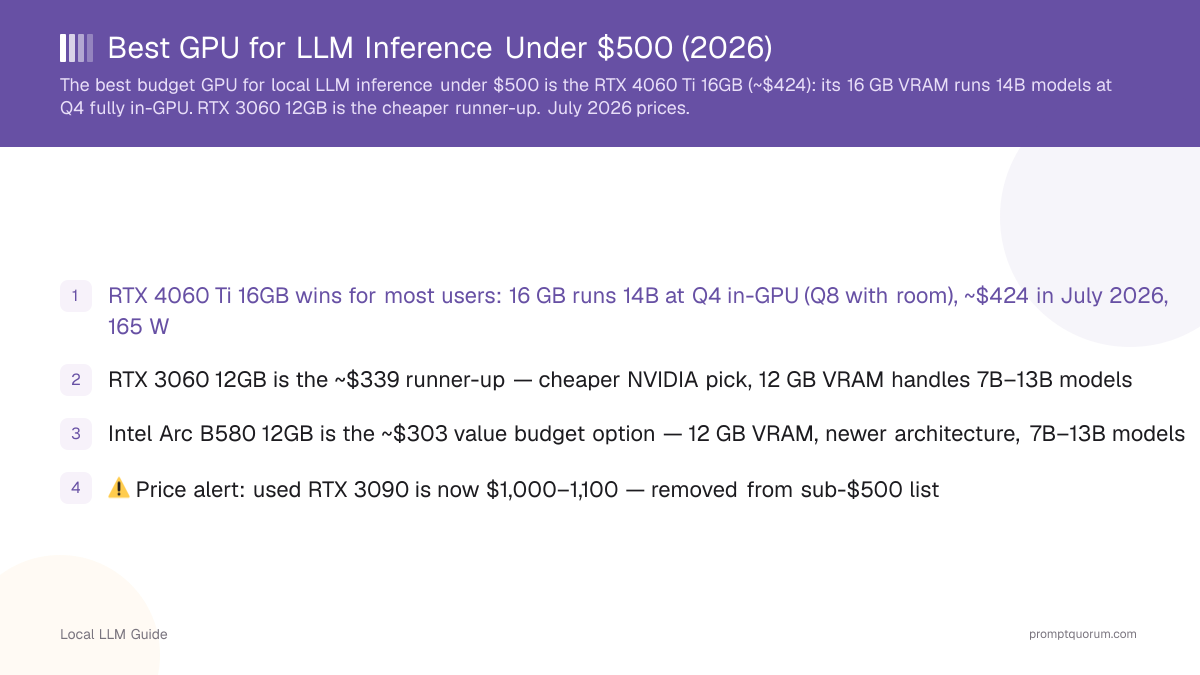
- Intel Arc B580 12GB wins for most users: 12 GB VRAM, $250–290, ~31 tok/s on Llama 3.1 8B Q4 — the only new 12 GB card still reliably under $500
- RTX 3060 12GB used ($270–300) is the runner-up — the cheapest way to get the full CUDA toolchain
- ⚠️ Price alert: RTX 4060 Ti 16GB, the previous winner, is out of stock at its $399 MSRP and trades near $562 when available — removed from the sub-$500 list
- ⚠️ Price alert: new RTX 3060 12GB is $474–599, up 45% since its relaunch — the used market is the sane route to this card
- ⚠️ Price alert: used RTX 3090 is now $850–1,050 — removed from sub-$500 list
- ⚠️ Price alert: RTX 4070 12GB is now $560–705 — removed from sub-$500 list
- ⚠️ Price alert: RX 7800 XT 16GB is now ~$832 — removed from sub-$500 list
- Why everything moved: a worldwide DRAM and GDDR7 shortage, driven by AI datacenter demand, has pushed graphics-card street prices well above list across the whole market. Nothing about the hardware changed — only what it costs.
- Need 30B+ model capability? Budget at least $850 for a used RTX 3090 (24 GB) or a used RTX 4080 SUPER (16 GB, ~$850–900 used — new units now run ~$1,600 after the shortage)
- All three GPUs on this list run Ollama, LM Studio, and llama.cpp out of the box
Best GPUs for LLM Inference Under $500 — Ranked
📍 In One Sentence
The Intel Arc B580 12GB is the best GPU under $500 for local LLM inference because it is the only new 12 GB card still reliably in stock below $500 after the 2026 memory shortage.
💬 In Plain Terms
GPU VRAM determines which AI models you can run. A 16 GB GPU runs 14B models at high quality. A 24 GB GPU (like a used RTX 3090) runs 30B+ models. Under 12 GB limits you to 7B models or smaller.
Intel Arc B580 12GB — Best Overall ($250–290)
The Intel Arc B580 12GB is the best GPU under $500 for local LLM inference, largely because it is the last one reliably left in the window. It launched at $249 and still sells at $249.99 at Best Buy and around $290 at Newegg, while every NVIDIA card that used to occupy this list has been pushed above $500 by the 2026 memory shortage. It runs Ollama via the SYCL/oneAPI backend on both Linux and Windows, delivering ~28–35 tok/s on Llama 3.1 8B Q4. The 12 GB VRAM cap limits you to 13B models at Q4 — it will not hold a 14B at Q8. Intel's driver support has improved substantially since launch, though it remains a step behind CUDA in tooling breadth: expect Ollama and llama.cpp to work well, and LoRA fine-tuning to be awkward.
RTX 3060 12GB Used — Best CUDA Option ($270–300)
The NVIDIA GeForce RTX 3060 12GB is the cheapest route to the full CUDA toolchain, but buy it used. Its retail relaunch at $339 did not hold: new cards have risen roughly 45% to $474–599, which puts the new card at or past the $500 ceiling this page is about. The used market has moved far less, at $270–300. Its 12 GB GDDR6 runs 7B–13B models at Q4/Q8 comfortably; it cannot hold a 14B model at Q8, but a 14B at Q4 (~8.5 GB) fits. Benchmark: ~32–40 tok/s on Llama 3.1 8B Q4 with Ollama. The full CUDA toolchain means Ollama, LM Studio, vLLM, and LoRA fine-tuning all work out of the box on Windows and Linux — the one thing the Arc B580 cannot match.
RTX 4060 Ti 16GB — Best Card, If You Can Find It at List (~$399 MSRP, ~$562 in stock)
The RTX 4060 Ti 16GB is still the best *hardware* on this list and was this page's winner until the 2026 memory shortage. Its 16 GB GDDR6 runs Qwen3 14B and Mistral 12B at Q4 fully in-GPU — and at Q8 with no swapping — at 45–60 tok/s on 7B Q4 and 18–25 tok/s on 14B Q8 with Ollama, all at a 165 W TDP that any 650 W PSU handles. The problem is buying one. Listings at the $399 MSRP sit out of stock at major retailers, and the cheapest verifiable in-stock card is around $562, roughly 41% over list. If you find one at or near MSRP it is the best purchase on this page by a wide margin; at $562 it is outside the budget this page is written for. Watch it rather than plan around it.
Performance Comparison — Current Prices + Test Results
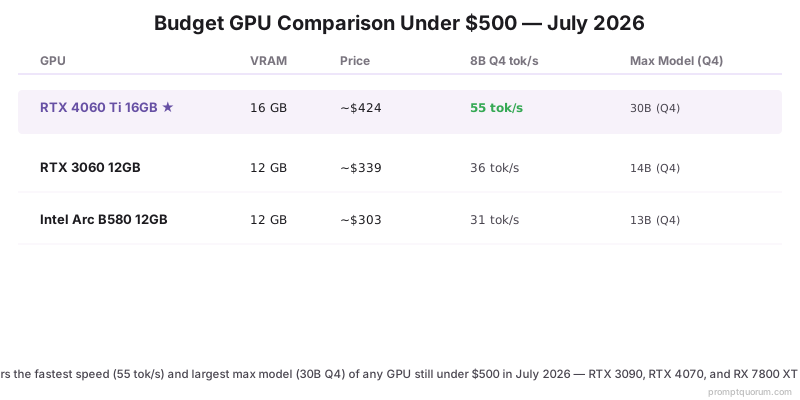
Benchmarks measured with Ollama 0.30.x, llama.cpp server, models from HuggingFace. Test system: Ryzen 9 7950X, 64 GB DDR5, NVMe SSD. Speeds are unchanged from previous testing — the hardware did not move, the prices did. Excluded for exceeding $500: used RTX 3090 ($850–1,050), RTX 4070 12GB ($560–705), RX 7800 XT 16GB (~$832), and new RTX 3060 12GB ($474–599).
GPU | VRAM | Price | Llama 3.1 8B Q4 tok/s | Qwen3 14B Q8 tok/s | Max Model (Q4) |
|---|---|---|---|---|---|
| Intel Arc B580 12GB ★ | 12 GB | $250–290 | 31 tok/s | VRAM limited | 13B (Q4) |
| RTX 3060 12GB (used) | 12 GB | $270–300 | 36 tok/s | VRAM limited | 14B (Q4) |
| RTX 4060 Ti 16GB | 16 GB | ~$562 in stock | 55 tok/s | 22 tok/s | 30B (Q4) |
How We Selected and Tested These GPUs
Selection criteria: available to purchase new or used under $500; supported by at least one major inference runtime (Ollama, LM Studio, llama.cpp); VRAM ≥ 12 GB (8 GB cards excluded — insufficient for meaningful local LLM use). Several cards have been removed from this list on price: used RTX 3090 (24 GB) now trades at $850–1,050; RTX 4070 12GB lists at $560–705; RX 7800 XT 16GB at ~$832; and the new RTX 3060 12GB, which relaunched at $339, has risen about 45% to $474–599. The RTX 4060 Ti 16GB is retained but flagged — its $399 MSRP listings are out of stock and in-stock cards sit near $562. The cause is common to all of them: a worldwide DRAM and GDDR7 shortage driven by AI datacenter demand has pushed graphics-card street prices well above list across the market, with NVIDIA RTX 50-series cards trading roughly 36–39% over MSRP and AMD raising Radeon prices about 10%. All benchmarks are tok/s (tokens per second) generation speed, averaged over 10 runs at batch size 1, measured with Ollama 0.30.x on Ubuntu 22.04 LTS. GPU prices verified against retailer listings and eBay sold listings.
VRAM Requirements by Model Size
📍 In One Sentence
VRAM requirements: 7B model needs ~4–5 GB (Q4) or ~7–8 GB (Q8); 14B model needs ~8–9 GB (Q4) or ~14–15 GB (Q8); 30B model needs ~18–20 GB (Q4); 70B model needs ~40–42 GB (Q4).
💬 In Plain Terms
Think of VRAM like RAM for AI models. The model must fit entirely in VRAM for fast inference. If it spills to CPU RAM (called "offloading"), speed drops 80–95%. Q4 quantization halves the size vs Q8 at a small quality cost.
- 7B model at Q4: ~4.5 GB VRAM — any GPU on this list handles it easily
- 7B model at Q8: ~7.5 GB VRAM — fits all GPUs here
- 13B model at Q4: ~8.5 GB VRAM — fits all GPUs on this list
- 14B model at Q8: ~14 GB VRAM — only RTX 4060 Ti 16GB and RTX 3090 (used); neither is under $500 now
- 30B model at Q4: ~18 GB VRAM — only RTX 3090 (24 GB) handles this comfortably
- 70B model at Q4: ~40 GB — requires two GPUs or CPU offloading
Which GPU Should You Buy?
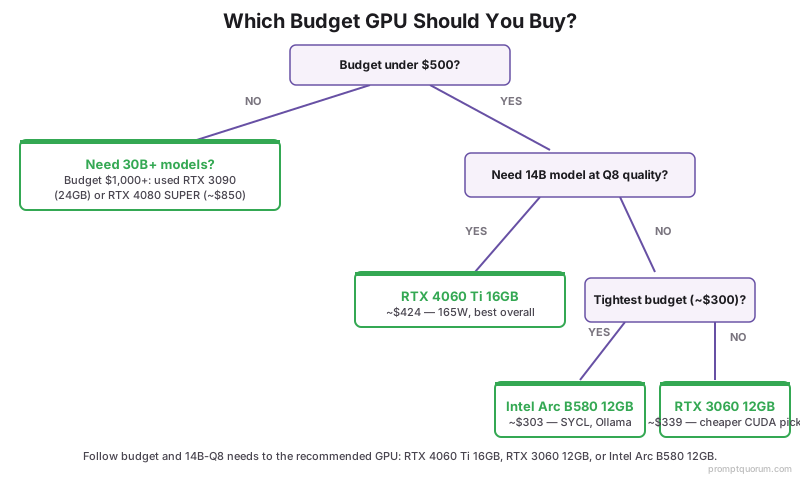
Use this decision guide based on your primary use case:
- Best all-around under $500 → Intel Arc B580 12GB ($250–290). The only new 12 GB card still dependably in stock below $500. 7B–13B models at Q4, ~31 tok/s on Llama 3.1 8B Q4, Ollama via SYCL on Windows and Linux.
- Cheapest CUDA card that works → RTX 3060 12GB used ($270–300). The full CUDA toolchain — Ollama, LM Studio, vLLM, LoRA fine-tuning — for roughly the same money as the Arc. Buy used: the new card is now $474–599.
- Best hardware, if you can find it at list → RTX 4060 Ti 16GB. At its $399 MSRP it beats everything else here, running 14B at Q8 in-GPU. But MSRP listings are out of stock and in-stock cards run ~$562, which is outside this page's budget.
- Need 30B model capability? → The sub-$500 window closed in mid-2026 and has not reopened. Used RTX 3090 (24 GB) now trades at $850–1,050. Budget $850+ for a used RTX 3090 or a used RTX 4080 SUPER (16 GB) — new RTX 4080 SUPER units now run ~$1,600.
- Windows user, no fuss → RTX 3060 12GB used. NVIDIA CUDA has the broadest Windows toolchain support for LLMs, fine-tuning, and multimodal runtimes, and the used 3060 is the cheapest way into it.
Software Compatibility by GPU
All three GPUs run Ollama and llama.cpp. Differences emerge in advanced tools:
GPU | Ollama | LM Studio | vLLM | Text Gen WebUI | CUDA Fine-Tuning |
|---|---|---|---|---|---|
| Intel Arc B580 12GB | ✅ (SYCL) | ⚠️ beta | ❌ | ⚠️ partial | ❌ |
| RTX 3060 12GB | ✅ | ✅ | ✅ | ✅ | ✅ |
| RTX 4060 Ti 16GB | ✅ | ✅ | ✅ | ✅ | ✅ |
Power Draw and System Requirements
GPU power draw determines what PSU and case you need. Running LLMs keeps GPUs at 80–100% utilization continuously — unlike gaming, there are no idle frames.
- Intel Arc B580 12GB: 190 W — 650 W+ PSU; standard 8-pin
- RTX 3060 12GB: 170 W — works with 550 W+ PSU; one 8-pin connector
- RTX 4060 Ti 16GB: 165 W — works with 550 W+ PSU; one 8-pin connector
Is 8 GB VRAM enough for running LLMs locally?
8 GB VRAM limits you to 7B models at Q4 quantization — the full model barely fits. You cannot run 13B models at full quality, and 14B models will partially offload to CPU RAM, dropping speed by 80–95%. For meaningful local LLM use in 2026, 12 GB is the practical minimum, 16 GB is recommended.
Can I still buy a used RTX 3090 for under $500 in 2026?
No. Used RTX 3090 cards trade at $850–1,050 on eBay. The price rose first as LLM enthusiasts recognised the 24 GB VRAM value, then again during the 2026 memory shortage. It is no longer a sub-$500 option and has not been for some time. If you need 30B model capability (which requires 24 GB VRAM), budget $850+ for a used RTX 3090 or consider a used RTX 4080 SUPER (16 GB, ~$850–900 used — new units now run ~$1,600 after the shortage) for faster 14B Q8 performance.
Does AMD work for running LLMs locally?
Yes, with caveats. Ollama on Linux with ROCm works well on cards like the RX 7800 XT. Windows ROCm support has improved but still requires manual steps, and fine-tuning (LoRA) on AMD hardware is not supported by most tools. Note on pricing: the RX 7800 XT 16GB has risen to ~$832, so it no longer fits a sub-$500 budget — in that price range a used RTX 3060 12GB ($270–300, CUDA) or an Intel Arc B580 12GB ($250–290) are the picks. For Windows or fine-tuning, stick with NVIDIA.
What about Intel Arc GPUs for AI?
Intel Arc B580 12GB is the best Arc option in 2026 and, after the memory shortage repriced the NVIDIA field, the best card on this page overall. It runs Ollama on both Windows and Linux via the SYCL backend, though performance is 30–40% below NVIDIA in raw tok/s. The value case is now decisive rather than merely strong: 12 GB VRAM at $250–290 while comparable NVIDIA cards sit at $474–599. The main limitation is still software — vLLM, fine-tuning tools, and multimodal runtimes do not support Arc well yet, so if you need LoRA fine-tuning, buy a used RTX 3060 12GB instead.
Can I run a 70B model on a single GPU under $500?
Not at full speed. Even the RTX 3090 (24 GB) cannot hold 70B Q4 (~40 GB) entirely in VRAM. You can use CPU offloading with llama.cpp to split the model between GPU VRAM and system RAM, but speed drops to 2–5 tok/s — too slow for interactive use. To run 70B models at usable speeds, you need two GPUs (2× RTX 3090 totaling 48 GB) or cloud inference.
Will newer GPUs (RTX 5060 Ti) make these obsolete?
The RTX 5060 Ti 16GB has shipped, and it did not undercut the RTX 4060 Ti — it went the other way. It launched at a $429 MSRP and now sells around $800 (recent median $805), roughly 88% over list, because the same memory shortage that repriced this whole list hit it hardest as a current-generation card. It is a genuinely better GPU than anything here, with 16 GB of VRAM and faster inference, but it is not a sub-$500 card and waiting for it to become one is not a plan worth making. Buy on what is available now: the Intel Arc B580 12GB at $250–290, or a used RTX 3060 12GB at $270–300 if you need CUDA.
How much does a used RTX 4060 Ti 16GB cost?
Used RTX 4060 Ti 16GB cards have tracked the new-card rise: with in-stock new cards near $562, used listings now run roughly $420–$480 on eBay and other secondhand marketplaces, depending on condition and remaining warranty. This is one of the few cards where used is not a large saving, because supply of new cards at MSRP dried up. Because the card is relatively recent and demand from LLM users has kept resale value strong, the savings versus new are smaller than with older cards like the RTX 3090. Check sold (not active) eBay listings for the real market price, and confirm the listing is the 16 GB variant — an 8 GB RTX 4060 Ti also exists and cannot run 14B models at Q4.