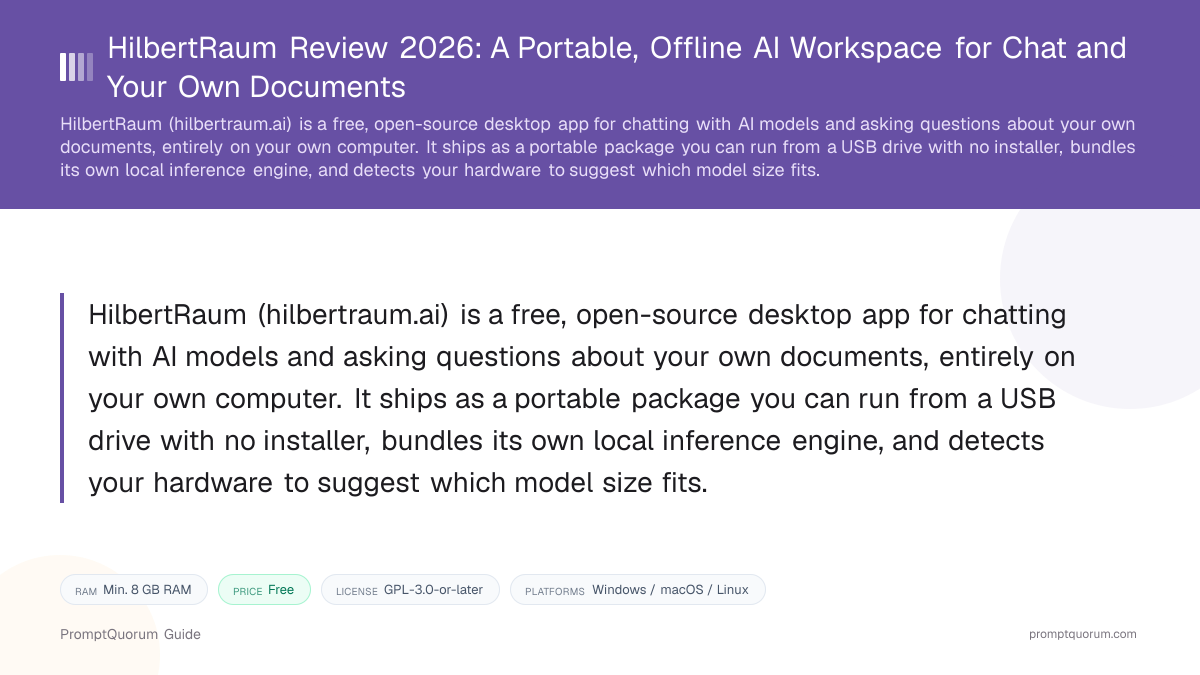
Key Takeaways
- Free and open-source, no paid tier and no account required — see HilbertRaum Pricing and License below for the exact license
- Runs local models through bundled llama.cpp and whisper.cpp engines — no separate backend to install first
- Portable by design: the app, models, and an AES-256-GCM-encrypted workspace can live on a USB drive or external disk and move between machines
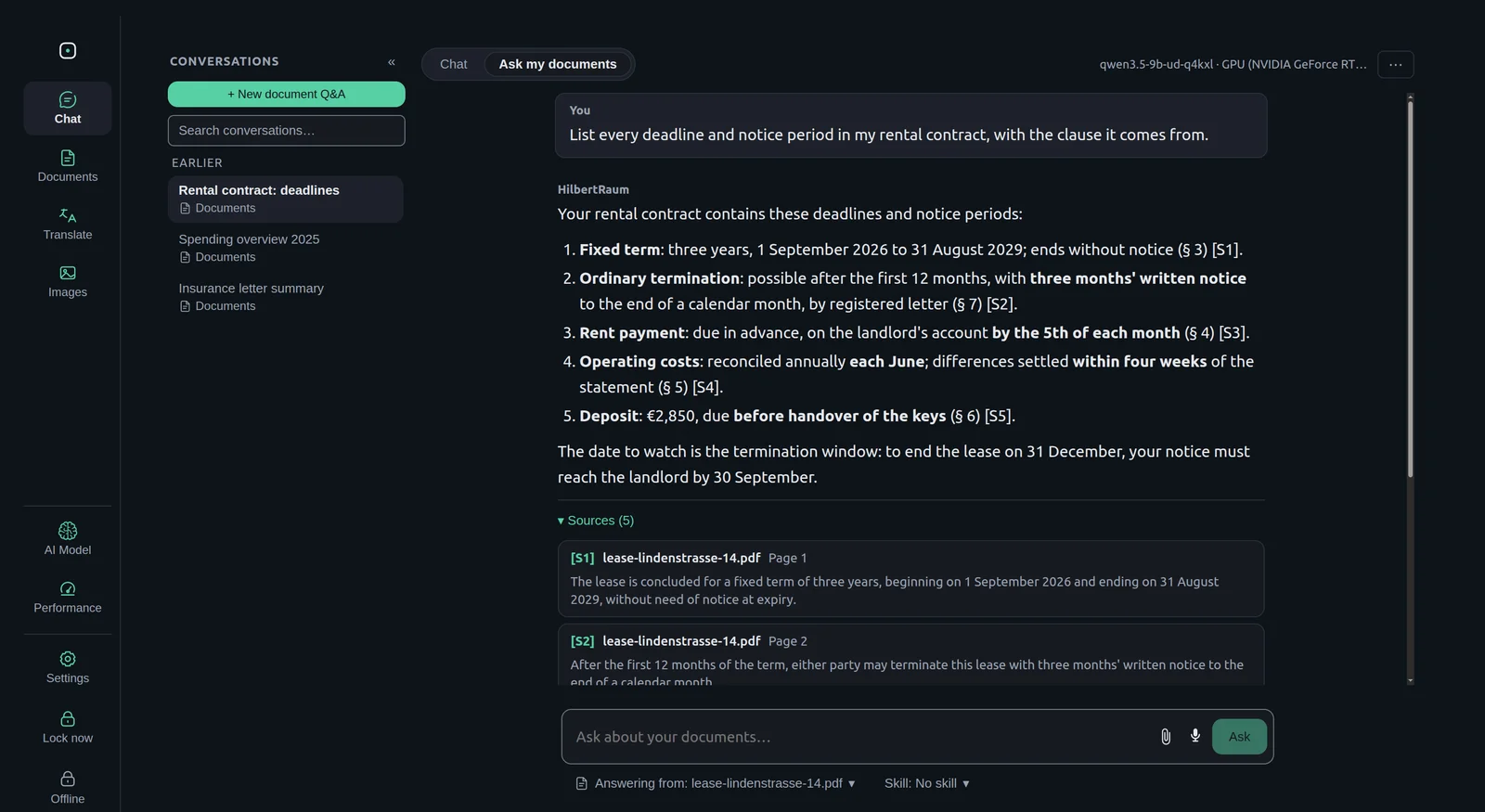
- Answers questions about your own PDFs, Word files, and text documents with citations, using hybrid search and reranking
- Detects the RAM and VRAM available on the machine it is running on and recommends a model size that fits, from roughly 8 GB RAM upward
- Also includes optional offline Wikipedia archives (Kiwix/ZIM format), image understanding, dictation (speech-to-text via Whisper), OCR for scanned documents, and document translation across 51 languages
- Available on Windows, macOS (Apple Silicon), and Linux
- Developed by HilbertraumAI, per the GitHub organization hosting the code
📍 In One Sentence
HilbertRaum is a free, open-source, portable desktop app that runs AI chat and document Q&A entirely offline, with no installer and no cloud dependency.
💬 In Plain Terms
Instead of installing software and sending your questions to a company's servers, HilbertRaum lets you copy one app onto a USB drive, plug it into a computer, and start chatting or asking questions about your own PDFs — nothing leaves the machine, and nothing has to be "installed" in the usual sense.
📌Note: This review is the deep-dive companion to HilbertRaum's entry in the Local LLM Software Directory — see that page for how HilbertRaum compares at a glance to dozens of other local AI tools.
What Is HilbertRaum?
HilbertRaum is a desktop application for chatting with AI models and asking questions about your own documents, run entirely on your own computer. Its GitHub README describes it as a private, offline AI workspace: you chat with a local model, ask questions about your own documents and an optional offline Wikipedia, and everything stays on the machine you are using. The application is built with Electron, React, and TypeScript, per the repository's documented stack, and runs its own bundled inference engines rather than requiring a separate program like Ollama to already be installed.
- Core function: a chat interface plus a document Q&A feature that both run through local, bundled inference engines
- Local inference: llama.cpp for chat models and whisper.cpp for audio transcription, run as native sidecar processes rather than a separate application you install first
- Offline-first architecture: the README states the application blocks cloud fallback, web search, and telemetry by default, and logs any connection attempt while running disconnected
- Chat models supported: curated open-weight models from the Qwen, Gemma, Ministral, and Granite families, downloaded separately from the app (model weights are not bundled with the software)
- Developer: HilbertraumAI, the GitHub organization hosting the project's source code, releases, and issue tracker at github.com/HilbertraumAI/HilbertRaum
Key Features
HilbertRaum's feature set centers on three things: running entirely offline, working without installation, and helping you pick a model that actually fits your hardware. Here is what each part does, per the official GitHub README and hilbertraum.ai.
- Portable, no-install mode — download the portable build from GitHub, copy it to a USB drive or external disk, and run it there: pick a model directly in the app, and HilbertRaum downloads the matching engine and model files itself once you confirm. A separate one-command setup script (
prepare-drive.ps1on Windows,prepare-drive.shon macOS/Linux) is also available for pre-loading a drive with an encrypted workspace and a chosen model in advance, but that script is an optional shortcut for preparing a stick ahead of time, not the normal way to use HilbertRaum - Document Q&A with citations — import PDFs, Word files, or plain text, and ask questions against them; answers use hybrid search and a reranking model (BGE v2 M3), and can be converted into reviewable records with frozen source snippets for verification
- Hardware-detection model suggestions — HilbertRaum benchmarks the RAM and VRAM it finds and recommends a chat model sized for that machine, from roughly 8 GB RAM (a small Qwen model) up to 32 GB+ (a larger quantized model) rather than leaving the user to guess
- Offline Wikipedia (Knowledge Packs) — optional Kiwix-format (ZIM) Wikipedia archives, in roughly 100 languages per the project's documentation, that can be queried alongside your own documents without an internet connection
- Multimodal support — image understanding via a bundled vision model, dictation (speech-to-text via Whisper), and OCR for scanned documents
- Document translation — built-in translation across 51 languages via an opt-in translation model (TranslateGemma)
- Document skills — summarization, comparison, and structured extraction (for example, from invoices, bank statements, or contracts)
- Local API — an optional, OpenAI-compatible loopback endpoint so other local applications can use HilbertRaum's running model as a backend
Usage Examples: Three Ways to Use HilbertRaum
These are concrete workflows built from HilbertRaum's documented features above — not hypothetical use cases.
Run HilbertRaum from a USB drive
Download the portable build for your platform from the GitHub releases page, copy it onto a USB drive or external disk, and launch it from there — no installer runs on the host machine. On first launch, pick a model directly in the app; HilbertRaum downloads the matching engine and model files itself once you confirm. For pre-loading a drive with an encrypted workspace and a model in advance, for example to hand a ready-to-go stick to someone else, run the platform-specific setup script instead (for example, scripts/prepare-drive.sh --target /Volumes/HILBERTRAUM --with-assets --accept-license on macOS/Linux) — that script is an optional shortcut, not a required step.
Ask questions about your own PDFs with citations
Import a set of PDFs, Word files, or text documents into HilbertRaum, then ask a question in plain language. The app searches your documents with hybrid search and reranking, and returns an answer with citations back to the specific source passages, which can be reviewed as frozen snippets rather than taken on faith.
Let HilbertRaum pick a model for your hardware
On first run, HilbertRaum benchmarks the RAM and VRAM available on the machine and suggests a model tier — for example, a smaller Qwen build on an 8–11 GB RAM laptop, or a larger quantized model on a 32 GB+ workstation — instead of requiring you to research model sizes and quantization formats yourself first.
Download HilbertRaum for Windows, macOS, and Linux
HilbertRaum is available on Windows, macOS (Apple Silicon), and Linux, as a direct download from the project's GitHub Releases page. Links below are from the official GitHub Releases — always verify against that page directly, since exact file names change between releases.
Platform | Download |
|---|---|
| Windows 10/11 | GitHub Releases — portable .exe, no installer |
| macOS (Apple Silicon) | GitHub Releases — .app.zip (arm64) |
| Linux | GitHub Releases — .AppImage |
The macOS build in the current release assets is Apple Silicon (arm64) only — this review found no Intel Mac (x86_64) build. You can also build HilbertRaum from source (git clone, then npm ci and npm run dev, per the README; Node.js 22.12 or later is required for building, not for running the prebuilt app). As with any local-model tool, actual usability depends on which chat model you download afterward — HilbertRaum itself has an 8 GB RAM floor, but a given model's memory requirement is a separate, model-specific constraint.
HilbertRaum Pricing and License
HilbertRaum has no paid tier. hilbertraum.ai does not have a pricing page, and the application's GitHub LICENSE file is GPL-3.0-or-later, applying to the whole application rather than a subset of "free" features.
- No subscription, no paid tier, and no usage limits imposed by HilbertRaum itself
- No account or sign-up required to use the app
- The application license is GPL-3.0-or-later, a copyleft license — this differs from a permissive license like MIT or Apache 2.0, so read the full license text yourself if your organization has specific requirements around redistributing or modifying GPL-licensed software
- Bundled native components have their own licenses: llama.cpp and whisper.cpp are MIT/Apache-2.0, the optional kiwix-tools component is GPL-3.0-or-later, and OCR language data is Apache-2.0, per the README
- Chat model weights are downloaded separately and are not covered by HilbertRaum's own license — the README states they are primarily Apache-2.0 licensed, but verify the specific model's license before any commercial use
- "HilbertRaum" and its logo are stated as trademarks in the README, with a note that forks must use separate branding
From the Maker
PromptQuorum asked the HilbertRaum maker to describe the app's design goals in their own words. The following is presented as their own statement, unedited except for formatting.
"We want to make local AI as easy as possible. As AI use grows, protecting private data and documents matters more every day. That's why we built HilbertRaum: offline AI for everyone, without having to deal with runtimes, quantization, or model files."
"In the best case, you just plug in a USB stick and get started. We're currently preparing exactly that: a ready-to-use stick with pre-installed, vetted models."
"If you don't want to wait, or you're a bit more technical, you can download the app for free and run it directly from your own computer or an external drive, with no installation. The app detects your hardware and recommends suitable models, which we curate and benchmark ourselves beforehand. The software is, and will remain, free and open source. If you'd rather have the ready-made stick, you can join the waitlist at hilbertraum.ai."
— Vladimir Tosovic, HilbertraumAI
Who Should Use HilbertRaum?
Whether HilbertRaum fits depends on whether portability and a guided hardware-to-model match matter to you more than a large existing user community or a mature plugin ecosystem.
Use HilbertRaum if
- You want to run AI chat and document Q&A entirely offline, on your own hardware, with no account or subscription
- You want the option to carry the entire setup — app, models, and workspace — on a USB drive or external disk between machines
- You do not want to research model sizes and quantization yourself and would rather have the app suggest a model based on detected hardware
- You want to ask questions about your own PDFs, Word files, or text documents with citations back to the source
- You want the underlying application to be open-source (GPL-3.0-or-later) rather than a closed-source binary
Wait, or look elsewhere, if
- You want a chat client with a large, established user base and plugin ecosystem — see What Is HilbertRaum above for the current star count against more established tools like Jan or GPT4All
- You need built-in cloud model connections (for example, your own OpenAI or Anthropic API key) in the same app — this review found no documentation of that feature; HilbertRaum's offline guard is explicitly designed to block cloud fallback
- You need an Intel Mac build — the current release only ships an Apple Silicon (arm64) macOS build
- You need a dedicated mobile app — HilbertRaum is a desktop application for Windows, macOS, and Linux only
- You need official support guarantees rather than community/issue-tracker support — HilbertRaum's support channel is GitHub Issues, typical of a young open-source project rather than a commercial vendor with an SLA
HilbertRaum vs. Other Local Chat Apps
HilbertRaum sits in the same broad category as other local-first, offline desktop chat clients that also handle document Q&A. Here is how it compares to the closest alternatives — see the Local LLM Software Directory for the full catalog.
- Jan — a free, open-source desktop app built around llama.cpp with optional cloud provider connections (OpenAI, Anthropic, and others) alongside local models; broader cloud integration than HilbertRaum, but no built-in USB-portable mode or offline Wikipedia. See the Jan review.
- GPT4All — an established open-source, local-first chat client from Nomic AI with a large existing user base; a more mature project, but without HilbertRaum's hardware-detection model suggestions or portable-workspace design. See the GPT4All review.
- AnythingLLM — a document-chat and RAG-focused app that also supports local models; a closer match to HilbertRaum's document Q&A feature specifically, worth comparing directly if retrieval over your own files is your main need. See the AnythingLLM review.
- Locally Uncensored — a free, open-source desktop app bundling chat, coding, image, video, and LoRA training behind one installer, with document-chat support; broader multimodal scope than HilbertRaum, though not built around a portable USB workflow. See the Locally Uncensored review.
Common Mistakes When Evaluating HilbertRaum
Most confusion about HilbertRaum comes from its portable/no-install design, its GPU-optional hardware requirements, or its stage of project maturity.
Mistake 1: Assuming HilbertRaum needs a traditional installer
HilbertRaum is distributed as a portable executable (Windows), an app bundle (macOS), or an AppImage (Linux) — none of these require a traditional install wizard. The "portable" design is the point: the app, its models, and its workspace can live on a USB drive rather than being written into system directories.
Mistake 2: Assuming a GPU is required
A GPU is optional. HilbertRaum's README documents CPU-only operation as fully supported, with a stated minimum of 8 GB RAM; a GPU speeds up inference but is not a hard requirement.
Mistake 3: Expecting a large existing community or long track record
HilbertRaum is a young project compared to more established tools in this category, such as Jan or GPT4All — see What Is HilbertRaum above for the current star and fork count. That does not mean the software does not work, but it does mean less third-party documentation, fewer community troubleshooting threads, and a shorter track record to evaluate.
Mistake 4: Assuming HilbertRaum can connect to cloud models like Jan does
HilbertRaum is local-only by design, not local-first-with-cloud-option. Its README describes an offline guard that explicitly blocks cloud fallback, web search integration, and telemetry — this is a different design choice from apps like Jan that let you add your own OpenAI or Anthropic API key in the same interface.
Frequently Asked Questions
What is HilbertRaum?
HilbertRaum (hilbertraum.ai, source at github.com/HilbertraumAI/HilbertRaum) is a free, open-source, portable desktop app that runs AI chat and document question-answering entirely offline on your own computer.
Is HilbertRaum free?
Yes. hilbertraum.ai has no pricing page, and the GitHub LICENSE file (GPL-3.0-or-later) applies to the whole application with no paid tier found by this review.
What license does HilbertRaum use?
GPL-3.0-or-later, a copyleft license distinct from permissive licenses like MIT or Apache 2.0 — see HilbertRaum Pricing and License above for what that means for the bundled components and downloaded models.
Does HilbertRaum really run from a USB drive with no installation?
Yes, per the official README — see Key Features above for exactly what the portable setup script places on the drive.
Can HilbertRaum answer questions about my own documents?
Yes. HilbertRaum can import PDFs, Word files, and plain text, then answer questions about them using hybrid search and reranking, with citations back to the specific source passages.
Does HilbertRaum need a GPU?
No. A GPU is optional. HilbertRaum's README documents CPU-only operation as fully supported, with a stated minimum of 8 GB RAM; a GPU speeds up inference but is not required.
What platforms does HilbertRaum support?
Windows, macOS (Apple Silicon only — no Intel Mac build was found in the current release assets), and Linux, per the official GitHub Releases page.
Does HilbertRaum send any data to the cloud?
No, by design. The project's README describes an offline guard that blocks cloud fallback, web search integration, and telemetry, and logs any connection attempt while the application runs disconnected.
What is the offline Wikipedia (Knowledge Packs) feature?
HilbertRaum can optionally load Kiwix-format (ZIM) Wikipedia archives, available in roughly 100 languages per the project's documentation, and query them alongside your own documents without an internet connection.
What is HilbertRaum's current version?
Version 0.1.61, per the official GitHub Releases page, verified 2026-09-25. Check that page directly for anything shipped after this review's publish date.
Is there a ready-made HilbertRaum USB stick I can just buy?
Not yet, as of this review. The maker is preparing a separate, ready-to-use stick with vetted models pre-installed for people who would rather not set anything up themselves — see HilbertRaum Pricing and License above for the waitlist link. The free download remains the same open-source app either way.