Key Takeaways
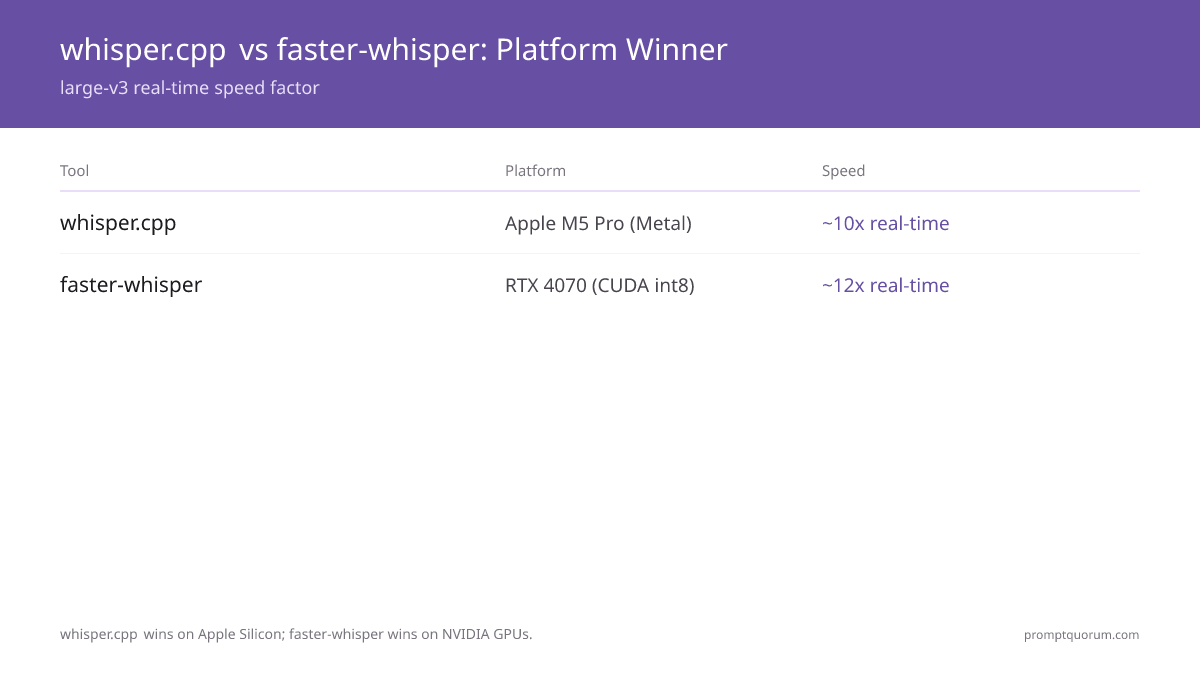
- whisper.cpp is the best local STT choice for Apple Silicon. The C/C++ port leverages Core ML and Apple Metal for hardware acceleration — large-v3 at ~10× real-time on M5 Pro, with no Python dependency required.
- faster-whisper is the best local STT choice for NVIDIA GPUs and Python pipelines. CTranslate2 int8 quantization cuts VRAM by ~40% and boosts throughput by ~4× over the original OpenAI implementation — large-v3 at ~12× real-time on RTX 4070, using only ~2.5 GB VRAM.
- Both tools use identical Whisper model weights from OpenAI. WER (word error rate) is the same for both — the difference is entirely in runtime performance and integration pathway, not transcription accuracy.
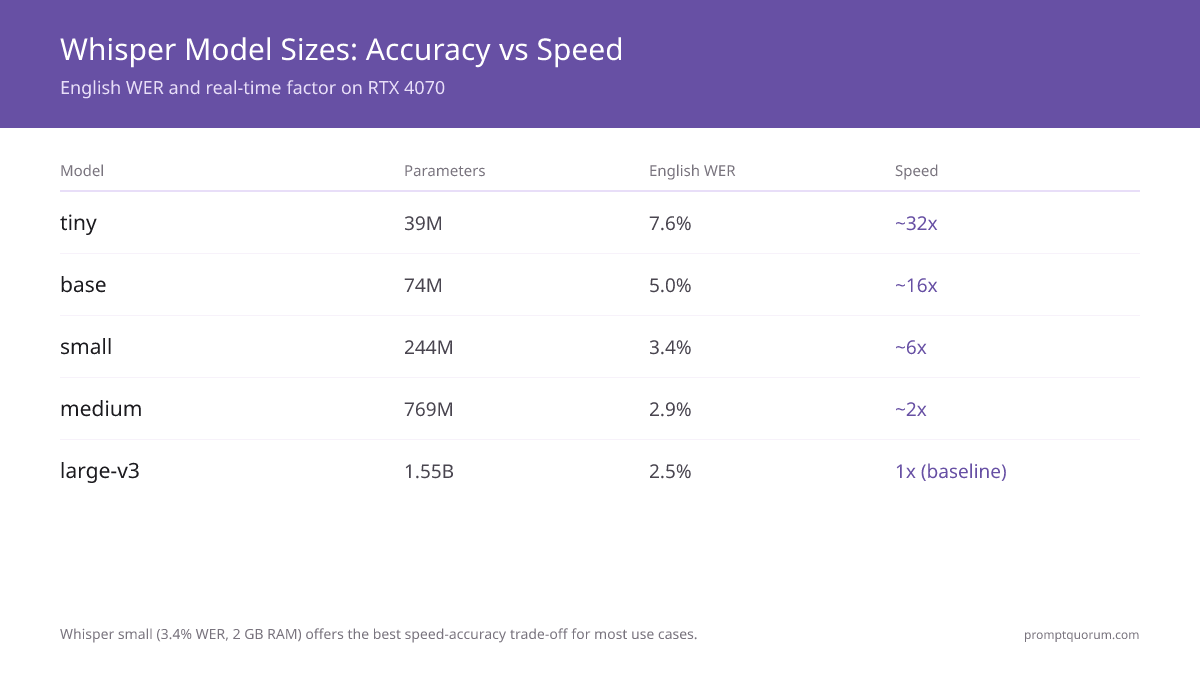
- Whisper large-v3 gives the best accuracy at 2.5% WER on English. For most production use cases, Whisper small (3.4% WER, 2 GB RAM) or medium (2.9% WER, 5 GB RAM) offers a better speed-accuracy trade-off.
- Real-time transcription is achievable with both tools — whisper.cpp via its
--streamflag, faster-whisper via its built-in VAD (voice activity detection) pipeline. Practical latency is 0.5–2 seconds behind live speech depending on model size. - whisper.cpp runs on CPU, Metal, CUDA, and Vulkan — making it the practical choice for cross-platform embedded use (Raspberry Pi, Windows GPU setups, ARM servers). faster-whisper supports CPU and CUDA only (no Metal on Mac).
- For Raspberry Pi 5 and embedded Linux, whisper.cpp tiny and base on CPU are the real-time-capable models — tiny runs comfortably faster than real-time, base around real-time with
-t 4. The small model (3.4% WER) runs below real-time on the Pi 5 and is best for batch jobs. All inference is CPU (ARM NEON) — the Pi has no usable GPU path for Whisper.
Quick Facts
- Both tools: Based on OpenAI's open-source Whisper model (MIT license). Same accuracy — different runtimes.
- whisper.cpp: Written in C/C++ by ggerganov. Supports CPU (AVX2/NEON), CUDA, Metal (Apple), Vulkan. No Python required.
- faster-whisper: Python library using CTranslate2. Supports CPU (int8) and CUDA. No Apple Metal support.
- Whisper model sizes: tiny (39M), base (74M), small (244M), medium (769M), large-v3 (1.55B). All use the same ggml / CTranslate2 format.
- Best model for most use cases: Whisper small — 3.4% WER, runs in 2 GB RAM, 6× real-time on modern CPU.
- RTX 4070 benchmark (large-v3): faster-whisper ~12× real-time; whisper.cpp CUDA ~8× real-time. faster-whisper wins on NVIDIA.
- M5 Pro benchmark (large-v3): whisper.cpp Metal ~10× real-time; faster-whisper CPU-only ~3× real-time. whisper.cpp wins on Apple.
Why Local Speech-to-Text?
Cloud STT services (Google Speech-to-Text, AWS Transcribe, Azure Speech) charge per audio minute — typically $0.006–$0.024/minute — and send your audio to remote servers. For privacy-sensitive applications (medical dictation, legal recordings, journalist interviews, corporate meetings), local transcription eliminates the data exposure entirely.
- Privacy: Audio never leaves your machine, so no cloud processor is involved in transcription. Data-protection duties such as legal basis and secure storage still apply to you.
- Cost: Zero per-minute fees. A developer transcribing 8 hours of meetings per week saves $120–480/month at cloud STT pricing.
- Offline: Works on planes, in secure facilities, in areas without reliable internet. No API key management.
- Latency: No upload/download round-trip. For real-time voice interfaces, local processing reduces STT latency from 300–800 ms (cloud) to 50–300 ms.
- Customization: Fine-tune on domain-specific vocabulary. Run any model size that fits your hardware.
- Home assistant integration: Whisper running locally means wake words and voice commands never leave your home network. See local Whisper in Home Assistant → for the add-on setup that replaces cloud STT entirely.
Whisper Model Sizes — Foundation for Both Tools
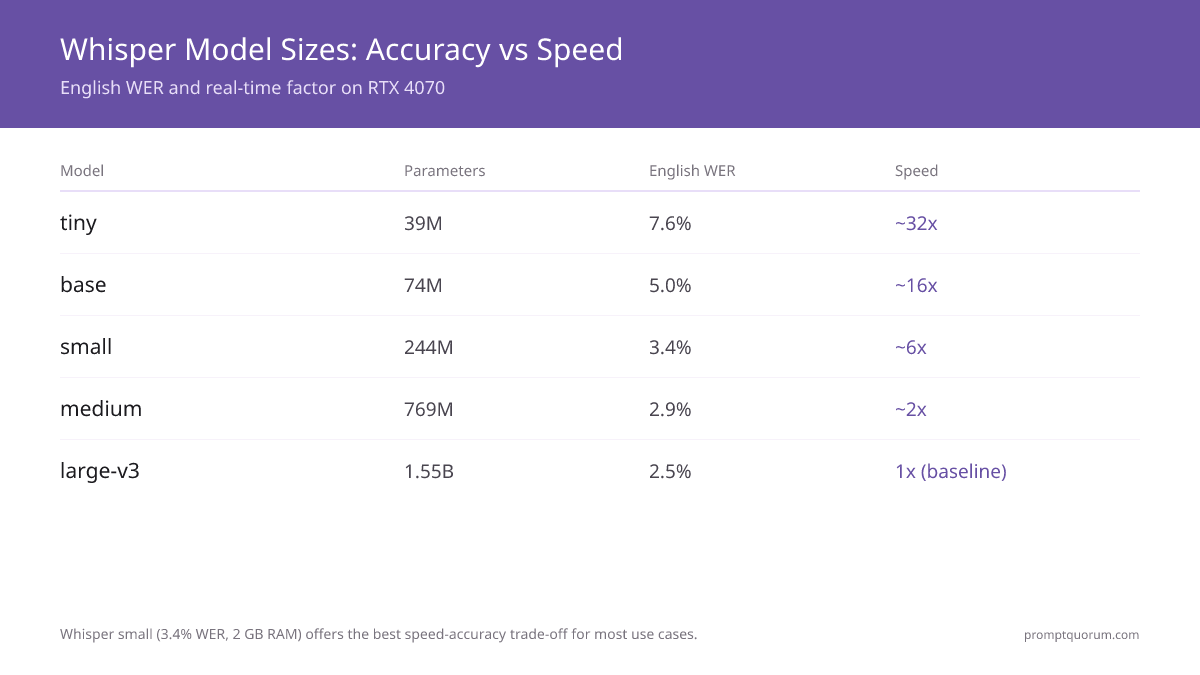
Both whisper.cpp and faster-whisper use the same Whisper model weights, converted to their respective formats (GGML for whisper.cpp, CTranslate2 for faster-whisper). Choose your model size based on your VRAM/RAM budget and accuracy requirements.
Model | Parameters | VRAM / RAM | English WER | Speed Factor (vs real-time on RTX 4070) |
|---|---|---|---|---|
| tiny | 39M | ~1 GB | 7.6% | ~32× |
| base | 74M | ~1 GB | 5.0% | ~16× |
| small | 244M | ~2 GB | 3.4% | ~6× |
| medium | 769M | ~5 GB | 2.9% | ~2× |
| large-v3 | 1.55B | ~10 GB | 2.5% | 1× (baseline) |
| distil-large-v3 | ~756M | ~4 GB | ~2.6% | ~6× |
WER (word error rate) figures from the Whisper paper on the LibriSpeech clean test set. Lower is better. Speed factors for faster-whisper int8 on RTX 4070. distil-large-v3 figures from the Distil-Whisper paper.
Distil-Whisper: The Faster Alternative
distil-whisper/distil-large-v3 is a distilled variant of large-v3 with ~50% fewer parameters, running ~6× faster while keeping WER within ~1% of the original. It is the right choice when transcription speed matters more than squeezing out the last fraction of accuracy. distil-large-v3 works with both faster-whisper (native CTranslate2 support) and whisper.cpp (via GGML format conversion), so it integrates into whichever runtime you already use.
- Parameters: ~756M — roughly half of large-v3's 1.55B, fitting in ~4 GB VRAM instead of ~10 GB.
- Speed: ~6× real-time on RTX 4070 (vs. 1× baseline for large-v3) — comparable to the medium model in speed, with large-v3-level accuracy.
- WER: ~2.6% on English — only ~0.1% higher than large-v3's 2.5%. In practice, the difference is inaudible on typical speech.
- Compatibility: Works with faster-whisper natively (
WhisperModel("distil-large-v3", device="cuda", compute_type="int8")). For whisper.cpp, convert to GGML format using the distil-whisper GGML conversion script. - Best for: Batch transcription jobs, server deployments with limited VRAM, and any use case where you want large-v3 quality at medium-model speed.
- Not for: Multilingual transcription — distil-large-v3 is English-only. For other languages, use large-v3 or medium.
whisper.cpp — The C/C++ Port
whisper.cpp (by Georgi Gerganov) is a pure C/C++ reimplementation of OpenAI's Whisper model, optimized for low-resource and cross-platform inference. It requires no Python, no CUDA toolkit, and runs on virtually any hardware — from Raspberry Pi to Apple M5 Pro to Windows CUDA setups.
- Platform support: CPU (AVX2, AVX512, ARM NEON), Apple Metal (Core ML), CUDA (NVIDIA), Vulkan (AMD/Intel GPU), OpenCL.
- Apple Silicon advantage: whisper.cpp exports models to Core ML format, enabling inference on the Apple Neural Engine. Large-v3 runs at ~10× real-time on M5 Pro via Metal — faster than any cloud round-trip.
- Installation: Clone the repo, run
make(orcmake). Pre-built binaries available for common platforms. No Python dependency. - Model download:
bash ./models/download-ggml-model.sh base.en— downloads the GGML-format model file (~142 MB for base). - CLI example:
./main -m models/ggml-base.bin -f audio.wav— transcribes a WAV file to stdout. Add-l defor German. - Real-time stream mode:
./stream -m models/ggml-base.bin --step 3000 --length 10000— transcribes from microphone in 3-second chunks. - Python wrapper: pywhispercpp provides a Python binding for whisper.cpp, enabling use in Python pipelines without sacrificing Metal acceleration.
- Limitation: No native VAD (voice activity detection). Stream mode requires tuning
--stepand--lengthparameters for your use case.
# Build from source (macOS / Linux)
git clone https://github.com/ggerganov/whisper.cpp
cd whisper.cpp
make -j4

# Download a model
bash ./models/download-ggml-model.sh large-v3

# Transcribe a file
./main -m models/ggml-large-v3.bin -f recording.wav

# Enable Metal on Apple Silicon (Core ML)
make -j4 WHISPER_COREML=1
./main -m models/ggml-large-v3-encoder.mlmodelc -f recording.wav
whisper.cpp Latest Version & Updates
The latest whisper.cpp release is v1.9.5, published October 6, 2026. It syncs the bundled ggml library to v0.26.0 with backend work across CUDA, Vulkan, Metal, SYCL, OpenCL and CPU kernels, and adds Whisper fixes such as an abort callback during language detection and an integer-overflow fix in parallel chunk offsets. whisper.cpp is also packaged officially for Debian (sid) as whisper.cpp / libwhisper-dev / libwhisper1, alongside the long-standing unofficial Snap. faster-whisper's latest tagged release is still v1.2.1 (October 31, 2025), but the repository is actively maintained: commits landed as recently as October 16, 2026. Both runtimes still load the same OpenAI Whisper weights; nothing about transcription accuracy changed in 2026.
- whisper.cpp v1.9.5 (October 6, 2026): Syncs ggml to v0.26.0 with CUDA, Vulkan, Metal, SYCL, OpenCL, WebGPU and CPU kernel updates, adds an abort callback during language detection, fixes an integer overflow in parallel chunk offsets, and makes the CLI return the correct error code when a file fails.
- whisper.cpp v1.9.4 (September 11, 2026): The server now returns the detected language, the encoder callback runs before language auto-detection, and Windows on ARM was added to the release job.
- whisper.cpp v1.9.3 (August 20, 2026): Syncs ggml to v0.20.2 with backend-wide performance improvements, Metal TQ2_0 quantization support, fused CUDA/SYCL kernels, and ARM/WASI fixes.
- whisper.cpp v1.9.0–v1.9.2 (June–August 2026): Point releases continuing the same ggml-sync and cross-backend performance line ahead of v1.9.3.
- whisper.cpp v1.8.6 (June 2, 2026): Reimplemented
ffmpeg-transcodefor clearer optional FFmpeg decoding of compressed audio (MP3, M4A) plus a CI examples-path fix. - whisper.cpp v1.8.5 (May 2026): Streaming VAD (voice activity detection) improvements, server parameter-leak and token-timestamp fixes, and memory-leak fixes in the Ruby and VAD bindings.
- whisper.cpp v1.8.4 (March 19, 2026): Latest
ggmlsync with broad performance gains, a new-g/--gpu-deviceflag (andGGML_CUDAdevice selection) to pick a GPU, and UTF-8 segment-wrapping fixes. - Native VAD is now built into whisper.cpp. Recent releases added a native voice-activity-detection path, narrowing a long-standing faster-whisper advantage — though faster-whisper's Silero VAD integration remains more turnkey.
- faster-whisper v1.2.1 (October 31, 2025): Latest tagged release;
pip install faster-whisperpulls it. There is no tagged release in 2026, but the main branch is active: commits from October 16, 2026 add input validation, such as an error for languages a model does not support. v1.2.0 (August 2025) added distil-large-v3.5 support. - CTranslate2 v4.8.3 (October 13, 2026): The inference engine under faster-whisper keeps shipping. The v4.8 line added Windows ROCm fixes, load-time hardening, and a fix for a division by zero in Whisper
align()when a window has no frames. - No new accuracy-class Whisper model in 2026. OpenAI's newest multilingual weights remain large-v3-turbo (October 2024; 809M parameters, decoder cut from 32 to 4 layers, MIT license), which trades a small quality loss for much higher speed and runs in both tools. distil-large-v3 stays the English-only speed option. Updates to either runtime are runtime and tooling changes, not accuracy changes.
faster-whisper — The CTranslate2 Port
faster-whisper (by SYSTRAN) is a Python library that reimplements Whisper inference using CTranslate2 — a highly optimized C++ inference engine that supports int8 quantization, reducing VRAM usage and increasing throughput. On NVIDIA GPUs, faster-whisper is the fastest local Whisper implementation available.
- Platform support: CPU (int8 quantization) and NVIDIA CUDA GPU. No Apple Metal support — runs CPU-only on Mac.
- int8 advantage: CTranslate2 int8 quantization reduces VRAM by ~40% and increases inference speed by ~2× vs float16, with negligible WER impact (< 0.1% absolute).
- Installation:
pip install faster-whisper— no compilation required (Python 3.9+). GPU use needs NVIDIA cuBLAS for CUDA 12 and cuDNN 9; older CUDA 11 / cuDNN 8 setups must pin an olderctranslate2(3.24.0). - Built-in VAD: faster-whisper includes Silero VAD integration, which automatically skips silent audio segments — critical for real-time transcription pipelines.
- Python-native: Direct Python API makes it trivial to chain with LLMs, audio processing libraries, and web frameworks.
- Speed: large-v3 int8 on RTX 4070 runs at ~12× real-time and uses ~2.5 GB VRAM. CPU int8 achieves ~20× real-time for the tiny model.
- Batch processing: faster-whisper supports batched inference for processing large audio archives efficiently.
- Limitation: No Metal support on Mac — runs CPU-only on Apple Silicon, achieving ~3× real-time for large-v3 vs. whisper.cpp's ~10× with Metal.
from faster_whisper import WhisperModel

# Load model (downloads automatically on first run)
model = WhisperModel("large-v3", device="cuda", compute_type="int8")

# Transcribe
segments, info = model.transcribe("audio.wav", beam_size=5)

print(f"Detected language: {info.language} (probability: {info.language_probability:.2f})")
for segment in segments:
    print(f"[{segment.start:.2f}s → {segment.end:.2f}s] {segment.text}")
Get ggml-base.bin via pip (Python Setup)
To use ggml-base.bin from Python via pip, install the pywhispercpp binding — pip install pywhispercpp — then load Model("base"), which downloads ggml-base.bin automatically on first run. There is no pip install whisper.cpp; pywhispercpp is the pip wrapper around the whisper.cpp C/C++ engine, and it keeps Metal and CUDA acceleration. The GGML model file (ggml-base.bin, ~142 MB) is downloaded separately from Hugging Face and cached locally — the pip package ships the inference engine, not the weights.
📍 In One Sentence
Run pip install pywhispercpp, then Model("base") in Python fetches and caches ggml-base.bin automatically on first use.
💬 In Plain Terms
pip installs the program (pywhispercpp); the ggml-base.bin model file is a separate ~142 MB download that happens the first time you load the "base" model — or that you grab by hand with the download-ggml-model.sh script.
- Install the binding:
pip install pywhispercpp. For NVIDIA CUDA acceleration, build withGGML_CUDA=1 pip install git+https://github.com/absadiki/pywhispercpp. - Auto-download ggml-base.bin:
from pywhispercpp.model import Modelthenmodel = Model("base")downloadsggml-base.binfrom Hugging Face (ggerganov/whisper.cpp) on first run and caches it. Use"base.en"for the English-only variant. - Manual download (CLI route, no pip): From a cloned whisper.cpp repo,
bash ./models/download-ggml-model.sh basesaves the file tomodels/ggml-base.bin— the same file pywhispercpp fetches. - Direct download:
curl -L -o ggml-base.bin https://huggingface.co/ggerganov/whisper.cpp/resolve/main/ggml-base.binpulls the model with no script. Swapbasefortiny,small,medium, orlarge-v3. - Do not confuse the packages:
pip install openai-whisperinstalls OpenAI's original PyTorch Whisper (it uses.ptcheckpoints, notggml-base.bin).pip install faster-whisperuses the CTranslate2 format. Onlypywhispercppconsumes GGMLggml-*.binfiles. - Where the file lives: pywhispercpp stores downloaded GGML models under its module cache (or a path you pass via
Model("base", models_dir="...")), so the sameggml-base.binis reused across runs — no re-download.
# 1. Install the pip binding for whisper.cpp
pip install pywhispercpp

# 2. ggml-base.bin downloads automatically on first use
#    from pywhispercpp.model import Model
#    model = Model("base")          # fetches & caches ggml-base.bin (~142 MB)
#    for seg in model.transcribe("audio.wav"):
#        print(seg.text)

# --- Or get ggml-base.bin manually (no pip) ---
# From a cloned whisper.cpp checkout:
bash ./models/download-ggml-model.sh base       # -> models/ggml-base.bin

# Or download the file directly from Hugging Face:
curl -L -o ggml-base.bin \
  https://huggingface.co/ggerganov/whisper.cpp/resolve/main/ggml-base.bin
Head-to-Head Benchmark Table
All benchmarks use the large-v3 model unless noted. Speed is measured in multiples of real-time (e.g., 10× means 60 minutes of audio transcribed in 6 minutes). VRAM figures for GPU runs; RAM figures for CPU runs.
📍 In One Sentence
On Apple Silicon, whisper.cpp with Metal runs large-v3 at ~10× real-time; on NVIDIA GPUs, faster-whisper with int8 runs at ~12× real-time — each tool wins decisively on its target platform.
💬 In Plain Terms
Pick whisper.cpp on Mac (it uses the Apple Neural Engine), and faster-whisper on Windows/Linux with an NVIDIA GPU (it processes audio 12× faster than real-time while using 40% less GPU memory).
Metric | whisper.cpp (large-v3) | faster-whisper (large-v3) |
|---|---|---|
| Platform / language | C/C++ (cross-platform) | Python (CTranslate2) |
| GPU support | CUDA, Metal, Vulkan | CUDA only |
| CPU optimization | AVX2, ARM NEON | int8 quantization |
| Speed — RTX 4070, large-v3 | ~8× real-time | ~12× real-time ✓ |
| Speed — M5 Pro, large-v3 | ~10× real-time (Metal) ✓ | ~3× real-time (CPU only) |
| Speed — CPU only (x86), base | ~15× real-time | ~20× real-time ✓ |
| VRAM — large-v3, GPU | ~3 GB | ~2.5 GB (int8) ✓ |
| Python integration | Needs wrapper (pywhispercpp) | Native ✓ |
| VAD (silence detection) | Manual (--step tuning) | Built-in (Silero VAD) ✓ |
| Real-time streaming | Yes (--stream flag) ✓ | Yes (VAD pipeline) |
| WER accuracy (large-v3) | 2.5% (identical) | 2.5% (identical) |
| Python dependency | None ✓ | Python 3.9+ |
| Raspberry Pi / embedded | Yes — C binary ✓ | Limited — Python overhead |
| Output formats | SRT, VTT, JSON, CSV, txt | Python objects (start, end, text) |
whisper.cpp writes output directly to standard subtitle and transcript file formats (SRT, VTT, JSON, CSV, txt) — ideal for subtitle workflows where you need a file on disk with no additional code. faster-whisper yields a Python generator of segment objects with start, end, and text attributes — ideal for LLM pipeline chaining, where you pass segment text directly into a downstream model without writing intermediate files. For subtitle generation, whisper.cpp is simpler. For pipelines that process segments programmatically, faster-whisper is simpler.
Reference Benchmark: GPU vs CPU Timings from faster-whisper
The faster-whisper project publishes its own timings on a 13-minute audio file — they show whisper.cpp with Flash Attention matching faster-whisper fp16 on a GPU, while batching and int8 are where faster-whisper pulls ahead. The figures below come from the faster-whisper README (large-v2 on an RTX 3070 Ti 8 GB with CUDA 12.4 for the GPU rows; the small model on an Intel Core i7-12700K with 8 threads for the CPU rows; beam size 5). They are not our own measurements and use different hardware and models than the large-v3 figures above.
📍 In One Sentence
In the faster-whisper README benchmark, whisper.cpp with Flash Attention (1m05s) and faster-whisper fp16 (1m03s) are nearly tied on a GPU; faster-whisper int8 with batching finishes the same 13-minute file in 16 seconds.
Setup | Precision | Time | VRAM / RAM |
|---|---|---|---|
| GPU · whisper.cpp (Flash Attn) | fp16 | 1m05s | 4127 MB |
| GPU · faster-whisper | fp16 | 1m03s | 4525 MB |
| GPU · faster-whisper | int8 | 59s | 2926 MB |
| GPU · faster-whisper, batch 8 | int8 | 16s | 4500 MB |
| CPU · whisper.cpp | fp32 | 2m05s | 1049 MB |
| CPU · faster-whisper | int8 | 1m42s | 1477 MB |
| CPU · faster-whisper, batch 8 | int8 | 51s | 3608 MB |
Read this next to the head-to-head table: single-stream fp16 GPU speed is close between the two tools on this setup. faster-whisper's lasting advantages are int8 memory savings (2.9 GB vs 4.1–4.5 GB at fp16) and batched inference (16 s vs 59 s). On CPU, whisper.cpp fp32 and faster-whisper int8 are within roughly 25% of each other without batching.
Real-Time Transcription Setup
Real-time transcription processes audio in chunks as it arrives from a microphone, producing text with a short lag behind speech. Both tools support this, but with different trade-offs.
- whisper.cpp stream mode: Run
./stream -m models/ggml-small.bin --step 3000 --length 10000 -t 4. Processes 3-second audio chunks; ~0.5–1.5 second lag with the small model. No Python needed. - faster-whisper VAD pipeline: Use
vad_filter=Trueinmodel.transcribe(). Silero VAD automatically segments audio at silence boundaries — more natural chunks than fixed-length windows. - Practical latency: 0.5–2 seconds behind live speech with small or medium models. Use tiny for the lowest latency (< 0.5 seconds, but higher WER).
- Model selection for real-time: small or base is the practical sweet spot — fast enough to keep up with speech, accurate enough for clean audio. Avoid large-v3 for real-time unless you have a dedicated GPU.
- Microphone input: whisper.cpp reads raw audio via SDL2 or portaudio. faster-whisper reads audio arrays from any Python audio library (sounddevice, pyaudio, soundfile).
- Stability: whisper.cpp stream mode can produce repeated tokens ("hallucinate" short fillers) on silence. Suppress with
--suppress-blankand--no-speech-threshold.
Apple Silicon: whisper.cpp Wins
On M1, M2, M3, M4, and M5 Macs, whisper.cpp with Core ML / Metal acceleration is the correct tool — no question. faster-whisper has no Metal support and runs CPU-only on Mac, achieving roughly 3× real-time for large-v3. whisper.cpp with Metal achieves ~10× real-time on M5 Pro — a 3× speed advantage.
- Core ML export: Run
./models/generate-coreml-model.sh large-v3to export the encoder to Core ML format. This offloads encoder inference to the Apple Neural Engine. - M5 Pro benchmark (large-v3, Metal): ~10× real-time. 60 minutes of audio transcribes in ~6 minutes. Note: M5 Pro shipped March 2026 — these are early community benchmarks. Performance may improve with whisper.cpp updates optimizing for the M5 Neural Engine.
- M3 MacBook Air benchmark (large-v3, Metal): ~7× real-time. 60 minutes in ~8.5 minutes.
- Memory: Unified memory means no separate VRAM — a 16 GB M5 Pro can comfortably run large-v3 (~3 GB) alongside other processes.
- faster-whisper on Mac: CPU-only, int8. Large-v3 at ~3× real-time. Usable for batch overnight transcription but not for real-time or time-sensitive workflows.
- Recommendation: Use whisper.cpp for all Mac STT work. Add pywhispercpp if you need Python integration while retaining Metal acceleration.
NVIDIA GPU: faster-whisper Wins
On Windows and Linux with NVIDIA GPUs, faster-whisper is the superior choice. Its CTranslate2 CUDA backend is more optimized than whisper.cpp's CUDA path — ~12× vs. ~8× real-time for large-v3 on RTX 4070, with lower VRAM usage.
- RTX 4070 (12 GB) benchmark (large-v3 int8): ~12× real-time, ~2.5 GB VRAM.
- RTX 3060 (12 GB) benchmark (large-v3 int8): ~8× real-time, ~2.5 GB VRAM.
- RTX 4060 (8 GB) benchmark (large-v3 int8): ~7× real-time, ~2.5 GB VRAM — easily fits.
- int8 vs float16: int8 is ~2× faster and uses ~40% less VRAM with negligible accuracy loss. Always use
compute_type="int8"on NVIDIA. - Batch processing: faster-whisper's
batched=Trueparameter enables parallel processing of multiple audio files, maximizing GPU utilization for large transcription jobs. - Python pipeline integration: faster-whisper slots directly into LangChain, Haystack, and custom Python pipelines. No subprocess overhead vs. wrapping whisper.cpp.
Older NVIDIA GPUs (GTX 970): int8 Falls Back to float32
On a GTX 970 (Maxwell, compute capability 5.2), faster-whisper still runs on CUDA, but compute_type="int8" does not give you int8 — CTranslate2 converts the weights to float32. Its quantization table maps every GPU at compute capability 6.0 or lower to float32 for any requested type, so the ~40% VRAM saving and the int8 speedup quoted for RTX cards do not apply.
📍 In One Sentence
On a GTX 970 (compute capability 5.2), faster-whisper runs on CUDA in float32 only — a requested int8 compute type is converted automatically.
💬 In Plain Terms
The GTX 970 is too old for GPU int8. It still works, but you get no memory savings, so stay with the tiny, base or small models on its 4 GB.
- What still works: CTranslate2's prebuilt binaries support NVIDIA GPUs with compute capability 3.5 or higher, so a GTX 970 (5.2) can run faster-whisper on CUDA, provided your installed CUDA and cuDNN libraries match the release (see Common Issues).
- Where GPU int8 works: int8 needs compute capability 7.0 or higher (Volta and RTX 20-series onward) or exactly 6.1 (GTX 1050 to 1080 Ti, int8_float32). Compute capability 6.0, 6.2 and everything below fall back to float32; float16 needs 7.0 or higher.
- Memory consequence: float32 stores 4 bytes per parameter against 1 byte for int8, so by parameter count large-v3 (1.55B) needs roughly 6 GB for weights alone — more than the GTX 970's 4 GB. Small (244M, about 1 GB in float32) fits comfortably; medium (769M, about 3 GB) is borderline.
- Speed: We have not benchmarked a GTX 970, so there is no measured figure here. Expect float32 throughput well below the RTX 4070 int8 numbers in this guide, and test tiny, base and small on your own audio.
- Check what your GPU supports:
ctranslate2.get_supported_compute_types("cuda")lists the compute types CTranslate2 accepts on your card. - Fallbacks: CPU int8 (
device="cpu", compute_type="int8") works on any modern x86 CPU, and whisper.cpp's quantized GGML models (for exampleggml-large-v3-q5_0.bin, about 3–4 GB) are the usual way to fit larger models into 4 GB — verify the CUDA or Vulkan build on your card.
import ctranslate2
from faster_whisper import WhisperModel

# Which compute types does this GPU accept?
print(ctranslate2.get_supported_compute_types("cuda"))

# On compute capability < 6.1 (e.g. GTX 970), request float32 explicitly so nothing is converted silently
model = WhisperModel("small", device="cuda", compute_type="float32")
Whisper on Raspberry Pi 5: tiny, base & small
On a Raspberry Pi 5, whisper.cpp runs the tiny and base models in real time for live transcription, while the small model runs below real time and is best kept to batch jobs. The Pi 5's quad-core Cortex-A76 has no usable GPU path for Whisper, so all inference is CPU (ARM NEON). Use the quantized GGML models (ggml-*-q5_0.bin) to cut memory use and speed inference.
📍 In One Sentence
On a Raspberry Pi 5, the whisper.cpp small model runs slower than real time (~0.5×, batch only); tiny and base are the models that keep up with live speech.
💬 In Plain Terms
A Pi 5 can transcribe live audio with the tiny and base Whisper models, but the small model is too heavy to keep up in real time — use small for recorded files you process in the background, not for a live microphone.
- Whisper small on Pi 5: Roughly 0.4–0.6× real-time on CPU (a 10-minute clip takes ~17–25 minutes). Accurate at 3.4% WER but too slow for live captioning — use it for overnight/batch transcription.
- Whisper base on Pi 5: Around real-time to ~2× with multithreading (
-t 4). The practical sweet spot for live transcription on the Pi, with acceptable 5.0% WER. - Whisper tiny on Pi 5: Fastest option, comfortably faster than real-time for live use, at the cost of higher 7.6% WER. Best for wake-word and short-command recognition.
- Use quantized models:
bash ./models/download-ggml-model.sh small-q5_0trims RAM and speeds inference with minimal accuracy loss — important on the Pi 5's shared memory. - faster-whisper on Pi 5: Installable (
pip install faster-whisper, CPU int8) and competitive for batch jobs, but whisper.cpp's lighter C binary is the more common embedded choice. - Thermals: Sustained transcription pushes the Pi 5 CPU hard — use active cooling to avoid thermal throttling that erodes these numbers.
When to Use Which
A direct mapping from your scenario to the right tool:
📍 In One Sentence
Use whisper.cpp on Apple Silicon and embedded/cross-platform targets; use faster-whisper on NVIDIA GPUs and Python pipelines.
💬 In Plain Terms
If you have a Mac, pick whisper.cpp — it's 3× faster than faster-whisper on Apple hardware. If you have an NVIDIA GPU and write Python, pick faster-whisper — it's faster and needs 40% less GPU memory.
Scenario | Best Choice | Why |
|---|---|---|
| Apple Silicon Mac (any model) | whisper.cpp | Metal / Core ML acceleration — 3× faster than faster-whisper (CPU-only on Mac) |
| NVIDIA GPU server (Linux/Windows) | faster-whisper | CTranslate2 int8 — faster and lower VRAM than whisper.cpp CUDA path |
| Python data pipeline | faster-whisper | Native Python API; no subprocess wrapper; VAD built in |
| Raspberry Pi / embedded Linux | whisper.cpp | Pure C binary; no Python runtime overhead; ARM NEON optimized |
| Real-time voice assistant | whisper.cpp | Stream mode with low overhead; works without Python on Pi / embedded |
| Batch transcription (large audio archive) | faster-whisper | Batched inference, GPU utilization, Python async integration |
| AMD GPU (Vulkan) | whisper.cpp | Vulkan backend support; faster-whisper is CUDA-only |
| CPU-only Linux server | faster-whisper | int8 quantization gives ~30% speed advantage on x86 CPU |
Beyond whisper.cpp and faster-whisper
Two additional tools extend Whisper with capabilities that neither whisper.cpp nor faster-whisper provide out of the box: speaker diarization and extreme-speed batch GPU inference.
- WhisperX: Built on top of faster-whisper, WhisperX adds word-level timestamps and speaker diarization — identifying which speaker said which words. Best for meeting transcription with speaker labels, podcast editing, and interview transcripts. Install with
pip install whisperxand provide a Hugging Face token for the diarization model. - insanely-fast-whisper: A Hugging Face Transformers pipeline wrapper that adds Flash Attention 2 support for significantly faster GPU inference than standard faster-whisper on NVIDIA hardware. Best for batch processing large audio archives on NVIDIA GPUs. Requires a Flash Attention 2-compatible GPU (Ampere or newer: RTX 3000+, A100, H100).
Common Issues and Fixes
The most frequent setup and runtime problems, with direct fixes:
- CUDA version mismatch: Current faster-whisper releases need cuBLAS for CUDA 12 and cuDNN 9. If you are stuck on older libraries, pin ctranslate2:
pip install --force-reinstall ctranslate2==4.4.0(CUDA 12 with cuDNN 8) or3.24.0(CUDA 11 with cuDNN 8). Check your CUDA version withnvcc --version. - Metal model export fails: Ensure Xcode Command Line Tools are installed — run
xcode-select --install. The Core ML export script requires thecoremltoolsPython package:pip install coremltools. - Hallucination on silence: Both tools can produce repeated filler tokens on silent audio segments. Use
--no-speech-threshold 0.6in whisper.cpp stream mode, orvad_filter=Truein faster-whisper'smodel.transcribe()to skip silent segments automatically. - Out of memory on large-v3: Switch to int8 quantization in faster-whisper (
compute_type="int8") — reduces VRAM from ~5 GB (float16) to ~2.5 GB. In whisper.cpp, use the quantized GGML variant (e.g.,ggml-large-v3-q5_0.bin) which cuts memory to ~3–4 GB. - Garbled output on non-English audio: Do not use
.enmodel variants (tiny.en, base.en) for non-English speech — they are English-only. Use the multilingual models (base, small, medium, large-v3) and set the language explicitly:-l dein whisper.cpp orlanguage="de"in faster-whisper. - Slow CPU inference: Ensure your CPU supports AVX2 instructions (required for optimized CPU inference). Check with
grep avx2 /proc/cpuinfoon Linux orsysctl machdep.cpu.featureson Mac. CPUs without AVX2 fall back to generic SIMD and will be 2–3× slower.
Frequently Asked Questions
Is there a Debian or apt package for whisper.cpp?
Yes — whisper.cpp is now packaged officially for Debian (currently in sid), providing the whisper.cpp binary plus libwhisper-dev and libwhisper1 for linking against it as a shared library. It hasn't reached stable Debian releases or Ubuntu's default repos yet, so on most systems you'll still need to add sid or build from source. An unofficial Snap (sudo snap install whisper-cpp) is also available for Debian 9+ and Ubuntu if you don't want to build from source or pull from sid.
How do I check which version of whisper.cpp I have installed?
Run the compiled binary with no arguments or --help — the version is printed in the banner line. You can also check the exact commit with git describe --tags inside the cloned repository, or compare your build date against the release notes at github.com/ggml-org/whisper.cpp/releases to see if you're behind the current v1.9.5.
Is the transcription accuracy the same between whisper.cpp and faster-whisper?
Yes. Both tools use the same OpenAI Whisper model weights — the model itself is identical. The difference is only in the inference runtime (C/C++ vs CTranslate2 Python). WER on the same audio file will be within 0.1% absolute of each other, which is within normal variation from beam search randomness.
Can I use faster-whisper on a Mac with Apple Silicon?
Yes, but it runs CPU-only — faster-whisper has no Metal support. On an M5 Pro, faster-whisper large-v3 runs at ~3× real-time (CPU int8), compared to whisper.cpp's ~10× real-time with Metal. For most Mac users, whisper.cpp is 3× faster for the same model. The only reason to use faster-whisper on Mac is if your Python pipeline already depends on it and speed is not critical.
What Whisper model size should I use for a voice assistant?
For real-time voice interfaces, Whisper small is the standard recommendation — 3.4% WER on clean English, ~200 ms STT latency on a modern CPU or GPU, and fits in 2 GB RAM. Use tiny if you are on very constrained hardware (Raspberry Pi Zero 2W, older phones) and can tolerate ~7.6% WER. Use medium or large-v3 only for batch transcription where latency is not a constraint.
Does whisper.cpp support languages other than English?
Yes. All Whisper multilingual models (base, small, medium, large-v3) support 99 languages. Add `-l [language code] to the CLI: -l de for German, -l fr for French, -l ja` for Japanese, etc. The tiny.en and base.en models are English-only and slightly more accurate for English than their multilingual equivalents.
How do I install faster-whisper with CUDA support?
Install with pip install faster-whisper. Current releases need NVIDIA cuBLAS for CUDA 12 and cuDNN 9 on your system (on Linux, pip install nvidia-cublas-cu12 "nvidia-cudnn-cu12==9.*" provides them). On older CUDA 11 / cuDNN 8 setups, pin ctranslate2==3.24.0 (or 4.4.0 for CUDA 12 with cuDNN 8). Then specify device="cuda" when loading the model: WhisperModel("large-v3", device="cuda", compute_type="int8"). Use device="auto" if you want it to fall back to CPU when CUDA is not available.
Which is more accurate — whisper.cpp or faster-whisper?
Identical. Both tools use the same OpenAI Whisper model weights and produce the same WER on any given audio file. The difference between whisper.cpp and faster-whisper is speed and platform support, not transcription accuracy. Any WER difference you measure between runs is within normal variation from beam search, not from the runtime itself.
Can I run Whisper large-v3 on 8 GB RAM?
Yes on GPU — large-v3 int8 in faster-whisper uses ~2.5 GB VRAM and runs on any 8 GB GPU. On CPU-only hardware, 8 GB RAM is tight for large-v3 (float32 uses ~10 GB). Use medium (5 GB RAM) or small (2 GB RAM) on CPU-only systems. whisper.cpp is more memory-efficient on CPU than faster-whisper due to lower runtime overhead.
How much does local Whisper cost vs cloud STT?
Zero ongoing cost. Cloud STT services charge $0.006–$0.024 per audio minute — for a developer transcribing 8 hours of meetings per week, that's $120–480/month. Local Whisper runs on hardware you already own, with no per-minute fees, no API key management, and no audio data leaving your machine.
Does faster-whisper int8 work on a GTX 970?
No — not as real int8. The GTX 970 has compute capability 5.2, and CTranslate2 runs int8 only on GPUs with compute capability 7.0 or higher (or exactly 6.1); on older cards it converts the weights to float32 automatically. faster-whisper still runs on the GPU in float32, so use tiny, base or small to stay inside 4 GB, or run CPU int8, which works on any modern x86 CPU. We have not benchmarked a GTX 970, so there is no measured speed figure here.
How big are the Whisper model files for whisper.cpp and faster-whisper?
whisper.cpp's README lists GGML model files of about 75 MiB (tiny), 142 MiB (base), 466 MiB (small), 1.5 GiB (medium) and 2.9 GiB (large) on disk, needing roughly 273 MB, 388 MB, 852 MB, 2.1 GB and 3.9 GB of memory. faster-whisper downloads CTranslate2 models from Hugging Face on first use; large-v3 is about 3 GB there (1.55B parameters at 2 bytes each in float16). The model-size table above lists parameter counts for every size.
Is Whisper large-v3-turbo better than large-v3 for local transcription?
It is faster, not more accurate. large-v3-turbo has 809M parameters because OpenAI cut the decoder from 32 layers to 4, and its model card describes it as much faster than large-v3 at the expense of a minor quality degradation, under the MIT license. The card also warns that it can hallucinate or repeat text and that accuracy varies across languages, so keep large-v3 for the hardest audio and use turbo (or distil-large-v3 for English) when speed matters. Both whisper.cpp and faster-whisper can run it.
Can whisper.cpp use an AMD or Intel GPU instead of CUDA?
Yes. whisper.cpp's Vulkan backend (-DGGML_VULKAN=1) works across vendors as long as your driver supports the Vulkan API, ROCm/HIP (-DGGML_HIP=1) targets AMD GPUs, and OpenVINO accelerates the encoder on Intel CPUs and GPUs. faster-whisper's own documentation covers NVIDIA CUDA only; CTranslate2's release notes mention ROCm wheels, but we have not tested that path.
Is mlx-whisper faster than whisper.cpp on a Mac?
One independent test says yes for large-v3-turbo: Bill Mill's January 2026 rerun measured mlx_whisper at about 13.1 seconds against 26.7 seconds for whisper.cpp on the same long recording, roughly 2× faster. A community speed test on a short clip put the two close, with whisper.cpp using Core ML and q5_0 quantization. The M5 Pro figures in this guide were not compared against MLX, so benchmark your own audio before choosing.
Sources
- whisper.cpp on GitHub — Source, build instructions, model download scripts, and Metal/Core ML setup guide.
- faster-whisper on GitHub — Source, Python API documentation, and benchmark results.
- distil-whisper/distil-large-v3 on Hugging Face — Model card, benchmark results, and usage instructions for the distilled Whisper variant.
- WhisperX on GitHub — Word-level timestamps and speaker diarization built on faster-whisper.
- insanely-fast-whisper on GitHub — Flash Attention 2 Whisper pipeline for maximum NVIDIA GPU throughput.
- OpenAI Whisper on GitHub — Original Whisper model, paper, and model cards for all sizes.
- OpenAI Whisper paper (Radford et al., 2022) — "Robust Speech Recognition via Large-Scale Weak Supervision." Source of WER figures.
- CTranslate2 documentation — Quantization details, hardware support, and int8 optimization rationale.
- CTranslate2 quantization documentation — Which compute types each GPU compute capability supports (basis of the GTX 970 section).
- faster-whisper README benchmarks — 13-minute GPU and CPU timings used in the reference benchmark, plus current CUDA 12 / cuDNN 9 requirements.
- openai/whisper-large-v3-turbo on Hugging Face — Model card: 809M parameters, 4 decoder layers, MIT license.
- Bill Mill: updated mlx_whisper vs. whisper.cpp benchmark — Independent large-v3-turbo timing comparison on Apple Silicon.
- whisper.cpp releases — Release notes for v1.9.4 and v1.9.5.