Figure 1First launch. One local model (Gemma 4 E2B, 3.6 GB, strength slider at 'Capable') or a connected provider. A yellow notice reads 'Add at least one model before continuing with a connected provider.' and the Continue button is greyed out.
Verdict
General assessment
Partly tested. What the tester tried mostly worked: Msty picked up his existing Ollama models, a text chat and an image upload ran, and the Model Hub says whether a model fits the Mac. What did not come together: the website and first screens do not say what the app is for, a file upload looped between a knowledge base and the chat, and no image model could be used in Media Studio. The notes stop at the Model Matchmaker without a conclusion on Msty.
Fit for the tester's use
Not recorded. The tester's own question, 'why should a home user use it', is not answered in the notes. The closing judgment in the Word file describes a different app and is not used here.
ObservedExisting Ollama models showed up in Msty's model picker. No second model download is recorded in the notes.
ObservedTwo things did not work as the tester expected: the file upload looped between the knowledge base and the chat, and no local image model could be used in Media Studio.
Tester viewThe tester could not tell from the website what Msty is for as a home user. The notes contain no final verdict on Msty.
Scorecard Status: Partial
Installationn/aDownload size recorded (246 MB). Install steps and macOS prompts were not recorded.
Onboarding and model choice3/5Ollama models appear next to hosted providers and model cards carry a hardware-fit hint. The first screens do not say what the app is for, and the Ollama connection was not obvious to the tester.
Core function4/5Chat with an Ollama model and image input worked. One text reply, one vision test and one file test only; answer quality was not assessed.
Guidance and iteration2/5The file upload looped between a knowledge base and the chat. Image-only and cloud-tagged models sit in the same picker as chat models.
Performancen/aOne data point: 52.81 tok/s on one reply (model name partly cut off). Not enough to score.
Documentationn/aNot tested.
Trust and privacyn/aNot audited. The vendor claims a 'privacy-first workspace'; the picker also holds a ':cloud' model and hosted providers. Offline operation was not tested.
Uninstalln/aNot tested.
Scores are proposals derived from the evidence below (1 = poor, 5 = very good). They are the tester's to confirm.
Test details
App
Msty Studio (desktop) by CloudStack, LLC. The notes spell it 'Mysty' and 'Misty' (voice transcription); this report uses the vendor's spelling. Vendor claim
Version
Not recorded. For context: the vendor changelog lists Msty Studio 3.0.0 Beta 15 (7 October 2026) and 2.9.11 (15 September 2026) as recent releases.
Tester
Hans Kuepper, founder of PromptQuorum
Started
13 October 2026 (time not recorded). The notes say the test would run 'over the next two days'. Observed
Ended
Not recorded
Hardware
Apple M3-family Mac, 24 GB. The notes say 'M3, 24 GB'. The standard test machine is a MacBook Pro with M3 Pro and 24 GB unified memory; same machine assumed. The app itself reported 16.8 GB available at one point. Assumption
System
macOS; version not recorded
Source
Download Studio button on the vendor's Studio product page Observed
Download
246 MB (installer, as read by the tester) Observed
Plan used
Not recorded. Vendor price list on 16 October 2026: Free $0; Aurum $149 per user per year; Aurum Lifetime $349 one-time; Enterprise on request. Vendor claim
Why tested
The tester wanted to know what Msty is for. He calls it one of the early, professional tools and could not see why a home user should use it. Tester view
Objective
As stated in the notes: understand what Msty is about, and see how it connects to local models, hoping for Ollama so that no further model has to be downloaded. Observed
AI help used
Not recorded
Every statement carries a label:ObservedMeasuredTester estimateVendor claimThird partyAssumptionTester viewTester errorWhat the labels mean
Disclosure. The tester founded PromptQuorum (promptquorum.com), a content site and directory about local AI apps. Msty is listed in that directory and has an existing, separately written review page on the site. The notes record no contact with the vendor, no payment and no sponsorship.
Downloading 10 GB, 20 GB and different models for each app is just not the way forward.
Tester notes, lightly edited from voice transcription.
How the test went
The website: what is it for?
Observed
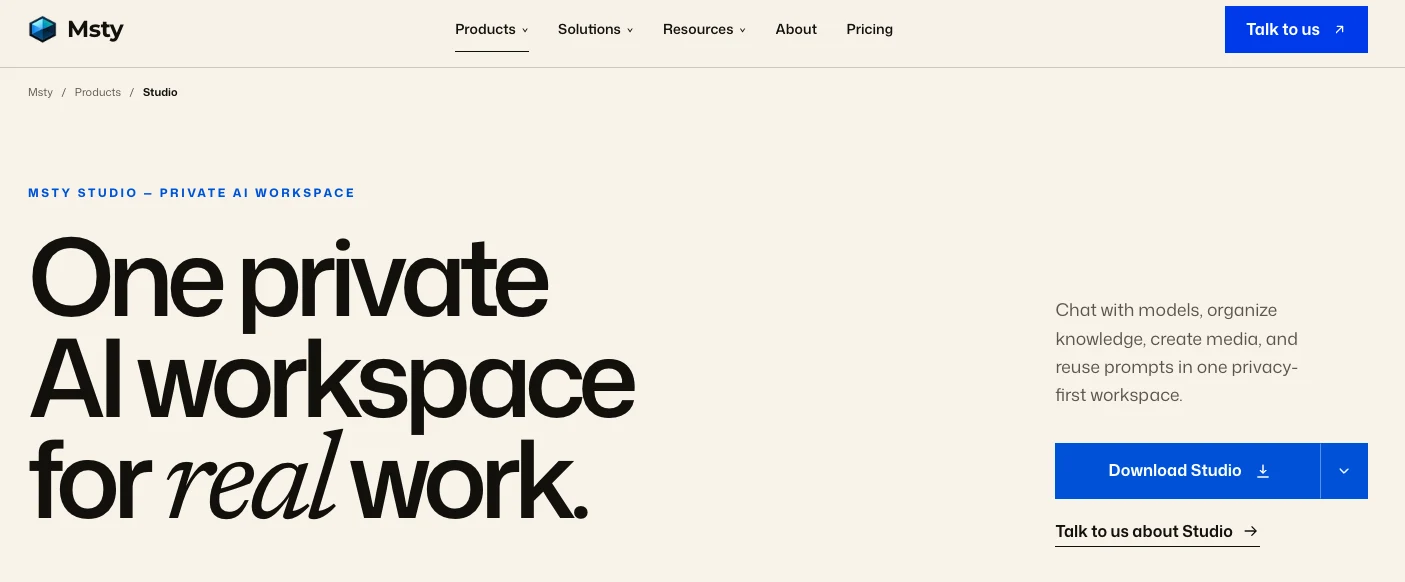
The tester started on the Studio product page. Headline: 'One private AI workspace for real work.' Sub-line: 'Chat with models, organize knowledge, create media, and reuse prompts in one privacy-first workspace.' Button: 'Download Studio'.
Figure 2The Studio product page the tester started from. The headline and the line 'Chat with models, organize knowledge, create media, and reuse prompts in one privacy-first workspace.' are the vendor's wording.
Tester view
He wanted to understand what Msty is about: it is 'one of the early ones, one of the professional ones', and for a home user he was not sure what the point is. 'The screen makes it clear that it's not clear what it's actually for.'
Observed
The tester saw several solutions and products and chose 'Download Studio' because it seemed to be the one that runs locally.
Vendor claim
The vendor's product page names Studio, Go ('bounded AI agents'), Nexus ('AI control center') and Stack ('governed knowledge layer'). Checked on 16 October 2026; the tester did not open these.
Observed
The download file is 246 MB. The tester: 'so it's okay'.
Tester view
His hope was an Ollama or LM Studio connection so that no further model download is needed. In his view every app should offer that choice next to built-in models, because 10 to 20 GB per app is 'just not the way forward'.
First launch: one local model or a provider
Observed
The first screen (Figure 1, top of this page) offers a card tagged 'LOCAL AI · RUNS ON YOUR MACHINE': Gemma 4 E2B, 3.6 GB, described as Google's compact multimodal model with vision. A strength slider runs from Light to Powerful and sits at 'Capable'. The button reads 'Download & Get Started'.
Observed
Below it, 'Or connect an AI provider' shows OpenAI, Claude, xAI, Gemini, OpenRouter and 'More'. A yellow notice reads 'Add at least one model before continuing with a connected provider.' and 'Continue with connected provider' is greyed out.
Vendor claim
'Runs on your machine' is the app's own label. The tester did not download this model (he used models already in Ollama) and did not check network traffic.
Assumption
The notice appears because no model had been added at that point. Which action enables 'Continue' was not tested.
Connecting Ollama
Observed
The 'New Model Provider' list groups Msty Remote and Ollama under 'Msty Compatible', MLX Remote under 'MLX Compatible' and LLaMA.cpp under 'OpenAI Compatible'. The list in the screenshot is scrolled, so entries above xAI are not visible.
Figure 3'New Model Provider' list, scrolled. Ollama sits under 'Msty Compatible', MLX Remote under 'MLX Compatible', LLaMA.cpp under 'OpenAI Compatible'. Entries above xAI are not visible.
Observed
Notes: 'It allowed me to connect to Ollama, select Ollama, but then it didn't select it.' He went back to the local-download screen to see what was going on.
Tester error
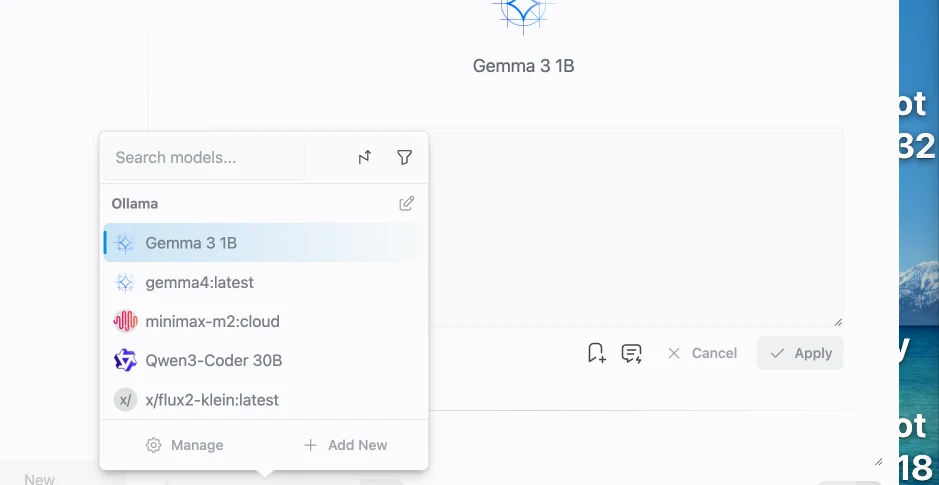
The connection had worked. The tester did not realize it because, in his words, the app shows the model name and not the word Ollama. The picker then listed five models under an Ollama header.
Figure 4Model picker after connecting Ollama: five models under an 'Ollama' header, including an image model (x/flux2-klein:latest) and a ':cloud' entry in the same list as chat models.
Observed
Correction to the notes: the picker screenshot does show an 'Ollama' header over the list. The notes probably refer to an earlier screen that was not captured (assumption).
Observed
The tester's stated hope was met: his existing Ollama models were usable and the notes record no further model download.
Assumption
The ':cloud' suffix on minimax-m2:cloud suggests a model that runs in the cloud and not on the Mac. Not verified. If so, the Ollama list mixes local and cloud models without a visible marker.
Tester view
'So good, so good. Thanks.'
Chat tests
Observed
The tester asked for a QR code (prompt text not recorded; the reply refers to www.promptquorum.com). The reply said it is a text-based AI that cannot generate images, and gave five steps for using a free online QR generator.
Figure 5Reply to the QR-code request. The model name is cut off at the top ('gemma4:latest' partly visible). A 'Thoughts (1)' fold sits above the answer. The counter under the reply reads 52.81 tok/s.
Measured
52.81 tok/s is shown under the reply. The model name is partly cut off ('gemma4:latest' visible at the top; the match is likely, not certain).
Tester error
A text model was asked for a picture. The reply was correct for a text model. The tester framed it as 'the difference to a functional model'.
Observed
The tester then selected an image model from earlier work (x/flux2-klein in Ollama) as the chat model. Per the notes, it 'does not support chat'. The message itself was not captured.
Assumption
The tester doubted that two or three models can be loaded at once ('I don't think so'). Not tested. The vendor page lists 'Split Chats: run models side by side'.
Observed
Back on gemma4:latest he uploaded a picture and the model could read it (notes only; the picture and the answer were not recorded).
Uploading a Search Console file
Observed
The tester uploaded a Google Search Console export. According to the notes the app 'just ran' an analysis without being asked. The first point of the advice, as quoted in the notes: 'Investigate High-CTR Regions: A rapid audit of Gambia, Saint Barthélemy, Bangladesh, and Gabon is essential.' The numbers were not checked against the file. Model and file size not recorded.
Observed
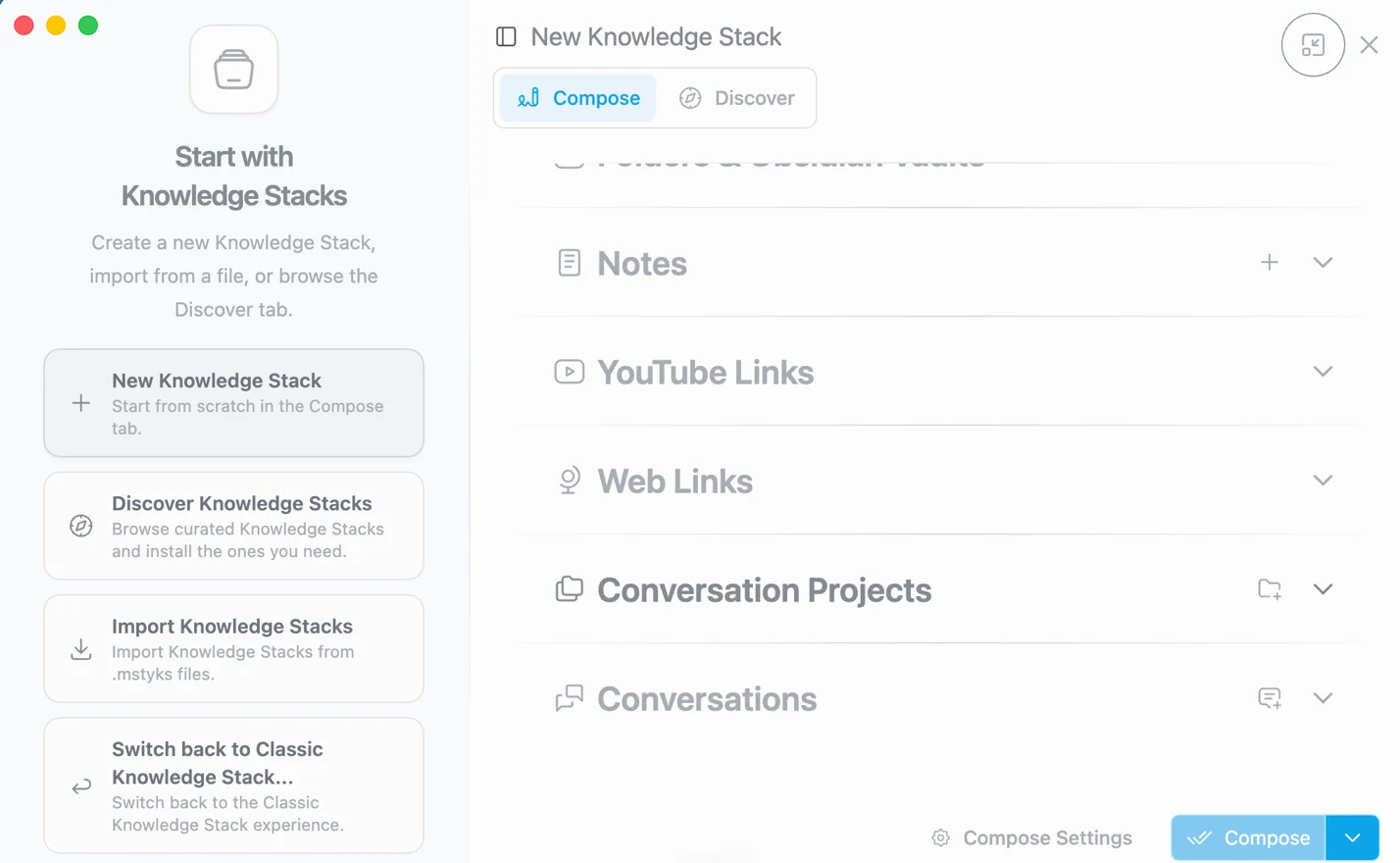
The loop, as described: uploading puts the file into 'some background tool, knowledge base'. Back in the chat, the app analyses automatically and gives no chance to say what to analyse. Typing 'I want this analyzed' in the chat makes the app ask for the data.
Figure 6Knowledge Stacks start screen: new, discover, import (.mstyks files) and 'Switch back to Classic Knowledge Stack'. Sources on the right: Notes, YouTube Links, Web Links, Conversation Projects, Conversations. Whether the Search Console file went through this screen is not confirmed.
Assumption
The Knowledge Stacks screenshot follows these notes. That the file went through Knowledge Stacks is the tester's reading ('knowledge base'), not confirmed.
Observed
The Knowledge Stacks screen offers: new stack, discover curated stacks, import .mstyks files, and 'Switch back to Classic Knowledge Stack'. Sources shown: Notes, YouTube Links, Web Links, Conversation Projects, Conversations; a row partly cut off at the top appears to read 'Folders & Obsidian Vaults'.
Tester view
'Okay, this goes in circles.' Then: 'So this looks like an interesting tool, but let's see.'
Media Studio
Observed
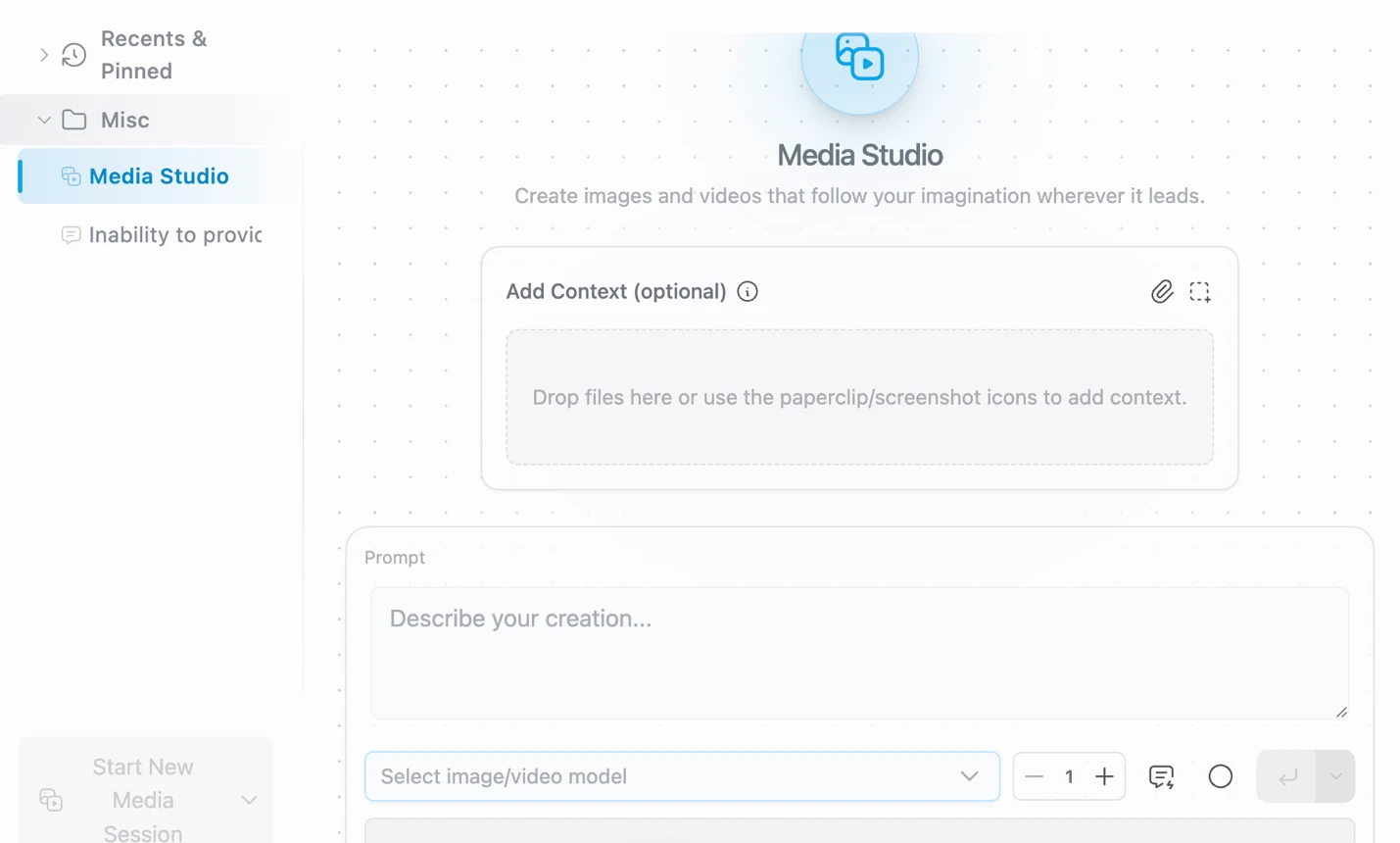
The sidebar has a 'Media Studio' entry. The screen reads 'Create images and videos that follow your imagination wherever it leads.' It has an optional context drop zone, a prompt box ('Describe your creation...'), a counter set to 1 and a menu reading 'Select image/video model'.
Figure 7Media Studio. The model menu still reads 'Select image/video model'. The contents of the menu were not captured; no image was generated.
Tester view
'Great, can do pictures too.' But when connecting to his local LLM setup, the app said his Ollama has no picture model, and he thought Flux was the right one.
Observed
No image was generated in Msty. The notes record no image-model selector that worked for him.
Assumption
Media Studio does not list the Ollama image model x/flux2-klein. The contents of the model menu were not captured. The vendor changelog dates Media Studio to release 2.7.0 (29 April 2026) and mentions xAI and OpenRouter image and video models, which suggests hosted providers. Not verified.
Model Hub and Model Matchmaker
Observed
The Model Hub sidebar lists Model Providers, Local Models, Model Squad, Model Matchmaker, Model Cost Calculator, VRAM Calculator and Context Explorer. Local Models has tabs Featured, Installed, Search and Import. Only the Matchmaker was opened, per the notes.
Figure 8Model Hub, Featured local models (list scrolled, only part visible): Mistral 7B Instruct v0.3 6.9 GB, Llama 3.2 3B 1.7 GB, Llama 3.2 1B 645 MB, Meta Llama 3.1 8B 4.5 GB, all labelled 4-bit. Sidebar lists seven tools.
Observed
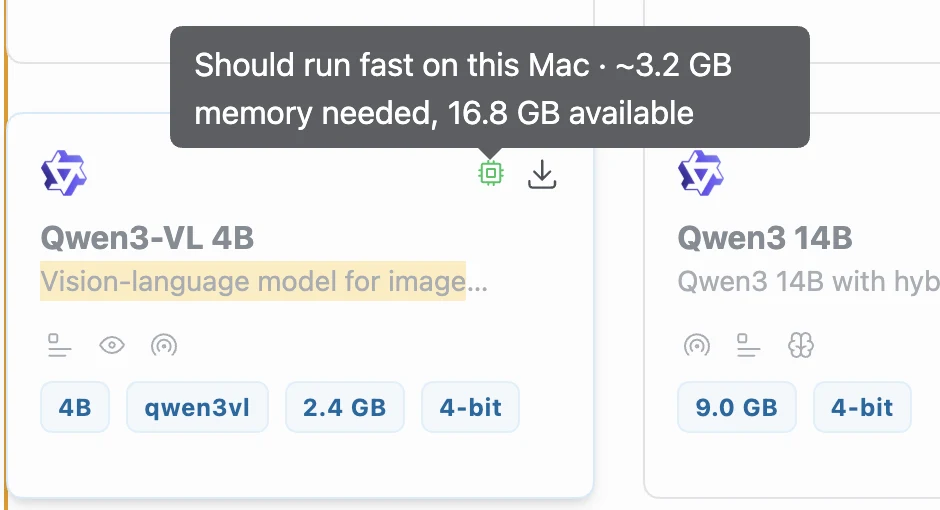
Model cards show size and quantization. A tooltip on Qwen3-VL 4B (2.4 GB, 4-bit) reads 'Should run fast on this Mac · ~3.2 GB memory needed, 16.8 GB available'.
Figure 9Hardware hint on a model card: 'Should run fast on this Mac · ~3.2 GB memory needed, 16.8 GB available'. The card shows Qwen3-VL 4B, 2.4 GB, 4-bit. The estimate is the app's own; the model was not run.
Vendor claim
That fit estimate is the app's own. The model was not run.
Tester view
'Model Matchmaker. Great idea. I like it.' But he found no selectors for picture generation.
Observed
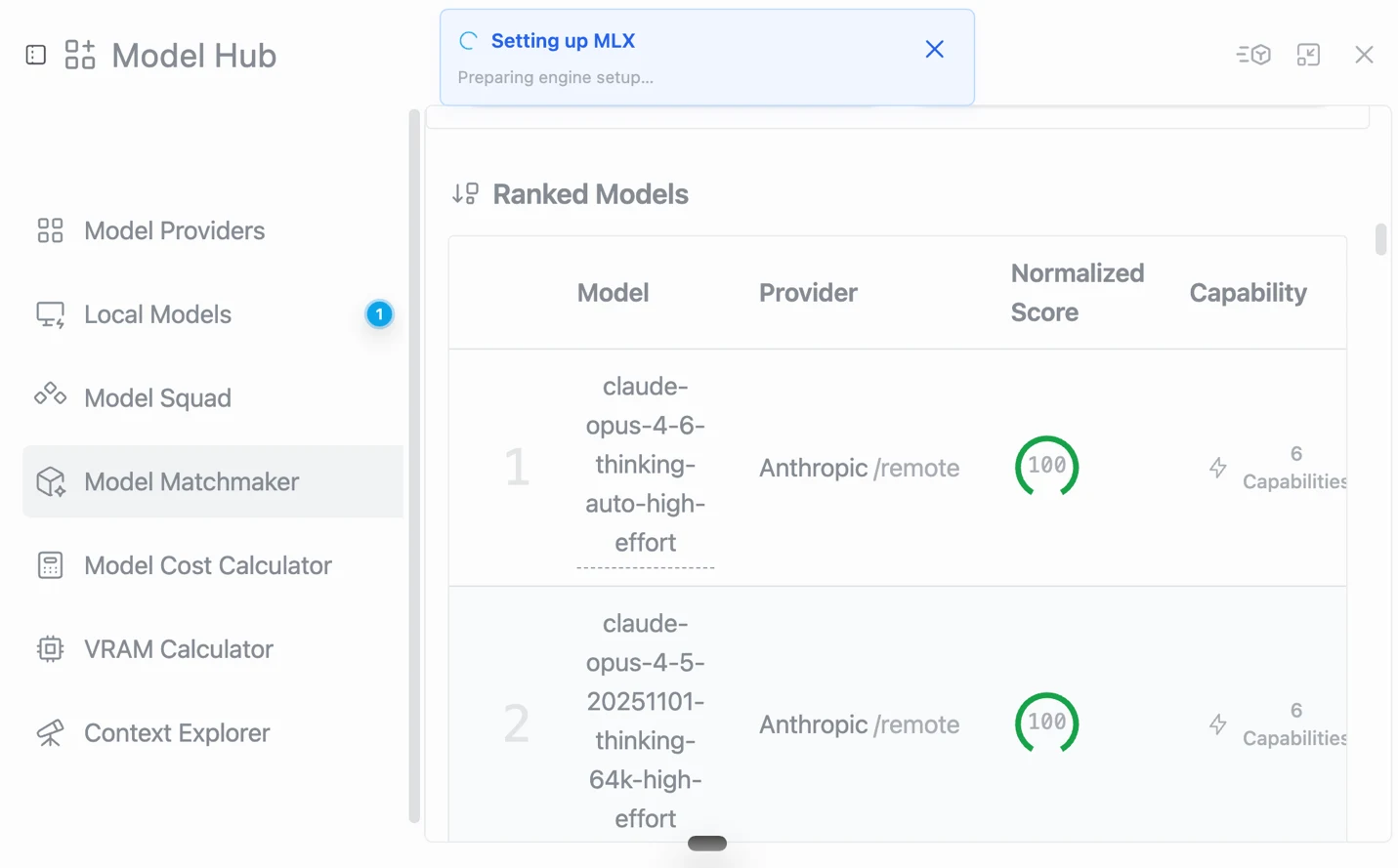
The next screenshot shows the Matchmaker's ranked list: #1 claude-opus-4-6-thinking-auto-high-effort and #2 claude-opus-4-5-20251101-thinking-64k-high-effort, both 'Anthropic /remote', score 100. A notice 'Setting up MLX: Preparing engine setup...' is visible; why it appeared was not recorded.
Figure 10Model Matchmaker, 'Ranked Models'. #1 claude-opus-4-6-thinking-auto-high-effort, #2 claude-opus-4-5-20251101-thinking-64k-high-effort, both provider 'Anthropic /remote', normalized score 100. A notice 'Setting up MLX: Preparing engine setup...' is showing. The ranking's data date is not visible.
Tester view
'In October 2026 and I see this, I'm not impressed. That is an AI process to update this. I have tools on my website to update the website. Why is it so difficult?'
Assumption
'This' is read here as the ranking in the screenshot being out of date. The notes do not say which screen he meant.
Third party
Anthropic's models page (checked 16 October 2026) lists Claude Opus 5.5 (claude-opus-5-5) as the newest Opus and does not list the two 4.x models as current. The ranking's data date is not shown in the screenshot, so whether it is stale is not confirmed.
Observed
Visible Featured models are Mistral 7B Instruct v0.3, Llama 3.2 3B and 1B, Meta Llama 3.1 8B. Mistral 7B at 6.9 GB is larger than Llama 3.1 8B at 4.5 GB, both labelled 4-bit; the difference is not explained on the cards.
Where the notes stop
Observed
The Msty part of the notes ends at the Model Matchmaker. The rest of the Word file (from the 'Generate similar images' passage on) describes another app, an image generator, with its own screenshots. It was left out of this report.
Observed
Not recorded for Msty: app and macOS version, end time, plan used, a verdict, an uninstall check.
Claims versus what the tester saw
Claim
Source
Observed
Label
'Chat with models, organize knowledge, create media, and reuse prompts in one privacy-first workspace.'
Vendor Studio page (also in the tester's screenshot)
Chat with Ollama models worked. Knowledge Stacks opened. Media Studio opened but produced no image. Prompt reuse was not tried. Privacy was not audited.
Observed
'Bring local inference engines like MLX, llama.cpp, and Ollama together with hosted providers in one organized hub.'
Vendor Studio page, checked 16 Oct 2026
Ollama connected and its models were listed. LLaMA.cpp and MLX Remote appear in the provider list. Only Ollama was used. An MLX setup notice appeared once.
Observed
Split Chats: 'run models side by side'
Vendor Studio page, checked 16 Oct 2026
Not tested. The tester assumed that two or three models cannot be loaded.
Assumption
Media Studio: image generation and video concept shaping
Vendor Studio page, checked 16 Oct 2026
The screen exists. No image was generated; no usable local image model was found.
Observed
'LOCAL AI · RUNS ON YOUR MACHINE' (Gemma 4 E2B, 3.6 GB)
First-launch screen
Not downloaded. The tester used models already in Ollama. No network check.
Observed
'Should run fast on this Mac · ~3.2 GB memory needed, 16.8 GB available'
Model Hub tooltip
The model was not run, so the estimate was not checked.
Vendor claim
Free plan: $0, includes local and online models and Media Studio (some features limited)
These are download sizes shown on model cards, not runtime memory. Context length and engine change what a model needs. The app reported 16.8 GB available at the time of the Qwen3-VL tooltip. The Ollama models the tester actually used (Gemma 3 1B, gemma4:latest, Qwen3-Coder 30B) show no size in the picker. The Qwen3 14B card is only partly visible in the screenshot (its name, size and quantization are readable).
Usage log
#
Task
Model
Result
Time
Status
Figures
1
Connect Ollama as a provider
-
Connected; five models listed under Ollama. The tester first believed it had failed.
Tester errorBelieved the Ollama connection had failed. It had worked; the models were listed.
Tester errorAsked a text model for a picture (QR code), then judged it against 'a functional model'.
Tester errorWrote that the app does not say 'Ollama'. His own screenshot shows an 'Ollama' header over the model list.
Tester errorLeft gaps in the record: app version, macOS version, end time, plan used, prompts, which model answered the file test, and a verdict on Msty.
Tester errorMixed two apps in one document. The second half of the Msty file describes an image generator, which cost clarity about where the Msty test ends.
AssumptionThe tester doubted that several models can run at once. Not tested, and the vendor lists Split Chats.
Findings register
ID
Finding
Category
Label
Severity
Figures
MS-01
The Studio page and first screens do not tell a home user what the app is for.
Severity is the impact on a first-time user. Proposed, not measured.
Who it is for
Likely fit
AssumptionPeople who already run Ollama and want one desktop front end for local and hosted models (Ollama reuse worked in this test).
Vendor claimTeams that need SSO, audit logs and shared controls (listed on the vendor's Studio page; not tested).
Likely poor fit
Tester viewA home user who wants to understand from the first screens what the app is for.
AssumptionUsers who expect to generate images in Media Studio from a local Ollama image model (did not work in this test).
Retest. Retest the untested parts (Split Chats, prompts, Media Studio with a hosted image model, the file workflow, uninstall) and record version and macOS first. The vendor changelog shows 3.0.0 still in beta on 7 October 2026, so the interface may change at release (assumption).
Okay, this goes in circles.
Tester notes, lightly edited from voice transcription.
Frequently asked questions
Does Msty Studio work with Ollama?
Yes, in this test. After Ollama was added as a provider, five Ollama models appeared in the model picker, and the notes record no second model download. The tester first believed the connection had failed. Observed
Can Msty Studio generate images with a local Ollama model?
Not in this test. Media Studio opened, but the tester found no way to use his local image model (x/flux2-klein) there, and no image was generated. The contents of the 'Select image/video model' menu were not captured, and hosted providers were not tried. Observed
Does Msty Studio say whether a model fits my Mac?
Model cards in the Model Hub carry a hardware hint, for example 'Should run fast on this Mac · ~3.2 GB memory needed, 16.8 GB available' on Qwen3-VL 4B. The estimate is the app's own; the model was not run. Vendor claim
How much does Msty Studio cost?
The vendor's price list, read on 16 October 2026, shows Free at $0, Aurum at $149 per user per year and Aurum Lifetime at $349 one-time. The plan the tester used is not recorded. Vendor claim
Background on the maker
Not hands-on. The items below come from the vendor's own site, its changelog and the PromptQuorum directory, read on 16 October 2026 by a web-fetch tool that summarises pages. None of it was independently verified for this test.
Vendor claimThe vendor's footer reads 'Msty is a product of CloudStack, LLC.' (2026).
Vendor claimPrice list: Free $0; Aurum $149 per user per year; Aurum Lifetime $349 one-time; Enterprise and Teams on request, minimum 5 seats. The pricing page does not state a software license.
Third partyThe PromptQuorum directory lists Msty as closed source, freemium, for macOS, Windows and Linux, last upstream update 7 October 2026. The listing has not been verified (freshness: unverified).
Vendor claimChangelog: Media Studio introduced in release 2.7.0 (29 April 2026); MLX support for Apple Silicon first appears in 2.0.0-alpha.10 (7 August 2025), marked experimental; Knowledge Stacks 2.0 in 2.0.0-alpha.9 (31 July 2025). Latest listed on 7 October 2026: 3.0.0 Beta 15.