
Local LLMs
Updated
2026년 5월 최고의 로컬 LLM: Ollama, LM Studio, 하드웨어 및 VRAM 가이드
2026년 5월 최고의 로컬 LLM — 최신 Ollama 모델(Llama 4 Scout, Qwen3, Gemma 3), LM Studio vs Jan.ai 비교, RTX 3060 12 GB 등 VRAM 및 GPU 요구 사항, pull 명령어, 초보자 하드웨어 추천. 토큰당 $0, 완전한 개인 정보 보호, 오프라인.
핵심 요점
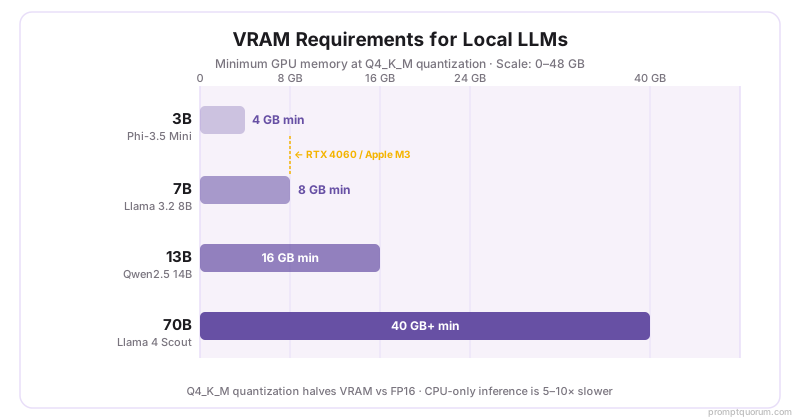
- 8 GB RAM으로 7B 모델을 로컬에서 실행할 수 있습니다(Ollama 또는 LM Studio, 10분 이내 설정)
- 40 GB VRAM으로 70B 모델(Llama 4 Scout, DeepSeek V3)을 최고 품질로 실행
- Q4 양자화는 최소한의 품질 손실로 VRAM 요구 사항을 절반으로 줄입니다 — 7B 모델이 4–5 GB VRAM에 맞음
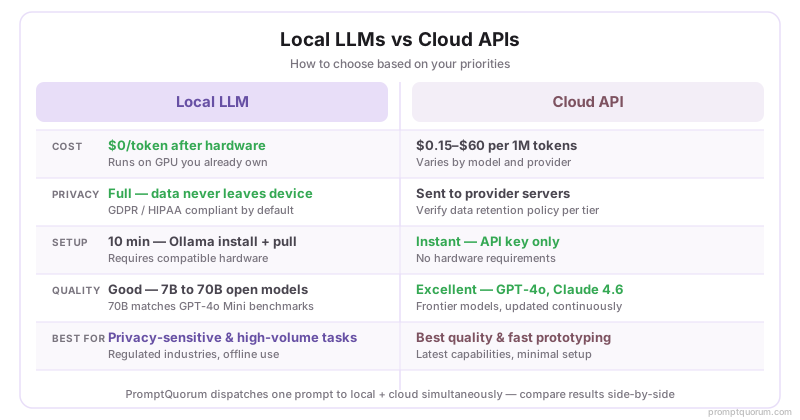
- Llama 4 Scout, Qwen3, DeepSeek, Mistral은 대부분의 코딩 및 추론 벤치마크에서 GPT-4o mini에 필적
- 하드웨어 구입 후 API 비용 제로 — 사용 제한 없음, 공급업체 종속 없음
- 모든 데이터가 귀하의 기기에 유지됩니다 — 텔레메트리 없음, 클라우드 저장소 없음, GDPR 준비
- LoRA 파인튜닝에는 500개 이상의 레이블이 지정된 예제와 24 GB+ VRAM이 필요합니다(또는 학습용 클라우드 GPU)
- Qwen 로컬 배포 가이드 2026 — Qwen2.5 7B–72B용 단일 명령 Ollama 설정
- LLM 추론을 위한 $500 미만 최고의 GPU — RTX 4060 Ti 16 GB가 가성비 선두
- DeepSeek vs Qwen: 로컬 비교 2026 — 벤치마크 직접 비교
- Alibaba Cloud vs Tencent Cloud GPU 2026 — 중국 시장을 위한 GPU 클라우드
- 로컬 LLM 비용 계산기: 구축 vs 임대 2026 — 3년 ROI 계산기
결과 개선하기
로컬 모델을 실행하고 계신가요? 출력 품질은 프롬프트 작성 방법에 따라 달라집니다. 모든 로컬 LLM에서 더 나은 답변을 얻기 위한 체계적인 기법을 배워 보세요.
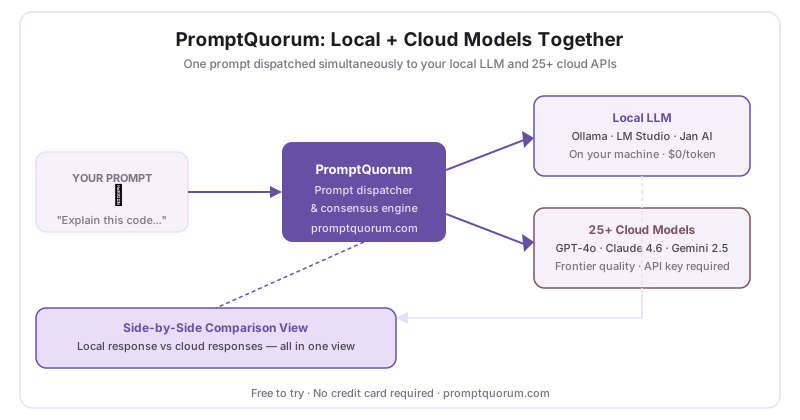
PromptQuorum은 귀하의 로컬 LLM(Ollama, LM Studio, Jan AI)에 연결하여 프롬프트를 25개 이상의 클라우드 모델에 동시에 전송합니다. 로컬과 클라우드 결과를 한 화면에서 비교하세요.
PromptQuorum 무료로 사용해 보기 →2026년 5월 신규 추가
| 모델 | Pull 명령어 | VRAM | 비고 |
|---|---|---|---|
| Llama 4 Scout 17B | ollama pull llama4:scout | 10 GB | Meta. 12 GB VRAM에서 최고의 전반적 품질 |
| Qwen3 8B | ollama pull qwen3:8b | 5 GB | Alibaba. 최고 코딩 + 다국어, 8 GB GPU |
| Gemma 3 12B | ollama pull gemma3:12b | 8 GB | Google. 강력한 추론, RTX 3060에서 실행 |
| DeepSeek-R2 8B | ollama pull deepseek-r2:8b | 5 GB | DeepSeek. 수학 및 논리에 최고, 8 GB RAM |
Ollama vs LM Studio vs Jan.ai: 무엇을 사용해야 하나요?
| 기능 | Ollama | LM Studio | Jan.ai |
|---|---|---|---|
| 인터페이스 | 터미널 (CLI) | 데스크탑 GUI | 데스크탑 GUI + 채팅 |
| API 엔드포인트 | localhost:11434 | localhost:1234 | localhost:1337 |
| 모델 브라우저 | CLI 전용 | 내장 | 내장 |
| 최적 용도 | 개발자, 자동화 | 초보자, GUI 사용자 | 개인 정보 보호 우선 채팅 |
| 설정 시간 | 2분 | 5분 | 5분 |
이번 달 신규
1방금 게시됨 — 14일 후 이 위치에서 사라집니다
시작하기: 첫 번째 로컬 LLM을 어떻게 실행하나요?
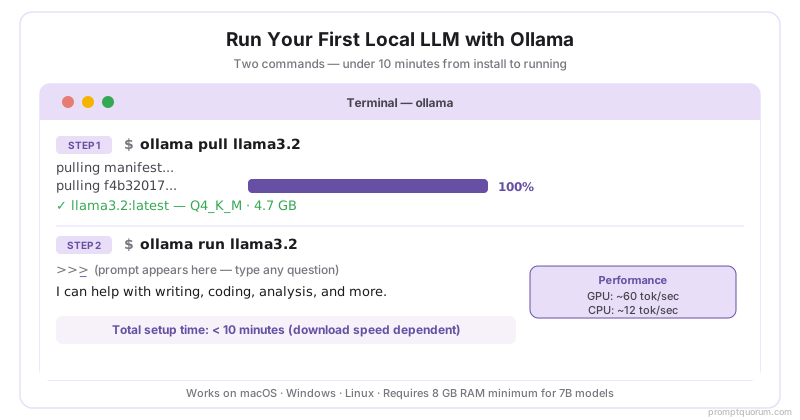
10분 이내에 제로에서 실행까지. OS별 설치 가이드, 첫 모델 실행 안내, 초보자를 위한 개인 정보 보호 우선 설정 체크리스트. Ollama는 macOS, Windows, Linux에서 단 하나의 명령으로 설치됩니다. 8 GB RAM의 경우 `ollama pull llama3.2:3b`로 Llama 3.2 3B(Q4, ~2 GB)를 시작하세요.
사용 사례별 모델: 실제로 어떤 로컬 LLM을 사용해야 하나요?
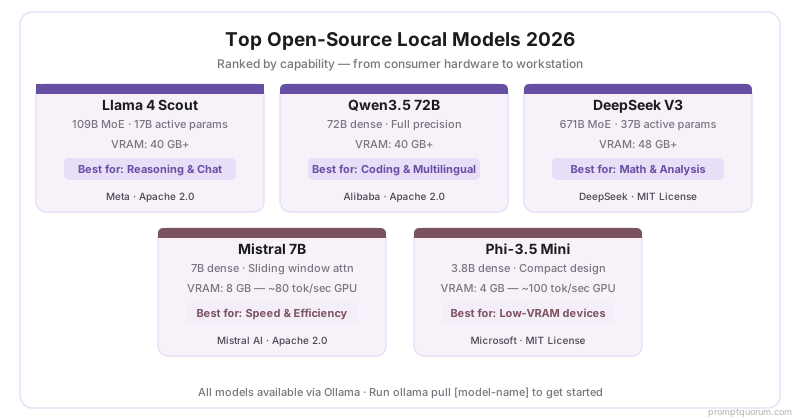
모델 순위, 벤치마크 비교, 사용 사례별 추천. 2026년 5월 기준 최고의 로컬 실행 모델은 Llama 4 Scout 17B(전반적 최고, MoE 아키텍처), Qwen3(코딩 최고), Gemma 3 12B(16 GB RAM에서 최고)입니다. 모두 MMLU, HumanEval, 실제 하드웨어 테스트로 순위가 매겨졌습니다.
Frequently Asked Questions
What is a local LLM?
A large language model (e.g., Llama 4, Qwen3.5, DeepSeek) that runs on your own hardware instead of a cloud API. You get full privacy, offline capability, no usage limits, and zero API costs after hardware purchase.
How much VRAM do I need for a local LLM?
8 GB VRAM runs 7B models at Q4 quantization. 16 GB handles 13B models comfortably. 40 GB+ (e.g., dual RTX 4090s or A100) is required for 70B models. Apple Silicon unified memory counts as VRAM.
What is the difference between Ollama and LM Studio?
Ollama is a CLI tool that runs models via simple terminal commands and exposes an OpenAI-compatible API at `localhost:11434`. LM Studio provides a desktop GUI, model browser, and built-in chat interface. Both support the same models.
Can local LLMs match cloud models like GPT-4o?
On coding and reasoning tasks, Llama 4 Scout, DeepSeek V3, and Qwen3 score within 5–10% of GPT-4o mini on standard benchmarks (MMLU, HumanEval). Claude Opus 4.8 and GPT-4o maintain an edge on complex multi-step tasks.
How do I fine-tune a local model?
Fine-tuning requires 500+ labeled training examples, the QLoRA framework (reduces VRAM requirement via 4-bit quantization), 24 GB+ VRAM (or a cloud GPU rental), and 1–4 hours of training time for a 7B model.
What is the minimum hardware to run a local LLM in 2026?
Minimum: 8 GB RAM and any modern CPU (runs 3B–7B models at 2–5 tokens/sec). Recommended: a GPU with 8 GB+ VRAM (RTX 3060 or newer) for 20–40 tokens/sec on 7B models.
Are local LLMs free to use?
Yes. Ollama and LM Studio are free and open-source. The models themselves (Llama, Mistral, Qwen, DeepSeek) are available under open-source licenses at no cost. The only cost is your hardware.
What is the best local LLM for coding in 2026?
Qwen3-Coder 7B is the top performer for code completion and review on consumer hardware (8 GB VRAM). DeepSeek-Coder V2 Lite is the strongest alternative. For CPU-only setups, Phi-3.5 Mini offers the best coding quality under 4 GB RAM.
Can I run a local LLM without a GPU?
Yes. Any modern CPU can run 3B–7B models at Q4 quantization using Ollama (CPU mode) or LM Studio. Typical CPU inference speed: 2–8 tokens/sec on a modern laptop CPU, compared to 20–50 tokens/sec on an RTX 4060. 7B Q4 requires ~5 GB RAM (not VRAM). For CPU-only setups, Phi-3.5 Mini (3.8B) and Llama 3.2 3B offer the best quality-to-speed ratio.
How do I update local LLM models when new versions are released?
Ollama: run `ollama pull <model-name>` again — it downloads only changed layers. LM Studio: open the model browser, find the updated version, and download it. Old GGUF files are not automatically removed — delete them manually from ~/.ollama/models (Ollama) or ~/Library/Application Support/LM Studio/models (macOS) to free disk space. Model updates from Meta, Alibaba, and Mistral typically arrive within 24–48 hours of official release.
What are the best Ollama models in May 2026?
Top Ollama models for May 2026: Llama 4 Scout 17B (best overall on 12 GB VRAM, `ollama pull llama4:scout`), Qwen3 8B (best coding, `ollama pull qwen3:8b`, 5 GB VRAM), Gemma 3 12B (strong reasoning on RTX 3060, 8 GB VRAM), and DeepSeek-R2 8B (best math/logic, 5 GB VRAM). Run any model with `ollama run <name>` after pulling.
What is the best local LLM for an RTX 3060 12 GB VRAM?
The RTX 3060 12 GB VRAM is an excellent local LLM GPU. Best choices: Llama 4 Scout 17B at Q4 (~10 GB VRAM, `ollama pull llama4:scout`), Gemma 3 12B (~8 GB VRAM), or Qwen3 14B (~9 GB VRAM). All run at 20–40 tokens/sec. The 12 GB VRAM puts you above the RTX 3060 Ti (8 GB) and opens up 13B-class and 17B MoE models at full quality.
Ollama vs LM Studio vs Jan.ai: which should I use?
Use Ollama if you want a CLI tool with an OpenAI-compatible API at localhost:11434 — best for developers and automation. Use LM Studio if you want a desktop GUI, built-in model browser, and chat interface — best for beginners. Use Jan.ai if you want a privacy-focused chat app with a built-in model store. All three support the same GGUF models. Setup time: Ollama 2 min, LM Studio 5 min, Jan.ai 5 min.
What are the best budget GPUs for local LLMs in 2026?
Best budget GPUs for local LLMs: RTX 3060 12 GB (~$250 used) runs 13B models at 20–30 tok/s. RTX 4060 8 GB (~$300 new) runs 7B at 35–45 tok/s. RTX 3080 10 GB (~$350 used) handles 13B comfortably. For sub-$200: RTX 2070 8 GB runs 7B models at 15–20 tok/s. AMD RX 6700 XT 12 GB (~$200 used) is comparable to RTX 3060 with ROCm on Linux. Minimum recommended: 8 GB VRAM for useful 7B inference.
Compliance & Regional Context
EU / GDPR
Local LLMs process all data on-premises. When combined with full-disk encryption and access logging, on-premises inference satisfies GDPR Article 28 (no data processor agreement needed if data never leaves the machine). Ollama binds to `localhost` by default — no external exposure.
Japan / APPI
Japan's Act on the Protection of Personal Information (APPI) restricts cross-border data transfer for personal data. Local LLMs eliminate cross-border transfer entirely. METI's 2024 AI governance guidelines encourage privacy-preserving AI — local deployment is aligned with these recommendations.
China / CAC
The Cyberspace Administration of China's Interim Measures for Generative AI Services (2023) require AI providers offering services to Chinese users to register. Local LLMs running entirely on-premises are outside the CAC's public-facing provider definition, significantly reducing compliance burden for enterprise deployments.
Visual Summary: Local LLMs 2026
The slide deck below covers hardware requirements (8 GB VRAM for 7B models, 40 GB+ for 70B), top open-source models 2026, Ollama setup in 5 minutes, Q4_K_M quantization, regional compliance (GDPR, APPI), and key takeaways. Download the PDF as a Local LLMs quick-reference card.
Download Local LLMs Reference Card (PDF)Frequently Asked Questions About Local LLMs
What is a local LLM?
A local LLM is a large language model that runs entirely on your own hardware — CPU, GPU, or Apple Silicon — without sending data to external servers. You download the model file (typically 2–40 GB) and run it using a tool like Ollama or LM Studio. As of May 2026, the most popular local LLM is Meta Llama 4 Scout 17B, which runs on machines with 10 GB VRAM at 10–80 tokens/sec.
Is a local LLM better than ChatGPT?
For privacy and cost, yes. For raw output quality, no. As of 2026, frontier cloud models (GPT-4o, Claude Opus 4.8) outperform all locally-runnable models on complex reasoning. However, local 70B models (Llama 4 Scout, Qwen3 72B) match or exceed GPT-4o mini on most everyday tasks — at zero per-query cost.
How much RAM do I need to run a local LLM?
Minimum: 8 GB RAM to run a 7B model at Q4 quantization. Recommended: 16 GB for 13B models, 40+ GB for 70B models. Apple Silicon unified memory counts fully toward this — an M3 Mac with 18 GB can run a 13B model well. GPU VRAM is equivalent to RAM for GPU inference.
How do I run a local LLM?
Install Ollama (ollama.com), then run one command: `ollama run llama3.1:8b`. The model downloads automatically and you can start chatting in under 5 minutes. No API key, no account, no internet connection after the initial download.
What is the best free local LLM in 2026?
Meta Llama 4 Scout 17B for general use (Llama Community License, 10 GB VRAM). Qwen3-Coder 32B for coding (92.7% HumanEval, 20 GB VRAM). DeepSeek-R2 8B for reasoning (MIT licence, 5 GB VRAM). All are free, open-weight, and available via `ollama pull`.
Are local LLMs private?
Yes. When running with Ollama or LM Studio, your prompts, documents, and responses never leave your machine. No data is transmitted to any server. This makes local LLMs the recommended choice for GDPR-regulated workflows, legal and medical document processing, and any task involving confidential or personal information.
Related: Prompt Engineering Guide
Running a local model is step one. Getting great output from it is step two. The Prompt Engineering guide covers 80 techniques across 9 topics — from fundamentals like temperature and context windows to advanced methods like chain-of-thought, RAG, and team governance. Every technique works with local models.
Related: Smart Home Guide
Running a local model is step one. Putting it to work in your home is step two. The Smart Home guide covers Home Assistant setup, Ollama integration, local voice assistants with Whisper + Piper, privacy-first automation, and hardware recommendations for always-on AI in your home — all offline, no cloud subscription.