PromptQuorum hands-on test · LTX Desktop · 20 October 2026
LTX Desktop on a 24 GB Mac: Stopped at Setup, Below the Vendor's Memory Floor
Hands-on test on a 24 GB Mac. The app launched smoothly, then the setup screen asked for 129.1 GB of model downloads and the tester gave up: 24 GB of memory is not enough for this app, he says.
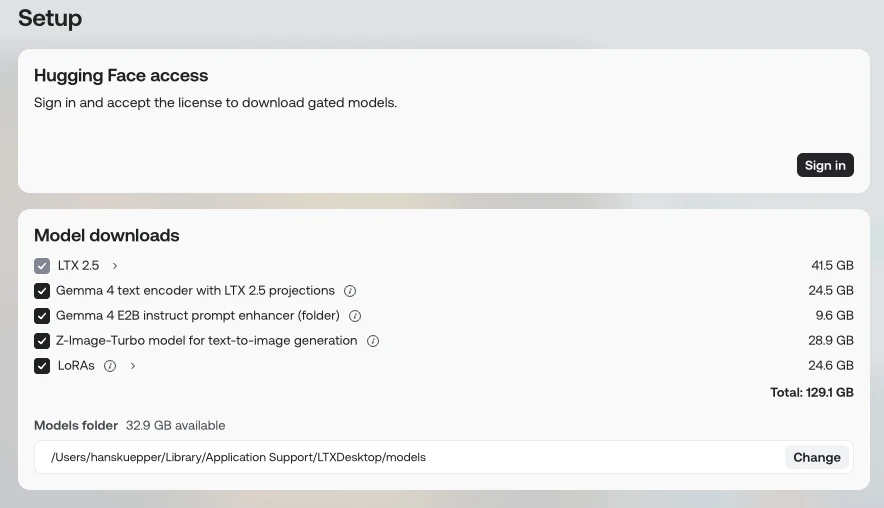
Figure 1Setup screen: Hugging Face sign-in, five model downloads (LTX 2.5 41.5 GB, Gemma 4 text encoder 24.5 GB, Gemma 4 E2B prompt enhancer 9.6 GB, Z-Image-Turbo 28.9 GB, LoRAs 24.6 GB), total 129.1 GB, models folder with 32.9 GB available.
Verdict
General assessment
Not scored: the test ended at the setup screen, before any video or image was made. What the notes and screenshots show: a smooth first launch, a required Hugging Face sign-in, and a model list that totals 129.1 GB against 32.9 GB of free space. The tester's conclusion is that his 24 GB of unified memory is not enough to run the app, not that disk space is the problem. The vendor's README points the same way: it lists 32 GiB of total RAM as the floor for local generation on a Mac.
Fit for the tester's use
Not a fit for this machine, per the tester. The largest single download (LTX 2.5, 41.5 GB) is bigger than the 24 GB of memory, although download size is not the same as memory needed at run time (assumption). The README, read on 20 October 2026, says Macs below 24 GB use the cloud API only and that 32 GB is limited to 540p and 5 s; 48 GB or more is listed for full local generation. The app nevertheless offered the local model download on this 24 GB Mac, which the README does not explain (see 'How the test went').
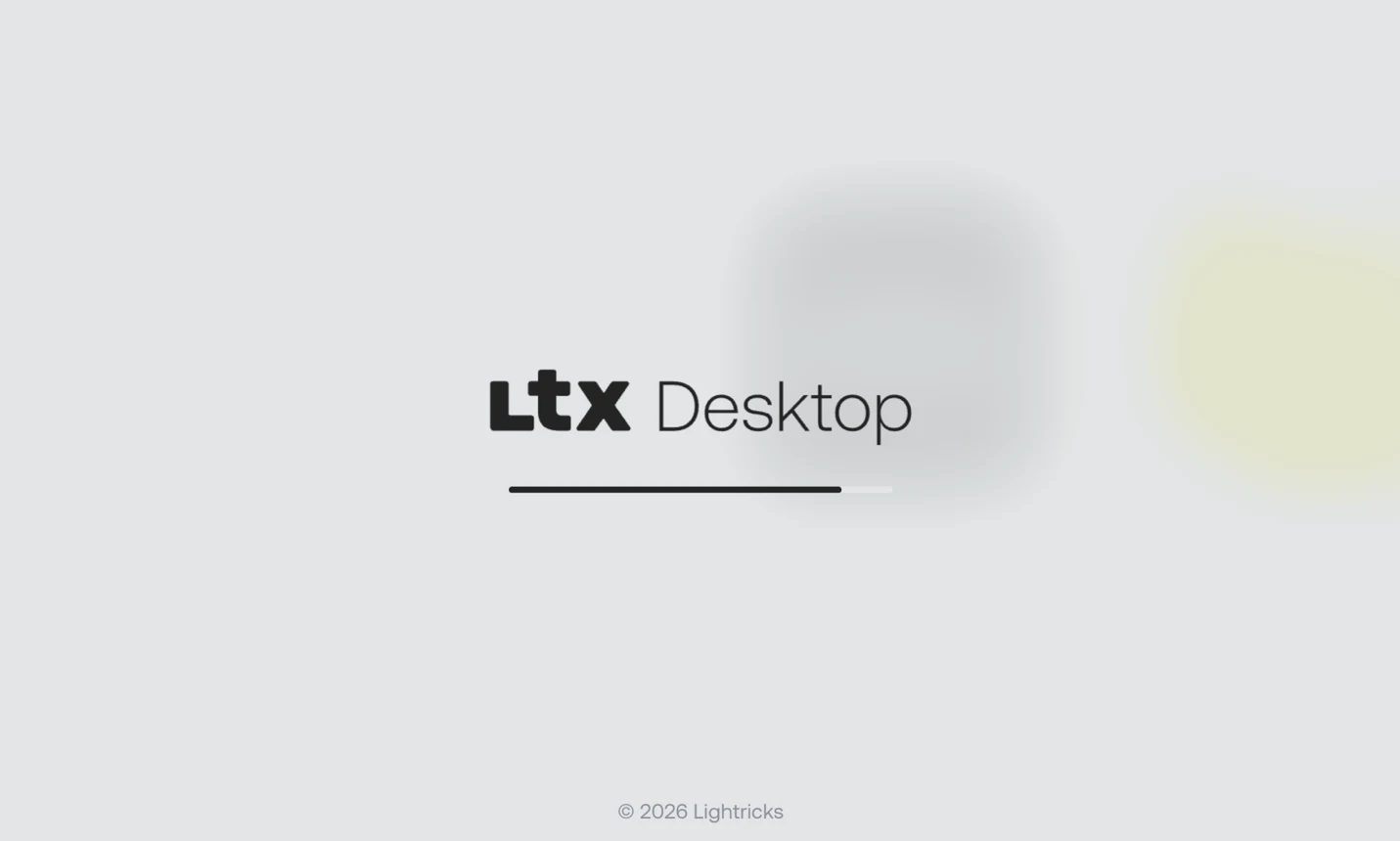
ObservedThe app launched to a branded splash screen with a loading bar; the tester calls the launch smooth.
MeasuredSetup lists 129.1 GB of model downloads and shows 32.9 GB available on the models folder's drive.
Tester viewThe tester stopped there and concludes that a 24 GB Mac cannot run this app: a memory limit, not a disk-cleanup problem.
Vendor claimThe README lists a floor of 32 GiB total RAM for local generation on macOS; the test Mac has 24 GB. Not verified in the app.
Scorecard Status: Not completed
Installationn/aNot scored. The installer downloaded and the app launched; setup was not completed.
Onboarding and model choicen/aNot scored. Setup shows five downloads with sizes and a total; sign-in to Hugging Face is required.
Core functionn/aNot tested. No video or image was generated.
Guidance and iterationn/aNot tested.
Performancen/aNot tested.
Documentationn/aNot tested.
Trust and privacyn/aNot audited.
Uninstalln/aNot tested.
No scores were given because the test stopped at setup. Scores need a test that reaches the app's main function.
Not recorded. The app shows no version on the two screenshots.
Tester
Hans Kuepper, founder of PromptQuorum
Started
20 October 2026 (time not recorded). The notes carry no date; this is the date the Word file was handed in. Assumption
Ended
Not recorded
Hardware
The notes say 'Mac 4 Pro'. The standard test machine is a MacBook Pro with M3 Pro and 24 GB; the same machine is assumed. The 24 GB figure is not in doubt, the chip generation is. Assumption
System
macOS; version not recorded. The vendor README names macOS versions (see 'Claims'), so this gap matters.
Source
Not recorded where the installer was downloaded from
Download
About 700 MB installer (as read by the tester) Observed
Why tested
Not stated in the notes.
Objective
Not stated. Derived from the notes: install the local video app and try it on the 24 GB Mac. Assumption
AI help used
Not recorded
Every statement carries a label:ObservedMeasuredTester estimateVendor claimThird partyAssumptionTester viewTester errorWhat the labels mean
Disclosure. The tester founded PromptQuorum (promptquorum.com), a content site and directory about local AI apps. LTX Desktop has no directory tile and no review on the site at the time of this test. The notes record no contact with the vendor, no payment and no sponsorship.
Figure 2First launch: splash screen with a loading bar.
Tester view
'Smooth.'
Setup screen
Observed
The Setup screen has a 'Hugging Face access' box: 'Sign in and accept the license to download gated models.' with a Sign in button. The tester did not sign in.
Figure 1Setup screen: Hugging Face sign-in, five model downloads (LTX 2.5 41.5 GB, Gemma 4 text encoder 24.5 GB, Gemma 4 E2B prompt enhancer 9.6 GB, Z-Image-Turbo 28.9 GB, LoRAs 24.6 GB), total 129.1 GB, models folder with 32.9 GB available.
Measured
Under 'Model downloads' five items are ticked: LTX 2.5 (41.5 GB), Gemma 4 text encoder with LTX 2.5 projections (24.5 GB), Gemma 4 E2B instruct prompt enhancer, folder (9.6 GB), Z-Image-Turbo model for text-to-image generation (28.9 GB) and LoRAs (24.6 GB). The screen shows 'Total: 129.1 GB'.
Measured
The models folder is /Users/hanskuepper/Library/Application Support/LTXDesktop/models, with '32.9 GB available'. The folder can be changed with a Change button.
Assumption
129.1 GB is more than 32.9 GB by 96.2 GB. Whether the app blocks the download, warns, or lets it fail part-way was not tested.
Why the test stopped
Tester view
'And that ended. I cannot run this on my little laptop.'
Tester view
The tester's reason is memory: his Mac has 24 GB of unified memory, and he considers that too little for this app. Freeing disk space would not change that, he says.
Assumption
The largest single download (LTX 2.5, 41.5 GB) is bigger than 24 GB. Download size is not the same as memory needed while running, because an app can load or compress weights in parts; no memory reading was taken.
Observed
No download was started, no generation was attempted, and no memory warning appears in either screenshot.
What the vendor says (read 20 October 2026)
Vendor claim
The GitHub README (Lightricks/LTX-Desktop) lists for macOS: Apple Silicon (M1 or later) with 48 GB or more for full local generation; 32 GB limited to 540p and 5 s; less than 24 GB and Intel Macs use the Gen Space API only. The app needs macOS 14 or later.
Vendor claim
The README also states floors of 32 GiB total RAM and macOS 26 or later for local generation on a Mac; below them the app shows a 'Coming soon to your device' notice instead of the generation tools. All platforms need 100 GB or more of free disk space, up to 160 GB or more with LoRAs. An LTX API key is never required to start.
Observed
The test Mac has 24 GB, below the README's 32 GiB floor, yet the app showed the local model download and no 'Coming soon' notice in the screenshots. The macOS version and the app version were not recorded, so the two cannot be compared.
Third party
Search results also surfaced older Lightricks help-center pages. As summarised, they say that on a Mac generation goes through the LTX API, that local inference on Mac is not yet supported, and that 16 GB or more of unified memory is needed. The help-center page itself returned an error when opened, so this is second-hand and may be out of date.
Assumption
The README and the screenshots may describe different app versions. Which statement applies to the tester's build is unknown.
Claims versus what the tester saw
Claim
Source
Observed
Label
Setup requires 129.1 GB of models
App setup screen
The five listed sizes add up to 129.1 GB, matching the total shown.
Measured
100 GB or more of free disk space needed; up to 160 GB or more with LoRAs
Vendor README, read 20 Oct 2026
The setup screen's total (129.1 GB) sits inside that range. Disk space was not the tester's stated reason for stopping.
Vendor claim
Local generation on a Mac needs 32 GiB total RAM; 48 GB or more for full local generation; less than 24 GB uses the cloud API only
Vendor README, read 20 Oct 2026
Not tested. The test Mac has 24 GB. The app still showed the local model download.
Vendor claim
On macOS, generation goes through the LTX API; local inference is not supported
Older help-center pages, second-hand
Contradicted by the setup screen, which offers local model downloads. Possibly a different app version.
Third party
Fewer than 10-15% of MacBook users have 32 GB or more of memory; fewer than 3-5% have 64 GB or more; fewer than 1-2% of Windows machines have 64 GB or more
Tester notes, credited only to 'Google'
No study, publisher or date is given. Not checked here.
Third party
Does it fit in 24 GB?
24 GB memory
LTX 2.541.5 GB above 24 GBMeasured
Gemma 4 text encoder with LTX 2.5 projections24.5 GB above 24 GBMeasured
These are download sizes from the setup screen, not memory used while running; an app may load weights in parts (assumption). The five items together are 129.1 GB, which does not fit on the chart. The test Mac has 24 GB of unified memory. Nothing was run, so no memory reading exists.
Tester errorDid not check the app's requirements against the 24 GB Mac before installing. The mismatch showed up only on the setup screen.
Tester errorWrote the hardware as 'Mac 4 Pro'. The standard machine is an M3 Pro with 24 GB; the same machine is assumed and the chip generation is unconfirmed.
Tester errorLeft gaps in the record: app version, macOS version, start and end time, where the installer came from.
AssumptionThe setup screen shows a disk-space figure, not a memory figure. The memory conclusion is the tester's own, supported by the vendor README, and no memory error was seen.
Findings register
ID
Finding
Category
Label
Severity
Figures
LTX-01
The vendor README lists 32 GiB of total RAM as the floor for local generation on a Mac; the test Mac has 24 GB.
Severity is the impact on a first-time user. Proposed, not measured.
Who it is for
Likely fit
Vendor claimMacs with Apple Silicon and 48 GB or more, for full local generation, per the vendor README (not verified).
Vendor claimWindows and Linux PCs with an NVIDIA GPU with 24 GB or more of VRAM, per the vendor README (not verified).
Likely poor fit
Tester viewMacs with 24 GB of unified memory, per the tester.
AssumptionAnyone with less than about 130 GB free disk who wants the full model set.
Retest. Retest on a Mac with 48 GB or more of memory and at least 150 GB of free disk, and record the app and macOS versions first. Check what the app does on a 24 GB Mac on the current release: whether it shows 'Coming soon to your device' or offers the download. Not tested: sign-in, download, generation, uninstall.
I guess in the future all of the computers will get bigger and bigger. While the models get better, it's just needed to have bigger and bigger computers to run local AI at that level.
Tester notes, quoted as written.
Frequently asked questions
Can a Mac with 24 GB run LTX Desktop?
The tester stopped at the setup screen and concluded that his 24 GB Mac cannot run it. The test never reached generation. Lightricks' README lists a floor of 32 GiB total RAM for local generation on macOS. Tester view
How much disk space does LTX Desktop need?
The setup screen listed five model downloads totalling 129.1 GB, and the test Mac showed 32.9 GB available. The README asks for 100 GB or more of free disk space, and up to 160 GB with LoRAs. Measured
How big is the LTX Desktop installer?
About 700 MB, as read by the tester. The models are downloaded separately during setup and are far larger. Observed
Do I need a Hugging Face account for LTX Desktop?
The setup screen asks the user to sign in to Hugging Face and accept a license to download gated models. The test stopped before sign-in. Observed
What does LTX Desktop download during setup?
Five items: LTX 2.5 (41.5 GB), a Gemma 4 text encoder with LTX 2.5 projections (24.5 GB), a Gemma 4 E2B instruct prompt enhancer (9.6 GB), the Z-Image-Turbo text-to-image model (28.9 GB) and LoRAs (24.6 GB). Measured
Background on the maker
Not hands-on. The items below come from the splash screen, the vendor's GitHub README and the tester's notes. The README was read on 20 October 2026 with a web-fetch tool that summarises pages, and was not independently verified.
Vendor claimThe README is the vendor's own project page for LTX Desktop on GitHub (Lightricks/LTX-Desktop). It states the system floors and disk needs summarised under 'What the vendor says'.
Third partyOlder help-center pages surfaced by a web search describe Mac generation as API only; they were not opened (the page returned an error) and may be out of date.
Third partyThe memory-tier statistics in the tester's notes are credited to 'Google' without a source.