Key Takeaways
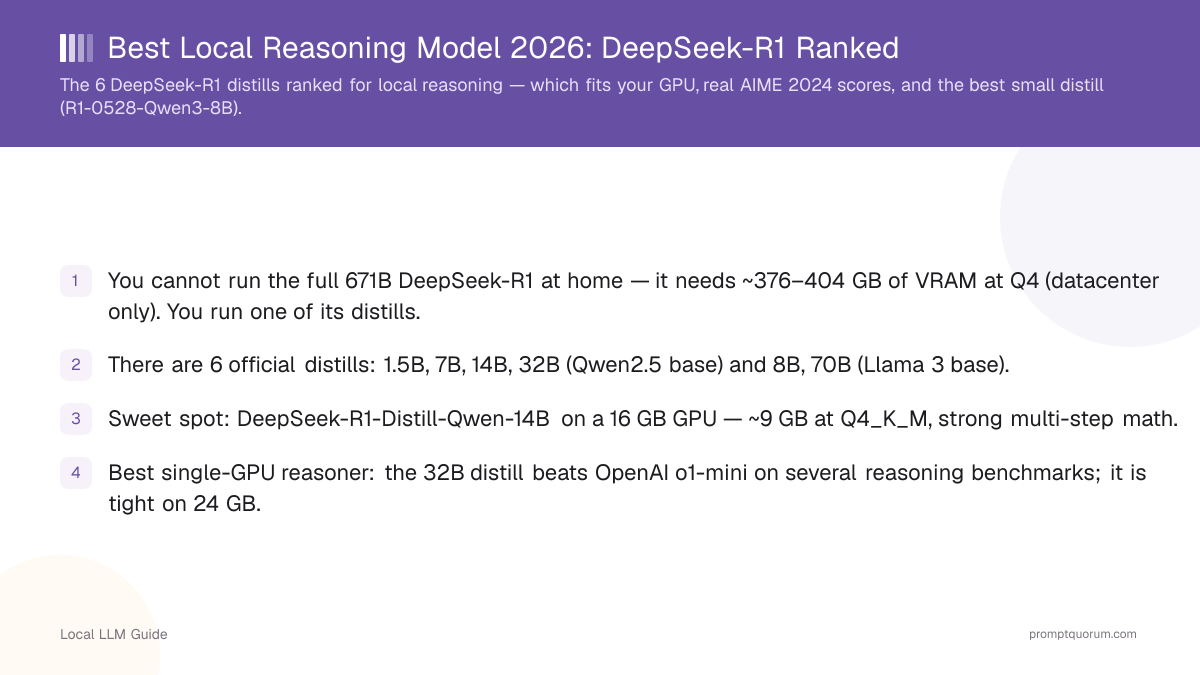
- You cannot run the full 671B DeepSeek-R1 at home — it needs ~376–404 GB of VRAM at Q4 (datacenter only). You run one of its distills.
- There are 6 official distills: 1.5B, 7B, 14B, 32B (Qwen2.5 base) and 8B, 70B (Llama 3 base).
- Sweet spot: DeepSeek-R1-Distill-Qwen-14B on a 16 GB GPU — ~9 GB at Q4_K_M, strong multi-step math.
- Best single-GPU reasoner: the 32B distill beats OpenAI o1-mini on several reasoning benchmarks; it is tight on 24 GB.
- Best small model: DeepSeek-R1-0528-Qwen3-8B leads open 8B models on AIME 2024 and fits an 8 GB card.
- All distills install with one command, e.g. `ollama run deepseek-r1:14b` (default Q4_K_M).
- Set temperature to 0.6 and use no system prompt — put all instructions in the user prompt to avoid R1 repetition failures.
- This page ranks reasoning (math, logic, multi-step) only. For coding, see the DeepSeek vs Qwen coding guide.
What Is a Local Reasoning Model?
A reasoning model is an LLM trained to produce an explicit chain-of-thought before its final answer, which makes it far stronger at math, logic, and multi-step problems than a standard chat model of the same size. DeepSeek-R1 distills are reasoning models: they "think out loud" inside the response, checking and revising steps before committing to an answer.
The trade-off is latency and verbosity. A reasoning model spends extra tokens working through the problem, so a single answer can take several seconds and hundreds of tokens of visible reasoning. For a math proof or a logic puzzle that is exactly what you want; for a quick factual lookup it is wasted time.
The distinction that trips people up: DeepSeek-V3 is a chat model, DeepSeek-R1 is the reasoning model. They share architecture lineage but are tuned for different jobs. If you want conversational answers, use V3; if you want step-by-step problem solving, use R1 or one of its distills. We explain exactly what the distillation keeps and loses in DeepSeek-R1 vs the Distills.
Update: DeepSeek's flagship line has since moved to DeepSeek-V4 (Flash and Pro), which reached general availability in August 2026 and ships as open weights under an MIT license — V4-Flash released July 31, 2026, V4-Pro on August 12–13, 2026. The R1 distills covered here are not being discontinued and remain the practical local-reasoning pick: V4-Pro is a 1.6T-total / 49B-active-parameter model that needs roughly 48–80 GB of VRAM even at Q4 quantization — multi-GPU territory, not a single consumer card. If you have that hardware and want the newest general-purpose architecture, V4 is worth evaluating; for reasoning on one GPU, the distills below remain the answer.
For a deeper primer on running these models, start with the Local LLM Hardware Guide 2026 and LLM Quantization Explained, which cover the VRAM math this guide relies on.
📍 In One Sentence
A local reasoning model is an LLM that writes an explicit chain-of-thought before answering, making it stronger at math and logic than a same-size chat model.
💬 In Plain Terms
Think of a reasoning model as a student who shows their work. It is slower and writes more, but it gets multi-step problems right far more often than a model that blurts out an answer.
The 6 DeepSeek-R1 Distills at a Glance
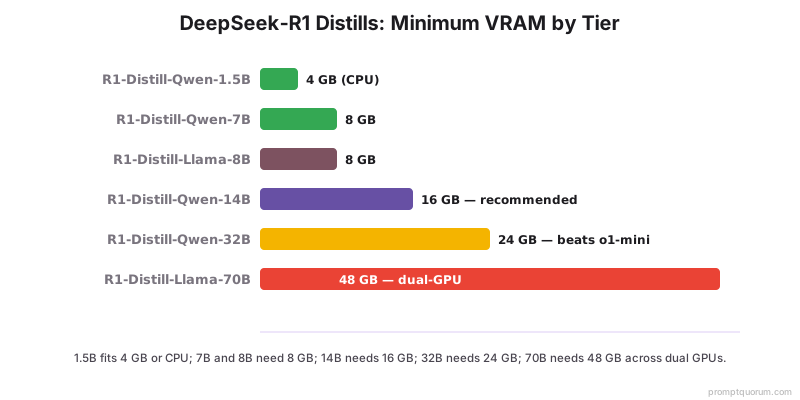
DeepSeek released six official distills of R1, each created by fine-tuning an existing open base model on reasoning traces from the full 671B R1. Four use a Qwen2.5 base (1.5B, 7B, 14B, 32B) and two use a Llama 3 base (8B, 70B). VRAM figures below are for the Ollama default Q4_K_M quantization.
📍 In One Sentence
DeepSeek-R1 has six official distills from 1.5B to 70B, built on Qwen2.5 and Llama 3 bases, with the 14B model the best balance for a 16 GB GPU.
Distill | Base Model | File Size (Q4_K_M) | Min VRAM | Best For |
|---|---|---|---|---|
| DeepSeek-R1-Distill-Qwen-1.5B | Qwen2.5 1.5B | ~1.1 GB | 4 GB / CPU | Edge devices, quick tests |
| DeepSeek-R1-Distill-Qwen-7B | Qwen2.5 7B | ~4.7 GB | 8 GB | Entry GPUs, 55.5% AIME 2024 |
| DeepSeek-R1-Distill-Llama-8B | Llama 3 8B | ~4.9 GB | 8 GB | Llama-license workflows |
| DeepSeek-R1-Distill-Qwen-14B | Qwen2.5 14B | ~9 GB | 16 GB | Best overall balance |
| DeepSeek-R1-Distill-Qwen-32B | Qwen2.5 32B | ~18–20 GB | 24 GB | Beats o1-mini, best single GPU |
| DeepSeek-R1-Distill-Llama-70B | Llama 3 70B | ~40 GB | Dual-GPU / 48 GB | Strongest distill, max accuracy |
The DeepSeek-R1-Distill-Llama-8B carries both the Llama 3 license and the MIT license. The Qwen-based distills inherit Qwen licensing. Always check the license for commercial use.
The Best Small Reasoning Distill: DeepSeek-R1-0528-Qwen3-8B
DeepSeek-R1-0528-Qwen3-8B is the strongest small reasoning model you can run on an 8 GB GPU, distilled from the updated R1-0528 onto a Qwen3 8B base. It leads open 8B models on AIME 2024 and scores roughly 10 percentage points higher than the base Qwen3 8B on that benchmark — a meaningful jump for math and logic at this size.
Choose it over the original 7B and 8B distills when you want the best small-model accuracy and your hardware tops out at 8 GB. It fits the same RTX 3060 12GB tier and runs at Q4_K_M in roughly 5 GB. For most laptop and entry-GPU users who care about reasoning quality over raw speed, this is the model to start with.
💬 In Plain Terms
If your GPU has 8 GB, the newer R1-0528-Qwen3-8B is the smartest small reasoning model — it uses a better base than the original distills and scores higher on competition math.
DeepSeek-R1 Distills Ranked by Hardware Tier
Pick the highest tier your VRAM supports. More parameters means better reasoning, but only if the model fits without spilling to system RAM (which collapses speed). Use this ranking to match a distill to the GPU you own or plan to buy.
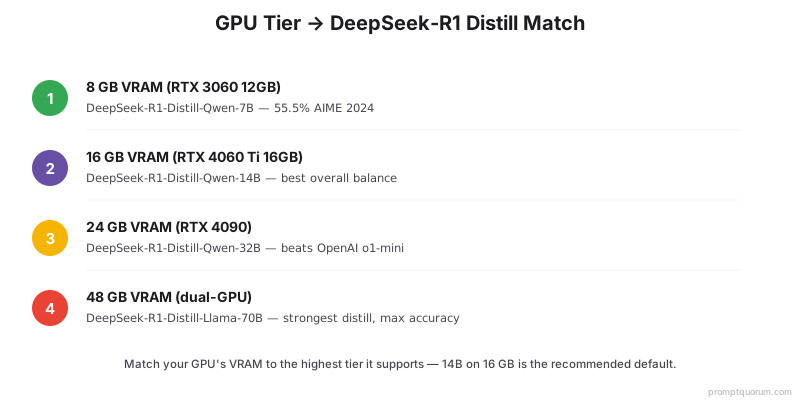
8 GB VRAM → DeepSeek-R1-Distill-Qwen-7B (RTX 3060 12GB)
The 7B distill is the entry point for serious local reasoning. At Q4_K_M it is ~4.7 GB and scores 55.5% on AIME 2024 — competition-level math that no 7B chat model approaches. The NVIDIA RTX 3060 12GB (~$280) is the value pick here: 12 GB leaves headroom for longer reasoning contexts. Command: `ollama run deepseek-r1:7b`. If you want the best small-model accuracy, swap in DeepSeek-R1-0528-Qwen3-8B on the same card.
16 GB VRAM → DeepSeek-R1-Distill-Qwen-14B (RTX 4060 Ti 16GB)
The 14B distill is the best overall local reasoning model: strong multi-step math and logic, ~9 GB at Q4_K_M, with room for context on a 16 GB card. The NVIDIA RTX 4060 Ti 16GB (~$420) is the recommended GPU — 16 GB fits the model and a generous reasoning window at 165 W. This is the tier most readers should target. Command: `ollama run deepseek-r1:14b`.
24 GB VRAM → DeepSeek-R1-Distill-Qwen-32B (RTX 4090)
The 32B distill is the best single-consumer-GPU reasoning model and beats OpenAI o1-mini on several reasoning benchmarks. At Q4_K_M it is ~18–20 GB — tight but workable on a 24 GB RTX 4090, leaving limited room for context. If reasoning accuracy is your priority and you have a 24 GB card, this is the model. Command: `ollama run deepseek-r1:32b`. For longer contexts, drop to a smaller quant or the 14B.
Dual-GPU / 48 GB → DeepSeek-R1-Distill-Llama-70B
The 70B distill is the strongest of the six and delivers the highest reasoning accuracy, but at ~40 GB (Q4) it does not fit any single consumer card. Run it across two 24 GB GPUs (e.g., 2× RTX 3090 or 2× RTX 4090) or on a 48 GB workstation card. Expect slower throughput than the 32B but the best answers. Command: `ollama run deepseek-r1:70b`. Only worth it if you genuinely need the top tier of open reasoning.
Always-On Server → Minisforum Mini-PC
If you want a reasoning model running 24/7 without a noisy tower, a Minisforum mini-PC with an integrated GPU or an eGPU enclosure runs the 7B and 14B distills as a quiet always-on endpoint. It will not match a desktop RTX 4090 on the 32B, but for a home reasoning server answering math and logic queries on demand, the low idle power and silence are the draw. Pair it with the 7B or 14B distill.
How Do the DeepSeek-R1 Distills Score on Reasoning Benchmarks?
These are reasoning benchmarks — AIME 2024 (competition math), MATH-500 (mixed math), and GPQA Diamond (graduate-level science Q&A). They measure step-by-step problem solving, not coding. The headline result: the 32B distill beats OpenAI o1-mini on several of these, and the 7B distill posts 55.5% on AIME 2024, a score no same-size chat model reaches. Note: OpenAI retired o1-mini from its API in late 2025 (o3-mini and o4-mini have since been retired too), so the o1-mini comparisons here are the original published benchmark anchor for these distills, not a live head-to-head against a currently available OpenAI model. The distills' own AIME 2024 and MATH-500 scores above are what matter for a local deployment decision.
📍 In One Sentence
The DeepSeek-R1-Distill-Qwen-32B beats OpenAI o1-mini on several reasoning benchmarks, and the 7B distill scores 55.5% on AIME 2024.
Distill | AIME 2024 | Reasoning Tier | Notes |
|---|---|---|---|
| DeepSeek-R1-Distill-Qwen-7B | 55.5% | Strong for 7B | Best entry-GPU reasoner |
| DeepSeek-R1-0528-Qwen3-8B | Leads open 8B | Best small | ~+10 pts over base Qwen3 8B |
| DeepSeek-R1-Distill-Qwen-14B | Higher than 7B | Best balance | 16 GB sweet spot |
| DeepSeek-R1-Distill-Qwen-32B | Top single-GPU | Beats o1-mini | Best 24 GB reasoner |
| DeepSeek-R1-Distill-Llama-70B | Highest of the six | Maximum | Needs dual-GPU |
Use exact scores where published (7B = 55.5% AIME 2024) and relative rankings elsewhere. Benchmark numbers shift with quantization and sampling settings; treat them as directional within a tier, not absolute.
When Should You NOT Use a Reasoning Model?
Avoid a reasoning model when the task is not a reasoning task — they are slower, more verbose, and no more accurate on simple retrieval or chat. Use a standard chat model like DeepSeek-V3 or Llama 3.3 instead.
- Avoid for quick factual lookups — the visible chain-of-thought wastes tokens and time on answers a chat model returns instantly.
- Avoid for open-ended conversation — reasoning models are tuned for problems with a correct answer, not dialogue.
- Avoid for pure coding throughput — for code generation, route to the DeepSeek vs Qwen coding guide; this page covers reasoning only.
- Avoid when latency is critical — if you need sub-second responses, a smaller chat model wins.
- Use a reasoning model when the task is math, logic, multi-step planning, or anything where showing the work improves correctness.
Config Pro-Tip: Temperature 0.6 and No System Prompt
Set temperature to 0.6 (the 0.5–0.7 range is safe) and use no system prompt — put every instruction in the user prompt. This is the single most important configuration for DeepSeek-R1 distills. The models are prone to a repetition-and-incoherence failure mode when given a system prompt or a temperature near 0 or above ~0.8.
In practice: leave the Ollama/LM Studio system prompt field empty, prepend your instructions to the user message, and keep temperature at 0.6. If you see the model loop or drift mid-reasoning, this setting is almost always the fix.
Setup: Ollama Quick-Start Per Tier
Every distill installs and runs with a single Ollama command (all default to Q4_K_M). Install Ollama first if you have not — see How to Install Ollama. Then pick the command for your tier:
ollama run deepseek-r1:1.5b   # edge / CPU
ollama run deepseek-r1:7b     # 8 GB VRAM
ollama run deepseek-r1:8b     # 8 GB VRAM (Llama base)
ollama run deepseek-r1:14b    # 16 GB VRAM — recommended
ollama run deepseek-r1:32b    # 24 GB VRAM — beats o1-mini
ollama run deepseek-r1:70b    # dual-GPU / 48 GB
Verdict: Which DeepSeek-R1 Distill Should You Run?
The decision comes down to your VRAM and whether you prioritize accuracy or speed. Here is the one-line answer for each case.
Pick your distill
Use a local LLM if:
- •16 GB GPU → DeepSeek-R1-Distill-Qwen-14B (best overall, the default pick)
- •24 GB GPU → DeepSeek-R1-Distill-Qwen-32B (beats o1-mini, best single-GPU reasoner)
- •8 GB GPU → DeepSeek-R1-0528-Qwen3-8B (best small) or the 7B distill
- •Dual-GPU / 48 GB → DeepSeek-R1-Distill-Llama-70B (maximum accuracy)
Use a cloud model if:
- •You need frontier reasoning beyond any distill → compare against GPT-5.6 / Claude / Gemini via PromptQuorum
- •You cannot dedicate a GPU → a hosted reasoning API may be cheaper than buying hardware
Quick decision:
- →If unsure, start with the 14B on a 16 GB card.
- →Always run at temperature 0.6 with no system prompt.
- →For coding, use a coding model — not a reasoning distill.
Frequently Asked Questions
Can I run the full 671B DeepSeek-R1 locally?
No. The full DeepSeek-R1 is a 671B-parameter Mixture-of-Experts model (~37B active per token) and needs roughly 376–404 GB of VRAM at Q4 — datacenter hardware only. At home you run one of its distills (1.5B to 70B). An Unsloth 1.58-bit build (~131 GB) exists but runs at around 0.3 tokens/second, which is a curiosity rather than a usable setup.
Which DeepSeek-R1 distill is the best overall?
For most people, DeepSeek-R1-Distill-Qwen-14B on a 16 GB GPU is the best balance of reasoning quality, speed, and VRAM fit. If you have a 24 GB card, the 32B distill is stronger and beats OpenAI o1-mini on several reasoning benchmarks.
What is the best small DeepSeek reasoning model?
DeepSeek-R1-0528-Qwen3-8B. It is distilled from the updated R1-0528 onto a Qwen3 8B base, leads open 8B models on AIME 2024, and scores about 10 points higher than the base Qwen3 8B. It fits an 8 GB GPU at Q4_K_M.
Does DeepSeek-V4 replace the R1 distills as the best local reasoning model?
No. DeepSeek-V4 (Flash and Pro) reached general availability in August 2026, but V4-Pro needs roughly 48–80 GB of VRAM even quantized — far beyond a single consumer GPU. For local reasoning on one card, the R1 distills on this page remain the practical recommendation; V4 is a separate, much larger option for teams with multi-GPU or datacenter hardware.
Is the "beats OpenAI o1-mini" comparison still meaningful?
As a fixed benchmark reference, yes — the scores are unchanged. As a live comparison, less so: OpenAI retired o1-mini from its API in late 2025, and its direct successors (o3-mini, o4-mini) have since been retired as well, with GPT-5.4-mini now OpenAI's current lightweight reasoning model. The AIME 2024 and MATH-500 scores for each distill are the numbers to rely on for a deployment decision.
How much VRAM does each distill need?
At the Ollama default Q4_K_M: 7B needs ~8 GB (file ~4.7 GB), 14B needs ~16 GB (~9 GB file), 32B needs ~24 GB (~18–20 GB file), and 70B needs dual-GPU or 48 GB (~40 GB file). FP16 is roughly 4× the Q4_K_M size; Q8_0 is roughly 2×.
Is DeepSeek-R1 good at coding?
This guide ranks reasoning (math, logic, multi-step) only. For code generation, the trade-offs are different — see our dedicated comparison at /power-local-llm/deepseek-vs-qwen-coding-local-2026 rather than choosing a reasoning distill for coding throughput.
What is the difference between DeepSeek-V3 and DeepSeek-R1?
DeepSeek-V3 is a chat model tuned for conversation; DeepSeek-R1 is a reasoning model that produces an explicit chain-of-thought before answering. For math and logic, use R1 or a distill; for general chat, use V3.
Why does my DeepSeek-R1 distill loop or produce gibberish?
Almost always a configuration issue. Set temperature to 0.6 (0.5–0.7 is fine) and remove any system prompt — put all instructions in the user message. R1 distills have a known repetition failure mode triggered by system prompts and extreme temperatures.
How do I install a DeepSeek-R1 distill?
Install Ollama, then run one command for your tier, e.g. `ollama run deepseek-r1:14b`. All distills default to Q4_K_M. See the setup section above for the full command list.
Does the 8B distill have a different license?
Yes. DeepSeek-R1-Distill-Llama-8B carries the Llama 3 license in addition to MIT, because its base is Llama 3. The Qwen-based distills (1.5B, 7B, 14B, 32B) inherit Qwen licensing. Check the license before commercial use.
Should I buy an RTX 4060 Ti 16GB or an RTX 4090 for reasoning?
If your budget allows the RTX 4090 and you want to run the 32B distill (which beats o1-mini), buy the 4090. If you want the best value and the 14B distill covers your needs, the RTX 4060 Ti 16GB at ~$420 is the smarter buy.
Update Log
- Published 2026-06-19. Next review due 2026-12-19 (semi-annual freshness tier).
- Covers the 6 official DeepSeek-R1 distills plus DeepSeek-R1-0528-Qwen3-8B. Verified against published AIME 2024 scores and Q4_K_M VRAM figures.
- Refreshed 2026-08-28: clarified DeepSeek-V4 (Flash and Pro) is now generally available (Aug 2026) but, at ~48–80 GB VRAM for V4-Pro, does not change the local-reasoning recommendation — R1 distills remain the practical pick. Added a caveat that OpenAI o1-mini, the benchmark comparator used throughout, was retired from the API in late 2025 (o3-mini and o4-mini have since been retired too); distill AIME 2024/MATH-500 scores are unchanged and reverified. Next review due 2027-02-28.