Key Takeaways
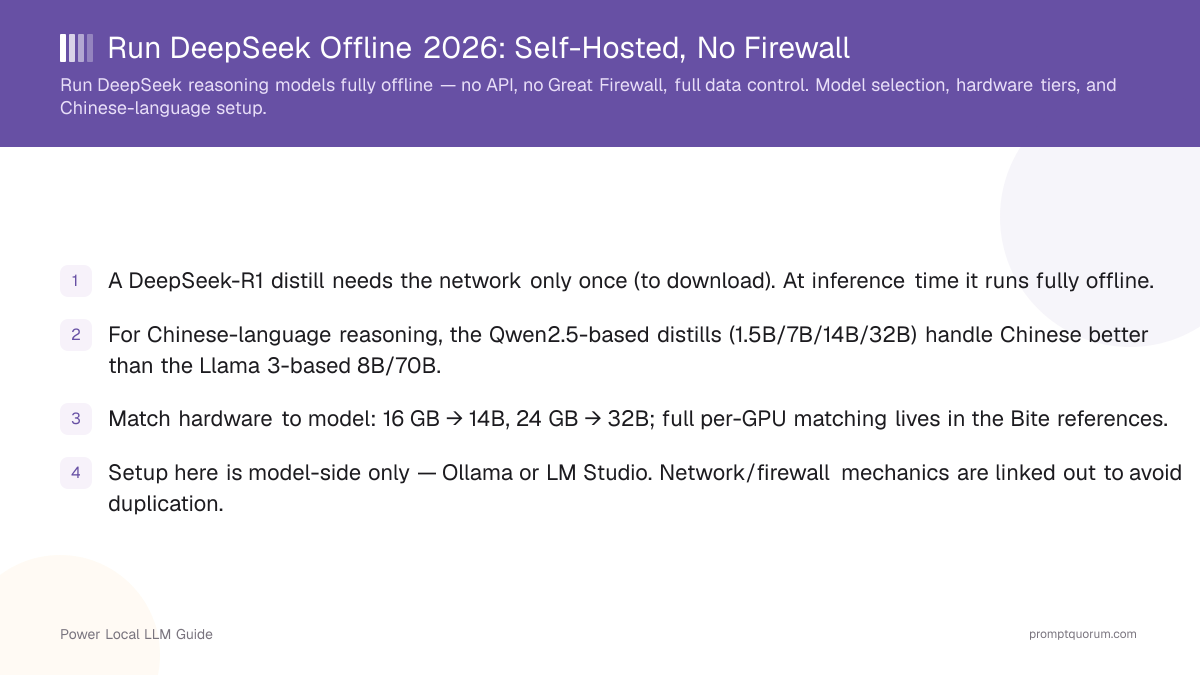
- A DeepSeek-R1 distill needs the network only once (to download). At inference time it runs fully offline.
- For Chinese-language reasoning, the Qwen2.5-based distills (1.5B/7B/14B/32B) handle Chinese better than the Llama 3-based 8B/70B.
- Match hardware to model: 16 GB → 14B, 24 GB → 32B; full per-GPU matching lives in the Bite references.
- Setup here is model-side only — Ollama or LM Studio. Network/firewall mechanics are linked out to avoid duplication.
- Verify "offline" empirically: block the network or monitor outbound traffic during a session and confirm zero egress.
- Self-hosting offline means no Great Firewall dependency and no cross-border data flow.
- Run every distill at temperature 0.6 with no system prompt.
Why Run DeepSeek Offline?
Running DeepSeek offline gives you full data control and removes any dependency on a hosted API or network conditions — the model answers from local hardware with nothing leaving the machine. For sovereignty-sensitive work, this is the difference between a tool you control and a service you depend on.
Four motivations dominate: data sovereignty (prompts and outputs never leave your environment), no per-token API bill once hardware is bought, independence from network restrictions (concrete for users behind the Great Firewall — an offline model has no foreign endpoint to reach), and reliability (no outage or rate limit on a hosted endpoint). None of these is "it's automatically cheaper" — see the cost comparison below.
This is the practical counterpart to the privacy analysis in Does Local DeepSeek Solve the China Data Problem? — that page explains why local self-hosting removes the data-flow concern; this one shows how to build it and what hardware to buy.
📍 In One Sentence
Running DeepSeek offline keeps every prompt and output on local hardware, removing dependence on a hosted API and any network restriction.
💬 In Plain Terms
An offline model is like a book you own versus a website you visit. Once it is on your shelf, you do not need the internet — or anyone's permission — to read it.
Local DeepSeek vs the DeepSeek API
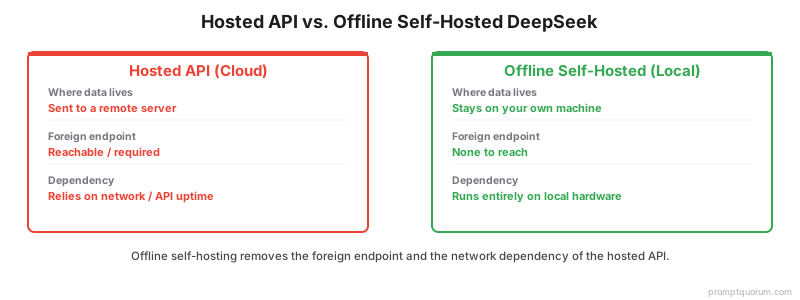
Don't assume local is cheaper — DeepSeek's hosted API pricing is very low, so the honest reason to self-host is privacy, control, and offline operation, not guaranteed savings. As of August 25, 2026 (verified against DeepSeek's own API pricing page), DeepSeek-V4 Flash costs $0.007/$0.22 per million input tokens (cache-hit/cache-miss, off-peak) and $0.66 per million output tokens off-peak; DeepSeek-V4 Pro costs $0.022/$0.66 input and $1.98 output off-peak, roughly doubling during weekday peak hours (01:00–04:00 and 06:00–10:00 UTC). At that pricing, a light or occasional user can spend very little on the API for a long time before hardware pays for itself.
The break-even math depends entirely on your usage volume: heavy daily use (many millions of tokens/month) tips the balance toward hardware over months; occasional or bursty use may never break even. Use PromptQuorum's local AI cost calculator with your own expected monthly spend to get a real number instead of guessing.
Factor | DeepSeek API | Local DeepSeek |
|---|---|---|
| Hardware | None | $400–2,800+ depending on tier (see budget section) |
| Internet | Required | Not needed after model download |
| Per-token cost | Yes (see pricing above) | No ongoing API cost |
| Privacy | Prompts sent to a hosted endpoint | Nothing leaves the machine |
| Maintenance | None | You manage the hardware and software stack |
| Model control | Hosted, vendor-controlled | Self-controlled, any distill you choose |
| Offline capable | No | Yes, after the one-time download |
| Best for | Occasional use, convenience | Daily/heavy use, privacy, sovereignty |
The real reason to self-host is privacy + independence + control — not automatic cost savings. If you use DeepSeek occasionally, the API is very likely cheaper and simpler.
Which DeepSeek Distill Is Best for Chinese-Language Reasoning?
For Chinese-language reasoning, choose a Qwen2.5-based DeepSeek-R1 distill (7B, 14B, or 32B) — Qwen2.5 was trained with strong Chinese coverage, so these distills handle Chinese prompts and output noticeably better than the Llama 3-based 8B and 70B. The reasoning behavior is the same across distills; the base model determines language quality.
Practical picks for Chinese workloads: the 14B on a 16 GB card is the balanced default, and the 32B on a 24 GB card is the strongest single-GPU option. Both reason in Chinese fluently because of the Qwen2.5 base. Reserve the Llama-based distills for English-dominant work or Llama-license requirements.
Head queries this serves: 本地部署 deepseek (locally deploy DeepSeek), deepseek 离线 (DeepSeek offline), and deepseek 私有化部署 (DeepSeek private deployment). The answer to all three is the same — a Qwen2.5-based distill run locally with Ollama or LM Studio.
📍 In One Sentence
For Chinese-language reasoning, pick a Qwen2.5-based DeepSeek-R1 distill (7B/14B/32B); the Qwen base handles Chinese far better than the Llama-based distills.
Which Model Should You Run, and How Much VRAM?
Match the distill to your VRAM and use case — the same tiers as any DeepSeek-R1 deployment, plus what each tier is realistically good for. This is the brief version; the two Bite references have the full per-GPU table and per-quant VRAM.
- PromptQuorum's take: for most people, 14B or 32B is the sweet spot. The jump to 70B is a genuinely different hardware category (dual GPUs, large-memory workstation, serious cooling and power) — treat it as its own purchase decision, not a natural next step from 32B.
- The full 671B model is not a normal consumer-PC target. If your workload needs that scale, compare a dedicated AI workstation build against cloud/API costs rather than assembling it piecemeal — see the local AI workstation build guide.
VRAM | Best Distill (offline) | Verdict | Best for |
|---|---|---|---|
| 8 GB | 7B or R1-0528-Qwen3-8B | Good entry point | Laptops, inexpensive GPUs, small servers, experimentation |
| 16 GB | 14B (Qwen2.5) | Best value | Most serious users; balanced default, strong Chinese |
| 24 GB | 32B (Qwen2.5) | Best single-GPU | Enthusiasts wanting a real step up without multi-GPU |
| 48 GB+ / dual-GPU | 70B (Llama 3) | Serious workstation territory | Professionals; weaker Chinese-language output than the Qwen distills |
| ~400 GB+ | Full DeepSeek-R1 (671B) | Not a normal consumer workload | Enterprise-class multi-GPU clusters only — don't buy a mini PC expecting this |
For an always-on, low-power offline endpoint, a capable mini PC runs the 7B and 14B distills quietly — see Best Mini PCs for Local LLMs. For exact GPU matching see the Bite references in Related Guides.
Best Hardware Classes for Local DeepSeek
Instead of one product mention, here are the four realistic hardware paths — pick the one that matches your priorities, then use the dedicated guide for exact current picks and prices.
- NVIDIA GPU — best for maximum performance and compatibility. The default choice: broadest software support (Ollama, vLLM, llama.cpp all run well on CUDA), the most VRAM-per-dollar options across the 16 GB/24 GB tiers, and the easiest troubleshooting since most local-LLM tooling is developed against NVIDIA first. See the best GPU buying guide for local LLMs for current picks.
- AMD GPU — best for buyers willing to work with the ROCm ecosystem. Potentially strong VRAM-per-dollar, but verify ROCm/software compatibility for your exact runtime (Ollama, llama.cpp) before buying — support is narrower than NVIDIA's and varies by card generation.
- Apple Silicon — best for a quiet, low-power machine with large unified memory. The advantage isn't traditional GPU VRAM, it's shared memory capacity — a Mac with enough unified RAM can load larger distills than a comparably priced discrete GPU, at a fraction of the power draw. See Best Mac for Local AI.
- Mini PC — best for an always-on local AI server. The right call if the workload is 7B, some 14B, Home Assistant integration, RAG, or a background local assistant rather than maximum inference speed. See Best Mini PCs for Local LLMs.
- Cloud GPU rental — best if you want to test a tier before buying, or need occasional burst capacity. Not "offline," but a legitimate way to try 32B/70B-class performance before committing to hardware. See the cloud GPU rental guide.
Our Recommended Local DeepSeek Setup
For most PromptQuorum readers who want a genuine step up in local reasoning without entering multi-GPU territory: a 24 GB GPU, 64 GB system RAM, and 2 TB of NVMe storage, running DeepSeek-R1 32B through Ollama. This is a configuration target, not a specific product — use the GPU buying guide linked below for current model picks and prices.
- Realistic uses at this tier: Chinese-language reasoning, coding assistance, document analysis, a private assistant, RAG over local documents, and local-agent experimentation.
- Budget-constrained? Step down to the 16 GB / 14B tier — see Which Model and How Much VRAM? above and the budget breakdown below.
Component | Target spec |
|---|---|
| GPU | 24 GB VRAM |
| System RAM | 64 GB |
| Storage | 2 TB NVMe |
| Software | Ollama |
| Model | DeepSeek-R1-Distill-Qwen-32B |
How Do You Set Up DeepSeek Offline?
The offline setup is model-side only: download once, then run with no network. These are the steps with Ollama (LM Studio is the GUI equivalent — pull the model, then go offline).
- 1Install Ollama or LM Studio
Why it matters: These run the model locally with no external dependency at inference time; install once while online. - 2Pull the distill once
Why it matters: Run `ollama run deepseek-r1:14b` (or your tier) while connected — this is the only step that needs the network. - 3Disconnect or block the network
Why it matters: After the model is cached, cut network access; the model serves answers entirely from local weights. - 4Set temperature 0.6, clear the system prompt
Why it matters: Prevents the R1 repetition failure mode; put all instructions in the user prompt. - 5Run inference offline
Why it matters: Every prompt and output now stays on the machine with no egress — confirm with the verification step below.
ollama pull deepseek-r1:14b    # one-time, online
# then disconnect / block network
ollama run deepseek-r1:14b     # fully offline inference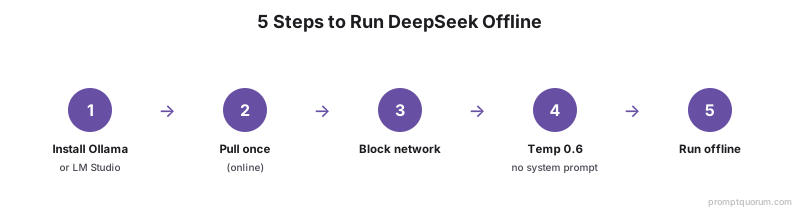
What About Network and Firewall Mechanics?
The offline model itself needs no firewall configuration, VPN, or network tunneling — it has no foreign endpoint to reach — so the only network work is ensuring nothing else on the machine phones home. That general topic (firewall rules, air-gapping, blocking outbound connections) is covered in depth elsewhere and not duplicated here.
For the full firewall and offline-network setup — including air-gapping a workstation and locking down outbound traffic — see Local AI Behind a Firewall: Offline 2026. This article owns DeepSeek model selection and the offline model setup; that one owns the network mechanics.
How Do You Verify You Are Truly Offline?
Prove offline status empirically: run a full inference session with outbound traffic monitored or the network disabled, and confirm there are zero outbound connections from the model process. Do not assume — demonstrate it, because that is what makes the sovereignty claim auditable.
Two quick methods: disable the network adapter (or pull the cable) and confirm inference still works — proof the model needs no connectivity; or keep the network up but watch outbound connections with a packet capture or per-process firewall and confirm the Ollama/LM Studio process opens none during a session.
Config Pro-Tip: Temperature 0.6 and No System Prompt
Set temperature to 0.6 (0.5–0.7 is safe) and use no system prompt — put all instructions in the user prompt. This avoids the repetition-and-incoherence failure mode the DeepSeek-R1 distills are prone to, and it matters just as much offline as online.
Buy Hardware or Use the API?
This is the real decision, and it depends on how often you'll actually use DeepSeek — not on which option is "better" in the abstract.
- Buy hardware if: you use DeepSeek every day, privacy is important for your work, you need offline operation, you plan to run multiple local services on the same machine, you already own suitable hardware, or you want predictable long-term access without depending on a vendor's pricing changes.
- Use the API if: you use DeepSeek occasionally, you don't want to maintain hardware or a software stack, you need maximum inference speed without buying enterprise-class GPUs, or offline operation genuinely doesn't matter for your use case.
- DeepSeek's current API pricing (verified above) is low enough that occasional users are very likely better off simply paying for API usage rather than buying hardware to save money — the hardware case is about privacy and control, not guaranteed savings.
- Run your own numbers with the local AI cost calculator before deciding — plug in your expected monthly API spend and hardware price to see an actual break-even estimate instead of a rule of thumb.
Hardware Budget by Tier
Important 2026 context: GPU and VRAM prices have risen substantially over the past year due to memory-market pressure — a used 24 GB card that cost roughly $1,000–1,300 in 2025 was trading closer to $2,200–2,800. Budget accordingly rather than assuming last year's pricing still holds; the entry 16 GB tier has stayed comparatively stable.
Budget | Goal | Notes |
|---|---|---|
| Under $500 | DeepSeek 7B, small 14B workloads | Used or entry-level GPU systems |
| $500–900 | 14B local DeepSeek | 16 GB GPU — sweet spot for beginners, pricing here has stayed relatively stable |
| $1,500–3,000 | 32B DeepSeek | 24 GB GPU — this tier is significantly pricier in 2026 than in prior years; verify current prices before budgeting |
| $3,000+ | Serious local AI, room to grow | 24 GB+ GPU, 64–128 GB RAM, multiple NVMe drives |
| $5,000+ | 70B and larger models | Compare a dedicated AI workstation build against cloud/API costs at this budget — see the workstation build guide |
What Not to Buy
A few common mistakes worth naming plainly, since a page that only ever says "buy this" reads as a sales page.
- Don't buy a $2,000+ GPU system just to run a 7B model — that's a waste of money the entry tier already handles.
- Don't buy 128 GB of system RAM without a workload that actually needs it; VRAM, not system RAM, is usually the real bottleneck for GPU inference.
- Don't buy an AMD GPU solely because the on-paper specs look impressive — verify ROCm/software compatibility for your exact runtime first.
- Don't buy a mini PC expecting fast 70B or full-671B inference — the memory and compute requirements at that scale are a completely different hardware class.
- Don't assume local is cheaper before running the numbers — an occasional user is very likely better served by the API (see the cost comparison above).
Frequently Asked Questions
Can DeepSeek run completely offline?
Yes. Once a distill has been downloaded, inference can continue with the network disabled — you can disconnect or block the network entirely and it keeps working from local weights.
Does DeepSeek-R1 need a VPN in China?
Not when running the model locally. An offline model has no foreign endpoint to reach, so VPNs and firewall workarounds are irrelevant to inference. The only network task is ensuring nothing else on the machine sends data out.
Which DeepSeek distill is best for Chinese?
A Qwen2.5-based distill (7B, 14B, or 32B). Qwen2.5 has strong Chinese coverage, so these handle Chinese prompts and output better than the Llama 3-based 8B and 70B distills.
How much VRAM does DeepSeek 32B need?
A 24 GB GPU is a practical target for a 32B quantized deployment, depending on quantization and runtime — see the Which Model and How Much VRAM table above for the full tier breakdown.
Can a mini PC run DeepSeek?
Yes, particularly the 7B distill and some 14B configurations. Mini PCs are a good choice for an always-on, low-power endpoint, but they are generally not the right choice for maximum DeepSeek performance or for 70B+ models.
Can I run DeepSeek on Apple Silicon?
Yes. Large unified-memory Apple Silicon systems can be particularly interesting for local LLM experimentation, since the advantage is shared memory capacity rather than traditional GPU VRAM — see the Best Hardware Classes section above.
Is local DeepSeek cheaper than the API?
Not necessarily. Hardware has a substantial upfront cost, and DeepSeek's current API pricing is low. Local deployment's biggest advantages are privacy, control, and offline operation, not guaranteed cost savings — run your own numbers with the linked cost calculator.
How do I know the offline model isn't sending data anywhere?
Monitor outbound traffic during a session or disable the network entirely and confirm inference still works. A locally loaded model does not inherently need a DeepSeek API connection for inference, but you should verify this empirically for your own deployment rather than assuming it.
What hardware runs DeepSeek offline well?
A 16 GB GPU runs the 14B distill and a 24 GB GPU runs the 32B. For an always-on quiet endpoint, a capable mini PC handles the 7B and 14B. See the GPU and VRAM bites for exact matching, and the Best Hardware Classes section for NVIDIA/AMD/Apple Silicon/mini PC trade-offs.
Can I run the full DeepSeek-R1 offline?
Not on consumer hardware. The full 671B R1 needs roughly 400 GB+ of VRAM at Q4-level quantization. Offline self-hosting realistically uses the distills (1.5B–70B), which run on local GPUs.
Where do the firewall and network steps go?
This guide deliberately does not re-teach firewall and air-gapping mechanics. See Local AI Behind a Firewall: Offline 2026 for the full network lockdown; here we cover DeepSeek model selection, hardware, and the offline model setup.
What settings should I use for offline DeepSeek?
Temperature 0.6 with no system prompt, instructions in the user message. This is the standard DeepSeek-R1 configuration and prevents the repetition failure mode.
Update Log
- Full affiliate-page refresh 2026-08-25: added hardware-class breakdown (NVIDIA/AMD/Apple Silicon/mini PC/cloud), a recommended build target, a verified DeepSeek API pricing comparison, a buy-vs-API decision section, a corrected 2026 hardware budget table (GPU/VRAM prices rose substantially year-over-year), and a "what not to buy" section. Corrected an overclaim ("DeepSeek open weights have no telemetry" → verify empirically per deployment instead of asserting categorically).
- Published 2026-06-19. Next review due 2026-09-25 (monthly freshness tier, reflecting fast-moving GPU/API pricing).
- Owns DeepSeek offline model selection, Chinese-language model choice, hardware-class selection, and the offline model setup. Network/firewall mechanics intentionally linked out. Monetizes the hardware infrastructure around DeepSeek (GPU/Mac/mini-PC/workstation guides), not DeepSeek's own API.