What Fooocus Is
Fooocus is a local, offline image-generation application built entirely on the Stable Diffusion XL (SDXL) architecture, distributed as free and open-source software under the GPL-3.0 license. Unlike AUTOMATIC1111's tab-based technical interface or ComfyUI's node-graph editor, Fooocus deliberately removes most manual controls — no visible sampler picker, no CFG scale slider by default, no resolution grid — and replaces them with a small set of presets (General, Realistic, Anime) plus an "Advanced" panel a reader can ignore entirely.
The project runs on Gradio, the same Python web-UI framework used by many other local AI tools, and its interface intentionally borrows the feature list of Midjourney and LeonardoAI, remapping each of their commands (--style, --ar, V1–V4 variations, upscaling) onto a Fooocus equivalent so users coming from those cloud tools have a familiar mental model.
The core design goal, stated directly in the project's own documentation, is that the number of mouse clicks between downloading Fooocus and generating a first image should be fewer than three. That single design constraint — rather than any specific model innovation — is what distinguishes Fooocus from other Stable Diffusion front ends: it is a UI/UX layer, not a new model.
📍 In One Sentence
Fooocus is a free, offline, Gradio-based interface for Stable Diffusion XL that hides technical parameters behind presets and automatic prompt expansion, aiming for a "just type a prompt" experience.
💬 In Plain Terms
If AUTOMATIC1111 and ComfyUI are a technical control panel and a wiring diagram, Fooocus is closer to a single "generate" button — it makes most of the decisions for you and only exposes advanced settings if you go looking for them.
Project History and Creator
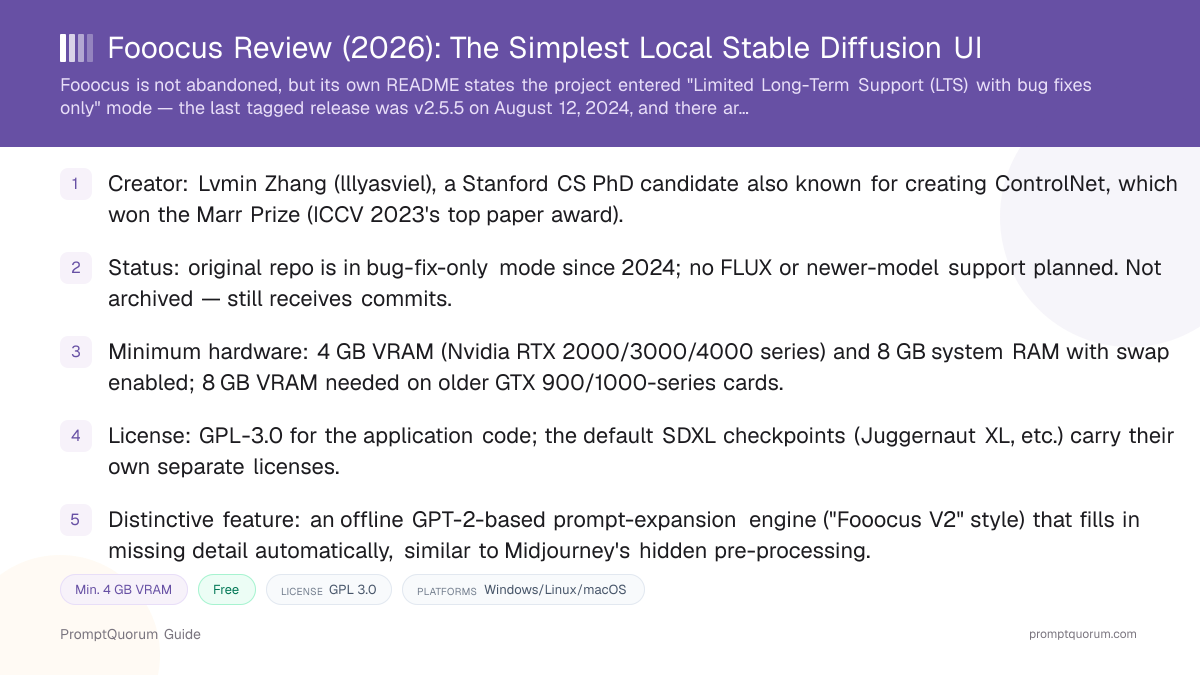
Fooocus was created by Lvmin Zhang, who publishes under the GitHub handle lllyasviel, and whose repository was first created on GitHub on August 9, 2023. Zhang is a computer science PhD candidate at Stanford University researching controllable generative modeling and computer graphics.
Zhang is independently well known in the Stable Diffusion community as the creator of ControlNet, the neural-network architecture that added precise spatial conditioning (pose, depth, edge maps) to text-to-image diffusion models. The ControlNet paper won the Marr Prize, the top paper award at the International Conference on Computer Vision (ICCV) 2023 — one of computer vision's most competitive conferences. Zhang has also released other local AI tools including WebUI Forge (a performance-focused AUTOMATIC1111 fork), PaintsUndo, and IC-Light.
Fooocus was built, in the project's own words, from a mixture of the AUTOMATIC1111 Stable Diffusion WebUI and ComfyUI codebases — reusing their proven inference techniques while presenting a radically simplified front end. As of September 2026 the project has accumulated more than 52,000 GitHub stars and over 8,600 forks, among the most-starred local image-generation tools on GitHub.
A safety note directly from the project itself: Fooocus has no official website. The README explicitly warns that domains such as fooocus.com, fooocus.net, fooocus.ai, fooocus.org, fooocus.pro, and fooocus.one are fake and have no relationship to the real project — the only official source is the GitHub repository itself.
Is Fooocus Still Maintained in 2026?
The lllyasviel/Fooocus README carries a section titled "Project Status: Limited Long-Term Support (LTS) with Bug Fixes Only," which states the project — built entirely on the Stable Diffusion XL architecture — is now considered feature-complete, and that "future updates will focus exclusively on addressing any bugs that may arise." The README explicitly says there are no current plans to migrate to or incorporate newer model architectures such as FLUX, though it leaves the door open if the open-source community converges on a single dominant successor method.
For readers who want the newest models, the README itself recommends alternative platforms — specifically WebUI Forge (also from the same creator) and ComfyUI or its simplified front end SwarmUI — rather than promising FLUX support inside Fooocus itself.
This is not the same as an abandoned project. The GitHub repository is not archived, remains open to issues and pull requests (314 open issues as of this review), and GitHub's own activity data shows commits landing as recently as December 2025 — over a year after the last tagged release. The README credits contributor mashb1t with "huge efforts" reducing the codebase's outstanding bugs, and mashb1t separately maintains a fork at github.com/mashb1t/Fooocus that has continued to receive commits even more recently (last pushed October 2025) — though that fork also has not cut a new tagged release since August 2024, mirroring the upstream project's pace.
The practical takeaway: Fooocus is stable and safe to install today, but a reader who specifically wants FLUX, SD 3.5, or other post-2024 model architectures inside a simplified UI will not find that in Fooocus and should look at ComfyUI, SwarmUI, or WebUI Forge instead.
📍 In One Sentence
Fooocus is not abandoned, but its own README states the original project is in "Limited Long-Term Support (LTS) with bug fixes only" mode, with no tagged release since August 2024 and no plans to support newer architectures like FLUX.
💬 In Plain Terms
Think of it as a finished, stable tool rather than a growing one — the developer considers the SDXL-based feature set essentially complete and is not chasing every new model release.
How to Install and Run Fooocus
Fooocus ships a one-click Windows package, plus manual install paths for Linux, Mac, and Docker — there is no separate model download step for the default preset, since Fooocus fetches its own default checkpoint automatically on first launch.
- 1Download the Windows package (or clone the repo on Linux/Mac)
Why it matters: Windows users get a self-contained `.7z` package from the [GitHub Releases page](https://github.com/lllyasviel/Fooocus/releases) with an embedded Python environment — no separate Python install required. Linux and Mac users clone the repository and set up a Conda or venv environment instead. - 2Extract the package and run run.bat
Why it matters: Uncompress the downloaded archive and double-click `run.bat` — this launches the General preset. `run_anime.bat` and `run_realistic.bat` launch the Anime and Realistic presets instead, each with a different default checkpoint. - 3Let Fooocus auto-download its default model
Why it matters: On first launch, Fooocus automatically downloads the checkpoint for whichever preset you ran — Juggernaut XL v8 (Rundiffusion) for General, RealisticStockPhoto v2.0 for Realistic, or AnimaPencilXL v5.0 for Anime — into the `Fooocus/models/checkpoints` folder. - 4Type a prompt and press Generate
Why it matters: No sampler, CFG scale, or resolution choice is required — Fooocus applies sensible defaults automatically. Advanced controls are available behind an "Advanced" toggle for readers who want them later. - 5Use Image Prompt, Inpaint, or Upscale/Vary as needed
Why it matters: Fooocus maps Midjourney-style workflows (image prompting, inpainting, upscaling, subtle/strong variation) onto its own UI panels, using its own inpainting model and image-prompt algorithm rather than a standard SDXL ControlNet setup. - 6Switch to community checkpoints once comfortable
Why it matters: Any SDXL checkpoint from Civitai or Hugging Face can be placed in the `models/checkpoints` folder and selected inside Fooocus, extending it beyond the three built-in presets.
Prompt Expansion and Built-In Styles
Fooocus's signature feature is an offline GPT-2-based prompt-processing engine, presented in the UI as the "Fooocus V2" style. The project's own documentation compares it to Midjourney's hidden prompt pre-processing and LeonardoAI's "Prompt Magic" — the idea is that a short prompt like "house in garden" and a 1,000-word prompt should both produce polished, coherent results, because the expansion model fills in missing stylistic and compositional detail automatically.
Beyond Fooocus V2, the interface ships several other built-in style presets, including "Fooocus Photograph," "Fooocus Negative," and a "cinematic-default" style, with additional SDXL styles contributed by community members credited in the project's README (twri, 3Diva, and Marc K3nt3L). Styles can be combined, and multiple styles stack in the Advanced panel for readers who want more control than the three top-level presets provide.
Other under-the-hood techniques the README documents include a native refiner swap inside a single k-sampler (avoiding the momentum loss that happens when AUTOMATIC1111 or ComfyUI swap between two independent samplers), negative ADM guidance tuned for SDXL's highest resolution level, and Fooocus's own inpainting model and image-prompt algorithm rather than a standard SDXL ControlNet or IP-Adapter pipeline.
📍 In One Sentence
Fooocus runs an offline GPT-2-based prompt-expansion model, exposed as a style called "Fooocus V2," that automatically adds detail to short or vague prompts before generation.
Fooocus License and Commercial Use
Fooocus is licensed under GPL-3.0 (the GNU General Public License, version 3), as confirmed in the license metadata on its GitHub repository. GPL-3.0 permits free use, modification, and redistribution of the Fooocus codebase itself, provided any distributed derivative work is also released under GPL-3.0 (copyleft) — this applies to the application code, not to images you generate with it.
The three default checkpoints Fooocus downloads automatically — Juggernaut XL v8 (Rundiffusion) for the General preset, RealisticStockPhoto v2.0 for Realistic, and AnimaPencilXL v5.0 for Anime — are community-trained Stable Diffusion XL fine-tunes hosted independently on platforms like Civitai and Hugging Face, and each carries its own separate license (commonly a CreativeML OpenRAIL-M variant, but terms vary by checkpoint and can change). Anyone planning to use generated images commercially should check the specific checkpoint's own license page before doing so — Fooocus's GPL-3.0 license does not automatically extend to, or override, a checkpoint's terms.
The project itself carries no commercial dimension: the README states plainly that Fooocus is "a 100% non-commercial offline open-source software," with no official website, no paid product, and no company selling it — the only warning to heed is the fake-domain notice covered in the Project History section above.
📍 In One Sentence
Fooocus's application code is licensed under GPL-3.0 (GNU General Public License version 3), confirmed on its GitHub repository — but the default SDXL checkpoints it downloads are separate community models with their own, different licenses.
💬 In Plain Terms
The Fooocus software itself is fully open source and free to use or modify; the pictures it generates depend on which checkpoint made them, and that checkpoint's own license — not Fooocus's — governs commercial use of those specific images.
Hardware Requirements
The minimum requirement to run Fooocus at all is 4 GB of Nvidia VRAM plus 8 GB of system RAM with virtual swap enabled, per the specification table in the project's own README. This makes Fooocus one of the lower-barrier local Stable Diffusion UIs, since SDXL checkpoints often ask for 8–12 GB VRAM in other front ends without Fooocus's built-in memory-management optimizations.
The project's own testing example cites a laptop with an Nvidia RTX 3060 (6 GB VRAM) and 16 GB system RAM generating images at roughly 1.35 seconds per sampling step — a useful real-world reference point, though actual speed depends on resolution, preset, and current GPU driver version.
Nvidia RTX 2000-4000
- Min. VRAM:
- 4 GB VRAM
- Min. RAM:
- 8 GB + swap
- Notes:
- Fastest tier; RTX 4000-series quickest
Nvidia GTX 900/1000
- Min. VRAM:
- 8 GB VRAM (6 GB reported by some)
- Min. RAM:
- 8 GB + swap
- Notes:
- Only marginally faster than CPU
Nvidia GTX below 900
- Min. VRAM:
- Not supported
- Min. RAM:
- —
- Notes:
- Use CPU-only mode instead
AMD GPU (Windows)
- Min. VRAM:
- 8 GB VRAM (DirectML, beta)
- Min. RAM:
- 8 GB + swap
- Notes:
- ~3x slower than Nvidia RTX 3000
AMD GPU (Linux)
- Min. VRAM:
- 8 GB VRAM (ROCm, beta)
- Min. RAM:
- 8 GB + swap
- Notes:
- ~1.5x slower than Nvidia RTX 3000
Apple M1/M2 (unofficial)
- Min. VRAM:
- Shared system memory
- Min. RAM:
- Shared
- Notes:
- ~9x slower than Nvidia RTX 3000
CPU only
- Min. VRAM:
- None (0 GB)
- Min. RAM:
- 32 GB
- Notes:
- ~17x slower than Nvidia RTX 3000
Figures are drawn directly from the "Minimal Requirement" table in the lllyasviel/Fooocus README as of 2026-09-06 — AMD and Mac support are both explicitly marked as beta/unofficial by the project itself, and exact VRAM usage varies with resolution, batch size, and installed drivers.
Pricing: Free, No Paid Tier
Fooocus is entirely free with no paid tier, subscription, or official commercial product of any kind. The application is GPL-3.0-licensed open-source software; the only cost to a reader is their own hardware and electricity, and the checkpoints it downloads by default (Juggernaut XL, RealisticStockPhoto, AnimaPencilXL) are likewise free to download.
Unlike some other local AI tools that pair a free self-hosted app with an optional paid cloud tier, Fooocus has no such offering — the README is explicit that the project has no official website and no company behind it selling anything. Readers should treat any site claiming to sell a "Fooocus Pro" version, or any domain other than the GitHub repository itself, as unaffiliated with the real project.
Fooocus vs. Alternatives
Fooocus
- Best for:
- Fewest clicks to a first image; zero manual parameter tuning for beginners
- Self-hostable:
- Yes — free, own GPU (min. 4 GB VRAM)
- License / cost:
- GPL-3.0 (app); default checkpoints carry their own separate licenses
- Key trade-off:
- Original repo is bug-fix-only since August 2024; SDXL-only, no FLUX support
Articles about Fooocus (6)
- SwarmUI Review: The Multi-GPU Stable Diffusion Web UIUpdated October 9, 2026
- Local Image, Video & Vision Tools Compared (2026): Generation, Vision and OCRUpdated September 20, 2026
- AUTOMATIC1111 Review: Stable Diffusion WebUI ExplainedUpdated September 6, 2026
- ComfyUI Review: Free Node-Based UI for Stable Diffusion & FluxUpdated September 6, 2026
- ControlNet Review: Structural Control for Stable DiffusionUpdated September 6, 2026
- Stable Diffusion Review: Free Local Text-to-Image ModelsUpdated September 5, 2026
Also mentioned in:
- Draw Things Review: Local-First Image AI with Optional CloudUpdated October 9, 2026
- Stable Diffusion WebUI Forge Review: Faster, Lower-VRAM AUTOMATIC1111 ForkUpdated September 19, 2026
- InvokeAI Review: Professional-Grade Stable Diffusion StudioUpdated September 6, 2026
AUTOMATIC1111 WebUI / WebUI Forge
- Best for:
- Tab-based technical UI with the largest extension ecosystem of any local SD front end
- Self-hostable:
- Yes — free, own GPU
- License / cost:
- AGPL-3.0, free
- Key trade-off:
- Exposes every parameter directly — a steeper learning curve than Fooocus
ComfyUI
- Best for:
- Full pipeline control via a visual node graph; usually first to support new model releases
- Self-hostable:
- Yes — free, own GPU
- License / cost:
- GPL-3.0, free (separate paid ComfyUI cloud/API tier exists)
- Key trade-off:
- Node-graph interface has real setup complexity for a total beginner
Articles about ComfyUI (10)
- ComfyUI Review: Free Node-Based UI for Stable Diffusion & FluxUpdated September 6, 2026
- LM Mini Review: iPhone Chat App for On-Device and Home-Server AIUpdated October 24, 2026
- Locally Uncensored Review: Local Chat, Image, and Video in One AppUpdated October 24, 2026
- Draw Things Review: Local-First Image AI with Optional CloudUpdated October 9, 2026
- SwarmUI Review: The Multi-GPU Stable Diffusion Web UIUpdated October 9, 2026
- Tina Review: iPhone Client for Ollama, llama.cpp and ComfyUIUpdated October 4, 2026
- Local Coding Assistants, Agents & Workflow Tools Compared (2026): IDE Plugins, Agent Frameworks and Autonomous AgentsUpdated September 21, 2026
- Local Image, Video & Vision Tools Compared (2026): Generation, Vision and OCRUpdated September 20, 2026
- DreamServer Review: One-Command Local AI Server StackUpdated September 19, 2026
- AUTOMATIC1111 Review: Stable Diffusion WebUI ExplainedUpdated September 6, 2026
+13 more not shown
InvokeAI
- Best for:
- Polished professional UI with a unified canvas and team-oriented workflows
- Self-hostable:
- Yes — free, own GPU
- License / cost:
- Apache 2.0, free (Invoke's paid cloud tier was discontinued after Adobe's 2025 acquisition)
- Key trade-off:
- Smaller community extension ecosystem than AUTOMATIC1111 or ComfyUI
SwarmUI (formerly Stability AI's StableSwarmUI)
- Best for:
- A simplified tabbed front end running on top of the ComfyUI backend
- Self-hostable:
- Yes — free, own GPU
- License / cost:
- MIT license, free
- Key trade-off:
- Smaller community than ComfyUI or AUTOMATIC1111; not as beginner-focused as Fooocus
This is a positioning summary, not a benchmark ranking. Licenses, star counts, and maintenance status were verified directly against each project's GitHub repository as of 2026-09-06 and can change — see Stable Diffusion Review for the underlying model family this article, and every UI above, relies on.
Who Should Use Fooocus
- Total beginner who has never run local AI image generation before. Fooocus's preset-and-prompt-expansion design removes the steepest part of the Stable Diffusion learning curve — no sampler, CFG scale, or resolution decisions are required to get a usable result.
- Reader who wants a Midjourney-like experience without a subscription or cloud dependency. Fooocus's feature set deliberately mirrors Midjourney's command list (styles, variations, upscaling) while running entirely offline on local hardware.
- Owner of a lower-VRAM GPU. A 4 GB VRAM minimum (on Nvidia RTX 2000-series and up) is lower than what AUTOMATIC1111 or ComfyUI typically recommend for comfortable SDXL use, making Fooocus a reasonable entry point on older or budget GPUs.
- Reader who is fine staying on SDXL-based models. If the current preset lineup (general-purpose, realistic, anime) already covers your use case, Fooocus's stability and simplicity outweigh its lack of newer-architecture support.
- Reader who wants Civitai-style prompt weighting to just work. Fooocus uses AUTOMATIC1111's prompt-reweighting syntax, so prompts copied directly from Civitai behave as expected without reformatting.
Who Should Not Use Fooocus
- Reader who wants FLUX, SD 3.5, or any post-2024 model architecture. Fooocus's own README states there are no current plans to support newer architectures — readers who want the newest models should use ComfyUI, SwarmUI, or WebUI Forge instead.
- Power user who wants fine-grained control over every step of the generation pipeline. Fooocus's entire design philosophy is hiding parameters; readers who want to inspect or rewire every stage of a diffusion pipeline should use ComfyUI's node graph instead.
- Reader relying on the original project for fast bug fixes or new features. The original repository is explicitly in bug-fix-only mode with no committed roadmap — readers who need active feature development should evaluate the community-maintained mashb1t/Fooocus fork or a different UI entirely.
- Team needing production-grade batch processing or an API-first workflow. Fooocus is built around a single-user Gradio interface, not an API server — readers building an automated pipeline should look at ComfyUI's API mode or InvokeAI instead.
- Reader who wants heavy ControlNet-style pose/depth conditioning. Fooocus uses its own simplified "Image Prompt" system rather than exposing full ControlNet model selection; readers who need precise pose or depth control should use AUTOMATIC1111, WebUI Forge, or ComfyUI with dedicated ControlNet models.
Frequently Asked Questions
Is Fooocus free?
Yes. Fooocus is free, open-source software licensed under GPL-3.0, with no paid tier, subscription, or official commercial product. The default SDXL checkpoints it downloads (Juggernaut XL, RealisticStockPhoto, AnimaPencilXL) are also free, though each carries its own separate license governing commercial use of generated images.
Is Fooocus still being updated?
It is in a reduced-activity state, not abandoned. The project's README states it is in "Limited Long-Term Support (LTS) with bug fixes only" mode: the last tagged release was v2.5.5 on August 12, 2024, and there are no plans to support newer model architectures like FLUX. The GitHub repository is not archived and has continued to receive commits as recently as December 2025, and contributor mashb1t maintains an actively updated fork at github.com/mashb1t/Fooocus.
Who created Fooocus?
Fooocus was created by Lvmin Zhang, who publishes under the GitHub handle lllyasviel. Zhang is a Stanford University computer science PhD candidate also known for creating ControlNet, whose paper won the Marr Prize (ICCV 2023's top paper award), as well as WebUI Forge, PaintsUndo, and IC-Light.
How much VRAM does Fooocus need?
The minimum is 4 GB VRAM on an Nvidia RTX 2000, 3000, or 4000-series GPU, plus 8 GB of system RAM with virtual swap enabled. Older Nvidia GTX 900/1000-series cards need roughly 8 GB VRAM, AMD GPUs need about 8 GB VRAM via DirectML (Windows, beta) or ROCm (Linux, beta), and CPU-only operation is possible with 32 GB of system RAM but runs roughly 17 times slower than an Nvidia RTX 3000-series GPU.
What is the GPT-2-based prompt expansion in Fooocus?
It is an offline prompt-processing engine, exposed in the UI as the "Fooocus V2" style, that automatically expands short or vague prompts with additional stylistic and compositional detail before generation — similar in concept to Midjourney's hidden prompt pre-processing or LeonardoAI's "Prompt Magic." It runs locally and does not require an internet connection.
Is Fooocus better than AUTOMATIC1111 or ComfyUI?
It depends on your goal. Fooocus is easier to start with because it hides technical parameters behind presets, at the cost of fine-grained control. AUTOMATIC1111's WebUI (or its WebUI Forge fork) exposes every parameter directly and has the largest extension ecosystem of any local Stable Diffusion front end. ComfyUI offers full pipeline control via a node graph and is usually first to support new model releases. Readers who outgrow Fooocus's presets typically move to one of those two.
Does Fooocus support FLUX or Stable Diffusion 3.5?
No. Fooocus is built entirely on the Stable Diffusion XL architecture, and its own README states there are no current plans to add support for newer architectures such as FLUX. Readers who want FLUX or SD 3.5 in a similarly local setup should use ComfyUI, SwarmUI, or WebUI Forge instead.
Where do I download Fooocus?
The only official source is the lllyasviel/Fooocus GitHub repository, where a one-click Windows package is published under Releases. The project's own README explicitly warns that domains like fooocus.com, fooocus.net, fooocus.ai, fooocus.org, fooocus.pro, and fooocus.one are fake websites with no relationship to the real project.
What is the default model Fooocus uses?
Fooocus auto-downloads a different default SDXL checkpoint depending on which preset you launch: Juggernaut XL v8 (Rundiffusion) for the General preset, RealisticStockPhoto v2.0 for the Realistic preset, and AnimaPencilXL v5.0 for the Anime preset. All three are community-trained checkpoints hosted independently of Fooocus itself.
Can I use images generated with Fooocus commercially?
Fooocus's own GPL-3.0 license covers the application code, not the images it produces. Commercial use of a generated image is governed by the license of the specific checkpoint used to create it — the default checkpoints (Juggernaut XL, RealisticStockPhoto, AnimaPencilXL) each carry their own separate license, typically a CreativeML OpenRAIL-M variant, published on their Civitai or Hugging Face page. Check that page before commercial use.
Verdict
Fooocus earns its reputation as the easiest way to run Stable Diffusion locally — the preset-and-prompt-expansion design genuinely removes the steepest part of the learning curve that makes AUTOMATIC1111 and ComfyUI intimidating to a first-time user, and it does so while running entirely offline on hardware as modest as a 4 GB VRAM GPU. The honest caveat is maintenance: the original project's own README places it in bug-fix-only mode with no tagged release since August 2024 and no plans to support FLUX or other post-2024 architectures, even though the repository remains active and non-archived. Readers who want the simplest possible entry point into local, SDXL-based image generation, and who don't need the newest model architectures or fine-grained pipeline control, will find Fooocus does exactly what it promises. Readers who want either more control (ComfyUI, AUTOMATIC1111/WebUI Forge) or newer models in a similarly local setup (ComfyUI, SwarmUI) should look past Fooocus to those instead — ideally after checking github.com/lllyasviel/Fooocus directly for the project's current status.
Sources
- lllyasviel/Fooocus — GitHub repository and README — primary source for features, installation, minimal-requirement hardware table, license, and the "Limited Long-Term Support" maintenance-status statement.
- lllyasviel/Fooocus — Releases — release history and dates, including the most recent tagged release, v2.5.5 (August 12, 2024).
- mashb1t/Fooocus — GitHub repository — community-maintained fork with more recent commit activity than the upstream repository.
- lllyasviel/ControlNet — GitHub repository — creator Lvmin Zhang's earlier project, referenced for background on the developer.
- Lvmin Zhang — personal academic page — biographical and research background for the creator.
- Scientific American — profile of Lvmin Zhang — independent profile covering Zhang's AI-tools work, including Fooocus and ControlNet.