PromptQuorumBuilt for humans. Structured for AI.

PromptQuorum hands-on test · Univocal · 13 November 2026

Univocal on an M4 Pro Mac with 24 GB: Dictation Worked in Three Languages, Read Aloud Did Not Start

By · Founder of PromptQuorum · Discovery engine for open-weight & open-source AI

A first session with a Mac app that dictates and reads aloud: a careful first run with licence terms up front, dictation in English, French and German, a premium-voice route the tester could not follow, and a read-aloud function that did not start when used.

Related: PromptQuorum review of Univocal · Local AI app directory

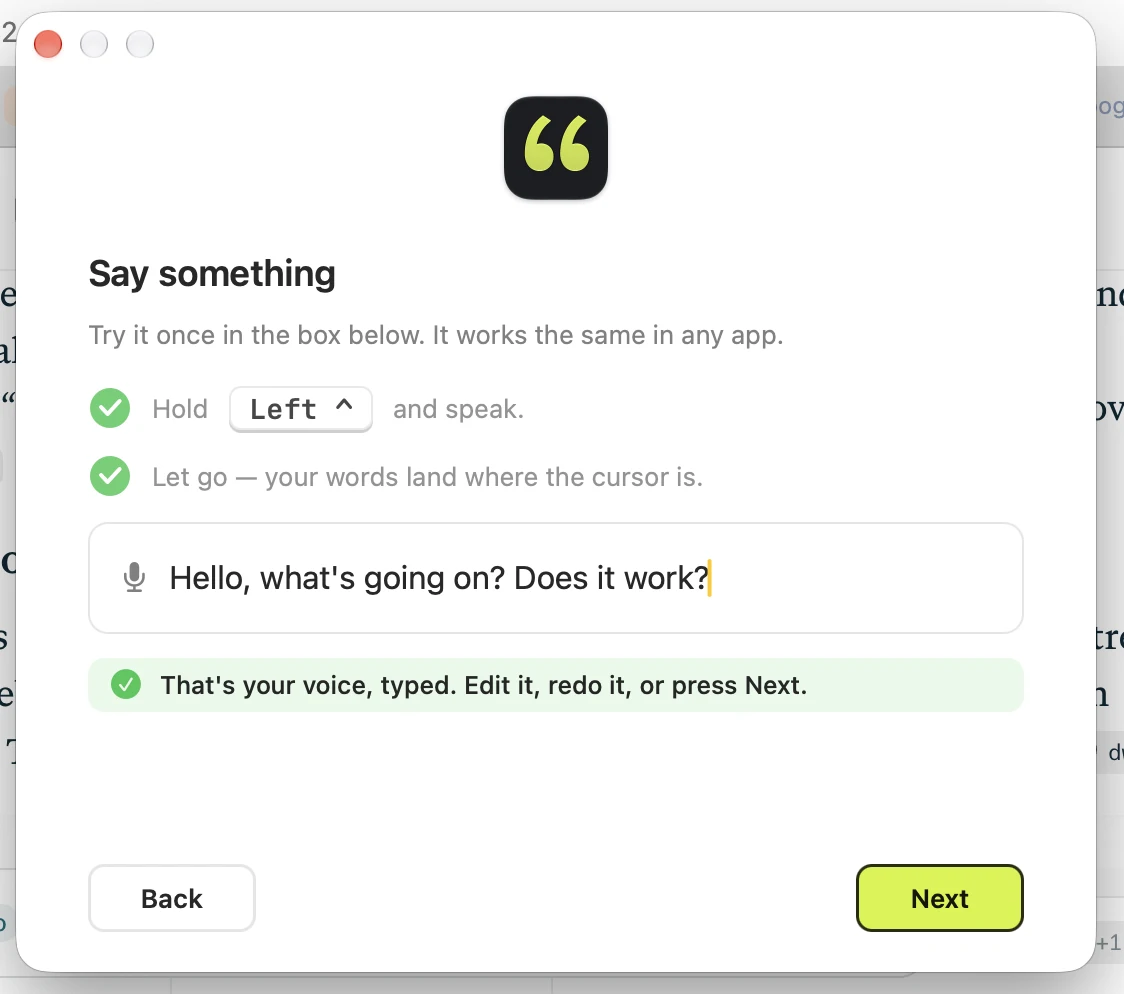
Figure 1First dictation in setup. Observed.

Verdict

General assessment

A compact, polished Mac app for dictation and reading aloud. In this session dictation worked in three languages and the first run explained its steps; reading aloud selected text did not start, and the better German voice the app pointed to could not be found. Offline operation, the privacy claims, memory use, delay, the browser extension, the Connections and Vocabulary tabs and uninstall were not tested.

Fit for the tester's use

The tester likes the licence screen, the language control and the setup. His notes end with the failed bullet-point test and no decision on continued use.

  • ObservedUnivocal is a Mac app that dictates into any app and reads text aloud. The tester ran it on an Apple M4 Pro with 24 GB. The installer is small, a licence screen comes before setup, and the main window showed a 574 MB dictation model downloading.
  • ObservedDictation worked: in the setup box, and in English, French and German in the tester's notes, including German spoken very fast on purpose. No accuracy count or timing was made.
  • ObservedReading aloud marked text did not start, and the tester could not change the key. The shortcut had worked once in the setup step. The cause was not isolated.
  • ObservedA popup pointed to a better German voice in macOS settings. The tester followed the four steps and found no premium voices.
  • ObservedSpoken bullet-point requests in English and German gave no bullets. No bullet feature is advertised in the screenshots.
  • Vendor claimThe app says audio is transcribed on this Mac and never uploaded. Offline use, network traffic, memory, delay, the browser extension, the Connections and Vocabulary tabs and uninstall were not tested.

Scorecard Status: Partial

  • Installation4/5Small DMG, drag to Applications, no account screen seen.
  • Onboarding and model choice3/5Clear steps and a download estimate; the voice popup could not be followed. No dictation model choice is offered.
  • Core function3/5Dictation worked; reading aloud did not.
  • Guidance and iteration3/5Many explanatory texts; the read-aloud shortcut and the formatting limits stayed unclear.
  • Performancen/aNot timed.
  • Documentationn/aOnly in-app text was seen.
  • Trust and privacyn/aNot audited.
  • Uninstalln/aNot tested.

Scores are proposed by the report author from the tester's evidence; n/a means not tested, not zero.

Test details

App
Univocal (NarNar Labs LLC per the licence screen) Observed
Version
0.3.33 (General settings) Measured
Source
Downloaded with Chrome; the exact page is not recorded. The directory lists the vendor site univocalapp.com.
Tester
Hans (founder of PromptQuorum) Observed
Start / end
Chrome download at 11:06 on the test day (macOS dialog says "today"). Test date and end time are not recorded; the ID uses the draft date.
Hardware
Apple M4 Pro, 24 GB unified memory ("always on an M4 Pro 24GB" in the notes). Earlier tests in this series recorded M3 Pro; see Sprich and LU. Tester view
System
macOS version not recorded.
Why tested
The developer contacted the tester after seeing the Sprich hands-on test on the PromptQuorum site. Tester view
Objective
Not stated as a goal. The notes show install, first run, dictation in three languages, settings, read aloud and a bullet-point test.
AI help used
Claude drafted this report from the tester's Word notes and 15 screenshots; the dictated parts of the notes are probably Univocal's own output (assumption). Assumption
Disclosure
The tester founded PromptQuorum, a content site and directory about local AI apps. Univocal was added to the directory on 2026-11-13 with an AI-written review based on the maker's pages, not on hands-on testing; this test is the first hands-on one. The developer contacted the tester; what he asked for is not recorded. The tester used the 14-day trial and no lifetime licence is visible in the screenshots. Univocal receives clicks from the site. No payment or sponsorship is recorded. Observed

Every statement carries a label:ObservedMeasuredTester estimateVendor claimThird partyAssumptionTester viewTester errorWhat the labels mean

Disclosure. The tester founded PromptQuorum, a content site and directory about local AI apps. Univocal was added to the directory on 2026-11-13 with an AI-written review based on the maker's pages, not on hands-on testing; this test is the first hands-on one. The developer contacted the tester; what he asked for is not recorded. The tester used the 14-day trial and no lifetime licence is visible in the screenshots. Univocal receives clicks from the site. No payment or sponsorship is recorded. The tester says the developer is from Korea and that Korea is one of the website's top markets (tester view, not verified here). No screenshot names a country.

Raw notes PDF: to be added

Six moments that shaped this test

All other apps just opened and nothing was there. This one actually has licence terms and something to click through.

Tester notes, lightly edited from dictation. All three are his judgment, not measurements.

How the test went

Download, install and setup

Observed

The developer had contacted the tester after the Sprich test went online. The DMG is small, 6.5 MB by the tester's reading; no screenshot. The directory lists about 6.3 MB for version 0.3.33 (third-party).

Observed

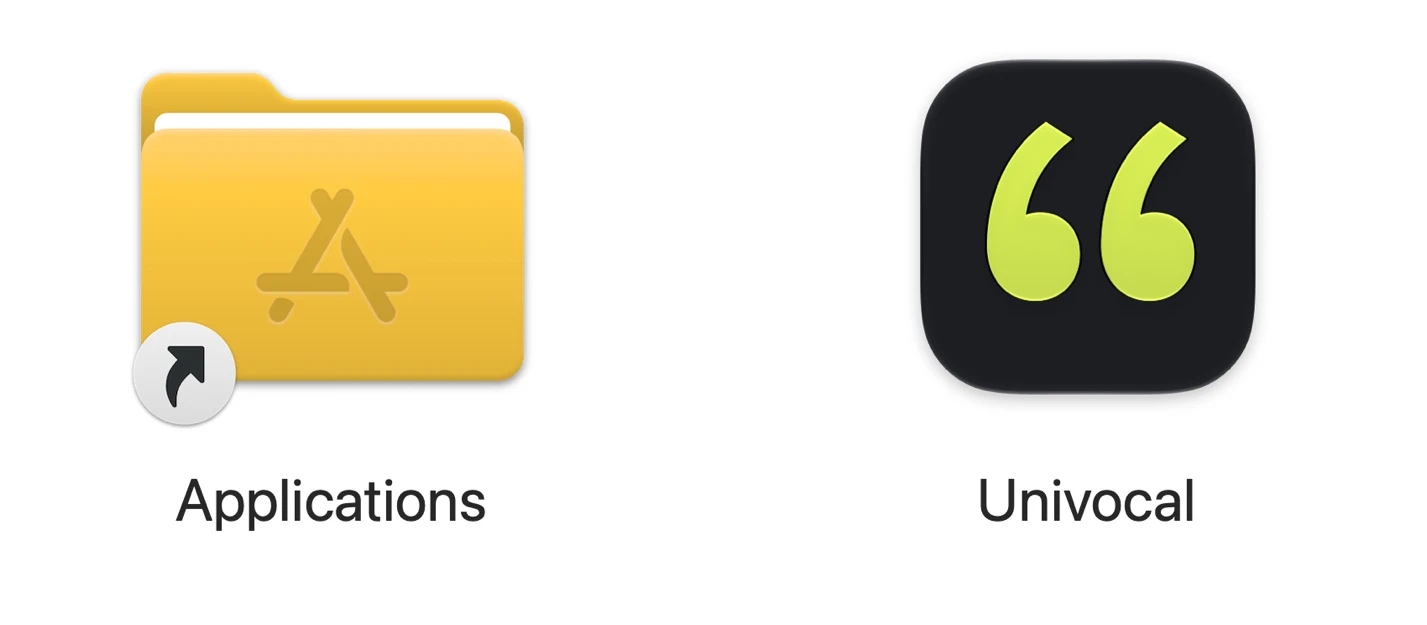
The installer window shows Applications on the left and Univocal on the right, the reverse of the usual layout. The drag step is still needed.

Figure 2Installer window, reversed order. Observed.
Observed

On first open macOS asked "Are you sure you want to open it?" and stated that Chrome downloaded the file at 11:06 and that Apple found no malicious software. Signing and notarisation status are not shown.

Figure 7First-open confirmation from macOS. Observed.
Observed

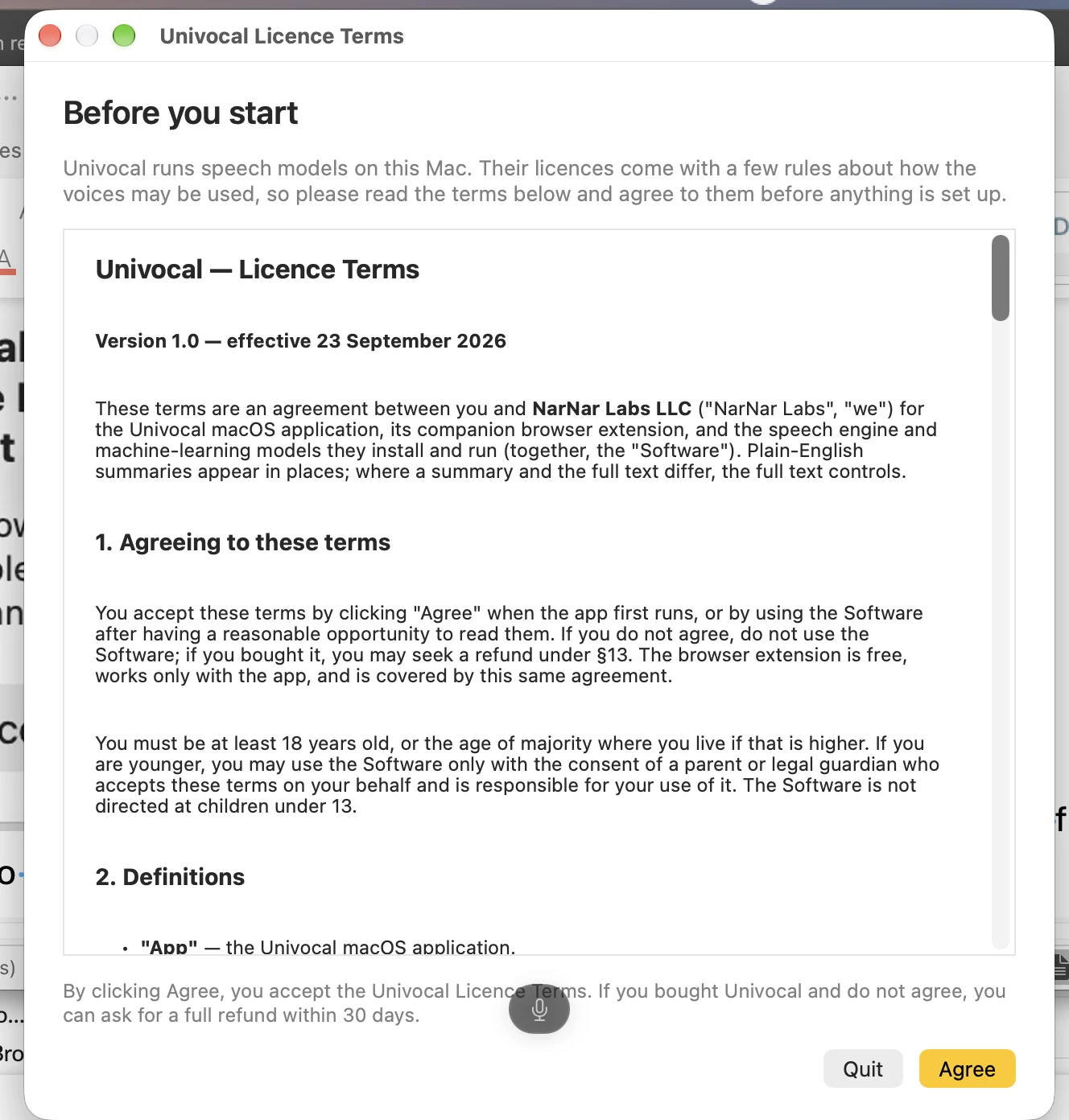
A licence window opened before setup: version 1.0, effective 23 September 2026, between the user and NarNar Labs LLC, covering the app, its companion browser extension and the speech models. Buttons: Quit, Agree. A 30-day refund is offered to buyers who disagree. Only the first lines were read.

Figure 3Licence terms before anything is set up. Observed.
Tester view

"All other apps just opened and nothing was there. This one actually has licence terms and something to click through." Not checked app by app.

Observed

Setup presets English (United Kingdom) as primary and lets the user add languages from a long list; the first language is also the language of the app windows and the order can be dragged. German and French were added.

Figure 8Language step with the list open. Observed.
Observed

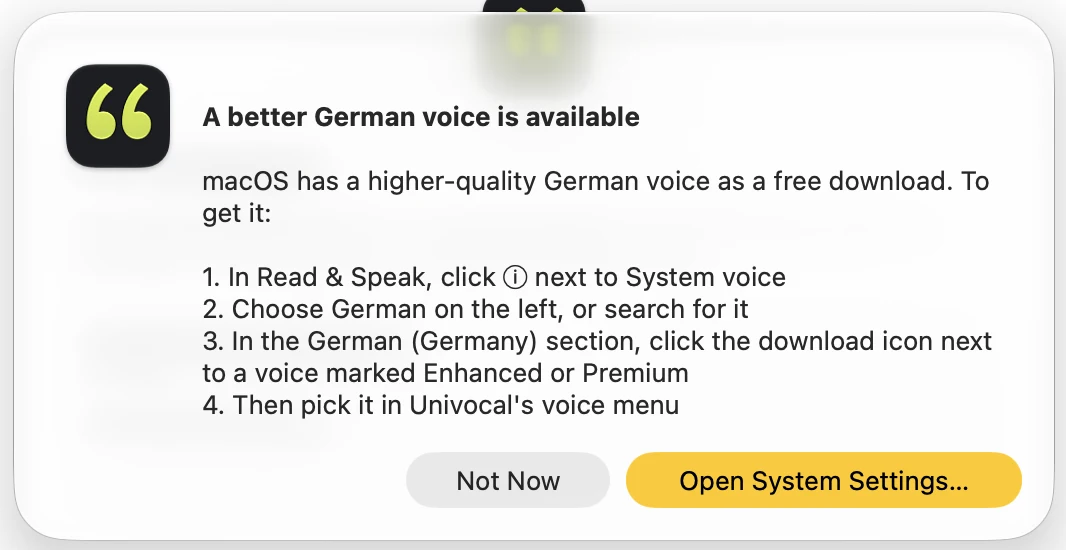
A popup said a better German voice is a free macOS download and gave four steps: Read & Speak, the info icon next to System voice, German in the left column, the download icon next to an Enhanced or Premium voice. The tester followed it and found no premium voices, though he knows such voices exist on iOS. Which step failed is not recorded.

Figure 5Popup pointing to macOS voices. Observed.
Measured

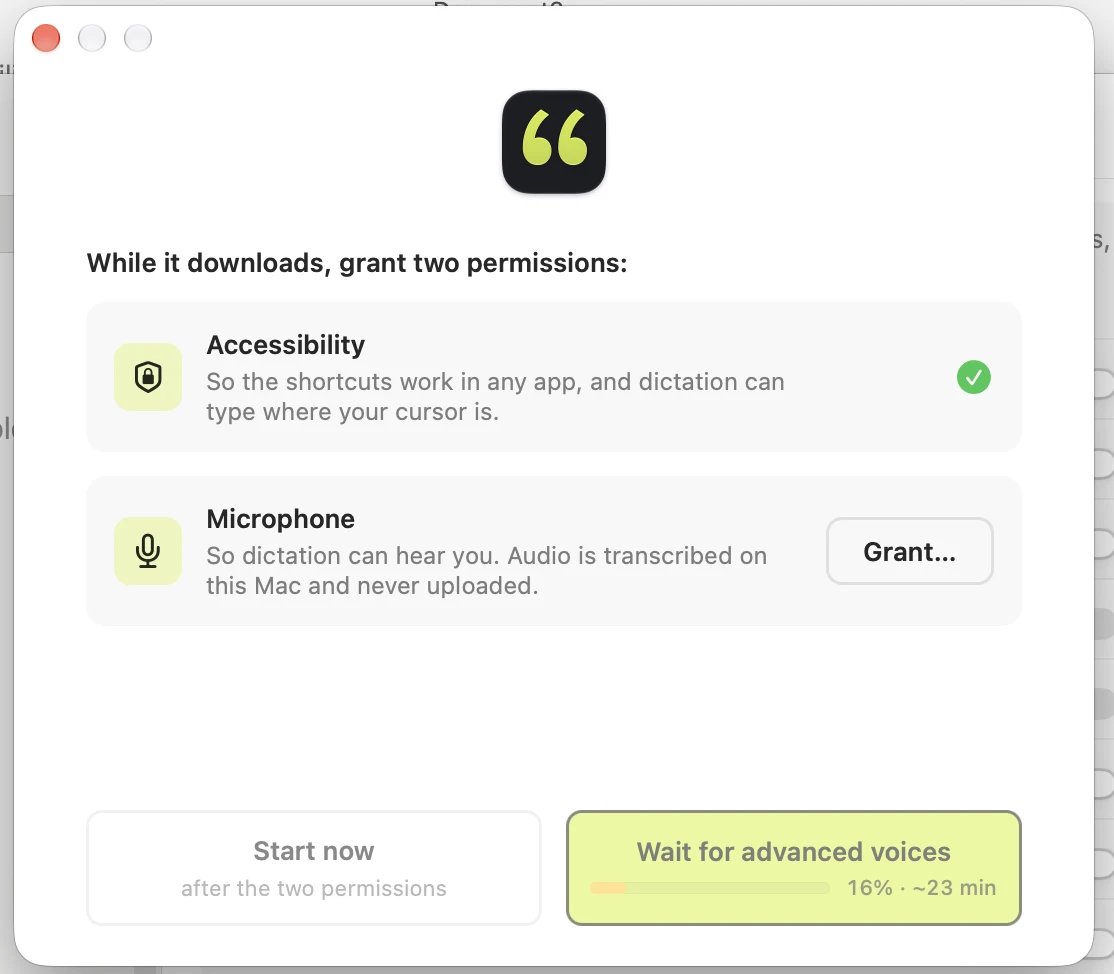
Setup asked for two permissions: Accessibility (ticked) and Microphone (Grant). The download button read "Wait for advanced voices", 16 %, about 23 min, and "Start now" waited for both permissions.

Figure 4Permissions step with a download estimate. Measured.
Measured

The main window showed "Downloading the dictation model (574 MB)... 17%" and a Dictate tile at 39 %; the Read aloud tile was ready with Option-Shift-R. What the two percentages measure and the total download size are not recorded. The window says the download "happens once and takes a few minutes"; the total time was not recorded.

Figure 9Main window during the first download. Measured.
Observed

The voice picker lists voices by language with a search box, All/Female/Male filters, a "Your languages" menu and a play button per voice; Apple's voices carry an Apple tag. German (Germany) showed Anna ticked. The tester finds the voice choice well organised.

Figure 10Voice picker. Observed.
Observed

In the "Hear it" step Option-Shift-R opened a reader window with the welcome text, Play, speed 1x, language Auto (English), voice Emma, text size and Escape to close. Whether audio played and words were highlighted is not recorded.

Figure 11Reader window from the Hear it step. Observed.

Usage

Observed

In the "Say something" step, holding Left Control and speaking typed "Hello, what's going on? Does it work?" into the box; both steps were ticked.

Figure 1First dictation in setup. Observed.
Observed

Dictation produced English, French and German text in the notes, including German spoken very fast on purpose, which the tester says worked. No language switch is recorded between them; the Dictation page says "Mix your languages" (assumption: automatic detection). No time, accuracy count or target app is recorded.

Observed

Dictation settings: voice key Left Control, mode Push (selected) or Toggle, "Remove fillers and false starts" on, "Keep transcript on clipboard" off, "Type words as you speak" off, listening glow on, spinner while processing, and a Recent dictations list. The tester likes that both modes are offered.

Figure 14Dictation settings. Observed.
Measured

General settings: version 0.3.33, launch at login on, Dock icon on, language English, appearance System, automatic update check on. The tabs are Languages, Dictation, Read Aloud, Connections, Vocabulary, Permissions and Licence; Connections and Vocabulary were not opened.

Figure 12General settings. Measured: version 0.3.33.
Observed

The Languages list shows English (United Kingdom) primary with Emma, German (Germany) with Wren and French (France) with Siwis, each with a play button. The tester calls the names funny.

Figure 13Languages and voices. Observed.
Observed

Reading aloud did not start when the tester marked text and pressed the button, and he could not change the key. Which text, app and key were used is not recorded. The shortcut worked once in the setup step.

Observed

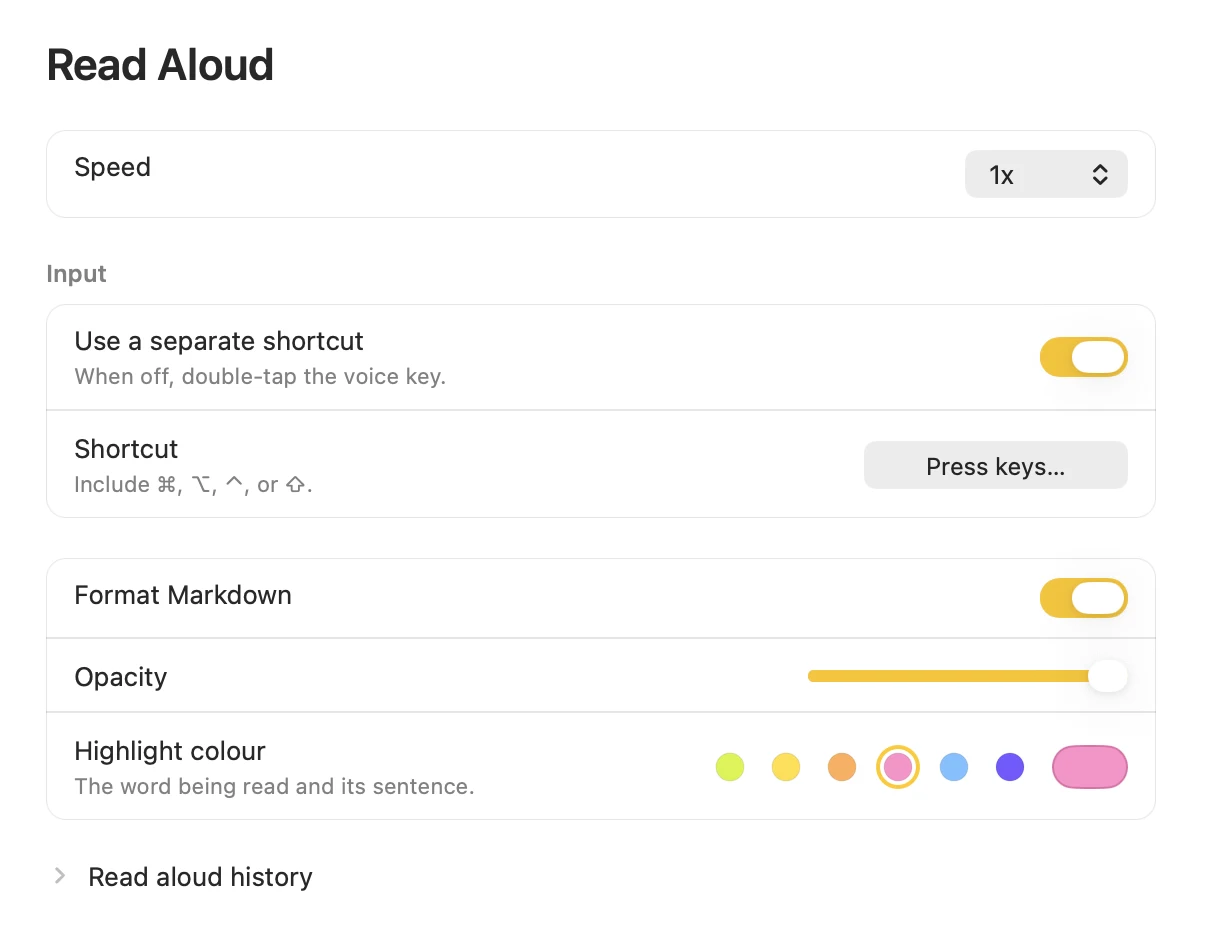
Read Aloud settings: speed 1x, "Use a separate shortcut" on, a Shortcut field reading "Press keys...", "Format Markdown" on, an opacity slider, highlight colours and a history. Whether the field was empty or showed a prompt is unclear (assumption: possible cause of the failure).

Figure 6Read Aloud settings. The shortcut field reads Press keys. Observed.
Observed

A spoken English request to list "cat, house, dog" and a German request ("Bitte als Bullet Points") gave no bullets; the German result joined two words into "Katzenhaus". No screenshot. The tester says another app he tried did the same.

Tester estimate

The tester kept three speech and model programs open at once and the Mac still worked; nothing was measured. He puts it down to each using a small model.

Tester view

"Soon my computer runs out of keys for all of these special functions."

Decision

Observed

The notes end with the bullet-point test and the pricing and trial note; no decision on continued use is stated.

Observed

The app shows "Trial · 14 days left" and a Buy button. The vendor site (screenshot, not shown here) states $39 once, a Black Friday price of $15 with a code from 20 to 30 November, 14 days free, no subscription and no account. No account step is among the screenshots.

Figure 9Main window during the first download. Measured.
Tester view

He is surprised that another dictation tool he tested carried a formatting engine of more than 2 GB while this one shows a 574 MB dictation model.

Tester view

"It is very well done with the languages: you can really define which languages you want to use."

Claims versus what the tester saw

ClaimSourceObservedLabel
Setup text: the voice and speech models download "once and takes a few minutes".Main windowAn earlier screen estimated about 23 minutes at 16 %; total time not recorded.Observed
"Audio is transcribed on this Mac and never uploaded." Reader text: nothing read or said leaves the Mac.Setup and reader textNot verified. No network traffic was inspected and no offline run was tried.Vendor claim
Reader: "Every word you hear lights up as it is spoken."Reader windowReader window seen; audio and highlight not recorded.Observed
Univocal reads and dictates in the languages chosen.Languages stepDictation seen in English, French and German; reading in German and French not recorded.Observed
macOS has a better German voice as a free download.Setup popupThe tester did not find it.Observed
$39 once, 14 days free, no card, no account. Black Friday 20-30 November: $15 with a code.Vendor site (screenshot)Trial banner seen; no account screen among the screenshots.Vendor claim
About 1.2 GB first-run download, 32 languages, DMG about 6.3 MB.PromptQuorum directory entry574 MB component seen; language list long but not counted; DMG 6.5 MB read by the tester.Third party

Usage log

#TaskAppResultTimeStatusFigures
1Dictation in the setup box, hold Left ControlUnivocal setupSentence typed in the boxNot recordedPassFig. 1
2English sentence ("Hi, how are you? How does it work?")Not recordedText in the notes; target app not recordedNot recordedPass-
3French questionNot recordedText in the notes; accuracy not judged by the testerNot recordedPass-
4German question spoken very fast on purposeNot recordedWorked per the testerNot recordedPass-
5Reader window from the setup step, Option-Shift-RUnivocal setupWindow opened; audio not recordedNot recordedPartialFig. 11
6Read marked text aloudNot recordedDid not startNot recordedFail-
7Change the read-aloud keyUnivocal settingsNot achievedNot recordedFailFig. 6
8Find a premium German voicemacOS settingsNot foundNot recordedFailFig. 5
9Bullet points by voice, English requestNot recordedNo bulletsNot recordedFail-
10Bullet points by voice, German requestNot recordedTwo words joined, no bulletsNot recordedFail-
11Three speech and model programs at onceMacComputer stayed usable per the testerNot recordedPass-
12Offline use, uninstall, Connections, Vocabulary, browser extensionNot applicableNot testedNot recordedNot completed-

Where the tester got it wrong

  • Tester errorCalled the macOS first-open dialog a standard warning for an app that is not from the App Store and not registered with Apple. The dialog says Apple checked it and found no malicious software; its signing status is not shown.
  • Tester errorSaid Emma was the German voice he selected. The screenshots show Emma with English (United Kingdom); German shows Anna in the voice list and Wren in the Languages list.
  • AssumptionThe notes' first dictated sentence differs from the one in the setup screenshot. Probably two separate attempts; not known.
  • Assumption"I like this version one zero" is read as the licence version 1.0, not the app version 0.3.33.
  • Tester errorGaps in the record: test date, end time, macOS version, total download time, the app used for the French and German tests, the key and text used when read aloud failed, a screenshot of the bullet test, what the developer wrote, how the other two programs were named. Voice-to-text slips were normalised: "meeting" is read as "setting" (the popup's button is Open System Settings), and "Strato sort program" is unclear and was left out. The line "Bien sûr !" in the French exchange has no recorded speaker.

Findings register

IDFindingCategoryLabelSeverityFigures
UV-01The DMG is 6.5 MB per the tester; no screenshot. The directory lists about 6.3 MB for 0.3.33 (third-party).InstallObservedPositive-
UV-02The installer window shows Applications on the left and Univocal on the right, the reverse of the usual layout (tester view). The drag step is still needed; the tester notes some apps avoid it.InstallObservedInfoFig. 2
UV-03On first open macOS asks "Are you sure you want to open it?" and states Chrome downloaded it at 11:06 and that Apple found no malicious software. Signing and notarisation status are not shown.InstallObservedInfoFig. 7
UV-04A licence window opens before setup: version 1.0, effective 23 September 2026, between the user and NarNar Labs LLC, covering the app, its companion browser extension and the speech models. Buttons: Quit, Agree. A 30-day refund is offered to buyers who disagree. The tester says other apps tested simply opened (tester view; not checked app by app). Only the first lines were read.OnboardingObservedPositiveFig. 3
UV-05The language step presets English (United Kingdom) as primary and lets the user add languages from a long list (Arabic to Danish and beyond); the first language is also the language of the app windows; the order can be dragged. German and French were added. Whether more languages cost memory is not known. The directory lists 32 languages (third-party). Partly hidden text suggests the download starts after this step (assumption).OnboardingObservedPositiveFig. 8
UV-06A popup says a better German voice is a free macOS download and gives four steps: Read & Speak, the info icon next to System voice, German in the left column, the download icon next to an Enhanced or Premium voice. The tester followed it and found no premium voices, though he knows such voices exist on iOS. Which step failed is not recorded; the "System voice" control is not visible in any screenshot.OnboardingObservedMediumFig. 5
UV-07Setup asks for two permissions: Accessibility (ticked) and Microphone (Grant). The download button reads "Wait for advanced voices", 16 %, about 23 min, and "Start now" waits for both permissions. The text says audio is transcribed on this Mac and never uploaded (vendor claim).OnboardingMeasuredPositiveFig. 4
UV-08The main window shows "Downloading the dictation model (574 MB)... 17%" and a Dictate tile at 39 %; the Read aloud tile is ready with Option-Shift-R. What the two percentages measure, and the total download size, are not shown or recorded. The directory lists about 1.2 GB (third-party). The tester says the download began without being asked.OnboardingMeasuredInfoFig. 9
UV-09The main window says the download "happens once and takes a few minutes"; the earlier setup button estimated about 23 min at 16 %. Whether 23 min was the full or the remaining time is not stated (assumption: remaining). Actual duration not recorded.OnboardingMeasuredLowFig. 4, Fig. 9
UV-10The voice picker lists voices by language with a search box, All/Female/Male filters, a "Your languages" menu and a play button per voice; Apple's voices carry an Apple tag. German (Germany) showed Anna ticked. The tester finds the voice choice well organised (tester view).OnboardingObservedPositiveFig. 10
UV-11In the "Hear it" step Option-Shift-R opened a reader window with the welcome text, Play, speed 1x, language Auto (English), voice Emma, text size and Escape to close. Whether audio played and words were highlighted is not recorded.OnboardingObservedInfoFig. 11
UV-12In the "Say something" step, holding Left Control and speaking typed "Hello, what's going on? Does it work?" into the box; both steps ticked.DictationObservedPositiveFig. 1
UV-13Dictation produced English, French and German text in the notes, including German spoken very fast on purpose, which the tester says worked. No language switch is recorded between them; the Dictation page says "Mix your languages" (assumption: automatic detection). No time, accuracy count or app is recorded.DictationObservedPositive-
UV-14Dictation settings: voice key Left Control, mode Push (selected) or Toggle, "Remove fillers and false starts" on, "Keep transcript on clipboard" off, "Type words as you speak" off, listening glow on, spinner while processing, and a Recent dictations list. The tester likes that both modes are offered (tester view).DictationObservedInfoFig. 14
UV-15General settings: version 0.3.33, launch at login on, Dock icon on, language English, appearance System, automatic update check on, Check Now, Report Issue. Tabs: Languages, Dictation, Read Aloud, Connections, Vocabulary, Permissions, Licence; Connections and Vocabulary were not opened. The directory lists 0.3.33 as released on 2026-11-11 (third-party).SettingsMeasuredInfoFig. 12
UV-16Languages list: English (United Kingdom) primary with Emma, German (Germany) with Wren, French (France) with Siwis, each with a play button. The tester calls the names funny (tester view). Which voices come from Apple is not shown; only the picker labels voices Apple.SettingsObservedLowFig. 13, Fig. 10
UV-17Read aloud did not start when the tester marked text and pressed the button, and he could not change the key. Which text, app and key were used is not recorded. The shortcut worked once in the setup step. Cause not isolated.Read aloudObservedHigh-
UV-18Read Aloud settings: speed 1x, "Use a separate shortcut" on, a Shortcut field reading "Press keys...", "Format Markdown" on, an opacity slider, highlight colours and a history. Whether the field was empty or showed a prompt is unclear (assumption: possible cause of UV-17).Read aloudObservedLowFig. 6
UV-19The app shows "Trial · 14 days left" and a Buy button. The vendor site (screenshot, not shown here) states $39 once, a Black Friday price of $15 with a code from 20 to 30 November, 14 days free, no subscription and no account (vendor claim). No account step is among the screenshots.Trial and priceObservedInfoFig. 9
UV-20A spoken English request to list "cat, house, dog" and a German request ("Bitte als Bullet Points") gave no bullets; the German result joined two words into "Katzenhaus". No screenshot. The tester says another app he tried did the same. No bullet feature is advertised in the screenshots, so this is not a miss against a claim.FormattingObservedLow-
UV-21The tester ran three speech and model programs at once and the Mac still worked; nothing was measured (tester view: because each uses a small model).PerformanceTester estimateInfo-
UV-22The setup and reader texts say everything stays on the Mac. No network traffic was inspected and no offline run was tried.TrustVendor claimInfo-
UV-23Not tested or not recorded: offline use, delay, memory, Connections, Vocabulary, the browser extension, live typing, other languages, reading in German or French, uninstall, macOS version.ScopeObservedInfo-

Severity is the impact on a first-time user. Proposed, not measured. Info marks a finding that is neither a problem nor a strength; Positive marks something that worked well.

Who it is for

Likely fit

  • AssumptionMac users on Apple Silicon who dictate in English, French or German and want a small paid app with a trial (assumption from one session).

Likely poor fit

  • AssumptionAnyone who needs reading aloud to work out of the box, or bullet-point formatting by voice.

Retest. Retest after a version change or once the read-aloud failure is explained. Cover: read aloud with the default shortcut, a premium German voice, the Connections and Vocabulary tabs, offline use with traffic inspected, delay, memory, uninstall; record macOS version and date.

It is very well done with the languages: you can really define which languages you want to use.

Tester notes, lightly edited from dictation. All three are his judgment, not measurements.

Frequently asked questions

Does Univocal dictation work in several languages?

Yes, in the session. Dictation produced English, French and German text in the tester's notes, including German spoken very fast on purpose. No accuracy count was made and the French result was not judged by the tester. Observed

Did reading aloud work in Univocal?

Not when the tester used it on marked text: it did not start, and he could not change the key. The shortcut worked once in the setup step and the reader window opened there; whether audio played is not recorded. The cause was not isolated. Observed

How big is the Univocal download?

The installer is about 6.5 MB by the tester's reading, and the main window showed a 574 MB dictation model during the first download. The total first-run download was not recorded; the directory lists about 1.2 GB (third-party). Runtime memory was not measured. Measured

Does Univocal run offline and keep audio on the Mac?

The setup text says audio is transcribed on the Mac and never uploaded, and the reader text says nothing read or said leaves it. No network traffic was inspected and no offline run was tried, so this is not verified. Vendor claim

How much does Univocal cost and is there a trial?

The app showed a 14-day trial and a Buy button. The vendor site, seen in a screenshot, states $39 once and a Black Friday price of $15 with a code from 20 to 30 November, with no subscription and no account. These are vendor claims. Vendor claim

Can Univocal turn spoken bullet points into a list?

Not in the session. An English and a German request for bullet points gave plain text, and the German result joined two words. No bullet feature is advertised in the screenshots, so this is not a miss against a claim. Observed

Background on the maker

Third-party and unverified. Kept apart from the test.

  • Third partyPublished by NarNar Labs LLC; proprietary, no source repository found; the maker's pages name no founder, country or address. Apple silicon Macs with macOS 14 or later only.
  • Third partyEarliest changelog entry 0.3.0 on 2026-07-29; 0.3.33 on 2026-11-11; interface languages include English, Korean, Japanese, Chinese, Spanish, German and French. Source: PromptQuorum directory review, checked 2026-11-13.

More hands-on tests

How to read the labels

Observed
Seen first-hand in the app, a screenshot or the tester's notes.
Measured
A value read from a dialog, counter or tool, with the number given.
Tester estimate
The tester's own estimate; not timed or counted.
Vendor claim
Stated by the app, its store listing or its website; not verified.
Third party
From another source (an AI assistant, an article); not verified here.
Assumption
An inference. It may be wrong.
Tester view
The tester's judgment or opinion.
Tester error
Where the tester made a mistake or missed something.

Sources

  • Tester's hands-on notes and screenshots (original Word notes; PDF of the raw notes to be added).
  • PromptQuorum directory entry and review of Univocal (slug: univocal), verified 2026-11-13.
  • Vendor site univocalapp.com (vendor claims); vendor changelog listed in the directory, not opened for this test.

Test ID pq-test-univocal-2026-11-13 · Test standard v0.2 · Raw notes PDF: to be added

How I test apps — and why there is no fixed standard — These tests are my personal views, not guarantees.

MCP