PromptQuorumBuilt for humans. Structured for AI.

PromptQuorum hands-on test · Sprich · 9 and 13 November 2026

Sprich on an M4 Pro Mac with 24 GB: Local Dictation That Types Into Any App

By · Founder of PromptQuorum · Discovery engine for open-weight & open-source AI

Two sessions, 9 and 13 November 2026: a polished five-step setup, quick dictation in English and German once the tester used the key correctly, a meeting recorded and split into two speakers despite poor room sound, a German-only interface, and several side features not tried.

Related: PromptQuorum review of Sprich · Local AI app directory

Figure 1Welcome screen (German). It shows press once, speak, press again. The "never leave your Mac" line is a vendor-claim.

Verdict

General assessment

A carefully built, German-first dictation app for Apple Silicon Macs. In this session dictation worked in Word, WhatsApp and Telegram in English and German; Russian did not. In a second session on 13 November a 6-minute meeting with two people was recorded and transcribed, with the speakers told apart, despite very poor room sound; the tester says the meeting function works well. File transcription, text rewriting, offline operation, the privacy claims and uninstall were not tested.

Fit for the tester's use

The tester is impressed, gives it five out of five and recommended it to a contact. He rates it as fast as his cloud dictation tool, though nothing was timed. Whether he will keep using it is not stated in his notes. He also finds it really great that the meeting notes run locally.

  • ObservedSprich is a Mac dictation app: press a key, speak, and the text appears where the cursor is. The tester ran it on an Apple M4 Pro with 24 GB. Setup has five steps and downloads two models of about 3.3 GB together.
  • ObservedDictation worked in Microsoft Word, WhatsApp and Telegram, in English and German. A Russian test failed. A product name came out as "Sprich Ae" in the history.
  • Tester errorThe tester first judged the app slow because he used the default toggle mode wrongly (press once, speak, press again). After using it correctly he found it instant. Speed was never timed.
  • ObservedThe interface is German only; the tester found no language switch.
  • Vendor claimThe app says everything runs locally and offline and that voice and text never leave the Mac. This was not tested.
  • ObservedIn a second session on 13 November the tester recorded a 6-minute meeting with two people. The room sound was very bad; Sprich still transcribed it and assigned two speakers. A follow-up dialog offers Zusammenfassung, Protokoll, Follow-up-E-Mail and Arztbrief. The tester says the meeting function works well.
  • ObservedThe text-rewrite menu, file transcription, the dictionary, the tone setting's effect, offline use and uninstall were not tested.

Scorecard Status: Partial

  • Installation4/5Small DMG, drag to Applications; an account is required.
  • Onboarding and model choice4/5Five clear steps, background download; no model choice is offered.
  • Core function4/5Dictation worked in three apps in English and German; Russian failed.
  • Guidance and iteration3/5The default key mode misled the tester once and the interface is German only; a feedback form is built in.
  • Performancen/aNot timed. The tester estimates it as instant after correct use.
  • Documentationn/aOnly in-app text was seen; no manual or website guide was opened.
  • Trust and privacyn/aNot audited. Local and offline claims were not tested.
  • Uninstalln/aNot tested.

Scores are proposed by the report author from the tester's evidence; n/a means not tested, not zero.

Test details

App
Sprich (sprich.ai); the window header reads "sprich.ai" Observed
Version
Not recorded. The directory checked version 2.2.4 on the vendor site on 2026-11-09; the tester's build may differ.
Source
Not recorded. The directory lists the vendor download page at sprich.ai.
Tester
Hans (founder of PromptQuorum) Observed
Start
2026-11-09. The first dictation in the history is at 17:43 and the last screenshot at 18:07; install start and end time are not recorded. A second session on 2026-11-13 covered one meeting recording (12:24 per the app header). Observed
Ended
Not recorded
Hardware
Apple M4 Pro, 24 GB unified memory, nothing else running. The notes' header says "Mac 4 ... VRAM"; the chip was named M4 Pro in the dictated notes. Observed
System
macOS version not recorded. The directory lists macOS 15 or later and Apple Silicon only (third-party).
Why tested
The notes compare it with the cloud dictation tool the tester uses now and say he would not share confidential data with that tool. Tester view
Objective
Not stated as a goal. The notes show a first look at setup, dictation in three apps, languages, history, settings and the meetings tab. The second session recorded one meeting.
Apps dictated into
Microsoft Word, WhatsApp, Telegram Observed
AI help used
Claude drafted this report from the tester's Word notes and 15 screenshots, and the Meeting mode chapter from the tester's message of 13 November and 2 further screenshots. The dictated parts of the notes appear to come from Sprich itself (assumption: the history entries match the notes' text), so some slips in the notes may be app output. Assumption
Disclosure
The tester founded PromptQuorum, a content site and directory about local AI apps. Sprich was added to the directory on 2026-11-09, the same day as this test, with an AI-written review. The developer replied to the tester after the test; the date is not stated, and whether he had these notes is not recorded. Sprich receives clicks from the site. No payment or sponsorship is recorded in the notes. Observed

Every statement carries a label:ObservedMeasuredTester estimateVendor claimThird partyAssumptionTester viewTester errorWhat the labels mean

Disclosure. The tester founded PromptQuorum, a content site and directory about local AI apps. Sprich was added to the directory on 2026-11-09, the same day as this test, with an AI-written review. The developer replied to the tester after the test; the date is not stated, and whether he had these notes is not recorded. Sprich receives clicks from the site. No payment or sponsorship is recorded in the notes.

Raw notes PDF: to be added

Six moments that shaped this test

The interface, the setup, really nice, really professional, top-notch.

Tester notes, lightly edited from dictation. Both are his judgment, not measurements.

How the test went

Download, first launch and setup

Observed

The test ran on 9 November 2026. The tester downloaded a small DMG, which he read as 20 MB; no screenshot. The installer window shows the app icon beside an Applications shortcut. The directory lists 18.2 MB for version 2.2.4 (third-party).

Figure 2Installer window. Observed.
Tester view

The tester likes the logo, a German play on the word Sprich split into “spr” and “ich”.

Observed

An account is needed: setup step 1, “Anmelden”, is ticked before the model step, and the tester says registration is required.

Measured

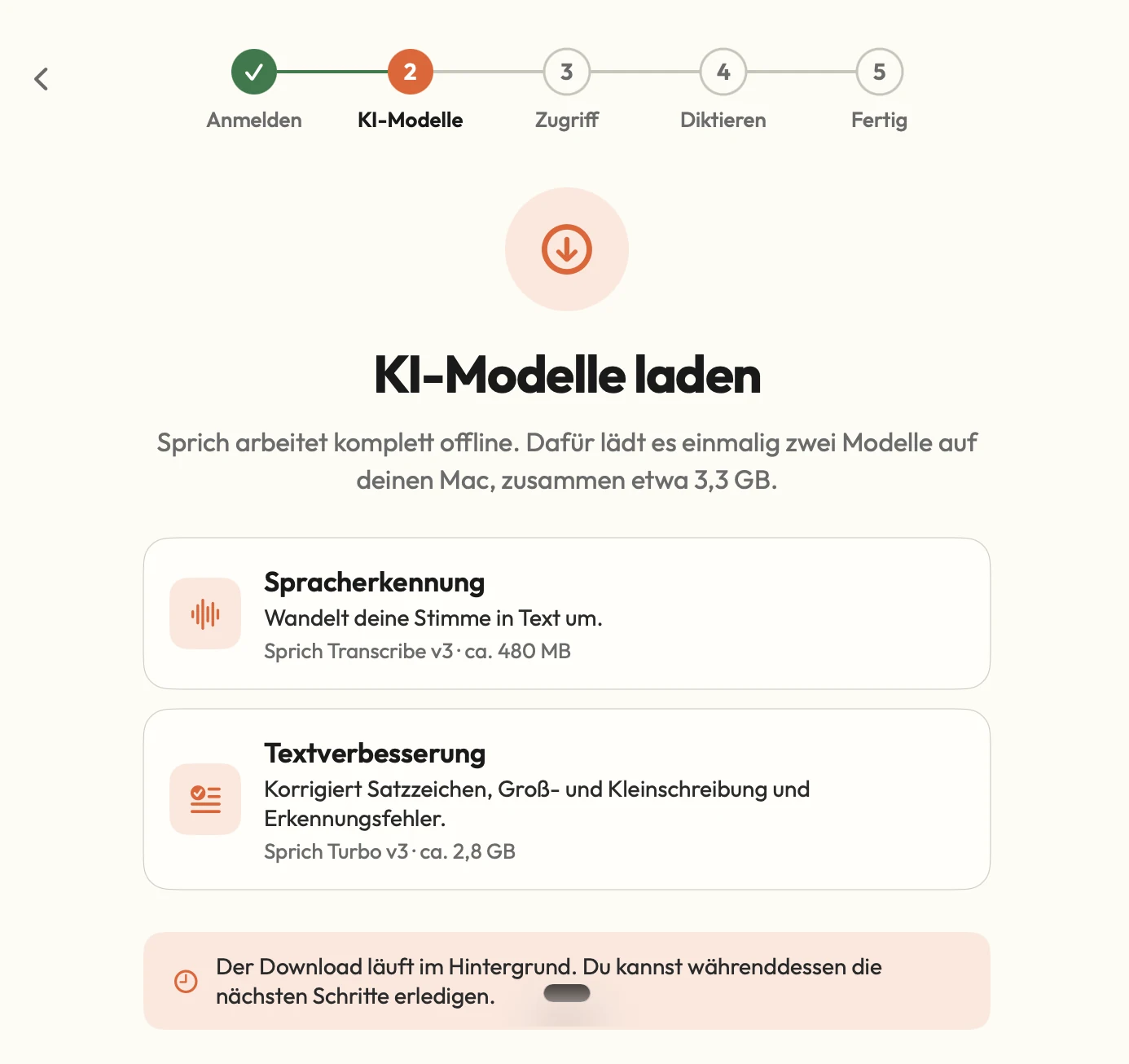
Step 2 downloads two models once: Sprich Transcribe v3 (speech recognition, about 480 MB) and Sprich Turbo v3 (text improvement, about 2.8 GB), about 3.3 GB together by the app’s own text. The download runs in the background while the next steps are done. These are download sizes, not runtime memory.

Figure 3Model step of the setup. Sizes are the app's own figures (measured); "works fully offline" is a vendor-claim.
Observed

The screens do not name the models underneath. The tester noticed this and wanted to find out.

Observed

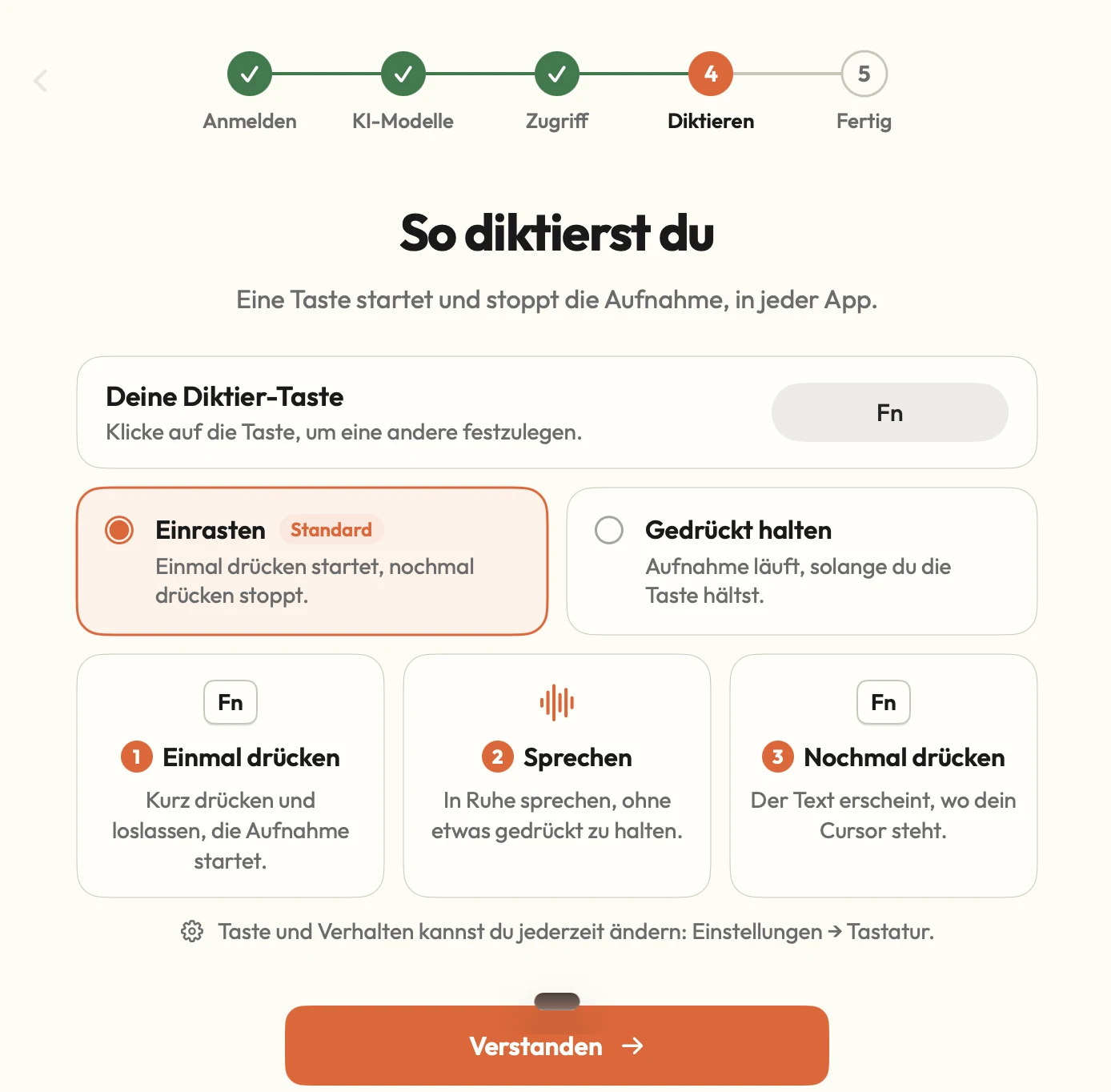
He changed the dictation key; which key he chose is not recorded. Step 4 shows Fn, while the welcome screen’s illustration shows right Command. Two modes exist: Einrasten (press to start, press to stop; marked Standard) and Gedrückt halten (record while held).

Figure 4Key and mode step. The toggle mode is marked Standard. Observed.
Measured

He reached the last step, “Fast geschafft”, while the models were still downloading: speech recognition 72 %, text improvement 12 %. Total download time and setup time are not recorded.

Figure 5Models still downloading at the end of setup. Time not recorded. Measured.

Usage

Tester error

The first Word tests felt slow and one text seemed to go missing. The tester wrote that a speech tool has to answer within a second or two and that his cloud tool was faster. Then he found his own mistake: in the default toggle mode the key has to be pressed once to start and once to stop. He corrected the notes.

Tester estimate

With the key used wrongly, the tester estimates several seconds, sometimes over 10 s, before text appeared. After correct use he found the app instant. Nothing was timed.

Observed

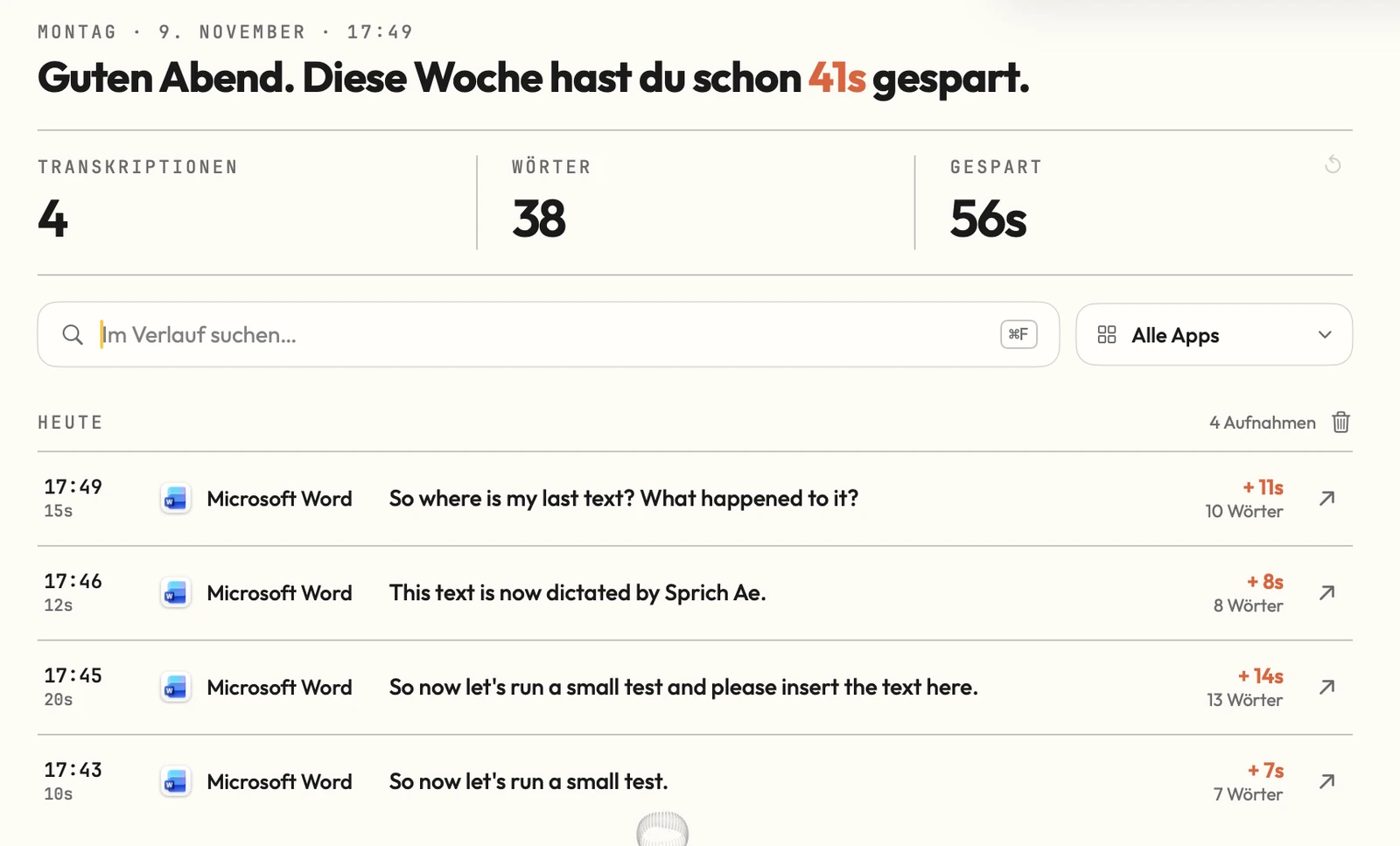
The first four English dictations into Word, 17:43 to 17:49, are 7 to 13 words each. One reads “Sprich Ae” in the history where the tester’s notes show “Sprich AI”; what he said and whether he edited the text are not recorded.

Figure 6History after the first four tests in Word, 9 November, 17:43 to 17:49. Observed.
Observed

German dictation into WhatsApp arrived with greeting, paragraphs and punctuation, and the tester says it sorted the text correctly. One phrase, “die doppelt drücken knüpfen muss”, reads oddly; the intended wording is not recorded.

Figure 7German dictation into WhatsApp. Text and punctuation as inserted; one phrase reads oddly. Observed.
Observed

English dictation into Telegram arrived as three messages with filler words such as “Uh” kept. The setup screen promises correction of punctuation, capitalisation and recognition errors, not fillers.

Figure 8English dictation into Telegram. Filler words stay in the text. Observed.
Observed

A French sentence was dictated and its text is in the notes; the tester did not judge accuracy and the spoken sentence is not recorded. A Russian test did not work: the app did not understand the words and the output was garbled. The language setting at that time is not recorded; that it was set to German is an inference.

Measured

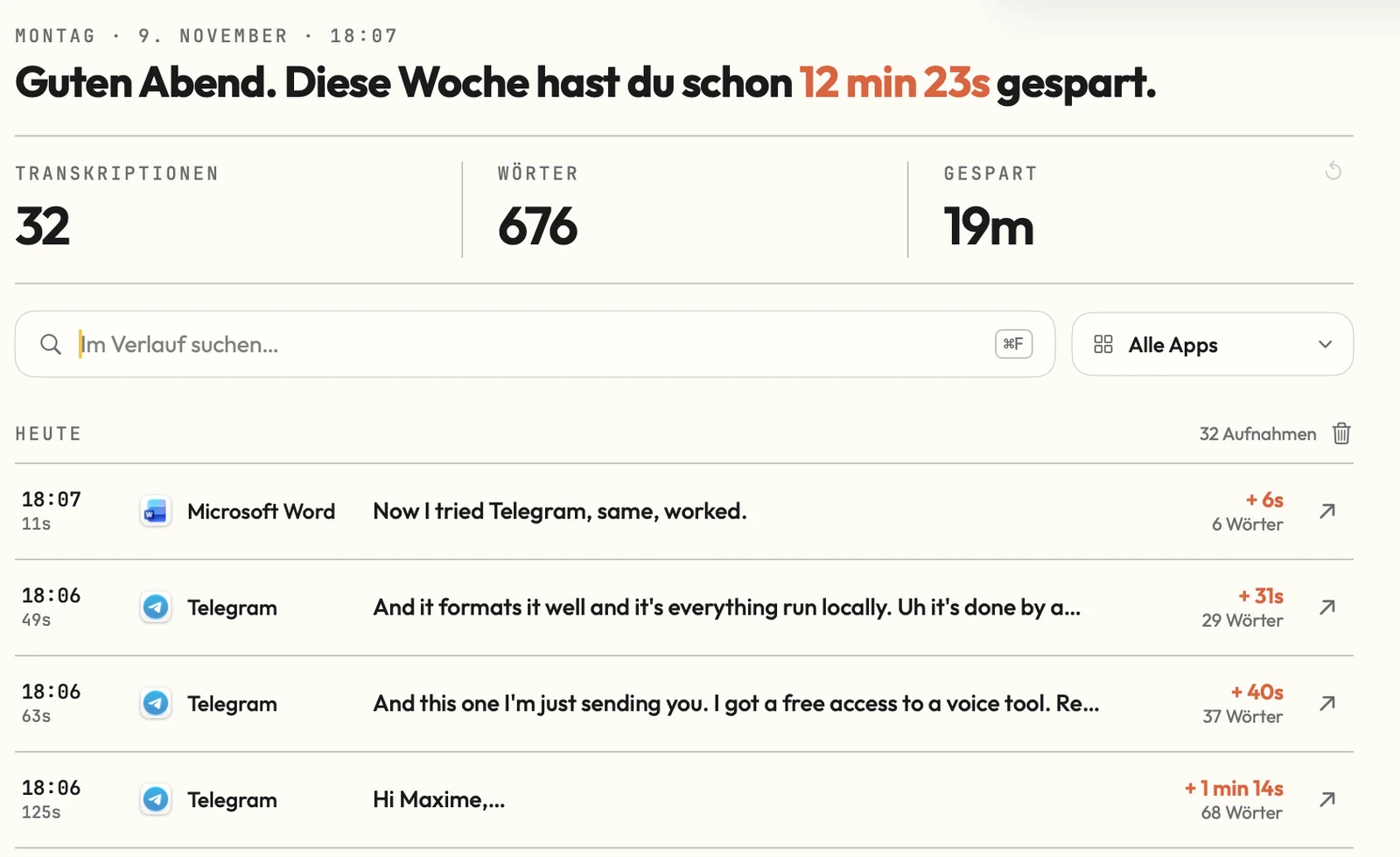
The History tab kept every dictation with time, target app, text, recording length, word count and saved time, plus a search box and an app filter. At 17:49 the headline said 41 s saved this week and the tile 56 s; at 18:07 (32 transcriptions, 676 words) the headline said 12 min 23 s and the tile 19 m. The app does not explain how “saved” is computed.

Figure 9History at 18:07 on 9 November. The two saved-time figures differ. Measured by the app.
Tester view

Later he switched to hold-to-talk, the mode he is used to, and was impressed again. Not timed.

Settings, extras and the developer’s reply

Observed

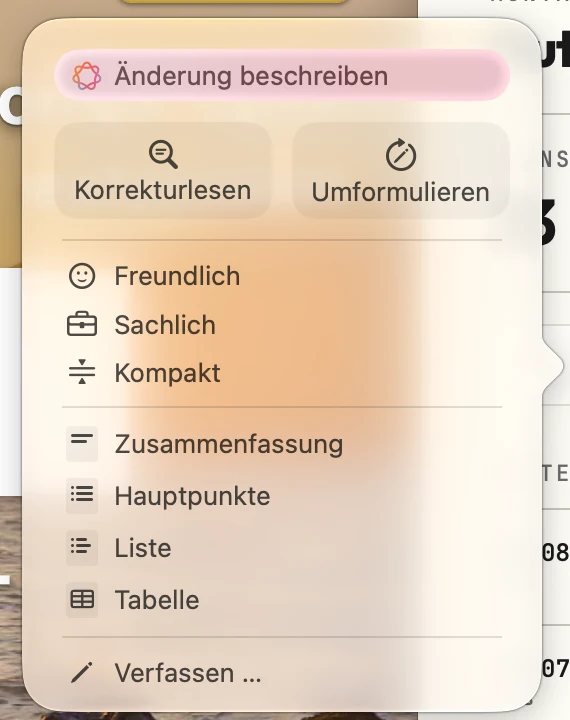
A popup menu offers Änderung beschreiben, Korrekturlesen, Umformulieren, Freundlich, Sachlich, Kompakt, Zusammenfassung, Hauptpunkte, Liste, Tabelle and Verfassen. The tester wanted to understand how it works and did not use it. Which program provides the menu, Sprich or macOS, is not recorded.

Figure 10Text-rewrite menu. Not used in the test; which program provides it is not recorded. Observed.
Observed

Settings has a Schreibton dropdown, Formal (ticked) or Informell. Only the dropdown was seen; the tester’s “Wow” is about the option, not a tested result.

Figure 11Writing-tone setting. Only the dropdown was seen; the effect was not tested. Observed.
Observed

The recording indicator can be set to Taste, Mikro (selected) or Kein. The tester saw a microphone bubble change from grey to orange; the header shows “Mikro bereit”.

Figure 12Recording indicator setting. Observed.
Observed

The sprich.ai account page offers a password change and two-factor authentication. The tester was “really impressed” by the latter, but the card shows only an “Aktivieren” link, so it was not switched on.

Figure 13Website account page. Observed.
Vendor claim

The Meetings tab offers “Meeting aufnehmen”; its tip says calls give a transcript, summary and tasks and everything stays on the Mac. The tester tried it in a second session (see the Meeting mode chapter).

Figure 14Meetings tab at first open, before the 13 November recording. The summary claim in the tip is a vendor-claim.
Observed

He looked for a language switch to make English screenshots and found none; the interface is German only.

Observed

The built-in “Bug melden” form has Bug, Feedback and Feature tabs and fields for title, description, expected and actual result, frequency and up to 3 attachments of 1 MB each. The “Mitgesendete Daten” section was not opened and whether anything was sent is not recorded. “Transcripts are never sent” is the form’s own line.

Figure 15Feedback form. Whether it was submitted is not recorded. The "never sent" line is a vendor-claim.
Vendor claim

The developer replied to the tester in German after the test; the date is not stated. Paraphrased: he is glad the tester now makes his recordings with Sprich; Parakeet understands about 25 European languages, selectable for file transcription; dictation is optimised for German, and English terms inside a German sentence work well; the interface is German only so far, a deliberate choice because the local version is optimised for German. None of this is verified.

Meeting mode, tried on 13 November

Observed

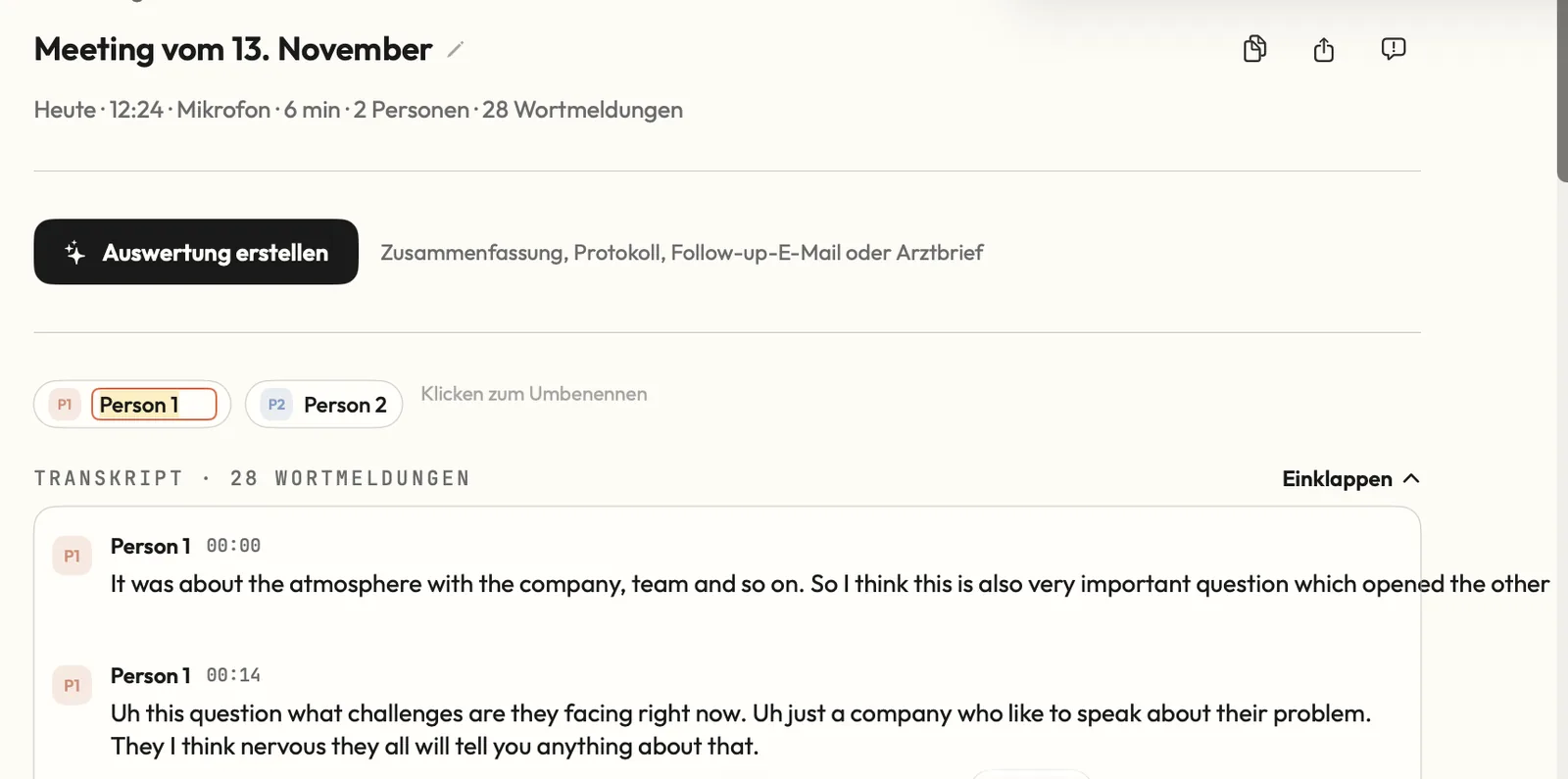
On 13 November 2026 the tester recorded a meeting with the Meetings tab. The header of the saved meeting reads “Meeting vom 13. November”, 12:24, Mikrofon, 6 min, 2 Personen, 28 Wortmeldungen (utterances). Which app version he used is not recorded.

Figure 16Saved meeting from 13 November: 6 min, 2 persons, 28 utterances, speakers Person 1 and Person 2 with time stamps. The room sound was very bad by the tester's account.
Tester view

He says the meeting function works well and that it lets him record a meeting.

Tester view

The sound quality in the room was very bad.

Observed

Sprich recorded and transcribed it anyway and assigned the speech to two speakers, Person 1 and Person 2. A hint reads “Klicken zum Umbenennen” (click to rename). Each utterance has a speaker and a time stamp (00:00 and 00:14 in the excerpt). The excerpt is English text with some rough phrasing; whether that comes from the speech or from the recognition is not recorded. Accuracy of the text and of the speaker assignment was not scored.

Figure 16Saved meeting from 13 November: 6 min, 2 persons, 28 utterances, speakers Person 1 and Person 2 with time stamps. The room sound was very bad by the tester's account.
Observed

A button “Auswertung erstellen” (create evaluation) opens a dialog with four formats: Zusammenfassung (key statements, decisions, tasks; preselected), Protokoll (by topic, with resolutions), Follow-up-E-Mail (a ready-to-send message to the participants) and Arztbrief (history, findings, assessment, procedure). Which format the tester generated and what came out is not recorded.

Figure 17Evaluation dialog over the meeting. Four formats; the local-processing and 20 to 60 seconds line is a vendor-claim. Which format was generated is not recorded.
Vendor claim

The dialog says it runs locally on your Mac and usually takes 20 to 60 seconds (“Läuft lokal auf deinem Mac · meist 20–60 Sekunden”). Nothing was timed and no network traffic was inspected.

Figure 17Evaluation dialog over the meeting. Four formats; the local-processing and 20 to 60 seconds line is a vendor-claim. Which format was generated is not recorded.
Tester view

The tester finds it really great that this runs locally.

Observed

Scope: one 6-minute recording with two people. Longer meetings, system-sound capture, offline operation and the quality of the generated evaluations were not tested or not recorded.

Decision

Observed

The notes end with the feedback form and no decision on continued use.

Tester view

The tester compares the app with his cloud tool, whose server locations he does not know, and says he would not share confidential data there.

Tester view

From his 30 years in consulting he values writing meeting notes himself. He then recorded a meeting in a room with the app and finds it really great that it runs locally.

Claims versus what the tester saw

ClaimSourceObservedLabel
“Sprich schreibt, was du sagst.” Dictate into any app: Mail, Notes, Slack, browser.App welcome screenSeen in Word, WhatsApp and Telegram. Mail, Notes, Slack and a browser were not tried.Observed
Everything runs locally; voice and text never leave the Mac; the app works fully offline.App welcome screen and setupNot verified. No network traffic was inspected and no offline run was tried.Vendor claim
Setup “takes only a few minutes”.App welcome screenDuration not recorded; models were still downloading at the last step.Observed
Two models, about 3.3 GB together.Setup step 2The sizes shown add up; disk or memory use was not measured.Measured
The text step corrects punctuation, capitalisation and recognition errors.Setup step 2Punctuation and paragraphs seen in WhatsApp; fillers stay in Telegram.Observed
The key and mode can be changed any time in Settings, Keyboard.Setup step 4The tester changed the key and later the mode.Observed
Meetings: transcript, summary and tasks, all on the Mac. The evaluation runs locally, "usually 20 to 60 seconds".Meetings tab tip and evaluation dialogA 6-minute meeting was recorded and transcribed on 13 November and two speakers were assigned. The evaluation dialog was seen; which format was generated, how long it took and whether it ran locally are not recorded.Vendor claim
Dictation is optimised for German; Parakeet understands about 25 European languages.Developer messageEnglish and German worked, Russian failed; file transcription not tried.Vendor claim
57 languages.PromptQuorum directory entryNot verified; it does not agree with the developer’s figure.Third party
Feedback form: transcripts are never sent.Bug report formNot verified.Vendor claim

Usage log

#TaskAppResultTimeStatusFigures
1Dictate English test sentence into WordWord7 words, 10 s recorded, “+7s” saved17:43Pass-
2Dictate English sentence into WordWord13 words, 20 s, “+14s”17:45Pass-
3Dictate English sentence into WordWord8 words, 12 s, “+8s”; product name differs (“Sprich Ae”)17:46PartialFig. 6
4Dictate English sentence into WordWord10 words, 15 s, “+11s”17:49PassFig. 6
5First attempts with the key used wronglyWordTester estimate: several seconds, sometimes over 10 s before text appearedNot recordedFail-
6Dictate English sentence into WordWord6 words, 11 s, “+6s”; delay not timed18:07PassFig. 9
7German message into WhatsAppWhatsAppGreeting, paragraphs and punctuation as insertedNot recordedPassFig. 7
8Three English messages into TelegramTelegram68 words 125 s “+1 min 14s”; 37 words 63 s “+40s”; 29 words 49 s “+31s”18:06PassFig. 8, Fig. 9
9French sentenceNot recordedOutput shown in the notes; accuracy not judgedNot recordedNot completed-
10Russian wordsNot recordedGarbled, not recognisedNot recordedFail-
11Hold-to-talk modeNot recordedWorked per the tester; not timedNot recordedPass-
12Text-rewrite menu-Not used-Not completedFig. 10
13Record a meeting in a roomMeetings6 min, 2 persons, 28 utterances; room sound very bad (tester); transcript with two speakers produced12:24 (13 Nov)PassFig. 16
14Open the evaluation dialogMeetingsFour formats offered; which one was generated and its output are not recordedNot recordedPartialFig. 17
15Feedback form-Opened; submission not recordedNot recordedPartialFig. 15
16Writing tone Formal / Informell-Dropdown opened; effect not testedNot recordedPartialFig. 11

Where the tester got it wrong

  • Tester errorJudged the app slow, in writing and against his cloud tool, before understanding the default toggle mode, and wrote "every statement about length and so on was wrong" after correcting it. The welcome screen and setup step 4 both explain press, speak, press again; he says he overlooked it or found it hard to follow.
  • Tester errorWrote that the model is "three gigabyte" and told a contact the app "eats 3.3 gigabytes on your memory". 3.3 GB is the combined download size on the setup screen; runtime memory was not measured.
  • Tester errorWas "really impressed" by two-factor authentication, but the screenshot shows only an "Aktivieren" link; it was not switched on.
  • AssumptionThe Russian failure may come from the dictation language being set to German. The setting at that time was not recorded; this is an inference.
  • Tester errorGaps in the record: app and macOS version, install and end time, setup duration, which dictation key was chosen, the spoken text and language setting for the French and Russian tests, any measured delay, whether the feedback form was sent. The hardware header reads "Mac 4 ... VRAM"; Apple Silicon has unified memory, and the chip was later named M4 Pro.

Findings register

IDFindingCategoryLabelSeverityFigures
SP-01The tester read the DMG download as 20 MB; no screenshot. The installer window shows the app icon beside an Applications shortcut. The directory's own check on the same day lists 18.2 MB for version 2.2.4 (third-party).InstallObservedPositiveFig. 2
SP-02An account is needed: setup step 1, "Anmelden", is ticked before the model step, and the tester says registration is required.InstallObservedLow-
SP-03Setup downloads two models once: Sprich Transcribe v3 (speech recognition, about 480 MB) and Sprich Turbo v3 (text improvement, about 2.8 GB), about 3.3 GB together by the app's own text. The download runs in the background while the next steps are done. These are download sizes, not runtime memory.OnboardingMeasuredPositiveFig. 3
SP-04The screens name only "Sprich Transcribe v3" and "Sprich Turbo v3"; the models underneath are not named. The developer names Parakeet and about 25 European languages; the PromptQuorum directory lists 57 languages (third-party). Neither figure was verified and they do not agree.OnboardingVendor claimInfo-
SP-05Setup step 5, "Fast geschafft", appeared while the models were still downloading (speech recognition 72 %, text improvement 12 %) and says dictation starts when they finish. Total download time and setup time are not recorded.OnboardingMeasuredInfoFig. 5
SP-06The dictation key can be changed and the tester changed it; which key he chose is not recorded. Setup step 4 shows Fn, while the welcome screen's illustration shows right Command ("⌘ Rechts"); which is the default and which he set is not recorded. Two modes exist: Einrasten (press to start, press to stop; marked Standard) and Gedrückt halten (record while held).OnboardingObservedLowFig. 4, Fig. 1
SP-07In the default toggle mode the tester used the key wrongly and read the result as a slow app: tester-estimate several seconds, sometimes over 10 s before text appeared. After correct use he found it fast. The instruction is on screen twice, in German. That a default toggle differs from the hold-to-talk habit of many users is an assumption.UsageObservedMediumFig. 4
SP-08After the mistake the tester judged dictation "instant" and, in a message to a contact, as fast as his online dictation app, which is not named. No delay was timed; the history shows recording length and time saved, not latency.UsageTester estimateInfo-
SP-09English dictation into Word produced four history entries of 7 to 13 words. One reads "Sprich Ae" in the history where the tester's notes show "Sprich AI"; what he said and whether he edited the text are not recorded.Core functionObservedLowFig. 6
SP-10German dictation into WhatsApp arrived with greeting, paragraphs and punctuation; the tester says it sorted the text correctly (tester-view). One phrase, "die doppelt drücken knüpfen muss", reads oddly; the intended wording is not recorded.Core functionObservedPositiveFig. 7
SP-11English dictation into Telegram arrived as three messages with filler words such as "Uh" kept. The setup screen promises correction of punctuation, capitalisation and recognition errors, not fillers, so this is not a miss against it.Core functionObservedInfoFig. 8
SP-12A French sentence was dictated and its text is in the notes. The tester did not judge accuracy and the spoken sentence is not recorded.LanguagesObservedInfo-
SP-13A Russian test "got lost" by the tester's account: the app did not understand the words and the output was garbled. The spoken phrase and the dictation language at that time are not recorded.LanguagesObservedMedium-
SP-14A History tab lists every dictation with time, target app, text, recording length, word count and saved time, plus a search box and an app filter. The tester likes that the texts are kept and sees it as a way to retrieve everything he dictated (tester-view).HistoryObservedPositiveFig. 6
SP-15The saved-time figures disagree on the same screen (see the numbers table). The app does not explain how "saved" is computed or what each figure covers.HistoryMeasuredLowFig. 6, Fig. 9
SP-16A popup menu offers Änderung beschreiben, Korrekturlesen, Umformulieren, Freundlich, Sachlich, Kompakt, Zusammenfassung, Hauptpunkte, Liste, Tabelle and Verfassen. The tester wanted to understand how it works and did not use it. Which program provides the menu, Sprich or macOS, is not recorded.FeaturesObservedInfoFig. 10
SP-17Settings has a Schreibton dropdown, Formal (ticked) or Informell. Only the dropdown was seen; the tester's "Wow" is about the option, not a tested result.FeaturesObservedInfoFig. 11
SP-18The recording indicator can be set to Taste, Mikro (selected) or Kein. The tester saw a microphone bubble change from grey to orange; the header shows "Mikro bereit".FeaturesObservedPositiveFig. 12
SP-19The interface is German only and the tester found no language switch, so he could not make English screenshots. The developer says it is German only so far because the local version is optimised for German (vendor-claim).InterfaceObservedMedium-
SP-20A Meetings tab offers "Meeting aufnehmen"; its tip says calls give a transcript, summary and tasks and everything stays on the Mac. This tip is a vendor-claim; the tester's own meeting session is SP-25 to SP-30.FeaturesVendor claimInfoFig. 14
SP-21The sprich.ai account page offers a password change and two-factor authentication. The 2FA card shows an "Aktivieren" link, so it is off.WebsiteObservedInfoFig. 13
SP-22A "Bug melden" form has Bug, Feedback and Feature tabs and fields for title, description, expected and actual result, frequency and up to 3 attachments of 1 MB each. The "Mitgesendete Daten" section was not opened and whether anything was sent is not recorded. The tester calls it impressive (tester-view). "Transcripts are never sent" is a vendor-claim.FeedbackObservedPositiveFig. 15
SP-23The welcome screen and setup say everything runs locally, that voice and text never leave the Mac and that the app works fully offline. No network traffic was inspected and no offline run was tried.TrustVendor claimInfoFig. 1
SP-24Not tested or not recorded: file transcription and the dictionary tab (both visible in the navigation), the effect of the rewrite menu and the tone setting, dictation into Mail, Notes, Slack or a browser, plan and pricing, runtime memory, uninstall.ScopeObservedInfo-
SP-25On 13 November the tester recorded a meeting in a room. The saved meeting shows "Meeting vom 13. November", 12:24, Mikrofon, 6 min, 2 Personen, 28 Wortmeldungen. He says the meeting function works well. App version, language setting and who spoke are not recorded.MeetingsObservedPositiveFig. 16
SP-26The room sound was very bad by the tester's account (tester-view). Sprich still produced a transcript with time stamps and two speakers, Person 1 and Person 2, which can be renamed by click. The screenshot excerpt is English with some rough phrasing; accuracy of the text and of the speaker assignment was not scored.MeetingsObservedPositiveFig. 16
SP-27"Auswertung erstellen" opens a dialog with four formats: Zusammenfassung (key statements, decisions, tasks), Protokoll (by topic, with resolutions), Follow-up-E-Mail (ready to send to the participants) and Arztbrief (history, findings, assessment, procedure). Which one the tester generated and its output are not recorded.MeetingsObservedInfoFig. 17
SP-28The dialog says "Läuft lokal auf deinem Mac · meist 20–60 Sekunden" (runs locally on your Mac, usually 20 to 60 seconds). Nothing was timed and no network traffic was inspected.TrustVendor claimInfoFig. 17
SP-29The tester finds it really great that the meeting recording and what follows run locally (tester-view).MeetingsTester viewPositive-
SP-30Meeting scope: one 6-minute recording with two people. Not tested or not recorded: which evaluation format was generated and its output, evaluation time, transcript and speaker accuracy, longer meetings, system-sound capture, offline operation.ScopeObservedInfo-

Severity is the impact on a first-time user. Proposed, not measured. Info marks a finding that is neither a problem nor a strength; Positive marks something that worked well.

Who it is for

Likely fit

  • AssumptionGerman-speaking Mac users on Apple Silicon who dictate German or English into everyday apps and want the processing local, as the app states (assumption from one session).

Likely poor fit

  • AssumptionAnyone who needs Russian or a non-German interface today, or an Intel Mac (the directory lists Apple Silicon only).

Retest. Retest on a new major version, a published English interface or confirmed language list. Cover: record the app and macOS versions; time the delay; Russian with the language set; file transcription; longer meetings with each evaluation format generated and timed; the rewrite menu; offline use with traffic inspected; runtime memory; uninstall.

Five out of five, ten out of ten, I don't know what to say.

Tester notes, lightly edited from dictation. Both are his judgment, not measurements.

Frequently asked questions

Does Sprich work in other apps?

Yes, in the apps the tester tried. Dictation produced text in Microsoft Word, WhatsApp and Telegram. Mail, Notes, Slack and a browser were not tried. Observed

Which languages did Sprich handle in the test?

English and German worked. A French sentence was dictated and its text is in the notes, but accuracy was not judged. A Russian test failed: the output was garbled. The dictation language set at that time is not recorded. Observed

Is Sprich’s interface available in English?

No. The tester found only a German interface and no language switch. The developer says it is German only so far, a deliberate choice because the local version is optimised for German; that is not verified. Observed

How big is the Sprich download?

Setup downloads two models, Sprich Transcribe v3 (about 480 MB) and Sprich Turbo v3 (about 2.8 GB), about 3.3 GB together by the app’s own text. These are download sizes; runtime memory was not measured. Measured

Does Sprich really run offline and locally?

The app says everything runs locally, that voice and text never leave the Mac and that it works fully offline. Network traffic was not inspected and no offline run was tried, so this is not verified. Vendor claim

Was Sprich fast?

The tester first judged it slow because he used the default toggle mode wrongly (press once, speak, press again). After correct use he found it instant and as fast as his cloud dictation tool. Nothing was timed. Tester estimate

Does Sprich’s meeting mode work?

In one short test, yes. On 13 November the tester recorded a 6-minute meeting with two people. The room sound was very bad, but Sprich still transcribed it and assigned two speakers. It then offers summary, minutes, follow-up e-mail and doctor’s letter formats. Accuracy was not scored and which format was generated is not recorded. Observed

Background on the maker

Not hands-on. The item below comes from the PromptQuorum directory entry for Sprich and is not verified here.

  • Third partyClosed source, freemium with a one-off Lifetime option; macOS 15 or later, Apple Silicon only; website in German only. The directory notes that the maker's own pages do not reconcile speech-model and Windows statements. Source: PromptQuorum directory review, version 2.2.4, checked 2026-11-09; the changelog shows an update on 2026-10-22.

More hands-on tests

How to read the labels

Observed
Seen first-hand in the app, a screenshot or the tester's notes.
Measured
A value read from a dialog, counter or tool, with the number given.
Tester estimate
The tester's own estimate; not timed or counted.
Vendor claim
Stated by the app, its store listing or its website; not verified.
Third party
From another source (an AI assistant, an article); not verified here.
Assumption
An inference. It may be wrong.
Tester view
The tester's judgment or opinion.
Tester error
Where the tester made a mistake or missed something.

Sources

  • Tester’s hands-on notes and screenshots, 9 November 2026 (original Word notes; PDF of the raw notes to be added).
  • Tester’s message and two screenshots of the meeting session, 13 November 2026.
  • PromptQuorum directory entry and review of Sprich (slug: sprich), verified 2026-11-09.
  • Vendor site sprich.ai (vendor claims).

Test ID pq-test-sprich-2026-11-09 · Test standard v0.2 · Raw notes PDF: to be added

How I test apps — and why there is no fixed standard — These tests are my personal views, not guarantees.

MCP