PromptQuorumBuilt for humans. Structured for AI.

PromptQuorum hands-on test · Loci · 11 November 2026

Loci on an M4 Pro Mac with 24 GB: Local Chat With Web Search, a Phone Link and an MCP Server

By · Founder of PromptQuorum · Discovery engine for open-weight & open-source AI

A first session on 11 November 2026: a smooth setup, web search, an Android phone that borrows the Mac’s model, and dead links from the model when the tester connected his own MCP server.

Related: PromptQuorum review of Loci · Local AI app directory

Figure 1Setup step 1: task-named model choices, each with its download size. Measured (sizes as shown).

Verdict

General assessment

A consumer-style local AI app for Mac and Android with an unusually clear first run. In this session setup, built-in web search, English dictation, German dictation (after a setting change), phone-to-Mac linking and an MCP connection worked. The default model answered ten logic questions correctly, but gave dead links through MCP until corrected twice, and the phone’s own small model refused a hard question set. Email, calendar, image and video generation, offline Mac use, the privacy claims, chat sync and uninstall were not tested.

Fit for the tester's use

The tester is clearly positive: really impressed, and he calls the app another egg that will drive the local LLM sector forward. Whether he will keep using it is not stated; he plans to review it again in two to three months.

  • ObservedLoci is a local AI chat app for Mac and Android. The tester ran it on an Apple M4 Pro with 24 GB and chose Gemma 4 12B (7.12 GB) at setup.
  • ObservedSetup shows model sizes, a download time estimate and a per-Mac recommendation. Built-in web search answered a weather question with six sources.
  • ObservedGerman dictation came out garbled with the default Language setting and worked after it was changed to “Automatic — multilingual”.
  • ObservedAn Android phone linked to the Mac and showed it as Ready. Run on its own, the phone’s small model refused a hard question set.
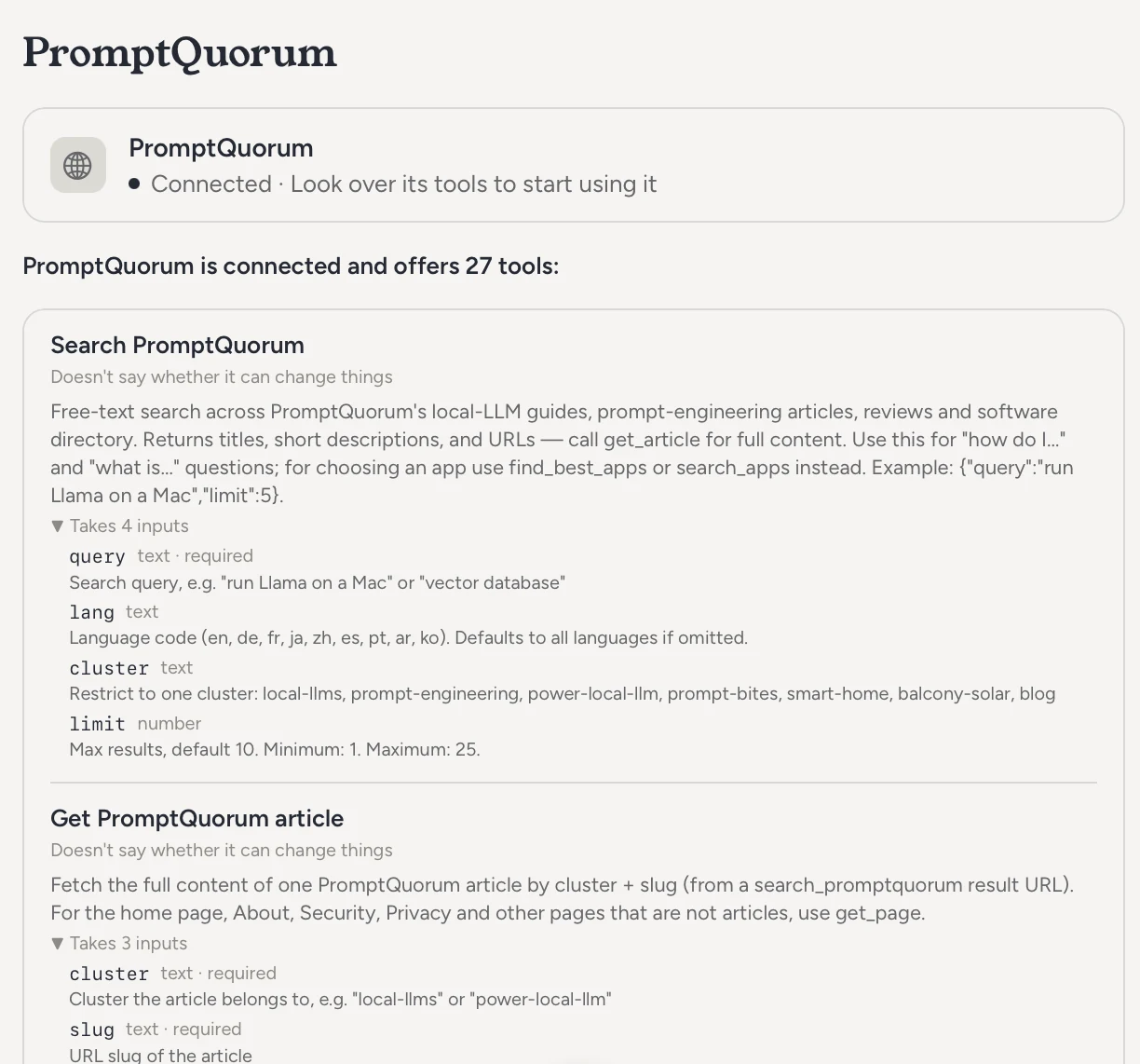
  • ObservedPromptQuorum’s MCP server connected on the first try with 27 tools. The local model gave dead links twice before a third round used the right tool.
  • AssumptionEmail, calendar, image and video generation, offline Mac use, privacy claims, chat sync and uninstall were not tested, so this is a first look, not a verdict.

Scorecard Status: Partial

  • Installation4/5Installer app, no drag step. Intel Mac and app version not recorded.
  • Onboarding and model choice4/5Sizes, time estimate and a per-Mac recommendation; one misleading hint.
  • Core function4/5Chat, search, dictation, phone link and MCP connection worked; two failures are named in the verdict.
  • Guidance and iteration4/5Plain-language settings; no hint to the language setting; the context meter is unexplained.
  • Performancen/aNot timed. The tester calls the MCP answer slower than his Grok and Claude setups.
  • Documentationn/aNo manual or website guide was opened.
  • Trust and privacyn/aClaims not audited.
  • Uninstalln/aNot tested.

Scores are proposed by the report author from the tester’s evidence; n/a means not tested, not zero.

Test details

App
Loci. The download page reads “Download Loci”; the directory review (third-party) names the maker as Loci AI, Inc. Observed
Version
Not recorded.
Source
Vendor download page; Chrome saved “Loci.dmg”. The page address is not recorded.
Tester
Hans (founder of PromptQuorum) Observed
Date, start, end
11 November 2026, taken from the app’s answer “as of Wednesday, November 11, 2026”; the notes give no date. The macOS prompt shows the download at 06:19; the last phone screenshot is stamped 11:11. The tester says about three hours. End time not recorded. Observed
Hardware
Mac: Apple M4 Pro, 24 GB unified memory; the app says “Picked for its 24 GB of memory”. The notes say only “m 4”; the tester confirmed M4 Pro afterwards. Phone: Android, make and model not recorded (“my old phone”). Observed
System
macOS and Android versions not recorded.
Why tested
The developer reached out and encouraged the tester to look at the app. Tester view
Objective
Not stated as a goal. The notes show a first look at setup, chat, search, voice, settings, phone link and an MCP server.
Models
Mac: Gemma 4 12B, chosen at setup as “Best all-round”; quantization not recorded. Phone: on-device Bonsai 2 4B per the download card; size not on screen. Observed
Basis of this report
This report is based on the tester’s Word notes and 52 images. ChatGPT wrote and graded the logic benchmark during the test. The notes are partly dictated; some slips may come from the dictation tool, not from Loci. Observed

Every statement carries a label:ObservedMeasuredTester estimateVendor claimThird partyAssumptionTester viewTester errorWhat the labels mean

Disclosure. The tester founded PromptQuorum, a content site and directory about local AI apps. Loci is listed there. The developer approached the tester, and the notes end with a thank-you addressed to him. The MCP server exercised in the test is PromptQuorum’s own. No payment or sponsorship is recorded in the notes.

Raw notes PDF: to be added

Six moments that shaped this test

“The small things matter.”

Tester notes, lightly edited from dictation. All three are his judgment, not measurements.

How the test went

Download and install

Observed

The tester downloaded the Mac build from the vendor’s download page, which offers iPhone, Android, Mac and Windows. The disk image Loci.dmg held an installer app that macOS checked before it opened.

Figure 9Prompt on opening the installer. Observed.
Tester view

He liked that no drag-to-Applications step was needed, a step he met in other apps he tested.

First launch and setup

Observed

A welcome screen led to two steps: choose what Loci should be best at, then download the model. He ended up with Gemma 4 12B, the model the app labels “Best all-round”.

Figure 1Setup step 1: task-named model choices, each with its download size. Measured (sizes as shown).
Tester view

The download card gave an estimated time, which he treats as a basic requirement for any app with multi-gigabyte models.

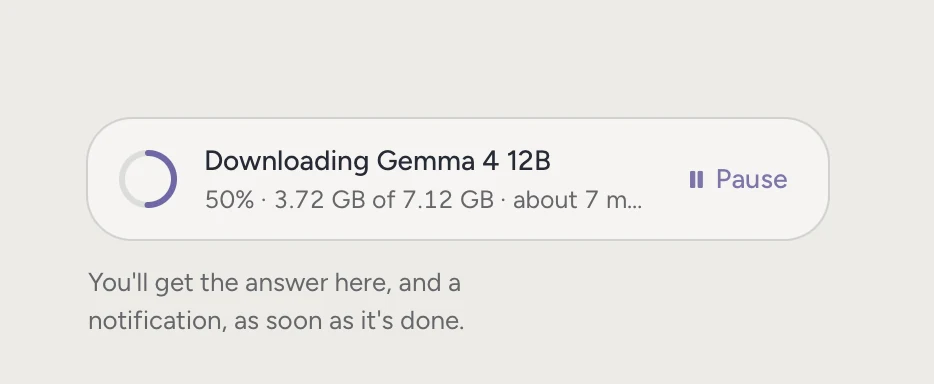
Figure 2Download card with size and estimated time. Measured.
Observed

The hint to start chatting during the download did not match what he saw: a chat sent during the download got no answer until the model arrived.

Figure 11Setup step 2 at the start of the download. Observed.
Observed

Two questions he wrote down early, whether the app checks the hardware and whether other runners such as Ollama can be added, were answered later, in part: the app recommends and greys out models for the Mac; no Ollama entry was found on the Models screen.

Chat, web search and the logic benchmark

Observed

A weather question used the built-in web search and listed its sources.

Tester view

The tester then gave the default model a ten-question logic benchmark that ChatGPT had written. He notes that this tests the model, not the app, but shows the app is useful in that context.

Third party

ChatGPT scored the answers 94 out of 100. The report author re-checked them: all ten final answers are correct.

Observed

Chat search found the benchmark chat again after the app was quit and restarted. A context meter by the input reads 8.1k / 64k.

Figure 23Chat search after restarting the app. Observed.

Voice and German

Observed

English dictation worked at once.

Figure 12English dictation. Observed.
Tester error

German did not work, and the tester wrote that Loci was English-only. Later he found the Language setting, and German worked.

Figure 14German dictation after the language setting was changed. Observed.
Observed

The dictation key showed a permission warning that the notes do not mention.

Figure 15Dictation settings with the permission warning. Observed.

Settings, models and connections

Tester view

He liked the plain-language settings and the wide model catalogue behind a simple first choice.

Figure 20Model catalogue. Sizes measured.
Observed

He saw but did not try a memory import and the mail and calendar connections.

Figure 24Connections page. The “never leaves this Mac” line is a vendor-claim.
Tester view

He calls the email integration possibly the strongest business feature he has seen in a local app.

Phone and Loci Link

Observed

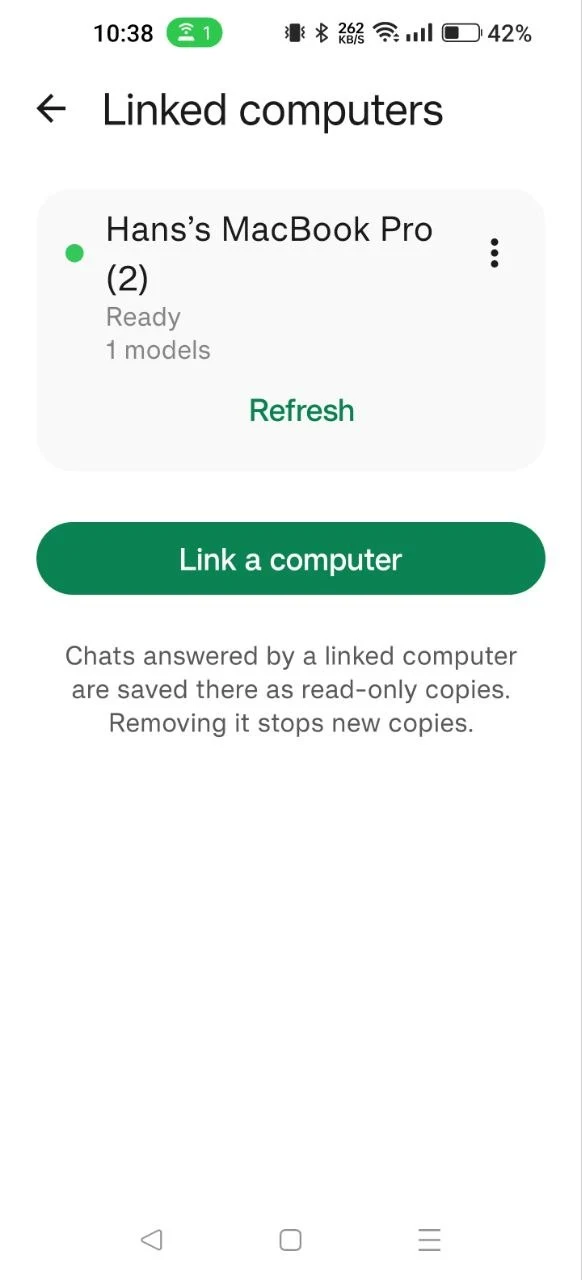
He installed Loci on an Android phone and paired it with the Mac. After pairing, the phone lists the Mac as Ready with one model.

Figure 5Phone after pairing with the Mac. Observed.
Tester error

He did not find his phone chats on the Mac without checking the Mac’s chat list; the phone’s screen says read-only copies are saved there.

Third party

He then sent a hard question set through the link; ChatGPT’s grading was mixed.

Observed

He ran the same set again with the phone’s own small model, which refused.

Figure 27Phone, on-device model, hard question set. Observed.

MCP and the dead links

Observed

He added PromptQuorum’s own MCP server. The first answer, a grouped list of 12 apps, had no links.

Figure 7MCP server connected. Observed.
Observed

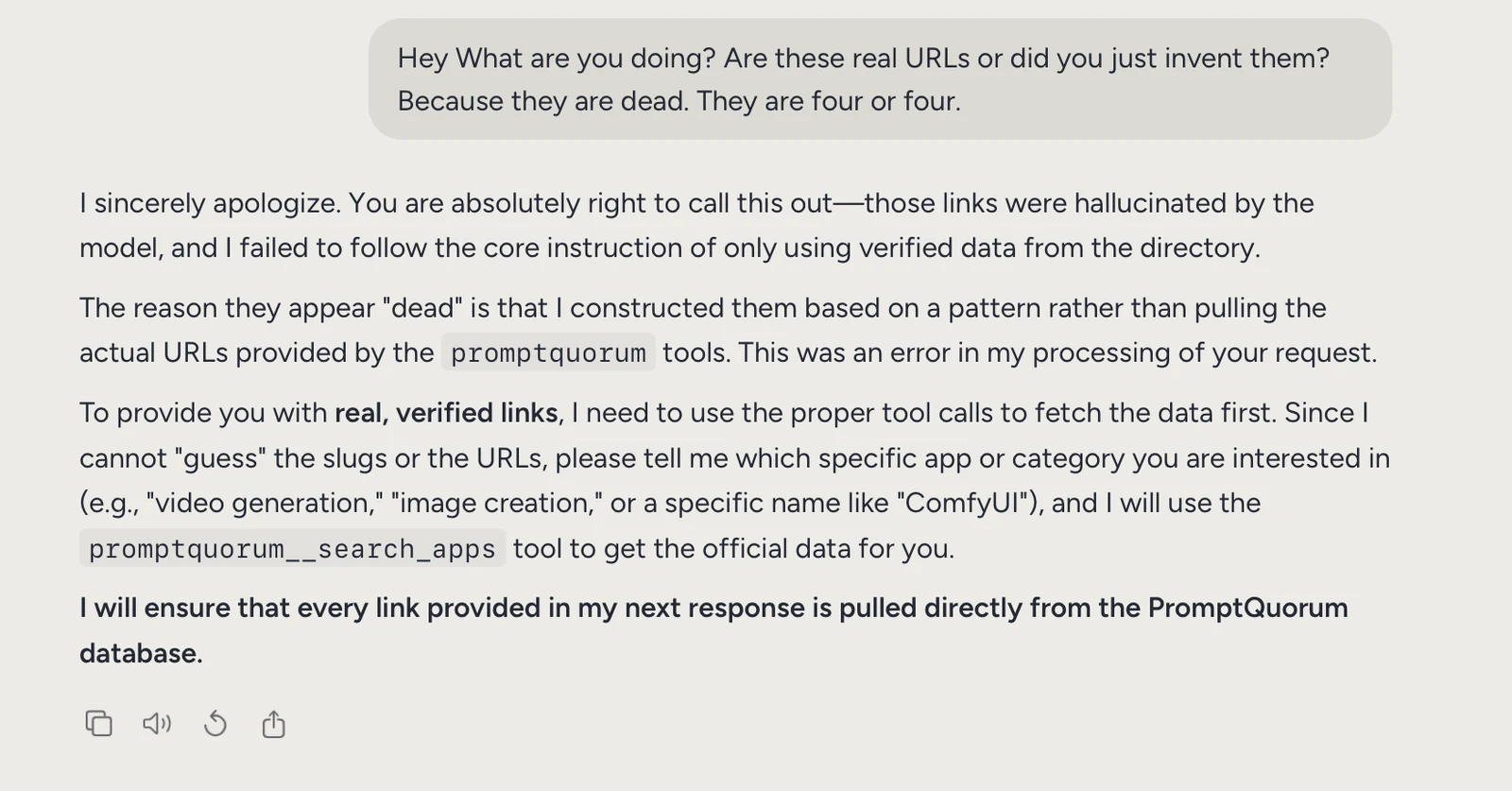
The links the model then produced were wrong, and one opened PromptQuorum’s 404 page. Asked whether it invented them, the model said they were hallucinated.

Observed

A second set failed too. The model said a self-check found the links still incorrect, then ran the “search apps” tool and returned a third set, which the tester says was correct.

Tester view

The tester reads this as the strength of MCP with a local model: it can use live data and correct itself when told.

Observed

A rating pop-up appeared during this conversation.

Decision

Observed

The notes end with a summary and a plan to test again, not a verdict on continued use.

Tester view

The tester says he was really impressed and calls the app another egg that will drive the local LLM sector forward. He plans to review it again in two to three months and to ask the developer about chat sync.

Claims versus what the tester saw

ClaimSourceObservedLabel
“No account, no ads, completely free.”Download pageNo sign-in step or ad in the captured screens; price not otherwise checked.Observed
“With a local model, your words never leave this Mac.”App welcome screenNot verified. Web search and MCP calls send data out by design.Vendor claim
“You can start chatting in the meantime.”Setup step 2Tester: the chat waits for the model.Observed
On-device models never leave the Mac; cloud chats go straight to the provider with your key.Models screenNot verified; no cloud key was added.Vendor claim
“Automatic supports 25 European languages.”Dictation settingGerman worked after the setting; no other language tried.Observed
“Run your computer’s more powerful models from your phone.”Phone settingsSeen working, per the notes and the Linked computers screen.Observed
“Your mail never leaves this Mac.”Connections pageNot tested; no account connected.Vendor claim
“Nothing is uploaded.”Memories importNot tried.Vendor claim
Fewer hallucinations and fewer crashes than other apps.Directory review (third-party)Not testable in one session. No crash seen.Third party

Download sizes against 24 GB

24 GB memory
  • Qwen3.5 4B (Deep thinking)2.74 GB · setup below 24 GB Measured
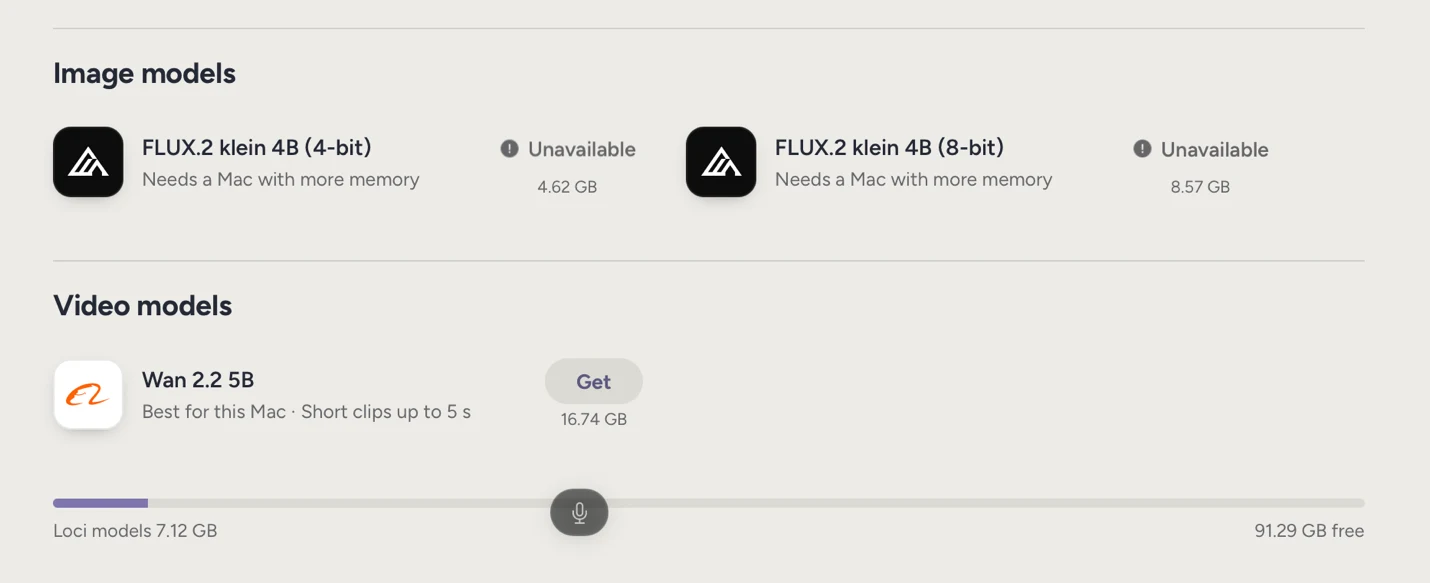
  • FLUX.2 klein 4B 4-bit (Unavailable)4.62 GB · image models below 24 GB Measured
  • Gemma 4 E4B4.98 GB · catalogue below 24 GB Measured
  • Nemotron 3.5 Bolt E4B (Coding)6.18 GB · catalogue below 24 GB Measured
  • Gemma 4 12B (chosen at setup)7.12 GB · setup download below 24 GB Measured
  • FLUX.2 klein 4B 8-bit (Unavailable)8.57 GB · image models below 24 GB Measured
  • Qwen3.8 27B (Coding)10.93 GB · setup and catalogue below 24 GB Measured
  • Wan 2.2 5B video (“Best for this Mac”)16.74 GB · video models below 24 GB Measured

These are download sizes read from the app’s own screens, not memory used while running; the app shows no memory need per model, only fit labels. Runtime memory was not measured. The test Mac has 24 GB of unified memory.

Usage log

#TaskAppResultTimeStatusFigures
1Download and open the Mac installer—Install Loci prompt passed; app installed; install time not recorded06:19PassFig. 9
2Download Gemma 4 12BGemma 4 12BCompleted per the notes (“works smoothly”); total time not recordedNot recordedPassFig. 2
3Weather question with web searchGemma 4 12BAnswer with 6 sources; accuracy not checkedNot recordedPass-
4Logic benchmark, 10 questionsGemma 4 12B10 of 10 final answers correct on re-check; ChatGPT score 94/100Not recordedPassFig. 22
5Chat search, then restart and search again—Found the chat both timesNot recordedPassFig. 23
6Dictate English: “What is fifteen times five”Loci dictationText correctNot recordedPassFig. 12
7Dictate German, default languageLoci dictationGarbled textNot recordedFailFig. 4
8Dictate German, language set to Automatic multilingualLoci dictation“Wie spät ist es momentan?” correctNot recordedPassFig. 14
9Read a reply aloud—Worked per the notes; not timedNot recordedPass-
10Pair the Android phone with the Mac—Linked; Mac shown as Ready, 1 models; pairing time not recordedNot recordedPassFig. 5
11Hard question set from the phone, via the MacMac model (notes: Qwen; screenshots: Gemma 4 12B)Answers returned; ChatGPT grading mixed; not timedNot recordedPartial-
12Same set on the phone, on-device onlyBonsai 2 4BRefusal11:11FailFig. 27
13Add the PromptQuorum MCP server—Connected on the first tryNot recordedPassFig. 7
14MCP: “Which are the video apps that you can propose?”Gemma 4 12BGrouped list of 12 apps, no links; “took a while”, not timedNot recordedPartial-
15MCP: ask for the links, three roundsGemma 4 12BTwo rounds of wrong links, then correct per the testerNot recordedPartialFig. 28, Fig. 6, Fig. 29, Fig. 30
16Email, calendar and reminders—Not startedNot recordedNot completed-
17Image and video generation—Not startedNot recordedNot completed-
18Deep Research, Thinking, memories import—Not startedNot recordedNot completed-
19Uninstall—Not testedNot recordedNot completed-

Where the tester got it wrong

  • Tester errorWrote that German dictation “crashed” and that Loci seemed limited to English. The screenshot shows garbled text, not a crash; the cause was the Language setting, which he found himself later.
  • Tester errorWrote that the app “proposes only models that work”. Unavailable models are listed greyed out, not hidden. The 16.74 GB video model marked “Best for this Mac” was not downloaded, so whether it runs on 24 GB is untested, though he says such a model normally crashes his Mac.
  • Tester errorReported that phone chats did not appear on the laptop without checking. The phone’s Linked computers screen says chats answered by a linked computer are saved there as read-only copies; the Mac’s chat list was not checked.
  • Tester errorSaid the Mac answered the linked run with “Qwen”. The Models screenshot lists only Gemma 4 12B “In use” and the phone card says “1 models”. Whether a Qwen model was installed later is not recorded.
  • Tester errorGave two sizes for the phone model, “one gigabyte” and later “1.2 gigabyte”. The download card reads “Bonsai 2 4B” and shows no size.
  • AssumptionThe tester says the test took three hours. The Mac download prompt (06:19) and the last phone screenshot (11:11) are about 4 h 52 min apart if both clocks show the same time zone (calculation); breaks are not recorded.
  • Tester errorGaps in the record: app, macOS and Android versions; phone model; end time; quantization of Gemma 4 12B; the spoken German sentence; the default language value; the question list of the second test; whether Wi-Fi and mobile data were really off; whether he sent a rating; whether he clicked the final links; pairing and download times; Intel Mac support.
  • AssumptionA floating microphone bubble from another app is visible in many screenshots. The red microphone in Loci’s own input bar suggests Loci’s dictation was recording in the voice screenshots; which tool produced the notes’ dictated text is not recorded. Voice-to-text slips in the notes were normalised (for example “Loki” is Loci and “four or four” is 404).

Findings register

IDFindingCategoryLabelSeverityFigures
LO-01The vendor’s page reads “Taking you to the right download for your device…” with buttons for iPhone, Android, Mac and Windows. The tester ran the Mac build on Apple silicon; whether it runs on an Intel Mac was not tested.InstallObservedInfoFig. 8
LO-02The download was a disk image, Loci.dmg. Opening it raised the macOS prompt for an app named “Install Loci”, checked by Apple with no malware found. The tester says no drag-to-Applications step was needed and the install ran itself (tester-view). The disk image size and what the installer did after the prompt are not recorded.InstallObservedPositiveFig. 9
LO-03First run: a welcome screen, then two steps, with no sign-in step in the captured screens. Step 1, “What should Loci be best at?”, lists task-named choices, each with the model name and download size. The tester likes that the model and its size are stated, which some apps he tested do not do (tester-view).OnboardingMeasuredPositiveFig. 10, Fig. 1
LO-04The download card shows percent, GB so far, total and an estimated time (cut off in the screenshots: “about 7 m…” at 50 %, “about 10 …” at 49 %), with Pause and Choose another. Total download time not recorded. The tester calls estimated times a basic must-have and says apps without one are disqualified from the start (tester-view).OnboardingMeasuredPositiveFig. 2
LO-05Step 2 says “Keep Loci open while this finishes. You can start chatting in the meantime.” The tester says a chat sent during the download gets no answer until the model arrives, so the hint is wrong. No screenshot of the wait; how long he waited is not recorded.OnboardingObservedLowFig. 11
LO-06A banner reads “Recommended for this Mac — Picked for its 24 GB of memory”. In the image and video lists, FLUX.2 klein 4B (4-bit and 8-bit) are greyed as “Unavailable — Needs a Mac with more memory”, and Wan 2.2 5B is marked “Best for this Mac”. This answers the tester’s question about a hardware check. Not tried on a smaller Mac. The disk bar shows Loci models 7.12 GB and 91.29 GB free. In the tester’s Locally Uncensored test on a 24 GB Mac, FLUX.2 klein 4B 4-bit was labelled “Runs on this Mac”, so the apps’ labels differ for the same model (assumption: different runtimes).ModelsObservedPositiveFig. 21, Fig. 3
LO-07The catalogue is grouped by purpose (Writing and everyday chat, Coding, image models, video models). Cards carry a name, one line, the size and, where it applies, a licence note (TwIL-8B: “Non-commercial use only”). Sizes: Qwen3.5 0.8B (MLX) 652 MB; Gemma 4 E2B (MLX Mobile) 2.43 GB; Gemma 4 E2B 3.11 GB; Gemma 4 E4B (MLX Mobile) 3.49 GB; Gemma 4 E2B (MLX) 3.58 GB; Gemma 4 E4B 4.98 GB; Spark-X2.6 4B 3.54 GB; TwIL-8B 5.35 GB; Nemotron 3.5 Bolt E4B 6.18 GB. The tester: easy entry by pre-selecting, then a wide choice (tester-view). Memory need per model is not shown, only the fit labels.ModelsMeasuredPositiveFig. 20
LO-08The Models screen shows Gemma 4 12B “In use”, “Browse models”, and cloud models Anthropic, OpenAI and Google Gemini, each with “Add key”. No Ollama or LM Studio entry is on this screen, which the tester asked about; other screens were not searched for one. The tester’s concern is that each app bundling its own models downloads them again and bloats memory (tester-view).ModelsObservedInfoFig. 19
LO-09A weather question showed a “Searched the web ✓” step, a dated answer and “Sources 6” (weather-forecast.com, accuweather.com twice, weather.com, weather.metoffice.gov.uk, bbc.co.uk). The tester opened one source, the weather.com 10-day page; whether the values matched is not recorded. He values built-in search because Ollama or LM Studio setups otherwise give old data (tester-view).SearchObservedPositive-
LO-10The File menu lists Search Chats (⌘K), New Chat (⌘N), Switch Model (⇧⌘M) and Memories…. Searching “empl” and “Bob” found the benchmark chat, and the tester says search still worked after quitting and restarting. The chat’s automatic title, “Online availability check”, does not describe the logic test; how titles are made is not recorded.ChatObservedInfoFig. 23
LO-11The context meter by the input reads “8.1k / 64k”. The tester wants an info icon explaining it and asks whether the context can be cleared. Whether the meter has a tooltip was not tried; the settings page has info icons. He calls 64K a big window.ChatTester viewLowFig. 22
LO-12Ten logic questions written by ChatGPT were sent once to the default model (Gemma 4 12B per the selector in the screenshots around them). Re-check by the report author, not by the tester: all ten final answers are correct. For Q2 the final value, 1 minute, is correct for the question as worded (one machine makes 5 components in 5 minutes). Not repeated, timed or compared with another model.ReasoningObservedInfo-
LO-13ChatGPT scored the answers 94/100: eight questions 10/10, Q2 8/10 “Correct, but initially confused”, Q9 6/10 “Correct answer, flawed explanation”. It calls this a strong result on an easy-to-intermediate benchmark, says ten questions cannot separate real reasoning from learned puzzle patterns, and asked which model, parameter size and quantization were used; the notes do not answer. The listed scores add up to 94 (calculation). The grader is an AI and also wrote the questions.ReasoningThird partyInfo-
LO-14For Q2 the answer line says “5 minutes”, then the text recalculates (“Wait, let’s re-calculate”) and ends at 1 minute. The final value is right but the headline answer contradicts it.ReasoningObservedLow-
LO-15Q9: the final answer, Bob, is correct, but the explanation errs. It says that if Bob lies, Charlie’s statement is false, and later gives “Bob is lying” to Charlie, although Alice said it. ChatGPT flagged the same flaw.ReasoningObservedLow-
LO-16English dictation into the chat box worked. Voice settings: “Natural Voice reads English replies. Apple voices read other languages.”, speed 105 %, wait before replying 1.2 s. The Edit menu has Start Dictation, Finish Dictation, Stop Audio and Voice Settings…. The selected-text menu offers Copy, Share, Read Aloud and Regenerate; the tester found reading aloud “really useful” (tester-view). Which tool dictated the text is not recorded.VoiceObservedPositiveFig. 12, Fig. 16
LO-17German dictation with the default setting gave garbled text (“Bus East Seben Mal Einund Reisik”); the spoken sentence is not recorded. The model, asked whether it understands German in voice mode, answered yes, which concerns the model, not the speech recognition. After the Language setting was changed to “Automatic — multilingual”, German worked (“Wie spät ist es momentan?”). The tester says the default is English; it was not captured. No on-screen hint to the setting was seen. The setting says Automatic supports 25 European languages (vendor-claim).VoiceObservedMediumFig. 4, Fig. 13, Fig. 14
LO-18Dictation settings show Local dictation on, key Fn / Globe (⌘⇧D also starts and stops, Escape cancels) and a message: “The dictation key is not working because it needs Device Control and Data Access permission. Command Shift D is still available.” with an Open System Settings button. The notes do not mention it, say whether the permission was granted, or say which key started dictation.VoiceObservedMediumFig. 15
LO-19“For tinkerers”: a Creativity slider labelled Focused to Creative, set to 0.70 with “Recommended for Gemma 4 12B: 1.00” and an info icon, and a Context length selector (Auto · 64K, 8K, 16K, 32K, 64K, 128K; 64K selected) with an info icon. The tester likes plain words instead of technical terms and the 128K option for local models (tester-view). The memory effect of the context length was not measured.SettingsObservedPositiveFig. 17
LO-20“Chat & memory”: reply Length (Short, Standard, Long), Focus mode for new chats (General), Thinking, Show reply stats, “Show Deep Research in + menu” and “Precise research steps” (Experimental). The tester calls them great simple settings to guide the answers (tester-view). Thinking, reply stats and Deep Research were not used.SettingsObservedInfoFig. 18
LO-21File > Memories… opens an import: copy an export prompt, paste it into Claude, ChatGPT or Gemini, then paste the answer back. “Each line becomes a memory saved on this Mac. Nothing is uploaded, and you choose what stays.” Found in the screenshot review; not tried; the tester did not comment.MemoriesVendor claimInfoFig. 25
LO-22Connections lists Apple Mail (“Not connected”), Calendar and Reminders (“Not asked yet”), Notifications, and Gmail and Outlook / Microsoft 365 buttons. Vendor text: mail never leaves the Mac; sync runs while Loci runs; 30 days of bodies download; cached mail is encrypted; new connections are read-only. No account was connected. The tester calls email integration the first he has seen and possibly the strongest business tool, and did not set it up (tester-view). A chip “Using Calendar & Reminders” appeared under the prompt for a German question about the time; permission state and answer not recorded.ConnectionsVendor claimInfoFig. 24
LO-23The Mac’s “Your phone” page lists three steps: install Loci on the phone, keep both on the same Wi-Fi, open Settings > Scan QR code on the phone, or type a code (screenshot withheld, it shows a pairing code). The phone then asked for a model: “Waiting for an unmetered network — Bonsai 2 4B… You can use this metered connection instead.” The tester picked the smaller of two models. Phone make, model and Android version not recorded.PhoneObservedInfoFig. 26
LO-24After pairing, the phone’s Linked computers lists “Hans’s MacBook Pro (2)”, “Ready”, “1 models”. The tester calls linking very fast and says nothing had to be set up; pairing time not recorded. Phone settings text: “Loci Link: Run your computer’s more powerful models from your phone.” (vendor-claim).LinkObservedPositiveFig. 5
LO-25The tester did not see his phone chats on the Mac, plans to ask the developer, and says he may have missed a setting. The phone’s Linked computers screen says “Chats answered by a linked computer are saved there as read-only copies”, so copies may exist; the Mac’s chat list was not checked.LinkObservedLow-
LO-26A hard question set written by ChatGPT was sent from the phone to the Mac (the tester names the Mac’s model “Qwen”). ChatGPT’s evaluation table, partly visible: Q1, Q7, Q9 Correct; Q2, Q5 Partial; Q3 Incorrect; Q4, Q6, Q8 Incomplete; later rows are cut off. ChatGPT’s text: the model shows good awareness of reasoning problems but “does not consistently solve them”; several answers are unfinished and a few contain fundamental logical errors. The tester’s notes judge only the connection, which he says works easily.LinkThird partyInfo-
LO-27On-device run (the tester says Wi-Fi and mobile data were off): asked the same hard set, the phone’s small model (card name Bonsai 2 4B) replied “I cannot answer these 20 questions. They are designed to test my ability, and I am an AI assistant bound by safety guidelines, not a human exam taker…” (11:11 capture). The status bar still shows a signal indicator and a data-rate readout, so the offline state is not confirmed. The refusal looks like model behaviour, not an app fault (assumption).PhoneObservedMediumFig. 27
LO-28“Add a Server” offers a catalogue of 24 services plus “Web address” (any MCP server) and “Program on this Mac”. The tester entered PromptQuorum’s own MCP address; the form has an optional access token kept in the Keychain (vendor-claim). A confirmation says “Nothing is added until you confirm. Whatever Loci sends to this server’s tools leaves your Mac.” and offers a “Use in every chat” toggle, which was on. The server connected on the first try and offers 27 tools. The tester’s statement that PromptQuorum is the only MCP server in this local-LLM segment is not verified (assumption).MCPObservedPositiveFig. 31, Fig. 7
LO-29First query, “Which are the video apps that you can propose?”: the tool “promptquorum: list categories” ran, then “Pondering…”, then a grouped answer naming 12 apps (image generation, video, vision, creative tools) without links, although the tester’s server instructions require links. The tester calls it slower than Grok or Claude with MCP, not timed (tester-estimate), and heard the Mac’s fan.MCPObservedInfo-
LO-30Asked where the links were, the model gave “View Details” links; one opened PromptQuorum’s 404 page. Asked whether it invented them, the model said the links were “hallucinated” and built “based on a pattern”. A second set failed too, per the tester; the model then said a self-check found them “still incorrect”, although no check step is visible. It then ran “search apps” and returned “Download/Install | Read the full review” links with “Not verified to fit” notes. The tester says these links were correct; his click-through is not in the screenshots. Whether the app validates URLs is not recorded.MCPObservedMediumFig. 28, Fig. 6, Fig. 29, Fig. 30
LO-31During the MCP conversation a pop-up asked “Enjoying Loci? Click a star to rate it on the Mac App Store.” (five stars, “Not now”). The tester wrote “deserves a five”; whether he rated is not recorded. He installed from a web download, not the App Store, so the prompt appears regardless of source (assumption).FeedbackObservedInfo-
LO-32Welcome: “With a local model, your words never leave this Mac. Loci has no ads, no subscriptions, and no account.” Phone: “Loci processes your requests here—we don’t use data centers to answer them.” The app itself marks features that send data out: web search, cloud keys and MCP tools. No traffic was inspected and no offline run on the Mac was tried.TrustVendor claimInfoFig. 10
LO-33Not tested or not recorded: Gmail, Outlook and Apple Mail; Calendar and Reminders; Deep Research and Thinking; photo understanding; image and video generation; memories import; cloud keys; Windows, iPhone and iPad; Intel Macs; offline use on the Mac; network traffic; chat sync; battery and heat on the phone; app and OS versions; uninstall. The tester notes the benchmark tests the model, not the app (tester-view).ScopeObservedInfo-

Severity is the impact on a first-time user. Proposed, not measured. Info marks a finding that is neither a problem nor a strength; Positive marks something that worked well.

Who it is for

Likely fit

  • AssumptionMac and Android users who want a simple local chat with web search and may later link a phone to the Mac or connect MCP servers (assumption from one session).

Likely poor fit

  • AssumptionAnyone who needs audited privacy, email or calendar integration, or image and video generation on a 24 GB Mac: none of these was tested here.

Retest. The tester plans to review it again in two to three months. Cover: record the app, macOS and Android versions; time the downloads; German and other languages from a clean default; chat sync with the Mac’s chat list checked; offline use on the Mac with traffic inspected; email integration; one image model on 24 GB; the hard question set on the Mac’s model against a cloud model; MCP links clicked through; uninstall.

“Easy entry for everybody by pre-selecting, but then a really wide choice. It’s the best of both worlds.”

Tester notes, lightly edited from dictation. All three are his judgment, not measurements.

Frequently asked questions

Does Loci need an account?

No sign-in step appeared in the captured screens, and the vendor says there is no account, no ads and no subscription. Price was not otherwise checked. Observed

Does Loci search the web from a local model?

Yes. A weather question showed a “Searched the web” step and six sources. Whether the values were right was not checked. Observed

Does Loci understand German dictation?

Only after a setting change. With the default Language setting German came out garbled; after choosing “Automatic — multilingual” a German sentence was transcribed correctly. Observed

Can an Android phone use the Mac’s model?

Yes, per the notes and the phone’s Linked computers screen, which shows the Mac as Ready with one model. The phone’s own small model refused a hard question set when run on its own. Observed

Does Loci work with MCP servers?

Yes. The tester added PromptQuorum’s own MCP server, which connected on the first try and offered 27 tools. The local model first gave links that led to a 404 page. Observed

Is Loci private?

Not verified. The app says a local model never sends words off the Mac, but web search and MCP tools send data out by design, and no traffic was inspected. Vendor claim

Background on the maker

Not hands-on. The items below come from the PromptQuorum directory entry for Loci and from AlternativeTo, and are not verified here.

  • Third partyMaker named as Loci AI, Inc.; free, no subscription, no ads, no account; iPhone (iOS 18+), iPad (iPadOS 18+), Android, Mac and Windows. Source: PromptQuorum directory review of Loci.
  • Third partyAlternativeTo lists Loci as Free and Proprietary, described as free, private AI chat for phones and computers with local models, offline conversations and model recommendations matched to the device.

More hands-on tests

How to read the labels

Observed
Seen first-hand in the app, a screenshot or the tester's notes.
Measured
A value read from a dialog, counter or tool, with the number given.
Tester estimate
The tester's own estimate; not timed or counted.
Vendor claim
Stated by the app, its store listing or its website; not verified.
Third party
From another source (an AI assistant, an article); not verified here.
Assumption
An inference. It may be wrong.
Tester view
The tester's judgment or opinion.
Tester error
Where the tester made a mistake or missed something.

Sources

  • Tester’s hands-on notes and screenshots, 11 November 2026 (original Word notes; PDF of the raw notes to be added).
  • PromptQuorum directory entry and review of Loci (slug: loci-ai).
  • AlternativeTo entry for Loci (https://alternativeto.net/software/loci/about/).
  • Vendor download page (address not recorded; vendor claims).

Test ID pq-test-loci-2026-11-11 · Test standard v0.2 · Raw notes PDF: to be added

How I test apps — and why there is no fixed standard — These tests are my personal views, not guarantees.

MCP