PromptQuorumBuilt for humans. Structured for AI.

PromptQuorum hands-on test · StratoSort · 17 November 2026

StratoSort on an M4 Pro Mac with 24 GB: A Dry Run Before Any File Moved, Mixed Matching, and a Link to Another Local AI App over MCP

By · Founder of PromptQuorum · Discovery engine for open-weight & open-source AI

A second session after the tester's first attempt did not work out: guided setup, a dry run, per-file review and a full sorting run, a spreadsheet read as 300 characters, and the document index queried from a second local AI app over MCP.

Related: PromptQuorum review of StratoSort · Local AI app directory

Figure 1Welcome screen in Guided mode. The privacy line is a vendor claim. Observed.

Verdict

General assessment

An on-device file organizer by its own description, with safeguards the tester could see: a dry run, a per-file review before anything moves, and an MCP link that the app says only reads. In this session analysis, review and a file move were run (the end of the move is not recorded) and the MCP link worked from another local AI app, but matching was mixed and needs tuning. Undo, copy mode, the models used, offline operation, the privacy claims and uninstall were not tested. The built-in search and document chat (Knowledge OS) were not part of the session; the tester opened them afterwards and saw a chat answer with source markers, but did not check the answers (see the correction chapter).

Fit for the tester's use

The tester sees it as a promising tool that needs small tests and repeated fine-tuning, and plans to retest next year when he has more business documents. He had seen the MCP link, possibly with a retrieval layer on top, as the interesting direction. The developer has since pointed out that search and document chat are already built in, so that layer exists (see the correction chapter). No decision on continued use is stated.

  • ObservedStratoSort is a desktop app that suggests names and folders for files and lets the user review them before anything moves. The tester ran it on an Apple M4 Pro with 24 GB, in a second session after a first attempt that did not work out.
  • ObservedCorrection of 2026-11-21: StratoSort has its own retrieval system (RAG) with search and document chat, called Knowledge OS (Cmd+K). An earlier version of this page wrongly said a retrieval layer was missing. The developer, Ben Kennedy, pointed it out; the tester then opened Search, Chat, Timeline and Relate.
  • MeasuredA five-file dry run moved nothing and assigned two files to a folder, at 43 % and 65 % confidence. After analysing 281 more files, a banner counted 126 uncategorized.
  • ObservedAn Excel file was read as 300 characters, and two Search Console exports ended in the fallback although their folder was named as closest.
  • ObservedA 286-file move to an external SSD renamed files to lowercase names with a date. The end of the move is not recorded.
  • ObservedOver MCP, the Loci app listed the smart folders and searched the documents for "Clarity data"; the tester had to work out the connection himself.
  • Vendor claimThe app says it is private and on-device and that its MCP tools only read. Network traffic, offline use, undo, copy mode, memory, timing and uninstall were not tested.

Scorecard Status: Partial

  • Installationn/aInstaller window seen; size, model download and setup time not recorded.
  • Onboarding and model choice4/5Guided mode and dry run help; the folder concept was unclear to the tester and a whole-folder read failed.
  • Core function4/5Per-file review, renaming and moving worked; matching was mixed and spreadsheets were read in part.
  • Guidance and iteration3/5Folder-description hint, Details view and per-file choices; the preview step is not interactive.
  • Integration (MCP)5/5Connected and two read tools worked; setup needed reverse engineering.
  • Performancen/aAnalysis and move times not recorded.
  • Documentationn/aOnly in-app text and the developer's guidance mentioned by the tester; neither read in detail.
  • Trust and privacyn/aNot audited.
  • Uninstalln/aNot tested.

Scores are proposed by the report author from the tester's evidence; n/a means not tested, not zero.

Test details

App
StratoSort. The installer label reads "StratoSort Stack"; the window header reads "StratoSort". Observed
Version
Not recorded. The PromptQuorum directory lists 5.1.2 (GitHub release of 2026-11-01), checked 2026-11-10; the tester's build may differ.
Source
Not recorded. The directory lists stratosort.com and the GitHub repository iLevyTate/StratoSortStack.
Tester
Hans (founder of PromptQuorum) Observed
Start / end
Not stated. Files in the screenshots carry the date 2026-11-17 in their new names, so the session ran on or after that day; the draft date is the same (inference). End time not recorded. Assumption
Hardware
Apple M4 Pro, 24 GB unified memory, as stated by the tester. Tester view
System
macOS 27, as stated by the tester. Tester view
Why tested
The first attempt did not work out. The tester wrote to the developer, then tried again with guided steps. He calls the app business-oriented and is interested in file order for a company he plans to start. Tester view
Objective
Not stated as a goal. The notes show sorting a prepared test set into output folders, reviewing and moving the files, and connecting the app to Loci, another local AI app.
Test data
About 286 files (5 in the dry run plus 281 analysed afterwards). Content types seen: Search Console Excel exports, Clarity CSV exports, Word test notes, images. Smart folders seen: Pictures, Leftovers, excel GSc, Clarity, plus the fallback Uncategorized. Output on an external SSD. Observed
Second app
The MCP client is Loci, as stated by the tester (the dictated notes read "Low key" and "Loki"). The client screens do not show its name. Tester view
AI help used
Claude drafted this report from the tester's Word notes and 22 screenshots. The notes were probably dictated by voice (assumption). The correction chapter was drafted by Claude from the developer's note and five further screenshots. Assumption
Disclosure
The tester founded PromptQuorum, a content site and directory about local AI apps. StratoSort was added to the directory on 2026-11-10 with an AI-written review based on the maker's pages and a founder statement supplied by the developer, not on hands-on testing. The tester is in contact with the developer, who responded to the tester's first attempt. StratoSort receives clicks from the site. No payment or sponsorship is recorded in the notes. Observed

Every statement carries a label:ObservedMeasuredTester estimateVendor claimThird partyAssumptionTester viewTester errorWhat the labels mean

Disclosure. The tester founded PromptQuorum, a content site and directory about local AI apps. StratoSort was added to the directory on 2026-11-10 with an AI-written review based on the maker's pages and a founder statement supplied by the developer, not on hands-on testing. The tester is in contact with the developer, who responded to the tester's first attempt. StratoSort receives clicks from the site. No payment or sponsorship is recorded in the notes.

Raw notes PDF: to be added

Six moments that shaped this test

You need to start small with some files and then check it, check it, check it, and fine-tune all the rules.

Tester notes, lightly edited from dictation. Both are his judgment, not measurements.

How the test went

Earlier attempt, installer and first launch

Observed

This was the tester's second session. In the first he clicked through without reading the guidance, found the app not self-explanatory and thinks he made setup mistakes. What went wrong is not recorded.

Observed

He then wrote to the developer, who by his account reviewed the comments and addressed some issues within several days. No message is shown; the issues and the version are not recorded.

Observed

The installer window shows the app icon, labelled "StratoSort Stack", beside an Applications shortcut. Installer size is not recorded.

Figure 8Installer window. Observed.
Observed

The app opens on a welcome screen: "Step 1 of 5, Start securely", a Guided and a Dashboard mode, and a main button "Organize files now, recommended for a first session", with side buttons for AI and model settings and smart folders. He chose guided steps because he wanted to follow the instructions this time. A notification bell shows a count; its content is not recorded.

Figure 1Welcome screen in Guided mode. The privacy line is a vendor claim. Observed.
Observed

Two cards offer other starting points: Guided steps and Dashboard.

Figure 9Alternative starting points. Observed.
Third party

The models offered, chosen and downloaded, their size and the setup time are not recorded. The directory lists about 7 GB for the base models.

Folders and the dry run

Observed

The tester asked the app to read a whole folder and it did not, so he gave it individual files. The folder, any message and the cause are not recorded; no screenshot.

Tester view

He built the folder structure in Finder, an input folder plus output folders, and found that easier than doing it in the app. The app speaks of smart folders with a description, while he thinks in input and output folders. In-app folder creation does exist (see the banner in the review step).

Observed

The output folders were on an external SSD, as the move list and the MCP table show. The tester says the first attempt had not accepted it; the cause was not recorded.

Measured

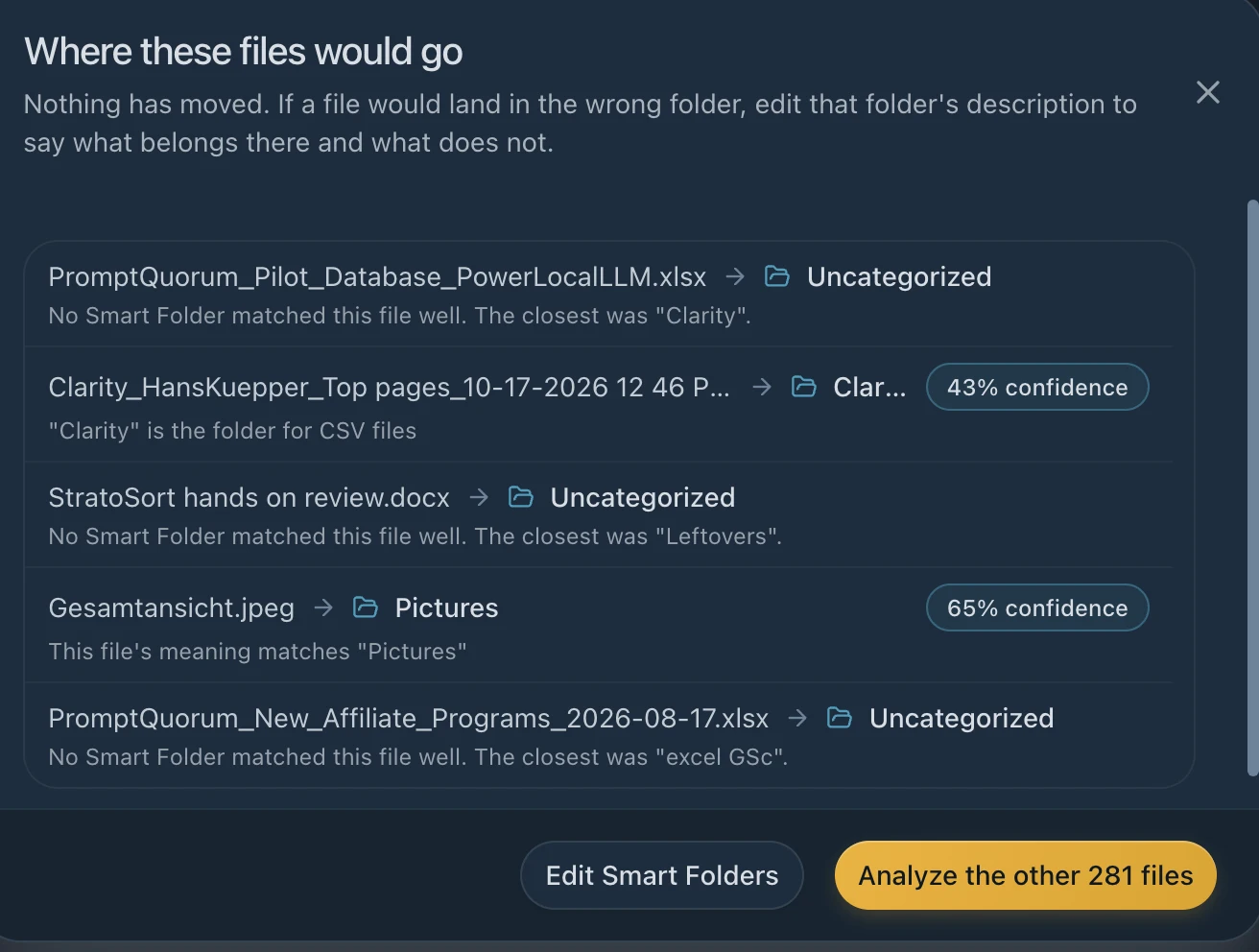
A first test on five files showed where each would go; the screen says "Nothing has moved". Two files were assigned: a Clarity CSV to Clarity at 43 % confidence and a picture to Pictures at 65 %. Three went to Uncategorized, each with a closest folder named: Clarity, Leftovers and excel GSc. His own review-notes file was among the three.

Figure 2Five-file dry run, nothing moved. Confidence values read from the app. Measured.
Tester view

He was not convinced and wanted a form at that step to confirm or reject each result, instead of going back to edit the folders and run again. The screen offers "Edit Smart Folders" and "Analyze the other 281 files"; per-file choices appear later, in the review step.

Analysis and review

Measured

The other 281 files were analysed. The progress card shows "Analyzing 5 of 281 files, 2 % complete", the file being processed and a Stop button. Total analysis time is not recorded.

Figure 10Analysis progress. Total duration not recorded. Measured.
Observed

In the review step each file has a card with a checkbox, an editable suggested name, a category dropdown (best match plus other suggestions), a "Needs review" note with the reason, a confidence bar and a Details link. Whether every file was reviewed before the move is not recorded.

Figure 11Per-file category choice in the review step. Observed.
Observed

Details shows project, purpose, date, document type, method, length, a summary, keywords, reasoning and the extracted text. The tester reads this as the way to fine-tune the sorting and says some data is extracted and kept in what he calls a database; the screens show the extracted fields only.

Figure 12Details view for one spreadsheet. Observed.
Observed

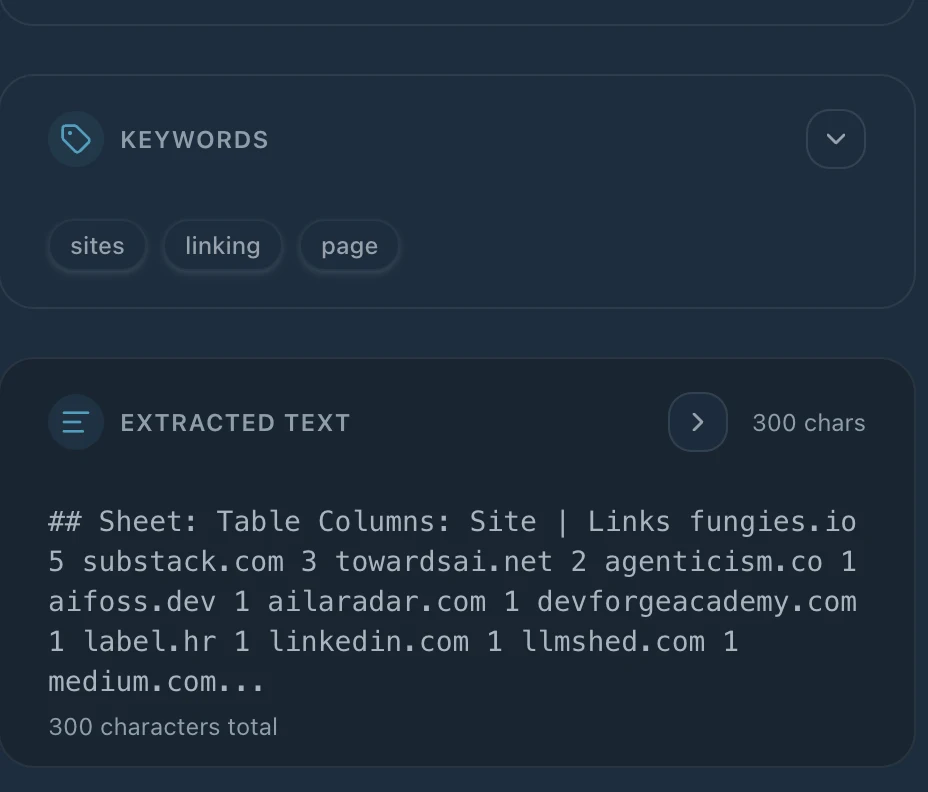
For an Excel file the extracted text is 300 characters and ends with an ellipsis after the column headers and a few rows. Whether the limit applies to other file types or to the classification step is not known (assumption: it may explain weak matches on spreadsheets).

Figure 3Extracted text for an Excel file ends after 300 characters. Observed.
Observed

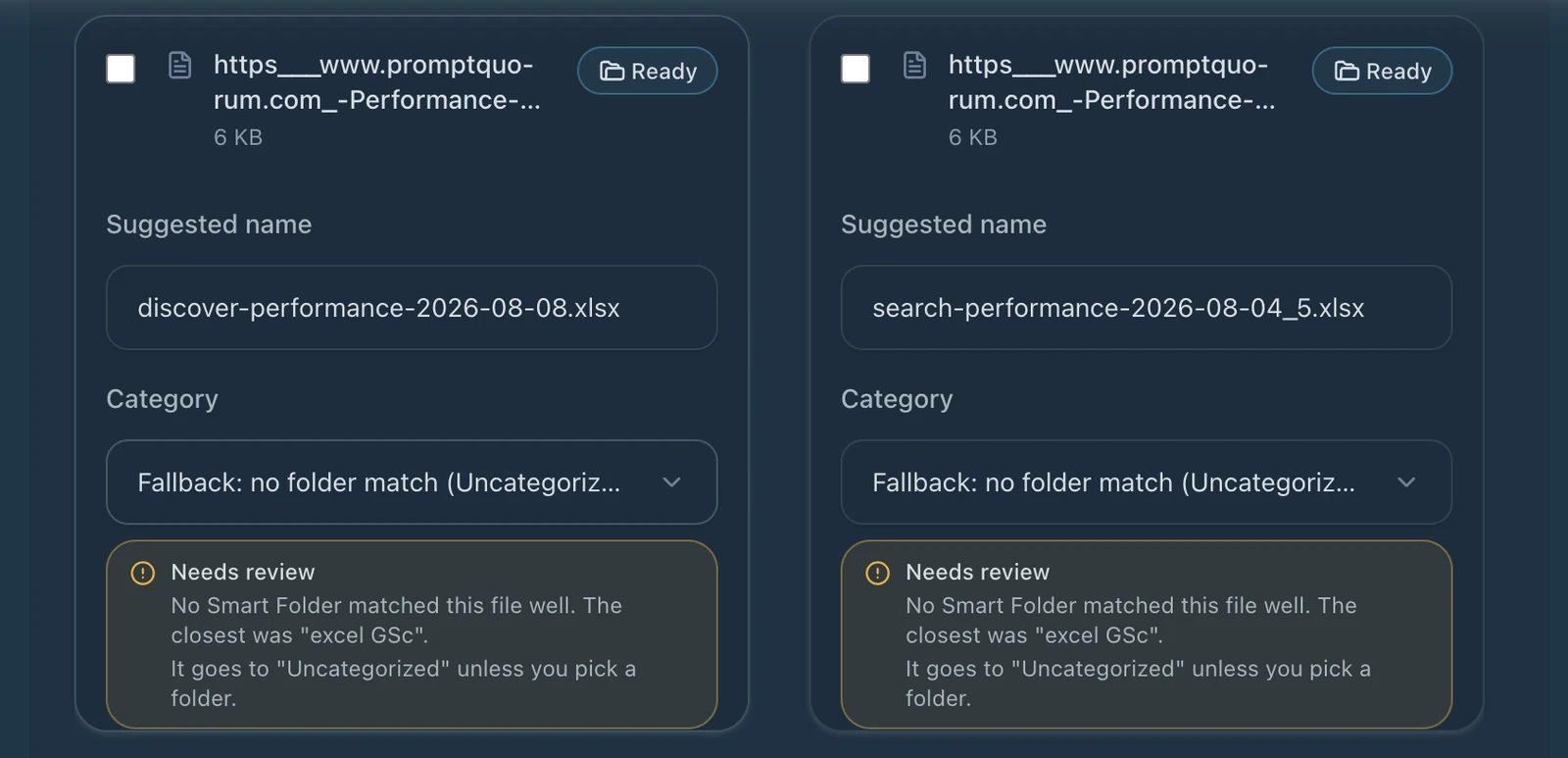
Two Search Console Excel exports of 6 KB each, named after the site URL, got descriptive suggested names but went to the fallback, although the note names "excel GSc", the tester's folder for them, as closest. The cause was not isolated.

Figure 4Two Excel exports left in the fallback although "excel GSc" was the closest folder. Observed.
Measured

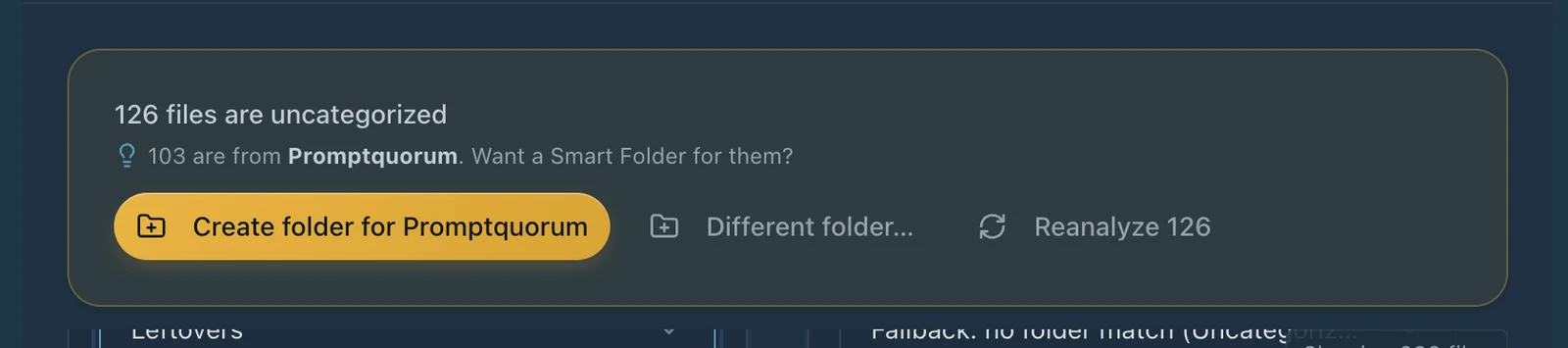
A banner reads "126 files are uncategorized" and "103 are from Promptquorum. Want a Smart Folder for them?", with Create folder, Different folder and Reanalyze buttons. The suggestion appears to follow the site name in the file names, not the content type (assumption).

Figure 5Uncategorized banner in the review step. Measured by the app.
Tester estimate

The tester first felt the match was 70 to 80 percent and revised this to about 40 percent not matched after seeing the uncategorized count. Taken against the 286 files, 126 would be 44 %; that is a calculation and assumes both counts refer to the same files.

Moving files

Observed

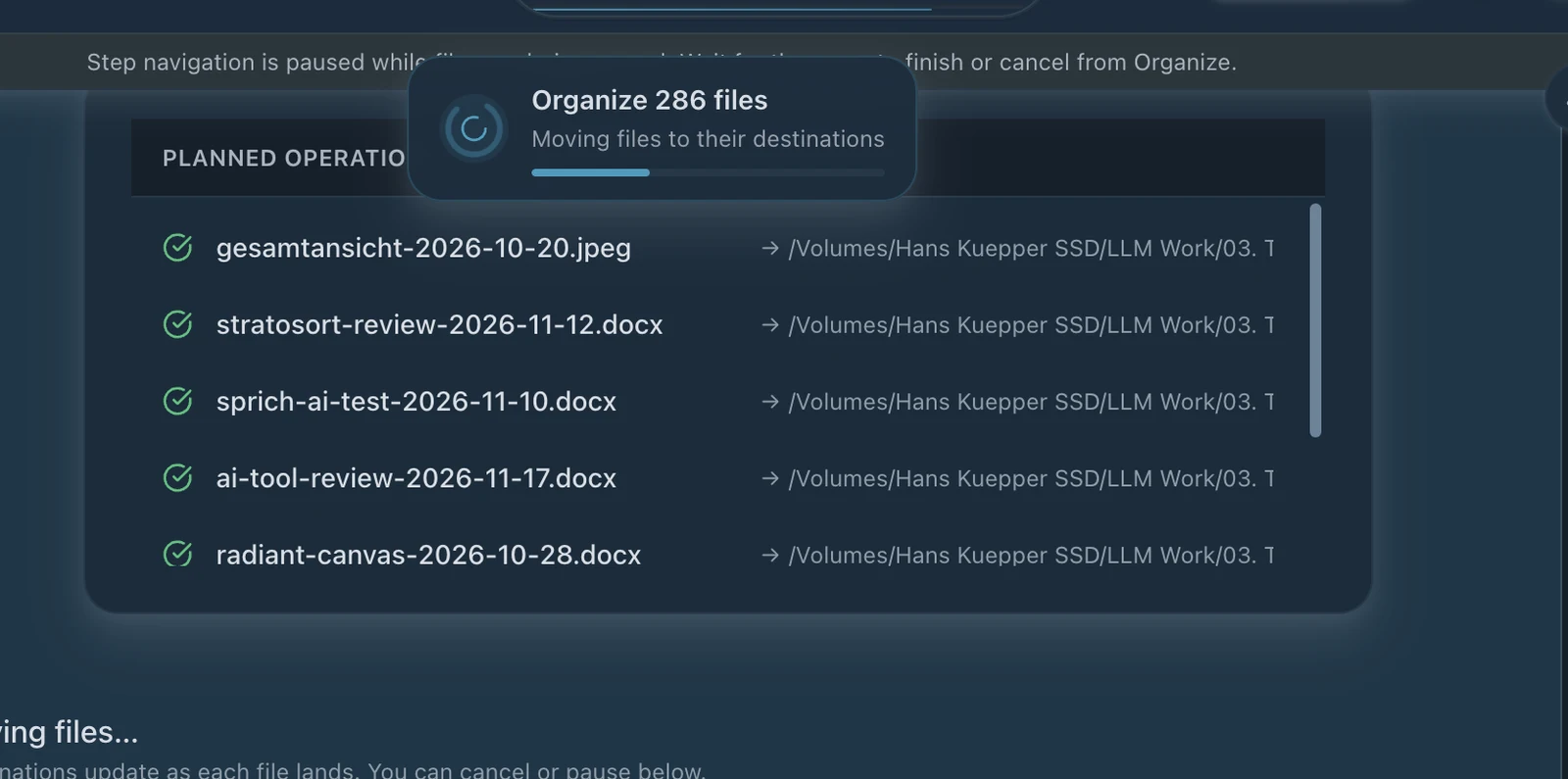
"Organize 286 files, moving files to their destinations" lists planned operations with green ticks and paths on the external SSD; step navigation is paused until the move finishes or is cancelled. The tester's own test-notes documents were among the files. The end of the move is not recorded.

Figure 6Planned operations with renamed files, early in the move. Observed.
Observed

The move list replaced original names with lowercase names and a date, for example "Gesamtansicht.jpeg" became "gesamtansicht-2026-10-20.jpeg" and "StratoSort hands on review.docx" became "stratosort-review-2026-11-12.docx". The tester wrote that renaming was not tried; the list shows it was applied in this run. The result was not checked on disk, and the origin of the dates is not shown.

Measured

One WhatsApp image of 126 KB was added on its own and got a card with a suggested name, Pictures as best match and 64 % confidence. The tester says single files from anywhere on the computer can be added and sorted with the rest, and he values this.

Figure 13Single file added from outside the test folder. Measured.
Observed

A second capture reads "Organize 75 files"; its relation to the 286-file run is not recorded, and neither end is shown.

A link to another local AI app over MCP

Observed

The app has an MCP screen listing four tools: search_documents, chat_with_documents, get_document_summary and list_smart_folders, with buttons that copy the setup for Claude Desktop, Cursor and Zed.

Figure 14MCP screen in the app. The read-only line is a vendor claim. Observed.
Observed

Because MCP is a standard protocol, the app can be linked to a standard LLM client: the setup buttons on that screen are for Claude Desktop, Cursor and Zed, and the tester linked it to Loci. The tester did not try Claude Desktop, Cursor or Zed, so no connection to those was verified.

Vendor claim

A line on that screen says: "These tools only read. None of them moves, renames or deletes files."

Observed

The tester says he had to "backwards engineer" the connection to another local AI app. What failed and what he changed are not recorded.

Observed

The client, Loci, reports "Strato is connected and offers 4 tools" at a local address and says for each tool that it does not say whether it can change things. That the tools carry no read-only marker is an assumption; the app says they only read.

Figure 15Tool list as shown by Loci. Observed.
Observed

Loci's server list shows PromptQuorum with 27 tools and Strato with 4 tools, both connected.

Figure 16Server list in Loci. Observed.
Measured

list_smart_folders returned a table with folder, file count, description and destination path. Visible rows: Uncategorized 53, Pictures 8, excel GSc 196. The 53 does not match the 126 seen earlier in the review step; the time between the two is not recorded, so they are not reconciled.

Figure 17Result of list_smart_folders. Counts as shown; later rows not visible. Measured.
Observed

Before the search, Loci asked "Allow Strato to run search_documents?" with the query "Clarity data", a local address, and the buttons Allow once and Decline.

Figure 18Permission prompt before the search. Observed.
Observed

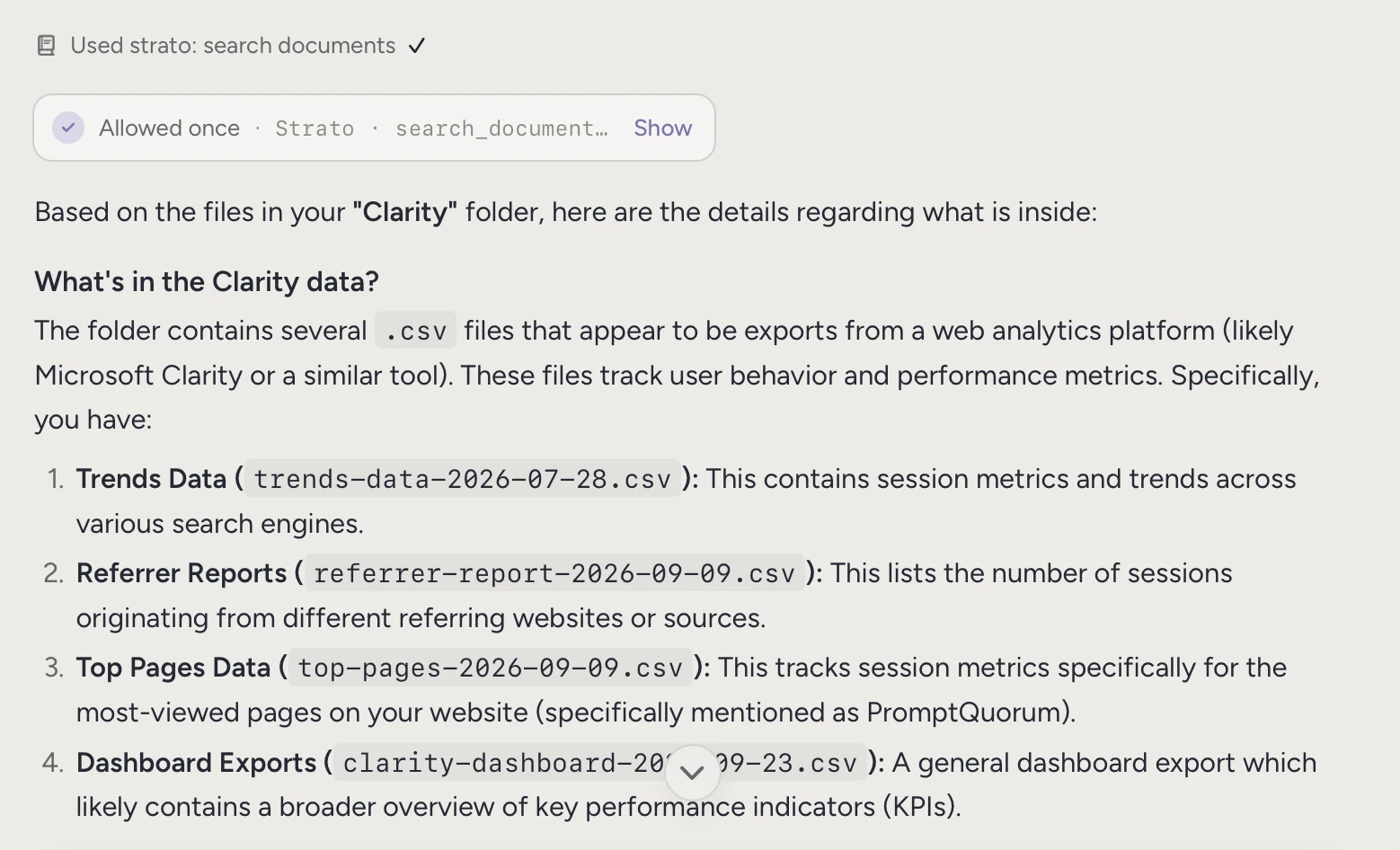
search_documents with the query "Clarity data" returned four CSV files from the Clarity folder, each with a one-line description. The client's reply guesses that the source is Microsoft Clarity or a similar tool. Correctness against the file contents was not checked; the reply continues below the visible area.

Figure 7Result of the search_documents call "Clarity data" in Loci. Observed.
Tester view

He says it does not yet look like a retrieval system but moves toward a dataset that outside tools can query. He called only two of the four tools; get_document_summary and chat_with_documents were not called. Correction: StratoSort does have a retrieval system of its own (see the correction chapter below).

Correction: StratoSort has built-in search and chat (Knowledge OS)

Observed

After this test was first published, the developer, Ben Kennedy, wrote that StratoSort already includes a retrieval system (RAG) with its own search and document chat, and that he should have pointed the tester to it more clearly. This page said the opposite in several places; those statements are corrected here and marked in the text. Thank you, Ben, for pointing it out.

Vendor claim

Per the developer: pressing Cmd+K on the Mac, or clicking Knowledge OS in the navigation, opens five views. Search finds analysed files by meaning or keywords, combining vector similarity with keyword search. Chat answers questions about those files with source-document citations. Relate is a graph of related files and clusters. Atlas is a map of the library with similar files grouped together. Timeline lists analysed files by date.

Observed

The tester opened Knowledge OS afterwards. The Search view has a box reading "Describe what you're looking for..." and three search tips: natural language such as "vacation photos from beach", file types such as "PDF documents", and content descriptions such as "spreadsheet with budget". No search was run in the screenshot.

Figure 19Search view of Knowledge OS with its search tips; no search was run in this screenshot. Observed.
Observed

The Timeline view lists analysed files, each with a folder label that is cut off in the narrow window (for example CLARI…, SEO D… and STRAT…) and the file name. The visible entries are the test's own exports and notes.

Figure 20Timeline view listing analysed files by folder label and name. Observed.
Measured

The top bar of the Relate view reads 5 smart folders and 550 files indexed; the 550 differs from the 286 files of the sorting run, and the reason is not recorded. The graph shows 14 clusters, 47 bridges, 0 scattered files, a health grade of A (92) with 1 finding, and 14 nodes with 28 links. A suggestion card names two files as 83% related although they sit in different folders.

Figure 21Relate view with the file graph; counts read from the app. Measured.
Observed

In Chat, a conversation named "bing data" holds an assistant answer about Bing sessions with two numbered source markers beside the text, and a persona selector reading "Professional Re…" (cut off). Whether the numbers in the answer match the source files was not checked.

Figure 22Chat answer with two source markers. Whether the numbers match the files was not checked. Observed.
Observed

A second capture of the same chat shows the status "Analyzing documents..." while the answer text is already on screen without the source markers, and the sidebar reads "No conversations yet".

Figure 23The same chat while documents were being analysed; the source markers had not appeared yet. Observed.
Vendor claim

The developer describes the mechanism: StratoSort indexes extracted file content locally, retrieves the relevant material for a question and supplies it to the model, which answers from the user's documents. No other app or MCP is needed for this. MCP gives another app access to the library, while the built-in Search and Chat run inside StratoSort.

Vendor claim

The developer says the default setup runs locally, including embeddings, retrieval and chat. Optional cloud providers can be enabled but are not required. With MCP, whether retrieved content stays local also depends on the client and model that are connected. The tester has not verified this.

Vendor claim

On the tester's point that sorting needs clear folder descriptions and feedback, the developer says this is separate from training or fine-tuning the language model. On the Organize screen, a file's destination can be changed before the move. After two different files with the same type and label are moved from the suggested folder into the same other folder, StratoSort learns that routing correction; it can be reviewed in Settings > Performance > Memory & Rules. The tester has not tried this.

Vendor claim

The developer says recent releases addressed the issues from the tester's first test: conflicting filenames, clearer previews and full destination lists, external-drive access, more consistent spreadsheet routing, and clearer reporting when files do not move. Version 5.4.0 added a five-file trial before large batches, safer handling of overlapping folders and "Needs review" for weak matches instead of a forced destination, and fixed growing memory use during long batches and reduced repeated analysis. The tester has not retested these versions.

Observed

What this changes: the statement that a retrieval layer would have to be added was wrong, and the remark that the app does not yet look like a retrieval system does not hold. What stays: the screens were seen once, no answer was checked against the files, and the sorting results of the original session are unchanged.

Decision

Observed

The notes end with an overall view and no decision on continued use.

Tester view

In his understanding the app sorts files, needs time to fine-tune, and works best with a small start and repeated checking, adjusting the smart folders as you go. He used moving, not copying, and did not try the rewording and renaming functions.

Tester view

He plans to set up a legal entity next year and to repeat the test with more documents to see whether it can keep his folder system in order. His interest is that combination with MCP and perhaps a retrieval layer on top. Correction: that layer is already built in (see the correction chapter above).

Tester view

"You need to start small with some files and then check it, check it, check it, and fine-tune all the rules."

Tester view

"Having worked in consulting, I know the worst thing is always keeping an order in file systems, and then afterwards finding something."

Claims versus what the tester saw

ClaimSourceObservedLabel
Welcome screen: private, on-device, you review before any file moves.Welcome screenReview cards and "Nothing has moved" seen; on-device operation not verified.Vendor claim
"Review, rename, and organize files with local AI."Welcome screenReview, rename and organize seen; which models ran, and whether locally, not recorded.Vendor claim
"These tools only read. None of them moves, renames or deletes files."MCP screenOnly two read calls made; no write attempt. The client says the tools do not state whether they can change things.Vendor claim
Hybrid semantic and keyword search with ranked results, snippets and scores.MCP tool textOne search run; the visible reply is a file list; scores and snippets not visible.Vendor claim
Suggests names and folders you can review and undo; adds semantic search and document chat.PromptQuorum directory entryNames, folders and review seen; undo not tested. Search, Chat, Timeline and Relate were opened afterwards (see the correction chapter); answer quality not checked.Third party
Works with Claude Desktop, Cursor and Zed.PromptQuorum directory entryCopy-config buttons for those three seen; connection made from another client.Third party
About 7 GB base model download after install.PromptQuorum directory entryNot recorded.Third party
No account, no telemetry, no outbound requests with update checks off and no cloud key.Founder statementNo account screen among the screenshots; traffic not inspected.Vendor claim
The developer addressed some of the issues raised after the first attempt.Tester's notesWhich issues and which version are not recorded.Observed

Usage log

#TaskAppResultTimeStatusFigures
1First attempt, clicked through without guidanceStratoSortDid not work out per the tester; details not recordedNot recordedFail-
2Launch in Guided modeStratoSortReached the folder stepNot recordedPassFig. 1
3Read a whole folder in the appStratoSortFolder not read per the tester; no screenshotNot recordedFail-
4Add individual filesStratoSortWorked per the testerNot recordedPass-
5Dry run on 5 filesStratoSort2 matched a folder, 3 went to UncategorizedNot recordedPartialFig. 2
6Analyse the other 281 filesStratoSortStarted; end and duration not recordedNot recordedPartialFig. 10
7Open Details for one spreadsheetStratoSortFields shown; text cut at 300 charactersNot recordedPassFig. 3, Fig. 12
8Sort two Search Console exports into "excel GSc"StratoSortFallback insteadNot recordedFailFig. 4
9Add one WhatsApp imageStratoSortReady for Pictures, 64 %Not recordedPassFig. 13
10Move 286 files to the external SSDStratoSortIn progress at capture; end not recordedNot recordedPartialFig. 6
11Second move, 75 filesStratoSortOne progress capture onlyNot recordedPartial-
12Rename files as part of the moveStratoSortNew names in the move listNot recordedPassFig. 6
13Connect another local AI app over MCPLociConnected after the tester worked out the setup himselfNot recordedPartialFig. 15, Fig. 16
14list_smart_foldersLociTable returnedNot recordedPassFig. 17
15search_documents, query "Clarity data"LociFour files listedNot recordedPassFig. 18, Fig. 7
16get_document_summary, chat_with_documentsNot applicableNot calledNot recordedNot completed-
17Open Knowledge OS: Search, Chat, Timeline, Relate (after the first publication)StratoSortFour views opened; one chat answer with two source markers seen; answers not checkedNot recordedPartialFig. 19, Fig. 20, Fig. 21, Fig. 22, Fig. 23
18Undo, copy mode, Dashboard mode, AI and model settings, offline use, uninstallNot applicableNot testedNot recordedNot completed-

Where the tester got it wrong

  • Tester errorWrote that renaming was not tried. The move list shows new names (for example a picture and a Word file in lowercase with a date) and green ticks, so renaming was applied in this run. Not checked on disk.
  • Tester errorIn the first attempt he clicked through without reading the guidance and thinks he made setup mistakes. What went wrong is not recorded.
  • Tester errorJudged that it does not look like a retrieval system after calling only list_smart_folders and search_documents. StratoSort has its own retrieval (RAG) with search and document chat, called Knowledge OS; the developer says he should have pointed the tester to it more clearly. The tool list also names get_document_summary and chat_with_documents, which were not called.
  • AssumptionHis estimate of "40 % not matched" is a rounding of the 44 % in the review chapter, if the 126 files belong to the 286. The earlier "70 to 80 %" was a feeling, not a count.
  • Tester errorGaps in the record: app version, models and their download, input folder contents, the folder descriptions he wrote, analysis time, whether every file was reviewed before the move, whether the 286 and 75 file moves finished, how the MCP connection was made, what the developer changed, undo, uninstall. Voice-to-text slips were normalised: "Stratosorgstack" is StratoSort Stack, "SST" is SSD, "M C Ps" is MCPs. "Low key" and "Loki" are read as Loci, as confirmed by the tester. "Some AI mechanism picked up that" is read as the banner in the review step (assumption).

Findings register

IDFindingCategoryLabelSeverityFigures
SS-01The installer window shows the app icon, labelled "StratoSort Stack", beside an Applications shortcut. Installer size not recorded.InstallObservedInfoFig. 8
SS-02The welcome screen reads "Step 1 of 5, Start securely", offers a Guided and a Dashboard mode and a main button "Organize files now, recommended for a first session", with side buttons for AI and model settings and smart folders. The tester chose guided steps after the first attempt. A notification bell shows a count; its content is not recorded.OnboardingObservedPositiveFig. 1, Fig. 9
SS-03Models offered, chosen and downloaded, their size and the setup time are not recorded. The directory lists about 7 GB for the base models (third-party).OnboardingThird partyInfo-
SS-04Per the tester's notes the developer reviewed his comments from the first attempt and addressed some issues within several days. No message is shown; the issues and the version are not recorded.SupportObservedInfo-
SS-05The tester asked the app to read a whole folder and it did not; he then gave individual files. The folder, any message and the cause are not recorded; no screenshot.FoldersObservedMedium-
SS-06Creating the input folder and output folders was easier for the tester in Finder than in the app, and he found the app unclear here. The app speaks of smart folders with a description, while the tester thinks in input and output folders (tester view). In-app folder creation does exist (see the banner in the review step).FoldersTester viewMediumFig. 5
SS-07Output folders on an external SSD were used in this run, as the move list and the MCP table show. The tester says the first attempt did not take the external SSD; the cause was not recorded.FoldersObservedPositiveFig. 6
SS-08"Trying your Smart Folders" analyses a few files and says "No files are moved". The result screen repeats "Nothing has moved" and tells the user to edit a folder's description if a file would land wrongly.Dry runObservedPositiveFig. 2
SS-09Of five files, two were assigned: a Clarity CSV to Clarity at 43 % confidence and a picture to Pictures at 65 %. Three went to Uncategorized, each with a closest folder named: Clarity, Leftovers and excel GSc. The tester's own review notes file was among the three.Dry runMeasuredMediumFig. 2
SS-10At the preview step the tester wanted a form to confirm or reject each result (tester view). The screen offers "Edit Smart Folders" and "Analyze the other 281 files". Per-file choices appear later in the review step.Dry runTester viewLowFig. 2
SS-11The progress card shows "Analyzing 5 of 281 files, 2 % complete", the file being processed and a Stop button. Total analysis time is not recorded.AnalysisMeasuredInfoFig. 10
SS-12Each file has a card with a checkbox, an editable suggested name, a category dropdown (best match plus other suggestions), a "Needs review" note with the reason, a confidence bar and a Details link. Whether every file was reviewed before the move is not recorded.ReviewObservedPositiveFig. 11, Fig. 4
SS-13Details shows project, purpose, date, document type, method, length, a summary, keywords, reasoning and the extracted text. That this is kept in a database is the tester's reading; the MCP tool text speaks of a cached analysis (vendor claim).ReviewObservedPositiveFig. 12
SS-14For an Excel file the extracted text is 300 characters and ends with an ellipsis after the column headers and a few rows. Whether the limit applies to other file types or to the classification step is not known (assumption: it may explain weak matches on spreadsheets).ReviewObservedMediumFig. 3
SS-15Two Search Console Excel exports of 6 KB each, named after the site URL, got descriptive suggested names but went to the fallback, although the note names "excel GSc", the tester's folder for them, as closest. Cause not isolated.ReviewObservedMediumFig. 4
SS-16A banner reads "126 files are uncategorized" and "103 are from Promptquorum. Want a Smart Folder for them?" with Create folder, Different folder and Reanalyze buttons. The suggestion appears to follow the site name in the file names, not the content type (tester view and assumption). Reading the 126 as 44 % of 286 is a calculation (assumption).ReviewMeasuredLowFig. 5
SS-17"Organize 286 files, moving files to their destinations" lists planned operations with green ticks and paths on the external SSD; step navigation is paused until the move finishes or is cancelled. The tester's own test-notes documents were among the files. A second capture reads "Organize 75 files"; its relation to the first is not recorded, and neither end is shown.MoveObservedInfoFig. 6
SS-18Original names were replaced in the move list by lowercase names with a date, for example "Gesamtansicht.jpeg" became "gesamtansicht-2026-10-20.jpeg" and "StratoSort hands on review.docx" became "stratosort-review-2026-11-12.docx". The origin of the dates is not shown.MoveObservedMediumFig. 6
SS-19One WhatsApp image of 126 KB was added on its own and got a card with a suggested name, Pictures as best match and 64 % confidence. The tester says single files from anywhere can be added.MoveMeasuredPositiveFig. 13
SS-20The app has an MCP screen listing four tools: search_documents, chat_with_documents, get_document_summary and list_smart_folders. A line says they only read and do not move, rename or delete files (vendor claim). Buttons copy the setup for Claude Desktop, Cursor and Zed.MCPObservedPositiveFig. 14
SS-21The tester says he had to "backwards engineer" the connection to another local AI app. What failed and what he changed are not recorded.MCPObservedMedium-
SS-22The client reports "Strato is connected and offers 4 tools" at a local address and says for each tool that it does not say whether it can change things. That the tools carry no read-only marker is an assumption; the app says they only read.MCPObservedLowFig. 15, Fig. 16
SS-23list_smart_folders returned a table with folder, file count, description and destination path. Visible rows: Uncategorized 53, Pictures 8, excel GSc 196. The 53 does not match the 126 seen earlier in the review step; the time between the two is not recorded, so they are not reconciled.MCPMeasuredPositiveFig. 17
SS-24search_documents with the query "Clarity data" returned four CSV files from the Clarity folder, each with a one-line description. The client's reply guesses that the source is Microsoft Clarity or a similar tool. Correctness against the file contents was not checked; the reply continues below the visible area.MCPObservedPositiveFig. 18, Fig. 7
SS-25The welcome screen says private and on-device, and the founder says there is no account and no telemetry (vendor claims). No traffic was inspected, no offline run was tried, no account screen is among the screenshots and the models used are not recorded.TrustVendor claimInfo-
SS-26Not tested or not recorded: undo, copy mode, Dashboard mode, AI and model settings, get_document_summary, chat_with_documents, the rewording function, timing, memory, offline use, uninstall, Windows and Linux.ScopeObservedInfo-
SS-27Correction. StratoSort has built-in search and document chat in a Knowledge OS window (Cmd+K) with Search, Chat, Timeline, Relate and Atlas. The tester opened Search, Chat, Timeline and Relate afterwards; the top bar showed 5 smart folders and 550 files indexed, and one chat answer carried two source markers. Answer correctness and Atlas were not checked. The earlier statement that a retrieval layer was missing was wrong.Search and chatObservedInfoFig. 19, Fig. 22

Severity is the impact on a first-time user. Proposed, not measured. Info marks a finding that is neither a problem nor a strength; Positive marks something that worked well.

Who it is for

Likely fit

  • AssumptionMac users with mixed, private document folders who accept starting small, checking often and tuning the folder descriptions (assumption from one session).

Likely poor fit

  • AssumptionAnyone who expects accurate sorting after the first pass.
  • Third partyAnyone who needs commercial use without checking the licence: the directory lists a noncommercial licence and a paid per-seat licence for commercial use.

Retest. Retest on a new major version, after the issues the developer addressed are shipped, or when the tester has the company documents next year. Cover: record the app version and the models; run a known test set and count matched against uncategorized; the spreadsheet text limit; undo; copy mode; the built-in Search and Chat (check answers and source markers against the files, and try Atlas); get_document_summary and chat_with_documents over MCP; the changes the developer lists for version 5.4.0; offline use with traffic inspected; runtime memory; uninstall; the licence terms.

Having worked in consulting, I know the worst thing is always keeping an order in file systems, and then afterwards finding something.

Tester notes, lightly edited from dictation. Both are his judgment, not measurements.

Frequently asked questions

Does StratoSort move files before you approve them?

Not in the session. The five-file dry run said "Nothing has moved", and each file got a review card before the move. Whether every file was reviewed before the 286-file move is not recorded. Observed

How well did StratoSort sort the test files?

Mixed. In the dry run two of five files were assigned to a folder; in the review step a banner counted 126 uncategorized files; two Search Console exports went to the fallback although their folder was named as closest. No accuracy count was made. Measured

Can another AI app query StratoSort over MCP?

Yes, in the session. The Loci app connected, listed four tools and returned results from list_smart_folders and search_documents. The tester had to work out the connection himself; get_document_summary and chat_with_documents were not called. Observed

Does StratoSort rename files?

Yes, in the move list: original names were replaced by lowercase names with a date. The result was not checked on disk, and the rewording function was not tried. Observed

Is StratoSort private and offline?

The welcome screen says private and on-device, and the founder statement says no account and no telemetry. No network traffic was inspected and no offline run was tried, so this is not verified. Vendor claim

What was not tested?

Undo, copy mode, Dashboard mode, AI and model settings, timing, memory, offline use and uninstall. The built-in document chat was opened only afterwards and its answers were not checked. The app version and the models used were not recorded. Observed

Does StratoSort have its own search and document chat (RAG)?

Yes. The developer says StratoSort indexes extracted file content locally, retrieves relevant material for a question and gives it to the model, so no other app or MCP is needed. On the Mac, press Cmd+K or click Knowledge OS to open Search, Chat, Relate, Atlas and Timeline. The tester opened Search, Chat, Timeline and Relate afterwards and saw a chat answer with source markers; he did not check whether the answer was correct. An earlier version of this page wrongly said a retrieval layer was missing. Observed

Background on the maker

Third-party and unverified. Kept apart from the test.

  • Third partyMaker: Ben Kennedy, Ph.D., who says he built it solo over about 17 months of part-time work (vendor claim, founder statement of 2026-11-10).
  • Third partySource-available under PolyForm Noncommercial 1.0.0, freemium; the directory notes that commercial use needs a paid per-seat licence, that the project is very young, that an update check is on by default and that its privacy claims were not tested. Release 5.1.2 of 2026-11-01 with installers for Mac, Windows and Linux. Source: PromptQuorum directory entry, checked 2026-11-10.

More hands-on tests

How to read the labels

Observed
Seen first-hand in the app, a screenshot or the tester's notes.
Measured
A value read from a dialog, counter or tool, with the number given.
Tester estimate
The tester's own estimate; not timed or counted.
Vendor claim
Stated by the app, its store listing or its website; not verified.
Third party
From another source (an AI assistant, an article); not verified here.
Assumption
An inference. It may be wrong.
Tester view
The tester's judgment or opinion.
Tester error
Where the tester made a mistake or missed something.

Sources

  • Tester's hands-on notes and screenshots (original Word notes; PDF of the raw notes to be added).
  • PromptQuorum directory entry and review of StratoSort (slug: stratosort), verified 2026-11-10.
  • Vendor site stratosort.com (vendor claims) and the source repository iLevyTate/StratoSortStack, listed in the directory and not opened for this test.
  • Developer's note to the tester (Ben Kennedy) on the built-in search and chat, the sorting corrections and the 5.4.0 changes, received after the first publication (vendor claims).

Test ID pq-test-stratosort-2026-11-17 · Test standard v0.2 · Raw notes PDF: to be added

How I test apps — and why there is no fixed standard — These tests are my personal views, not guarantees.

MCP