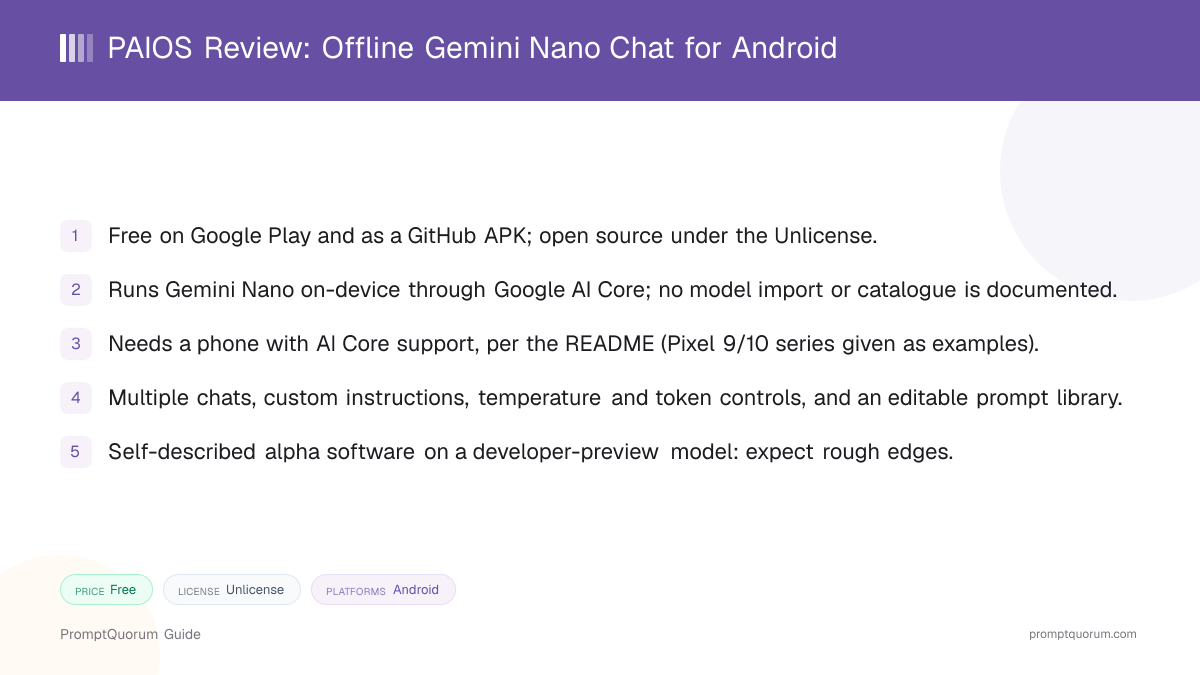
Key Takeaways
- Version reviewed: 1.1.8, the latest GitHub release at the time of review, published April 21, 2026.
- Price and license: free, with no in-app purchases listed on Google Play; the code is under the Unlicense, a public-domain-style license.
- Model: Gemini Nano, run by Google AI Core on the phone; the documentation describes no way to load other models.
- Platform: Android only, and only on AI Core-supported phones (see Device Requirements).
- Maturity: the developer labels it alpha, and the project had its last commit in May 2026.
📍 In One Sentence
PAIOS, built by developer Puzzak, lets you chat with Gemini Nano fully on-device through Google AI Core, with multiple chats, custom prompts, and temperature controls; it costs nothing and its source is public.
💬 In Plain Terms
Think of it as a chat window for the small AI model that Google already built into supported Android phones: no account, no cloud model, and no model files to manage, but also no choice of model.
Get PAIOS
PAIOS is available from Google Play and as a direct APK on GitHub. Both are free. Use the Play listing for automatic updates, or the GitHub APK if you prefer to install outside the Play Store.
This review is a companion to PromptQuorum's Local LLM Software Directory, which lists PAIOS alongside other on-device and local AI tools.
Channel | Get It |
|---|---|
| Google Play | PAIOS - Offline AI on Google Play |
| GitHub APK | PAIOS releases on GitHub |
| Source code | Puzzaks/PAIOS |
Since version 1.1.2 the app uses a new package name, and the developer says older versions no longer work because of a Play Store listing issue. Install a current build rather than an old APK.
PAIOS at a Glance
Attribute | PAIOS |
|---|---|
| Platform | Android only |
| Price | Free |
| License | Unlicense (public-domain-style) |
| Runs fully offline | Chat runs on-device; see Privacy for network use |
| Import your own models | Not stated; Gemini Nano is the documented model |
| In-app model downloads | Not stated |
| Image input | Not stated; text interface |
| Voice input / output | Not stated |
Attributes follow the mobile-chat comparison used in the Local LLM Software Directory. "Not stated" means the README, roadmap, and changelog do not mention the feature, not that it was tested and found missing.
What PAIOS Is
PAIOS is a front end for Gemini Nano, not an inference engine. Google AI Core, the Android system service that hosts Gemini Nano, runs the model. PAIOS adds the chat interface around it: separate conversations, prompts, and generation settings.
It is built mainly by one developer, Puzzak, with community translation contributions, written in Dart, and published as an independent project that is not affiliated with Google. The repository was created in November 2025 and has about 170 GitHub stars.
This review draws on the README, changelog, roadmap, GitHub releases, and the Google Play listing. It does not include hands-on testing on a device, so speed and answer quality are not rated here.
How to Get Started
Setup is a normal app install on a supported phone, with no account. The README does not describe the first-run flow in detail, so the steps below follow the documented requirements.
- 1Check that your phone supports AI Core
Why it matters: PAIOS only works where Google AI Core is available; confirm your device is supported before installing (see Device Requirements). - 2Install PAIOS
Why it matters: Get it from [Google Play](https://play.google.com/store/apps/details?id=page.puzzak.paios) or the [GitHub releases page](https://github.com/Puzzaks/PAIOS/releases). - 3Start a chat
Why it matters: Create a conversation, then set its temperature, token limit, and prompt if you want something other than the defaults. - 4Optional: customize prompts
Why it matters: Open the prompt manager to pick a system prompt, write your own, or import one from a Markdown file.
Features and Controls
PAIOS focuses on controlling how Gemini Nano is prompted, since the model itself is fixed. Everything below comes from the README and changelog for versions up to 1.1.8.
- Multiple chats. Create, rename, and pin conversations, each with its own context.
- Generation controls. Adjust temperature and maximum response tokens; since 1.1.7, temperature can be set per chat.
- Prompt manager. Since 1.1.6 you can pick, edit, and assign system and user prompts per chat; 1.1.8 added Markdown import and export of prompts.
- Custom instructions. Steer the model toward a persona or task, and optionally inject the current date, time, and app language.
- Prompt transparency. You can view the actual system prompt PAIOS sends to the model.
- Auto-continue. Since 1.1.7, long answers can be continued automatically, a workaround for the roughly 25-second generation limit described in the roadmap.
- Translations. Community contributors have added Turkish, German, and Chinese interface translations.
Device Requirements
PAIOS needs a phone with Google AI Core support. The README states that it "requires a supported device with Google AI Core (e.g., Pixel 9/10 series)". It lists no minimum RAM or storage figure, so device support, not specs, is the gate.
Google decides which phones receive AI Core and Gemini Nano, and that list can change. Check Google's own device documentation, or try the Play Store install on your phone, before assuming a non-Pixel device will work.
Privacy and Network Use
The README says PAIOS runs "entirely on-device using Google's AI Core. No data leaves your phone." The Google Play listing shows the developer's data-safety declaration as "No data collected" and "No data shared".
The changelog adds detail worth knowing. Version 1.1.2 introduced optional analytics for debugging and crash reporting, version 1.1.5 added crash reporting, and later versions mention Firebase Remote Config for app settings and prompts downloaded from GitHub. The README and the Play declaration do not mention these, and this review did not inspect the app's network traffic.
If you need zero network contact, check the app's settings for the analytics option and inspect traffic yourself. The source is public, so the claims can be audited by anyone.
Trade-Offs: Benefits vs. Limitations
Free, public-domain-style license
- What it means in real use:
- No price, no account, and a very permissive license on the code.
- Limitation / caveat:
- Mostly one maintainer; the last commit was in May 2026, so update pace is uncertain.
No model files to manage
- What it means in real use:
- Google AI Core supplies Gemini Nano, so there are no GGUF files or catalogues to deal with.
- Limitation / caveat:
- No model switching or import is documented; Gemini Nano is the supported model.
Strong prompt controls
- What it means in real use:
- Per-chat prompts, temperature, and token limits make the small model easier to steer.
- Limitation / caveat:
- The README warns Gemini Nano is tuned for summarization and smart reply, and it may hallucinate or lose context.
Open source, auditable
- What it means in real use:
- Anyone can read the code behind the privacy claims.
- Limitation / caveat:
- The README says typing curses or slurs can soft-lock the app when auto-retry is on, because of the model's own filters.
Auto-continue for long answers
- What it means in real use:
- Responses cut off by the roughly 25-second generation window can be extended.
- Limitation / caveat:
- The changelog lists auto-continue as still in testing: it may continue finished answers or miss cut-off ones.
PAIOS vs. Alternatives
PAIOS
- Platforms:
- Android
- Price and license:
- Free, Unlicense
- Model flexibility:
- Gemini Nano, via Google AI Core
- Key difference:
- Open-source Gemini Nano client with strong prompt controls; needs an AI Core phone
Articles about PAIOS (1)
- PAIOS Review: Offline Gemini Nano Chat for AndroidUpdated October 2, 2026
Google AI Edge Gallery
- Platforms:
- Android, iOS
- Price and license:
- Free, Apache 2.0
- Model flexibility:
- Google's on-device Gemma models
- Key difference:
- Google's own on-device app, running Gemma models
Layla
- Platforms:
- Android
- Price and license:
- Freemium, closed source
- Model flexibility:
- GGUF models plus other on-device backends
- Key difference:
- Android-first assistant with broader model choice, but not open source
PocketPal AI
- Platforms:
- Android, iOS
- Price and license:
- Free, MIT
- Model flexibility:
- GGUF models you download yourself
- Key difference:
- Ships its own inference engine instead of using AI Core, but you manage model files yourself
Off Grid AI
- Platforms:
- Android, iOS, macOS, Windows
- Price and license:
- Freemium, MIT
- Model flexibility:
- Local models plus Ollama connections
- Key difference:
- Cross-platform and feature-rich, but a much larger app than a focused Gemini Nano client
Platform, price, and feature details for third-party apps change frequently. Verify current specifics on each app's own listing before deciding.
Who Should Use PAIOS
- Owners of an AI Core-supported phone who want a free chat front end for Gemini Nano. It is the most direct way to talk to the model Google already ships on the device.
- Privacy-minded users who prefer open source. The code is public and under the public-domain-style Unlicense, so the data-handling claims can be checked.
- Tinkerers who like to steer a small model. Per-chat prompts, temperature, and a prompt library with Markdown import and export reward experimentation.
Who Should Not Use PAIOS
- Anyone whose phone lacks AI Core support. The app cannot run without it (see Device Requirements above).
- Users who want to choose or import models. PAIOS documents Gemini Nano only; try PocketPal AI or Layla instead.
- People who need depth or reliability. Gemini Nano is a small on-device model, and the project calls itself alpha.
- iPhone, Mac, or Windows users. PAIOS is Android-only; Off Grid AI covers more platforms.
Frequently Asked Questions
Is PAIOS free?
Yes. The Google Play listing shows no in-app purchases, and the roadmap lists monetization only as a future, unchecked item.
Who makes PAIOS?
An independent developer who publishes as Puzzak (GitHub: Puzzaks). The project states it is not affiliated with, endorsed by, or sponsored by Google.
Does PAIOS work on any Android phone?
No. It needs Google AI Core, which Google enables on selected devices. See Device Requirements for the README wording.
Can I use other models, like Llama or Gemma, in PAIOS?
Not as far as the documentation shows. PAIOS is built as a client for Gemini Nano through AI Core; the README tagline adds "and maybe something else!" and the roadmap's first entry also names Flan-T5, but no model picker or import is documented. For other models, see the alternatives table above.
Why do long answers sometimes stop partway?
The roadmap describes a roughly 25-second generation window that can end answers early. Version 1.1.7 added auto-continue as a workaround, and the changelog still lists it as in testing.
Is PAIOS actively maintained?
Releases run from 1.0.0 to 1.1.8, the latest, published on April 21, 2026, and the last commit was in May 2026. The roadmap still lists open items such as AICore version controls and in-app documentation.
Can I install PAIOS without Google Play?
Yes. Each GitHub release includes an APK, and the source is public if you prefer to build it yourself.
Verdict
PAIOS does one narrow thing well on paper: it turns the Gemini Nano model already inside supported Android phones into a configurable, open-source chat app, free and without an account.
The same narrowness is the catch. You get one documented small model, a hard dependency on Google AI Core support, and software its own author calls alpha. That makes it a good fit for owners of recent Pixel-class phones who like to experiment, and a poor fit for anyone who wants model choice, broad device support, or polish.
If your phone qualifies, install it and see how Gemini Nano feels with your own prompts. If it does not, or you want more models, start with PocketPal AI or Layla.
Sources
- PAIOS on GitHub — README, changelog, roadmap, license, and repository statistics.
- PAIOS releases — version 1.1.8 and release assets.
- PAIOS - Offline AI on Google Play — listing, price, and data-safety declaration.
- Developer site — developer homepage linked from the repository.