Get ToolNeuron
ToolNeuron is available from Google Play or as a direct APK download from its GitHub Releases page. Both distribution channels carry the same open-source app.
This review is a companion to PromptQuorum's Local LLM Software Directory, which indexes local-AI tools across platforms, including ToolNeuron's own entry.
Channel | Get It |
|---|---|
| Google Play | ToolNeuron on Google Play |
| GitHub (APK) | ToolNeuron Releases on GitHub |
The app is free either way — GitHub also hosts the full source code for readers who want to audit or build it themselves.
What ToolNeuron Is
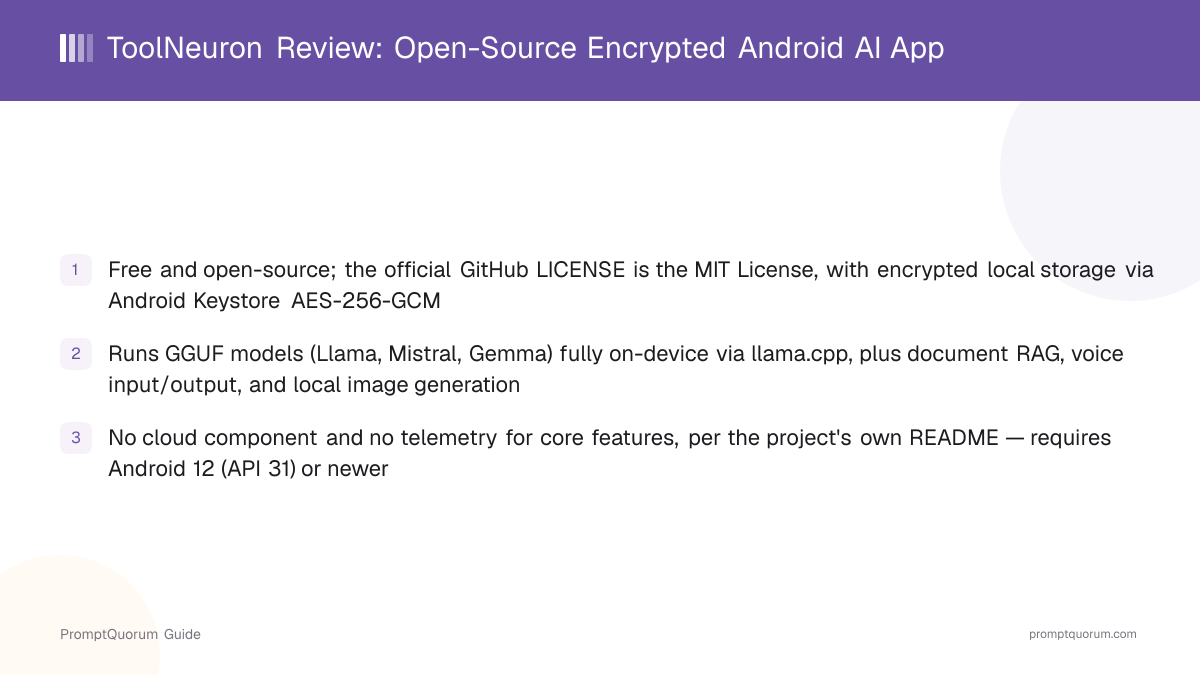
ToolNeuron is an Android app that runs GGUF-format language models directly on the device through llama.cpp, with no server-side component. Per the project's own description, it aims to be "on-device AI for Android. No Google Play services, no telemetry, no cloud" — models, chats, documents used for retrieval, and encryption key material are all designed to stay on the phone.
Beyond plain chat, the app bundles document retrieval (RAG) over common file formats, voice input and output through the sherpa-onnx speech engine, a local HTTP server that exposes an OpenAI-compatible API for other apps to connect to, a built-in Hugging Face model browser, and a sandboxed plugin system for installing extra capabilities.
This review relies on the project's public GitHub repository — its README, license file, and repository metadata — and the Google Play listing, rather than an independent code audit or hands-on benchmarking.
Who Built ToolNeuron
ToolNeuron is built and maintained by developer Siddhesh Sonar, who publishes the project openly on GitHub under the MIT license. The repository shows active, detailed development: a documented security architecture, a modular codebase split across app, inference, encryption, and networking components, and a public Discord community for users and contributors.
Because the source is published rather than closed, claims about what the app does — and does not do — with local data can be checked directly against the code, rather than resting solely on the developer's own description.
How to Get Started
Setting up ToolNeuron takes a few steps and no account creation. The overall process, from install to a first offline response, takes a few minutes plus however long the chosen model takes to download.
- 1Install the app
Why it matters: Get [ToolNeuron from Google Play](https://play.google.com/store/apps/details?id=com.dark.tool_neuron), or download the APK directly from [GitHub Releases](https://github.com/Siddhesh2377/ToolNeuron/releases). The app itself is free either way. - 2Set up local encryption
Why it matters: The app sets up its Android Keystore-backed encryption and a 6-digit PIN on first run, per the project's security documentation, before chat data is stored. - 3Browse and download a GGUF model
Why it matters: Use the built-in Hugging Face browser to find a compatible GGUF model, or supply your own. This step requires an internet connection; chat afterward does not. - 4Chat, or add documents for RAG
Why it matters: Once a model is downloaded, chat runs fully on-device via llama.cpp. Attach a supported document (PDF, DOCX, and others) to a conversation to have the model answer from it. - 5Optional: enable voice or the local API server
Why it matters: Voice input/output and the OpenAI-compatible local HTTP server are both optional features layered on top of plain chat — neither is required to use the app.
Supported Models and Features
ToolNeuron runs any compatible GGUF-format model, including common families such as Llama, Mistral, and Gemma, through llama.cpp. A built-in Hugging Face browser lets readers filter available models by pipeline tag, parameter count, quantization, and license before downloading.
Beyond chat, the project's own README lists: document RAG over PDF, DOCX, XLSX, PPTX, ODT, EPUB, RTF, Markdown, HTML, JSON, XML, CSV, and plain text; voice input and output through the sherpa-onnx engine (VITS, Piper, and Whisper voices); local image generation, added to the app in May 2026 per the project's changelog notes; a local HTTP server exposing an OpenAI-compatible API with its own web UI; and a sandboxed plugin system for installing community-built extensions.
This is a broader feature set than a single-purpose chat client, and each feature runs through the same on-device engine rather than calling out to a cloud service, per the project's documentation.
Requirements
ToolNeuron requires Android 12 (API level 31) or newer, on arm64-v8a or x86_64 hardware, per the project's public build configuration. As with any on-device LLM app, the practical hardware floor depends more on which GGUF model is loaded — its parameter count and quantization — than on a single fixed spec; a small quantized model needs far less memory than a large one.
Readers on older Android versions or 32-bit-only devices should expect the app not to install, since minimum-SDK and ABI filters are enforced by the Android package itself, not just a soft recommendation.
Privacy and Security
ToolNeuron's stated design goal is to avoid any cloud dependency: no Google Play services requirement, no telemetry, and no server-side component for its core chat and RAG features, per the project's own README. This is reinforced by an unusually detailed, publicly documented security architecture rather than a one-line privacy claim.
Local data — including the encryption key material itself — is protected with an Android Keystore-backed AES-256-GCM key (StrongBox-preferred where the device supports it) and Argon2id-based PIN authentication, per the project's security documentation. The same documentation describes a lockout mechanism that escalates after repeated failed PIN attempts, and an optional panic-PIN feature that wipes local app data.
- No account required. The app can be installed and used without creating a profile or signing in.
- No cloud component for core features. Chat, RAG, and voice are all designed to run on-device, per the project's README.
- Encrypted local storage. Chats, documents, and encryption keys are protected with Android Keystore AES-256-GCM and Argon2id authentication, per the project's documentation.
- Open-source code. Because the app's source is published under the MIT license, its architecture and data-handling claims can be checked directly against the code rather than resting only on the developer's statements.
Trade-Offs: Benefits vs. Limitations
Free and open source (MIT)
- What it means in real use:
- No cost, and the full source is available to audit on GitHub.
- Limitation / caveat:
- Being open source does not by itself guarantee an independent security audit has been performed.
Broader feature set than plain chat
- What it means in real use:
- Document RAG, voice, a local API server, and plugins are all bundled in, not separate apps to manage.
- Limitation / caveat:
- More moving parts than a single-purpose chat app; this review has not independently verified every feature's reliability.
Detailed, documented security model
- What it means in real use:
- Encrypted local storage and PIN-based authentication protect data if the phone is lost or accessed by someone else.
- Limitation / caveat:
- The security documentation is the project's own; this review has not independently penetration-tested the app.
No cloud dependency for core features
- What it means in real use:
- Chat, RAG, and voice all run offline once a model is downloaded, per the project's README.
- Limitation / caveat:
- Android-only — no iPhone, desktop, or web version exists.
ToolNeuron vs. Alternatives
ToolNeuron
- Platforms:
- Android only
- Price:
- Free, open source (MIT)
- Model flexibility:
- Any GGUF model via a built-in Hugging Face browser
- Key difference:
- Broadest feature set here — RAG, voice, local API server, and plugins alongside chat
Articles about ToolNeuron (3)
- Local Chat Apps & Assistants Compared (2026): Desktop, Mobile, Self-Hosted, Assistants and RoleplayUpdated September 20, 2026
- Local Image, Video & Vision Tools Compared (2026): Generation, Vision and OCRUpdated September 20, 2026
- LocalAI Review: ApexCreator's Offline Android AI Chat AppUpdated September 12, 2026
Also mentioned in:
- Honey LLM Review: Offline AI Chat and Document Q&A for AndroidUpdated October 16, 2026
- Local Knowledge & Retrieval Tools Compared (2026): RAG, Document Chat, Vector Databases, Notes and SearchUpdated September 20, 2026
Layla
- Platforms:
- Android and iOS
- Price:
- $19.99 one-time purchase, plus in-app tiers
- Model flexibility:
- GGUF, LiteRT-LM, and PTE model backends
- Key difference:
- Persona and roleplay focus, with an optional opt-in cloud mode; closed source
Articles about Layla (4)
- Layla Review: On-Device AI Companion App for Android and iOSUpdated October 30, 2026
- Best Local LLM Apps for Android in 2026: 6 Apps Compared on Real PhonesUpdated October 26, 2026
- PAIOS Review: Offline Gemini Nano Chat for AndroidUpdated October 5, 2026
- Build a Local Voice Assistant on Your Phone: Whisper + Local LLM (No Cloud) — 2026Updated August 29, 2026
Also mentioned in:
- Local Chat Apps & Assistants Compared (2026): Desktop, Mobile, Self-Hosted, Assistants and RoleplayUpdated September 20, 2026
RikkaHub
- Platforms:
- Android only
- Price:
- Free, open source
- Model flexibility:
- GGUF models, per its own listing
- Key difference:
- Another free, open-source Android option — compare feature depth directly
Articles about RikkaHub (2)
- RikkaHub Review: Multi-Provider AI Chat for AndroidUpdated September 6, 2026
- LocalAI Review: ApexCreator's Offline Android AI Chat AppUpdated September 12, 2026
Also mentioned in:
- Private LLM Review: On-Device AI Chat for iPhone, iPad, and MacUpdated October 23, 2026
- AnyLLM Review: BYOK AI Chat Client for AndroidUpdated October 17, 2026
- Local Chat Apps & Assistants Compared (2026): Desktop, Mobile, Self-Hosted, Assistants and RoleplayUpdated September 20, 2026
- Chapper Review: AI & LM Studio Client for iPhone, iPad, and MacUpdated September 6, 2026
- LLM Farm Review: Open-Source GGUF App, Off the App StoreUpdated September 6, 2026
Maid
- Platforms:
- Android and iOS
- Price:
- Free, open source
- Model flexibility:
- GGUF models via llama.cpp
- Key difference:
- Cross-platform (iOS too), simpler single-purpose chat client
Articles about Maid (5)
- Maid Review: Open-Source Local LLM Chat App for AndroidUpdated September 6, 2026
- Layla Review: On-Device AI Companion App for Android and iOSUpdated October 30, 2026
- Best Local LLM Apps for Android in 2026: 6 Apps Compared on Real PhonesUpdated October 26, 2026
- Private LLM Review: On-Device AI Chat for iPhone, iPad, and MacUpdated October 23, 2026
- Local Chat Apps & Assistants Compared (2026): Desktop, Mobile, Self-Hosted, Assistants and RoleplayUpdated September 20, 2026
Also mentioned in:
- Tina Review: iPhone Client for Ollama, llama.cpp and ComfyUIUpdated October 4, 2026
- Ollama Local AI Review: Android LLM Runner and LAN API ProxyUpdated October 2, 2026
- Chapper Review: AI & LM Studio Client for iPhone, iPad, and MacUpdated September 6, 2026
- LLM Farm Review: Open-Source GGUF App, Off the App StoreUpdated September 6, 2026
Platform, price, and feature details for third-party apps change frequently — verify current specifics on each app's own listing before deciding.
Who Should Use ToolNeuron
- Android users who want a free, open-source, on-device AI app. The full source is public, and there is no cost to install or use it.
- Readers who want more than plain chat. Document RAG, voice input/output, and a local API server are bundled in rather than requiring separate apps.
- Privacy-conscious users who value a documented security model. Encrypted local storage and PIN-based authentication go beyond a simple privacy policy statement.
- Developers who want to extend the app. The plugin system and open-source codebase allow direct customization, unlike a closed-source alternative.
Who Should Not Use ToolNeuron
- iPhone, desktop, or web users. ToolNeuron is Android-only; there is no iOS, Mac, Windows, Linux, or browser-based version.
- Owners of devices on Android 11 or older, or 32-bit-only hardware. The app requires Android 12 (API 31) or newer on arm64-v8a or x86_64.
- Readers who need an established track record before trusting an app. ToolNeuron is newer and has a smaller public track record than some longer-running alternatives.
- Readers who want a single, simple chat app with nothing else. The broader feature set (RAG, voice, plugins, a local server) is a benefit for some readers and unnecessary complexity for others.
Frequently Asked Questions
Is ToolNeuron free?
Yes. ToolNeuron is free to install and use, and open source under the MIT license, per its GitHub repository.
Who makes ToolNeuron?
ToolNeuron is built and maintained by developer Siddhesh Sonar.
What models does ToolNeuron support?
Any compatible GGUF-format model, including common families such as Llama, Mistral, and Gemma, run through llama.cpp. A built-in Hugging Face browser helps find and download models.
Does ToolNeuron work without an internet connection?
Yes, for its core features. The project's README states the app has no cloud component and no telemetry; an internet connection is needed only to download a model or app update.
What Android version does ToolNeuron need?
Android 12 (API level 31) or newer, on arm64-v8a or x86_64 hardware, per the project's public build configuration.
Is ToolNeuron open source?
Yes. The app is published on GitHub under the MIT license, and the source can be audited or built directly.
What extra features does ToolNeuron have beyond chat?
Document RAG over common file formats, voice input and output via sherpa-onnx, a local OpenAI-compatible HTTP server, a Hugging Face model browser, and a sandboxed plugin system, per the project's README.
How does ToolNeuron compare to Layla or RikkaHub?
ToolNeuron is free and open source with a broader built-in feature set (RAG, voice, a local API server, plugins). Layla is a $19.99 paid, closed-source app for both Android and iOS with a persona/roleplay focus and an optional cloud mode. RikkaHub is another free, open-source Android chat app. Choose based on whether you value ToolNeuron's broader feature set, Layla's cross-platform roleplay focus, or a simpler single-purpose client.
Verdict
ToolNeuron delivers a genuinely broad, free, and open-source on-device AI app for Android: GGUF chat via llama.cpp, document RAG, voice input/output, a local OpenAI-compatible API server, and a plugin system, all backed by a documented, encryption-first security architecture rather than a vague privacy promise.
The published MIT-licensed source code is a meaningful advantage over closed-source Android alternatives — readers who care about verifying what an app actually does with local data can check the code directly rather than trusting a listing alone.
What keeps this review measured rather than unconditionally enthusiastic is the app's relative youth and the absence of independent, hands-on benchmarking of its many features by PromptQuorum specifically; readers with performance-critical needs should test the app on their own device before relying on it heavily.
Android users who want a free, open-source, privacy-focused app with more than plain chat should try it; readers who want an iPhone app, a simpler single-purpose client, or a more established track record should consider Layla or RikkaHub instead.
Sources
- ToolNeuron on Google Play — pricing and distribution.
- ToolNeuron GitHub repository — README, license, security documentation, and repository metadata, checked 2026-09-12.
- ToolNeuron project site — product overview.