What Is LLM Farm?
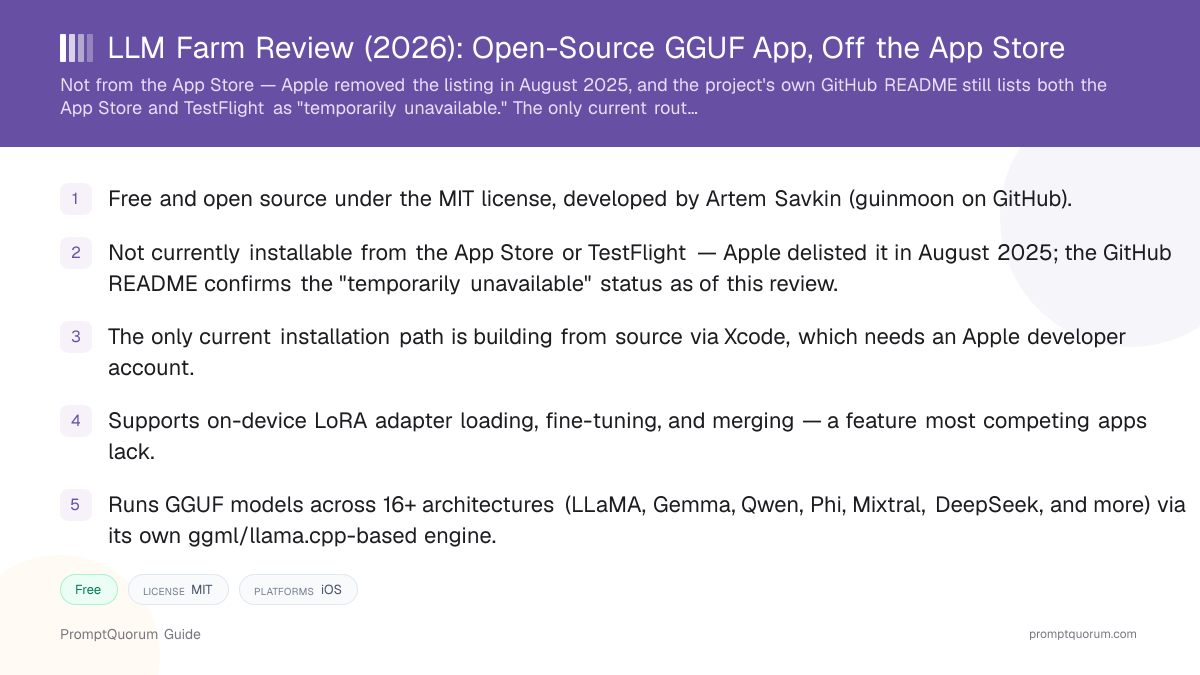
LLM Farm is a mobile and desktop app that downloads open-weight language models in the GGUF format and runs them locally on an iPhone, iPad, or Mac, using a Swift wrapper (the developer's own llmfarm_core.swift library) around ggml and llama.cpp as the inference engine. The app itself is MIT-licensed, meaning the full source code is public and free to inspect, fork, or modify.
LLM Farm supports a wide range of model architectures beyond the common LLaMA-family models — the repository lists more than 16 supported architectures, including GPT-2, Starcoder, Falcon, MPT, Bloom, StableLM, and RWKV, alongside multimodal vision-language models such as LLaVA and Moondream. It also includes on-device LoRA loading, fine-tuning, and adapter-merging tools, a feature set closer to a local ML experimentation toolkit than a simple chat app.
Who Built LLM Farm?
LLM Farm was created by developer Artem Savkin, who publishes under the GitHub username guinmoon, and first appeared on the App Store on December 13, 2023. The LICENSE file in the repository names Artem Savkin as the copyright holder, dated 2023.
The project is maintained independently rather than by a funded company. The GitHub repository was created in June 2023 and has accumulated over 2,000 stars and more than 180 forks at review time, with 46 open issues on its tracker. Development has continued intermittently since the App Store removal: commit history shows updates to the underlying llama.cpp engine as recently as December 2025 and a README update in January 2026, though the project's last tagged release (version 1.4.3) shipped in January 2025 — meaning code changes have continued without a new packaged release in more than a year as of this review.
- Developer: Artem Savkin (GitHub: guinmoon), working independently rather than as a company.
- App Store launch: December 13, 2023. GitHub repository created: June 14, 2023.
- License: MIT — permissive open source, free to use, fork, and modify. Copyright holder per the LICENSE file: Artem Savkin, 2023.
- Over 2,000 GitHub stars and more than 180 forks at review time, with an active but unresolved issue tracker (46 open issues).
- Development pace: intermittent since 2025 — commits updating the llama.cpp dependency and documentation continued into early 2026, but no new tagged release has shipped since version 1.4.3 in January 2025.
Is LLM Farm Still on the App Store?
No. As of this review, LLM Farm is not available for download from the Apple App Store, and its TestFlight beta channel is also closed. The app was originally published on the App Store on December 13, 2023, and was removed by Apple around August 8, 2025, based on the project's release and commit history. The App Store listing that previously existed at apps.apple.com/app/llm-farm/id6461209867 no longer resolves.
The project's own GitHub README states directly: "The app is temporarily unavailable in TestFlight and Appstore." PromptQuorum could not confirm the reason for the removal — the repository does not state one — and cannot confirm whether or when the app might return to either distribution channel. An older wiki FAQ page mentions the developer previously offering to build a manual .ipa file for users who emailed if TestFlight access was unavailable; this review could not confirm whether that offer is still honored, since the current README does not repeat it.
- App Store status: delisted since approximately August 2025, per the project's own commit and release history.
- TestFlight status: closed, per the current GitHub README, as of this review.
- Reason for removal: not stated by the developer or by Apple in any source PromptQuorum could locate.
- Only confirmed current path to install the app: building it from source via Xcode, using the public GitHub repository.
How to Get LLM Farm Today
Because LLM Farm is not currently on the App Store, getting it running means building the open-source project from source code using Xcode — this is a materially higher bar than downloading an app. The steps below follow the build instructions in the project's own GitHub repository.
- 1Install Xcode and an Apple developer account
Why it matters: You need a Mac with Xcode installed and a free or paid Apple developer account to compile and sign the app for your own device. This is the main barrier for non-developers. - 2Clone the repository recursively
Why it matters: Run `git clone --recurse-submodules https://github.com/guinmoon/LLMFarm` — the `--recurse-submodules` flag is required because the underlying `llmfarm_core` inference library has been moved to a separate repository and is pulled in as a submodule. - 3Open the project in Xcode and build it for your device
Why it matters: Open the Xcode project file, select your device or the Mac target, set your own developer signing team, and build. This produces an app you can run on your own hardware, but not one you can distribute to others through the App Store. - 4Download a GGUF model and load it
Why it matters: Once the app is running, add a GGUF model file (from Hugging Face or another source) and load it from the app's model management screen, then start chatting entirely on-device.
Which Models Does LLM Farm Support?
LLaMA, Gemma, Qwen, Phi, Mixtral, DeepSeek, Yi, StableLM
- Category:
- Text generation
- Notes:
- Loaded as GGUF files via the app's ggml/llama.cpp-based engine
GPT-2, Starcoder, Falcon, MPT, Bloom, RWKV, Mamba, GPTNeoX, PLaMo
- Category:
- Text generation (legacy / niche architectures)
- Notes:
- Broader architecture coverage than most competing mobile apps
Any other GGUF or GGJTv3 model
- Category:
- Custom import
- Notes:
- GGUF requires the
.ggufextension; the older GGJTv3 format requires.bin, per the project wiki
Is LLM Farm Available on iPhone, iPad, and Mac?
iPhone / iPad
- Availability:
- Requires building from source via Xcode — not installable from the App Store at review time
- Notes:
- Minimum iOS version 16, per the project README; Metal acceleration is used for on-device inference.
Mac
- Availability:
- Requires building from source via Xcode
- Notes:
- Minimum macOS version 13, per the project README; native macOS support alongside iOS/iPadOS is listed in the same codebase.
Android / Windows / Linux
- Availability:
- Not supported
- Notes:
- LLM Farm has no Android, Windows, or Linux release. Android users should look at RikkaHub, ChatterUI, or Maid instead.
How Much Does LLM Farm Cost?
LLM Farm itself is free and open source under the MIT license — there is no purchase price and no subscription for the app's code or its chat functionality. PromptQuorum could not find any evidence of an in-app purchase, premium tier, or paid marketplace inside LLM Farm in the repository, wiki, or historical App Store listing text reviewed for this article.
The real cost of using LLM Farm today is indirect: you need a Mac to build the app (Xcode is macOS-only), and depending on your Apple developer account type, either nothing (free personal-team signing, limited to your own devices for a rolling seven-day certificate) or the Apple Developer Program fee if you want a longer-lived signing certificate. Beyond that, downloaded GGUF model files consume device storage, typically several gigabytes per model, the same as with any other local-LLM app.
- App itself: Free, MIT-licensed open source — no purchase price found for the code or its functionality.
- In-app purchases: None found in the sources reviewed for this article.
- Build tooling: Xcode is free, but requires a Mac; a free Apple ID can sign builds for personal use with a certificate that must be renewed roughly every seven days, or a paid Apple Developer Program membership avoids that renewal cycle.
- Storage cost: Not monetary, but real — each downloaded GGUF model file consumes device storage, typically several gigabytes per model.
What Features Does LLM Farm Have?
Beyond running GGUF models locally, LLM Farm's feature set leans toward a local ML experimentation toolkit rather than a simple chat client, per its GitHub README and wiki. These include:
- Broad architecture support. More than 16 model architectures, including several (Starcoder, Falcon, MPT, Bloom, RWKV, GPTNeoX) not commonly supported by other mobile local-AI apps.
- Multimodal (vision-language) models. Support for LLaVA, BakLLaVA, Obsidian, ShareGPT4V, MobileVLM, Yi-VL, and Moondream lets the app process image-plus-text prompts, per the README.
- Multiple sampling methods. Temperature, Tail-Free Sampling (TFS), Locally Typical Sampling, Mirostat, Greedy, and Grammar-constrained sampling are all listed as supported options.
- Grammar-constrained output. Grammar sampling lets a model's output be constrained to a defined structure (such as valid JSON), useful for structured-output use cases.
- Model setting templates and context restoration. Saved configurations per model, and the ability to restore a conversation's context state rather than reprocessing it from scratch.
- Apple Shortcuts integration. The app can be triggered from Apple's Shortcuts automation app, per the README.
- Basic retrieval-augmented generation (RAG). The README lists RAG capability, though the project's documentation does not detail its exact retrieval method or supported document formats in the material reviewed for this article.
LoRA Fine-Tuning and Merging On-Device
LLM Farm includes on-device LoRA (Low-Rank Adaptation) tooling — loading adapters, fine-tuning a base model, and merging a trained adapter back into the base model — a combination most mobile local-AI apps do not offer at all. Per the project's wiki documentation:
LoRA adapters can be loaded by placing adapter files in a lora_adapters directory, either as a single adapter through the chat settings interface or as multiple adapters configured with individual scale parameters in a configuration file. Fine-tuning is available directly in the app under Settings > FineTune, though the wiki notes this is resource-intensive on mobile hardware — on iOS, the documentation states it is limited to roughly 3B-parameter models using minimal settings. A separate Settings > Merge Lora function lets a trained adapter be merged with its base model and exported, with the wiki recommending Q4_K quantization or smaller for practical iOS performance.
- Load one or multiple LoRA adapters, each with its own configurable scale parameter.
- Fine-tune a base model on-device via Settings > FineTune — per the wiki, iOS practically supports only around 3B-parameter models at minimal settings for this.
- Merge a trained LoRA adapter into its base model and export the result via Settings > Merge Lora.
- Trade-off: the wiki states that memory-mapped file loading (mmap) cannot be used while a LoRA adapter is attached, which increases RAM usage compared to running the base model alone.
What Hardware Do You Need to Run LLM Farm?
The model you choose, not the app itself, sets your real hardware floor — as general local-LLM sizing guidance, a quantized 2–4B parameter model needs roughly 3–4 GB of free RAM, while a 7–8B parameter model needs 8 GB or more. This is standard GGUF hardware guidance, not an LLM Farm-specific benchmark; PromptQuorum has not independently measured LLM Farm's exact memory usage per model.
On iPhone, iPad, and Mac, LLM Farm uses Metal acceleration for inference, which generally improves speed over CPU-only execution on Apple Silicon hardware. The app requires iOS 16 or macOS 13 as a minimum, per the project README, so older devices that cannot run those OS versions cannot run the app regardless of RAM.
- Small models (2–4B parameters, quantized): usable on most recent iPhones and Macs with 4 GB+ of free RAM.
- Mid-size models (7–8B parameters, quantized): 8 GB or more of device RAM recommended for acceptable responsiveness.
- LoRA fine-tuning specifically: per the project wiki, practically limited to roughly 3B-parameter models on iOS, using minimal settings, due to on-device compute and memory limits.
- Minimum OS: iOS 16 or macOS 13, per the GitHub README.
- Storage: budget several gigabytes of free device storage per downloaded GGUF model file.
Who Should Use LLM Farm
- Developers comfortable building an app from source in Xcode. Since the App Store and TestFlight routes are currently closed, this is a hard requirement, not a nice-to-have.
- Users who specifically want on-device LoRA fine-tuning or adapter merging. This is a feature set most competing mobile local-AI apps do not offer at all.
- Users who want the broadest range of supported model architectures on a mobile device. Sixteen-plus architectures, including several niche ones (RWKV, Mamba, GPTNeoX), is unusually broad for a phone app.
- Users who want to inspect or modify the code themselves. The MIT license permits forking and modification, and the codebase is a useful reference for understanding a Swift-based llama.cpp/ggml wrapper.
Who Should Not Use LLM Farm
- Anyone who cannot or does not want to build an iOS/macOS app from source. This is the single biggest reason to skip LLM Farm right now: there is no App Store install, and no confirmed TestFlight access, as of this review.
- Users who need Android, Windows, or Linux support. LLM Farm is Apple-only; Android users should look at RikkaHub, ChatterUI, or Maid, and desktop non-Mac users should look at Ollama, LM Studio, or Jan AI.
- Users who want a guaranteed, currently-installable app today. PocketPal AI and Private LLM are both installable from the App Store right now without building anything.
- Users who expect frequent, versioned releases. The project's last tagged release shipped in January 2025; while commits have continued intermittently since, there has been no new packaged version in more than a year as of this review.
- Users who need guaranteed support or a defined roadmap. LLM Farm is maintained independently by one developer, per its repository history, with no stated commitment to restoring App Store availability.
LLM Farm vs. Alternatives
LLM Farm
- License / cost:
- Free, open source (MIT)
- Platforms:
- iPhone/iPad, Mac
- Current install path:
- Build from source via Xcode only — App Store and TestFlight are closed
Articles about LLM Farm (3)
- Best Local AI Apps for iPhone in 2026 (Run LLMs Without WiFi)Updated October 23, 2026
- Run a Local LLM on Your Tablet: iPad Pro M5, Galaxy Tab S10, OnePlus Pad 2 (2026)Updated October 23, 2026
- Build a Local Voice Assistant on Your Phone: Whisper + Local LLM (No Cloud) — 2026Updated August 29, 2026
Also mentioned in:
- Best Mobile LLM Models for Phones in 2026: Phi-4 Mini vs Gemma 3 vs SmolLMUpdated October 19, 2026
PocketPal AI
- License / cost:
- Free, open source (MIT)
- Platforms:
- iPhone/iPad, Android
- Current install path:
- App Store and Google Play, tap-to-install
Articles about PocketPal AI (10)
- PocketPal AI Review: Free, Open-Source On-Device ChatUpdated September 5, 2026
- Best Local AI Apps for iPhone in 2026 (Run LLMs Without WiFi)Updated October 23, 2026
- Loci AI Review (2026): Offline AI for iPhone, Android, iPad, Mac and WindowsUpdated October 23, 2026
- Private LLM Review: On-Device AI Chat for iPhone, iPad, and MacUpdated October 23, 2026
- Run a Local LLM on Your Tablet: iPad Pro M5, Galaxy Tab S10, OnePlus Pad 2 (2026)Updated October 23, 2026
- Best Local LLM Apps for Android in 2026: 6 Apps Compared on Real PhonesUpdated October 19, 2026
- Best Mobile LLM Models for Phones in 2026: Phi-4 Mini vs Gemma 3 vs SmolLMUpdated October 19, 2026
- Local AI Chat Pocket Review: Offline LLM and Image Chat for iPhone and iPadUpdated October 6, 2026
- PAIOS Review: Offline Gemini Nano Chat for AndroidUpdated October 5, 2026
- Oscilla Review: Free On-Device AI Chat for iPhoneUpdated October 4, 2026
+36 more not shown
Private LLM
- License / cost:
- Paid, one-time purchase; closed source
- Platforms:
- iPhone/iPad/Mac (Apple only)
- Current install path:
- App Store, tap-to-install
Articles about Private LLM (10)
- Private LLM Review: On-Device AI Chat for iPhone, iPad, and MacUpdated October 23, 2026
- Best Local AI Apps for iPhone in 2026 (Run LLMs Without WiFi)Updated October 23, 2026
- Loci AI Review (2026): Offline AI for iPhone, Android, iPad, Mac and WindowsUpdated October 23, 2026
- Local Chat Apps & Assistants Compared (2026): Desktop, Mobile, Self-Hosted, Assistants and RoleplayUpdated September 20, 2026
- AI on Device Review: A $4.99 Apple Intelligence-Only AppUpdated September 12, 2026
- Google AI Edge Gallery Review: Gemma 4 On-Device Chat for iPhoneUpdated September 12, 2026
- Liquid Apollo Review: On-Device LFM2 Chat, Plus Optional CloudUpdated September 12, 2026
- Noema Review: Multi-Format Local AI for iPhone, iPad, and MacUpdated September 12, 2026
- Off Grid AI Review: Cross-Platform Local AI for iOS, Android, macOS, and WindowsUpdated September 12, 2026
- Pocket AI Review: Offline On-Device AI Chat for iPhoneUpdated September 11, 2026
+12 more not shown
Enclave AI
- License / cost:
- Free with paid tier; closed source
- Platforms:
- iPhone/iPad/Mac (Apple only)
- Current install path:
- App Store, tap-to-install
Articles about Enclave AI (3)
- Enclave AI Review: On-Device AI for iPhone, iPad, MacUpdated October 17, 2026
- Local Chat Apps & Assistants Compared (2026): Desktop, Mobile, Self-Hosted, Assistants and RoleplayUpdated September 20, 2026
- Liquid Apollo Review: On-Device LFM2 Chat, Plus Optional CloudUpdated September 12, 2026
Also mentioned in:
- On Device AI Review: 200+ Local Models for iPhone, iPad, MacUpdated September 12, 2026
- Maid Review: Open-Source Local LLM Chat App for AndroidUpdated September 6, 2026
- RikkaHub Review: Multi-Provider AI Chat for AndroidUpdated September 6, 2026
Layla
- License / cost:
- Free and paid tiers; closed source
- Platforms:
- Android and iOS, per layla-network.ai
- Current install path:
- Check layla-network.ai for current store availability before assuming a free tier exists
Articles about Layla (4)
- Layla Review: On-Device AI Companion App for Android and iOSUpdated September 6, 2026
- Best Local LLM Apps for Android in 2026: 6 Apps Compared on Real PhonesUpdated October 19, 2026
- PAIOS Review: Offline Gemini Nano Chat for AndroidUpdated October 5, 2026
- Build a Local Voice Assistant on Your Phone: Whisper + Local LLM (No Cloud) — 2026Updated August 29, 2026
Also mentioned in:
- Local Chat Apps & Assistants Compared (2026): Desktop, Mobile, Self-Hosted, Assistants and RoleplayUpdated September 20, 2026
- ToolNeuron Review: Open-Source Encrypted Android AI AppUpdated September 12, 2026
Maid
- License / cost:
- Free, open source
- Platforms:
- Android
- Current install path:
- Google Play or build from source
Articles about Maid (5)
- Maid Review: Open-Source Local LLM Chat App for AndroidUpdated September 6, 2026
- Private LLM Review: On-Device AI Chat for iPhone, iPad, and MacUpdated October 23, 2026
- Best Local LLM Apps for Android in 2026: 6 Apps Compared on Real PhonesUpdated October 19, 2026
- Local Chat Apps & Assistants Compared (2026): Desktop, Mobile, Self-Hosted, Assistants and RoleplayUpdated September 20, 2026
- Layla Review: On-Device AI Companion App for Android and iOSUpdated September 6, 2026
Also mentioned in:
- Tina Review: iPhone Client for Ollama, llama.cpp and ComfyUIUpdated October 4, 2026
- Ollama Local AI Review: Android LLM Runner and LAN API ProxyUpdated October 2, 2026
- Chapper Review: AI & LM Studio Client for iPhone, iPad, and MacUpdated September 6, 2026
ChatterUI
- License / cost:
- Free, open source (AGPL-3.0)
- Platforms:
- Android
- Current install path:
- Build from source or sideload a release APK
RikkaHub
- License / cost:
- Free, open source
- Platforms:
- Android
- Current install path:
- GitHub releases or build from source
Articles about RikkaHub (2)
- RikkaHub Review: Multi-Provider AI Chat for AndroidUpdated September 6, 2026
- LocalAI Review: ApexCreator's Offline Android AI Chat AppUpdated September 12, 2026
Also mentioned in:
- Private LLM Review: On-Device AI Chat for iPhone, iPad, and MacUpdated October 23, 2026
- AnyLLM Review: BYOK AI Chat Client for AndroidUpdated October 17, 2026
- Local Chat Apps & Assistants Compared (2026): Desktop, Mobile, Self-Hosted, Assistants and RoleplayUpdated September 20, 2026
- ToolNeuron Review: Open-Source Encrypted Android AI AppUpdated September 12, 2026
- Chapper Review: AI & LM Studio Client for iPhone, iPad, and MacUpdated September 6, 2026
AnythingLLM Mobile
- License / cost:
- Free, open source
- Platforms:
- Android; iOS not yet available at review time
- Current install path:
- Google Play or the AnythingLLM Mobile site
Articles about AnythingLLM Mobile (2)
- AnythingLLM Mobile Review: On-Device Chat + RAGUpdated September 6, 2026
- AnythingLLM Review: Open-Source RAG and Document ChatUpdated September 11, 2026
Also mentioned in:
- Liquid Apollo Review: On-Device LFM2 Chat, Plus Optional CloudUpdated September 12, 2026
- Chapper Review: AI & LM Studio Client for iPhone, iPad, and MacUpdated September 6, 2026
Availability status changes frequently in this category — this table reflects what PromptQuorum could confirm in September 2026. Check each project's own page before assuming a link is still current.
Frequently Asked Questions
Is LLM Farm still available?
The open-source project is still active on GitHub, but the app is not currently installable from the App Store or TestFlight. Apple removed the App Store listing around August 2025, and the project's README still describes both channels as "temporarily unavailable" as of this review. The only current way to run it is to build it from source using Xcode.
Why was LLM Farm removed from the App Store?
PromptQuorum could not find a stated reason from the developer or Apple in any source reviewed for this article. The project's GitHub README acknowledges the removal without explaining its cause.
Is LLM Farm free?
Yes. LLM Farm is free and open source under the MIT license, and PromptQuorum found no evidence of an in-app purchase or paid tier in the sources reviewed. The practical cost is a Mac and Xcode to build it, plus an Apple developer account.
Who developed LLM Farm?
LLM Farm was created by developer Artem Savkin, who publishes under the GitHub username guinmoon. It is maintained independently rather than by a company.
Is LLM Farm open source?
Yes, the full source code is published on GitHub under the MIT license, a permissive license that allows free use, modification, and redistribution.
Can LLM Farm fine-tune models with LoRA?
Yes, per the project's wiki documentation. LLM Farm supports loading LoRA adapters, fine-tuning a base model on-device (limited to roughly 3B-parameter models on iOS per the wiki), and merging a trained adapter back into the base model. This is a feature most competing mobile local-AI apps do not offer.
Does LLM Farm work on Android?
No. LLM Farm supports only iOS (16+) and macOS (13+), per its GitHub README. Android users should look at RikkaHub, ChatterUI, or Maid instead.
How do I install LLM Farm without the App Store?
Clone the GitHub repository recursively with git clone --recurse-submodules, open the project in Xcode, sign it with your own Apple developer account, and build it for your device. This requires a Mac and basic familiarity with Xcode and iOS code signing.
How does LLM Farm compare to PocketPal AI or Private LLM?
LLM Farm and PocketPal AI are both free and MIT-licensed, but LLM Farm currently requires building from source while PocketPal AI installs directly from the App Store and Google Play. LLM Farm supports more model architectures and includes on-device LoRA fine-tuning, which neither PocketPal AI nor the paid, closed-source Private LLM offers. Choose LLM Farm only if you are comfortable building an app yourself; choose PocketPal AI or Private LLM if you want something installable today. See the comparison table above for details.
Verdict
LLM Farm remains one of the most technically capable open-source local-AI projects for Apple devices — its architecture coverage and on-device LoRA fine-tuning and merging tools go further than most mobile apps in this category, PocketPal AI and Private LLM included. But as of this review, it is not an app most people can actually install: Apple removed it from the App Store in August 2025, TestFlight access is closed per the project's own README, and the only confirmed path to running it is compiling the open-source code yourself in Xcode. That is a reasonable trade for a developer who wants to inspect the code, experiment with LoRA fine-tuning, or run an unusual model architecture. It is not a reasonable ask for someone who just wants to download an app and chat privately today — for that, PocketPal AI (free, open source, tap-to-install) or Private LLM (paid, polished, tap-to-install) are the practical choices covered in the alternatives section above.
Sources
- LLM Farm on GitHub — source code, license (MIT), README, commit history, and star/fork counts referenced in this review.
- LLM Farm LICENSE file — MIT license text and copyright holder (Artem Savkin, 2023).
- LLM Farm wiki: FAQ — installation notes and supported file format details.
- LLM Farm wiki: LoRA — LoRA loading, fine-tuning, and merging documentation.
- llmfarm_core.swift on GitHub — the underlying inference library referenced in this review.
- GitHub release history for guinmoon/LLMFarm — last tagged release (1.4.3, January 2025) referenced in this review.