Key Takeaways
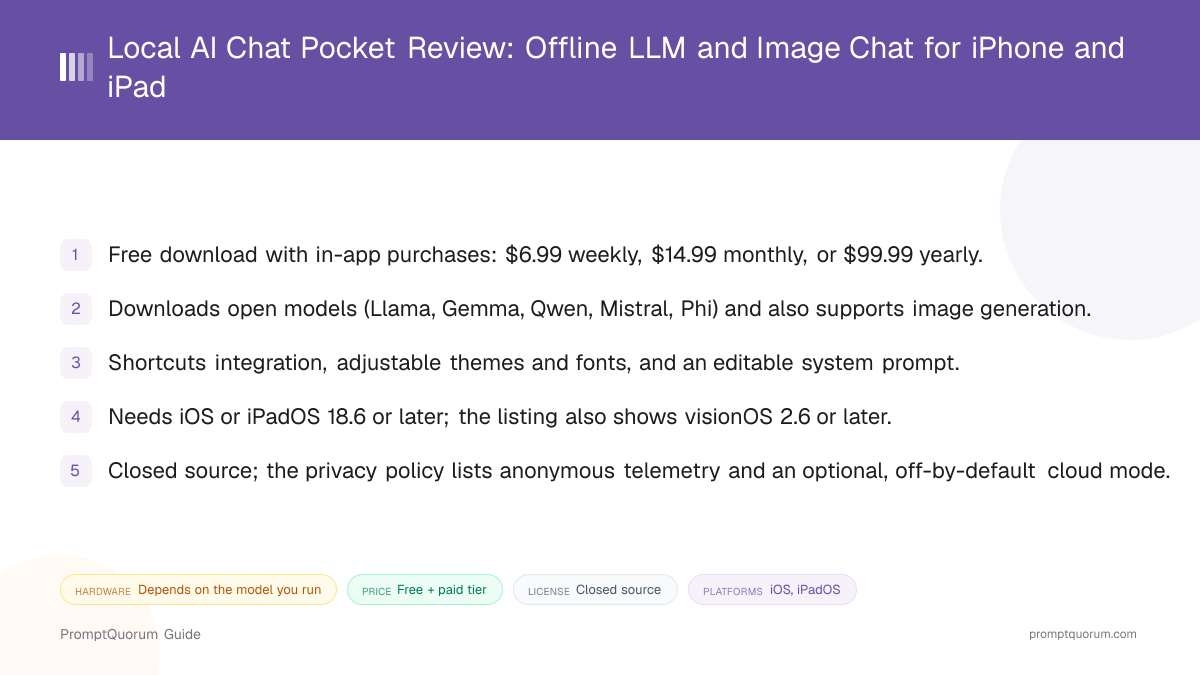
- Version reviewed: 0.5.6, as shown on the App Store listing.
- Price: free to download; in-app purchases are listed at $6.99 weekly, $14.99 monthly and $99.99 yearly.
- Platform: iOS and iPadOS 18.6 or later; the listing also shows visionOS 2.6 or later.
- Standout features: broad model list, image generation, Shortcuts integration, editable system prompt.
- Openness: closed source; no public repository was found.
📍 In One Sentence
Local AI Chat - pocket, by developer Rica Harz, is a freemium iPhone and iPad app that downloads open language models to the device, generates images, and chats offline.
💬 In Plain Terms
Think of it as a pocket-sized offline chatbot: once a model is on the phone, no connection is needed, and the app adds Shortcuts and image generation on top.
Get Local AI Chat Pocket
Local AI Chat - pocket is distributed through the Apple App Store. The download is 256.4 MB and the app is a free download with in-app purchases.
This review is a companion to PromptQuorum's Local LLM Software Directory, which lists the app alongside other mobile and desktop local AI tools.
Channel | Get It |
|---|---|
| Apple App Store | Local AI Chat - pocket on the App Store |
| Website | oneai.framer.website |
| Support | Pocket support page |
| Privacy policy | Pocket privacy policy |
No public source repository was found. There is no Android or Mac build; the listing covers iPhone, iPad and Apple Vision only.
Local AI Chat Pocket at a Glance
Attribute | Local AI Chat Pocket |
|---|---|
| Platform | iOS, iPadOS (18.6+) |
| Price | Free, in-app purchases |
| License | Closed source |
| Runs fully offline | Yes, once a model is on the device |
| In-app model downloads | Not stated in the listing |
| Image input | Not stated in the listing |
| Image generation | Yes, on-device image models |
| Voice input / output | Not stated in the listing |
Attributes follow the mobile-chat comparison used in the Local LLM Software Directory. They come from the App Store listing and product site, which do not cover every feature.
What Local AI Chat Pocket Is
Local AI Chat - pocket is an offline chat app built around switchable on-device models. The listing pitches "the simplest way to use private LLMs" that "works fully offline", and its product site calls the app Pocket, "the local LLM app that keeps your data private".
It is published by Rica Harz, an individual developer, and is categorized as Productivity. Do not confuse it with similarly named apps such as "Private AI Chat: Pocket LLM", which has a different developer.
This review draws on the App Store listing, the product site and the privacy policy only. It does not include hands-on testing, so speed, stability and answer quality are not rated here.
How to Get Started
Setup is an App Store install, then picking a model inside the app. The listing does not document the first-run flow, so the steps below follow what it states.
- 1Check device and OS
Why it matters: The listing requires iOS or iPadOS 18.6 or later, or visionOS 2.6 or later. - 2Install the app
Why it matters: Get it from the [App Store](https://apps.apple.com/us/app/local-ai-chat-pocket/id6476791661); the download is 256.4 MB before any model. - 3Choose a model
Why it matters: The listing says you can choose a new model or switch between existing ones in the app; larger models need more of the device's memory. - 4Chat offline, then customize
Why it matters: Once a model is on the device, chat works with no connection. Adjust the theme, fonts and system prompt, or call the model from Shortcuts.
Features
The app's selling point is a wide model list in a simple interface. Everything below comes from the App Store listing.
- Language models. The listing names Llama 3.2 1B and 3B, Llama 3 8B, Mistral 7B, Phi, Gemma 2 2B and 9B, OpenELM, Qwen 3 and Deepseek, mostly as 4-bit builds.
- Image generation. Image models are supported alongside text models, with a switch between them; the listing does not name which image models.
- Shortcuts. You can chat with the local model or send its output to other actions through Apple Shortcuts.
- Personalization. Theme, fonts and the system prompt can be adjusted in the app, and chats can be pinned.
- Languages. The interface is available in English plus 22 other languages.
Device Requirements
The app requires iOS or iPadOS 18.6 or later, or visionOS 2.6 or later. The listing gives no RAM figure and no list of supported chips.
Memory is the real limit: a 1B model fits far more devices than a 7B or 9B one. Neither the listing nor the site says which models fit which iPhone, so test a small model first.
Pricing and Privacy
Local AI Chat - pocket is free to download, with in-app purchases listed at $6.99 weekly, $14.99 monthly and $99.99 yearly. Neither the listing nor the site says what the paid tiers unlock, so check the paywall in the app before relying on a feature.
The listing says "zero data collection" and that your data never leaves the device. The privacy policy, effective February 17, 2026, is more detailed: it describes minimal anonymized telemetry, crash and performance data kept for up to 12 months, and says chats and personal content stay on the device by default.
The policy also describes an optional cloud processing mode, off by default, that would send text, images and chats to the third-party provider TogetherAI. The policy does not cover subscription payments. The app is closed source and this review did not inspect network traffic, so these statements are the developer's own.
Trade-Offs: Benefits vs. Limitations
Offline chat
- What it means in real use:
- Chat with downloaded models with no connection.
- Limitation / caveat:
- Needs iOS 18.6 and enough memory for the chosen model.
Wide model list
- What it means in real use:
- Llama, Gemma, Qwen, Mistral, Phi and Deepseek in one app.
- Limitation / caveat:
- No sizes, fit guidance or runtime are published per device.
Image generation
- What it means in real use:
- Text and image models in the same app.
- Limitation / caveat:
- The listing does not name the image models or speeds.
Shortcuts support
- What it means in real use:
- Call the local model from your own automations.
- Limitation / caveat:
- Only what the listing states; no action list is published.
Free to start
- What it means in real use:
- No cost to download and try.
- Limitation / caveat:
- Paid tiers cost up to $99.99 a year with no stated feature split.
Local AI Chat Pocket vs. Alternatives
Local AI Chat Pocket
- Platforms:
- iOS, iPadOS
- Price and license:
- Freemium, closed source
- Model source:
- In-app model list
- Key difference:
- Adds image generation and Shortcuts; weekly paid tier
Locally AI
- Platforms:
- iOS, Mac
- Price and license:
- Freemium, closed source
- Model source:
- In-app model catalog
- Key difference:
- Also on Mac; no image generation is listed
Articles about Locally AI (4)
- Locally AI Review: Private Offline LLMs on iPhone, iPad and MacUpdated September 4, 2026
- Oscilla Review: Free On-Device AI Chat for iPhoneUpdated October 4, 2026
- Local Chat Apps & Assistants Compared (2026): Desktop, Mobile, Self-Hosted, Assistants and RoleplayUpdated September 20, 2026
- Best Local LLM Apps for iPhone in 2026 (Run AI Without WiFi)Updated September 1, 2026
Also mentioned in:
- Tina Review: iPhone Client for Ollama, llama.cpp and ComfyUIUpdated October 4, 2026
- Private LLM Review: On-Device AI Chat for iPhone, iPad, and MacUpdated September 5, 2026
Private Mind
- Platforms:
- iOS, Android
- Price and license:
- Free, MIT
- Model source:
- Hugging Face downloads
- Key difference:
- Open source and on Android too; fully free
Articles about Private Mind (1)
- Private Mind Review: Open-Source Offline AI Chat for iPhone and AndroidUpdated October 3, 2026
Also mentioned in:
- AnyLLM Review: BYOK AI Chat Client for AndroidUpdated October 17, 2026
- Honey LLM Review: Offline AI Chat and Document Q&A for AndroidUpdated October 16, 2026
- Local AI: Offline Chat & Image Review: Free Android App with Stable Diffusion and Prompt ToolkitsUpdated October 9, 2026
- TokForge Review: Offline Android AI Chat with Roleplay and Image GenerationUpdated October 9, 2026
- MLXHub Review: On-Device MLX Chat and LAN Server for iPhone and iPadUpdated October 5, 2026
- LLM Hub Review: On-Device AI Suite for Android and iPhoneUpdated October 3, 2026
Oscilla
- Platforms:
- iOS
- Price and license:
- Free, closed source
- Model source:
- 40+ in-app models
- Key difference:
- Larger fixed catalog; no in-app purchases listed
Articles about Oscilla (1)
- Oscilla Review: Free On-Device AI Chat for iPhoneUpdated October 4, 2026
PocketPal AI
- Platforms:
- iOS, Android
- Price and license:
- Free, MIT
- Model source:
- GGUF models
- Key difference:
- Open source, llama.cpp-based, cross-platform
Articles about PocketPal AI (9)
- PocketPal AI Review: Free, Open-Source On-Device ChatUpdated September 5, 2026
- PAIOS Review: Offline Gemini Nano Chat for AndroidUpdated October 5, 2026
- Oscilla Review: Free On-Device AI Chat for iPhoneUpdated October 4, 2026
- Local Chat Apps & Assistants Compared (2026): Desktop, Mobile, Self-Hosted, Assistants and RoleplayUpdated September 20, 2026
- OlliteRT Review: Turn an Android Phone Into a Local LLM ServerUpdated September 19, 2026
- AI on Device Review: A $4.99 Apple Intelligence-Only AppUpdated September 12, 2026
- Google AI Edge Gallery Review: Gemma 4 On-Device Chat for iPhoneUpdated September 12, 2026
- Noema Review: Multi-Format Local AI for iPhone, iPad, and MacUpdated September 12, 2026
- AnythingLLM Mobile Review: On-Device Chat + RAGUpdated September 6, 2026
+24 more not shown
Platform, price, and feature details for third-party apps change frequently. Verify current specifics on each app's own listing before deciding.
Who Should Use Local AI Chat Pocket
- People who want one offline app for text and image models. Both are listed in the same interface.
- Shortcuts users. The Shortcuts integration lets other automations call the local model.
- Anyone who wants a broad model list to try. Llama, Gemma, Qwen, Mistral and more are named.
Who Should Not Use Local AI Chat Pocket
- Anyone who needs open source. The code is not public; Private Mind and PocketPal AI are open source.
- Android or Mac users. Only iPhone, iPad and Apple Vision are listed; PocketPal AI and Private Mind both run on Android.
- Devices below iOS or iPadOS 18.6. The listing sets that floor.
- Anyone who needs a strict no-telemetry guarantee. The privacy policy describes anonymous telemetry and an optional cloud mode; read it first.
- Anyone who wants a recently updated app. Version 0.5.6 dates from May 27, 2026, with release notes reading only "Bug fixes and performance improvements."
Frequently Asked Questions
Is Local AI Chat Pocket free?
It is free to download with in-app purchases at $6.99 weekly, $14.99 monthly or $99.99 yearly, as shown on the App Store listing.
Who makes Local AI Chat - pocket?
Rica Harz, an individual developer, per the App Store and the privacy policy. Apps with similar names, such as "Private AI Chat: Pocket LLM", come from different developers.
Can it run without an internet connection?
Yes, once a model is on the device. The optional cloud mode in the privacy policy is off by default.
Does it work on Android or Mac?
No. The listing covers iPhone, iPad and Apple Vision only.
Which models can I run?
The listing names Llama, Gemma, Qwen, Mistral, Phi, OpenELM and Deepseek models, mostly 4-bit builds, plus image models.
Verdict
Local AI Chat - pocket is a good fit on paper for someone who wants a simple offline chat app with a wide model list, image generation and Shortcuts on an iPhone or iPad running iOS 18.6 or later.
The caveats are transparency, pricing and upkeep: it is closed source, the paid tiers are undocumented, the privacy policy is more nuanced than the listing's "zero data collection", and the last update was in May 2026.
If you want open source, start with Private Mind. If you want image generation and Shortcuts in one app, try the free tier before paying.
Sources
- Local AI Chat - pocket on the App Store — version, price, requirements, features and developer.
- Pocket product site — the developer's own description of the app.
- Pocket privacy policy — data collection, telemetry and the optional cloud mode.
- Pocket support page — support entry linked from the product site.