Key Takeaways
- Version reviewed: 1.2026.05, as shown on the App Store listing, last updated May 21.
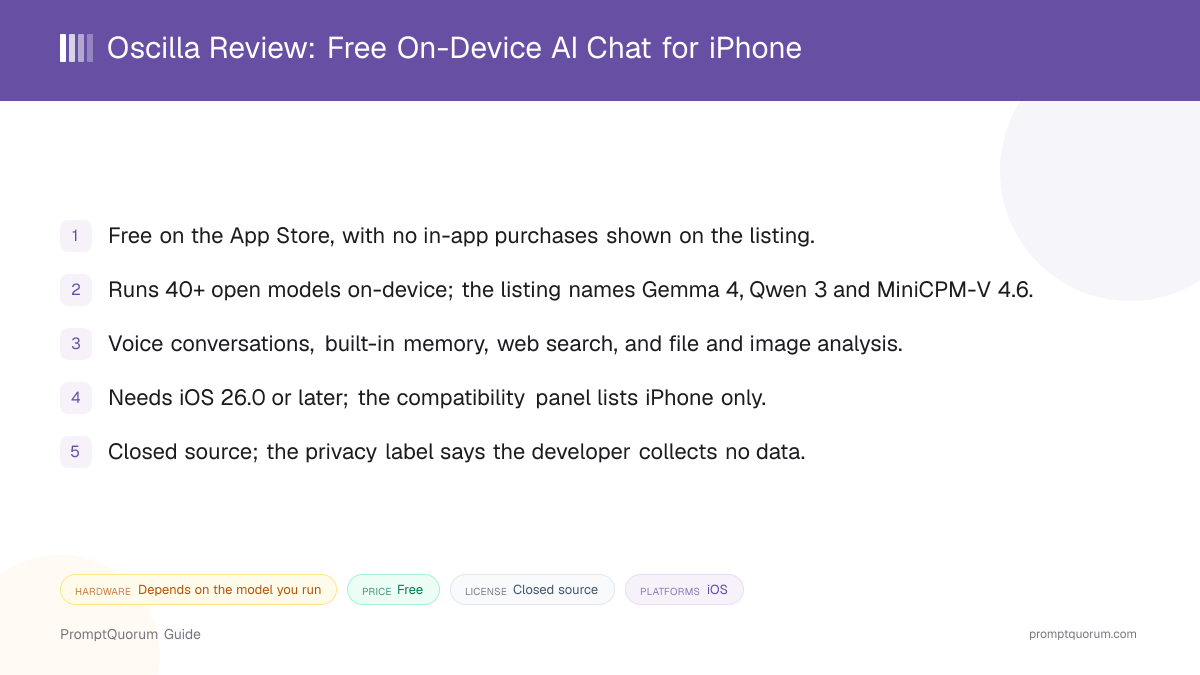
- Price: free, with no in-app purchases shown on the listing.
- Models: 40+ downloadable open models, from 350M to 8B parameters in the examples the listing names.
- Platform: iPhone with iOS 26.0 or later; Mac and iPad are mentioned in the description but not in the compatibility panel.
- Openness: closed source, and the developer site is a "coming soon" page for a V2 release at the time of review.
📍 In One Sentence
Oscilla, from Martechia LLC, is a free iPhone app that runs open AI models fully on-device with voice, memory, web search and image analysis, and its listing says the developer collects no data.
💬 In Plain Terms
Think of it as a model library on your phone: you pick an open model, download it once, and chat with it without a cloud server, but you cannot inspect the code behind it.
Get Oscilla
Oscilla is distributed through the Apple App Store only. The download is 46.7 MB; models are downloaded separately inside the app.
This review is a companion to PromptQuorum's Local LLM Software Directory, which lists Oscilla alongside other on-device and local AI tools.
Channel | Get It |
|---|---|
| Apple App Store (iPhone) | Oscilla - Local AI on the App Store |
| Developer website | oscilla.ai |
The listing's description says the app runs on "iPhone, iPad, and Mac", but its compatibility panel lists iPhone only. Check your device on the App Store page before installing.
Oscilla at a Glance
Attribute | Oscilla |
|---|---|
| Platform | iPhone (iOS 26.0+) |
| Price | Free |
| License | Closed source |
| Runs fully offline | Yes, per the listing: "entirely on your iPhone" |
| In-app model downloads | Yes, 40+ models |
| Import your own models | Not stated |
| Image input | Yes, file and image analysis (e.g. MiniCPM-V 4.6) |
| Voice input / output | Yes, real-time voice conversations |
Attributes follow the mobile-chat comparison used in the Local LLM Software Directory. "Not stated" means the listing and website do not mention the feature, not that it was tested and found missing.
What Oscilla Is
Oscilla is a chat app with its own on-device model runtime, not a front end for a server. The listing describes it as "local AI for Apple devices" and says it runs models "entirely" on the device with no cloud dependency.
It is published by Matthew David Fusco under Martechia LLC (doing business as Oscilla). The inference runtime is not named in any public source, so this review does not state whether it uses MLX, llama.cpp or Core ML.
This review draws on the App Store listing and oscilla.ai. It does not include hands-on testing, so speed, battery use and answer quality are not rated here.
How to Get Started
Setup is an App Store install followed by a model download. The listing does not describe the first-run flow, so the steps below follow what it documents.
- 1Check your iOS version
Why it matters: The listing requires iOS 26.0 or later, so older iPhones that cannot update will not install it. - 2Install Oscilla
Why it matters: Get it from the [App Store](https://apps.apple.com/us/app/oscilla-local-ai/id6759628356); the app itself is under 50 MB. - 3Download a model
Why it matters: Pick a small model first, since the listing names models from 350M to 8B parameters and a bigger model needs more free storage and memory. - 4Start chatting
Why it matters: Type, talk with the voice mode, or attach a file or image; memory and web search are built into the app.
Features and Models
Oscilla's pitch is breadth: many models plus voice, memory and search in one free app. Everything below comes from the App Store listing and developer site.
- 40+ models. Recent updates add Nvidia Nemotron Mini 4B, IBM Granite 4.1 (3B and 8B), LFM 2.5 (350M, 1.2B Instruct, 450M VL) and OpenBMB MiniCPM-V 4.6; the listing also names Gemma 4, Qwen 3, SmolLM3 and Ministral 3.
- Real-time voice. Spoken conversations run locally, per the listing.
- Built-in memory. The app keeps context about you across chats; the listing does not say where that memory is stored beyond "on your device".
- Web search. Listed as a feature; the listing does not say how a search request is made, so assume it needs a network connection.
- File and image analysis. Attach documents or photos; vision-capable models such as MiniCPM-V 4.6 handle images.
Device Requirements
Oscilla requires iOS 26.0 or later and is listed for iPhone. The App Store gives no RAM figure, so the practical limit is how large a model your iPhone can hold in memory.
Expect small models (350M to 4B parameters) to run on most supported iPhones and the 8B-class models to need a recent, higher-memory device. This is a general rule for on-device models, not a figure from the listing.
Privacy and Data
The App Store privacy label reads "The developer does not collect any data from this app." The listing and website describe the app as private by design, with conversations staying on the device.
Because the app is closed source and this review did not inspect network traffic, the claim cannot be independently audited here. The web search feature implies at least some network use when it is active; the listing does not detail it. Apple notes that privacy labels are self-reported by the developer.
Trade-Offs: Benefits vs. Limitations
Free with a wide model list
- What it means in real use:
- You can try Gemma, Qwen, Granite and vision models without paying.
- Limitation / caveat:
- Pricing beyond today's free listing is not documented, and the V2 site page gives no pricing.
Voice, memory and search built in
- What it means in real use:
- One app covers spoken chat and persistent context without extra setup.
- Limitation / caveat:
- The listing does not explain how memory is stored or how web search is performed.
Runs offline
- What it means in real use:
- Chats stay on the phone once a model is downloaded.
- Limitation / caveat:
- Model size is capped by iPhone memory; large models will be slow or unavailable.
Small app download
- What it means in real use:
- The app is 46.7 MB, with models fetched as you need them.
- Limitation / caveat:
- Each model is a separate multi-gigabyte download for the larger ones.
Privacy label with no data collected
- What it means in real use:
- Apple's label lists no data collected by the developer.
- Limitation / caveat:
- Closed source and self-reported; no engine, licence or audit is published.
Oscilla vs. Alternatives
Oscilla
- Platforms:
- iPhone
- Price and license:
- Free, closed source
- Model flexibility:
- 40+ downloadable open models
- Key difference:
- Voice, memory and search in one free app; engine not disclosed
Locally AI
- Platforms:
- iOS, Mac
- Price and license:
- Freemium, closed source
- Model flexibility:
- Open models downloaded in-app
- Key difference:
- Also runs on Mac and names MLX as its runtime; includes voice and image input
Articles about Locally AI (3)
- Locally AI Review: Private Offline LLMs on iPhone, iPad and MacUpdated September 4, 2026
- Local Chat Apps & Assistants Compared (2026): Desktop, Mobile, Self-Hosted, Assistants and RoleplayUpdated September 20, 2026
- Best Local LLM Apps for iPhone in 2026 (Run AI Without WiFi)Updated September 1, 2026
Also mentioned in:
- Tina Review: iPhone Client for Ollama, llama.cpp and ComfyUIUpdated October 4, 2026
- Private LLM Review: On-Device AI Chat for iPhone, iPad, and MacUpdated September 5, 2026
Private LLM
- Platforms:
- iOS, Mac
- Price and license:
- Paid, closed source
- Model flexibility:
- Models downloaded in-app
- Key difference:
- Paid app that also runs on Mac, with no voice mode listed in the directory
Articles about Private LLM (10)
- Private LLM Review: On-Device AI Chat for iPhone, iPad, and MacUpdated September 5, 2026
- Local Chat Apps & Assistants Compared (2026): Desktop, Mobile, Self-Hosted, Assistants and RoleplayUpdated September 20, 2026
- AI on Device Review: A $4.99 Apple Intelligence-Only AppUpdated September 12, 2026
- Google AI Edge Gallery Review: Gemma 4 On-Device Chat for iPhoneUpdated September 12, 2026
- Liquid Apollo Review: On-Device LFM2 Chat, Plus Optional CloudUpdated September 12, 2026
- Noema Review: Multi-Format Local AI for iPhone, iPad, and MacUpdated September 12, 2026
- Off Grid AI Review: Cross-Platform Local AI for iOS, Android, macOS, and WindowsUpdated September 12, 2026
- Pocket AI Review: Offline On-Device AI Chat for iPhoneUpdated September 11, 2026
- AnythingLLM Mobile Review: On-Device Chat + RAGUpdated September 6, 2026
- Chapper Review: AI & LM Studio Client for iPhone, iPad, and MacUpdated September 6, 2026
+11 more not shown
Enclave AI
- Platforms:
- iOS
- Price and license:
- Paid, closed source
- Model flexibility:
- Models downloaded in-app
- Key difference:
- iOS-only paid app with voice; no vision input listed in the directory
Articles about Enclave AI (3)
- Enclave AI Review: On-Device AI for iPhone, iPad, MacUpdated September 3, 2026
- Local Chat Apps & Assistants Compared (2026): Desktop, Mobile, Self-Hosted, Assistants and RoleplayUpdated September 20, 2026
- Liquid Apollo Review: On-Device LFM2 Chat, Plus Optional CloudUpdated September 12, 2026
Also mentioned in:
- On Device AI Review: 200+ Local Models for iPhone, iPad, MacUpdated September 12, 2026
- Maid Review: Open-Source Local LLM Chat App for AndroidUpdated September 6, 2026
- RikkaHub Review: Multi-Provider AI Chat for AndroidUpdated September 6, 2026
PocketPal AI
- Platforms:
- iPhone, Android
- Price and license:
- Free, MIT
- Model flexibility:
- GGUF models you download
- Key difference:
- Open source, on Android too, and can import your own GGUF models
Articles about PocketPal AI (9)
- PocketPal AI Review: Free, Open-Source On-Device ChatUpdated September 5, 2026
- PAIOS Review: Offline Gemini Nano Chat for AndroidUpdated October 5, 2026
- Local Chat Apps & Assistants Compared (2026): Desktop, Mobile, Self-Hosted, Assistants and RoleplayUpdated September 20, 2026
- OlliteRT Review: Turn an Android Phone Into a Local LLM ServerUpdated September 19, 2026
- AI on Device Review: A $4.99 Apple Intelligence-Only AppUpdated September 12, 2026
- Google AI Edge Gallery Review: Gemma 4 On-Device Chat for iPhoneUpdated September 12, 2026
- Noema Review: Multi-Format Local AI for iPhone, iPad, and MacUpdated September 12, 2026
- AnythingLLM Mobile Review: On-Device Chat + RAGUpdated September 6, 2026
- Chapper Review: AI & LM Studio Client for iPhone, iPad, and MacUpdated September 6, 2026
+20 more not shown
Platform, price, and feature details for third-party apps change frequently. Verify current specifics on each app's own listing before deciding.
Who Should Use Oscilla
- iPhone users on iOS 26 who want to try many open models for free. The catalogue is wide and the app is free.
- People who want voice and memory in a local app. Both are built in rather than add-ons.
- Privacy-minded users comfortable with a closed-source app. The privacy label lists no data collected, though it cannot be audited here.
Who Should Not Use Oscilla
- Anyone who needs open source. The code is not public; try PocketPal AI instead.
- Users who cannot run iOS 26. The listing requires iOS 26.0 or later.
- Mac, iPad or Android users. Only iPhone is confirmed in the compatibility panel; Locally AI also runs on Mac.
- People who need to import their own models. The listing does not mention it.
Frequently Asked Questions
Is Oscilla free?
The App Store listing shows it as free with no in-app purchases. Future pricing is not documented.
Who makes Oscilla?
Matthew David Fusco, publishing under Martechia LLC, which does business as Oscilla.
Does Oscilla work on iPad or Mac?
The description says it runs on iPhone, iPad and Mac, but the compatibility panel lists iPhone only. Confirm on the App Store with your device.
Which models does Oscilla offer?
The listing names Gemma 4, Qwen 3, SmolLM3, Ministral 3, Granite 4.1, LFM 2.5, Nemotron Mini 4B and MiniCPM-V 4.6, among 40+ in total.
What does the Oscilla website show?
At the time of review, oscilla.ai is a "coming soon" page for Oscilla V2 dated September 11, 2026, with no feature or pricing detail.
Is Oscilla open source?
No public repository or licence was found, so this review treats it as closed source.
Verdict
Oscilla packs a wide model list, voice, memory and image input into a small free iPhone app, which makes it an easy app to try if your phone runs iOS 26.
The catch is transparency. The runtime is unnamed, the code is closed, the website is a placeholder, and some details such as iPad and Mac support are inconsistent between the description and the compatibility panel. That is fine for casual experimenting and a poor basis for anything sensitive.
Install it to see how its models feel on your phone. If you want open source or a disclosed engine, start with PocketPal AI or Locally AI.
Sources
- Oscilla - Local AI on the App Store — version, price, size, requirements, models and privacy label.
- oscilla.ai — developer website, currently a V2 "coming soon" page.