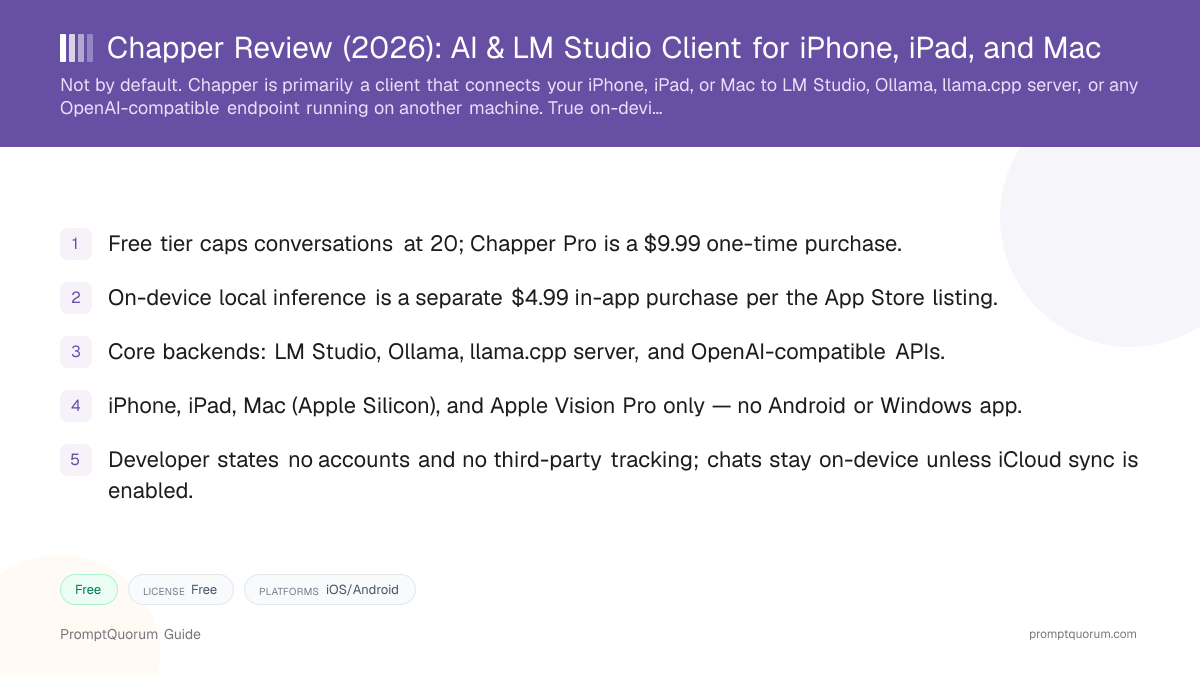
What Chapper Is
Chapper is a native Apple app, listed on the App Store as "Chapper: AI & LM Studio Client," built to connect iPhone, iPad, and Mac to AI models — either running on-device or on a server you control. Its core identity, reflected in its own App Store name, is as a client for LM Studio: you run a model on a Mac or PC using LM Studio, Ollama, or a llama.cpp server, and Chapper gives you a native mobile interface to chat with it from your phone or tablet.
It is developed by Prevolut Ltd, a company registered in England and Wales (Companies House number 17058766). The name is similar to the Revolut banking app, but the two are unrelated companies — Chapper's developer is a separate, smaller entity focused specifically on this AI client.
On-device inference — running a model directly on the phone or Mac with no server involved — is also supported, using Apple's MLX framework and, where available, Apple's own Foundation Models. However, per the current App Store in-app purchase list, that capability is sold as a separate "On Device Local Inference" purchase rather than bundled into the base app or the Pro tier automatically. Readers who want an app that is on-device by default, with no separate unlock, should weigh that against fully local apps like PocketPal AI or Private LLM.
How to Get Started
Getting started with Chapper differs depending on whether you plan to connect to a server or run a model on-device. No account creation is required either way.
- 1Download the app
Why it matters: Get [Chapper from the Apple App Store](https://apps.apple.com/us/app/chapper-ai-lm-studio-client/id6760984679) for free. The free tier lets you try the app with a 20-conversation limit before deciding whether to buy Pro. - 2Decide: server-based or on-device
Why it matters: If you already run [LM Studio](https://lmstudio.ai/) or [Ollama](https://ollama.com/) on a Mac or PC, connect Chapper to that server's address for the fastest path to a working chat. If you want the model running directly on your phone with no separate computer, you need the additional $4.99 "On Device Local Inference" in-app purchase. - 3Connect a backend or pick a model
Why it matters: For server mode, point Chapper at your LM Studio, Ollama, llama.cpp server, or OpenAI-compatible endpoint's address. For on-device mode, choose from the models supported through Apple's MLX framework and, where available, Apple's Foundation Models. - 4Decide on Pro
Why it matters: The free tier's 20-conversation cap is enough to judge whether the app fits your workflow. [Chapper Pro ($9.99, one-time)](https://apps.apple.com/us/app/chapper-ai-lm-studio-client/id6760984679) removes the cap and adds personas, MCP tools, long-term memory, all export formats, and iCloud sync, per the developer's own feature list. - 5Optional: enable iCloud sync
Why it matters: If you want conversations to carry across your iPhone, iPad, and Mac, iCloud sync is opt-in and end-to-end encrypted, per the developer's privacy page — it is off by default.
Pricing: Free Tier, Pro, and the On-Device Add-On
Chapper uses a three-tier pricing structure that is more layered than most apps in this category. The base app is free to download, a one-time Chapper Pro purchase unlocks most advanced features, and true on-device model inference is priced separately again. These figures were verified against the App Store listing and chapper.app for this review.
Free
- Price:
- $0
- What it unlocks:
- Core chat features, capped at 20 conversations
Chapper Pro
- Price:
- $9.99 (one-time)
- What it unlocks:
- Unlimited conversations, advanced sampling controls, all export formats, personas, MCP tools, long-term memory, analytics, custom app icons, iCloud sync
On Device Local Inference
- Price:
- $4.99 (one-time, separate from Pro)
- What it unlocks:
- Running models directly on-device via Apple MLX / Foundation Models, instead of connecting to LM Studio, Ollama, or another server
"Tea" tips
- Price:
- $0.99–$44.99
- What it unlocks:
- Optional one-time tips to the developer; no functional unlock
Prevolut Ltd's own site describes Chapper Pro as "no subscription, no hidden fees," with every future Pro feature included automatically once purchased. App Store prices can change and vary by region — confirm current pricing on the App Store listing before buying. Verified for this review on 2026-09-06.
Supported Backends and Models
Chapper's primary integration surface is remote backends, not a curated on-device model library. Per the developer's own site, it "works natively with LM Studio, Ollama, llama.cpp server, and any OpenAI-compatible API" — you can point Chapper at any endpoint speaking that protocol, including a self-hosted server on your own network.
For on-device use (the separate $4.99 add-on), the app supports models through Apple's MLX framework, a machine-learning framework built for Apple Silicon, and, where the operating system provides it, Apple Foundation Models — Apple's own on-device model made available to third-party apps on supported hardware and OS versions. Neither the App Store listing nor the developer's site publishes a fixed, named list of on-device models the way some competing apps do (Private LLM's 140+ curated model library, for example); this review treats the on-device model selection as narrower and more dependent on Apple's own MLX/Foundation Models ecosystem than on a large curated GGUF catalog.
Because model quality and speed for the server-based path depend entirely on what you run in LM Studio or Ollama on your own machine, Chapper itself does not set the ceiling on model capability the way a fully on-device app does — it is a transport and interface layer, with your own hardware doing the actual inference.
Platforms: iPhone, iPad, Mac, and Vision Pro
iPhone
- What to expect:
- Requires iOS 17.0 or later, per the App Store listing.
- Important note:
- Server-based chat (LM Studio/Ollama) needs a network path to that server; on-device chat needs the separate $4.99 add-on.
iPad
- What to expect:
- Requires iPadOS 17.0 or later; same app and feature set as iPhone.
- Important note:
- No iPad-specific layout details are published beyond standard App Store compatibility.
Mac
- What to expect:
- Requires macOS 14.0 or later on an Apple M1 chip or newer, per the App Store listing.
- Important note:
- A Mac is also the most common LM Studio/Ollama host, so many users will run the server and the Chapper client on the same machine, or run the server on a Mac and the client on iPhone/iPad.
Apple Vision Pro
- What to expect:
- App Store listing shows visionOS 1.0+ compatibility.
- Important note:
- This review did not independently test the Vision Pro experience; treat it as App Store-listed compatibility, not a hands-on verified feature.
Android, Windows, Linux
- What to expect:
- No official app on Google Play, the Microsoft Store, or any Linux package repository.
- Important note:
- Android and Windows users who want a similar LM Studio/Ollama-connected mobile client should look at RikkaHub (Android) or AnythingLLM Mobile (Android, iOS planned).
Privacy: What Chapper Does and Does Not Collect
Prevolut Ltd's own site states Chapper requires no account and uses "no third-party tracking," and that conversations are stored on-device unless a reader explicitly enables iCloud sync or connects to their own external server. Because the app's core design routes chat through backends you control (your own LM Studio/Ollama server, or on-device inference), the amount of data that ever reaches Prevolut's own infrastructure is limited by that architecture, not just by policy.
- No account required. You can download and use Chapper, including making in-app purchases through Apple's standard purchase flow, without creating a Chapper-specific profile.
- No third-party tracking, per the developer's own site copy. This review relies on that stated claim rather than an independent audit of the closed-source app's network traffic.
- iCloud sync is opt-in and end-to-end encrypted, per the developer. It is off by default; enabling it is the one documented case where chat data leaves the local device, and it goes to the reader's own iCloud account, not to Prevolut's servers.
- Server connections send data to whatever endpoint you configure. If you connect Chapper to a third-party or cloud-hosted OpenAI-compatible API instead of your own local LM Studio/Ollama server, your prompts go to that endpoint under that endpoint's own privacy terms — this is a property of the client/server model in general, not specific to Chapper.
- Privacy policy and terms are published at prevolut.uk/products/chapper/privacy and prevolut.uk/products/chapper/terms — read these directly for the current, complete legal terms rather than relying solely on marketing copy.
Company and Version History
Chapper is developed by Prevolut Ltd, a company registered in England and Wales under Companies House number 17058766. Public App Store data does not give an exact first-release date, but the app's relatively high App Store ID (6760984679) and its early version numbering point to a 2026 launch.
- Version 1.1.0. Described by the developer as one of the biggest Chapper releases to date; exact date not published in sources available for this review.
- Version 1.2.0. A major update centered on the "C.A.S.H." sandboxed terminal workflow feature, plus quality improvements.
- Version 1.3.1 (August 6, 2026). The current App Store release as of this review, adding a first look at an "Agent Mode," quicker model switching, a larger AI answer field, and a round of small fixes.
Trade-Offs: Benefits vs. Limitations
Free tier to try before buying
- What it means in real use:
- You can test the interface and a server connection before spending anything.
- Limitation / caveat:
- Capped at 20 conversations, and on-device inference is not available at all on the free tier.
Broad backend compatibility
- What it means in real use:
- Works with LM Studio, Ollama, llama.cpp server, and any OpenAI-compatible endpoint — flexible for anyone already running a local server.
- Limitation / caveat:
- Model quality and speed depend entirely on the server you connect to, not on the app itself.
Feature-dense Pro tier
- What it means in real use:
- MCP tools, personas, long-term memory, structured JSON output, and multi-format export cover advanced use cases most competitors skip.
- Limitation / caveat:
- That breadth adds a $9.99 purchase on top of the base app, and the on-device path costs an additional $4.99.
No account required
- What it means in real use:
- Install and start chatting without signing up for anything.
- Limitation / caveat:
- Because the app is closed-source, the "no third-party tracking" claim rests on the developer's own statement rather than independent code review.
Native, polished Apple app
- What it means in real use:
- Runs as a first-class citizen across iPhone, iPad, Mac, and Vision Pro with a single purchase.
- Limitation / caveat:
- Apple-only — no Android or Windows version, unlike some server-client competitors.
Split pricing is flexible
- What it means in real use:
- Users who only need the server-client feature can skip the $4.99 on-device add-on entirely.
- Limitation / caveat:
- The three-tier structure (free/Pro/on-device) is less transparent at a glance than a single flat price, and easy to misread as "$9.99 gets you everything."
Chapper vs. Alternatives
Chapper
- Platforms:
- iPhone/iPad/Mac/Vision Pro (Apple only)
- Price:
- Free (20-chat cap) / $9.99 Pro / +$4.99 on-device
- Model access:
- LM Studio, Ollama, llama.cpp, OpenAI-compatible APIs; on-device via MLX/Foundation Models (paid add-on)
- Key difference:
- Primarily a server client; on-device inference is a separate purchase
PocketPal AI
- Platforms:
- iPhone/iPad, with some Android support
- Price:
- Free, open source
- Model access:
- Any GGUF file, fully on-device by default
- Key difference:
- Free, open-source, and on-device from the start — no server or add-on needed
Articles about PocketPal AI (10)
- PocketPal AI Review: Free, Open-Source On-Device ChatUpdated September 5, 2026
- Best Local AI Apps for iPhone in 2026 (Run LLMs Without WiFi)Updated October 23, 2026
- Loci AI Review (2026): Offline AI for iPhone, Android, iPad, Mac and WindowsUpdated October 23, 2026
- Private LLM Review: On-Device AI Chat for iPhone, iPad, and MacUpdated October 23, 2026
- Run a Local LLM on Your Tablet: iPad Pro M5, Galaxy Tab S10, OnePlus Pad 2 (2026)Updated October 23, 2026
- Best Local LLM Apps for Android in 2026: 6 Apps Compared on Real PhonesUpdated October 19, 2026
- Best Mobile LLM Models for Phones in 2026: Phi-4 Mini vs Gemma 3 vs SmolLMUpdated October 19, 2026
- Local AI Chat Pocket Review: Offline LLM and Image Chat for iPhone and iPadUpdated October 6, 2026
- PAIOS Review: Offline Gemini Nano Chat for AndroidUpdated October 5, 2026
- Oscilla Review: Free On-Device AI Chat for iPhoneUpdated October 4, 2026
+36 more not shown
Private LLM
- Platforms:
- iPhone/iPad/Mac (Apple only)
- Price:
- $4.99 one-time purchase
- Model access:
- 140+ curated on-device models with OmniQuant/GPTQ quantization
- Key difference:
- Single flat price, on-device only, no server-client mode
Articles about Private LLM (10)
- Private LLM Review: On-Device AI Chat for iPhone, iPad, and MacUpdated October 23, 2026
- Best Local AI Apps for iPhone in 2026 (Run LLMs Without WiFi)Updated October 23, 2026
- Loci AI Review (2026): Offline AI for iPhone, Android, iPad, Mac and WindowsUpdated October 23, 2026
- Local Chat Apps & Assistants Compared (2026): Desktop, Mobile, Self-Hosted, Assistants and RoleplayUpdated September 20, 2026
- AI on Device Review: A $4.99 Apple Intelligence-Only AppUpdated September 12, 2026
- Google AI Edge Gallery Review: Gemma 4 On-Device Chat for iPhoneUpdated September 12, 2026
- Liquid Apollo Review: On-Device LFM2 Chat, Plus Optional CloudUpdated September 12, 2026
- Noema Review: Multi-Format Local AI for iPhone, iPad, and MacUpdated September 12, 2026
- Off Grid AI Review: Cross-Platform Local AI for iOS, Android, macOS, and WindowsUpdated September 12, 2026
- Pocket AI Review: Offline On-Device AI Chat for iPhoneUpdated September 11, 2026
+12 more not shown
Backyard AI
- Platforms:
- See full review for current platform support
- Price:
- See current listing
- Model access:
- See full review for current model support
- Key difference:
- Roleplay/character-chat focused desktop-first app, unlike Chapper's general-purpose client
Articles about Backyard AI (4)
- Backyard AI Review: Local AI Character Chat and RoleplayUpdated September 2, 2026
- Swerve Review: AI Story and Character Chat for iPhoneUpdated October 17, 2026
- Agnai Review: Self-Hostable AI Roleplay ChatUpdated September 12, 2026
- SillyTavern in 2026: The Free Frontend for AI Character Roleplay and Long-Form ChatUpdated September 5, 2026
Also mentioned in:
- Asiden Review: Windows 11 AI Desktop Companion With Local and Optional Cloud AIUpdated October 24, 2026
- Local Chat Apps & Assistants Compared (2026): Desktop, Mobile, Self-Hosted, Assistants and RoleplayUpdated September 20, 2026
- RisuAI Review: Open-Source Roleplay Chat ClientUpdated September 12, 2026
SillyTavern vs. Agnai vs. RisuAI
- Platforms:
- Browser-based front ends, self-hosted
- Price:
- Free, open source
- Model access:
- Connect to any local or cloud backend, character-card focused
- Key difference:
- Roleplay/character-card ecosystem rather than a native mobile app
LLM Farm
- Platforms:
- iOS/Mac (open source, GitHub: guinmoon/LLMFarm)
- Price:
- Free, open source
- Model access:
- Custom GGUF models via llama.cpp/ggml, on-device by default
- Key difference:
- Was pulled from the App Store and TestFlight in August 2025 per its own GitHub README — verify current availability
Articles about LLM Farm (4)
- LLM Farm Review: Open-Source GGUF App, Off the App StoreUpdated September 6, 2026
- Best Local AI Apps for iPhone in 2026 (Run LLMs Without WiFi)Updated October 23, 2026
- Run a Local LLM on Your Tablet: iPad Pro M5, Galaxy Tab S10, OnePlus Pad 2 (2026)Updated October 23, 2026
- Build a Local Voice Assistant on Your Phone: Whisper + Local LLM (No Cloud) — 2026Updated August 29, 2026
Also mentioned in:
- Best Mobile LLM Models for Phones in 2026: Phi-4 Mini vs Gemma 3 vs SmolLMUpdated October 19, 2026
Layla
- Platforms:
- iOS and Android
- Price:
- $19.99 plus in-app purchases
- Model access:
- Custom GGUF models; character/roleplay focus with 100+ voices
- Key difference:
- Cross-platform, character/roleplay-oriented, priced higher than Chapper
Articles about Layla (4)
- Layla Review: On-Device AI Companion App for Android and iOSUpdated September 6, 2026
- Best Local LLM Apps for Android in 2026: 6 Apps Compared on Real PhonesUpdated October 19, 2026
- PAIOS Review: Offline Gemini Nano Chat for AndroidUpdated October 5, 2026
- Build a Local Voice Assistant on Your Phone: Whisper + Local LLM (No Cloud) — 2026Updated August 29, 2026
Also mentioned in:
- Local Chat Apps & Assistants Compared (2026): Desktop, Mobile, Self-Hosted, Assistants and RoleplayUpdated September 20, 2026
- ToolNeuron Review: Open-Source Encrypted Android AI AppUpdated September 12, 2026
Maid
- Platforms:
- Cross-platform Flutter app (Android primary)
- Price:
- Free, open source (MIT license)
- Model access:
- Any GGUF file via llama.cpp; also connects to Anthropic, DeepSeek, Ollama, Mistral, OpenAI remotely
- Key difference:
- Free, fully open source, and combines local + remote access like Chapper does, but cross-platform
Articles about Maid (5)
- Maid Review: Open-Source Local LLM Chat App for AndroidUpdated September 6, 2026
- Private LLM Review: On-Device AI Chat for iPhone, iPad, and MacUpdated October 23, 2026
- Best Local LLM Apps for Android in 2026: 6 Apps Compared on Real PhonesUpdated October 19, 2026
- Local Chat Apps & Assistants Compared (2026): Desktop, Mobile, Self-Hosted, Assistants and RoleplayUpdated September 20, 2026
- Layla Review: On-Device AI Companion App for Android and iOSUpdated September 6, 2026
Also mentioned in:
- Tina Review: iPhone Client for Ollama, llama.cpp and ComfyUIUpdated October 4, 2026
- Ollama Local AI Review: Android LLM Runner and LAN API ProxyUpdated October 2, 2026
- LLM Farm Review: Open-Source GGUF App, Off the App StoreUpdated September 6, 2026
RikkaHub
- Platforms:
- Android
- Price:
- Free, open source
- Model access:
- Multiple cloud provider APIs plus local execution
- Key difference:
- Android-only equivalent to Chapper's multi-backend client model
Articles about RikkaHub (2)
- RikkaHub Review: Multi-Provider AI Chat for AndroidUpdated September 6, 2026
- LocalAI Review: ApexCreator's Offline Android AI Chat AppUpdated September 12, 2026
Also mentioned in:
- Private LLM Review: On-Device AI Chat for iPhone, iPad, and MacUpdated October 23, 2026
- AnyLLM Review: BYOK AI Chat Client for AndroidUpdated October 17, 2026
- Local Chat Apps & Assistants Compared (2026): Desktop, Mobile, Self-Hosted, Assistants and RoleplayUpdated September 20, 2026
- ToolNeuron Review: Open-Source Encrypted Android AI AppUpdated September 12, 2026
- LLM Farm Review: Open-Source GGUF App, Off the App StoreUpdated September 6, 2026
AnythingLLM Mobile
- Platforms:
- Android (iOS planned)
- Price:
- Free, open source
- Model access:
- Runs GGUF models on-device via Cactus Compute, or pairs with a self-hosted AnythingLLM server
- Key difference:
- Designed to pair with a self-hosted AnythingLLM workspace specifically, not a general multi-backend client
Articles about AnythingLLM Mobile (2)
- AnythingLLM Mobile Review: On-Device Chat + RAGUpdated September 6, 2026
- AnythingLLM Review: Open-Source RAG and Document ChatUpdated September 11, 2026
Also mentioned in:
- Liquid Apollo Review: On-Device LFM2 Chat, Plus Optional CloudUpdated September 12, 2026
Platform, price, and feature details for third-party apps change frequently — verify current specifics on each app's own listing before deciding. LLM Farm's App Store availability in particular should be re-checked, since its own GitHub README described it as pulled from the App Store as of August 2025.
Who Should Use Chapper
- Readers who already run LM Studio or Ollama on a Mac or PC. Chapper's core value is a native mobile front end for a server you already have running — this is its strongest, best-verified use case.
- Apple-only users who want one app for both server-based and on-device chat. If you are willing to pay for both Pro and the on-device add-on, Chapper covers a wider range of workflows than a single-purpose app.
- Power users who want MCP tools, personas, and structured JSON output. The Pro tier's feature list is denser than most apps in this category, useful for readers who want to script or automate around their local AI setup.
- Readers comfortable evaluating a small, early-stage app. With only 8 ratings on the App Store as of this review, Chapper is early in its public track record — acceptable for readers who like trying newer tools, less so for readers who prioritize a long, proven history.
Who Should Not Use Chapper
- Readers who want a single-purchase, fully on-device app with no server setup. Chapper's on-device path costs an additional $4.99 on top of Pro and is not the app's primary design — PocketPal AI (free) or Private LLM ($4.99 flat) fit that need more directly.
- Android, Windows, or Linux users. Chapper has no official app on any of these platforms — consider RikkaHub, Maid, or AnythingLLM Mobile instead.
- Readers who want a large, named, curated on-device model catalog. Neither the App Store listing nor the developer's site publishes a fixed model list comparable to Private LLM's 140+ curated models; on-device selection depends on Apple's MLX/Foundation Models ecosystem instead.
- Readers who want a long public track record before trusting an app with local infrastructure access. With an early-2026 App Store presence and 8 total ratings, Chapper has not yet built the multi-year history that Private LLM (launched 2023) or established open-source projects have.
- Readers who specifically want roleplay or character-card features. Chapper is a general-purpose chat/API client, not a character-chat app — Backyard AI or the tools compared in SillyTavern vs. Agnai vs. RisuAI are built specifically for that use case.
Frequently Asked Questions
How much does Chapper cost?
Chapper is free to download with a 20-conversation limit. Chapper Pro is a $9.99 one-time purchase that removes the cap and unlocks most advanced features. On-device local inference is a separate $4.99 in-app purchase, on top of Pro, per the current App Store listing. Verified for this review on 2026-09-06 — App Store prices can vary by region and change over time.
Does Chapper run AI models entirely on my iPhone?
Only if you buy the separate $4.99 "On Device Local Inference" in-app purchase, which uses Apple's MLX framework and, where available, Apple Foundation Models. By default and in its core design, Chapper is a client that connects to LM Studio, Ollama, llama.cpp server, or an OpenAI-compatible endpoint running elsewhere.
Who develops Chapper?
Chapper is developed by Prevolut Ltd, a company registered in England and Wales (Companies House number 17058766). It is unrelated to the Revolut banking app despite the similar name.
Is Chapper available on Android or Windows?
No. Chapper is built for iPhone (iOS 17+), iPad (iPadOS 17+), Mac (macOS 14+, Apple Silicon), and Apple Vision Pro only. There is no official Android, Windows, or Linux version.
What backends does Chapper support?
Per the developer's own site, Chapper "works natively with LM Studio, Ollama, llama.cpp server, and any OpenAI-compatible API." You can also point it at a self-hosted server on your own network.
Does Chapper require an account?
No. The developer states no account is required, and Chapper is used without any sign-up — including for in-app purchases, which go through Apple's standard purchase flow.
Does Chapper collect my data?
The developer's own site states no third-party tracking is used and that conversations stay on-device unless iCloud sync is enabled or you connect to your own external server. This review relies on that stated claim; Chapper is closed-source, so it has not been independently code-audited for this review.
How does Chapper compare to PocketPal AI?
PocketPal AI is free, open source, and on-device by default with no server required. Chapper is primarily a client for LM Studio, Ollama, and OpenAI-compatible servers, with true on-device inference sold as a separate $4.99 add-on on top of a $9.99 Pro purchase. Choose PocketPal AI if you want a single free, fully on-device app; choose Chapper if you already run a local server and want a native, feature-dense mobile front end for it.
Is Chapper well-reviewed?
As of this review, Chapper has 3.3 out of 5 stars from 8 ratings on the App Store — a very small sample that should not be treated as a strong signal in either direction. The app appears to be relatively new, based on its version numbering and App Store ID.
What is the "C.A.S.H." feature in Chapper?
C.A.S.H. is a sandboxed terminal/shell workflow tool included in Chapper, introduced as the centerpiece of version 1.2.0. The developer's materials describe it as a way to run sandboxed workflows from within the app; this review has not independently tested its full capabilities or security boundaries.
Verdict
Chapper is a capable, feature-dense app for readers who already run LM Studio or Ollama and want a native Apple client for it — the MCP tools, personas, structured output, and multi-format export in the Pro tier go further than most apps in this category. Its pricing is also its biggest point of friction: a free tier capped at 20 conversations, a $9.99 Pro purchase, and a further $4.99 charge just to run models fully on-device add up to a more layered cost structure than the flat one-time prices of PocketPal AI (free) or Private LLM ($4.99). Combined with a thin public track record (8 App Store ratings, an apparent 2026 launch, and no confirmed 1.0 release date in the sources available for this review), Chapper reads as a promising but early-stage app rather than an established one. Readers who already have a local server running and want a polished way to reach it from iPhone or iPad should try the free tier first; readers who want a single-purchase, fully on-device app should start with PocketPal AI or Private LLM instead.
Sources
- Chapper on the App Store — price, in-app purchases, platform compatibility, ratings, and version notes.
- Chapper official site — feature list, backend compatibility, and privacy claims.
- Prevolut Ltd — Chapper product page — pricing model, free-tier limits, and company details.
- Chapper privacy policy and terms of service — legal terms in full.