Common Real-World Stacks
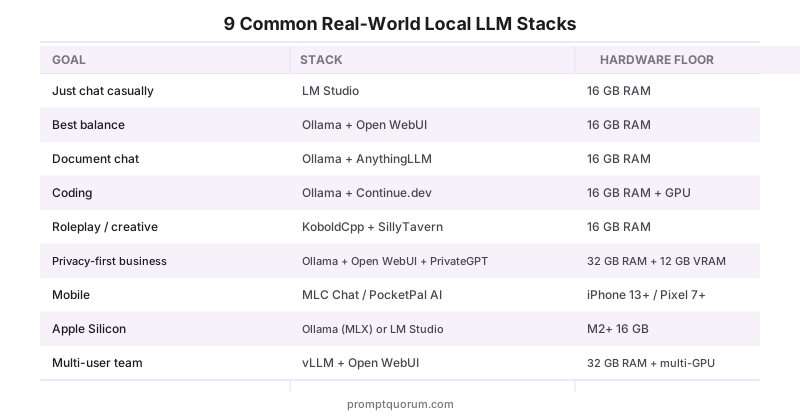
For readers who do not want to read all seven categories, pick the closest stack and copy it. Each row pairs a real goal with a tested combination and the hardware floor it actually runs on.
Goal | Stack | Hardware floor |
|---|---|---|
| Just chat casually | LM Studio standalone | 16 GB RAM, no GPU |
| Best balance for power users | Ollama + Open WebUI | 16 GB RAM, optional GPU |
| Document chat | Ollama + AnythingLLM | 16 GB RAM, optional GPU |
| Coding | Ollama + Cline | 16 GB RAM + GPU recommended |
| Roleplay / creative | KoboldCpp + SillyTavern | 16 GB RAM, GPU recommended |
| Privacy-first business | Ollama + Open WebUI + PrivateGPT | 32 GB RAM + 12 GB VRAM |
| Mobile / on-the-go | MLC Chat or PocketPal AI | iPhone 13+ / Pixel 7+ |
| Apple Silicon | Ollama (MLX backend) or LM Studio | M2/M3/M4/M5 with 16+ GB unified |
| Multi-user team | vLLM + Open WebUI | 32+ GB RAM + multi-GPU |
| Image generation | Stable Diffusion + ComfyUI or Invoke AI | 6+ GB VRAM GPU |
| Voice assistant | Ollama + Whisper.cpp + Piper TTS | 8 GB RAM, CPU-only possible |
Key Takeaways
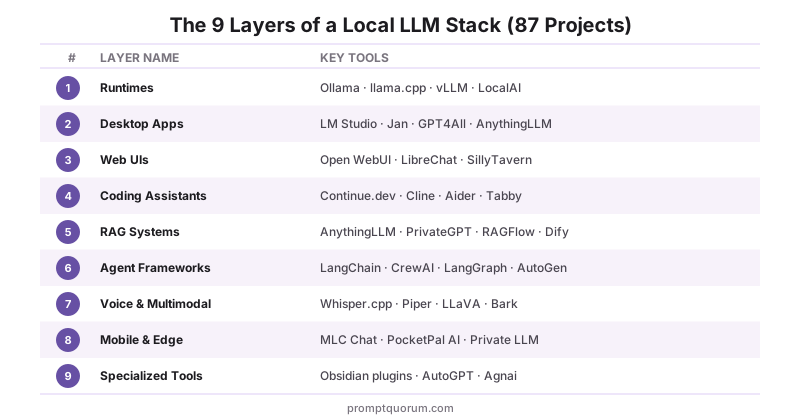
- 8 categories, 305 projects, one map. Run & Serve, Chat & Assistants, Code & Development, Knowledge & Retrieval, Voice & Audio, Images & Video, Train & Operate, and At the Edge (emerging protocols and unproven ideas) — most popular projects in 2026 fit in one primary category, and many span more than one.
- Pick a runtime first. Ollama is the right default for ~95% of readers; llama.cpp is the foundational engine underneath most other tools; vLLM is the production-serving pick for multi-user setups.
- Most categories above Run & Serve are optional. A desktop app OR a web UI is enough for chat. Add a code assistant or CLI tool only when you want code help; add a RAG system only when you want to chat with your own documents; add an agent framework only when one-shot calls stop being enough; add Images & Video only when you need visual output.
- Licence matters for commercial use. MIT and Apache 2.0 dominate the ecosystem. AGPL appears on a handful of UIs (text-generation-webui, KoboldCpp, Jan, SillyTavern) — fine for personal use, more deliberate for commercial deployments. The "License" column below names every one explicitly; see AI & open-source software licenses explained for what MIT, Apache-2.0, AGPL-3.0, and the other license types below actually require.
- Multi-tool stacks are normal. Ollama + Open WebUI + AnythingLLM + Cline + Stable Diffusion is a single-machine setup that covers chat, RAG, coding, and image generation without compromise. The "Common Real-World Stacks" table below names the recipes that actually work in 2026.
How This Directory Stays Current
This directory is continuously maintained, with individual entries updated as projects, pricing, licences, platforms, and hardware requirements change. Larger structural reviews happen quarterly, with focused updates throughout the year. Recent expansions added dozens of new tools across every category, split voice/multimodal into three focused categories (speech-to-text, text-to-speech, vision), split coding assistants into IDE integrations and terminal tools, and added an entirely new Images & Video category. All links and licenses were reverified; new entries (PearAI, Windsurf, Sourcegraph Cody, SuperAGI, Leon AI, Draw Things, Fooocus, StableSwarmUI, and others) were validated for active maintenance. Inclusion criteria: project is actively maintained (commits in the last 90 days), has a verifiable open-source licence or a clear commercial-use statement, and either holds meaningful user share in 2026 or fills a category that would otherwise be empty. Projects that go inactive for more than two release cycles are removed; new entrants that pass the criteria are added at the next review. To suggest a project for inclusion, open an issue or PR against the PromptQuorum repository — include the project URL, licence, and a one-sentence description in the format above.
Sources
- ggml-org/llama.cpp GitHub — primary source for runtime architecture and supported models.
- Ollama Library — official model catalogue and runtime documentation.
- LM Studio Documentation — feature reference for the dominant desktop GUI.
- Open WebUI Documentation — feature reference for the dominant self-hosted web UI.
- Hugging Face Hub — primary location for downloading model weights consumed by every runtime listed above.
- awesome-local-llm GitHub list — community-maintained inventory used as a sanity check for project inclusion.
Frequently Asked Questions
What is the difference between a local LLM runtime and a desktop app?
A runtime (Ollama, llama.cpp, vLLM) is the engine that loads model weights and serves an API — typically OpenAI-compatible. A desktop app (LM Studio, Jan, GPT4All) is a chat UI that calls a runtime under the hood. Some apps bundle their own runtime (LM Studio embeds llama.cpp), others require you to install a runtime separately (Open WebUI calls Ollama). The runtime decides what is possible; the app decides what is convenient.
Can I use multiple tools from this list at the same time?
Yes — most stacks combine 2-4 tools. A common setup: Ollama as the runtime, Open WebUI for chat, AnythingLLM for document chat, and Cline for coding — all four run against the same Ollama instance on a single machine. The "Common Real-World Stacks" table above lists the recipes that work without conflict.
Which tools work fully offline with no telemetry?
Ollama, llama.cpp, vLLM, Jan, GPT4All, Open WebUI, AnythingLLM, PrivateGPT, Cline, Aider, KoboldCpp, Llamafile, MLX-LM, and most of the AGPL/MIT-licensed apps in this directory work fully offline once the model is downloaded. LM Studio and several closed-source tools have optional analytics that can be disabled in settings — verify by running a packet capture once after install. Browser-based UIs (Open WebUI, LibreChat) are local-only when configured to use a local backend.
Are any of these commercial-licensed (not free for commercial use)?
A handful: LM Studio, Msty, Backyard AI, Layla, and Cursor are closed-source — generally free to use but not redistributable, and commercial terms vary. Private LLM is paid. AGPL-licensed tools (Jan, KoboldCpp, text-generation-webui, SillyTavern, Khoj, Copilot for Obsidian) are free for any use including commercial, but the AGPL terms require source disclosure if you modify and host them publicly. Apache 2.0 and MIT projects (the majority) are usable in any context including commercial without attribution constraints beyond the licence text.
Which tools support Apple Silicon (M-series chips) natively?
Ollama, llama.cpp, MLX-LM, LM Studio, Jan, Enchanted, GPT4All, MLC Chat, AnythingLLM, and most Electron/Tauri apps run natively on Apple Silicon and use the Metal backend. MLX-LM is Apple-specific and the fastest for large models on M-series. vLLM, TensorRT-LLM, and ExLlamaV2 are NVIDIA-focused and either do not run or run poorly on Apple Silicon — for Apple users, Ollama with the Metal backend is the default.
Do all these tools support GGUF model format?
GGUF is the native format for llama.cpp and any tool that wraps it (Ollama, LM Studio, Jan, GPT4All, KoboldCpp, Llamafile). vLLM and TensorRT-LLM use their own optimised formats (typically AWQ or FP16) for higher throughput. ExLlamaV2 uses EXL2 quantisation. MLX-LM uses MLX-converted weights. Most listed tools accept GGUF; a few (vLLM, TensorRT-LLM, ExLlamaV2, MLX-LM) require a one-time conversion step from the original Hugging Face weights.
Which tools are best for users with no coding experience?
GPT4All has the simplest install (one click, runs on 8 GB RAM), though its own updates have slowed recently. LM Studio is the most feature-rich without requiring a terminal. Jan is the most privacy-conscious of the no-code options. For document chat without command-line work, AnythingLLM is the easiest. All four are listed in the Desktop GUI Apps category above.
Can I run these tools on a server and access them remotely?
Most server-capable tools (Ollama, vLLM, LocalAI, Open WebUI, LibreChat, PrivateGPT, AnythingLLM) expose an HTTP API and bind to a network interface configurable in settings. Standard pattern: run Ollama on a home server or VPS, run a UI on your laptop or phone pointing at the server's IP. Treat the API like any web service — bind to localhost behind a reverse proxy, or to a private network with proper authentication. Open WebUI ships with multi-user support out of the box.
Which tools support multi-user / team setups?
Open WebUI, LibreChat, h2oGPT, AnythingLLM (with admin features enabled), and Dify are designed for multi-user use, with role-based access and per-user conversation history. vLLM is the right serving layer underneath when concurrent inference matters — it batches requests across users for throughput unattainable on Ollama at concurrency above ~3.
How often does this directory get updated?
Continuously — individual entries are updated as projects, pricing, licences, platforms, and hardware requirements change, with larger structural reviews every quarter. Individual changes (a project goes inactive, a new tool gains meaningful share, a licence changes) get patched into the existing entry. Entirely new categories (like the Images & Video category) are added during the quarterly reviews to keep the structure stable. See the "Last updated" date at the top of this page for the most recent refresh. The "Sources" section above lists the community indexes used to spot-check what the ecosystem is actually doing between refreshes.
Can I do image generation locally without cloud calls?
Yes — Stable Diffusion, ComfyUI, Invoke AI, AUTOMATIC1111 WebUI, and others in the Images & Video category run entirely on local hardware. Stable Diffusion needs 6+ GB VRAM (RTX 3060, RTX 4060, or equivalent); Fooocus and other optimized UIs can run on cards with 4-6 GB. Real-ESRGAN upscales generated images; ControlNet adds spatial control (edges, poses, depth maps); AnimateDiff generates video from text. All run without sending data to external servers.
Which local LLM apps work on iPhone and Android?
PocketPal AI, MLC Chat, and AnythingLLM Mobile run on both iOS and Android and are free and open source (MIT or Apache 2.0). Enchanted (free, Apache 2.0), Private LLM (paid), and Locally AI (freemium) cover iPhone and Mac, and Layla (freemium) is Android-only. On a flagship phone, expect usable speed from models in the 2-4B parameter range.
What are the best alternatives to Open WebUI?
LibreChat (MIT) and LobeChat (MIT, freemium) are the closest browser-based alternatives. Chatbox (GPL 3.0) is a lightweight cross-platform client, and AnythingLLM (MIT) adds built-in document chat on desktop and web. All of them connect to a local Ollama instance, so switching UIs does not change your models.
Should I choose AnythingLLM or Jan?
Choose AnythingLLM (MIT, desktop and web) if you want to chat with your own documents or need multi-user admin features. Choose Jan (desktop for Mac, Windows, and Linux) if you want a simple, privacy-first chat app for local models. Both are free and both can run against the same Ollama runtime.