What Is TokForge?
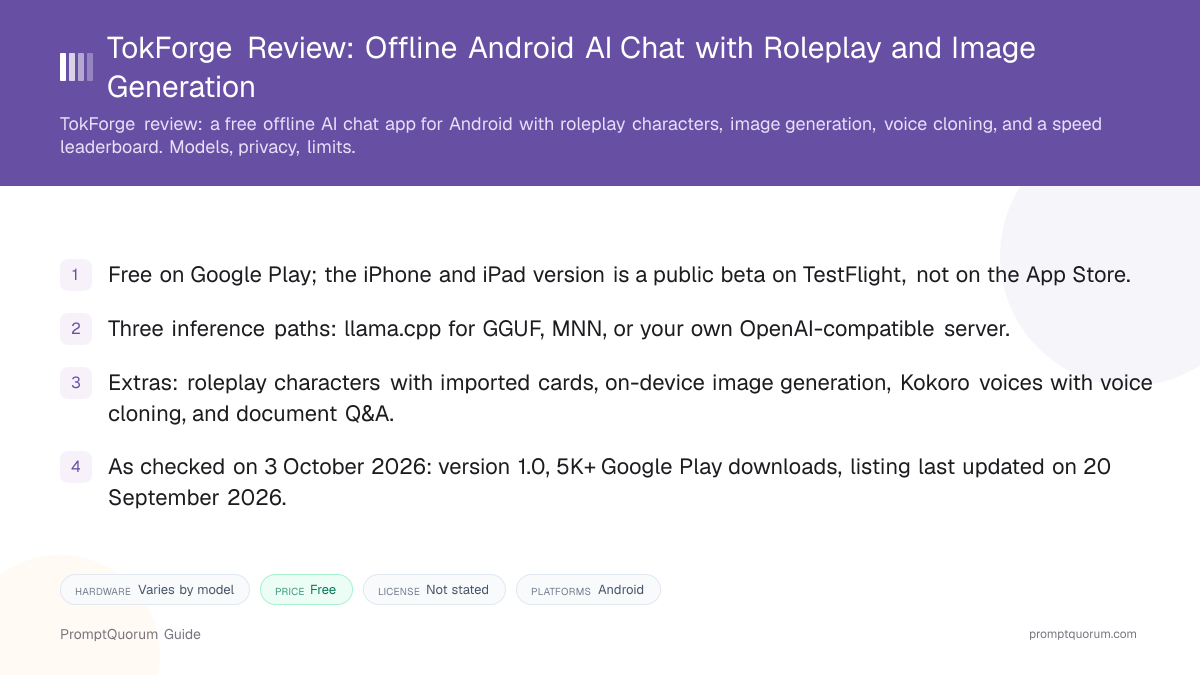
TokForge is an offline-first Android chat app that bundles a local model runner with roleplay, image, voice, and document tools. According to its Google Play listing, it runs full models on the phone with no cloud or account, supports characters imported from chub.ai and TavernAI cards, and picks the fastest engine for your chip automatically.
The developer says the app is much smaller than established alternatives. That candor matters for expectations: it has a small install base, and its iPhone and iPad version is only in public TestFlight beta, not yet on the App Store.
Get It
TokForge is distributed through Google Play on Android; the Apple version is a TestFlight beta rather than an App Store release.
Platform | Where to get it |
|---|---|
| Android | Google Play |
| iPhone / iPad | Public beta via TestFlight (see tokforge.ai) |
| Source code | Not published |
Version 1.3.6.1, confirmed by the developer on 9 October 2026; older pages and listings may still show 1.0.
How to Get Started
The sources describe the flow only in outline; PromptQuorum has not run these steps.
- 1Install and let the app size up your phone
Why it matters: The app detects device capabilities and curates the models offered, according to the developer's website. - 2Download a model
Why it matters: Choose from the curated catalog of 52 models or search Hugging Face through the built-in downloader. - 3Optionally run the benchmark
Why it matters: AutoForge benchmarks model and backend combinations on your hardware; posting to the public leaderboard is your choice. - 4Chat, create, or ask your documents
Why it matters: Start a chat, create or import a character, generate an image, or add a document and ask about it.
Features Confirmed by the Sources
Every item below comes from the Google Play description or the developer's website; none has been independently tested.
- Chat and roleplay. Create characters or import cards from chub.ai and TavernAI (PNG or JSON), with personas, lorebooks, alternate greetings, and group chats.
- Images. On-device generation that runs on the CPU everywhere, with GPU acceleration on Adreno and NPU acceleration on supported Snapdragon devices. The developer cites about 31 seconds for a 512x512 image on a Pixel 9 Pro XL.
- Voice. Kokoro text-to-speech with several voices, voice cloning from about a minute of recorded audio, and voice input.
- Documents and memory. Questions about PDF, DOCX, EPUB, Markdown, CSV, and text files, plus long-term memory and a knowledge graph.
- Engines and models. llama.cpp (GGUF) with OpenCL and Vulkan, MNN with OpenCL and Vulkan depending on the phone, or an OpenAI-compatible server, with automatic routing by chip and a 52-model catalog.
- Developer API and backup. Local API endpoints for automation (the website says 284, the Google Play listing 270+; the two figures are not reconciled) and backup and restore of conversations, characters, and settings.
Hardware and Speed
The developer's website states a minimum of 4 GB of RAM for small models and 8 GB or more for larger ones. Speed depends on the chip: the listing describes GPU paths on Adreno and NPU paths on supported Snapdragon devices, with CPU fallback elsewhere.
The app's AutoForge benchmark measures each model and backend combination on your phone, and the public leaderboard at leaderboard.tokforge.ai collects device-submitted results if you choose to post. Those figures are user-submitted and developer-hosted, not independent measurements.
Privacy and Online Features
The Google Play Data safety section declares "No data collected" and "No data shared with third parties", and the description claims zero analytics and zero telemetry. The website adds that chats are stored only on the device.
Three features go beyond that picture, by the listing's own description: web search is off by default and, when turned on, fetches current information; posting results to the public leaderboard is optional; and a connected OpenAI-compatible server receives whatever you send it. Because the source is not published, none of this can be checked against code, and these are the developer's declarations, not audit results.
📌Note: PromptQuorum has not inspected the app's network traffic. Anyone handling confidential data should verify behavior with web search and leaderboard posting off and on.
From the Maker
Isaac Maple, the developer behind TokForge, shared the following about the app and the reasons for building it. It is presented as the developer's own words, lightly edited for readability, not as PromptQuorum's independent editorial assessment:
"I think our best feature is autoForge, which finds the best and fastest inference setup for each handset and model: CPU, OpenCL or Vulkan, thread count and context size.
The app is really just me and one other buddy, guardian37x in the Discord.
I convert and try to optimize a lot of the smaller LLMs for Edge AI and upload them to my Hugging Face account. I think there are around 85 models there now.
As for why I built it: when I started, there were a few other options for mobile inference, but most were llama/GGUF based, cost money, were filtered, had ads, and weren't really performance-based or didn't have an API backend to really dive in. I also hadn't seen any that used MNN, and as an engineer, MNN at that time was sometimes 50% faster than GGUF, which was really exciting.
So that's why I built it. I figure AI inference costs will keep going up and become more expensive for regular people to access AI they own, on their own devices, that isn't filtered or censored. So I wanted to make something that addressed that and was fast, free and without ads."
— Isaac Maple, developer
Trade-Offs: Benefits vs. Limitations
Free and no account
- What it means in real use:
- Install and use without sign-up or subscription.
- Limitation / caveat:
- Proprietary and closed source; no public repository.
Roleplay and media in one app
- What it means in real use:
- Characters, images, voices, and documents sit in one install.
- Limitation / caveat:
- Breadth is described by the developer; quality is untested here.
Chip-aware engines
- What it means in real use:
- llama.cpp, MNN, and a remote server with automatic routing.
- Limitation / caveat:
- Best paths depend on the SoC; speeds vary a lot by phone.
Public benchmark data
- What it means in real use:
- A leaderboard shows how phones perform before you commit.
- Limitation / caveat:
- Results are user-submitted and hosted by the developer.
Android version is live on Google Play
- What it means in real use:
- The developer's FAQ lists version 1.3.6.1 as live on Google Play, with a newer beta on a separate track.
- Limitation / caveat:
- Small install base (5K+), and the iPhone version is a beta.
Who Should Use It
- Android users who want offline roleplay with imported character cards. Chub.ai and TavernAI card import is a headline feature.
- People who want images, voice, and documents without cloud services. All three are described as running on the device.
- Users who like seeing benchmark data for their chip. The built-in benchmark and leaderboard are designed for that comparison.
What We Could Not Verify
- Source code. TokForge is proprietary and closed source, with the license in section 2 of its terms, so behavior cannot be checked against code.
- Hands-on performance and quality. PromptQuorum did not run the app, so speed, battery use, and output quality are not assessed.
- The no-ads claim. The developer's FAQ says there are no ads, in-app purchases, or subscriptions; PromptQuorum did not install the app to confirm this.
- Developer background. Google Play names Defcon-One, with Isaac Maple and a United States location in the developer details; no company registration or track record was found in the sources read.
- iPhone and iPad. The public TestFlight beta, open to anyone, was not tested, and the app is not yet on the App Store.
Competitors and Alternatives
PocketPal AI
- Platforms:
- iOS, Android
- Price / license:
- Free / MIT
- Key difference:
- Open-source on-device chat client with its own model library
Articles about PocketPal AI (10)
- PocketPal AI Review: Free, Open-Source On-Device ChatUpdated September 5, 2026
- Mobile Local LLMs 2026: Offline AI on iPhone and AndroidUpdated November 28, 2026
- Local Chat Apps & Assistants Compared (2026): Desktop, Mobile, Self-Hosted, Assistants and RoleplayUpdated November 20, 2026
- Loci AI Review (2026): Offline AI for iPhone, Android, iPad, Mac and WindowsUpdated November 18, 2026
- Best Local LLM Apps for Android in 2026: 6 Apps Compared on Real PhonesUpdated November 17, 2026
- Best Local AI Apps for iPhone in 2026 (Run LLMs Without WiFi)Updated November 17, 2026
- Local AI on Android in 2026: What Is Possible, What Is Not, and the Apps We CoverUpdated November 13, 2026
- Local AI on iPhone in 2026: What Is Possible, What Is Not, and the iPhone Apps We CoverUpdated November 13, 2026
- Local LLM App Alternatives in 2026: Options to LM Studio, Ollama, Open WebUI and PocketPal AIUpdated November 10, 2026
- Best Mobile LLM Models for Phones in 2026: Phi-4 Mini vs Gemma 3 vs SmolLMUpdated November 9, 2026
+46 more not shown
Layla
- Platforms:
- Android, iOS
- Price / license:
- Paid / closed source
- Key difference:
- Companion and roleplay focus with an optional cloud mode
Articles about Layla (5)
- Layla Review: On-Device AI Companion App for Android and iOSUpdated October 30, 2026
- Best Local LLM Apps for Android in 2026: 6 Apps Compared on Real PhonesUpdated November 17, 2026
- Local AI on iPhone in 2026: What Is Possible, What Is Not, and the iPhone Apps We CoverUpdated November 13, 2026
- PAIOS Review: Offline Gemini Nano Chat for AndroidUpdated October 5, 2026
- Build a Local Voice Assistant on Your Phone: Whisper + Local LLM (No Cloud) — 2026Updated August 29, 2026
Also mentioned in:
- Local Chat Apps & Assistants Compared (2026): Desktop, Mobile, Self-Hosted, Assistants and RoleplayUpdated November 20, 2026
- ToolNeuron Review: Open-Source Encrypted Android AI AppUpdated September 12, 2026
LLM Hub
- Platforms:
- Android, iOS
- Price / license:
- Free + IAP / PolyForm NC
- Key difference:
- Wider on-device suite with an MCP agent and media generation
Articles about LLM Hub (4)
- LLM Hub Review: On-Device AI Suite for Android and iPhoneUpdated October 3, 2026
- Local Chat Apps & Assistants Compared (2026): Desktop, Mobile, Self-Hosted, Assistants and RoleplayUpdated November 20, 2026
- Local AI on Android in 2026: What Is Possible, What Is Not, and the Apps We CoverUpdated November 13, 2026
- Local AI on iPhone in 2026: What Is Possible, What Is Not, and the iPhone Apps We CoverUpdated November 13, 2026
Also mentioned in:
- US State AI Employment Laws: What Actually Applies to Your Hiring ProcessUpdated November 3, 2026
- Shadow AI: Which Controls Actually Fit Your Company SizeUpdated September 4, 2026
- Agentic AI Security in 2026: The Identity and Access Controls That WorkUpdated September 3, 2026
- AI-Generated Content and IP Risk: What You Actually Own, Infringe, and LeakUpdated September 3, 2026
Private Mind
- Platforms:
- iOS, Android
- Price / license:
- Free / MIT
- Key difference:
- Open-source offline chat with on-device document Q&A
Articles about Private Mind (5)
- Private Mind Review: Open-Source Offline AI Chat for iPhone and AndroidUpdated October 3, 2026
- Local Chat Apps & Assistants Compared (2026): Desktop, Mobile, Self-Hosted, Assistants and RoleplayUpdated November 20, 2026
- Local AI on Android in 2026: What Is Possible, What Is Not, and the Apps We CoverUpdated November 13, 2026
- Local AI on iPhone in 2026: What Is Possible, What Is Not, and the iPhone Apps We CoverUpdated November 13, 2026
- Local AI Chat Pocket Review: Offline LLM and Image Chat for iPhone and iPadUpdated October 6, 2026
Also mentioned in:
- MemoryAI Review: Free Offline AI Chat for iPhone and AndroidUpdated October 28, 2026
- Laria Review: Paid Android AI Assistant With Local ModelsUpdated October 26, 2026
- On Device LLM Review: Free Offline Android Chat AppUpdated October 26, 2026
- CompactifAI APP Review: Free Chat App with Offline and Cloud ModelsUpdated October 24, 2026
- Frankly AI Review: iPhone Chat App With Downloadable On-Device ModelsUpdated October 24, 2026
+12 more not shown
Competitor details change often; confirm each app's current price, license, and platforms on its own listing.
Frequently Asked Questions
Is TokForge free?
Yes. Google Play and the developer's website describe it as free with no account, and the developer's FAQ states there are no ads, in-app purchases, or subscriptions.
Is TokForge open source?
No. TokForge is proprietary, closed-source software; the license is in section 2 of its terms, and no public source repository exists.
Who makes TokForge?
Google Play lists the developer as Defcon-One, with Isaac Maple and a United States location in the developer details and a contact email on the listing.
Does it work offline?
Per the listing, chat, images, and voice run on the device once models are downloaded. Web search is off by default, leaderboard posting is optional, and downloads and any connected server need a network.
Is there an iPhone version?
Yes, as a public beta on TestFlight that anyone can join; it is not on the App Store yet. The Android version is on Google Play.
What hardware does it need?
The developer's website states at least 4 GB of RAM for small models and 8 GB or more for larger ones, with GPU and NPU paths on supported Snapdragon phones.
Which engines and models does it use?
llama.cpp for GGUF models, MNN, or an OpenAI-compatible server you connect yourself, plus a 52-model catalog and a Hugging Face downloader.
Can it import character cards?
Yes. The description says cards from chub.ai and TavernAI (PNG or JSON) can be imported, with personas, lorebooks, alternate greetings, and group chats.
How does it compare with PocketPal AI?
PocketPal AI is a free MIT-licensed chat client on iOS and Android, while TokForge is closed source with roleplay, image, and voice features on Android and an iPhone beta.
Verdict
TokForge packs roleplay characters, on-device images, voice cloning, document Q&A, and chip-aware engine routing into a free Android app that, per the developer, has no ads, in-app purchases, or subscriptions, and its public benchmark leaderboard is an unusual attempt at transparency about speed. Against that, the software is proprietary and closed source, the install base is small at 5K+, the iPhone and iPad version is a public TestFlight beta that is not yet on the App Store, performance figures come from the developer, and nothing here has been tested hands-on. It suits Android users who want a free offline roleplay-and-media app and accept those terms; readers who want auditable code can compare PocketPal AI or Private Mind.
Sources
- TokForge on Google Play — description, developer details, Data safety section, download count, and last-updated date, checked 3 October 2026.
- tokforge.ai — version, platforms, hardware guidance, and the developer's own comparison guide, checked 3 October 2026.
- TokForge terms — license (section 2): proprietary software, checked 9 October 2026.
- TokForge FAQ — free, with no ads, in-app purchases, or subscriptions, and the public TestFlight beta, checked 9 October 2026.