Key Takeaways
- Publisher: listed on Google Play as GeetMark, with a support email and a privacy-policy link on the listing.
- Price and license: free with ads; no license text and no public source repository were found.
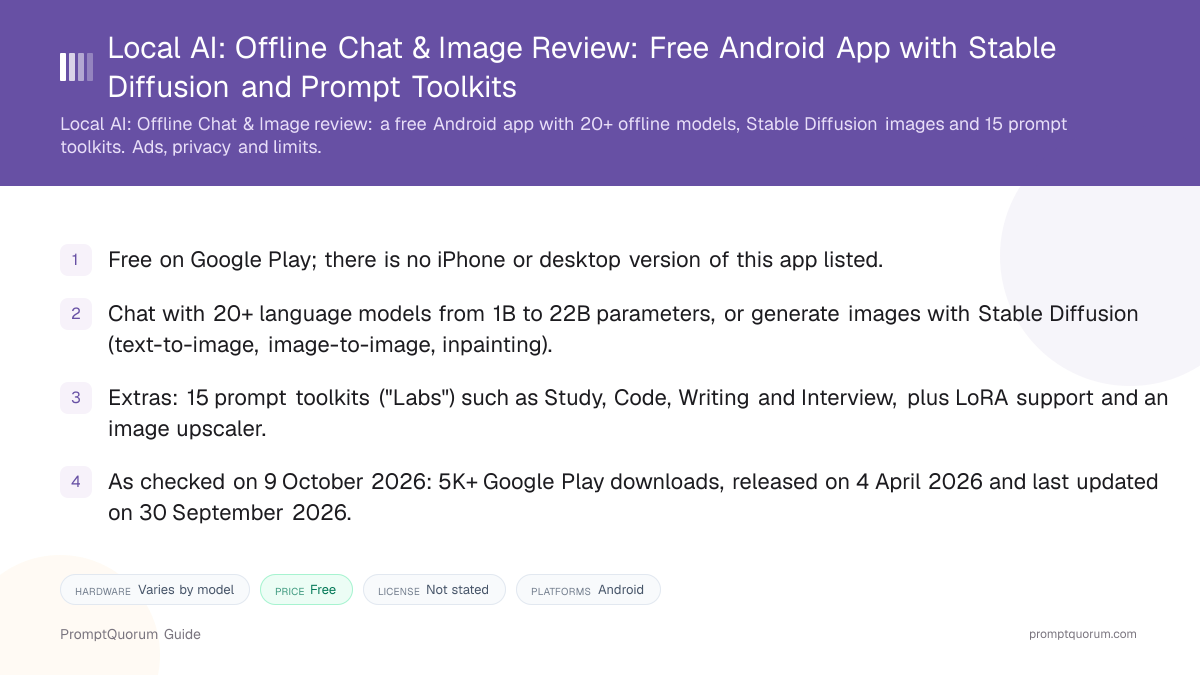
- Scope: 20+ chat models (1B to 22B parameters), Stable Diffusion with LoRA and .safetensors support, a local model manager, embeddings and an upscaler.
- Hardware: the listing recommends 4 GB+ of RAM, 2 to 15 GB of storage and a Snapdragon 8 Gen 1 or newer for best speed, with CPU and GPU fallback.
- Signals as checked on 9 October 2026: version 26.10.11, 5K+ downloads, Android 8.0 or newer, rated for all ages (USK).
📍 In One Sentence
Local AI: Offline Chat & Image is a free, ad-supported, closed-source Android app by GeetMark that runs language models and Stable Diffusion image generation on the phone and bundles 15 prompt toolkits.
💬 In Plain Terms
You install it from Google Play, download a model that fits your phone, and then chat, write, code or generate pictures without an account; the toolkits are ready-made prompt templates for tasks such as study, interviews and product descriptions.
📌Note: This review is based on the Google Play listing and the developer's website, checked on 9 October 2026. Capabilities are the developer's own description, and PromptQuorum has not tested or benchmarked the app.
What Is Local AI: Offline Chat & Image?
Local AI: Offline Chat & Image is an Android app that combines an offline chatbot, a Stable Diffusion image generator and a set of prompt-based writing and coding tools in one install. According to its Google Play listing, it needs no login or API key and processes everything on the device.
The app shares its name with other products: it is not the open-source LocalAI inference server, and the developer's website, Local AI Hub, is a separate directory of models and prompts that also advertises its own "Local AI Hub Android" download. That download is not linked from the Play listing, so this review covers only the Google Play app. The same site also advertises a "Local AI Hub Desktop" app for Windows, macOS and Linux (v1.3.1, described as open-source), but its download button points to a GitHub repository that returns 404, so it could not be verified and is not covered here.
Get It
The app is distributed through Google Play on Android; no iPhone, Mac or Windows version is listed.
Platform | Where to get it |
|---|---|
| Android 8.0+ | Google Play |
| Website | localai.appsgm.com |
| Privacy policy | Android privacy policy |
| Source code | Not published |
Version as verified on 9 October 2026: 26.10.11, read from the Play listing's app data; the last Play update was on 30 September 2026.
How to Get Started
The listing describes the flow only in outline; PromptQuorum has not run these steps.
- 1Install and check your free storage
Why it matters: The listing says models take 2 to 15 GB of storage depending on which you choose, and the first run may be slower while models are cached. - 2Download a model
Why it matters: The in-app model manager downloads language and image models in the background; downloading needs a network connection. - 3Chat or open a toolkit
Why it matters: Start a free-form chat, or pick one of the 15 Labs, such as Study Lab or Code Lab, for a task-specific prompt. - 4Generate images
Why it matters: Set steps, CFG scale, seed and scheduler for Stable Diffusion text-to-image, image-to-image or inpainting.
Features Confirmed by the Sources
Every item below comes from the Google Play description or the developer's website; none has been independently tested.
- Chat. 20+ language models from 1B to 22B parameters, adjustable temperature and token limits, and categories for coding, reasoning and roleplay in several languages.
- Prompt toolkits. 15 "Labs" for study, ideas, e-commerce, lifestyle, fun, data, speech, interviews, analysis, combined workflows, writing, language, professional, code and content tasks.
- Images. Stable Diffusion text-to-image, image-to-image and inpainting, LoRA and .safetensors models, control over steps, CFG scale, seed and scheduler, and an image upscaler.
- Acceleration. CPU and GPU, plus Snapdragon NPU acceleration where available.
- Management. A local model and file manager, embeddings support, background model downloads and saved prompt templates.
Hardware and Speed
The listing recommends 4 GB or more of RAM and says storage needs range from 2 to 15 GB depending on the models you keep. Best performance is stated for a Snapdragon 8 Gen 1 or newer; without an NPU the app falls back to CPU and GPU.
The listing adds that large models need more RAM and that the first run may be slower. No speed figures, benchmarks or tokens-per-second numbers were found, so real-world performance on any given phone is unknown.
Privacy, Ads and Online Features
The Google Play Data safety section declares "No data collected" and "No data shared with third parties", and the description calls the app "fully offline — no cloud, no tracking". The same listing carries a "Contains ads" label.
The developer's Android privacy policy is written for a product it calls "Local AI Hub Android" and lists optional crash reports and basic device information, and it says models are downloaded from sources such as Hugging Face and Civitai. These statements are the developer's declarations, not audit results, and because the source is not published none of them can be checked against code.
📌Note: PromptQuorum has not inspected the app's network traffic or ad behavior. Anyone handling confidential data should verify what the app sends while an ad is shown or a model is being downloaded.
Trade-Offs: Benefits vs. Limitations
Free and no account
- What it means in real use:
- Install and use without sign-up, login or API keys.
- Limitation / caveat:
- The listing carries a "Contains ads" label.
Chat and images in one app
- What it means in real use:
- Language models and Stable Diffusion sit in one install.
- Limitation / caveat:
- Breadth is described by the developer; quality is untested here.
15 ready-made prompt toolkits
- What it means in real use:
- Task templates for study, code, writing and interviews.
- Limitation / caveat:
- They are prompt templates, not separate tools or agents.
Wide model-size range
- What it means in real use:
- Choose from 1B to 22B parameter models.
- Limitation / caveat:
- Large models need more RAM; no speed figures were found.
Private by declaration
- What it means in real use:
- Data safety lists no data collected or shared.
- Limitation / caveat:
- Source is not published, so the claim cannot be code-checked.
Who Should Use It
- Android users who want one free app for offline chat and image generation. Both are described as running on the device.
- People who prefer ready-made prompts over writing their own. The 15 Labs cover everyday study, writing and work tasks.
- Users with a recent Snapdragon phone. The listing names Snapdragon 8 Gen 1 or newer as the best-performing hardware.
What We Could Not Verify
- License and source code. No license text or public repository was found, so behavior cannot be checked against code. The developer's website advertises a separate "open-source" Android app whose GitHub repositories returned 404, and it is not treated as this app.
- Hands-on performance and quality. PromptQuorum did not run the app, so speed, battery use, model quality and image quality are not assessed.
- Engine and model list. The listing does not name the inference engine or list which 20+ models are included, and the version number appears only in the page's embedded data, not in its visible text.
- Ads and purchases. The Play page shows a "Contains ads" label; what the ads are and whether paid options exist were not confirmed.
- Not for iPhone users. No iOS version is listed.
Competitors and Alternatives
PocketPal AI
- Platforms:
- iOS, Android
- Price / license:
- Free / MIT
- Key difference:
- Open-source on-device chat client with its own model library
Articles about PocketPal AI (10)
- PocketPal AI Review: Free, Open-Source On-Device ChatUpdated September 5, 2026
- PAIOS Review: Offline Gemini Nano Chat for AndroidUpdated October 5, 2026
- Oscilla Review: Free On-Device AI Chat for iPhoneUpdated October 4, 2026
- Local Chat Apps & Assistants Compared (2026): Desktop, Mobile, Self-Hosted, Assistants and RoleplayUpdated September 20, 2026
- OlliteRT Review: Turn an Android Phone Into a Local LLM ServerUpdated September 19, 2026
- AI on Device Review: A $4.99 Apple Intelligence-Only AppUpdated September 12, 2026
- Google AI Edge Gallery Review: Gemma 4 On-Device Chat for iPhoneUpdated September 12, 2026
- Noema Review: Multi-Format Local AI for iPhone, iPad, and MacUpdated September 12, 2026
- AnythingLLM Mobile Review: On-Device Chat + RAGUpdated September 6, 2026
- Chapper Review: AI & LM Studio Client for iPhone, iPad, and MacUpdated September 6, 2026
+20 more not shown
Off Grid AI
- Platforms:
- Android, iOS, Mac, Windows
- Price / license:
- Freemium / MIT
- Key difference:
- Offline chat with vision, voice and document chat
Articles about Off Grid AI (2)
- Off Grid AI Review: Cross-Platform Local AI for iOS, Android, macOS, and WindowsUpdated September 12, 2026
- Local Chat Apps & Assistants Compared (2026): Desktop, Mobile, Self-Hosted, Assistants and RoleplayUpdated September 20, 2026
Also mentioned in:
- PAIOS Review: Offline Gemini Nano Chat for AndroidUpdated October 5, 2026
TokForge
- Platforms:
- Android
- Price / license:
- Free / closed source
- Key difference:
- Roleplay characters, images, voice and a speed leaderboard
Articles about TokForge (1)
- TokForge Review: Offline Android AI Chat with Roleplay and Image GenerationUpdated October 9, 2026
Private Mind
- Platforms:
- iOS, Android
- Price / license:
- Free / MIT
- Key difference:
- Open-source offline chat with on-device document Q&A
Articles about Private Mind (1)
- Private Mind Review: Open-Source Offline AI Chat for iPhone and AndroidUpdated October 3, 2026
Also mentioned in:
- TokForge Review: Offline Android AI Chat with Roleplay and Image GenerationUpdated October 9, 2026
- MLXHub Review: On-Device MLX Chat and LAN Server for iPhone and iPadUpdated October 5, 2026
- LLM Hub Review: On-Device AI Suite for Android and iPhoneUpdated October 3, 2026
Competitor details change often; confirm each app's current price, license, and platforms on its own listing.
Frequently Asked Questions
Who makes it?
Google Play lists the publisher as GeetMark and links the developer's website and a privacy policy; no company background was found in the sources read.
Does it work offline?
Per the listing, chat and image generation run on the device once models are downloaded. Downloading models needs a network.
Which chat models does it include?
The listing says 20+ models from 1B to 22B parameters but does not name them, so the exact list could not be confirmed.
Can it generate images?
Yes, according to the listing: Stable Diffusion text-to-image, image-to-image and inpainting, with LoRA and .safetensors support and an upscaler.
What are the Labs?
They are 15 prompt-based toolkits, for example Study Lab for summaries and flashcards and Code Lab for generating and fixing code.
How does it compare with PocketPal AI?
PocketPal AI is a free MIT-licensed chat client on iOS and Android, while this app is closed source with ads and adds Stable Diffusion images and prompt toolkits on Android only.
Verdict
Local AI: Offline Chat & Image offers offline chat, Stable Diffusion image generation and 15 prompt toolkits in one free Android app, with a Data safety section that declares no data collected. Against that, the app carries ads, the source is not published and no license is stated, the model list, engine and version are not shown, the install base is small at 5K+, and nothing here has been tested hands-on. It suits Android users who want a free all-in-one offline app and accept those terms; readers who want auditable code can compare PocketPal AI or Private Mind.
Sources
- Local AI: Offline Chat & Image on Google Play — description, Data safety section, ads label, download count and dates, checked 9 October 2026.
- localai.appsgm.com — the developer's website, its Android privacy policy, and its apps and download pages, checked 9 October 2026.