Key Takeaways
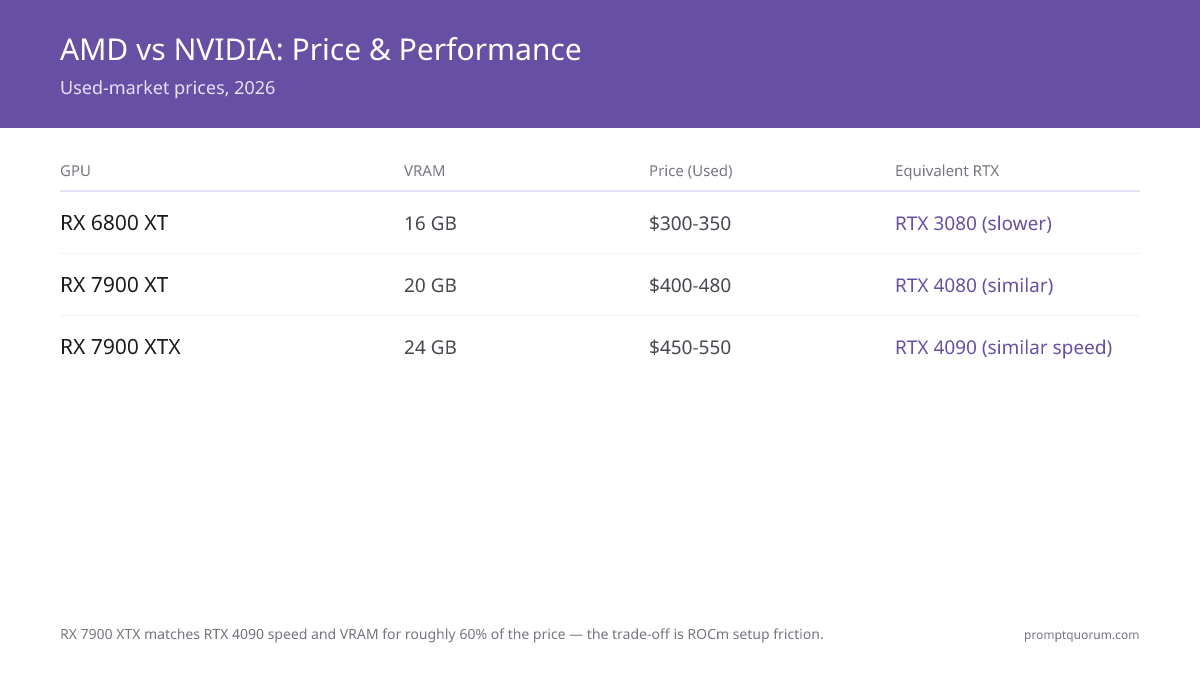
- AMD RX 6800 XT (16GB, $320-400 used) and RX 7900 XTX (24GB, $800-1,000 used) are the only viable options for local LLMs.
- Performance-per-dollar: AMD is 20-30% cheaper than NVIDIA, but software friction costs 5-10 hours of setup time.
- Ollama: Limited AMD support (ROCm path was inconsistent in our April 2026 testing, Ollama v0.3.x / ROCm 6.x — GPU detection failed on some configurations; CPU fallback is slow). Check github.com/ollama/ollama for current AMD compatibility.
- vLLM: Full AMD ROCm support as of v0.6.0, but setup requires manual drivers. Works well if you get past setup.
- Text Generation WebUI: Excellent AMD support via ROCm. Best user experience on AMD.
- Llama.cpp: Native AMD support (HIP backend). Solid performance. Recommended AMD path.
- Setup cost: Plan 5-10 hours debugging ROCm drivers, HIPCC compilation, kernel compatibility.
- Verdict (April 2026): Use AMD only if you have AMD already, or if you find a killer used deal ($320 for a 16GB card). Otherwise, NVIDIA CUDA is still simpler.
📍 In One Sentence
AMD RX 7900 XTX matches RTX 4090 at 24 GB VRAM for $800-1,000 used, but ROCm driver setup adds 5–10 hours of friction vs NVIDIA CUDA.
💬 In Plain Terms
AMD GPUs are like a car with great horsepower but a manual transmission — more power per dollar, but more work to get running. NVIDIA is the automatic.
Which AMD GPUs Are Actually Worth Using?
- RX 6800 XT (16GB GDDR6): The value king for AMD. 2020 release. Still solid for 7B-22B inference. Used: $320-400.
- RX 6900 XT (16GB GDDR6): Marginally faster 6800 XT. Rare. Used: $420-500. Not worth the price bump.
- RX 7900 XT (20GB GDDR6): Newer RDNA 3 arch. 20% faster than 6800 XT. Used: $700-850. Good for 70B Q4.
- RX 7900 XTX (24GB GDDR6): Top AMD consumer GPU. 24GB VRAM is game-changer for 70B. Used: $800-1,000. Comparable to RTX 4090 speed.
- Radeon Pro W6800 (32GB): Enterprise card, cheaper used (~$200-300). Slower, but 32GB is excellent for 70B Q8. Niche play.
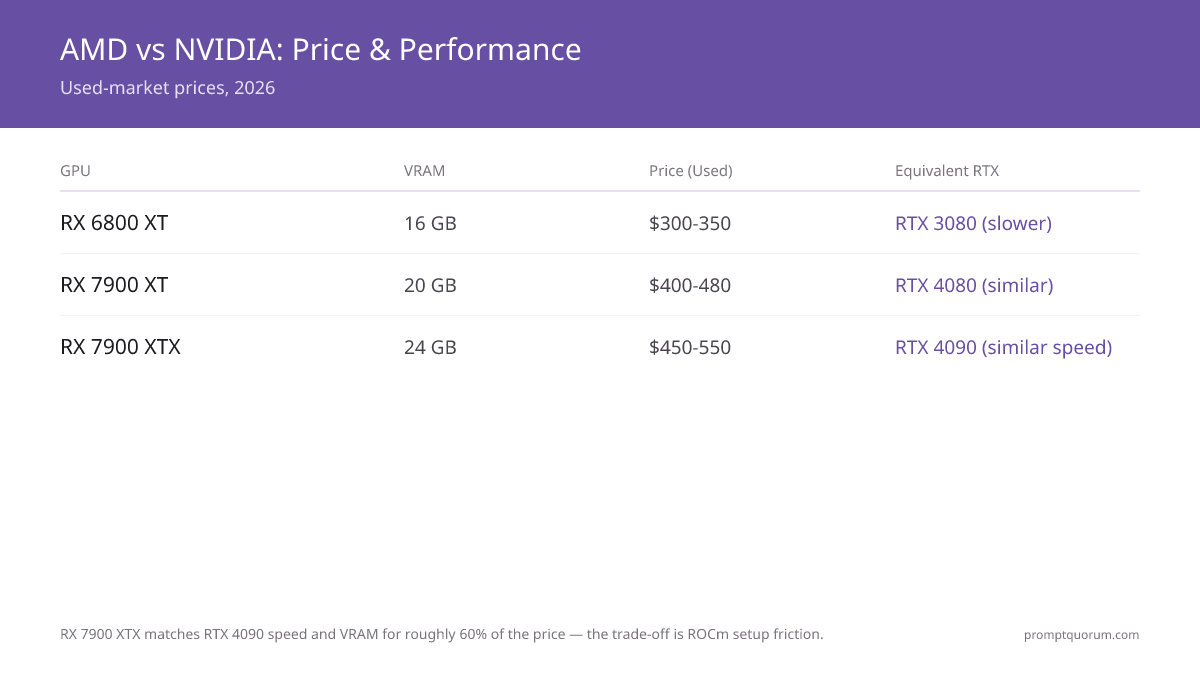
How Do AMD GPUs Compare to RTX on Price and Speed?
GPU | VRAM | TFLOPS | Price Used | Perf/$ vs. RTX | Equivalent RTX |
|---|---|---|---|---|---|
| RX 6800 XT | 16GB | 1,952 | $320-400 | +25% | RTX 3080 (slower) |
| RX 7900 XT | 20GB | 2,540 | $700-850 | +20% | RTX 4080 (similar) |
| RX 7900 XTX | 24GB | 2,750 | $800-1,000 | +15% | RTX 4090 (similar speed) |
| RTX 3080 | 10GB | 1,456 | $420-500 | -- | -- |
| RTX 4090 | 24GB | 2,752 | $2,000-2,600 | -- | -- |
What's the ROCm Setup Friction for AMD?
1. Install AMD ROCm drivers: `apt-get install rocm-dkms` (Ubuntu). On Windows, manual .exe installer. Takes 30 min.
2. Verify HIP compiler: `hipcc --version`. Often fails on first try. Debug kernel compatibility for your GPU.
3. Install HIPCC (AMD's HIP-to-C++ compiler): `apt-get install hip-runtime-amd`. Another dependency chain.
4. Test with small LLM: Run inference to verify GPU acceleration is working. Often defaults to CPU fallback.
5. Troubleshoot driver version mismatches: ROCm v5.7 works with kernel 5.15 but not 6.x. Consume 2-4 hours debugging.
NVIDIA CUDA by comparison: `nvidia-cuda-toolkit` → one apt-get, instant GPU access. AMD requires 5-10× more friction.
Can You Run Ollama and vLLM on AMD?
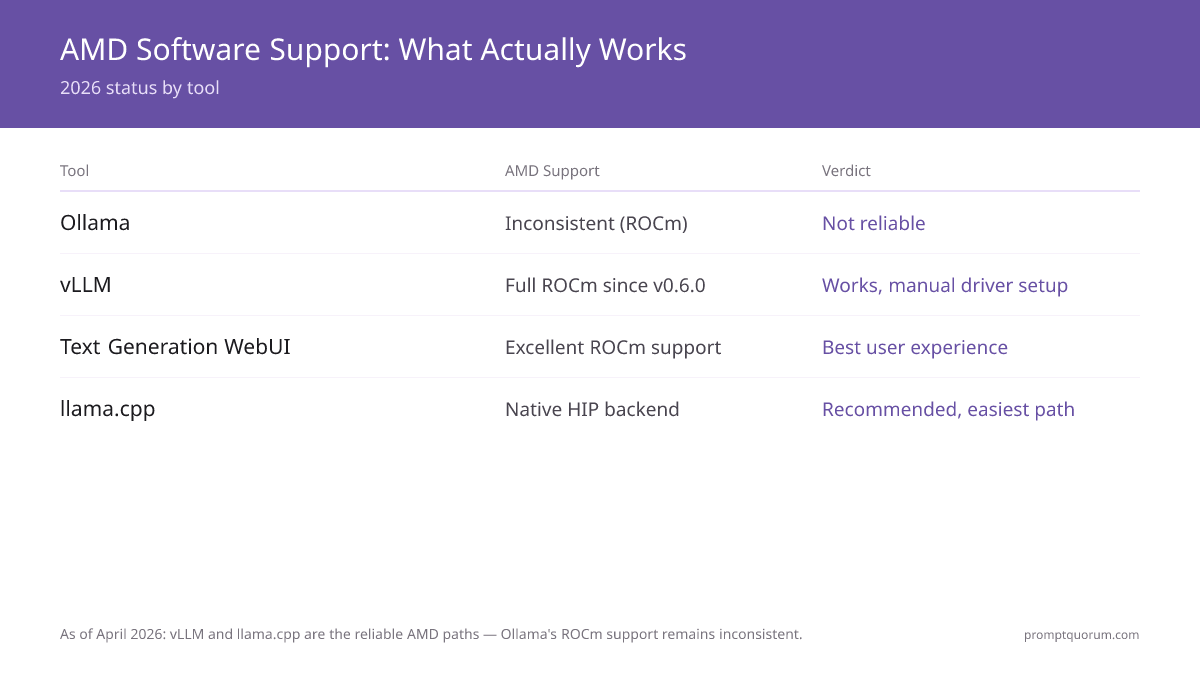
Ollama on AMD (as of our April 2026 testing, Ollama v0.3.x, ROCm 6.x): ROCm support was inconsistent in our tests — GPU detection failed on some configurations, and CPU fallback is slow. Check the current AMD compatibility list at github.com/ollama/ollama before committing.
vLLM on AMD: Full ROCm support since v0.6.0. Works well, but requires manual ROCm/HIP driver setup. Good if you're past the setup gauntlet.
Text Generation WebUI: Excellent AMD ROCm support. Best user experience on AMD. Recommended.
Llama.cpp: Native HIP backend. Solid performance. Easiest AMD path. Recommended.
LM Studio: NVIDIA only. No AMD support.
vLLM + llama.cpp are your AMD paths. Ollama is not reliable.
When Should You Actually Buy AMD Over NVIDIA?
Buy AMD if:
- You find a used RX 7900 XTX for <$450 (under-priced vs. RTX 4090 value).
- You already own AMD hardware and want ecosystem consistency.
- You're building a cluster and value compute-per-dollar over ease-of-setup.
Don't buy AMD if:
- You want a plug-and-play experience. NVIDIA CUDA is faster to get working.
- You need Ollama. AMD ROCm support for Ollama has been inconsistent in community testing (as of 2026).
- You're time-constrained. ROCm debugging can eat 10+ hours.
📍 In One Sentence
Buy AMD if you find a used RX 7900 XTX near $800 or already own AMD hardware; skip AMD if you want plug-and-play simplicity with Ollama.
💬 In Plain Terms
AMD beats NVIDIA on price-per-gigabyte of VRAM, but the setup process is harder. If you are new to local LLMs, start with NVIDIA.
What Are the Most Common AMD Adoption Mistakes?
- Buying RX 6700 (12GB) thinking it's a 3060 12GB equivalent--it's 20% slower and often harder to find used.
- Assuming ROCm "just works" like CUDA--plan 5-10 hours of troubleshooting driver and kernel compatibility.
- Using Ollama with AMD expecting seamless integration — ROCm support was inconsistent in our April 2026 testing (Ollama v0.3.x, ROCm 6.x); llama.cpp or vLLM are better bets.
Next steps
- Best Budget GPUs for Local LLMs — On a budget? Best value GPUs for LLM inference →
- GPU vs CPU vs Apple Silicon — AMD vs Apple vs CPU — which platform fits your workflow? →
- How Much VRAM Do I Need? — Match your GPU VRAM to model size →
How Do Regional Data Laws Affect the AMD vs NVIDIA Decision?
EU GDPR and UK DPA: Local inference on AMD hardware reduces data-transfer exposure. Running Qwen3 or Llama 3.3 on an AMD RX 7900 XTX keeps inference data on-device, supporting GDPR Article 25 (data minimisation) and Article 32 (security measures). However, compliance still requires lawful basis, DPIA, retention policy, and breach procedures. AMD ROCm on-premise deployments are chosen by European enterprises for sensitive document processing, but formal compliance review is always required.
Japan APPI and Singapore PDPA: On-device inference eliminates cross-border data transfer risk. Japanese enterprises under the amended APPI (2022) face strict requirements for personal data transferred outside Japan. AMD ROCm local deployments at Japanese universities, financial institutions, and healthcare providers sidestep these requirements entirely — no data residency audit needed when inference is fully local.
China DSL and PIPL: AMD hardware is subject to the same domestic deployment logic as NVIDIA. Chinese enterprises running local LLMs under the Data Security Law (2021) and PIPL (2021) benefit from on-premise AMD deployments the same way as NVIDIA: data never leaves the local network. AMD ROCm is not subject to the US GPU export controls that affect high-end NVIDIA A100/H100 server chips (consumer RX cards are unrestricted).
Frequently Asked Questions
Should I buy AMD RX 6800 XT or NVIDIA RTX 3080 for local LLMs?
RTX 3080 if you value simplicity (CUDA "just works"). RX 6800 XT if you want 25% better value and don't mind 5-10 hours ROCm setup.
Is AMD RX 7900 XTX better than RTX 4090?
Similar speed, same VRAM (24GB). RX 7900 XTX is $1,000-1,800 cheaper used ($800-1,000 vs. $2,000-2,600 — RTX 4090 prices rose sharply after NVIDIA discontinued it in 2026). ROCm setup is the trade-off.
Can I use AMD GPUs with Ollama?
Technically yes. In our April 2026 testing (Ollama v0.3.x, ROCm 6.x), ROCm support was inconsistent — GPU detection failed on some configurations and CPU fallback was common. Check the current AMD compatibility list at github.com/ollama/ollama; for reliable AMD inference today, vLLM or llama.cpp are the safer paths.
What's the best AMD path for local LLMs in 2026?
Llama.cpp (HIP backend) + Text Generation WebUI. Both have solid AMD support. Avoid Ollama.
Do I need Ubuntu for AMD ROCm, or does Windows work?
Windows support exists (HIP on Windows), but in our April 2026 testing it was less stable than Ubuntu. Ubuntu is the recommended path.
Is RX 6700, 6700 XT, or 6750 good for 7B models?
RX 6700 (12GB) works but is 20% slower than RX 6800 XT. RX 6700 XT (12GB, same VRAM) has ~15% faster clocks than the non-XT card but is still behind the 6800 XT. Only buy either if <$250. Otherwise, stretch to 6800 XT.
Is the RX 6900 XT worth buying for local LLMs?
Not really. The RX 6900 XT (16GB) is only marginally faster than the RX 6800 XT, is rarer used, and costs $420-500 vs. $320-400 for the 6800 XT. The price bump isn't worth it -- buy the 6800 XT instead.
Is the AMD Radeon 680M good for running local LLMs?
The Radeon 680M is integrated graphics built into Ryzen 6000/7000 mobile APUs -- it is not the same product as the discrete RX 6800M or RX 6800 XT. It has no dedicated VRAM and shares system RAM instead, so it is only viable for small quantized models (roughly 3B parameters or less at Q4) and will run noticeably slower than any discrete GPU on this page. For serious local LLM use, a discrete card like the RX 6800 XT is the better choice.
Can I mix AMD and NVIDIA GPUs in one system?
Theoretically yes, but management is a nightmare. Each GPU needs its own CUDA/HIP runtime. Not recommended.
How much VRAM does the AMD RX 7900 XTX have?
The AMD RX 7900 XTX has 24GB GDDR6 VRAM -- the same as RTX 4090. This makes it the most capable AMD card for running 70B models at Q4.
Is AMD ROCm stable enough for production LLM inference?
ROCm 6.x (2025) is significantly more stable than ROCm 5.x. For production use, llama.cpp HIP backend on Ubuntu 22.04+ is the most reliable stack. In our April 2026 testing (Ollama v0.3.x, ROCm 6.x), Ollama's ROCm support was inconsistent — GPU detection failed on some configurations. Check the current AMD compatibility list at github.com/ollama/ollama before committing.
What is the best AMD GPU for under $400?
AMD RX 6800 XT (16GB, ~$320-400 used) is the best value AMD GPU under $400. It runs 13B models at Q4 smoothly and 7B models at Q8 comfortably via llama.cpp HIP backend.
Can I run local LLMs on an AMD RX 6800M laptop GPU?
Yes. The AMD RX 6800M (mobile variant, 12GB GDDR6) can run 13B models at Q4_K_M (~8 GB) or 7B models at Q8_0 (~7 GB). Use llama.cpp HIP backend on Linux or Windows. ROCm driver support for RX 6800M is solid on Ubuntu 22.04+ with Linux Kernel 6.2+. Windows HIP support is newer (less stable). Speed: ~8-12 tokens/sec on CPU-only fallback, ~30-40 tokens/sec with HIP acceleration on RX 6800M.
Sources
- AMD ROCm documentation and GitHub: HIP compiler, driver compatibility matrix, LLM inference examples
- vLLM GitHub: AMD/ROCm backend implementation and support status (v0.6.0+)
- Llama.cpp GitHub: HIP backend for AMD GPU support
- AMD GPUs deliver strong token/second speeds, but speed alone doesn't determine response quality. What you ask the model matters as much as how fast it responds: context windows explained covers how to structure longer requests within GPU memory limits.