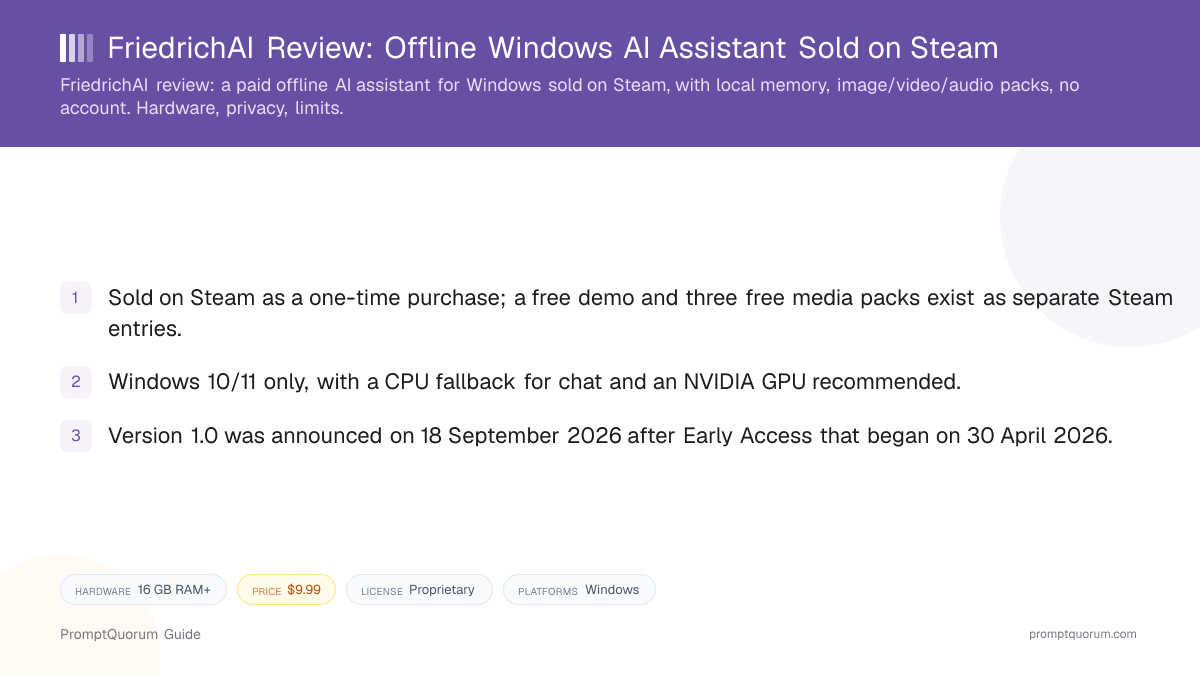
Key Takeaways
- Developer: Randolph Smith, listed as both developer and publisher on Steam; a self-described software-QA professional rather than an AI researcher.
- Price and license: $9.99 USD one-time on Steam, no subscription; proprietary, with no public source repository found.
- Scope: local chat, memory, saved-chat search, a Todo/Doing/Blocked/Done project board, Model Manager for GGUF models, and optional web search.
- Signals as checked on 9 October 2026: 13 of 14 Steam user reviews positive, full release on 18 September 2026, latest patch on 6 October 2026.
📍 In One Sentence
FriedrichAI is a closed-source Windows AI assistant, sold on Steam by a solo developer, that runs a local model with persistent memory and optional image, video, and audio packs and needs no account.
💬 In Plain Terms
You buy it on Steam like a game, install it, and talk to it; the chat, memory, and voice features keep working with the network switched off, while heavier media generation needs a strong graphics card.
📌Note: This review is based on the Steam store page, its news feed, and the DLC pages, checked on 9 October 2026, plus a comment from the developer. PromptQuorum has not tested or benchmarked the app.
What Is FriedrichAI?
FriedrichAI is an offline-first AI workspace for Windows that packages a local model runner, memory, and project tools into one installable app. According to its Steam page, the core assistant needs no cloud account or API key, and chats, memory, and project data stay on the PC.
The name honors the philosopher Friedrich Nietzsche, not Frederick the Great, according to the developer. Randolph Smith describes the app as aimed at people who should not need to know what a Python environment or a CUDA wheel is, in the maker comment further below.
Why the Maker Chose Steam
Randolph Smith picked Steam on purpose: he wanted local AI to feel like software you buy and own, and Steam already gives Windows users the payment, update, and refund system they trust. FriedrichAI is an unusual case of serious local-AI software sold there instead of on GitHub or in an app store. His reasons, summarized from the maker comment below:
- An underused audience. Millions of Windows users are already on Steam with a distribution and update system they trust, yet few developers treat it as a home for serious local-AI software.
- Buy and own, not rent. He wanted a one-time purchase that stays in your library, rather than another AI service rented every month. Steam supplies payments, automatic updates, refunds, and user reviews.
- Why not GitHub. GitHub suits developers, he says, but FriedrichAI targets people who should not need to know what a Python environment, a CUDA wheel, or a command line is.
- No dependency on his servers. The software should keep working even if the developer's servers go away.
🔍Insight: The maker names the cost himself: Steam was designed for games, so he had to work around unusual distribution and packaging problems, and local AI adds hardware-support challenges that a normal desktop app does not have. What Steam provides is visible on the listing: a free demo as a separate entry, free add-on packs as DLC, and public user reviews.
Get It
FriedrichAI is distributed through Steam for Windows 10/11 (64-bit) at $9.99 USD; the base app has a free demo, and the media packs are free add-ons.
Item | Where to get it |
|---|---|
| Full version | Steam, $9.99 USD |
| Free demo | Steam demo |
| Media packs | Free Steam add-ons: image, video, audio |
| Website | Steam store page (no separate site found) |
| Other listing | itch.io page |
| Source code | Not published |
Version as verified on 9 October 2026: 1.0, from the Steam news post "FriedrichAI 1.0 Is Here". No dedicated product website or privacy-policy page was found; the Steam page is the official listing.
How to Get Started
The Steam page recommends testing in stages; PromptQuorum has not run these steps.
- 1Try the free demo first
Why it matters: The demo is a frozen compatibility snapshot, not a trial, and the developer asks buyers not to purchase the full version if it does not run well. - 2Install the base assistant and confirm chat works
Why it matters: The Steam page advises confirming local chat before adding media packs or changing models. - 3Add optional packs only if your hardware allows
Why it matters: Image, video, and audio generation need large extra downloads and far more GPU power than chat.
Features Confirmed by the Sources
Every item below comes from the Steam page, news posts, or DLC listings; none has been independently tested.
- Chat and memory. Local chat with persistent memory, saved conversations that can be reopened and searched, and a plain-conversation interface that no longer requires slash commands.
- Project tools. A Project Board (Todo, Doing, Blocked, Done), Project Chronicle for preserving project context, and import of local text and Markdown files.
- Models. A bundled default model, plus a Model Manager that scans for and switches between user-supplied GGUF models. The Steam page says the app uses Qwen models under the Apache License 2.0.
- Voice. Local text-to-speech that can be disabled, and local speech-to-text through a microphone button, added in an August 2026 update.
- Optional media. Image generation (with variations), text-to-video, and audio and music generation as separate free packs.
- Interface. Eight interface languages: English, Ukrainian, German, French, Spanish, Brazilian Portuguese, Korean, and Japanese.
Hardware Requirements
Steam lists Windows 10/11, 16 GB of RAM and 20 GB of storage as the minimum, with an NVIDIA GPU recommended and a CPU fallback for chat. The recommended setup is a Ryzen 7 5700X-class processor, 32 GB of RAM, and an NVIDIA RTX card with 10 GB or more of VRAM.
Media generation is much heavier than chat: the page recommends 12 GB or more of VRAM for video and 16 GB or more for longer clips, and calls video, image-to-video, and morph workflows experimental. NVIDIA is the best-supported media path; AMD support is a separate Radeon-compatible build in beta, and a September 2026 patch added older Intel processors. The page also warns Norton users to update their antivirus first, because older definitions may flag parts of the app.
Privacy and Online Features
The Steam page states that chats, memory, saved conversations, and project data stay on the user's machine, and that no API key is required for the core assistant. Speech generation and speech recognition are described as running locally.
Optional web search is the exception: it is off unless configured and may need the user's own provider account or API key. Because the source is not published, none of this can be checked against code, and these are the developer's declarations, not audit results.
📌Note: PromptQuorum has not inspected the app's network traffic. Anyone handling confidential data should verify behavior with web search off and with the network disconnected.
From the Maker
Randolph Smith, the solo developer behind FriedrichAI, shared the following about the app and why he built it and chose Steam. It is presented as the developer's own words, lightly edited for readability, not as PromptQuorum's independent editorial assessment:
"FriedrichAI actually started almost by accident. I'm a longtime software QA guy, not an AI researcher. I was laid off in 2022, and when I eventually started experimenting with AI, I was very new to it. Originally I was using AI to help me build a fairly simple card game. That led me further down the local-AI rabbit hole, and I kept running into the same problem: local AI was incredibly interesting, but getting everything installed, configured and working could be a project in itself.
So FriedrichAI gradually became an attempt to package that experience into something normal people could actually use. The basic philosophy is still pretty simple: install it, run it, and talk to it. No cloud account, no API subscription required for the core product, no tracking, and no dependency on my servers. You can literally disconnect the computer from the internet and Friedrich keeps working.
It has grown considerably from there. Friedrich can now handle local chat with persistent local memory, image generation, video and audio generation through optional media components, speech-to-text and text-to-speech, user-supplied GGUF models, and optional web search for people who want it. I'm also working on MCP integration so Friedrich can interact with applications such as Blender while still keeping the human in control.
As for Steam, that choice was very deliberate. I thought Steam was vastly underutilized for the kind of software I was building. There are millions of Windows users already there, with a distribution and update system they already trust, but very few people seemed to be looking at Steam as a place to distribute serious local AI software. To me, that looked less like a limitation and more like an opportunity.
I also wanted FriedrichAI to feel like software you buy and own, rather than another AI service you're renting every month. Steam already has distribution, automatic updates, payments, refunds, user reviews and an enormous installed Windows audience. More importantly, people understand the transaction: you buy something, download it, and it stays in your library. GitHub is fantastic for developers, but I'm specifically trying to make local AI accessible to people who shouldn't need to know what a Python environment, CUDA wheel or command line is just to use it.
There are definitely tradeoffs. Steam was designed for games, not AI applications, so I've had to work around some unusual distribution and packaging problems. Local AI also creates hardware-support challenges that a normal desktop application doesn't have. But overall I still think it was the right choice.
Long term, my goal isn't simply to put a chat interface around a local model. I want FriedrichAI to become a genuinely useful local AI environment while keeping the things that made me build it in the first place: local ownership, privacy, accessibility, and no requirement that the developer's servers remain alive forever for the software you bought to continue working.
And one funny correction: Friedrich is actually a nod to Friedrich Nietzsche, not Frederick the Great. The inspiration was Nietzsche's 'gaze into the abyss,' which seemed particularly appropriate given that humanity now appears to be gazing into the AI abyss."
— Randolph Smith, developer
Trade-Offs: Benefits vs. Limitations
Buy once, no account
- What it means in real use:
- No subscription, sign-up, or API key for the core assistant.
- Limitation / caveat:
- Closed source; the license is proprietary.
Installable like a game
- What it means in real use:
- Steam handles payment, updates, and a free demo.
- Limitation / caveat:
- Windows only, and tied to a Steam account.
Persistent local memory
- What it means in real use:
- Context carries across sessions on your own PC.
- Limitation / caveat:
- Memory quality is untested here.
Image, video, audio packs
- What it means in real use:
- Media generation without a cloud service.
- Limitation / caveat:
- Large downloads; NVIDIA-first, AMD in beta.
Full 1.0 release
- What it means in real use:
- Out of Early Access since 18 September 2026.
- Limitation / caveat:
- Only 14 public Steam reviews so far.
Who Should Use It
- Windows users who want an offline assistant without a technical setup. The Steam install-and-talk flow is the main design goal.
- People who prefer paying once over subscriptions. The core assistant needs no account or API key.
- Users with an NVIDIA GPU who want local media generation. Image, video, and audio packs are free add-ons for it.
What We Could Not Verify
- License and source code. No public repository or open-source license was found, so behavior cannot be checked against code.
- Hands-on performance and quality. PromptQuorum did not run the app, so speed, memory quality, and media output are not assessed.
- Install base. Steam publishes no sales figures, so the number of paying users is not independently confirmed.
- MCP and Blender integration. The developer says it is in progress; no public documentation of it was found.
- Not for Mac, Linux, or mobile users. Only Windows 10/11 is listed.
Competitors and Alternatives
Jan
- Platforms:
- macOS, Windows, Linux
- Price / license:
- Free / Apache 2.0 (variant)
- Key difference:
- Open-source desktop chat with MCP and a local API server
Articles about Jan (10)
- Jan Review: The Open-Source, Offline ChatGPT AlternativeUpdated September 6, 2026
- Locally Uncensored Review: Local Chat, Image, and Video in One AppUpdated September 22, 2026
- Local Chat Apps & Assistants Compared (2026): Desktop, Mobile, Self-Hosted, Assistants and RoleplayUpdated September 20, 2026
- Local Inference Engines, Runtimes & Gateways Compared (2026): Run and Serve ModelsUpdated September 20, 2026
- Docker Model Runner Review: Local LLMs via the Docker CLIUpdated September 12, 2026
- LM Studio Review: The GUI-First Local AI Desktop AppUpdated September 12, 2026
- Ekorbia Review: Free Open-Source Local AI Desktop AppUpdated September 7, 2026
- GPT4All Review: Free Offline AI Chat App by Nomic AIUpdated September 7, 2026
- Maid Review: Open-Source Local LLM Chat App for AndroidUpdated September 6, 2026
- Atomic Chat Review: Local AI, Agents, and APIUpdated September 5, 2026
+32 more not shown
GPT4All
- Platforms:
- macOS, Windows, Linux
- Price / license:
- Free / MIT
- Key difference:
- Open-source desktop app with local document chat
Articles about GPT4All (10)
- GPT4All Review: Free Offline AI Chat App by Nomic AIUpdated September 7, 2026
- HilbertRaum Review: A Portable, Offline AI Workspace for Chat and Your Own DocumentsUpdated September 25, 2026
- Locally Uncensored Review: Local Chat, Image, and Video in One AppUpdated September 22, 2026
- Local Chat Apps & Assistants Compared (2026): Desktop, Mobile, Self-Hosted, Assistants and RoleplayUpdated September 20, 2026
- LM Studio Review: The GUI-First Local AI Desktop AppUpdated September 12, 2026
- Jan Review: The Open-Source, Offline ChatGPT AlternativeUpdated September 6, 2026
- Atomic Chat Review: Local AI, Agents, and APIUpdated September 5, 2026
- Enchanted Review: Native macOS/iOS Ollama ClientUpdated September 5, 2026
- Msty Review: Local + Cloud Chat in One Desktop AppUpdated September 5, 2026
- Bodega One Code Review: A Local-First BYOLLM Coding IDEUpdated September 3, 2026
+17 more not shown
LM Studio
- Platforms:
- macOS, Windows, Linux
- Price / license:
- Free / proprietary
- Key difference:
- Model-discovery-first runner with a local server
Articles about LM Studio (10)
- LM Studio Review: The GUI-First Local AI Desktop AppUpdated September 12, 2026
- Atlarix Review: A Free, Local-First AI Coding AgentUpdated September 25, 2026
- Locally Uncensored Review: Local Chat, Image, and Video in One AppUpdated September 22, 2026
- Cherry Studio 2.0 in 2026: The Free Agent-Based AI Desktop AppUpdated September 20, 2026
- llama.cpp Explained: The Engine Powering Ollama (2026)Updated September 20, 2026
- Local Chat Apps & Assistants Compared (2026): Desktop, Mobile, Self-Hosted, Assistants and RoleplayUpdated September 20, 2026
- Local Inference Engines, Runtimes & Gateways Compared (2026): Run and Serve ModelsUpdated September 20, 2026
- little-coder Review: A Coding Agent CLI Built for Small Local ModelsUpdated September 19, 2026
- Local Deep Research Review: Self-Hosted, Cited AI Research AgentUpdated September 19, 2026
- TranslateBooksWithLLMs Review: Translate Full Books With a Local or Cloud LLMUpdated September 19, 2026
+134 more not shown
HilbertRaum
- Platforms:
- Windows, macOS, Linux
- Price / license:
- Free / GPL-3.0
- Key difference:
- Portable, no-install workspace with document Q&A
Articles about HilbertRaum (2)
- HilbertRaum Review: A Portable, Offline AI Workspace for Chat and Your Own DocumentsUpdated September 25, 2026
- Local Chat Apps & Assistants Compared (2026): Desktop, Mobile, Self-Hosted, Assistants and RoleplayUpdated September 20, 2026
Competitor details change often; confirm each app's current price, license, and platforms on its own listing.
Frequently Asked Questions
Is FriedrichAI open source?
No. Steam shows a proprietary copyright notice, and no public source repository was found.
Do I need a subscription or an account?
No. The Steam page states there is no subscription, account, or API key for the core assistant; you do need a Steam account to buy it.
Can I use my own models?
Yes, supported GGUF models can be placed in the local model workspace, scanned, and switched through the Model Manager. Different models have very different RAM and VRAM needs.
Does it work on Mac or Linux?
Not according to the Steam page, which lists Windows 10/11 (64-bit) only.
Can I try it before buying?
Yes. A free demo exists as a separate Steam entry; it is a frozen compatibility snapshot rather than a time-limited trial and may run slower than the full version.
Does it work with an AMD graphics card?
AMD support is a separate Radeon-compatible build in beta, and AMD media generation is described as still under development.
Verdict
FriedrichAI is a notable attempt to ship local AI as a bought-once Windows application, with local memory, voice, project tools, and optional media packs in one install. Against that, the code is closed, the Steam review base is only 14 reviews, the best media path is NVIDIA-only, and nothing here has been tested hands-on. It suits Windows users who want a packaged offline assistant and accept those terms; readers who want auditable code can compare Jan or GPT4All.
Sources
- FriedrichAI: Offline AI on Steam — price, requirements, features, languages, demo, and reviews, checked 9 October 2026.
- Steam news for FriedrichAI — the "FriedrichAI 1.0 Is Here" post and later patch notes, checked 9 October 2026.
- FriedrichAI Text To Image Pack, Video Generation, and Audio Generation — the free media packs.
- FriedrichAI on itch.io — the developer's secondary listing.